Overview

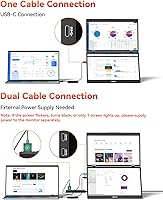
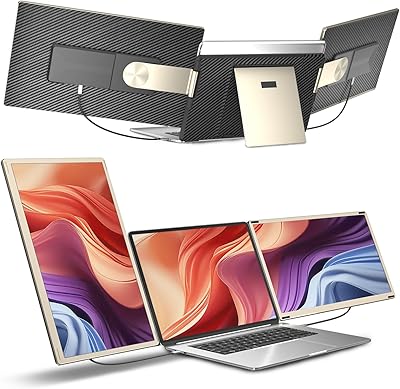
The HotYeah 15.6″ Triple Portable Laptop Monitor takes a different approach to on-the-go productivity — instead of spreading screens side by side, it stacks two additional 15.6″ panels vertically above your laptop display. Before anything else: this is Windows-only. Mac users, stop here. One USB-C cable handles everything — no drivers, no software installation, no adapter hunting. That single-cable simplicity puts it ahead of several competitors that require proprietary apps or multiple connections. The vertical stacking saves horizontal desk space but does add noticeable height, which matters in tight spots like airplane trays or small café tables. At its price, it targets serious mobile workers rather than casual users.

Features & Benefits

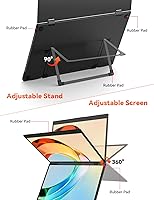
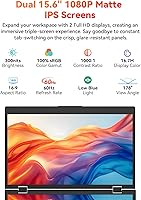
Each of the two panels delivers 1080p FHD resolution on a 15.6-inch IPS matte surface — that anti-glare coating is genuinely useful when you're working near windows. The 100% sRGB color gamut and 1000:1 contrast ratio mean colors stay accurate and readable, not washed out. Brightness caps at 300 nits, which handles most indoor settings comfortably. The upper screen's 360° rotation and 180° flip are practical during client walkthroughs — you can spin it to face someone across a table without repositioning your whole setup. It folds flat for transit, weighs under 3.6 lbs, and the metal frame feels solid rather than hollow. VESA holes add desk-mount flexibility if you occasionally work from a fixed station.

Best For

This travel display setup is built for people who genuinely struggle with a single screen while on the road. Remote workers and developers are the clearest beneficiaries — the vertical layout is especially well-suited to coding, where seeing long files without constant scrolling cuts real friction. Writers and analysts who need reference material open beside their active work will also find the stacked format more logical than constantly alt-tabbing. The 180° flip is a genuine plus for anyone who presents or reviews documents with clients face-to-face. That said, this is strictly a Windows ecosystem tool. If your laptop runs macOS or Chrome OS, this stacked portable monitor simply won't work for you.

User Feedback

Buyers consistently praise the one-cable setup — the fact that a single USB-C connection handles dual screens without any driver installation is the most frequently cited positive. Build quality gets solid marks too, with the metal frame holding up through regular travel. Where things get mixed: brightness becomes a real limitation near sunlit windows or outdoors, and some users on specific Windows configurations report that USB-C ports without full Power Delivery support cause compatibility headaches. A handful of reviewers also find the added vertical height awkward in low-clearance workspaces. Compared to side-by-side portable options, most users prefer this stacked format for desk use but acknowledge it's less adaptable in cramped travel environments.

Pros

  • Single USB-C cable handles dual screens with no drivers or software installation required.
  • The vertical stacking format preserves horizontal desk space, which matters in tight work environments.
  • IPS matte panels deliver accurate, glare-reduced visuals suitable for color-sensitive tasks.
  • 100% sRGB coverage makes this triple-screen extender reliable for design review and photo editing on the go.
  • Upper screen rotates 360° and flips 180°, enabling quick face-to-face screen sharing without repositioning.
  • Metal frame construction gives the unit a solid, travel-worthy feel that holds up over time.
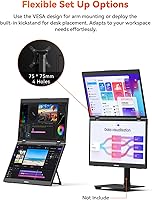
  • Built-in kickstand adjusts to 90° and VESA holes allow flexible mounting options at a fixed desk.
  • Folds flat for transport and sits under 3.6 lbs despite housing two full panels.
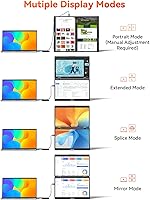
  • Supports multiple display modes including extend, portrait, and shared, covering most real-world workflow needs.
  • Flicker-free low blue light filtering reduces eye fatigue during extended work sessions.

Cons

  • Strictly Windows-only — no compatibility with macOS, Chrome OS, or Linux without workarounds.
  • 300-nit brightness is underwhelming near sunlit windows and essentially unusable outdoors.
  • USB-C ports without full Power Delivery support will cause compatibility failures that are hard to troubleshoot.
  • Added vertical height makes the setup impractical on airplane tray tables and similarly cramped surfaces.
  • The stacked layout does not suit users who prefer a traditional side-by-side multi-monitor arrangement.
  • Hinge durability over months of daily travel use remains a concern noted by longer-term buyers.
  • Some Windows laptop models show intermittent detection issues, requiring port-swapping or restarts to resolve.
  • No built-in cable management means the single USB-C cable can still create minor desk clutter.
  • Weight, while reasonable, still adds meaningful bulk to a travel bag already carrying a laptop and accessories.

Ratings

The HotYeah 15.6″ Triple Portable Laptop Monitor scores below are generated by AI after analyzing verified global user reviews, with spam, bot activity, and incentivized feedback actively filtered out. Ratings reflect the honest consensus of real buyers — Windows developers, remote workers, and frequent travelers — across multiple purchase cohorts. Both the standout strengths and the recurring frustrations are factored in transparently, so the numbers tell the full story.
Ease of Setup
91%
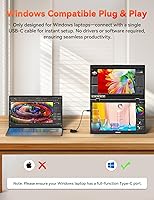
The single USB-C plug-and-play experience is the most consistently praised aspect of this travel display setup — users report screens are recognized by Windows within seconds, with no driver downloads or app installs needed. For people who have wrestled with multi-monitor software on competing products, this frictionless start genuinely changes the first-use experience.
A subset of users with non-Thunderbolt USB-C ports hit a wall immediately, and diagnosing port incompatibility is not intuitive for less technical buyers. The product documentation could do more to help users pre-check their port capabilities before connecting.
Build Quality
78%
22%
The metal frame gives this stacked portable monitor a noticeably more premium feel than the plastic-bodied alternatives in its category. Most short-to-medium-term users report the structure holds up solidly through repeated packing and unpacking during business travel.
The hinge mechanism — which bears the stress of daily folding — is a documented weak point for heavy users over several months. A handful of longer-term reviewers note loosening that affects how confidently the screens hold their angle on a desk.
Display Clarity
84%
At 1080p FHD on a 15.6″ IPS matte panel, text is sharp and comfortable to read at normal working distances, which matters when you have reference material or code open on a secondary screen all day. The matte finish is a genuine practical win — it cuts glare without introducing the milky softness some anti-glare coatings add.
The 60Hz refresh rate and 1080p ceiling mean this is strictly a productivity panel, not a media or gaming display. Users who expected richer detail or smoother motion were disappointed, though those expectations arguably do not match the product category.
Brightness & Visibility
57%
43%
In a dimly lit home office or a shaded café, 300 nits is workable and the matte surface helps manage ambient reflections reasonably well. Users working in controlled indoor lighting rarely flag brightness as a daily issue.
Near windows or in any outdoor environment, the 300-nit ceiling falls short — colors wash out and contrast drops to the point where the extended screens become difficult to use. This is a consistent and specific complaint from users who expected the monitors to handle variable real-world lighting conditions.
Color Accuracy
82%
18%
The 100% sRGB coverage with a 1000:1 contrast ratio gives the panels enough accuracy for light photo review, design reference work, and color-coded spreadsheet reading while on the road. Users in creative-adjacent roles appreciated not having to mentally correct for obvious color shift.
This is not a display for professional color grading — wide-gamut or HDR content is outside its scope entirely, and users with calibrated workflow expectations found the output acceptable rather than impressive. Those needing P3 or AdobeRGB coverage should look elsewhere.
Portability
73%
27%
Folding flat like a large laptop and weighing under 3.6 lbs for a dual-panel unit is a reasonable engineering achievement — frequent flyers report it fits into standard laptop bags without requiring a dedicated case. The metal build contributes to the sense that it can survive a busy travel schedule.
At just over 3.5 lbs added to an already heavy laptop bag, the total carry weight adds up fast on long travel days. The unit's folded height is also noticeably bulkier than a single portable monitor, which affects how easily it fits into tighter bag compartments.
Vertical Stacking Design
71%
29%
For developers viewing long code files, or writers who keep reference documents open above their active workspace, the vertical stack layout genuinely reduces horizontal head movement compared to side-by-side setups. In small hotel desks or compact co-working stations, it also preserves precious horizontal surface area.
The added height is a real ergonomic problem for some users — desks with overhead shelves or low-clearance setups simply cannot accommodate a three-screen tower comfortably. Users accustomed to side-by-side arrangements also report an adjustment period to the vertical workflow.
Screen Rotation & Flip
83%
The 180° flip for face-to-face screen sharing works exactly as described and has earned specific praise from consultants and client-facing workers who use it during on-site meetings. It takes seconds to flip and returns cleanly to the working position without recalibration.
The 360° rotation on the upper screen, while mechanically functional, can feel slightly stiff for some users, and accidental rotation during transport has been occasionally noted. It is a useful feature but benefits from careful handling when the unit is being repositioned.
Windows Compatibility
68%
32%
On mainstream Windows 10 and Windows 11 laptops from major manufacturers, the plug-and-play behavior generally works as promised — display settings expose all five supported modes without any manual configuration needed.
Compatibility across the Windows hardware ecosystem is uneven — specific laptop models, particularly those with non-standard USB-C implementations, see intermittent detection failures or require port-swapping to initialize. The Windows-only restriction also catches some buyers off guard despite the labeling.
Adjustability & Ergonomics
76%
24%
The built-in kickstand adjusts up to 90° and gives users enough tilt range to find a comfortable viewing angle on most flat surfaces without needing a secondary stand or prop. VESA mount hole support on a portable monitor in this category is an uncommon and genuinely useful addition for fixed-desk users.
The kickstand does not offer as fine-grained angle adjustment as a dedicated monitor arm, and on slightly uneven surfaces it can shift during extended sessions. Users who expected the same adjustability as a fixed desktop monitor were occasionally disappointed.
Value for Money
72%
28%
For a Windows user who genuinely needs a portable triple-screen setup and has a compatible laptop, the all-in-one nature of this unit — dual panels, single cable, VESA compatibility, multiple display modes — represents reasonable value relative to buying two separate portable monitors.
The Windows-only limitation, brightness ceiling, and hinge durability concerns make the price harder to justify for buyers who hit any of those friction points. Users who expected performance equivalent to a premium single portable monitor were left feeling the trade-off was uneven.
Eye Comfort
79%
21%
Flicker-free backlighting and built-in low blue light filtering at the hardware level mean users do not need to install third-party software or toggle OS-level settings to get baseline eye protection during long work sessions. Several reviewers working eight-plus-hour days noted reduced evening eye fatigue compared to their previous setups.
The low blue light implementation visibly shifts white tones slightly warmer, which bothers some color-sensitive users who prefer a neutral white point. There is no software toggle to disable it selectively, so users cannot switch between accuracy-first and comfort-first modes easily.
Display Mode Versatility
81%
19%
Having extend, mirror, splice, portrait, and shared modes available through standard Windows display settings — without any companion app — gives this travel display setup meaningful flexibility across different work contexts. Shared mode in particular is a feature few portable monitors offer at any price.
Mode switching requires going through Windows display settings rather than a dedicated hardware button, which adds a few steps when you want to change layouts mid-session. Users who frequently toggle between modes at client sites found the process slightly slower than expected.
Cable Management
63%
37%
A single USB-C cable connecting everything is a meaningful improvement over multi-cable portable monitor setups, and the dual USB-C port placement gives some flexibility for routing the cable to either side depending on the laptop orientation.
Beyond the single input cable, there is no onboard cable routing or clip system to keep the cord tidy on a desk — it sits loose, which creates minor clutter. Users working from small surfaces noted the dangling cable as a persistent minor annoyance during extended sessions.
Documentation & Support
61%
39%
Basic setup instructions are included and are adequate for straightforward compatible setups — most plug-and-play users do not need to consult them at all. HotYeah's customer support team is noted as responsive to pre-purchase compatibility questions raised through Amazon.
Troubleshooting guidance for USB-C compatibility failures is sparse, which leaves users with incompatible ports without clear next steps. The documentation does not provide a detailed list of tested compatible laptop models, making pre-purchase due diligence harder than it should be.

Suitable for:

The HotYeah 15.6″ Triple Portable Laptop Monitor is genuinely well-matched to Windows laptop users whose work demands more screen real estate than a single display allows, but who cannot justify hauling full-sized monitors to client sites, co-working spaces, or hotels. Developers and coders in particular tend to get a lot of mileage from the vertical stacking format — having a long file or documentation visible above your active coding window reduces the constant tab-switching that breaks concentration. Writers, analysts, and researchers who habitually work with reference material open alongside a primary document will find a similar benefit. The 180° screen flip also makes it a practical companion for anyone who regularly walks clients or colleagues through work face-to-face without a projector or shared display nearby. If you travel frequently with a Windows laptop and your productivity genuinely stalls on a single screen, this travel display setup addresses that problem in a reasonably compact and self-contained way.
Not suitable for:

The HotYeah 15.6″ Triple Portable Laptop Monitor is a hard pass for anyone outside the Windows ecosystem — macOS and Chrome OS users will find it simply non-functional, and that is a dealbreaker with no workaround. The vertical stacking design, while space-efficient horizontally, adds significant height to your workspace, which creates real problems in low-clearance environments like airplane tray tables, cramped café counters, or any setup where vertical clearance is limited. At 300 nits, brightness is adequate for controlled indoor lighting but starts to fall short near bright windows or in any outdoor setting, so if you frequently work in sun-drenched environments, this stacked portable monitor will frustrate you. Users whose laptops have USB-C ports that lack full Power Delivery or display output functionality will also run into compatibility issues that are not always easy to diagnose. Finally, buyers looking for a side-by-side multi-monitor layout rather than a vertical stack may find the form factor does not suit their natural workflow or physical desk arrangement.

Specifications

  • Panel Size: Each of the two extended screens measures 15.6″ diagonally, creating a combined visual workspace equivalent to approximately 23.8″.
  • Resolution: Both panels run at 1920×1080 FHD, delivering sharp, readable text and crisp visuals at standard laptop working distances.
  • Refresh Rate: The displays operate at 60Hz, which is appropriate for productivity, document work, and video playback but not high-frame-rate gaming.
  • Brightness: Maximum brightness is rated at 300 nits, suitable for typical indoor environments but limiting in high-ambient-light or outdoor conditions.
  • Color Gamut: The panels cover 100% sRGB color space, making them adequate for color-sensitive tasks like photo review and light design work.
  • Contrast Ratio: A 1000:1 contrast ratio ensures distinguishable shadow and highlight detail across most content types viewed in normal conditions.
  • Panel Type: Both screens use IPS LCD technology with a matte anti-glare surface finish to reduce reflections during indoor use.
  • View Angle: The IPS panels support a 178° viewing angle both horizontally and vertically, maintaining color accuracy when viewed off-axis.
  • Connectivity: The unit connects via a single full-function USB-C port and requires no drivers, software, or secondary cables to operate.
  • Display Modes: Supported display modes include extend, mirror, splice, portrait, and shared, configurable through standard Windows display settings.
  • Screen Rotation: The upper panel rotates a full 360° and can be flipped 180° to face a person sitting across from the user.
  • Weight: The complete unit weighs approximately 3.54 lbs (1.6 kg), which is notable but manageable given that it houses two full display panels.
  • Dimensions: Folded for transport, the unit measures 14.17 × 8.94 × 6.18 inches, comparable in footprint to a standard 15-inch laptop.
  • Frame Material: The outer chassis is constructed from metal, contributing to a more rigid feel and better long-term durability compared to all-plastic alternatives.
  • Kickstand: A built-in kickstand adjusts up to 90° to allow ergonomic angle customization on flat desk surfaces without any additional accessories.
  • VESA Compatibility: The rear panel includes 75×75mm VESA mount holes, enabling attachment to a compatible monitor arm or wall mount at a fixed workstation.
  • Compatible OS: This monitor is designed exclusively for Windows-based laptops and is not compatible with macOS, Chrome OS, or Linux systems.
  • Eye Care: The panels incorporate flicker-free backlighting and low blue light filtering to reduce eye fatigue during extended daily use sessions.
  • Blue Light Filter: Low blue light technology is built in at the hardware level, requiring no software toggle or third-party application to activate.
  • USB-C Ports: The unit features two full-function USB-C ports to accommodate different laptop port positions and cable routing preferences.

Related Reviews

Redalf Z2 15.6″ Triple Portable Monitor
71%
84%
Display Quality
62%
Portability
53%
Compatibility
77%
Setup & Ease of Use
74%
Build Quality
More
HotYeah 15.6-inch 1080P Portable Monitor
76%
83%
Display Quality
62%
Brightness & Visibility
91%
Portability & Design
88%
Value for Money
93%
Setup & Ease of Use
More
Siaviala S6 15.6″ Triple Portable Monitor Extender
71%
88%
Setup & Ease of Use
74%
Display Quality
61%
Portability & Travel Suitability
63%
Device Compatibility
77%
Build Quality
More
Topmonitor P15.6/2.5K 15.6-inch Portable Monitor
77%
91%
Image Sharpness
87%
Color Accuracy
93%
Portability
82%
Connectivity
88%
Value for Money
More
Upperizon U156LH 15.6″ Portable Monitor
72%
82%
Build Quality
78%
Display Quality
89%
Portability
71%
Connectivity
86%
Value for Money
More
DEPGI 15.6″ Portable Gaming Monitor
81%
88%
Display Quality
91%
Gaming Performance (Refresh Rate & Response Time)
89%
Portability
84%
Value for Money
77%
Build Quality
More
FOPO S17 15″ Triple Portable Monitor
70%
84%
Setup & Ease of Use
61%
Build Quality
77%
Display Quality
52%
Compatibility
58%
Portability & Weight
More
LUMIPIX Magic-001 15.6-inch Portable Monitor
76%
78%
Display Quality
91%
Portability
72%
Connectivity
61%
Stand Stability
79%
Value for Money
More
Laptomo S3 14-inch Triple Portable Monitor
72%
88%
Setup & Ease of Use
84%
Productivity Value
53%
Brightness & Glare
67%
Compatibility
61%
Portability & Weight
More
Anyuse PM1561P 15.6-inch Portable Monitor
74%
91%
Portability & Form Factor
84%
Image Clarity
72%
Setup & Compatibility
74%
Build Quality & Durability
61%
Brightness & Outdoor Usability
More

FAQ

No, it does not. The HotYeah 15.6″ Triple Portable Laptop Monitor is built exclusively for Windows laptops. If you are on macOS or Chrome OS, this unit will not function regardless of your USB-C port type. This is one of the most important things to confirm before purchasing.
No drivers or apps are required. As long as your Windows laptop has a full-function USB-C port, you plug in the cable and Windows handles the rest through its native display settings. Most users report the screens are recognized within a few seconds.

Your USB-C port needs to support both display output and power delivery — often called a full-function or Thunderbolt-capable port. Not all USB-C ports are equal; some only handle charging or data transfer. Check your laptop's spec sheet or manufacturer support page to confirm your port supports video output.

Indoors in a typical office or home setting, 300 nits is workable. Near a bright window or in direct sunlight, it will struggle — colors wash out and contrast drops noticeably. If most of your work happens in well-lit or outdoor environments, this brightness ceiling is a real practical limitation.

Yes. Since each panel can be independently controlled through Windows display settings, you can configure only one of the extended screens to be active if you prefer a simpler two-screen setup on any given day.

The metal frame gives the unit more rigidity than typical plastic-bodied portable monitors. The kickstand holds its angle reliably on flat surfaces. That said, the hinge connecting the screens does see stress over time with frequent folding and unfolding, and some longer-term users have noted it loosens with heavy daily travel use.

It is tight. The stacked vertical design adds significant height, and most standard airline tray tables do not provide enough clearance for comfortable use with all three screens active. Many users end up using only the laptop screen plus one extended panel in those situations.

Extend mode is what most people use day-to-day — it gives you three independent working areas. Portrait mode is useful for reading long documents or code files. The shared mode, which lets two people view the same content from opposite sides, comes in handy for quick reviews with colleagues or clients.

Yes. The back panel has 75×75mm VESA mount holes, so you can attach it to a compatible monitor arm or wall mount at a fixed workstation. This is a useful option if you dock at a desk regularly and want a more stable, height-adjustable setup.

The core trade-off is width versus height. Side-by-side setups spread your workspace horizontally, which feels more natural for many people but demands significant desk width. This stacked portable monitor conserves horizontal space at the cost of added height, which suits developers and writers who scroll vertically more than they scan left to right. Neither approach is universally better — it depends on how you actually work.