Overview

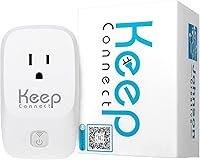
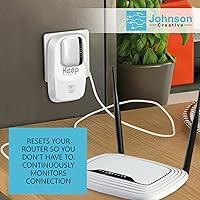
The Keep Connect MAX Router Rebooter tackles one of the most quietly infuriating problems in modern home life: the router that dies overnight and leaves everything offline until someone notices and physically unplugs it. This router watchdog sits near your modem or router, watches whether your internet is actually responding, and cuts then restores power if it detects a failure — the same thing you would do by hand, just automatically. It has been on the market since early 2019, giving it a real track record. One honest caveat up front: it does not fix the root cause of your instability. If your ISP is unreliable or your router hardware is aging out, those problems remain — this device just makes sure the standard workaround happens without you being present.
Features & Benefits

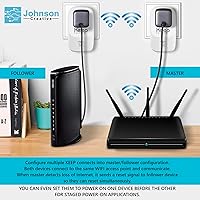
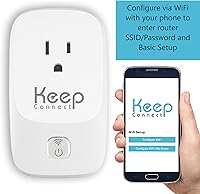
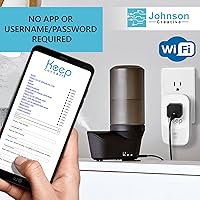
The core mechanic is simple: this auto-reboot device periodically pings external servers and, the moment it stops getting responses, it cuts and restores power to whatever is plugged in — a power cycle, done automatically. Beyond reactive reboots, you can also set scheduled periodic resets if your connection tends to get sluggish after days of uptime. No account or app is required for basic use, which is a real differentiator. Optional SMS or email alerts let you know a reboot happened without you checking anything. For multi-site management, a premium cloud app on iOS and Android adds centralized remote monitoring. Physical setup runs over 2.4 GHz Wi-Fi with WPS support, so no deep configuration is required — plug it in, connect it, and it gets to work.

Best For

This router watchdog earns its place most clearly when you cannot physically reach your router. Think vacation rentals — if a guest loses Wi-Fi at midnight, or your cabin's security camera drops offline while you are three states away, an automatic reboot buys real time until a proper fix is possible. Smart home setups with video doorbells, automation hubs, or connected locks are another natural fit, since those devices assume a live internet connection at all times. Non-technical users will appreciate that setup requires no router firmware access or networking background. Remote workers prone to dropped video calls will find the reduced babysitting worthwhile, and anyone overseeing multiple remote locations can lean on the optional cloud tier for a unified view of connection health.

User Feedback

Buyers who picked up this auto-reboot device for remote or unattended locations are largely satisfied — the most recurring sentiment in long-term reviews is simply that they stopped worrying about it. It reboots, a text arrives, and life continues. Setup earns consistent praise for being quick and unpretentious. On the other side, some owners report occasional false-positive reboots — the device triggered a restart during brief latency spikes when the connection was technically still alive. A few find the SMS notification setup instructions less intuitive than expected. The reliance on 2.4 GHz Wi-Fi is worth noting: if that band is inconsistent in your space, the device may have trouble staying connected itself. Against DIY smart-plug-on-a-timer alternatives, most reviewers consider this the smarter and more responsive option, though the price gap is a reasonable thing to weigh.

Pros

  • Fully automated reboots mean you stop discovering outages hours after they began.
  • Basic operation requires no account, no app, and no subscription — genuinely free out of the box.
  • Optional SMS and email alerts keep you informed without requiring you to check anything actively.
  • Scheduled periodic resets help prevent the slow connection degradation that builds up over days of uptime.
  • WPS-based setup is fast and accessible for users with no networking background.
  • The optional cloud app adds real multi-location oversight without needing separate hardware at each site.
  • Compact and lightweight enough to tuck behind a router without cluttering the space.
  • Has been actively sold and updated since early 2019, indicating a degree of manufacturer staying power.
  • Compares favorably to DIY smart-plug timer alternatives by responding to actual outages rather than a fixed clock.

Cons

  • Does not address the root cause of instability — ISP or hardware problems persist regardless.
  • Occasional false-positive reboots have been reported, triggered by brief latency spikes rather than true outages.
  • Relies on a stable 2.4 GHz connection to function, which is a weak point if that band is congested in your space.
  • SMS notification setup has a learning curve that some users find less intuitive than expected.
  • The premium cloud tier for multi-location monitoring requires an additional ongoing cost beyond the device price.
  • Limited to single-band 2.4 GHz Wi-Fi — no 5 GHz option for environments where 2.4 GHz is unreliable.
  • Offers no diagnostic data or logging, so you cannot review a history of outage frequency or duration.
  • Not useful as a long-term solution if the real fix is upgrading aging router hardware or switching ISPs.

Ratings

The scores below for the Keep Connect MAX Router Rebooter were generated by our AI system after analyzing verified global buyer reviews, actively filtering out incentivized, duplicate, and bot-driven submissions to surface what real owners actually experience. We weigh both the strongest praise and the most persistent frustrations equally, so the numbers reflect honest averages rather than curated highlights. Across categories, you will find this auto-reboot device earns its reputation in specific scenarios while showing clear limitations in others.
Ease of Setup
88%
Most buyers report having the device up and monitoring within ten to fifteen minutes, with WPS pairing eliminating the need to dig through router admin panels. Non-technical users — retirees managing a vacation cabin, for example — consistently note they were surprised by how little was required to get started.
A recurring exception involves the optional SMS notification configuration, where the instructions leave enough gaps that some users spend extra time troubleshooting. The initial Wi-Fi pairing step can also trip up anyone with a less common network setup or a combined modem-router unit.
Reliability of Outage Detection
79%
21%
When the internet genuinely drops, the device catches it consistently and triggers a reboot within a reasonable window — owners of remote rental properties and smart home setups repeatedly highlight that it handled real outages without any intervention. That core promise holds up well across the majority of reported use cases.
The most common technical complaint is false-positive reboots triggered during brief latency spikes when the connection was technically still alive. For households in areas with occasionally sluggish but unbroken ISP service, this can mean unnecessary disruptions to active video calls or downloads.
Notification System
72%
28%
Users who successfully configure SMS alerts describe the experience as genuinely reassuring — getting a text at 2am that your rental cabin router rebooted beats waking up to an angry guest message. Email notifications work as a quieter alternative for those who prefer inbox tracking over phone pings.
The setup instructions for notifications are consistently described as unclear or incomplete, and a meaningful share of buyers report spending more time on this step than on the rest of installation combined. A few give up on notifications entirely, which strips out a feature that adds real value for remote monitoring use cases.
Value for Money
68%
32%
For owners of vacation rentals or remote properties where a single unresolved overnight outage can cost a booking or a guest complaint, the math works clearly in this device's favor. The no-subscription baseline means there is no ongoing cost eating into that value calculation for most home users.
Buyers comparing it to a programmable smart plug — which costs a fraction of the price and can approximate the behavior with a fixed reboot schedule — do question whether the intelligence premium is justified. For households where internet drops are infrequent or predictably overnight only, the cost gap is harder to defend.
2.4 GHz Connectivity Stability
63%
37%
In typical home environments with a reasonably strong 2.4 GHz signal near the router, the device maintains its own connection without issue and goes months without needing any attention. For users in less crowded wireless environments, this band limitation is essentially invisible in practice.
The single-band 2.4 GHz limitation becomes a real problem in dense apartment buildings or homes where that band is congested — if the watchdog itself cannot maintain a stable connection, it cannot monitor or reboot anything. There is no 5 GHz fallback, which feels like a noticeable gap for a device whose entire job depends on staying connected.
Long-Term Durability
83%
Owners who have been running the device continuously since 2019 and 2020 report it still functioning without hardware failure, which is meaningful for something plugged in and running around the clock. The compact build generates minimal heat in normal operation, which likely contributes to its longevity.
The sample size of very long-term reviews is smaller than for newer products, so durability data beyond three to four years is limited. A handful of users report units that stopped responding after firmware-related issues, though it is difficult to separate hardware failure from configuration problems in those cases.
Scheduled Reset Feature
81%
19%
Users whose routers tend to slow down or degrade after extended uptime find the periodic reset scheduler genuinely useful — setting a 3am weekly reboot keeps things running without anyone thinking about it. It acts as a proactive maintenance layer on top of the reactive outage detection.
The feature has limited granularity in how reboot intervals are configured, which frustrates users who want precise control over timing. If a reboot is already in progress due to a detected outage, the interaction between scheduled and event-triggered reboots is not always clearly communicated in the interface.
Cloud App & Multi-Location Management
74%
26%
Property managers and small business owners overseeing several sites report the cloud app delivers on its core promise — a single view of connection health across multiple locations without needing to log into each individually. Remote reboot capability from a phone is described as especially useful when visiting a site in person is not practical.
The premium cloud tier adds an ongoing subscription cost that some single-location users find unnecessary, and the app experience itself receives mixed reviews for polish and reliability on Android. A few multi-site users note the heartbeat monitoring alerts for the device itself — not just the router — occasionally fire without clear cause.
Physical Design & Footprint
86%
At just over five ounces and roughly the size of a small paperback, the device fits naturally in the cluster of equipment near a router without demanding shelf space or cable management effort. Buyers consistently note it disappears into the setup after installation and requires no ongoing physical interaction.
The form factor means it hangs off the router's power supply rather than sitting flat, which can put mild stress on the cable connection in tighter setups. A wall-plug form factor — similar to a smart plug — would suit some installation environments better than the current inline design.
Standalone vs. App-Free Operation
89%
The fact that the device functions fully without a mandatory account or cloud dependency is one of its most appreciated traits, particularly among privacy-conscious buyers and those setting it up for less tech-savvy family members. No login means no locked-out scenarios if a service changes or an account lapses.
The trade-off of the standalone mode is that there is no remote visibility — if you are away from home and want to check whether a reboot occurred, you only know if you set up SMS alerts. Users who skipped notifications during setup sometimes discover this limitation only after an outage they missed.
Compatibility with ISP Equipment
77%
23%
Works with essentially any router or modem that plugs into a standard outlet, which covers the vast majority of consumer ISP equipment without compatibility concerns. Owners of combined modem-router units confirm it handles those configurations without issue.
A small number of users with ISP-supplied equipment that requires a specific boot sequence report the device does not always wait long enough between cutting and restoring power for their hardware to initialize properly. There is no configurable delay setting in the base firmware to address this.
Comparison to DIY Alternatives
71%
29%
Against a basic smart plug on a fixed timer, this auto-reboot device wins clearly in responsiveness — it reacts to actual outages rather than rebooting on schedule whether something is wrong or not. For unpredictable drop patterns throughout the day, no timer-based workaround can replicate that behavior.
For users whose only problem is a router that slows down once overnight, a programmable timer at a fraction of the cost is a defensible alternative, and several reviewers make exactly that point. The value gap narrows considerably once you accept that the core use case is reactive rather than preventive.

Suitable for:

The Keep Connect MAX Router Rebooter is a strong fit for anyone who cannot be physically present to restart a router when the internet drops. Vacation rental hosts are a prime example — if a guest loses Wi-Fi at 11pm, an automatic reboot resolves it without a call, a drive, or a frustrated review. Smart home owners who depend on connected cameras, doorbells, or locks staying online around the clock will find real value here, since those devices do not fail gracefully when connectivity lapses. Remote workers whose livelihood depends on a stable connection — especially those working odd hours or in areas with inconsistent ISP service — benefit from the hands-free recovery. Less technical buyers will appreciate that the baseline setup requires no router login, no firmware knowledge, and no mandatory account. Property managers or small business owners overseeing several locations can step up to the optional cloud tier for centralized visibility without deploying enterprise-level tools.
Not suitable for:

Buyers expecting this device to diagnose or fix the underlying cause of their internet instability will be disappointed — the Keep Connect MAX Router Rebooter automates a workaround, and if your ISP service is genuinely unreliable or your router hardware is failing, those root problems remain unaddressed. Users with routers in areas where the 2.4 GHz band is congested or weak may find the device itself struggles to maintain a stable connection, which undermines its core function. Anyone already running a smart plug on a simple reboot timer should weigh whether the added intelligence and cost actually improves their specific situation, since a basic timer costs considerably less. Power users or network administrators who want deep diagnostics, packet-level logging, or integration with professional monitoring platforms will find this too simple for their needs. It is also not the right tool for someone whose connection drops infrequently — the value proposition only makes practical sense when outages are a recurring, disruptive pattern.
Specifications

  • Brand: Manufactured by Johnson Creative under the Keep Connect brand.
  • Model: The MAX is the flagship model in the Keep Connect lineup.
  • Dimensions: The device measures 5 x 3 x 3 inches, making it compact enough to sit unobtrusively beside a router or modem.
  • Weight: Weighs 5.3 oz (0.15 kg), light enough to hang on a power strip without strain.
  • Wireless Standard: Connects to your home network via single-band 2.4 GHz Wi-Fi only — no 5 GHz support.
  • Setup Feature: Supports WPS (Wi-Fi Protected Setup) for quick, button-press pairing without entering a password manually.
  • Monitoring Method: Continuously pings external internet servers to verify live connectivity rather than just checking local network presence.
  • Reboot Trigger: Automatically cuts and restores power to the connected router or modem when an internet outage is detected.
  • Scheduled Resets: Users can configure periodic scheduled reboots at defined intervals independent of detected outages.
  • Notifications: Optionally sends SMS text messages or emails upon detected events; no notification is required and no account is mandatory for basic use.
  • App Support: A premium cloud services app is available on both iOS (App Store) and Android (Google Play) for multi-location monitoring and remote device management.
  • Compatible Devices: Works with standard home routers, cable or DSL modems, and any device that benefits from a controlled power cycle.
  • Power Interface: Plugs inline between a standard wall outlet and the router's power supply to control the power cycle.
  • Intended Use: Designed for home connectivity management and remote or unattended site internet uptime maintenance.
  • Date Introduced: First made available for purchase in January 2019, giving it over five years of active market history.
  • Manufacturer Status: Confirmed as not discontinued by the manufacturer as of the latest listing update.
  • ASIN: Amazon Standard Identification Number is B07MCRQPCS for direct product lookup.
  • Operating System: The optional companion app runs on iOS; Android support is available through the cloud services platform.

Related Reviews

Deeper Network Connect Mini Decentralized VPN Router
74%
83%
Privacy & Anonymity Protection
79%
Value for Money
86%
Setup & Ease of Use
91%
Portability & Form Factor
63%
Connection Speed & Throughput
More
Deeper Network Deeper Connect Air VPN Router
76%
88%
Privacy & Security
78%
Value for Money
93%
Portability & Form Factor
69%
Ease of Setup
63%
DPN / VPN Performance
More
ARRIS SURFboard mAX W21 WiFi 6 Router
71%
76%
Wireless Performance
67%
Coverage & Range
84%
Setup & Onboarding
61%
App Experience
82%
Parental Controls
More
Linksys EA8300 Tri-Band Wi-Fi Router
77%
83%
Wireless Performance
67%
Coverage & Range
91%
Setup & Ease of Use
86%
Multi-Device Handling
58%
Firmware & Software Stability
More
Linksys EA7500 AC1900 Dual-Band Router
76%
88%
Setup & Installation
83%
Signal Stability
67%
Wi-Fi Range & Coverage
81%
Multi-Device Performance
84%
Streaming Performance
More
ARRIS SURFboard mAX W30 Wi-Fi 6 Router
71%
78%
Wi-Fi Speed & Throughput
74%
Coverage & Range
76%
Mesh Performance
53%
App Experience
82%
Parental Controls
More
Linksys EA7200 AC1750 Dual-Band Wi-Fi Router
76%
91%
Ease of Setup
63%
Wi-Fi Range
82%
Connection Stability
77%
Multi-Device Performance
84%
App & Management
More
Router Guard Large WiFi Router EMF Shield
74%
78%
EMF Shielding Effectiveness
61%
WiFi Signal Impact
84%
Build Quality
96%
Ease of Installation
71%
Router Compatibility
More
Netgear Nighthawk AX5200 Router
87%
92%
Wi-Fi Performance
89%
Range & Coverage
84%
Setup & Installation
88%
Reliability & Stability
91%
Gaming & Streaming Experience
More
LilGadgets Connect+ Kids Headphones
81%
93%
Volume Safety & Limiting
86%
Comfort & Fit
78%
Build Quality & Durability
88%
Audio Sharing (SharePort)
72%
Microphone Quality
More

FAQ

No — the Keep Connect MAX Router Rebooter works in a fully standalone mode right out of the box. You connect it to your Wi-Fi, configure the basics, and it starts monitoring your connection without any account, subscription, or app required. The app and cloud tier are optional upgrades for people managing multiple locations.
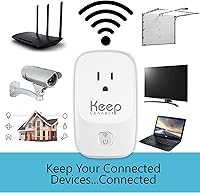
The device periodically sends small ping requests to external servers on the internet — think of it like repeatedly knocking on a door to see if anyone is home. If it stops getting responses after a defined number of attempts, it concludes the internet is genuinely down and triggers a power cycle. It is not just checking whether your router has a local network signal, which means it catches real outages rather than phantom ones.

It should not, because it is watching for failed ping responses rather than slow speeds. That said, some users have reported occasional false-positive reboots during brief, high-latency spikes where the pings timed out even though the connection was technically alive. It is a minority experience, but worth knowing about if your connection is frequently sluggish rather than fully dropping.

Yes — there is a scheduled reset feature that lets you force a periodic reboot at regular intervals regardless of detected outages. Some people use this to keep their connection feeling fresh, since certain routers tend to slow down after days of continuous uptime. It is a separate setting from the outage-triggered reboot.

If you choose to enter your phone number during setup, the device will send you an SMS when it detects and responds to an outage. This is completely optional — you can skip it entirely if you prefer. The texts themselves are free through Keep Connect's service; you are not billed per message. Some users find the notification setup instructions a bit terse, so allow a few extra minutes if you want alerts enabled.

Yes, your router can be dual-band (or even tri-band) without any issue. The device connects to your network on the 2.4 GHz band for its own monitoring communication, but what it physically controls is the power outlet your router plugs into — so the router's own capabilities do not matter. The main thing to confirm is that your 2.4 GHz band is stable and reachable where the device is placed.

That is genuinely one of its strongest use cases. With the optional premium cloud app, you can monitor connectivity status at remote properties from your phone. Even without the app, the SMS alert system means you will receive a notification whenever a reboot occurs, so you have visibility into outage events without needing to be present or log into anything.

You could, and some people do — a smart plug set to cut power at 3am every night costs much less. The practical difference is that this auto-reboot device responds to actual outages in real time rather than rebooting on a fixed schedule regardless of whether anything is wrong. If your router drops unpredictably throughout the day, a timer alone will not help between its scheduled windows. If your only problem is overnight slowdowns, the cost difference is worth thinking about.

It works with any device that benefits from a controlled power restart — routers, cable modems, DSL modems, or a router and modem combined into one unit. You can even plug a power strip into it if you want to reboot your modem and router simultaneously. The device does not care what is plugged into it; it just manages the power.

The core functionality — outage detection, automatic reboots, scheduled resets, and SMS or email notifications — is free with no subscription. The premium cloud services tier, which adds multi-location monitoring and remote device management through the mobile app, does carry an additional cost. For most single-location home users, the free standalone mode covers everything they need.

Where to Buy