Overview

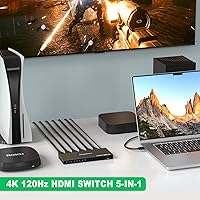
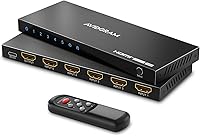
The AVIDGRAM AG5SW51X 5-Port HDMI 2.1 Switch sits comfortably in the mid-range of a crowded category, offering a practical solution for anyone managing multiple high-bandwidth sources on a single display. Unlike the plasticky budget options that flood this space, this HDMI 2.1 switch arrives in a slim metal chassis that feels more considered than its price suggests. At just over half an inch thick, it tucks neatly behind a monitor or into a media cabinet without adding clutter. An included IR remote and auto-source detection round out a package that backs itself with a 2-year warranty and lifetime technical support — a reassuring commitment for a peripheral most buyers expect to just work.
Features & Benefits

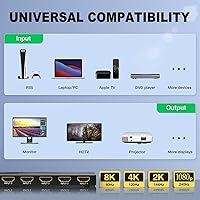
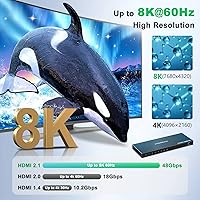
The headline capability here is full 48Gbps HDMI 2.1 bandwidth, which means 4K at 120Hz passes through cleanly — the resolution most PS5 and Xbox Series X owners will actually use day to day. The 8K at 60Hz support is real, but honest buyers should know 8K content remains scarce; the real value is in that high-refresh 4K headroom. Beyond resolution, the switcher handles VRR, Dolby Vision, HDR10+, and HDCP 2.3 without compromise, which matters if you are mixing gaming consoles with a Blu-ray player. Three independent switching modes — auto, manual, and IR remote — can each be toggled on or off, giving you granular control over how sources are selected. Audio passthrough covers Dolby TrueHD and DTS-HD Master Audio for anyone feeding a receiver.

Best For

This HDMI hub makes the most sense for multi-console gamers who want a PS5 and Xbox Series X running through one screen without touching cables. It is also a strong pick for home theater setups where signal integrity at 4K 120Hz with full HDR is non-negotiable. Content creators who cycle between a desktop, laptop, and capture card on a single monitor will appreciate the remote switching without needing to reach around to the back of a display. Anyone dealing with HDCP 2.3 requirements — think premium streaming apps or Blu-ray — will find the compliance here genuinely useful rather than a checkbox spec. Less ideal for ultra-budget buyers or anyone who only needs two or three ports and does not require HDMI 2.1 bandwidth at all.

User Feedback

Across its 291 ratings, the Avidgram 5-port switcher holds a 4.2-star average — a score that reflects genuine satisfaction with some honest caveats. Buyers consistently praise the build quality and signal stability at 4K 120Hz, with console gamers in particular noting clean compatibility with PS5 and Xbox Series X. The auto-switching works reliably for most, though a notable subset of users report it occasionally jumping to an unintended input — a frustration that can be resolved by simply disabling the feature entirely. The IR remote draws mixed reactions; some find the range acceptable, others wish it reached further across a room. A few buyers flag the external power requirement as a minor inconvenience. Isolated complaints about unit consistency appear, so buying from a seller with a clear return policy is worth considering.

Pros

  • Full 48Gbps HDMI 2.1 bandwidth ensures 4K 120Hz passes through without any signal degradation.
  • Supports VRR, Dolby Vision, HDR10+, and HDCP 2.3 — everything a modern gaming or home theater setup demands.
  • Three independently toggleable switching modes give you real control over how and when inputs change.
  • The metal chassis feels durable and sits flat enough to tuck behind nearly any monitor or TV.
  • Dolby TrueHD and DTS-HD Master Audio passthrough keeps this HDMI hub relevant for serious audio setups.
  • USB-C power input is a practical choice that avoids proprietary adapter dependency.
  • Auto-switching works reliably for most users when sources are powered on and off cleanly.
  • Broad device compatibility covers PS5, Xbox Series X, Apple TV, MacBook, and Blu-ray players without fuss.
  • A 2-year warranty with lifetime technical support is a stronger backing than most competitors offer at this tier.
  • Slim profile at under 0.6 inches thick makes cable management and placement genuinely straightforward.

Cons

  • The IR remote range has disappointed a notable share of buyers, limiting usefulness in larger rooms.
  • Auto-switching can misfire and jump to an unintended input when multiple sources are active simultaneously.
  • Requires an external USB power source, which adds one more cable to manage in an already crowded setup.
  • A minority of buyers have reported unit-to-unit inconsistency, suggesting quality control is not perfectly uniform.
  • No included AAA batteries for the IR remote, which is a small but annoying omission out of the box.
  • 8K support, while technically present, offers limited real-world value given how scarce 8K content remains today.
  • Users who disable auto-switching must manually select inputs each session, which removes a core convenience.
  • No pass-through power to connected devices means this is a passive switcher only, not a hub with extras.
  • The single output limits you to one display — not useful if you need to mirror or distribute to multiple screens.

Ratings

The AVIDGRAM AG5SW51X 5-Port HDMI 2.1 Switch has been evaluated by our AI rating system after analyzing verified purchase reviews from buyers worldwide, with spam, bot submissions, and incentivized feedback actively filtered out before scoring. Ratings reflect the full picture — where this HDMI hub genuinely delivers and where real users have run into friction. Both strengths and recurring pain points are transparently weighted into every score below.
Signal Integrity
91%
The vast majority of buyers report clean, stable 4K 120Hz output with no flickering, color banding, or resolution drops during extended gaming sessions. Console gamers running PS5 and Xbox Series X simultaneously through the switcher consistently confirm that the signal quality is indistinguishable from a direct HDMI connection.
A small but notable group of users experienced intermittent signal loss that was traced back to underpowered USB sources rather than the switch itself. Swapping to a dedicated USB wall adapter resolved the issue for most, but it adds an unexpected troubleshooting step for some buyers.
Build Quality
86%
The metal chassis stands out clearly against the cheap plastic enclosures found on most HDMI switches at this price level. Buyers frequently mention that the unit stays cool during long sessions and feels solid enough to live permanently behind a TV without concern about flexing or warping.
A handful of reviewers noted that the port openings feel slightly loose with heavier HDMI cable heads, which can cause connectors to sit at a slight angle. It is a minor issue for most, but buyers using thick aftermarket HDMI 2.1 cables may find the fit less secure than expected.
Auto-Switching Reliability
72%
28%
When used in a typical home setup where devices are powered on one at a time, auto-switching works dependably and saves buyers the hassle of manually selecting inputs between gaming sessions or media playback. Many users describe it as working exactly as expected in straightforward single-active-source scenarios.
The feature becomes noticeably less reliable when two or more sources are active simultaneously — a common situation for streamers or users with always-on media devices. Enough buyers report the switch jumping to unintended inputs that disabling auto-switching entirely has become a frequently recommended workaround in community discussions.
IR Remote Performance
63%
37%
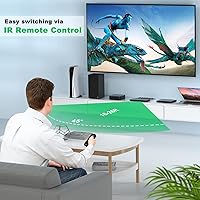
In compact setups where the switch sits within 10 to 12 feet of the seating position with a clear sightline, the IR remote handles source switching quickly and without noticeable input lag. For desk setups or smaller living rooms, most buyers find the remote functional and convenient.
At greater distances or with the unit tucked into a media cabinet, the remote range drops off noticeably and is one of the more consistent criticisms across reviewer pools. The lack of included batteries is also a recurring minor complaint that catches buyers off guard when first unboxing the unit.
HDR & Format Compatibility
89%
Dolby Vision, HDR10+, and HDR10 all pass through correctly according to the overwhelming majority of buyers who tested with compatible displays and sources. Home theater users pairing this hub with a 4K Blu-ray player report that the full HDR metadata chain arrives at the TV intact, with no unexpected downgrading to SDR.
A small number of users with older displays noted that certain HDR handshake negotiation issues emerged on initial connection, requiring a power cycle of the switch or source device. These cases appear display-specific rather than a flaw in the switcher itself, but they add setup friction for some buyers.
Gaming Feature Support
87%
VRR passthrough has been confirmed working correctly by multiple PS5 and Xbox Series X owners, with variable refresh rates negotiating as expected through the switch to compatible monitors and TVs. Buyers specifically shopping for a switch that preserves next-gen gaming features report satisfaction with this area.
QFT and QMS support is less commonly tested or confirmed by regular buyers, so real-world validation for those specific features is thinner than for VRR. Buyers with niche display configurations relying on those features may want to verify behavior during a return window.
Audio Passthrough
84%
Dolby TrueHD and DTS-HD Master Audio pass through without downmixing, which home theater buyers running an AV receiver in the chain praise consistently. Several reviewers specifically called out lossless audio performance as a deciding factor in choosing this unit over cheaper alternatives.
Users routing audio through a TV's ARC or eARC port downstream of the switch note that the audio chain can behave inconsistently depending on the TV model involved. This is more a limitation of how ARC interacts with external switches generally, but it is worth flagging for buyers with complex audio routing setups.
Ease of Setup
81%
19%
Most buyers describe the initial setup as plug-and-play, with auto-switching handling source detection without any configuration required out of the box. The included user manual is functional enough for the average buyer to get everything connected in under ten minutes.
Users who want to fine-tune switching behavior — such as disabling auto-switch or locking the IR remote — need to navigate hold-duration button combinations that are not intuitively obvious without reading the manual carefully. A couple of reviewers found the button-hold timing for toggling modes frustrating to get right consistently.
Power Setup
68%
32%
The USB-C power input is a practical and universally compatible choice that avoids the proprietary adapter dependency found on some competing switches. Buyers who have a spare USB port on their TV or a nearby USB wall adapter find it a complete non-issue in practice.
For buyers with a fully occupied media cabinet and no free USB ports, adding another cable for the power supply is a genuine inconvenience. Some reviewers also flagged that powering the unit from a low-output USB port on an older TV caused instability, requiring a dedicated adapter to resolve.
Device Compatibility
88%
The breadth of confirmed compatible devices is one of this HDMI hub's more appreciated qualities, with verified working reports spanning PS5, Xbox Series X, Apple TV 4K, MacBook with adapters, and multiple Blu-ray player brands. Buyers appreciate not having to second-guess whether their specific hardware will negotiate correctly.
MacBook users in particular need to ensure their USB-C to HDMI adapter or dock outputs a true HDMI 2.1 signal, as many popular adapters are limited to HDMI 2.0 bandwidth. The switch itself is not at fault, but the dependency on third-party adapter quality is worth flagging for that buyer segment.
Value for Money
77%
23%
Relative to other HDMI 2.1 switches offering five inputs, full 48Gbps bandwidth, and a metal build in the same tier, buyers generally consider the pricing fair for what is delivered. The 2-year warranty and lifetime tech support add perceived value that helps justify the cost against cheaper but less reliable alternatives.
Budget-conscious buyers who only need two or three sources, or who are running displays that top out at 4K 60Hz, will find the pricing harder to justify since a much cheaper HDMI 2.0 switch would serve them equally well. The value proposition is strongest specifically for buyers who need all five ports and genuine HDMI 2.1 capability.
Form Factor & Placement
83%
At just over half an inch thick, the Avidgram 5-port switcher lays nearly flat and is easy to position behind a monitor, on a shelf edge, or inside a media cabinet without adding visible clutter. Its low profile is consistently mentioned as a practical advantage by buyers who care about cable management aesthetics.
With five input ports and one output all on the same unit, cable routing can become somewhat messy depending on where the switch is positioned relative to source devices. Buyers who prefer both input and output ports on opposite ends of the device may find the single-side port layout awkward to work with in tight spaces.
Quality Consistency
66%
34%
The majority of buyers receive a fully functional unit that performs as described from day one, and the 4.2-star average across nearly 300 ratings reflects a baseline of genuine reliability for most purchasers. Positive experiences are clearly the norm rather than the exception.
A visible minority of reviews describe units that arrived with port defects, intermittent signal issues, or IR receivers that were unresponsive out of the box, pointing to some variation in manufacturing consistency. Buying from a seller with a straightforward return policy is a reasonable precaution given these patterns.
Warranty & Support
82%
18%
The 2-year warranty is longer than what most competitors in this segment offer, and Avidgram's inclusion of lifetime technical support is a meaningful differentiator for buyers who want ongoing help if issues arise after the warranty period. Reviewers who contacted support generally report positive resolution experiences.
A small number of buyers mention slower-than-expected response times from customer support during peak periods. While the warranty terms are strong on paper, the practical experience of claiming it can vary, and international buyers in particular note that return logistics can complicate the process.

Suitable for:

The AVIDGRAM AG5SW51X 5-Port HDMI 2.1 Switch is built for people who have genuinely outgrown their display's input count and refuse to compromise on signal quality to solve that problem. It is the right call for console gamers who keep both a PS5 and an Xbox Series X hooked up and want to run either at 4K 120Hz with VRR active — no cable swapping, no signal loss. Home theater enthusiasts feeding multiple sources into a single high-end TV will appreciate that the full HDR stack, including Dolby Vision and HDR10+, passes through intact alongside lossless audio formats like Dolby TrueHD. Content creators and streamers who cycle between a desktop PC, a laptop, and a capture card on one monitor will find the IR remote and auto-switching genuinely useful for staying in flow. Anyone dealing with HDCP 2.3 requirements — whether from a 4K Blu-ray player or a premium streaming device — gets reliable compliance without needing to think about it.
Not suitable for:

If your setup involves only two or three sources and your display already has spare HDMI 2.1 ports, the Avidgram 5-port switcher is simply more hardware than you need, and a passive two-port alternative would cost significantly less. Buyers on a tight budget who are still running 1080p displays or older content at 4K 30Hz have no practical use for HDMI 2.1 bandwidth here — a much cheaper HDMI 2.0 switch would serve them just as well. The unit requires an external USB power source to operate, which can be a genuine nuisance in a media cabinet that is already running short on USB ports. People who want to mount the switch at a distance from their seating area should think carefully about the IR remote's reported range limitations before committing. And buyers who have had bad experiences with inconsistent quality control in budget-to-mid-range peripherals may want to verify their return window before purchasing, given a handful of user reports flagging unit-to-unit variation.

Specifications

  • Input Ports: The switch provides 5 HDMI 2.1 input ports, allowing up to five source devices to connect simultaneously to a single display.
  • Output Ports: A single HDMI 2.1 output connects to the display, TV, or monitor receiving the selected signal.
  • Max Resolution: Supports up to 8K at 60Hz and 4K at 120Hz, covering the full range of current high-end display standards.
  • Bandwidth: Operates at the full HDMI 2.1 specification of 48Gbps, ensuring no signal compression or quality loss at maximum resolutions.
  • HDR Support: Compatible with HDR10, HDR10+, and Dolby Vision, preserving the full dynamic range metadata from source to display.
  • Audio Formats: Passes through Dolby TrueHD, DTS-HD Master Audio, LPCM, Dolby AC-3, and DTS 7.1 without re-encoding or downmixing.
  • HDCP Compliance: Supports HDCP 2.3, 2.2, and 1.4, satisfying the content protection requirements of premium streaming apps and 4K Blu-ray players.
  • Gaming Features: Includes support for VRR, QFT, QMS, and CEC, enabling variable refresh rate and low-latency modes on compatible gaming displays.
  • Switching Modes: Offers three independently toggleable switching methods: automatic source detection, a manual front-panel button, and an IR remote control.
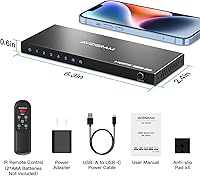
  • Power Input: Powered via a USB-A to USB-C cable, which is included in the box; no proprietary power adapter is required.
  • IR Remote: An IR remote control is included for wireless source switching; requires 2 AAA batteries, which are not included.
  • Build Material: The outer shell is constructed from a metal alloy, providing better heat dissipation and physical durability than typical plastic alternatives.
  • Dimensions: Measures 6.3 x 2.42 x 0.57 inches, making it slim enough to lay flat behind most displays or mount inside a media cabinet.
  • Weight: Weighs 7.2 ounces, keeping the unit light enough to position without additional mounting hardware in most setups.
  • Compatibility: Works with PS5, PS4 Pro, Xbox Series X/S, Xbox One, Xbox 360, PC, MacBook, Apple TV, Blu-ray players, Chromecast, projectors, and UHD monitors.
  • HDMI Version: Fully compliant with the HDMI 2.1 specification, making it forward-compatible with next-generation display and source hardware.
  • 3D Support: Passes through 3D video signals for use with compatible 3D-capable displays and source devices.
  • CEC Support: Consumer Electronics Control (CEC) passthrough allows connected devices to communicate and coordinate power or input states where supported.
  • Warranty: Backed by a 2-year manufacturer warranty and lifetime technical support from Avidgram's customer service team.
  • In the Box: Package includes the switch unit, one USB-A to USB-C power cable, one IR remote control, and a printed user manual.

Related Reviews
BolAAzuL 2-Port HDMI 2.1 KVM Switch
84%
91%
Value for Money
94%
Video Quality
88%
Ease of Setup
85%
Build Quality
80%
Usability and Controls
More
ANXQQ HDMI 2.1 KVM Switch 8K@60Hz 2 Port with Wired Control
86%
92%
Video Quality
89%
Ease of Use
87%
Value for Money
85%
Compatibility
91%
USB Support
More
FERRISA 8K HDMI 2.1 Switch 4-in-1
77%
91%
Ease of Setup
78%
Auto-Switching Reliability
88%
4K@120Hz Performance
61%
8K Signal Stability
74%
Remote Control Usability
More
Seiryruc 2-in-3-Out 4K HDMI KVM Switch
71%
88%
Setup & Installation
83%
Video Signal Quality
57%
Switching Method & Speed
81%
USB Peripheral Sharing
76%
Display Mode Flexibility
More
ienRon 6-Port 2.5Gb PoE Switch with 2-Port 10Gb SFP+
85%
86%
Performance
91%
Ease of Setup
88%
PoE Power Delivery
84%
Build Quality
93%
Fanless Operation
More
IOGEAR GCS32HU 2-Port HDMI KVM Switch
72%
93%
Ease of Setup
88%
Switching Reliability
91%
Value for Money
74%
Build Quality
67%
Cable Length & Reach
More
Alxum SJW-KM201B 2-Port HDMI KVM Switch
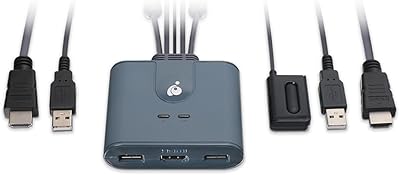
69%
93%
Ease of Setup
88%
Video Output Quality
79%
Switching Speed & Reliability
74%
Remote Controller Usefulness
76%
USB Hub Performance
More
ATEN CS22HF 2-Port HDMI KVM Switch
78%
93%
Ease of Setup
91%
Switching Convenience
84%
Video Quality
78%
Build Quality
66%
Cable Length & Management
More
Cudy HS105 5-Port 2.5G Ethernet Switch
82%
93%
Port Performance
96%
Ease of Setup
88%
Build Quality
97%
Noise Level
91%
Value for Money
More
Tenda SE105 5-Port 2.5G Unmanaged Switch
83%
97%
Ease of Setup
91%
Port Speed Performance
93%
Value for Money
67%
Build Quality
78%
Thermal Management
More

FAQ

Yes, provided you use good-quality HDMI 2.1 cables on both the input and output sides. The switch runs the full 48Gbps bandwidth, so there is no internal bottleneck. Where people sometimes run into trouble is using older HDMI 2.0 cables that cannot carry that bandwidth — swapping those out usually resolves any flickering or resolution drops.

Yes, it is one of the more commonly confirmed use cases among verified buyers. The switch passes VRR signals through correctly, so your PS5 should negotiate the same variable refresh rate it would if connected directly to the TV. Just make sure your television also supports VRR on the port you connect the switch output to.

Auto-switching detects when a new source powers on and switches to it automatically. It works well when you are turning devices on one at a time, but if multiple sources are active simultaneously, it can occasionally jump to the wrong input. The good news is you can disable auto-switching entirely by holding the select button for three seconds, then rely on manual or IR remote switching instead.

This is one of the more honest caveats worth knowing before buying. Several users report the remote works reliably at close to mid-range distances, typically up to around 10 to 15 feet with a clear line of sight. In a larger living room or if the switch is tucked away at an angle, the range can feel limited. If remote control from across a bigger space is important, that is worth factoring in.

Yes, the switch requires external USB power to operate — it is not a passive device. The included USB-A to USB-C cable handles this, so you can power it from a spare USB port on your TV, a USB wall adapter, or a powered hub. It is a minor inconvenience for some setups, but the power draw is low enough that almost any USB port will handle it.

Yes, as long as the adapter you use outputs a proper HDMI 2.1 signal, the switcher will accept it on any input port. Many USB-C to HDMI adapters are limited to HDMI 2.0 bandwidth, which means your MacBook connection may cap at 4K 60Hz rather than 4K 120Hz. For the full high-refresh experience from a Mac, you would need a dedicated HDMI 2.1 adapter or cable.

Dolby Vision metadata passes through the Avidgram 5-port switcher intact, so your display will receive the correct signal from whichever source is active. Keep in mind that the TV itself needs to support Dolby Vision on its HDMI inputs, and some TVs only enable it on specific ports. As long as the output port on your TV supports it, the switch will not strip or alter the metadata.

The metal chassis does make a noticeable practical difference. Metal dissipates heat more effectively than plastic, which matters for a device that may run for hours at a stretch. It also holds up better physically if it gets bumped or if cables are tugged. It is not a luxury device, but the build quality feels more durable than what you typically find on switches priced below this range.

Yes, this HDMI hub passes through Dolby TrueHD and DTS-HD Master Audio without downmixing, which is exactly what you need for lossless audio from a Blu-ray player. The HDCP 2.3 compliance also means the content protection handshake for 4K Blu-ray will complete correctly. Just run the output from the switch into your AV receiver rather than directly into your TV if you want the audio decoded there.

When auto-switching is enabled, the switch generally favors the most recently activated input. If two sources power on nearly simultaneously, behavior can be unpredictable, and some users have reported it landing on the wrong one. The cleanest workaround is to disable auto-switching and use the manual button or IR remote to select your source intentionally, which puts you fully in control of the switch behavior.