


Overview

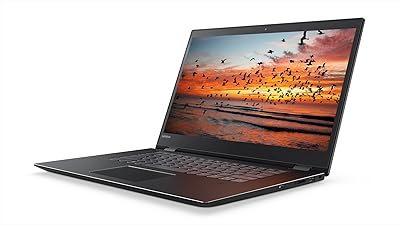
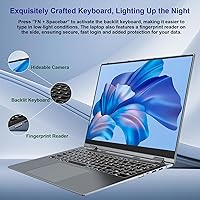
The Jumper J1 16-inch 2-in-1 Laptop is an ambitious entry from a Chinese brand quietly building a reputation in the budget convertible space. At first glance, the spec sheet punches above its price tier — a large IPS touchscreen with a 1920x1200 resolution and thin bezels is not something you typically find here. That said, the Intel Celeron processor is worth flagging upfront: this is a light-duty chip, suited for everyday tasks rather than heavy workloads. The machine launched in May 2025, so long-term reliability remains an open question. Still, for buyers who know what they are getting into, there is genuine appeal here.

Features & Benefits

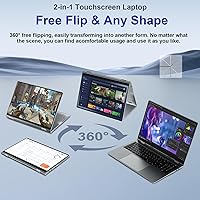
The 360° rotating hinge is the centerpiece, flipping this convertible laptop between laptop, tent, stand, and tablet modes without awkward resistance. The IPS panel's 1920x1200 resolution looks noticeably sharper than standard 1080p, and the thin bezels make the screen feel even larger than its size suggests. Where the Jumper 2-in-1 genuinely surprises is RAM and storage: 16GB DDR4 is paired with an extra expansion slot, and the 640GB SSD is upgradable to 2TB. Toss in WiFi 6 connectivity, a fingerprint reader, backlit keyboard, three USB 3.0 ports, and a Type-C port, and the feature count becomes hard to argue with at this price level.

Best For

This convertible laptop makes the most sense for students and home users who need a big screen for reading, note-taking, and Office work without spending a fortune. Remote workers whose daily routine revolves around emails, video calls, and documents will also find the Celeron holds its own just fine for those tasks. Anyone who occasionally wants tablet-mode flexibility without paying a premium for it will appreciate the hinge. That said, raw computing power is not the selling point — video editors, coders, or anyone running demanding software should look elsewhere. Screen size and storage headroom are where the Jumper 2-in-1 genuinely earns its keep.

User Feedback

Because this 16-inch Jumper only hit shelves in May 2025, the pool of real-world reviews is still shallow, so any patterns emerging now carry extra weight. Early buyers tend to praise the display quality and the sheer amount of screen for the money, with the fingerprint reader earning a few nods for everyday convenience. On the downside, the Celeron chip draws predictable criticism when users push beyond basic tasks — noticeable slowdowns during multitasking are a recurring theme. A handful of buyers have also questioned whether the hinge feels built to last. Battery life reports are mixed, with some aligning with the claimed figure and others falling short under active use.

Pros

  • The 16-inch IPS touchscreen at 1920x1200 resolution looks noticeably sharp for the price tier.
  • 16GB DDR4 RAM with an expansion slot for more is genuinely uncommon in this budget range.
  • WiFi 6 support keeps the Jumper 2-in-1 relevant as home networking infrastructure improves.
  • 640GB SSD storage covers most students and home users without constant space management.
  • The 360-degree hinge adds real flexibility for presentations, casual streaming, and reading.
  • A bundled one-year Office 365 subscription removes an immediate additional software cost.
  • The fingerprint reader provides quick, secure login without memorizing passwords daily.
  • Three USB 3.0 ports and a Type-C connection handle most peripheral needs without a hub.
  • The backlit keyboard makes evening or low-light typing sessions practical and comfortable.

Cons

  • The Celeron processor slows noticeably when more than a few applications run at the same time.
  • Real-world battery life frequently falls short of the eight-hour figure under active use.
  • Jumper offers limited customer support options compared to established mainstream laptop brands.
  • The chassis uses plastic construction that raises questions about multi-year physical durability.
  • Office 365 activation has caused friction for some buyers due to unclear redemption instructions.
  • No built-in HDMI port means connecting to an external display requires carrying an adapter.
  • Webcam performance degrades significantly in low-light conditions, undermining video call quality.
  • The overall weight makes this convertible laptop a commitment for anyone commuting with it daily.
  • Long-term hinge reliability remains unproven with the product barely past its launch window.

Ratings

The Jumper J1 16-inch 2-in-1 Laptop has been evaluated by our AI rating system after analyzing verified global buyer reviews, with spam, bot activity, and incentivized feedback actively filtered out. Scores reflect a candid picture of where this convertible laptop earns genuine praise and where real users have run into frustration. Both the standout strengths and the honest pain points are represented below.

Display Quality
83%
The 16-inch IPS panel with a 1920x1200 resolution consistently draws compliments from buyers who expected far less at this price tier. Thin bezels make the screen feel expansive, and color accuracy holds up well for everyday tasks like streaming, browsing, and reading documents for extended stretches.
While the display impresses in casual use, some users report that brightness could be higher in well-lit rooms or near windows. It is not a panel that color-sensitive creatives would rely on, and a few buyers noted occasional uneven backlight distribution toward the edges.
Performance & Speed
54%
46%
For truly light workloads — web browsing with a handful of tabs, Word documents, video calls, and basic spreadsheets — the Celeron chip handles things without obvious drama. Buyers who went in with calibrated expectations report a usable, if modest, daily experience for student and home-office tasks.
Push the machine beyond its comfort zone and the Celeron shows its limits quickly. Multitasking with several browser tabs open alongside an Office app causes noticeable lag, and anything resembling media editing or software compilation is simply not realistic on this processor.
Build Quality & Hinge
67%
33%
The 360-degree hinge mechanism draws genuine appreciation for its ability to flip between modes without requiring too much force. Buyers who use it in tent or stand mode for presentations or video watching find it holds position reasonably well during typical sessions.
Longer-term confidence in the hinge is still unproven given the May 2025 launch. A portion of early buyers have questioned whether the overall chassis feels durable enough for daily bag-and-go use, citing a slightly hollow feel to the plastic body that gives pause about multi-year survival.
Value for Money
88%
Few competing machines at this price point offer a 16-inch touchscreen, WiFi 6, 16GB RAM, a fingerprint reader, and a bundled year of Office 365 in a single package. For buyers working within a tight budget, the sheer feature count relative to the asking price is hard to dismiss.
Value perception drops if buyers discover the Celeron processor limits real-world usability sooner than expected. Those who need more than light productivity will find the price feels less justified once performance walls become apparent in day-to-day use.
RAM & Expandability
86%
Shipping with 16GB DDR4 is genuinely uncommon at this price, and the presence of a second memory slot means users can double that down the road without replacing the whole machine. Buyers who appreciate future-proofing on a budget specifically call this out as a deciding factor.
The extra expansion slot is a strong selling point on paper, but accessing it requires opening the chassis, which may void any warranty and is not something casual users are comfortable doing. Documentation on the upgrade process from Jumper is also sparse.
Storage
81%
19%
640GB of SSD storage is a practical amount for most students and home users, covering operating system, Office files, photos, and a reasonable media library without constant management. The SSD also means boot and load times are crisp, which noticeably improves the day-to-day feel of the machine.
The storage is listed as upgradable to 2TB, but as with RAM, the physical upgrade path is not well-documented for non-technical buyers. The 640GB baseline figure is also a slightly unusual number that raises questions about whether it reflects a non-standard configuration.
Keyboard & Backlight
72%
28%
The backlit keyboard, activated via FN and Spacebar, works as expected in dimly lit environments like evening study sessions or flights. Key travel feels acceptable for a machine this thin, and most buyers find it comfortable enough for extended typing without excessive fatigue.
The keyboard does not stand out against competitors in terms of tactile feedback, and the FN-shortcut activation method for the backlight is not intuitive for new users. A few reviewers noted that key labeling could be clearer, particularly for the function row shortcuts.
Battery Life
63%
37%
Under light use — documents, light browsing, and the occasional video — several buyers report getting close to the claimed eight-hour figure. For students who mainly use the machine in a single extended session before plugging in, real-world performance feels adequate.
Heavier use drops battery life noticeably, and buyers who push the machine harder or keep screen brightness elevated report figures closer to five or six hours. The gap between claimed and real-world battery performance is a recurring point of mild frustration in user feedback.
Touchscreen Responsiveness
74%
26%
Touch input registers reliably for basic interactions — scrolling, tapping, zooming in on documents or images. Buyers using the machine in tablet mode for light reading or casual browsing find the screen responsive enough to feel natural rather than frustrating.
The touchscreen does not match the sensitivity of premium devices, and fast or multi-finger gestures can occasionally lag or misregister. For buyers who planned to use tablet mode heavily, this can become a daily annoyance that chip away at the appeal of the 2-in-1 design.
Connectivity & Ports
84%
Three USB 3.0 ports and a Type-C connection cover most practical needs without requiring a hub for typical home or student setups. WiFi 6 support is a standout inclusion that ensures the machine stays relevant as router infrastructure upgrades over time.
There is no HDMI port listed, which limits quick hookups to external displays or projectors without an adapter. Bluetooth specification details are also vague in official documentation, leaving buyers uncertain about wireless peripheral compatibility.
Webcam Quality
51%
49%
The built-in webcam handles basic video calls on platforms like Zoom or Teams well enough that participants can see and recognize the user without major complaints. For casual check-ins and remote classes, it clears the minimum bar most buyers actually need.
Anyone who values sharp video quality for professional calls or content creation will find the webcam underwhelming. Low-light performance in particular draws criticism, producing a noticeably grainy or washed-out image that undercuts the otherwise decent display experience.
Software & Setup
76%
24%
Windows 11 Home ships clean on this machine, and the bundled one-year Office 365 subscription is activated straightforwardly for most buyers, removing the need for any immediate additional software spend. First-time laptop owners appreciate having everything ready to use out of the box.
A handful of users report friction during Office 365 activation, including unclear redemption instructions or region-related issues. Jumper's own software support ecosystem is thin compared to established brands, meaning troubleshooting outside of generic Windows forums is not easy.
Weight & Portability
69%
31%
At just over five pounds, the machine is manageable for students or commuters who carry it occasionally rather than every single day. The 0.78-inch profile keeps it from feeling bulky inside a bag despite the large screen footprint.
A 16-inch laptop at five pounds is not what most people would call a lightweight travel companion, and daily carry in a backpack does add up. Buyers who prioritized the large display over portability tend to be fine, but those who underestimated the size at purchase express some regret.
Brand Trust & Support
57%
43%
Jumper has been shipping budget Windows laptops long enough to have a serviceable track record in the value segment, and buyers who have owned prior Jumper devices tend to approach the brand without major skepticism. The one-year warranty provides a baseline level of purchase confidence.
Jumper is not a household name in Western markets, and customer support responsiveness is a known weak point. Users who have encountered hardware issues report slow or unclear communication from the brand, which is a real concern for a machine with limited long-term reliability data so far.

Suitable for:

The Jumper J1 16-inch 2-in-1 Laptop is a solid fit for students who need a large, capable screen for research, note-taking, and Office work without stretching a tight budget. The bundled year of Office 365 and the generous SSD storage mean a new buyer can get productive immediately without hidden extra costs. Remote workers or home users whose daily routine centers on emails, documents, and video calls will find the Celeron chip handles those tasks without drama. Anyone who occasionally wants the freedom to flip into tablet or tent mode — say, for casual streaming or a presentation — gets that flexibility here at a price that does not require justification. First-time laptop buyers will also appreciate that the machine arrives with Windows 11 Home and a clean setup experience, keeping the learning curve short.

Not suitable for:

Buyers who need consistent, responsive performance across multiple demanding applications at once should look past the Jumper J1 16-inch 2-in-1 Laptop without much deliberation. The Intel Celeron is a light-duty processor, and anyone expecting to run photo editing software, compile code, handle large spreadsheets alongside browser tabs, or do anything resembling video production will hit a wall faster than expected. The brand also lacks the established customer support infrastructure of mainstream laptop makers, which matters if something goes wrong outside a standard return window. Long-term build durability is simply unknown at this stage, given the machine only reached market in mid-2025, so buyers who keep laptops for four or five years and expect them to hold up physically may be taking a risk. Frequent travelers who need something genuinely lightweight will also find the five-pound, 16-inch chassis more burden than convenience on daily commutes.

Specifications

  • Display: 16-inch IPS touchscreen with a 1920x1200 pixel resolution, ultra-thin bezels, and full 360-degree rotation support.
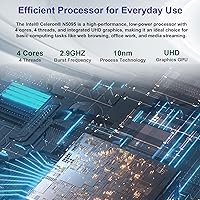
  • Processor: Intel Celeron quad-core running at 2GHz, built for light productivity tasks rather than demanding or compute-intensive workloads.
  • RAM: 16GB DDR4 RAM installed, with one additional expansion slot supporting up to 16GB more for a maximum of 32GB total.
  • Storage: 640GB SSD storage standard, with the drive bay supporting upgrades up to 2TB for buyers who need significantly more capacity over time.
  • Graphics: Intel UHD integrated graphics handle everyday visual tasks, light media playback, and standard display output without a dedicated GPU.
  • Operating System: Windows 11 Home ships pre-installed, providing a current, fully licensed OS experience out of the box.
  • Battery: 53.2Wh lithium battery with a manufacturer-rated life of approximately 8 hours under typical light-use conditions.
  • Wireless: WiFi 6 (802.11ax) dual-band connectivity supports both 2.4GHz and 5GHz frequencies for faster, more stable wireless performance.
  • Ports: Three USB 3.0 ports and one Type-C port provide a practical range of wired connectivity without requiring an immediate hub purchase.
  • Hinge: 360-degree rotating hinge allows the machine to switch between laptop, tent, stand, and tablet modes during everyday use.
  • Security: Side-mounted fingerprint reader enables fast biometric login under Windows Hello without requiring a PIN or password each time.
  • Keyboard: Full backlit keyboard with illumination toggled via the FN and Spacebar key combination, suitable for low-light typing sessions.
  • Dimensions: The chassis measures 14.37 x 9.6 x 0.78 inches, keeping the profile relatively slim for a 16-inch convertible form factor.
  • Weight: The machine weighs 5.05 pounds, which is manageable for occasional transport but worth noting for daily commuters.
  • Included Software: A one-year Microsoft Office 365 subscription is included, covering Word, Excel, PowerPoint, Outlook, and other core productivity applications.
  • Voltage: The device operates at 12 volts DC and ships with the required power adapter included in the box.
  • Optical Drive: No optical drive is included, which is standard for modern slim laptops and keeps the chassis thin and lightweight.
  • Availability: The product first became available in May 2025, making it a recent release with a still-developing long-term user track record.

Related Reviews
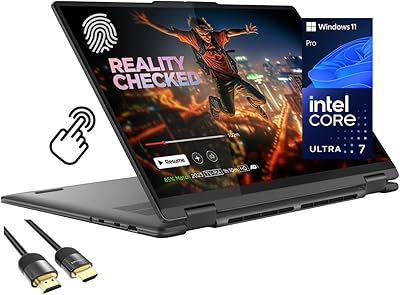
Lenovo Yoga 7i 16″ 2-in-1 Laptop, Core Ultra 7 155U, 16GB, 1TB
74%
84%
Display Quality
82%
Performance & Speed
79%
Build Quality & Hinge
81%
Keyboard & Trackpad
67%
Battery Life
More
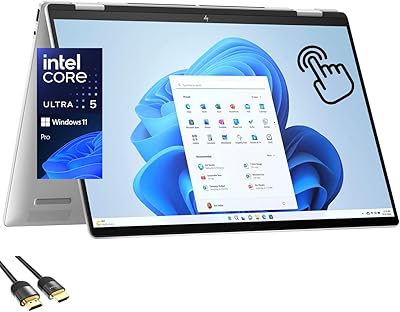
HP Envy x360 16-inch 2-in-1 Laptop (Core Ultra 5 125U, 16GB, 1TB)
76%
88%
Display Quality
83%
Performance & Speed
79%
Build Quality & Design
61%
Portability & Weight
67%
Battery Life
More
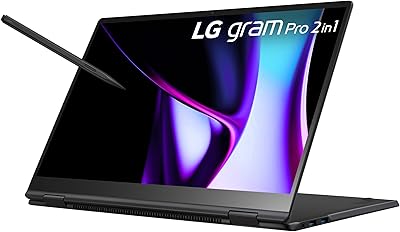
LG gram Pro 16T90SP-G 16-inch 2-in-1 Laptop Intel Core Ultra 7 16GB RAM 1TB SSD
86%
91%
Performance
93%
Portability
88%
Display Quality
77%
Battery Life
89%
Build Quality
More
ASUS Chromebook 16 2-in-1 Laptop
82%
91%
Value for Money
87%
Display Quality
88%
Battery Life
82%
Performance for Everyday Use
85%
Portability
More
KOOFORWAY BP8 8″ 2-in-1 Mini Laptop (1TB)
69%
91%
Portability & Form Factor
54%
Keyboard Usability
58%
Display Quality
72%
Performance (Daily Tasks)
79%
RAM & Multitasking
More
Lenovo Thinkpad 11e 2-in-1 Laptop, 11.6-inch, Intel Celeron, 4GB RAM, 128GB SSD
80%
88%
Value for Money
75%
Performance
93%
Portability/Size/Weight
70%
Display Quality
80%
Battery Life
More
Lenovo IdeaPad Flex 5 14-inch 2-in-1 Laptop, Ryzen 7 5700U, 16GB RAM, 512GB SSD
85%
88%
Performance
93%
Display Quality
80%
Battery Life
75%
Portability/Weight
85%
Keyboard Comfort
More
HP 2025 OmniBook X Flip 16″ 2-in-1 Laptop, Intel Core Ultra 7, 16GB RAM, 1TB SSD
86%
91%
Performance
94%
Battery Life
88%
Display Quality
75%
Portability
87%
Build Quality
More
Lenovo Flex 5 15.6-Inch 2-in-1 Laptop, Intel Core i5-8250U, 8GB RAM, 256GB SSD
84%
86%
Performance
89%
Battery Life
91%
Display Quality
84%
Portability
80%
Build Quality
More
RCA Cambio 10.1-inch 2-in-1 Tablet PC
79%
92%
Value for Money
88%
Portability
85%
Ease of Use
78%
Display Quality
82%
Keyboard Usability
More

FAQ

For most standard college tasks — writing papers, browsing research, using Office apps, and joining video calls — the Celeron manages fine. Where it struggles is when you start stacking multiple heavy applications simultaneously, like having thirty browser tabs open while running a video in the background. If your coursework stays in the document-and-web-browsing lane, you should be okay.

Yes, there is a second DDR4 memory slot that supports up to an additional 16GB, bringing the total to 32GB. That said, doing so requires opening the back panel of the machine, which is not difficult but does require some care. Make sure to check whether opening the chassis affects your warranty terms before proceeding.

Based on early buyer feedback, the hinge works as advertised and holds position reasonably well in tent and stand modes. The main uncertainty is long-term durability, since the machine only launched in mid-2025 and we do not yet have data on how the hinge behaves after a year or two of regular flipping. For now, it functions well for the occasional tablet or presentation setup.

The included subscription is a one-year code — you redeem it through a Microsoft account without needing a payment method upfront for the free year. After the year ends, Microsoft will prompt you to subscribe if you want to continue, but it does not auto-charge unless you manually enter billing information. A handful of buyers have reported minor friction during initial activation, so keep the packaging and any redemption instructions handy.

Under genuinely light use — documents, low-brightness screen, minimal background activity — some buyers do get close to 8 hours. More typical active use, particularly with WiFi on and screen at a comfortable brightness, tends to land closer to 5 to 6 hours. It is a usable battery for a standard day, but plan on having a charger nearby for anything longer.

No, there is no built-in HDMI port on this machine. You would need a USB-C to HDMI adapter or a USB 3.0 hub with HDMI output to connect to an external display. It is a worthwhile accessory to budget for if you plan to use the laptop with a second screen or in classroom presentations.

Jumper has been making budget Windows laptops for several years and has a modest but real presence in the value segment. They are not a fly-by-night brand, but they are also not in the same league as Lenovo or HP when it comes to support infrastructure and long-term parts availability. The one-year warranty provides baseline protection, and buying through a platform like Amazon gives you additional recourse if something goes wrong early on.

Reports from early buyers suggest the Windows 11 installation is relatively clean, without an excessive amount of third-party software loaded on arrival. You may find a small number of pre-installed utilities, which is common across most manufacturers, but nothing that buyers have flagged as unusually intrusive or difficult to remove.

Very light photo tasks — resizing images, basic adjustments in something like the built-in Windows Photos app — are workable. However, running dedicated software like Photoshop or Lightroom will be a frustrating experience on a Celeron chip, with slow load times and sluggish performance during edits. For anything beyond casual image browsing or quick crops, this convertible laptop is not the right tool.

The side-mounted fingerprint reader works consistently for most buyers and is one of the more appreciated small conveniences on this machine. It connects to Windows Hello and typically recognizes registered fingers quickly without multiple failed attempts. It is a practical, everyday quality-of-life feature that makes the login experience noticeably smoother than typing a password every time.