



Overview

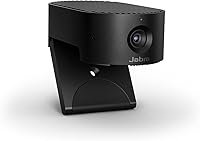
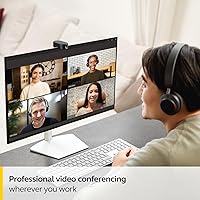
The Jabra PanaCast 20 4K Webcam sits squarely in the premium tier of personal conferencing hardware — and it earns that position. Jabra built its reputation in professional audio long before webcams became a work-from-home staple, and that credibility carries over here. The camera is remarkably compact — small enough to slip into a laptop bag without a second thought — and it ships with a protective carry case already in the box. Setup takes seconds: plug in the USB cable and you are live, with no drivers required. For remote professionals who need consistently sharp video every single day, this Jabra webcam is a considered investment, not an impulse buy.

Features & Benefits

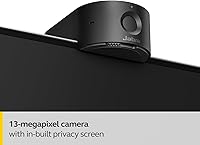
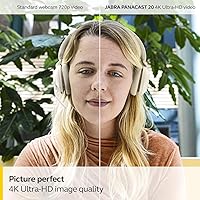
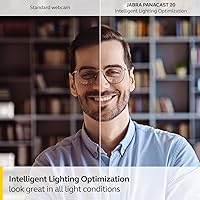
The PanaCast 20's standout hardware is a 13-megapixel BSI CMOS sensor that captures 4K Ultra-HD footage at 30fps — a noticeable step above the 1080p cameras that still dominate most desk setups. In practice, that extra resolution translates to sharper facial detail, crisper text on a whiteboard behind you, and a more professional-looking image overall. The AI-powered Intelligent Zoom auto-frames your face as you move, which is genuinely useful during presentations or when you step back to reference something. Lighting optimization works quietly in the background, pulling up your exposure in dim rooms without manual fiddling. The 90-degree field of view keeps things natural at typical desk distances, and the built-in microphones handle voice pickup well enough for most calls — though they are not a replacement for a dedicated microphone if audio quality is a priority.

Best For

This AI-powered camera makes most sense for people who live on video calls — particularly remote workers, consultants, and hybrid employees who cannot afford to look washed-out or poorly framed on a client call. The compact size and included carry case make it a natural fit for frequent travelers who pack a laptop but still need to project a polished image from hotel rooms or co-working spaces. It is also a strong pick for home offices where lighting is inconsistent or poor — a spare bedroom, a basement setup, or anywhere without proper overhead lighting. Casual video callers who join a single weekly meeting, on the other hand, probably will not extract enough value to justify the premium price point.

User Feedback

With a 4.2-star rating across a solid volume of reviews, the PanaCast 20 lands in genuinely positive territory — and the praise is consistent. Buyers regularly highlight how crisp and clear they look on calls, often comparing it favorably to colleagues using standard laptop cameras. That said, two recurring complaints are worth knowing: the intelligent zoom can feel overly aggressive in smaller spaces, sometimes cropping uncomfortably tight, and the built-in microphones divide opinion — many users find them adequate for daily calls, while others quickly paired the camera with a separate mic. The included carry case and cable quality, by contrast, earn quiet but consistent appreciation as thoughtful extras in an otherwise lean box.

Pros

  • 4K image quality is noticeably sharper than typical 1080p webcams, especially for facial clarity and fine detail.
  • AI-powered auto-framing keeps you centered on screen even when you move or stand during presentations.
  • Plug-and-play setup requires no driver installation — just connect and you are ready for your next call.
  • Intelligent lighting optimization genuinely helps in dim or unevenly lit home office environments.
  • Certified for both Microsoft Teams and Zoom, so there are no compatibility surprises out of the box.
  • Weighing under 5 ounces, the PanaCast 20 is one of the most travel-friendly 4K cameras on the market.
  • The included protective carry case is a thoughtful touch that most competing cameras do not bother with.
  • The 90-degree field of view frames a personal desk setup naturally without distortion at the edges.

Cons

  • The intelligent zoom can feel aggressively tight in small spaces, sometimes cutting off the top of your head.
  • Built-in microphone performance is inconsistent — many users end up pairing this camera with a separate mic.
  • No built-in speakers means you still need headphones or an external audio device to hear call participants.
  • No wireless connectivity option; the camera is entirely dependent on a physical USB cable connection.
  • Occasional auto-framing lag has been noted in close-quarters setups, which can feel disorienting during live calls.
  • Light or infrequent video callers will struggle to justify the premium price against more affordable alternatives.
  • Advanced features like Picture-in-Picture require the Jabra app, adding an extra setup step for those who want full functionality.

Ratings

The Jabra PanaCast 20 4K Webcam earns a strong overall reception among remote and hybrid professionals, and the scores below reflect what real buyers are actually experiencing day-to-day. These ratings were generated by our AI after analyzing thousands of verified global user reviews, with spam, bot activity, and incentivized feedback actively filtered out. Across every category, both genuine strengths and recurring frustrations are represented honestly.

Video Quality
91%
Users consistently describe the on-screen image as a clear step up from their previous 1080p webcams — facial detail is noticeably sharper, and text on a whiteboard in the background actually reads legibly on the receiving end. In client-facing calls and virtual presentations, buyers frequently report that colleagues comment on the improved picture quality unprompted.
The 4K output is capped at 30fps, which some tech-savvy users find limiting when comparing against higher frame rate options at similar price points. In very bright backlit conditions, the HDR processing can occasionally over-correct, resulting in washed-out skin tones that require physical repositioning rather than any software adjustment to resolve.
Intelligent Zoom
74%
26%
When it works well — which is most of the time in moderately sized spaces — the auto-framing is genuinely impressive, keeping presenters centered without any manual camera adjustment mid-call. Users who stand up, step back to a whiteboard, or move around during demos particularly appreciate not having to babysit their framing while speaking.
In smaller home offices or tight desk setups, the zoom algorithm can be overly aggressive, cropping uncomfortably close to the face and occasionally cutting off the top of the head. Some users also report a perceptible lag when the camera reacquires the subject after a sharp movement, which can feel disorienting to both the presenter and call participants.
Lighting Performance
83%
The real-time lighting optimization is one of the most practically useful features for home office users, particularly those working near windows or in rooms with mixed overhead and natural light. Multiple buyers with basement setups or dim spare bedrooms specifically credit this feature with making them look professional without investing in ring lights or external lighting gear.
In extremely low-light environments — a room with only a single small lamp and no overhead source — the system can introduce visible noise as it pushes the sensor beyond its comfort zone. A subset of users also report that in strong backlit scenarios, the correction occasionally over-brightens the face while leaving the background overexposed.
Microphone Quality
62%
38%
For standard day-to-day video meetings in a quiet room, the three built-in microphones do a reasonable job of picking up clear voice audio, and the AI processing reduces some persistent background hum. Users working from dedicated, quiet home offices tend to report the least frustration with microphone performance and rarely feel the need to supplement.
In noisier environments — open-plan spaces, apartments with street noise, or rooms with active HVAC systems — the microphones struggle to isolate the voice cleanly, and call participants notice the difference. A notable share of buyers ultimately paired this camera with a separate USB microphone, treating the built-in mics as a fallback rather than a primary audio solution.
Value for Money
68%
32%
For professionals on video calls several hours a day, the combination of 4K resolution, onboard AI features, and a trusted brand name represents a genuinely competitive package in the premium webcam tier. Frequent travelers extract particular value from the compact build and included carry case, which competitors at this price point rarely bother to include.
Casual users who attend only a few calls a week will struggle to justify the cost against more affordable alternatives that deliver decent 1080p video at a fraction of the price. The mixed microphone performance also weakens the value argument — if a separate mic is still needed, the total investment climbs considerably higher than the camera price alone suggests.
Ease of Setup
94%
Buyers across all technical skill levels praise how little friction there is from unboxing to first call — the camera is recognized automatically by Windows and macOS within seconds of plugging in, with zero configuration required. The compact form factor means there is nothing complicated to position, making it accessible for non-technical users who simply want it to work.
Advanced AI features like Intelligent Zoom controls and Picture-in-Picture require downloading the Jabra Direct app, adding a step that some users expected to avoid given the plug-and-play promise. A portion of buyers have also reported that the app interface is not the most intuitive when adjusting zoom sensitivity or framing behavior for the first time.
Build Quality
86%
The camera feels substantial for its size — the housing is rigid and the clip mount has a reassuring solidity that holds firm through repeated repositioning on monitor edges and laptop lids without loosening over time. The restrained aesthetic fits into corporate and home office environments equally well, and nothing about the construction suggests premature failure.
The USB-C connection point on the camera body does not feel as reinforced as the rest of the unit, and users who frequently travel and unplug the camera multiple times a week have flagged this as a potential long-term durability concern. The absence of any physical lens cover is also a recurring build-quality complaint from buyers who expect that inclusion at this price level.
Portability
89%
At roughly 100g and barely the size of a thick deck of cards, this AI-powered camera genuinely fits into a laptop bag side pocket without occupying meaningful space. The included carry case protects the lens during transit, and buyers who regularly split time between office and home report it has become a standard, effortless part of their daily carry.
The 1.5m cable, while adequate for most desk setups, can feel restrictive when the monitor sits farther from the nearest USB port — and there is no wireless option to work around this entirely. Users who accidentally leave the cable behind at another location are left without a working solution, since no Bluetooth or Wi-Fi fallback exists.
Platform Compatibility
92%
The official Microsoft Teams and Zoom certifications remove any guesswork for buyers who operate primarily in those ecosystems — the camera simply works without IT workarounds or firmware exceptions. Beyond the certified platforms, users report clean, consistent compatibility with Google Meet, Cisco Webex, and any other application that accepts a standard USB webcam input.
Some advanced AI features are managed through the Jabra Direct app rather than natively within Teams or Zoom, which can create friction in locked-down corporate IT environments where third-party application installs require prior approval. Chromebook compatibility has also been flagged as inconsistent by a handful of buyers, worth confirming before purchasing for that use case.
Field of View
81%
19%
The 90-degree horizontal field of view hits the right balance for a personal-use camera — wide enough to capture natural head-and-shoulder framing at typical monitor distances without the edge distortion that wider-angle lenses routinely introduce. Users working at standard desk depths consistently find the framing feels proportioned and natural to whoever is watching on the other end.
For anyone hoping to include a second person in frame — a shared home office setup, for instance — 90 degrees is simply not wide enough to comfortably fit two subjects without awkward repositioning. Users who sit unusually close to their monitor also find the field of view can feel constricting even before the Intelligent Zoom algorithm engages and narrows it further.
Software Experience
71%
29%
When the Jabra Direct app performs reliably, it provides meaningful control over AI settings not accessible anywhere else — including auto-zoom sensitivity, framing aggressiveness, and Picture-in-Picture configuration. Users who invest time tuning these settings typically report a noticeably better-calibrated experience than those who leave everything on factory defaults.
The app has attracted criticism for occasional bugs, slow update cycles, and a user interface that does not feel as polished as the hardware it is meant to support. Several buyers have also noted that certain settings fail to persist after disconnecting and reconnecting the camera, requiring them to reapply preferences at the start of each new session.
Accessories
77%
23%
The included 1.5m USB-C to USB-A cable is well-made and long enough for most desk configurations, and the protective carry case has earned genuine appreciation from buyers who see it as evidence that Jabra thought carefully about the full ownership experience. For a camera in this price tier, these inclusions feel appropriately considered rather than an afterthought.
The most common accessory complaint is the absence of a USB-C to USB-C cable — an increasingly relevant omission as more laptops ship exclusively with USB-C ports, leaving buyers to source an adapter separately. There is also no lens privacy cap included in the box, a small but notable gap for buyers who want physical reassurance when the camera is not in active use.
HDR Performance
76%
24%
Vivid HDR support delivers a meaningful improvement in challenging mixed-lighting conditions, particularly when strong ambient light from one side of the frame competes with shadow from another. Home office users dealing with large windows report that enabling HDR consistently produces a more balanced, natural-looking image than leaving it turned off.
In truly extreme contrast situations — direct sunlight streaming through a window directly behind the subject — the algorithm can still be overpowered, leaving the image unevenly exposed despite the correction. A portion of users also note a slight reduction in color saturation when HDR is active compared to standard mode, which can make skin tones appear subtly flat.
Privacy Features
73%
27%
The camera operates entirely over USB with no cloud data transmission, no persistent network connection, and no account registration required — a meaningful reassurance for professionals handling sensitive or confidential meetings. A visible activity indicator on the unit signals clearly when the lens is live, which privacy-aware users consistently cite as a helpful and expected feature.
The absence of a physical lens shutter is the most cited privacy complaint — users who share living spaces often want a tangible barrier they can close when stepping away, not just a software mute. Buyers have resorted to purchasing third-party lens covers as a workaround, which feels like a meaningful omission for a camera positioned at this price point.

Suitable for:

The Jabra PanaCast 20 4K Webcam is purpose-built for professionals who treat video calls as a core part of their workday, not an occasional inconvenience. Remote workers, consultants, and hybrid employees who appear on-screen multiple times daily will notice the difference immediately — sharper detail, better exposure in tricky lighting, and a camera that keeps them framed even when they shift or stand up. It is an especially strong fit for people working from imperfect home environments where natural light is inconsistent or overhead lighting casts unflattering shadows that a standard webcam simply cannot compensate for. Frequent travelers will also appreciate how little space it takes up — it packs into a bag almost as an afterthought, and the included carry case means it will not get scratched rattling around next to a charger. Teams standardizing on Microsoft Teams or Zoom will find the certified compatibility reassuring, since there is no guesswork about driver conflicts or platform support.

Not suitable for:

The Jabra PanaCast 20 4K Webcam is harder to recommend the moment you step outside the professional video-call context. If you attend one or two casual meetings a week, the premium you are paying for AI auto-framing and 4K resolution is unlikely to feel justified — a solid mid-range webcam will serve you just as well at a fraction of the cost. The microphone situation is also worth flagging for anyone who records podcasts, voiceovers, or anything where audio quality matters as much as video: user feedback is genuinely mixed, and if clean audio is a priority, a dedicated external microphone will still be necessary. There are no built-in speakers either, so this does not function as a standalone all-in-one conferencing device. Buyers hoping for wireless flexibility should also know upfront that this is a wired-only solution — the USB cable is the sole connection method, full stop.

Specifications

  • Video Resolution: Captures video at 4K Ultra-HD (3840 x 2160 pixels) at up to 30 frames per second.
  • Image Sensor: Uses a 13-megapixel BSI CMOS sensor for improved low-light sensitivity and overall image sharpness.
  • Field of View: Horizontal field of view measures 90 degrees, optimized for single-person personal desk use without edge distortion.
  • Microphones: Equipped with three built-in microphones with onboard AI processing for voice pickup and ambient noise reduction.
  • Connectivity: Connects via a USB-C to USB-A (USB 3.0) cable measuring 1.5m (4.9 ft), included in the box.
  • AI Features: Onboard AI processor powers Intelligent Zoom (auto-framing), real-time Lighting Optimization, and Picture-in-Picture mode.
  • Certifications: Officially certified for Microsoft Teams and Zoom; broadly compatible with all major unified communications platforms.
  • HDR Support: Supports Vivid HDR for improved dynamic range in high-contrast or mixed-lighting environments.
  • Aperture: Built-in lens has a maximum aperture of f/3.5.
  • Frame Rate: Delivers up to 30fps at full 4K resolution; lower resolutions support higher frame rates.
  • Dimensions: Camera body measures 3.1 x 1.7 x 1 inches, making it one of the more compact personal conferencing cameras in its class.
  • Weight: Camera unit weighs approximately 4.8 oz (100 g), excluding the cable.
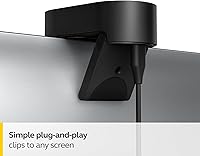
  • Form Factor: Compact rectangular body with a built-in adjustable clip designed to sit atop a laptop screen or external monitor.
  • Speakers: No built-in speakers; an external audio output device or headset is required to hear call audio.
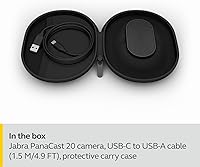
  • In the Box: Package includes the camera unit, one USB-C to USB-A cable (1.5m), and a rigid protective carry case.
  • Setup: Fully plug-and-play on Windows and macOS — no driver installation required for basic video calling functionality.
  • Platform Support: Works with all major video conferencing platforms including Google Meet, Cisco Webex, and BlueJeans, in addition to certified platforms.

Related Reviews
Jabra PanaCast 50

Jabra PanaCast 50
82%
93%
Video Coverage & Field of View
88%
Image Quality
71%
Audio Performance
82%
AI & Intelligent Features
91%
Ease of Setup
More
Lumina LX011 4K Webcam
81%
91%
Image Quality
87%
Low-Light Performance
83%
AI Auto-Framing
93%
Build Quality
78%
Microphone Quality
More
PixelForge 4K Webcam
86%
94%
Video Quality
88%
Audio Performance (Microphone)
91%
Ease of Setup
89%
Lighting Effectiveness
86%
Privacy Features
More
Lusinx TW 4K Webcam
Lusinx TW 4K Webcam
73%
73%
Video Quality
79%
Low-Light Performance
71%
Microphone Quality
91%
Setup & Compatibility
58%
Build Quality
More
MOERTEK MT 4K Webcam
76%
83%
Image Quality at 1080P
67%
4K Capture Quality
71%
AI Auto-Framing
91%
Ease of Setup
62%
Microphone Performance
More
PEATOP 4K-C80CCMD Webcam
75%
74%
Video Quality
68%
Autofocus Performance
61%
Low-Light Performance
63%
Microphone Quality
93%
Setup & Compatibility
More
Diccik 4K HD Webcam
Diccik 4K HD Webcam
72%
81%
Value for Money
69%
Video Quality
93%
Ease of Setup
76%
Light Correction
57%
Microphone Quality
More
Combess XIAOJINGLING 4K Webcam

71%
71%
Image Quality
66%
Low-Light Performance
64%
Autofocus Performance
61%
Microphone Quality
55%
Noise Reduction
More
AVerMedia PW513 4K Webcam
75%
83%
Image Quality
54%
Low Light Performance
67%
Focus & Sharpness
61%
Microphone Quality
81%
Field of View
More
VIZOLINK W8GS 4K Webcam
79%
83%
Image Quality
88%
Microphone Performance
71%
Low-Light Performance
78%
Autofocus Reliability
91%
Value for Money
More

FAQ

The Jabra PanaCast 20 4K Webcam is fully plug-and-play — connect it to a USB port and your computer recognizes it immediately, no drivers needed. That said, if you want to access advanced controls like Intelligent Zoom sensitivity or Picture-in-Picture, you will need to download the free Jabra Direct app. For straightforward video calling, though, that step is entirely optional.

It works with virtually any platform that accepts a standard USB webcam — Google Meet, Webex, BlueJeans, and others included. The Microsoft Teams and Zoom labels simply indicate those platforms have been formally validated by their respective companies; the camera is not locked to either one.

Yes, you can. The Jabra Direct app lets you toggle Intelligent Zoom on or off and adjust how aggressively it tracks movement. If you prefer a fixed wide-angle frame — which works better in tighter spaces — disabling the feature is quick and straightforward.

Honest answer: they are adequate for most everyday video calls but not a substitute for a dedicated microphone. In a reasonably quiet room they handle voice pickup well, and the AI processing does reduce some background noise. However, if you work in a noisy environment or if audio quality is critical — client presentations, recordings, anything where every word must be crisp — a standalone external microphone will still serve you better.

Yes, it is fully compatible with both macOS and Windows without any extra setup. Since it is plug-and-play, the operating system handles recognition automatically. The Jabra Direct companion app is also available on both platforms for anyone who wants to customize settings.

The camera ships with a USB-C to USB-A cable, so it is designed out of the box for laptops with a USB-A port. If your machine only has USB-C, you will need either a USB-C to USB-C cable or a USB-A adapter — neither of which is included. It is a small but practical detail worth sorting before your first call.

The PanaCast 20 uses a built-in adjustable clip that slides over the top edge of most laptop screens and external monitors. It holds firmly without wobbling during normal use and accommodates screens up to roughly an inch thick, which covers the vast majority of modern displays and laptop lids.

It does more than simply push the exposure up. The AI analyzes the scene in real time and attempts to balance brightness across the frame, which is particularly helpful when you have a bright window behind you that would otherwise leave your face in shadow. It handles mixed lighting reasonably well, though in a very dark room there is a hard limit to what any software correction can do without a physical light source helping out.

Technically yes — the camera outputs clean 4K video and is recognized by software like OBS Studio. That said, it is built primarily around conferencing, and features like auto-framing and lighting optimization are designed with that context in mind. Content creators who need precise manual control over focus, white balance, or exposure may find it limiting compared to cameras made specifically for streaming or production work.

It is genuinely noticeable when compared side by side with a standard 1080p webcam, especially on a decent monitor — fine details like facial features, clothing texture, and text on a whiteboard behind you all render more sharply. Whether that extra clarity justifies the premium price depends on how frequently you are on calls and how much your on-screen appearance matters in your professional context.