



Overview

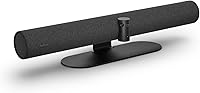
The Jabra PanaCast 50 is one of the few conference room cameras that genuinely earns its premium price tag rather than just charging it. Built around a panoramic 180-degree view, this video bar was engineered specifically for mid-to-large meeting rooms where a single fixed camera simply leaves people out of frame. Despite the enterprise-grade hardware packed inside, setup comes down to plugging a USB cable into a laptop or room PC — no drivers, no complicated configuration. It carries official certification for both Microsoft Teams and Zoom, which matters to IT teams who need guaranteed compatibility. If your organization runs serious hybrid meetings, this is a device worth evaluating carefully.

Features & Benefits

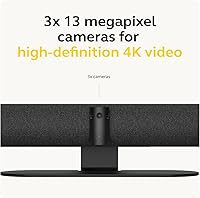
At the core of this video bar are three 13MP cameras whose output gets stitched together in real time to produce a Panoramic-4K image at 3840x1080 resolution. You can dial the horizontal field of view down to 90 degrees for smaller tables or open it all the way to 180 — four presets total, giving room administrators real flexibility. The eight-microphone array works alongside an onboard AI processor to track who is speaking and adjust the frame accordingly, so remote participants see an active view rather than a wide empty room. Vivid HDR keeps faces properly exposed even when windows are blasting sunlight behind participants. The Whiteboard mode detects and sharpens physical boards automatically during presentations, which is a genuinely useful touch.

Best For

The PanaCast 50 makes most sense for organizations outfitting medium to large boardrooms where full-room coverage is a genuine operational need rather than a luxury. IT managers will appreciate the certified compatibility with Teams and Zoom — fewer support tickets, predictable behavior across firmware updates. Companies running hybrid work models get a notable bonus in the Room Insights feature, which tracks occupancy data anonymously and helps facilities teams understand how meeting rooms are actually being used week to week. If your team regularly presents whiteboards or printed documents to remote participants, Jabra's conference camera handles that far better than a standard webcam ever could. For anyone building a single-device AV setup, it is hard to match in its class.

User Feedback

Among buyers who have put this video bar through real-world use, the coverage itself draws consistent praise — even in larger rooms, nobody ends up cropped out of the frame. The plug-and-play reliability also gets mentioned frequently, with users reporting it works cleanly across both dedicated Rooms setups and ad-hoc laptop connections. The build quality and professional look in executive boardrooms also come up as genuine strengths. That said, stitching artifacts do surface at wider field-of-view settings, which some find visually distracting. Audio performance generates the most divided feedback — functional, but teams accustomed to a dedicated speakerphone may find it a step down. A few users note that certain AI features only activate after a firmware update, so it is worth checking before your first big meeting.

Pros

  • Panoramic 180-degree coverage keeps every seat in frame during large meetings without any manual camera adjustments.
  • Four adjustable field-of-view presets let IT teams right-size the view for different room configurations.
  • Certified for Microsoft Teams and Zoom, removing compatibility guesswork for IT administrators managing multi-room deployments.
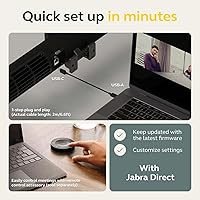
  • Plug-and-play USB setup means most rooms are operational in under ten minutes with no driver installation.
  • The video bar consolidates camera, microphone array, and speakers into one clean device, eliminating multi-component AV clutter.
  • HDR processing keeps faces properly exposed even when bright windows create challenging backlight conditions.
  • Anonymous room occupancy analytics are built in, giving facilities teams real data without additional hardware investment.
  • Automatic whiteboard detection sharpens physical boards during presentations without any manual framing by the presenter.
  • The build quality and professional aesthetic consistently earn positive remarks from executives and visitors in boardroom environments.
  • Intelligent Zoom actively tightens the frame around speakers rather than leaving remote participants staring at an empty wide-angle shot.

Cons

  • A visible stitching seam between camera panels appears at wider field-of-view settings and can distract remote participants.
  • Audio quality divides users — teams accustomed to dedicated speakerphone hardware will likely notice the difference on longer calls.
  • Several AI-powered features require a post-purchase firmware update before they become available, creating an incomplete first-use experience.
  • The Jabra Direct software is required to configure presets and room analytics, adding a layer of complexity for non-technical administrators.
  • At over 27 inches wide and 7.35 pounds, the physical footprint can feel disproportionate when deployed in smaller rooms below its ideal capacity.
  • The included 2-meter USB cable is too short for permanently installed setups where the display and meeting table are separated by distance.
  • Room Insights analytics require integration with Jabra's management platform, which smaller organizations may lack the resources to maintain actively.
  • In very large rooms — beyond roughly 25 feet deep — microphone pickup at the far end of the table begins to thin out noticeably.
  • The value case weakens significantly for low-frequency meeting rooms where the advanced features go unused for long stretches.
  • Stitching performance in high-contrast or mixed lighting scenarios requires careful room setup to minimize visible artifacts at wide angles.

Ratings

The Jabra PanaCast 50 earns a strong overall position in the conference room camera market, and the scores below reflect exactly that — no padding, no spin. Our AI rating engine analyzed verified purchaser feedback from buyers worldwide, actively filtering out incentivized reviews and bot submissions, to surface what real IT administrators, facilities managers, and end users actually experienced. Both the standout strengths and the genuine frustrations are represented here transparently.

Video Coverage & Field of View
93%
The panoramic coverage is where this video bar genuinely pulls ahead of the competition. Users in large boardrooms consistently report that every seat stays in frame without any manual repositioning, and the four adjustable presets give administrators real control over how much of the room remote participants see.
At the widest 180-degree setting, a visible stitching seam between camera panels can distract remote viewers, particularly in high-contrast lighting environments. Users who keep the field of view closer to 90 or 120 degrees report a noticeably cleaner image.
Image Quality
88%
The combination of three 13MP sensors and onboard HDR processing produces a consistently sharp, well-exposed image even when windows or overhead lights create challenging backlight conditions. Remote participants in well-lit rooms frequently comment on the professional, broadcast-like quality of the video output.
The Panoramic-4K resolution of 3840x1080 is wider than it is tall, which means vertical detail — useful when standing presenters move around — is more limited than a conventional 4K output. Some users also note that in very low light the image softens more than expected for the price tier.
Audio Performance
71%
29%
The eight-microphone beamforming array performs respectably for an all-in-one bar, picking up voices from across a large table without requiring anyone to lean toward a central speakerphone. For organizations that want a single-device setup, the audio is genuinely functional out of the box.
This is the category where user opinion splits most sharply. Teams accustomed to a dedicated conference speakerphone — particularly in rooms with hard surfaces and echo — find the audio noticeably lacking in warmth and clarity. The speakers cover the basics but do not match standalone audio hardware at a similar investment level.
AI & Intelligent Features
82%
18%
The Intelligent Zoom feature works well in practice, tightening the frame around active speakers rather than keeping an empty-looking wide shot throughout a call. The Whiteboard mode reliably detects and sharpens physical boards during presentations, which saves facilitators from having to manually adjust anything mid-meeting.
Several users discovered that some AI-driven features, including Virtual Director mode, are only accessible after installing a firmware update that is not applied at first power-on. This creates an unpleasant first-impression experience and is an avoidable friction point for a device at this price level.
Ease of Setup
91%
Plug-and-play really does describe the day-one experience here. IT teams report being able to deploy the device in a conference room and have it operational in under ten minutes, with no driver installation or manual configuration required for standard USB connectivity. The simplicity relative to multi-component AV setups is a genuine operational advantage.
While USB setup is straightforward, configuring advanced features — adjusting field-of-view presets, enabling Room Insights, or managing firmware — requires the Jabra Direct software, which adds a layer of complexity that occasionally surprises less technical room administrators.
Build Quality & Design
89%
The unit feels substantial and well-engineered, with a matte black finish that reads as professional rather than consumer-grade in executive boardrooms. At 7.35 pounds across a 27-inch bar, it sits firmly on top of a display or mounts to a wall without any wobble or flex.
The physical footprint is considerable. In smaller rooms where it is being used below its optimal capacity, the size can feel disproportionate, and cable management around the rear ports requires planning during installation to maintain a clean appearance.
Compatibility & Certification
94%
Certified for both Microsoft Teams Rooms and Zoom, the PanaCast 50 removes the compatibility guesswork that plagues some third-party conference hardware. IT managers deploying across a mixed-platform organization report consistent behavior regardless of which conferencing client is active on any given day.
Compatibility outside the two major certified platforms is functional but not guaranteed to deliver the full feature set. Organizations running on Google Meet or Cisco Webex get a working camera and microphone, but the AI-driven features and room analytics may not surface in the same way.
Room Insights & Occupancy Analytics
78%
22%
For facilities and operations teams managing hybrid work policies, the anonymous occupancy tracking is a practical tool that requires no additional hardware or badge-based systems. Organizations using this data have been able to make measurable decisions about room allocation and desk-booking policies.
The analytics dashboard requires integration with Jabra's platform and is not immediately intuitive for administrators encountering it for the first time. Smaller organizations may find the feature adds complexity they do not have the bandwidth to act on, making it a non-factor in their day-to-day use.
Intelligent Zoom & Auto-Framing
81%
19%
When it works as intended, the auto-framing keeps the view relevant and avoids the static wide-angle fatigue that remote participants experience on long calls. Active speaker tracking responds quickly enough in most meeting scenarios to feel natural rather than disorienting.
In fast-paced discussions with multiple simultaneous speakers or rapid turn-taking, the tracking algorithm occasionally struggles to settle on a frame before the conversation has already moved on. The effect is subtle but noticeable in high-energy brainstorming sessions.
Value for Money
67%
33%
For large-room deployments where replacing a multi-component AV setup with a single certified device genuinely reduces IT overhead and support costs, the investment calculates favorably over a two-to-three year horizon. The consolidation argument is real for the right buyer.
For smaller teams, occasional-use conference rooms, or organizations that already have capable audio equipment, the price is difficult to justify against capable alternatives that cost considerably less. The value case depends almost entirely on the scale and frequency of use.
Whiteboard & Presentation Mode
83%
The automatic whiteboard detection is one of the more practically useful AI features in this category. Facilitators running hybrid workshops report that remote participants can read handwritten notes and diagrams far more clearly than with a standard wide-angle camera, without anyone needing to manage the camera manually.
The feature works best with high-contrast markers on a clean white surface. Lightly colored markers, partially erased boards, or glass whiteboards with glare from overhead lights reduce the automatic enhancement noticeably, requiring manual intervention to get a usable image.
Connectivity Options
86%
Having both USB and Ethernet available gives IT teams meaningful flexibility during installation. Ethernet-connected deployments in dedicated Teams Rooms setups benefit from more stable bandwidth allocation compared to shared wireless networks in busy office environments.
The included USB cable covers most laptop-based use cases cleanly, but organizations needing longer cable runs for permanently installed setups will need to source their own, as the included 2-meter cable is insufficient for larger room configurations where the display and the meeting table are separated by distance.
Firmware & Software Experience
62%
38%
When firmware is current, the device performs reliably and feature-completely. Jabra has a reasonably active update cadence, and the Jabra Direct application covers the core management tasks that IT administrators need across a fleet of deployed units.
The dependency on firmware updates to unlock advertised features is a recurring frustration in user feedback. Devices that ship with older firmware can give a misleadingly incomplete first impression, and the update process through Jabra Direct adds steps that should not be necessary for a premium device to reach its full capability.
Microphone Pickup Range
76%
24%
The beamforming array handles voice pickup across a standard conference table well, and users in medium-sized rooms report that even participants seated at the far end of the table are captured clearly without needing to raise their voices or lean toward the unit.
In very large rooms — over 25 feet deep — the microphone range begins to show its limits, and voices at the periphery can sound noticeably thinner than those seated closer to the device. For rooms at the larger end of the recommended range, supplemental audio hardware may still be worth considering.

Suitable for:

The Jabra PanaCast 50 is built for organizations that run serious, frequent hybrid meetings in medium to large conference rooms — the kind where a single fixed camera consistently leaves half the table out of frame. IT administrators who manage meeting room hardware across multiple locations will find the certified Teams and Zoom compatibility genuinely reduces deployment headaches and ongoing support overhead. Facilities and operations teams piloting hybrid work policies get a concrete operational benefit from the Room Insights occupancy feature, which requires no additional hardware to produce useful room utilization data. Companies that regularly present physical whiteboards or printed materials to remote participants will notice an immediate improvement over standard conference cameras, since the automatic whiteboard enhancement actually works without manual adjustment. If your organization has been cobbling together a camera, a speakerphone, and a separate controller to outfit a boardroom, consolidating all of that into a single certified bar is a genuinely practical upgrade worth considering.

Not suitable for:

The Jabra PanaCast 50 is a difficult sell for small teams, budget-conscious buyers, or anyone outfitting a room that sees meetings only a few times a week. The price demands a use case that justifies it — a two-person huddle room or a home office setup simply cannot extract enough value from the panoramic coverage, room analytics, or enterprise certification to make the investment rational. Buyers who prioritize audio quality above all else should also pause before committing: this video bar handles sound respectably, but teams accustomed to a dedicated conference speakerphone will likely find the audio a step down, and pairing a separate audio solution with this device adds both cost and setup complexity. Organizations running primarily on Google Meet or Cisco Webex may also find that the AI-driven features and integrations that justify much of the price do not function as fully outside the Teams and Zoom ecosystems. Finally, anyone who needs to be up and running with every advertised feature on day one should be aware that firmware updates are required post-purchase to unlock parts of the AI feature set.

Specifications

  • Cameras: Three 13MP cameras work together with real-time stitching to produce a single unified image across the full field of view.
  • Resolution: Panoramic-4K output runs at 3840x1080 pixels at up to 30 frames per second.
  • Field of View: Horizontal field of view is adjustable across four presets: 90, 120, 140, and 180 degrees.
  • Microphones: An eight-microphone beamforming array handles voice pickup and directs audio processing toward active speakers.
  • Speakers: Four zero-vibration speakers are built into the unit for room audio output during calls.
  • AI Processor: An onboard AI processor handles Intelligent Zoom, Whiteboard mode, Virtual Director, and Room Insights analytics locally.
  • HDR: Vivid HDR processing is applied in real time to balance exposure across challenging lighting conditions such as backlit windows.
  • Connectivity: The unit connects via USB-C to USB-A (USB 3.0) or Ethernet, supporting both laptop-based and dedicated room system deployments.
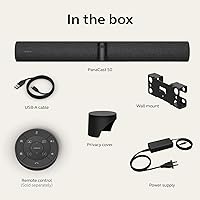
  • Included Cable: A USB-C to USB-A cable measuring 2 meters (USB 3.0) is included in the box.
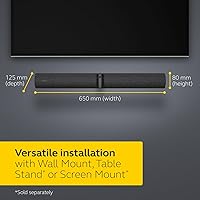
  • Dimensions: The device measures 27 x 7 x 5.25 inches, designed to sit on top of a display or mount to a wall above one.
  • Weight: The unit weighs 7.35 pounds, giving it a solid, stable presence without requiring heavy-duty mounting hardware.
  • Color: Available in Black with a matte professional finish suited to executive and corporate boardroom environments.
  • Certifications: Certified for Microsoft Teams Rooms and Zoom, ensuring full feature compatibility and support on both platforms.
  • Room Insights: Anonymous occupancy data is captured and reported in real time, requiring no badge systems or additional sensors.
  • Whiteboard Mode: Automatic whiteboard detection identifies and enhances physical whiteboard content during presentations without manual camera adjustment.
  • Virtual Director: Virtual Director mode dynamically switches the camera view between active speakers to simulate a multi-camera broadcast setup.
  • Storage: A Micro SD card slot is included for local storage of meeting data and firmware assets.
  • Video Format: Captured video is stored in MP4 format, with WAV, MP3, and AAC supported for audio.
  • Model Number: The official Jabra model number for this unit is 8200-232, used for warranty registration and enterprise procurement.
  • ASIN: The Amazon product identifier for this unit is B096N1VMVC, confirmed as the standard black non-bundle variant.

Related Reviews
Jabra Engage 50 Stereo Wired Headset
88%
94%
Call Clarity
90%
Noise Cancellation Effectiveness
88%
Comfort for Long Use
93%
Microphone Quality
85%
Build Quality
More
Jabra PanaCast 20 4K Video Conferencing Camera
88%
92%
Video Quality
95%
Ease of Setup
89%
AI Features (Zoom & Lighting)
80%
Lighting Performance
90%
Compatibility with UC Platforms
More
WFCO WF-8930/50NPB-50 50 Amp AC Distribution Center
85%
88%
Power Distribution Performance
91%
Build Quality & Durability
82%
Ease of Installation
87%
Value for Money
72%
Space Efficiency
More
Progressive Industries PSK-50 50 Amp Portable Surge Protector Kit
85%
94%
Surge Protection Performance
88%
Ease of Use
91%
Portability
89%
Durability
85%
LED Fault Indicator
More
Julius Studio 50 x 50 inch Cubic White Cube Photo Shooting Tent
83%
91%
Ease of Setup
88%
Portability/Storage
84%
Build Quality
85%
Light Diffusion
92%
Background Versatility
More
Urea 50% Nail Gel
Urea 50% Nail Gel
85%
90%
Effectiveness in Softening Nails
89%
Visible Results within One Week
92%
Ease of Application
94%
Quick-Drying Formula
85%
Texture & Feel
More
Rockville RFC50F 50 Farad Capacitor
82%
91%
Power Delivery & Performance
64%
Ease of Installation
85%
Design & Aesthetics
89%
Voltage Stabilization
80%
LED Illumination & Syncing
More
Jabra Stealth UC Bluetooth Headset
84%
89%
Sound Quality
90%
Comfort & Fit
76%
Battery Life
85%
Noise Cancellation
80%
Voice Control Functionality
More
JACKET Sunscreen SPF 50+ 4oz
86%
91%
SPF Protection
88%
Water Resistance
85%
Texture/Feel
92%
Skin Compatibility (Sensitive Skin)
80%
Long-Term Effects (Dark Spot Fading)
More
Jabra Evolve2 True Wireless Earbuds
86%
88%
Sound Quality
91%
Active Noise Cancellation
86%
Comfort for Long Hours
82%
Battery Life
87%
Ease of Use
More

FAQ

For basic video and audio on a call, yes — plug the USB cable into a laptop or room PC and most conferencing platforms will recognize it immediately with no driver installation required. That said, if you want to adjust field-of-view presets, update firmware, or access Room Insights data, you will need to install the Jabra Direct application separately.

It will function as a camera and microphone on virtually any platform that accepts a standard USB video device, including Google Meet and Webex. However, the official certifications and the deepest feature integrations are specific to Microsoft Teams Rooms and Zoom, so some AI-driven features may not surface fully outside those two environments.

At narrower field-of-view settings — 90 or 120 degrees — most users find the image looks cohesive and clean. The seam becomes more apparent at 140 and especially 180 degrees, and it tends to stand out most when there is strong contrast in the image, such as a person sitting directly in front of a bright window. It is worth factoring in if pristine wide-angle image quality is a top priority.

Ethernet is available but entirely optional — the device works perfectly well over a USB connection to a laptop or dedicated room computer. Ethernet connectivity is primarily useful for organizations deploying it in a dedicated Teams Rooms or Zoom Rooms setup where a persistent network connection is preferred for management and analytics.

You do not need a firmware update for basic video conferencing, but several AI features — including Virtual Director mode — are only available after updating to current firmware through the Jabra Direct app. It is worth running that update before your first important meeting to avoid discovering missing features mid-call.

Within that range, the eight-microphone beamforming array generally performs well, capturing voices from across the full table without participants needing to lean in or raise their volume. Beyond roughly 25 feet, pickup at the far end can start to thin out, and some organizations in very large rooms supplement with additional audio hardware for complete coverage.

Field-of-view adjustments can be made through the Jabra Direct software or, if you have the optional remote control, directly during a session. The transition between presets is fairly smooth, though most IT teams choose a fixed preset per room rather than switching on the fly during calls.

The feature is designed around anonymized data — it counts the number of people in the room without capturing or storing any identifiable imagery or biometric information. Jabra positions this explicitly as a privacy-safe approach to space utilization tracking, which is why the data is described as anonymous occupancy counts rather than surveillance footage.

The video bar can be placed directly on top of a flat-panel display using its built-in stand, or it can be wall-mounted above a screen using a compatible mounting bracket. Jabra offers a dedicated mounting kit for wall installations, and the unit is also compatible with a range of third-party VESA-compatible mounts depending on the room configuration.

For straightforward meetings in a well-treated room with a moderate number of participants, most users find the built-in audio adequate. The honest caveat is that teams coming from a high-quality dedicated conference speakerphone will likely notice the difference, particularly in rooms with hard reflective surfaces. If audio is the top priority for your team, it is worth auditing the room acoustics carefully or budgeting for a supplemental audio device.