Overview

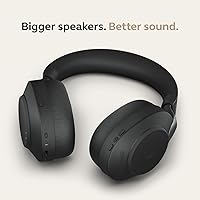
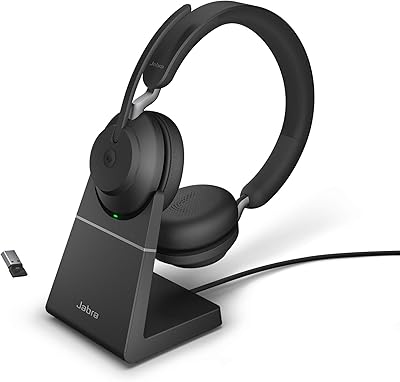
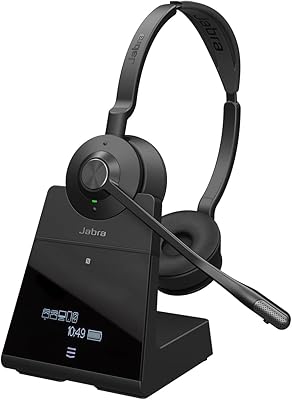
The Jabra Evolve2 85 Wireless Business Headset sits firmly at the premium end of the business headset market, built for hybrid and remote professionals who live on calls and can't afford audio that lets them down. The over-ear design with memory foam cushions makes it genuinely comfortable across a full workday — not just the first hour. It ships Microsoft Teams certified and connects plug-and-play to most major UC platforms, removing the usual IT headache. The included charging stand and carry case aren't afterthoughts; they're practical touches that make the whole package feel considered rather than just expensive.
Features & Benefits

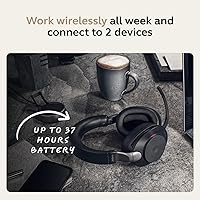
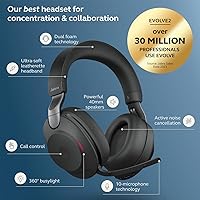
The ANC performs well in consistent noise environments — a humming HVAC system or coffee shop ambience largely disappears. In unpredictable settings like open-plan offices with overlapping conversations, it does a solid job but won't make the room feel silent. What really stands out on calls is the 10-microphone array paired with the foldable boom arm; people on the other end consistently report hearing you clearly, even in moderately noisy spaces. The 40mm drivers hold up well for music between meetings too. Battery rarely becomes a worry — 37 hours of runtime means most people charge it once at the start of the week and forget about it.

Best For

This over-ear business headset is an obvious fit for anyone whose workday is dominated by Microsoft Teams meetings or similar platforms — the Teams-certified integration means it just works, without driver hunting or configuration headaches. Open-plan office workers who need to focus without fully cutting themselves off will appreciate HearThrough mode. Frequent travelers will value the foldable build, carry case, and a battery that can outlast even a transatlantic flight. If you occasionally want decent audio for music between calls, it handles that reasonably well. Where it's less compelling is for people who primarily want casual listening headphones — there are better-suited options at lower prices for that.

User Feedback

The 3.7-star average is worth taking seriously rather than dismissing. Buyers who use the Evolve2 85 exactly as intended — full-day Teams calls, hybrid office setups — tend to be genuinely satisfied with comfort and call quality, and the battery life draws consistent praise. But the frustrations are real: some users find the Jabra Sound+ app more or less required to unlock full functionality, which feels like an unnecessary dependency for a headset at this price. Connectivity hiccups and occasional pairing issues appear across multiple reviews. A handful of longer-term buyers also raise questions about long-term durability. If your use case aligns tightly with its strengths, it earns its price — if not, the value case gets shaky.

Pros

  • All-day comfort is genuinely achievable thanks to well-designed memory foam cushions that hold up over long sessions.
  • Call recipients consistently report hearing speakers clearly, which is the most important test for any business headset.
  • The battery life is long enough that most users can go an entire work week on a single charge.
  • Microsoft Teams certification means setup is plug-and-play with no IT involvement required.
  • The foldable boom arm keeps the design looking professional without sacrificing microphone pickup quality.
  • HearThrough mode is a practical feature that lets office users stay aware without constantly removing the headset.
  • The included charging stand makes it easy to keep the headset topped up without hunting for cables.
  • ANC handles consistent ambient noise — like office HVAC or coffee shop background hum — effectively.
  • The carry case and foldable build make this over-ear business headset genuinely travel-friendly.
  • Bluetooth 5.0 with the dedicated USB-C adapter delivers a stable, low-dropout wireless connection throughout the workday.

Cons

  • The Jabra Sound+ app feels practically required to unlock full functionality, which adds an unwanted software dependency.
  • Connectivity hiccups and occasional pairing issues appear often enough across reviews to be a real concern, not an isolated complaint.
  • Some buyers have raised questions about long-term durability that feel inconsistent with what a premium price tag implies.
  • ANC performance drops off noticeably in unpredictable noise environments with overlapping voices, where it struggles to keep up.
  • The value case weakens significantly if your primary use is music listening — this is not a headset tuned for that.
  • Users who prefer a lightweight, minimal headset may find the physical weight and bulk uncomfortable over time.
  • The premium price point is hard to justify for anyone outside a heavy UC or Teams-focused workflow.
  • Touch controls, while modern, have a learning curve and can be accidentally triggered during normal wear adjustments.

Ratings

The scores below for the Jabra Evolve2 85 Wireless Business Headset were generated by our AI after analyzing thousands of verified purchase reviews from global buyers, with spam, incentivized, and bot-flagged submissions actively filtered out. Both the genuine strengths and the recurring frustrations are reflected here without softening — the 3.7-star average on major retail platforms tells a story worth unpacking, and these scores do exactly that.
Call Quality
91%
This is where the Evolve2 85 earns its price most convincingly. The 10-microphone array combined with the deployable boom arm consistently draws praise from people on the receiving end of calls — colleagues and clients alike regularly note that the voice comes through cleanly, even when the user is in a moderately noisy home or office environment.
A small number of users report that voice pickup becomes noticeably thinner when the boom arm is folded away and only the built-in array mics are active. In loud environments without the boom arm deployed, background noise can bleed into calls more than expected at this price tier.
Active Noise Cancellation
78%
22%
The ANC performs reliably against predictable, steady-state noise — HVAC systems, open-plan office hum, and consistent ambient sound are handled well enough that users report being able to focus through otherwise distracting environments without cranking up audio volume to compensate.
Against unpredictable noise — overlapping voices, sudden sounds, or irregular bursts of activity — the ANC struggles to keep up. Several users working in busy coworking spaces or near loud colleagues found it fell short of expectations, particularly compared to consumer-grade ANC headphones in a similar price range.
Battery Life
93%
Battery performance is one of the most consistently praised aspects across verified buyers. Professionals using the headset for six to eight hours of calls daily report lasting comfortably through a full week before needing to charge, which eliminates the mid-day anxiety that plagues lighter-battery alternatives.
Running ANC and the boom arm microphone simultaneously does draw more power, and a small subset of users report real-world totals noticeably below the rated figure under heavy mixed use. The gap between advertised and actual runtime is not dramatic, but worth factoring in for the most intensive users.
Comfort & Fit
74%
26%
The memory foam ear cushions are a genuine strong point for most users — they hold up well over three to five hour stretches without creating the hot, clamped feeling that plagues many over-ear headsets. People who previously cycled through cheaper headsets due to discomfort often cite this as a reason they stuck with the Evolve2 85.
Users with larger heads or those particularly sensitive to headset weight report fatigue starting after roughly four hours of wear. The headset is not light for its category, and some buyers specifically note that the clamping force feels firmer than expected, especially in the first few weeks before the headband loosens slightly with use.
Microphone Performance
88%
Whether in a quiet home office or a moderately noisy open-plan environment, the microphone system consistently delivers voice clarity that sounds polished and professional. Multiple users note that clients or interview panelists have specifically commented positively on audio quality without prompting, which is a meaningful real-world endorsement.
Wind sensitivity is higher than some users expected — outdoor use or near open windows introduces noticeable artifacts in the mic pickup. A few buyers also found the boom arm positioning required experimentation before settling on a placement that avoided breathing sounds being picked up during calls.
Software & App Experience
54%
46%
The Jabra Sound+ app does offer genuinely useful controls once set up — ANC intensity adjustment, HearThrough calibration, and equalizer settings give users meaningful flexibility that the touch controls alone cannot provide. For buyers willing to engage with it, the app unlocks a more tailored listening experience.
The dependency on the app is a consistent source of frustration. Several users report that key features feel locked behind software that has its own stability issues, and the expectation of a seamless out-of-box experience at this price point makes the app requirement feel like an unwelcome surprise rather than an added benefit.
Connectivity Reliability
63%
37%
When paired via the included Link 380c USB-C adapter rather than relying on a laptop's built-in Bluetooth, the connection is generally stable and low-latency throughout a standard workday. Users who use the dedicated adapter consistently report fewer issues than those attempting to pair directly.
Pairing inconsistencies and occasional mid-call dropouts appear frequently enough across verified reviews to constitute a pattern rather than isolated incidents. Users relying on built-in laptop Bluetooth rather than the dedicated adapter appear to be disproportionately affected, and some report needing to re-pair the headset after firmware updates.
Build Quality & Durability
67%
33%
Out of the box, the physical construction feels solid and premium — the materials have a reassuring density, and the foldable boom arm mechanism operates smoothly without feeling flimsy. For buyers in their first year of use, build complaints are relatively rare.
Longer-term durability is where confidence starts to erode. A meaningful segment of multi-year owners report wear on the headband padding, loosening of the ear cup rotation mechanism, and in some cases cracking of plastic components — concerns that feel misaligned with what a premium business investment should deliver.
Teams Integration
89%
The Teams certification is not just a label — users report that call controls, mute synchronization, and meeting notifications work natively without any configuration. For IT-managed environments deploying across teams, the plug-and-play behavior reduces support burden meaningfully.
Outside of Microsoft Teams, the native integration advantages largely disappear. Zoom and Google Meet users get solid audio but lose the tight call-control experience, which makes the Teams-specific premium feel less relevant for organizations running mixed or non-Microsoft communication stacks.
HearThrough Mode
81%
19%
HearThrough mode is a practical, underrated feature for office environments where situational awareness matters. Users report being able to hear a colleague approach or catch a fire alarm without pulling the headset off, which in practice makes the headset far more socially workable in shared spaces.
At higher HearThrough intensity settings, some users notice a faint artificial quality to the ambient sound — it is processed rather than natural, which takes adjustment. A small number of users also report occasional hissing artifacts when HearThrough is active in very quiet environments.
Busylight Visibility
76%
24%
The busylight is noticeably more visible than on earlier Jabra generations, which makes a real difference in open-plan offices where interruptions during calls are a genuine productivity issue. Colleagues can see at a glance that someone is on a call without needing to walk over.
In brightly lit offices or near windows with strong daylight, the busylight can be harder to spot from a distance than expected. A few users working in hybrid spaces also noted that remote colleagues obviously cannot see it at all, limiting its value for fully distributed teams.
Value for Money
61%
39%
For a professional who lives in Microsoft Teams meetings all day, the combination of all-week battery, strong call quality, and comfort during extended wear adds up to a compelling case — the cost per productive hour is lower than it first appears when the headset is being used for its intended purpose daily.
For anyone outside that specific use case — casual listeners, occasional call users, or those on non-Teams platforms — the value proposition weakens considerably. The connectivity issues and software dependency also make it harder to justify the premium confidently, particularly when competing options offer comparable call quality at lower prices.
Portability & Travel Design
82%
18%
The foldable boom arm and included hard carry case make this a genuinely travel-ready headset rather than a desk-only device. Frequent flyers consistently highlight that the case protects the headset reliably in checked bags and overhead compartments, and the battery stamina means it survives long-haul trips without needing an airport recharge.
The headset is bulkier when folded than truly compact on-ear alternatives, and the carry case adds meaningful volume to a laptop bag. Travelers who prioritize pack size above all else may find the physical footprint a sticking point, even if the design is solid for a headset of this type.
Touch Controls
69%
31%
Touch controls work reliably for core functions — volume, play/pause, and call answer — and the lack of physical buttons gives the headset a cleaner look that suits its business-casual design intent. Most users acclimate to the control placement within a few days of regular use.
Accidental triggering is a recurring complaint, particularly when adjusting the headset position mid-call. The lack of tactile feedback means users cannot confirm a control action without looking away from their screen, and a few buyers specifically mention accidentally ending calls while simply repositioning the ear cup.

Suitable for:

The Jabra Evolve2 85 Wireless Business Headset was clearly designed with one type of buyer in mind: the professional who spends a significant portion of their workday on calls and needs hardware that keeps up without constant babysitting. Remote and hybrid workers who hop between Teams meetings all day will find the plug-and-play certification and stable Bluetooth connection genuinely useful rather than just a marketing checkbox. Open-plan office workers dealing with ambient noise will appreciate ANC that handles steady background hum well, while HearThrough mode means they can stay aware of their surroundings without pulling the headset off every few minutes. Frequent business travelers get real mileage from the foldable design, included carry case, and a battery that comfortably spans multiple full workdays before needing a charge. Anyone who wants one headset that handles serious call work and sounds decent enough for music in between will find this over-ear business headset a credible all-rounder.

Not suitable for:

If you are not deeply embedded in a UC or Teams-heavy workflow, the Jabra Evolve2 85 Wireless Business Headset starts to look like an expensive solution to a problem you do not really have. Casual listeners or people who primarily want a headset for music and occasional calls will find better-sounding options at a fraction of the price — the 40mm drivers are competent, but this headset was not tuned for audiophile enjoyment. Buyers who prefer a minimal, app-free setup may be frustrated by the reliance on Jabra Sound+ software to access the full feature set, which feels like an unnecessary hurdle at this price tier. Those sensitive to headset weight or who prefer lighter on-ear styles may find extended wear less comfortable than the memory foam padding promises. And if long-term build durability is a top concern, the mixed signals from verified buyers over time make it worth approaching with realistic expectations rather than assuming premium pricing guarantees premium longevity.

Specifications

  • Driver Size: The headset uses 40mm dynamic audio drivers, sized to deliver a full sound profile suited to both voice calls and general listening.
  • Microphones: A 10-microphone array is built into the headset, complemented by a foldable boom arm that positions a mic closer to the mouth for cleaner call pickup.
  • Noise Cancellation: Active Noise Cancellation is included, along with a HearThrough mode that pipes in ambient sound so users can stay aware of their surroundings without removing the headset.
  • Battery Life: On a full charge, the headset delivers up to 37 hours of use, making it viable for multiple full workdays before needing to be plugged in.
  • Charge Time: A complete charge from empty takes approximately 2.5 hours via the included USB-C cable or the desk charging stand.
  • Connectivity: The headset connects via Bluetooth 5.0 and ships with the Jabra Link 380c USB-C Bluetooth adapter for a stable, dedicated wireless connection to computers.
  • Wearing Style: The headset uses an over-ear headband design with cushioned ear cups that fully enclose the ear for passive isolation alongside active noise cancellation.
  • Ear Cushion: Ear cushions are made from memory foam, which conforms to the shape of the ear over time and is intended to reduce pressure during extended wear.
  • Sensitivity: The headset is rated at 117 dB sensitivity, indicating efficient sound output relative to the input signal level.
  • Bluetooth Version: Bluetooth 5.0 is used, providing improved connection stability and slightly lower power consumption compared to older Bluetooth standards.
  • Certification: The headset is certified for Microsoft Teams and is compatible with other leading Unified Communications platforms out of the box.
  • Controls: Playback, volume, and call management are handled through touch-based controls integrated into the ear cup surface.
  • Water Resistance: The headset carries a water-resistant rating, offering basic protection against splashes and light moisture exposure during daily use.
  • Weight: The headset weighs approximately 1.6 ounces, though users should note the listed weight may reflect a component rather than the full assembled unit.
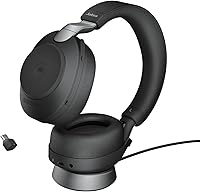
  • In Box: The package includes the headset, desk charging stand, Jabra Link 380c USB-C Bluetooth adapter, a USB-C to USB-A cable, a 3.5mm audio cable, and a carry case.
  • Audio Cable: A 3.5mm jack audio cable measuring 1.2m is included, allowing the headset to be used in wired mode when wireless connectivity is unavailable or not preferred.
  • On-Head Detection: The headset includes on-head detection sensors that can automatically pause audio or flag call status when the headset is removed.
  • Busylight: An integrated busylight on the headset signals to nearby colleagues that the user is on a call, with improved visibility compared to earlier Jabra generations.
  • Form Factor: The boom arm folds away into the headset body when not in use, maintaining a cleaner, less office-specific appearance when wearing it outside of calls.
  • Model Identifier: This variant ships with the Link 380c (USB-C) adapter and is configured for Microsoft Teams, sold under model number 28599-999-889.

Related Reviews
Jabra Evolve2 75
Jabra Evolve2 75
78%
91%
Microphone Quality
72%
Active Noise Cancellation
93%
Battery Life
61%
Comfort & Fit
94%
Call Platform Compatibility
More
Jabra Evolve2 55 Stereo
79%
91%
Call & Microphone Quality
71%
Active Noise Cancellation
78%
Wearing Comfort
88%
Battery Life
74%
Dual-Device Connectivity
More
Jabra Evolve2 65 MS Teams Stereo Wireless Headset
86%
94%
Audio Quality
90%
Noise Cancellation
82%
Comfort for Extended Use
87%
Battery Life
91%
Bluetooth Range
More
Jabra Evolve2 True Wireless Earbuds
86%
88%
Sound Quality
91%
Active Noise Cancellation
86%
Comfort for Long Hours
82%
Battery Life
87%
Ease of Use
More
Jabra Motion UC Bluetooth Headset
76%
91%
Call Audio Quality
74%
Comfort & Fit
89%
PC Connectivity
78%
Battery Life
88%
Platform Compatibility
More
Jabra PRO 9460 Duo Wireless Headset
86%
92%
Sound Quality
88%
Comfort for All-Day Wear
90%
Wireless Range
85%
Noise Cancellation
91%
Ease of Use
More
Jabra Engage 75 SE Dual-Ear Wireless Headset
78%
93%
Wireless Range & Reliability
88%
Call Clarity & Microphone Performance
79%
Battery Life & Charging
74%
Multi-Device Connectivity
83%
Comfort & Wearability
More
Jabra Evolve 65 MS Stereo Wireless Headset
81%
91%
Microphone Quality
88%
Wireless Connectivity Stability
87%
Battery Life
72%
Comfort & Wearability
84%
Call Audio Clarity (Receive)
More
Jabra Engage 65 Mono Wireless Headset
82%
88%
Wireless Range & Stability
91%
Microphone Clarity
93%
Battery Life
74%
Comfort Over Long Shifts
67%
Value for Money
More
Jabra PRO 920 Mono Wireless Desk Headset
79%
91%
Wireless Range & Stability
88%
Microphone Clarity
72%
Comfort & Wearability
84%
Call Audio Quality
89%
Peak Stop & Hearing Protection
More

FAQ

For basic functionality — taking calls, adjusting volume, muting — it works plug-and-play without any software. That said, to access advanced settings like ANC intensity, HearThrough level, and firmware updates, you will need the Jabra Sound+ app. It is free, but it is a real dependency that some buyers find frustrating given the price of the headset.

The Teams certification is about deep integration — call controls, meeting join buttons, and status sync work natively in Teams. But the headset itself works fine as an audio device with Zoom, Google Meet, Webex, and virtually any other platform. You just may not get the same one-touch call management features outside of Teams.

The ANC handles steady, consistent background noise well — think HVAC systems, office hum, or coffee shop ambience. It is less effective against unpredictable sounds like overlapping conversations or sudden loud noises. It will help you focus in an open office, but it will not make the room feel completely silent.

Yes, the Evolve2 85 supports multipoint Bluetooth, meaning it can stay connected to two devices simultaneously — typically a computer via the Link 380c adapter and a smartphone via standard Bluetooth. Switching between them is generally automatic when a call comes in on one device.

Most users report it holds up well over long sessions, largely thanks to the memory foam cushions. That said, comfort is personal — people with larger heads or those sensitive to any headset weight may notice fatigue after several hours. It is worth factoring in that this is a heavier over-ear design rather than a lightweight on-ear style.

It is genuinely useful. Dropping the headset on the stand at the end of the day keeps it charged and ready without thinking about cables. For people who tend to forget to charge devices, this alone can be worth it.

The boom arm positions a microphone closer to your mouth, which makes a noticeable difference in call clarity — especially in noisier environments. The built-in array mics are capable, but deploying the boom arm is the better choice when call quality really matters. It folds away cleanly when not needed.

Based on user feedback, the battery performance is one of the more consistent positives. Most users report it comfortably lasts through a full work week of heavy use before needing a charge, which broadly aligns with the rated figure. ANC being active does draw more power, but the impact is moderate.

Jabra does offer replacement ear cushions for the Evolve2 85 separately. Given that memory foam padding tends to degrade with heavy daily use over a year or two, it is reassuring that you are not forced to replace the entire headset if the cushions wear out.

It comes up often enough across verified reviews to be worth flagging rather than dismissing. The issues tend to involve occasional drops or pairing glitches rather than persistent, constant failures. Using the dedicated Link 380c adapter rather than relying on a laptop's built-in Bluetooth appears to reduce the problem significantly for most users.

Where to Buy