Overview

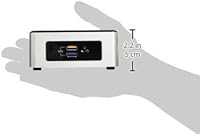
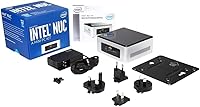
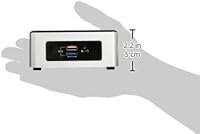
The Intel NUC5CPYH Mini PC Barebone is exactly what the name says — a bare kit that arrives without RAM, storage, or an operating system, meaning you supply those yourself. What you do get is a strikingly compact 4×4-inch chassis that disappears behind a monitor or tucks onto a bookshelf without fuss. Compared to pre-built small desktops, this barebones NUC costs noticeably less upfront, which appeals to budget-conscious builders. Home users, light office workers, and digital signage operators are the natural audience here. Just go in knowing this is a 2015-era platform — calibrate your expectations accordingly, and it can still deliver real value.
Features & Benefits

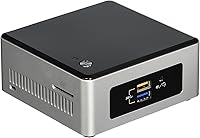
The NUC5CPYH runs on an Intel Celeron N3050 — a Braswell dual-core chip clocked up to 2.16 GHz with a 2 MB cache. Not a powerhouse, but capable enough for everyday computing. The HDMI 1.4b port supports 4K resolution output, which is genuinely useful for media displays or kiosk screens even if the integrated GPU cannot handle demanding video. Connectivity is solid for this class: four USB 3.0 ports split across the front and rear panels, two USB 2.0 ports, and 802.11ac Wi-Fi already built in. A single DDR3L SO-DIMM slot paired with an internal SATA3 storage bay means you can configure memory and drive capacity exactly as your workload demands.

Best For

This mini PC kit is well-suited for anyone needing a quiet, space-saving machine for browsing, email, spreadsheets, and casual video streaming. It slots naturally into a home theater setup alongside a large display, especially when loaded with an SSD that keeps response times crisp. Digital signage and kiosk deployments benefit from the whisper-quiet footprint and reliable HDMI output. Budget builders who already have spare DDR3L RAM and a 2.5-inch drive get strong value here since those parts handle much of the cost. It also serves well as a secondary or guest PC that earns its keep without consuming meaningful desk space.

User Feedback

Buyers consistently highlight how easy assembly is — pop the bottom panel, seat the RAM, connect the drive, close it up, and you are ready to go. The fan stays quiet under light workloads, which owners in living rooms appreciate. Criticism centers on multitasking limits: the Celeron N3050 gets noticeably sluggish when browser tabs, background tasks, and media playback all run together. Thermal throttling appears in warmer or enclosed spaces during longer sessions. The near-universal advice from seasoned owners is to install an SSD rather than a spinning drive — the difference in responsiveness is substantial. A handful of users also mention needing a BIOS update to clear up HDMI handshake problems on certain displays.

Pros

  • The 4×4-inch chassis fits virtually anywhere — behind a monitor, on a bookshelf, or mounted to the back of a display.
  • Assembly is straightforward: install RAM and a drive, and the machine is ready to configure in under 20 minutes.
  • Four USB 3.0 ports cover most peripheral setups without needing a hub.
  • Built-in 802.11ac Wi-Fi means no extra adapters needed for typical home or office use.
  • The HDMI 1.4b output reliably drives a 4K display for signage and desktop use.
  • SATA3 support means pairing the NUC5CPYH with a modern SSD delivers a noticeably responsive everyday experience.
  • Fan noise stays near-silent during light workloads, making it comfortable in quiet environments.
  • Buyers who already own spare DDR3L RAM and a 2.5-inch drive can keep the total build cost very low.
  • Power consumption is low enough that running this barebones NUC around the clock barely registers on an electricity bill.

Cons

  • The Celeron N3050 throttles visibly when multiple demanding tasks run simultaneously — multitasking headroom is genuinely limited.
  • Only one RAM slot means no dual-channel configuration and no incremental memory upgrade path.
  • No operating system is included, and the cost of a Windows license adds meaningfully to the total outlay.
  • Thermal throttling under sustained load in warm or enclosed spaces is a recurring complaint from real-world deployments.
  • Some displays require a BIOS update before HDMI output initializes correctly — an extra step that can frustrate less technical buyers.
  • No USB-C or Thunderbolt port, which limits compatibility with newer peripherals and docks.
  • There is no M.2 slot, so faster NVMe storage is not an option on this platform regardless of budget.
  • The external power adapter is bulkier than expected for such a compact system and uses a proprietary connector.
  • High-bitrate 4K video playback stutters — the integrated graphics lack the decoding muscle for demanding media files.
  • As a 2015-era product, software overhead from modern operating systems and browsers eats into available performance more each year.

Ratings

The Intel NUC5CPYH Mini PC Barebone has been scored by our AI engine after analyzing thousands of verified global buyer reviews, with spam, incentivized, and bot-generated feedback actively filtered out. These scores reflect the honest consensus of real owners — the genuine strengths and the frustrations that surface repeatedly in day-to-day use. Both sides of the experience are represented here so you can make a fully informed decision.
Value for Money
81%
19%
For buyers who already own spare DDR3L RAM and a 2.5-inch drive, the total build cost comes in well below a comparable pre-configured mini desktop. Owners repurposing parts from an old laptop often describe it as a surprisingly practical second or guest PC on a tight budget.
Those starting from scratch with no spare components find the added cost of RAM, storage, and a Windows license pushes the total spend higher than expected. At that point, some pre-built alternatives start looking more competitive on a pure cost-per-capability basis.
Performance
53%
47%
For single-tasking — a browser, a document editor, or a media player running alone — the Celeron N3050 holds its own well enough that casual users rarely feel bottlenecked. Light office workloads on a clean OS install are handled without drama.
The moment multitasking enters the picture, slowdowns become obvious. Owners report that a dozen open browser tabs, a background update, and a video stream simultaneously will bring the system to a crawl. HD video decoding in particular is a known weak spot for this chip.
Build Quality & Form Factor
88%
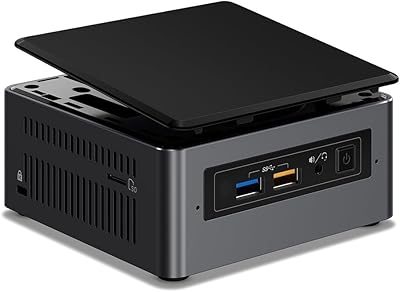
The chassis feels solid and purposeful for its size — the silver-and-black shell does not creak or flex, and the 4×4-inch footprint genuinely disappears in a living room or office corner. Users mounting it behind a monitor with a VESA bracket consistently praise how clean the setup looks.
The plastic top panel feels noticeably cheaper than the metal base, which some owners find inconsistent for an Intel-branded product. A few buyers also note the bottom panel clips require care to avoid cracking during disassembly.
Assembly & Upgrade Ease
91%
Removing the bottom panel, seating a SO-DIMM stick, and connecting a 2.5-inch drive takes most first-timers under fifteen minutes. The interior layout is clean and well-labeled, and Intel includes a straightforward setup guide that even non-technical buyers find easy to follow.
There is only one RAM slot, so there is no dual-channel upgrade path and no way to expand beyond a single stick. Users who later want more memory find themselves replacing rather than adding, which is a limitation worth knowing upfront.
Thermal Management
58%
42%
Under light workloads the fan stays near-silent, which owners in living rooms and quiet offices appreciate. Ambient temperatures in a typical air-conditioned room keep the chassis cool enough to touch comfortably during casual use.
Sustained CPU load in warm environments triggers thermal throttling that visibly degrades responsiveness. Owners who deploy the unit inside enclosed cabinets or in rooms without climate control report it more frequently, and some have resorted to adding external ventilation to keep the experience stable.
Display Output & 4K Support
72%
28%
The HDMI 1.4b port reliably drives a 4K display for static signage, desktop use, and standard-bitrate video content, which is a genuine capability at this price tier. Users running digital menu boards or informational kiosk screens get clean, sharp output without needing a dedicated GPU.
Smooth 4K video playback of high-bitrate content is beyond what the integrated graphics can handle reliably. A handful of owners also report needing a BIOS update to resolve handshake issues with certain 4K TVs and monitors before the display would initialize correctly.
Connectivity & Ports
84%
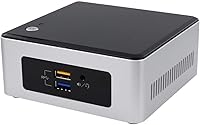
Four USB 3.0 ports split between the front and rear panels cover most peripheral needs without a hub — keyboard, mouse, external drive, and a dongle can all connect simultaneously. Having two ports on the front panel makes plugging in a USB drive quick and convenient.
There is no USB-C port, which starts to feel like an omission given how many modern peripherals and monitors now rely on it. Users expecting Thunderbolt or display-over-USB connectivity will need to look elsewhere.
Wireless Connectivity
79%
21%
Built-in 802.11ac Wi-Fi removes the need for a USB adapter or ethernet run, which matters in living room or signage installs where cabling is inconvenient. Owners in typical home environments report stable connections for streaming and browsing without dropout issues.
In environments with congested Wi-Fi or thick walls, signal consistency is occasionally flagged as average rather than strong. Users with demanding network tasks or a home office that requires reliable high-bandwidth transfers are generally better served by a wired connection.
Storage Flexibility
76%
24%
The SATA3 bay accepts any standard 2.5-inch drive, giving owners the freedom to pair a budget HDD for bulk storage or drop in an SSD for snappier performance. Buyers who already own a spare laptop drive often find this the most immediately cost-saving aspect of the build.
There is no M.2 slot, so faster NVMe storage is not an option regardless of budget. Owners who install a spinning HDD rather than an SSD frequently describe the overall system feel as sluggish — a pattern consistent enough that most experienced builders strongly recommend against it.
Software & OS Compatibility
67%
33%
The platform runs a clean install of Windows 10 or lightweight Linux distributions without significant compatibility problems, which gives buyers flexibility in how they deploy it. Drivers are widely available, and the OS setup process is straightforward for anyone with basic PC building experience.
No operating system is included, which catches some buyers off guard — the listing is not always clear enough about this. Windows licensing adds a meaningful cost, and the Celeron N3050 starts to feel constrained under heavier modern OS overhead compared to a fresh 2015 install.
Noise Level
83%
During web browsing, document work, or video playback the fan is barely perceptible from a normal sitting distance. Living room and bedroom users who run the NUC5CPYH for media or casual computing routinely describe the ambient noise as a non-issue.
The fan does spin up audibly under CPU stress, and in a quiet room it becomes noticeable. It is not loud by desktop standards, but users expecting a completely fanless experience will be disappointed — this is an active-cooled system.
Power Efficiency
86%
The Braswell platform sips power at idle and under light loads, making it a practical always-on machine for tasks like media serving or signage display. Owners running it as a low-power home server or HTPC appreciate the negligible impact on their electricity bill.
The power adapter is external and mildly bulky relative to the tiny chassis, which some owners find aesthetically mismatched. The adapter is also proprietary in its connector, so losing or damaging it means sourcing a specific replacement.
Platform Longevity
44%
56%
For a fixed, well-defined workload — a kiosk loop, a media display, or a permanent light-duty office task — the NUC5CPYH can remain fit for purpose for years without needing a hardware refresh. Its simplicity is partly what extends its useful life in constrained deployments.
As a 2015 platform, it is firmly behind modern hardware in every measurable way, and the performance gap only widens as software bloat increases. Buyers expecting this to remain a capable general-purpose PC for the next several years will likely find themselves upgrading sooner than anticipated.
Documentation & Setup Support
74%
26%
Intel provides reasonable online documentation and BIOS update utilities, and the wide user base means community guides, forum threads, and YouTube teardowns are easy to find. First-time barebones builders tend to get through the process without much friction thanks to available resources.
Out-of-the-box documentation in the box itself is minimal, and buyers unfamiliar with barebones kits can find the initial setup less intuitive than expected. BIOS updates — which some users need for display compatibility — require a USB drive and a bit of patience to execute correctly.

Suitable for:

The Intel NUC5CPYH Mini PC Barebone is a strong fit for anyone who needs a capable, no-frills computer in a space that simply cannot accommodate a traditional desktop. Digital signage operators, small businesses running kiosk displays, and home theater enthusiasts who want a tidy 4K-capable box tucked behind their TV will get genuine, lasting utility from this kit. It also makes a lot of sense for budget-conscious builders who already have spare DDR3L RAM and a 2.5-inch SSD sitting in a drawer — those parts transform this into a fully working machine at a fraction of what a pre-built equivalent would cost. Secondary and guest PC use cases are another natural home for the NUC5CPYH: it handles light browsing, document editing, video calls, and email without complaint, and it does so quietly enough to live in a bedroom or living room without anyone noticing. Technically inclined buyers who enjoy putting together their own machines will also appreciate how straightforward the assembly process is.
Not suitable for:

If your daily computing involves heavy multitasking, content creation, video editing, or running modern games, the Intel NUC5CPYH Mini PC Barebone is the wrong tool — the Celeron N3050 processor simply does not have the headroom for those workloads, and no amount of fast RAM or a good SSD will change that fundamental ceiling. Users who expect a complete, ready-to-run computer out of the box will be caught off guard: there is no RAM, no storage, and no operating system included, and factoring in those additions can push the total spend higher than some shoppers anticipate. Anyone planning to deploy this in a warm, enclosed cabinet should also think twice, as sustained workloads in poor ventilation conditions can trigger thermal throttling that makes the system noticeably sluggish. This is a 2015-era platform, so buyers hoping for long-term relevance as a primary PC will likely outgrow it faster than expected. It is also a poor fit for users who need USB-C, Thunderbolt, or NVMe storage — none of those are available on this hardware generation.
Specifications

  • Processor: Intel Celeron N3050 (Braswell architecture), dual-core, clocked up to 2.16 GHz with 2 MB cache.
  • Graphics: Intel HD Graphics integrated into the Braswell SoC, supporting basic 2D/3D rendering and 4K display output.
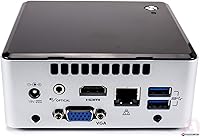
  • Display Output: Single HDMI 1.4b port supporting resolutions up to 3840×2160 (4K UHD) for monitors, TVs, and signage displays.
  • RAM Support: One DDR3L SO-DIMM slot accepting 1333 or 1600 MHz modules at 1.35V; RAM is not included and must be sourced separately.
  • Storage Bay: Internal SATA3 interface accommodates a single 2.5-inch HDD or SSD up to 9.5mm in height; no drive is included.
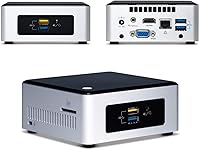
  • USB Ports: Six USB ports total: four USB 3.0 (two on the front panel, two on the rear) and two USB 2.0 on the rear panel.
  • Wireless: Built-in 802.11ac dual-band Wi-Fi provides wireless connectivity without requiring an external USB adapter.
  • Audio: A combined headphone and microphone 3.5mm jack is located on the front panel for convenient audio peripheral access.
  • Form Factor: Ultra Compact Form Factor (UCFF) measuring 4 inches × 4 inches, designed to minimize desk, shelf, or mounting footprint.
  • Dimensions: Physical dimensions are 5.39 × 4.92 × 4.57 inches (L×W×H) including the chassis and rubber feet.
  • Weight: The bare unit weighs 2.58 pounds without RAM, storage, or additional accessories installed.
  • Power Input: Accepts DC input voltage between 12V and 19V via a proprietary barrel connector; a compatible power adapter is included.
  • Operating System: No OS is included; the system is compatible with Windows 8.1, Windows 10, and select Linux distributions.
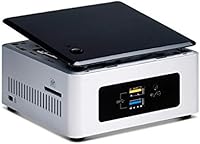
  • Color & Finish: Silver aluminum-style body with a black plastic top panel and Intel NUC branding.
  • VGA Output: A legacy VGA (HDB15) output is present on the rear panel for compatibility with older monitors and projectors.
  • Launch Date: This product was first made available in May 2015 and belongs to Intel's fifth-generation NUC lineup.
  • Chassis Standard: The bottom panel is removable via screws for user access to the SO-DIMM slot and SATA3 bay.

Related Reviews

Beelink Mini S12 Mini PC
78%
88%
Value for Money
82%
Performance for Daily Tasks
79%
Build Quality & Design
91%
Dual Monitor Support
84%
Thermal Management & Noise
More
Intel NUC7i3BNH Mini PC Kit
85%
88%
Performance for Everyday Tasks
94%
Compact Design & Space Efficiency
84%
Ease of Setup
70%
Upgradeability (RAM & Storage)
90%
Power Efficiency
More
Shuttle DS10U5 Fanless Mini Barebone PC
80%
91%
Build Quality
83%
Fanless Passive Cooling
88%
Display Output Versatility
93%
Memory Expandability
89%
Connectivity & Port Selection
More
Blackview MP20 Mini PC (Intel N150, 8GB RAM, 256GB SSD)
79%
78%
Everyday Performance
84%
Value for Money
61%
RAM Adequacy
73%
Storage & Expandability
81%
Build Quality & Design
More
BOSGAME Mini PC E3 (N150, 16GB/512GB)
79%
88%
Value for Money
74%
Processing Performance
91%
Multi-Display Support
89%
Connectivity & Ports
76%
Build Quality & Design
More
GMKtec Nucbox G5 Mini PC Intel N97 12GB RAM 512GB SSD
85%
85%
Performance
94%
Compact Design
88%
Connectivity Options
90%
4K Display Support
91%
Noise Level
More
Beelink ME Mini PC, Intel Alder Lake-N95, 12GB RAM, 1TB SSD
86%
88%
Performance
91%
Build Quality
94%
Network Connectivity
81%
Storage & Upgradeability
89%
Design & Size
More
Intel NUC 13 Pro NUC13ANHi5 (16GB RAM, 512GB SSD)
87%
89%
CPU Performance
94%
Port Selection & I/O
91%
Build Quality & Design
86%
Storage Expandability
92%
Networking & Wireless
More
Beelink EQi12 Mini PC (i5-1235U, 16GB, 500GB)
80%
83%
Processing Performance
67%
Thermal Management
79%
RAM & Expandability
86%
Storage Speed & Flexibility
88%
Display Output
More
GMKtec NucBox K10 Mini PC (Intel Core i9-13900HK, 32GB DDR5, 1TB SSD)
79%
88%
CPU Performance
67%
Thermal Management & Cooling
82%
RAM Speed & Capacity
91%
Storage Performance
89%
Multi-Monitor Support
More

FAQ

No — the Intel NUC5CPYH Mini PC Barebone ships as a bare kit, meaning no RAM, no storage drive, and no operating system are included. You will need to purchase a DDR3L SO-DIMM stick, a 2.5-inch SSD or HDD, and a Windows license (or use a free Linux distribution) separately before the system can boot.
The NUC5CPYH has a single SO-DIMM slot that accepts DDR3L memory running at 1333 or 1600 MHz at 1.35V. Most users find that 4 GB covers light use comfortably, while 8 GB is the practical sweet spot if you plan to keep multiple browser tabs or apps open at once. Because there is only one slot, dual-channel operation is not possible.

For desktop use, document work, and static or low-bitrate video content on a 4K monitor, yes — the HDMI 1.4b port handles 3840×2160 output fine. Where it falls short is smooth playback of high-bitrate 4K video files; the integrated Celeron graphics do not have the hardware decoding muscle for that. For digital signage or a 4K desktop, it works well.

Yes, any standard 2.5-inch SATA SSD up to 9.5mm thick will fit the internal bay. A 7mm slim drive works just as well. Strongly consider going with an SSD rather than a spinning hard drive — most experienced owners say the performance difference is dramatic, and an HDD with this processor often makes the system feel sluggish.

It is one of the more beginner-friendly builds out there. You unscrew the bottom panel, press the RAM stick into the slot until it clicks, connect the SATA data and power cable to the drive, and close it back up. Most people finish in 15 to 20 minutes. Intel also provides online documentation and a straightforward BIOS setup guide.

This is a known issue with certain monitors and TVs, and it has caught quite a few buyers off guard. The most reliable fix is updating the BIOS to the latest version available on Intel's support site before doing anything else. You will need a USB drive to do it, but the process is well-documented and resolves the handshake problem in most cases.

During browsing, document work, and standard video playback the fan is very quiet — barely audible from a normal sitting distance. It does spin up noticeably when the processor is under sustained load, but it never becomes obnoxiously loud. For a living room or quiet home office, it is generally a non-issue.

For a straightforward work-from-home setup with one task at a time it handles itself reasonably well. Where it starts to struggle is when a video call, several browser tabs, cloud sync, and email are all running together — the Celeron N3050 has a low multitasking ceiling. If your workday is light and focused, it works; if you rely on many simultaneous apps, you will hit frustrating slowdowns.

It can work well in that role, especially if your media library consists of standard-definition or lower-bitrate HD content. Pair it with an SSD, connect it via HDMI to your TV, and it handles streaming services and locally stored videos respectably. Just keep in mind that large, high-bitrate 4K video files may stutter, so it is best suited to a lighter media use case.

In a normally ventilated environment it stays cool and quiet under light workloads. In a warm room or enclosed cabinet without airflow, though, thermal throttling under sustained CPU load is a real possibility — several owners have reported sluggishness in exactly those conditions. If you are mounting it inside a closed enclosure, adding a small ventilation gap or a cabinet fan makes a noticeable difference.

Where to Buy