Overview

The Shuttle DS10U5 Fanless Mini Barebone PC sits in a niche most consumers never encounter — a purpose-built, configurable small form factor machine aimed at IT professionals, integrators, and technically confident buyers. The barebone format means no RAM, storage, or OS is included, which catches casual shoppers off guard. You are paying for the chassis, embedded processor, and a port layout that tilts decidedly toward professional deployment. The Intel Core i5-8265U delivers capable everyday performance, but don't expect it to push through heavy rendering or virtualization marathons. The port selection tells you immediately who this fanless mini PC was really designed for.
Features & Benefits

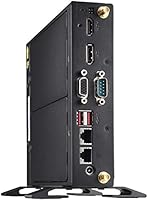
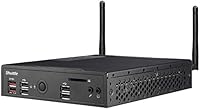
The fully passive cooling system is the headline feature — the chassis itself acts as a heat sink, producing zero fan noise under any workload. That is not just a comfort perk; fewer moving parts also means fewer failure points in always-on deployments. Triple display output covering HDMI, DisplayPort, and VGA with 4K UHD support is genuinely rare at this footprint. Memory headroom is serious: dual SODIMM slots accept up to 64GB of DDR4, far outpacing most compact PCs. Add dual Gigabit LAN, Wi-Fi, Bluetooth, a legacy serial port, and an included VESA mount, and this barebone unit handles a wide range of connectivity needs without reaching for adapters.

Best For

This fanless mini PC hits a sweet spot for a few specific audiences. Digital signage operators, POS builders, and kiosk deployers will value silent continuous operation in retail or industrial settings. Home theater enthusiasts wanting quiet 4K playback in a living room without fan hum will find it genuinely compelling. Small business buyers who already own DDR4 RAM and an M.2 SSD can bring their own components and offset the barebone cost — that flexibility is precisely the point. Linux users and developers needing RS-232 serial alongside eight USB ports will find this combination rare in something so compact, and it mounts cleanly behind a monitor or inside a cabinet.

User Feedback

Buyers who picked up this barebone unit for its intended purpose — kiosks, HTPC builds, embedded workstations — consistently highlight the solid chassis quality and genuinely silent operation as standout positives. The BIOS is reported as accessible and Linux compatibility has generally landed well in practice. A minority of users pushing sustained CPU-heavy workloads do note occasional thermal throttling, which is worth factoring in for compute-intensive applications. Where disappointment clusters is almost entirely among general consumers surprised by the barebone pricing relative to complete mini PCs — a mismatch of expectations rather than a product flaw. IT buyers who engaged the 3-year warranty and lifetime support have reported the experience positively, which matters for business deployments.

Pros

  • Completely silent operation makes it ideal for noise-sensitive environments like media rooms or patient-facing spaces.
  • Triple display outputs — HDMI, DisplayPort, and VGA — are rare at this compact size and save on adapters.
  • Up to 64GB DDR4 RAM support gives this barebone unit serious headroom for multitasking and light virtualization.
  • Dual Gigabit LAN opens up multi-network and NAS proxy use cases most mini PCs cannot touch.
  • The RS-232/422/485 serial port makes the Shuttle DS10U5 compatible with legacy industrial and retail hardware.
  • VESA mount is included, enabling clean behind-monitor or cabinet installs without extra purchases.
  • Buyers who already own RAM and an M.2 SSD can get up and running without paying for bundled components they do not need.
  • The 3-year warranty and free lifetime technical support are meaningful advantages for business and professional deployments.
  • Solid all-metal chassis holds up well in continuous-use commercial environments where build durability actually matters.
  • Linux compatibility is solid for most major distributions, with the serial port and dual LAN working reliably out of the box.

Cons

  • No RAM, storage, or OS is included — total cost climbs significantly once you factor in components.
  • The M.2 2230 SSD form factor is less common and more expensive than the standard 2280 size.
  • Sustained CPU-heavy workloads trigger thermal throttling, since there is no active cooling to fall back on.
  • The Intel i5-8265U is several processor generations old, which affects long-term software compatibility and resale value.
  • Wi-Fi is restricted to Intel CNVi cards, limiting upgrade options for users who want third-party wireless.
  • The external power brick adds a cable management burden in tight or client-facing installations.
  • Linux Wi-Fi setup can require manual driver configuration depending on the installed CNVi card variant.
  • No 2.5-inch SATA bay means high-capacity local storage requires external USB drives only.
  • The barebone pricing structure has generated significant buyer confusion and negative reviews from unprepared consumers.
  • Coil whine from power components has been reported by a small number of users under peak load conditions.

Ratings

The scores below for the Shuttle DS10U5 Fanless Mini Barebone PC were generated by our AI engine after systematically analyzing verified buyer reviews from global markets, with spam, incentivized submissions, and bot activity actively filtered out. Every number reflects the honest consensus of real-world users across professional IT deployments, home theater builds, and small business installs. Both the genuine strengths and the recurring frustrations are accounted for — nothing is smoothed over.
Build Quality
91%
The all-metal chassis earns consistent praise from buyers who have handled a lot of compact PCs. IT professionals setting up kiosks or digital signage rigs specifically call out the rigidity and finish as genuinely commercial-grade, not the hollow plasticky feel common in consumer mini PCs.
A small number of buyers noted the bottom panel felt slightly less substantial than the top housing, and a few reported minor cosmetic scuffs arriving out of the box. These are edge cases, but worth knowing if presentation matters for a client-facing install.
Fanless Passive Cooling
83%
For office workloads, media playback, signage loops, and light multitasking, the passive cooling system performs exactly as advertised — the unit runs in complete silence even after hours of continuous operation. HTPC buyers in particular love the absence of any fan hum in quiet living rooms.
Sustained CPU-heavy tasks like prolonged video encoding or heavy compilation runs do trigger noticeable thermal throttling. This is a physics reality with passive cooling, not a defect, but users expecting desktop-like sustained throughput from a fanless chassis will be disappointed.
Display Output Versatility
88%
Triple simultaneous outputs covering HDMI, DisplayPort, and legacy VGA is a rare combination in something this compact, and buyers running multi-monitor office setups or dual-screen digital signage arrays find it extremely practical right out of the box without dongles or hubs.
The integrated Intel UHD 620 handles 4K output cleanly, but driving three screens simultaneously at high resolutions can push the GPU close to its ceiling. A handful of users experienced minor display lag on the third monitor under demanding desktop compositions.
Memory Expandability
93%
Two full SODIMM slots accepting up to 64GB of DDR4 is genuinely uncommon in a unit this small, and buyers who need to run virtual machines or memory-hungry background services appreciate having real headroom to grow into. Several verified reviewers called this out as a deciding factor.
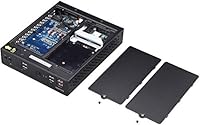
There are no bundled RAM sticks, so buyers need to source and install their own modules, adding to the total cost and setup time. Those unfamiliar with SODIMM installation may find the internal access slightly fiddly given the compact layout.
Connectivity & Port Selection
89%
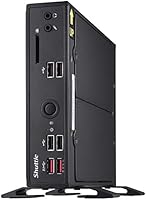
Eight USB ports split across USB 3.1 and 2.0, dual Gigabit LAN, Wi-Fi, Bluetooth, and a genuine RS-232/422/485 serial port make this barebone unit unusually well-equipped for both modern and legacy device integration. Developers connecting older industrial hardware or serial peripherals call this combination hard to find elsewhere at this size.
The M.2 Wi-Fi slot uses the CNVi standard, which restricts users to Intel-compatible wireless cards only — third-party card swaps are not straightforward. A few Linux users also noted that certain Wi-Fi card combinations required manual driver configuration.
Value for Money
61%
39%
For buyers who already own compatible DDR4 RAM and an M.2 SSD, the barebone format can make financial sense, especially given the industrial port set, passive chassis, and 3-year warranty that completed consumer mini PCs at lower prices simply do not offer.
At its asking price, the barebone nature is a genuine sticking point for buyers comparing against fully loaded mini PCs at similar or lower cost. General consumers who arrive expecting a ready-to-use machine consistently rate value poorly, and even informed buyers feel the premium is steep for a generation-old processor.
Noise Level
96%
There is no fan to spin, so the noise rating here is about as straightforward as it gets — users universally report complete silence under all typical workloads. For media rooms, recording studios used as secondary workstations, or patient-facing clinical environments, this is a meaningful real-world advantage.
Absolute silence is only maintained when the unit is not thermally stressed. Under peak sustained loads, some users report faint coil whine from the power delivery components, though this is infrequent and unlikely to affect most deployment scenarios.
Linux Compatibility
78%
22%
The majority of Linux users report a smooth experience with popular distributions including Ubuntu and Debian, with hardware components detecting reliably on current kernels. The serial port and dual LAN work well under Linux, which is a key draw for developers using this as a headless embedded server.
Wi-Fi and Bluetooth setup can require extra steps depending on the Intel CNVi card installed, and a small subset of users on niche distributions ran into driver gaps. It works, but it is not quite plug-and-play on Linux the way it is under Windows 10.
Processor Performance
69%
31%
The Intel Core i5-8265U handles office productivity, browser-based work, 4K video playback, and light multitasking without any perceptible strain. For the deployment scenarios this barebone unit targets — signage, POS, HTPC, thin-client work — the CPU is appropriately matched.
Whiskey Lake-U is several generations behind current silicon, and the 1.6 GHz base clock is modest. Buyers expecting snappy performance in compute-heavy workloads or who compare it against newer-generation mini PCs will find the processor a clear weak point for the price.
Setup & Configuration Experience
72%
28%
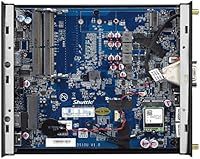
Experienced builders and IT professionals consistently describe the internal layout as clean and accessible. The BIOS is reported as flexible enough for custom deployments, and Shuttle's documentation is more thorough than what most mini PC brands provide at this tier.
For buyers without prior PC-building experience, the barebone setup process — sourcing compatible RAM, an M.2 2230 SSD, and installing an OS from scratch — adds real complexity and time. Several one-star reviews trace directly back to setup frustration rather than product failure.
Physical Footprint & Mounting
87%
At under 1.6 inches thick and roughly the footprint of a hardcover book, this fanless mini PC disappears behind a monitor with the included VESA bracket or tucks into a cabinet without consuming meaningful rack space. Retail and hospitality installers specifically appreciate the clean cable routing options.
The unit is slightly heavier than comparable consumer mini PCs, which some installers noticed when doing overhead or vertical VESA mounts. The power brick is external and adds a secondary cable to manage, which can complicate very tight installs.
Warranty & Technical Support
84%
A 3-year manufacturer warranty paired with free lifetime technical support is a meaningful differentiator for business buyers who need accountability beyond the typical one-year consumer coverage. IT managers and system integrators specifically cite the Shuttle support line as responsive and technically competent.
Some individual consumers found the support experience slower than expected for straightforward configuration questions, and the lifetime tech support benefit is more relevant for enterprise or commercial users than for home buyers who may never need it.
Storage Configuration Flexibility
74%
26%
Supporting M.2 2230 form factor SSDs keeps the storage footprint minimal inside the chassis, and buyers who already own a compatible drive can drop it in and boot in minutes. The USB 3.1 ports offer a reliable fallback for external storage expansion.
The M.2 2230 form factor is less common than the standard 2280 size, which limits SSD options and can mean paying a slight premium for compatible drives. There is no 2.5-inch SATA bay, so buyers needing high-capacity spinning storage must rely entirely on external USB drives.
Barebone Pricing Transparency
54%
46%
Buyers who researched the barebone category before purchasing largely understand the pricing model and accept the trade-off — paying for the platform and receiving full control over component selection. For organizations with existing RAM and SSD inventory, the math can genuinely work out.
The listing's own confusion around included specs has generated a disproportionate share of negative reviews from buyers who did not realize storage and RAM were excluded at checkout. This is a recurring and avoidable frustration that has damaged the perceived value for a meaningful segment of buyers.

Suitable for:

The Shuttle DS10U5 Fanless Mini Barebone PC is purpose-built for buyers who know exactly what they need and are willing to configure it themselves. IT professionals and system integrators deploying digital signage, kiosk terminals, or point-of-sale systems will find the silent operation, dual Gigabit LAN, and commercial-grade chassis genuinely well-suited to always-on environments. Home theater enthusiasts who want 4K playback in a living room without any fan noise — and already own compatible DDR4 RAM and an M.2 2230 SSD — will get a clean, nearly invisible setup that just works. Small businesses building out workstations on a phased budget can appreciate the barebone model, spreading component costs over time while benefiting from a 3-year warranty and lifetime technical support that consumer mini PCs rarely offer. Developers running Linux who need a serial port alongside modern USB connectivity will find this combination genuinely hard to source elsewhere at this physical footprint.
Not suitable for:

The Shuttle DS10U5 Fanless Mini Barebone PC is a poor fit for general consumers expecting a ready-to-use computer straight out of the box — the price does not include RAM, storage, or an operating system, and that surprises buyers who do not read the specs carefully. Anyone comparing it against fully loaded mini PCs from consumer brands will find the value equation hard to justify unless the specific feature set — passive cooling, serial port, dual LAN, triple display outputs — directly maps to their needs. The embedded Intel i5-8265U is a capable but aging processor, so buyers chasing current-generation performance for tasks like video editing, software compilation, or running multiple virtual machines should look elsewhere. The integrated graphics handle 4K display output fine but are not remotely suited for gaming, GPU acceleration, or creative workloads. Finally, buyers with no prior PC-building experience should think carefully before purchasing, as getting this unit running requires sourcing compatible components, installing them correctly, and setting up an OS from scratch.
Specifications

  • Processor: Embedded Intel Core i5-8265U (Whiskey Lake-U) running at 1.6 GHz base clock with Turbo Boost up to 3.9 GHz across 4 cores and 8 threads.
  • Cooling System: Fully passive fanless design using the metal chassis as a heat dissipation surface, producing zero acoustic output under all typical workloads.
  • Memory Slots: Two 260-pin DDR4 SODIMM slots supporting dual-channel configuration, with a maximum capacity of 32GB per slot and 64GB total.
  • Storage Support: Accepts one M.2 2230 form factor SSD; no storage drive, RAM, or operating system is included with the unit.
  • Display Outputs: Three simultaneous video outputs consisting of one HDMI port, one DisplayPort, and one VGA port, supporting up to 3840x2160 (4K UHD) resolution.
  • Graphics: Intel UHD Graphics 620 integrated into the i5-8265U, capable of 4K display output but not designed for GPU-accelerated or gaming workloads.
  • Networking: Dual Intel Gigabit Ethernet LAN ports, one M.2 2230 slot for 802.11ac Wi-Fi and Bluetooth via Intel CNVi-compatible wireless card.
  • USB Ports: Eight total USB ports split between four USB 3.1 (Gen 1) ports and four USB 2.0 ports for broad peripheral compatibility.
  • Serial Port: One RS-232/RS-422/RS-485 multi-mode serial port for connecting legacy industrial, retail, or automation hardware.
  • Dimensions: The unit measures 7.87 x 6.5 x 1.56 inches (LxWxH), making it thin enough to mount flat behind most standard monitors.
  • Weight: The barebone chassis weighs 4.85 pounds without RAM, storage, or optional wireless card installed.
  • OS Compatibility: Officially supports Windows 10 (64-bit) and Linux (64-bit); no operating system license or installation media is included.
  • Mounting: A VESA mounting bracket is included in the box, compatible with standard 75mm and 100mm VESA-pattern monitor and wall mounts.
  • Warranty: Covered by a 3-year manufacturer warranty with free lifetime technical support provided directly by Shuttle.
  • Color & Material: Black all-metal chassis with a brushed finish designed for professional and commercial installation environments.
  • Power Supply: Powered via an external AC adapter (power brick); internal components operate without any active fan or moving cooling parts.
  • Wireless Standard: Supports Intel CNVi 802.11ac Wi-Fi and Bluetooth via the M.2 2230 wireless slot; CNVi card must be Intel-compatible.
  • Availability Date: This product was first listed for sale on October 30, 2020.

Related Reviews

KINGDEL NC3000 Fanless Mini PC
75%
88%
Build Quality
83%
Fanless Cooling
74%
Processing Performance
91%
Port Selection
72%
Value for Money
More
MINIX NEO Z300-0dB 512GB Mini PC
83%
97%
Noise Level
71%
Thermal Management
78%
Everyday Performance
84%
Build Quality
88%
Connectivity & Ports
More
Beelink Mini S12 Pro (N100, 16GB, 500GB)
83%
83%
Everyday Performance
91%
Value for Money
76%
Build Quality & Design
84%
Thermal Management & Noise
88%
Connectivity & Ports
More
Beelink Mini S12 Mini PC
78%
88%
Value for Money
82%
Performance for Daily Tasks
79%
Build Quality & Design
91%
Dual Monitor Support
84%
Thermal Management & Noise
More
ACEMAGICIAN Kron Mini K1 Mini PC
73%
83%
Everyday Performance
54%
Gaming Capability
61%
Thermal Management
89%
Display & Connectivity
78%
Value for Money
More
Beelink ME Mini PC
Beelink ME Mini PC
87%
88%
Performance
91%
Connectivity
85%
Storage Expansion
95%
Power Efficiency
90%
Noise Levels
More
Beelink EQi13 Pro (32GB/500GB)
83%
88%
Processing Performance
91%
Memory & Multitasking
86%
Storage Speed & Expandability
74%
Thermal Management & Noise
93%
Networking Capabilities
More
FUNYET STARSHIP N95 512GB Mini PC
74%
83%
Value for Money
72%
Performance
58%
Storage Speed
91%
Port Selection
88%
Display Output
More
MINISFORUM X1-255 Barebone Mini PC
78%
83%
Performance
78%
Build Quality
71%
Value for Money
91%
Connectivity
69%
Thermal Management
More
Intel NUC7I3BNH Mini PC Kit
75%
88%
Build Quality
93%
Compact Form Factor
79%
Everyday Performance
74%
Value for Money
63%
Thermal Management
More

FAQ

You need to buy them separately. The Shuttle DS10U5 Fanless Mini Barebone PC ships with the chassis, embedded processor, and I/O — nothing else. You will need to source your own DDR4 SODIMM RAM, an M.2 2230 SSD, and an operating system before you can use it. This catches a lot of buyers off guard, so factor that into your total budget before purchasing.
Yes, the HDMI, DisplayPort, and VGA outputs can all run simultaneously, which is genuinely unusual at this size. That said, driving all three at high resolutions does push the integrated Intel UHD 620 fairly hard, so you may see minor performance dips on the third display depending on what you are running.

For typical workloads — office tasks, media playback, web browsing, signage loops — yes, it stays completely silent. There is no fan at all, so the only noise risk is faint coil whine under peak electrical load, which a small number of users have reported. If you are pushing it with sustained encoding or heavy CPU tasks, expect some thermal throttling rather than fan noise.

It uses the M.2 2230 form factor, which is shorter than the more common 2280 size most people are familiar with. Make sure you specifically buy a 2230-length M.2 NVMe or SATA drive — a standard 2280 drive will not fit physically. The 2230 format is available from most major SSD brands but does cost slightly more and has fewer options than 2280.

Generally yes — Ubuntu, Debian, and similar distributions install and run without major issues, and both the dual LAN ports and serial port work reliably under Linux. The main friction point is Wi-Fi, which depends on your Intel CNVi card and kernel version. On some setups you may need to manually install the wireless driver, so it is not completely plug-and-play on Linux the way Windows tends to be.

The M.2 wireless slot uses Intel CNVi, which is a proprietary interface that only works with compatible Intel wireless cards. You cannot drop in a standard third-party M.2 Wi-Fi card and expect it to function. Stick to Intel-branded 802.11ac CNVi cards — the AX200 and AC 9260 are commonly used options that work well in this unit.

For the workloads it is designed for — digital signage, kiosk operation, background server tasks, 4K media playback — it handles continuous operation without issues. Where you run into trouble is with sustained, CPU-intensive tasks like prolonged video transcoding or running multiple virtual machines simultaneously. Passive cooling has a thermal ceiling, and the processor will throttle itself before overheating causes damage, but it is not the right tool for compute-heavy always-on workloads.

The RS-232/RS-422/RS-485 serial port is aimed at users connecting legacy or industrial hardware — things like barcode scanners, receipt printers, PLCs, industrial sensors, or older point-of-sale peripherals that predate USB. If you are deploying this in a retail, manufacturing, or automation environment and need to talk to older equipment, that port is a significant practical asset. For home users or standard office setups, you will probably never touch it.

Yes, the included bracket attaches to the back of any monitor or display with a standard 75mm or 100mm VESA hole pattern, which covers most modern monitors. The unit hangs cleanly behind the screen with cables routed downward, keeping your desk completely clear. It can also be mounted to a wall independently if needed. The weight is manageable for overhead mounts, though a few installers noted it is slightly heavier than competing mini PCs.

Based on feedback from business and IT buyers who have actually used it, the warranty and Shuttle's lifetime support line are genuinely responsive and technically competent — above average for this product category. For individual consumers doing a one-off home build, you may never need it. For businesses running fleets of these units in commercial deployments, having a real warranty backed by a manufacturer that answers the phone is a meaningful practical advantage over generic consumer mini PC brands.