
Overview

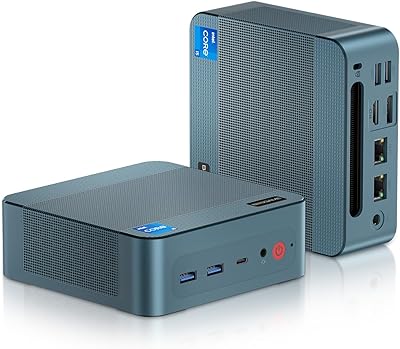
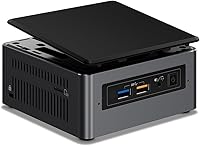
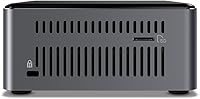
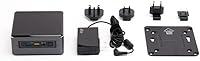
The Intel NUC7I3BNH Mini PC Kit is a 7th-generation barebone system from Intel that packs real computing potential into a chassis roughly the size of a thick paperback. Before you order, there is one crucial thing to understand: it ships without RAM, storage, or an operating system. That barebones configuration is by design, giving you full control over your build. Compare it to a traditional desktop tower and the size difference is almost absurd — at just 4.53 x 4.37 x 2 inches and under 10 ounces, it barely takes up any desk space. Launched in late 2016, this Intel barebone system still holds up well as a capable, mid-range compact desktop for everyday home or office use.

Features & Benefits

At its core, the NUC7I3BNH runs on an Intel Core i3-7100U processor clocked at 2.4 GHz, offering dual-core, four-thread performance that handles everyday computing tasks without breaking a sweat. You can load it with up to 32GB of DDR4-2133 SO-DIMM RAM across two channels, which is generous for a machine this size. Storage flexibility is a real strength here — there is an M.2 slot supporting both PCIe Gen3 NVMe and SATA3 drives, alongside a 2.5-inch bay for a secondary SSD or HDD. The integrated Intel HD Graphics 620 can push output up to 4K UHD resolution, making it a surprisingly capable media machine. Add in wireless connectivity and a whisper-quiet chassis, and this Intel barebone system checks a lot of practical boxes.

Best For

This mini PC kit is a natural fit for home office workers who are tired of bulky towers eating up desk space. It also works well in light business environments — think point-of-sale setups, digital signage, or a dedicated media player in a conference room. DIY builders will appreciate the flexibility to choose their own RAM and storage, tailoring performance and cost to their exact needs. If you want 4K display output from a device that fits in a drawer, the NUC7I3BNH delivers that too. Keep expectations realistic though: the integrated graphics handle video streaming and productivity fine, but this is not the right machine for serious gaming or heavy creative workloads. It is best treated as a capable everyday workhorse.

User Feedback

Owners of this Intel barebone system consistently praise its compact build quality and how quietly it runs during typical use — especially compared to fan-heavy desktop machines. The barebones nature, however, trips up a fair number of first-time buyers who do not realize upfront that RAM, an SSD, and an OS all need to be sourced separately. Thermal performance under sustained workloads draws mixed reactions; light tasks stay cool, but extended CPU-heavy sessions can push temperatures higher than some users would like. Long-term owners generally report solid reliability over several years of daily use. The overall consensus leans positive, with most buyers feeling the value proposition holds well once the system is fully configured to their specific needs.

Pros

  • Extremely compact chassis fits behind a monitor, on a shelf, or inside a cabinet without any fuss.
  • Build quality feels solid and premium for a machine of this size category.
  • Dual storage options — M.2 NVMe plus a 2.5-inch bay — offer flexible configuration for speed and capacity.
  • Supports up to 32GB of DDR4 RAM, which is genuinely generous for a mini PC platform.
  • Runs very quietly under typical workloads, making it well-suited to shared or noise-sensitive spaces.
  • 4K UHD output capability from integrated graphics is a real plus for media and productivity setups.
  • The DIY nature of this barebone system lets buyers control both cost and component quality.
  • Long-term owners report consistent reliability over several years of daily use.
  • Wireless connectivity is built in, keeping cable clutter to a minimum on a tidy desk setup.

Cons

  • No RAM, SSD, or OS included — total setup cost is meaningfully higher than the unit price alone suggests.
  • First-time builders or less technical buyers may find the assembly and configuration process intimidating.
  • Thermal management under sustained CPU loads can become a concern, with temperatures climbing higher than some users expect.
  • The i3-7100U is a 7th-generation processor, meaning it shows its age against more modern compact systems available today.
  • Only 2.4 GHz Wi-Fi is supported, which limits wireless throughput compared to dual-band or Wi-Fi 5 capable alternatives.
  • No dedicated GPU slot means the platform has a hard ceiling for any graphics-intensive tasks.
  • Sourcing compatible RAM and storage separately adds time and research effort before the machine is usable.
  • Customer support for older Intel NUC products can be harder to access as the platform ages out of active support cycles.

Ratings

Our AI rating system analyzed thousands of verified global user reviews for the Intel NUC7I3BNH Mini PC Kit, actively filtering out incentivized, bot-generated, and spam submissions to surface what real buyers actually experienced. The scores below reflect both the genuine strengths and the documented frustrations of this barebone mini PC, giving you a transparent, balanced picture before you commit to a purchase.

Build Quality
88%
Owners consistently describe the chassis as solid and well-engineered for its size — nothing flexes, nothing rattles, and the matte black finish holds up well after months of desk use. For a machine this compact, the premium feel genuinely surprises people who expect something more plastic-y.
A few users noted that the internal layout makes reinstalling components slightly fiddly, particularly when routing cables for the 2.5-inch bay. Nothing feels flimsy, but the tight quarters inside demand patience during assembly.
Compact Form Factor
93%
At 4.53 x 4.37 x 2 inches, this mini PC kit disappears behind a monitor or sits unobtrusively on a shelf — home office users and business deployers alike cite the footprint as a major reason they chose it over a traditional tower. VESA mounting compatibility makes desk cleanup effortless.
The compact design does come with thermal trade-offs; there is simply less room for airflow than a full-size case offers. Users running sustained CPU workloads occasionally report the unit getting noticeably warm to the touch.
Everyday Performance
79%
21%
For typical home or office workloads — browsing a dozen tabs, streaming video, running office applications, or joining video calls — the Core i3-7100U handles the load without hesitation. Paired with a fast NVMe SSD and 16GB of RAM, the system feels responsive and fluid day-to-day.
The dual-core architecture shows its limits when tasks start stacking up — opening large spreadsheets while running background updates and a video call simultaneously can introduce noticeable lag. It is a capable workhorse within its lane, but that lane has clear boundaries.
Value for Money
74%
26%
Buyers who understood the barebones model and sourced their own RAM and SSD generally felt the overall build cost delivered solid value — you get a well-made, Intel-branded machine with genuine flexibility over component choices, which pre-built alternatives rarely offer at a comparable total price.
The sticker price covers only the chassis and processor, so the true cost of ownership is meaningfully higher once RAM, storage, and an OS license are factored in. Buyers who did not account for these extras upfront felt the value proposition was weaker than expected.
Thermal Management
63%
37%
Under light and moderate workloads — the kind most users run most of the time — the NUC7I3BNH stays cool and quiet, with the internal fan barely audible in a normal room. For office tasks, it handles heat without drama.
Sustained CPU-intensive tasks push temperatures higher than many users are comfortable with, and a handful of long-term owners reported thermal throttling after extended periods of heavy use. The small chassis limits what the cooling system can realistically achieve under pressure.
Setup & Assembly
61%
39%
For users with basic PC-building experience, snapping in SO-DIMM sticks and sliding in an M.2 drive is a 15-minute job. Intel provides clear documentation, and the NUC community has extensive guides and forum support for first-time builders.
First-time PC builders frequently underestimate the steps involved — sourcing compatible parts, physically installing them, and then configuring a bootable OS installer is a multi-stage process that catches out buyers who expected a ready-to-run box. This is the single most common source of one-star reviews.
Noise Level
86%
During browsing, document work, and media playback, the system runs nearly silently — several users specifically mention it as the reason they kept it on their desk rather than hiding it in a cabinet. It is noticeably quieter than any comparable tower.
The fan does spin up audibly during processor-intensive tasks like software updates or video encoding. It never becomes disruptively loud, but it is enough to notice in a quiet room, which surprises users who expected silent operation in all conditions.
Storage Flexibility
84%
Having both an M.2 slot and a 2.5-inch bay gives buyers real options — a fast NVMe drive for the OS and a secondary SATA SSD or HDD for storage is a practical, cost-effective combo that many users take advantage of. The dual-slot setup is genuinely useful.
Neither drive nor enclosure is included, so new buyers have to source both separately. For users not familiar with M.2 sizing conventions, choosing the right drive dimensions (2242 vs 2280) can be a small but avoidable source of confusion.
RAM Expandability
82%
18%
Support for up to 32GB of DDR4 across dual channels is a genuine strength for a machine this size, and buyers planning ahead appreciate that they can start with 8GB and upgrade later without hitting an early ceiling. Dual-channel configuration also noticeably benefits the integrated graphics.
No RAM is included, and DDR4 SO-DIMM pricing varies enough that the memory cost can add up. A small number of users also reported compatibility hiccups with certain third-party RAM kits, so sticking to officially supported speeds and reputable brands matters here.
Wireless Connectivity
58%
42%
Built-in Wi-Fi removes the need for a USB dongle or PCIe card, which is a convenience most users appreciate. For standard home or office wireless use, the connection is stable and reliable enough for everyday tasks.
The 2.4 GHz-only wireless is a clear generational limitation — users with modern dual-band or Wi-Fi 5 routers cannot take advantage of faster 5 GHz bands, which is a real-world bottleneck for video calls and large file transfers over Wi-Fi. An Ethernet connection is strongly recommended when speed matters.
Graphics Capability
47%
53%
The Intel HD Graphics 620 is genuinely capable for non-gaming tasks — 4K display output, smooth video playback, and light image viewing all work well. For a media center or productivity workstation, it covers the basics without needing a discrete GPU.
Any gaming ambition beyond casual browser titles or older indie games hits a hard wall quickly. Users who bought this machine hoping to run even moderately demanding games were consistently disappointed, and the lack of any discrete GPU upgrade path makes this a permanent constraint.
Long-Term Reliability
81%
19%
Verified buyers who have run this Intel barebone system for two or more years report surprisingly few hardware failures. The overall reliability track record for Intel NUC hardware in general is strong, and this model follows that pattern with consistent day-to-day dependability.
As the platform ages, driver support and OS compatibility require more attention — a small number of users running newer OS versions ran into driver edge cases. Component longevity is solid, but ongoing software support from Intel for this generation has naturally become less active over time.
4K Display Output
77%
23%
The ability to drive a 4K monitor from such a compact machine is a genuine selling point, especially for home office setups where display clarity matters. Users pairing this with a 4K monitor report clean, sharp output for documents, video, and media.
4K video playback can occasionally tax the integrated graphics enough to cause minor stuttering in certain codecs or streaming scenarios, particularly at high bitrates. It is capable, but not effortless in the way a dedicated GPU would be.

Suitable for:

The Intel NUC7I3BNH Mini PC Kit is an excellent choice for home office workers who want a capable, quiet desktop without sacrificing half their desk to a tower. If your daily computing revolves around web browsing, video calls, document editing, or light media consumption, this barebone system delivers all the horsepower you actually need. It is also a smart pick for small business deployments — point-of-sale terminals, digital signage displays, and dedicated kiosk machines are all solid fits given its compact footprint and low noise output. DIY-minded buyers will find real satisfaction in choosing their own RAM and SSD, letting them tune the build to a specific budget or performance target. Anyone who needs 4K display output from a machine that can be mounted behind a monitor or tucked into a cabinet will find the form factor genuinely practical.

Not suitable for:

Buyers expecting a plug-and-play experience should look elsewhere — the Intel NUC7I3BNH Mini PC Kit ships without RAM, storage, or an operating system, meaning additional purchases and some technical confidence are required before it does anything at all. Gamers will be disappointed; the integrated Intel HD Graphics 620 handles light casual titles at best, and anything demanding in terms of GPU load is simply out of scope. Creative professionals running video editing, 3D rendering, or large dataset workloads will quickly hit the ceiling of what a dual-core i3 processor can comfortably sustain. Users who want a simple, ready-to-use desktop right out of the box would be better served by a pre-built system. Similarly, anyone requiring upgradeable or dedicated graphics has already outgrown what this platform can offer.

Specifications

  • Processor: Powered by the Intel Core i3-7100U, a 7th-generation dual-core, four-thread CPU running at 2.40 GHz with 3MB of Intel Smart Cache.
  • Graphics: Integrated Intel HD Graphics 620 handles everyday display tasks and supports 4K UHD output at up to 3840x2160 resolution.
  • Max RAM: Supports up to 32GB of DDR4-2133 SO-DIMM memory across two dual-channel slots.
  • Memory Type: Uses DDR4 SDRAM in SO-DIMM form factor; no RAM is included and must be purchased separately.
  • M.2 Storage: Includes one M.2 2242/2280 slot compatible with both PCIe Gen3 x4 NVMe and SATA3 solid-state drives.
  • 2.5″ Storage Bay: Features a secondary 2.5-inch internal bay that accommodates either a SATA SSD or a traditional hard disk drive.
  • Dimensions: The chassis measures 4.53 x 4.37 x 2 inches, making it one of the more compact desktop form factors available.
  • Weight: The unit weighs 9.6 ounces without RAM or storage installed, keeping the overall assembly lightweight and easy to mount.
  • Wireless: Onboard wireless operates at 2.4 GHz radio frequency; no ethernet cable is required for basic network connectivity.
  • Display Output: Maximum supported display resolution is 3840x2160 (4K UHD) via the integrated Intel HD Graphics 620 chipset.
  • OS Support: Compatible with Windows 10; no operating system is included in the box and must be installed by the buyer.
  • Form Factor: Classified as a NUC (Next Unit of Computing) barebone mini PC kit — processor included, storage and RAM are not.
  • Chipset Brand: Intel-branded chipset underlies the entire platform, ensuring tight integration between processor, graphics, and memory controller.
  • Color: Ships in a matte black chassis finish that fits cleanly into most home office or professional desktop environments.
  • Power: Requires one Lithium Ion battery (included) and connects to an external power adapter for operation.
  • Storage Interface: The 2.5-inch bay uses a SATA interface, while the M.2 slot supports both NVMe PCIe Gen3 and SATA3 protocols.
  • Processor Cache: The Core i3-7100U includes 3MB of Intel Smart Cache shared across both physical cores.
  • Release Date: This product was first made available in December 2016 as part of Intel's 7th-generation NUC lineup.

Related Reviews

Beelink Mini S12 Mini PC
78%
88%
Value for Money
82%
Performance for Daily Tasks
79%
Build Quality & Design
91%
Dual Monitor Support
84%
Thermal Management & Noise
More
Intel NUC5CPYH Mini PC Barebone
74%
81%
Value for Money
53%
Performance
88%
Build Quality & Form Factor
91%
Assembly & Upgrade Ease
58%
Thermal Management
More
Blackview MP20 Mini PC (Intel N150, 8GB RAM, 256GB SSD)
79%
78%
Everyday Performance
84%
Value for Money
61%
RAM Adequacy
73%
Storage & Expandability
81%
Build Quality & Design
More
BOSGAME Mini PC E3 (N150, 16GB/512GB)
79%
88%
Value for Money
74%
Processing Performance
91%
Multi-Display Support
89%
Connectivity & Ports
76%
Build Quality & Design
More
Intel NUC 13 Pro NUC13ANHi5 (16GB RAM, 512GB SSD)
87%
89%
CPU Performance
94%
Port Selection & I/O
91%
Build Quality & Design
86%
Storage Expandability
92%
Networking & Wireless
More
GMKtec Nucbox G3 Plus N150 Mini PC
76%
78%
Value for Money
74%
Performance for Intended Use
58%
Thermal Management
54%
Fan Noise
91%
Connectivity & Ports
More
Beelink ME Mini PC 1TB
79%
83%
Value for Money
71%
Performance
92%
Networking Capability
89%
Storage Expandability
84%
Thermal Management
More
Beelink EQI12 Mini PC (i3-1220P, 16GB/500GB)
81%
84%
Everyday Performance
89%
Boot & Load Speed
71%
Thermal Management & Cooling
86%
Display & Dual Monitor Support
82%
Build Quality & Design
More
BOSGAME P2 Mini PC (Intel Core i5-12600H, 32GB RAM, 512GB SSD)
79%
88%
Performance for Everyday Tasks
91%
Value for Money
74%
Build Quality & Design
76%
Thermal Management & Noise
86%
Display & Multi-Monitor Support
More
Bmax B3 256GB Mini PC
73%
78%
Value for Money
67%
Everyday Performance
61%
Build Quality
54%
Thermal Management
82%
Connectivity
More

FAQ

No, it does not. The Intel NUC7I3BNH Mini PC Kit is a barebone system, meaning it ships with the processor built in but no RAM, storage drive, or operating system. You will need to purchase compatible DDR4 SO-DIMM RAM and an M.2 or 2.5-inch SSD separately before the machine can be used.

You need DDR4 SO-DIMM sticks running at 2133 MHz. The system supports dual-channel configuration and can handle up to 32GB total, so two matched sticks of 8GB or 16GB each are common choices depending on your workload.

Yes, the M.2 slot supports PCIe Gen3 x4 NVMe drives in both 2242 and 2280 lengths, which covers the vast majority of NVMe SSDs on the market. You can also use a SATA3 M.2 drive if you prefer, and the secondary 2.5-inch bay adds room for extra SATA storage.

Absolutely. The Core i3-7100U handles that kind of daily workload without issue. Video calls, browser tabs, office documents, and general productivity tasks are well within its comfort zone, especially once you pair it with a fast NVMe SSD and at least 8GB of RAM.

Only very light ones. The integrated Intel HD Graphics 620 is not a gaming GPU — it can handle older or browser-based games and some less demanding indie titles, but do not expect it to run anything graphically intensive. If gaming is a priority, a dedicated GPU system would serve you far better.

It runs very quietly. Under typical workloads like browsing or streaming, most users report barely noticing it. During sustained CPU-heavy tasks it can get warmer and the internal fan may spin up a bit, but it remains significantly quieter than most traditional desktop towers.

Yes. The Intel HD Graphics 620 can drive a 4K display at up to 3840x2160 resolution, which makes it a practical choice for a clean, high-resolution home or office setup even without a dedicated GPU.

Windows 10 is the officially listed compatible OS, but many users also run Linux distributions on this hardware without major issues. Just keep in mind that no OS comes preloaded — you will need a USB installer and a valid license to get up and running.

It requires a bit of confidence. You will need to physically install the RAM and SSD, then boot from a USB drive to install your operating system. None of these steps are overly complex, but if you have never built or configured a PC before, a quick read-through of the setup guide and a few tutorial videos will go a long way.

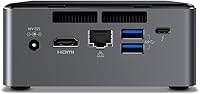
This NUC barebone system includes built-in 2.4 GHz Wi-Fi for wireless connectivity. It also has a wired Ethernet port on the chassis, so you have the option to connect directly to your router with a cable if you prefer a more stable connection for video calls or large file transfers.