Overview

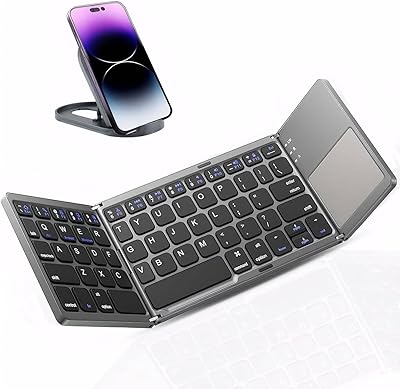
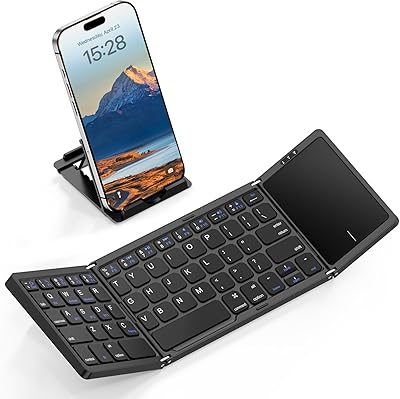
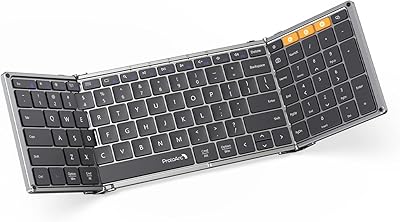
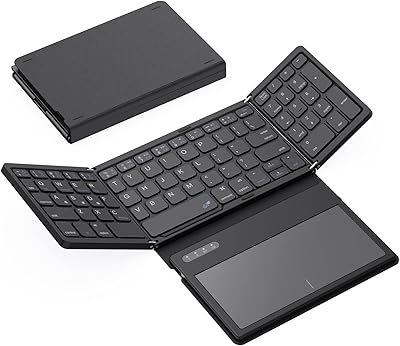
The iClever BK18 Foldable Bluetooth Keyboard launched in late 2024 and has quietly built a following among travelers and students who need real typing capability without hauling extra gear. It folds into a pocket-sized package — complete with a carrying pouch — making it easy to toss into a jacket or backpack. That said, honesty upfront matters: this is a 63-key layout with a 15mm key pitch, noticeably tighter than the 18mm standard on most laptops. There's no backlighting, no spill protection, and the numpad advertised in the title is actually the touchpad toggling into number-entry mode via Fn + Space — not a dedicated numpad row.
Features & Benefits

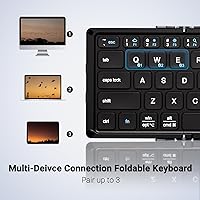
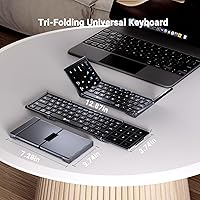
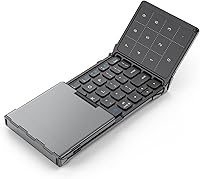
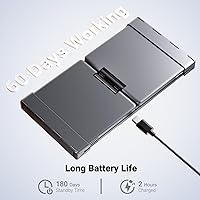
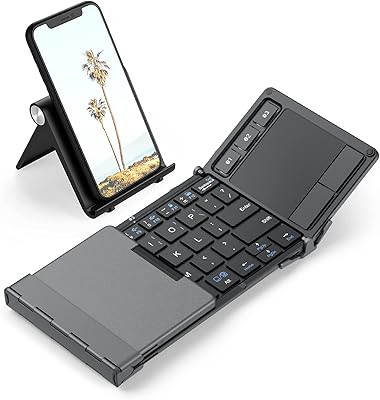
Unfolded, the BK18 opens to a 7.27″ x 3.74″ work surface and collapses to just 0.67″ thick — slim enough to slip into most phone pockets. It connects via Bluetooth 5.0 and can stay paired to three devices at once, with switching handled by dedicated keys rather than a fiddly app. The built-in touchpad is a genuine convenience for tablet users who'd otherwise need a separate mouse, and its secondary numpad function via Fn + Space works well for occasional number entry. Keys are quiet — rated under 50 dB — which is appreciated in shared spaces. Charge time is roughly two hours over USB-C, and realistic daily-use battery life lands around 60 days of active use, well below the 180-day standby figure quoted in the specs.

Best For

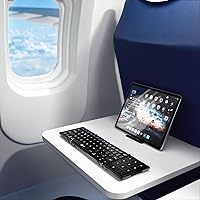
This pocket-sized Bluetooth keyboard hits its stride when paired with an iPad Air, iPad Pro, or a recent iPhone for café or commute work sessions. Frequent travelers will appreciate that it adds almost no bulk to a carry-on, and students juggling a laptop, tablet, and phone can handle all three from a single board. If you find yourself thumb-typing long emails or documents on a phone screen, the difference is immediate. Where it falls short: heavy data-entry users who rely on a true numpad daily will find the toggle workaround slow, and anyone working in low light will miss backlit keys. One firm note — iPad mini is not supported, a detail worth confirming before purchase.

User Feedback

Buyers consistently highlight pairing speed and portability as the standout wins — most report the three-device switching works reliably without re-pairing hassles. The touchpad draws praise from tablet users who want a point-and-click option without packing a mouse. On the critical side, touch typists coming from a full-size keyboard tend to report a real adjustment period with the tighter 15mm key pitch; it's not a dealbreaker for most, but it takes time. A smaller thread of reviews raises questions about hinge durability under daily folding. And the battery life framing catches people off guard — the 180-day figure refers to standby time, not active use, which is a distinction the listing buries rather than leads with.

Pros

  • Tri-fold design collapses to jacket-pocket size and ships with a carrying pouch included.
  • Pairs with up to three devices simultaneously and switches between them via dedicated keys.
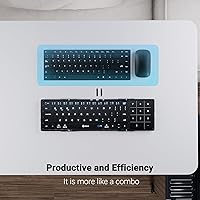
  • Built-in touchpad removes the need to pack a separate mouse for tablet or phone setups.
  • Keys stay quiet at under 50 dB, making this folding keyboard library and open-office friendly.
  • USB-C charging refills the battery in roughly two hours — no proprietary cable needed.
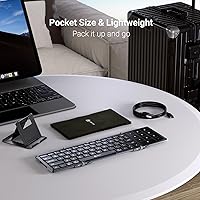
  • At 7.5 oz, it adds almost nothing to a carry-on or a day bag.
  • Active battery life of around 60 days means most users will rarely think about recharging.
  • Broad Bluetooth-only compatibility spans Windows, macOS, iOS on iPhone 13 and up, and Android 8 and up.

Cons

  • The 15mm key pitch is noticeably tighter than the laptop standard and demands a real adjustment period for touch typists.
  • No backlighting makes the BK18 impractical for low-light or nighttime use sessions.
  • The fold hinge has drawn durability questions from buyers who unfold and refold it every single day.
  • iPad mini owners are completely locked out — a compatibility gap that is easy to miss before purchasing.
  • The 180-day battery figure in the marketing copy applies to standby only, not real-world daily active use.
  • There is no wired fallback and no USB receiver, so a dropped Bluetooth connection leaves you without a keyboard entirely.
  • The numpad is a touchpad toggle via Fn + Space, not a dedicated key row — a meaningful difference for anyone doing regular data entry.
  • No spill resistance means a single coffee or water mishap could permanently damage the board.

Ratings

The iClever BK18 Foldable Bluetooth Keyboard scores on this page are produced by our AI review engine, which analyzed thousands of verified global buyer experiences while actively filtering out incentivized, duplicate, and bot-generated feedback. Every rating reflects a balanced synthesis of real-world praise and honest pain points — nothing is inflated to favor the brand. Whether portability or typing comfort matters most to you, these scores are built to give you a clear, trustworthy picture of where this folding keyboard genuinely delivers and where it asks you to compromise.
Portability & Form Factor
94%
Travelers and commuters consistently rank portability as the BK18's defining win. At 7.5 oz and folding down to a 0.67-inch profile, it disappears into a jacket pocket or sits almost invisibly in a backpack sleeve. The included carrying pouch adds practical protection that buyers genuinely appreciate on daily trips.
The tri-fold hinge, while clever, does add a brief setup step before each session — unfolding and positioning on a surface takes a few extra seconds compared to a traditional slim keyboard. On a lap or uneven surface, the board can feel slightly unstable without a hard flat desk underneath it.
Build Quality & Durability
68%
32%
For everyday travel use, the ABS plastic frame holds up reasonably well against the bumps and jostles of bag life. Most buyers find the build feels more solid than the price point might suggest, and the matte black keycaps resist visible wear and minor scuffs during normal daily handling.
The fold hinge is the component drawing the most long-term concern. A consistent thread of user feedback points to questions about how the plastic joint holds up after months of daily folding and unfolding, with no metal reinforcement to back it up. The complete absence of spill resistance is also a notable gap for café and commute use.
Typing Experience
71%
29%
For short-burst sessions — emails, quick documents, note-taking in transit — this folding keyboard is genuinely pleasant to use. The laptop-style key action feels light without being mushy, and most users who give it a consistent week of regular use report that their speed and accuracy return to near-normal levels.
The 15 mm key pitch is 3 mm narrower than most laptop keyboards, and that gap hits hardest for experienced touch typists. Errors spike noticeably in the first few days of use, and people who type fast for long stretches — whether writing reports or handling data entry — tend to report the sharpest frustration during the adjustment window.
Connectivity & Pairing
88%
Bluetooth 5.0 delivers fast, stable connections across all paired devices. Initial setup is low-friction — most users are typing within two minutes of unboxing — and the three-device switching via dedicated keys works reliably in real multi-device workflows, like jumping from a MacBook to an iPad between back-to-back meetings.
The absence of a USB receiver or wired fallback is a real limitation for anyone whose device has Bluetooth quirks or who works in crowded wireless environments like co-working spaces or airport lounges. If Bluetooth drops entirely, there is no alternative connection method to fall back on while troubleshooting.
Battery Life
74%
26%
Sixty days of real-world active daily use is a solid, practical number for a portable keyboard this size. The 2-hour USB-C recharge time means even if you run it down, you are not waiting long to get back to work, and the universal USB-C connector is already in most travel bags alongside phone and laptop chargers.
The marketing-listed 180-day figure refers exclusively to standby mode — not active typing — a distinction the product listing does not surface clearly. Buyers who purchase expecting months of continuous use without charging are repeatedly caught off guard, and the resulting trust gap shows up consistently and predictably across user feedback threads.
Touchpad Usability
79%
21%
Having a touchpad built in is a genuinely useful feature, particularly for iPad and iPhone users who would otherwise need to reach back to the screen to reposition a cursor mid-document. Most users describe it as responsive enough for everyday navigation — clicking links, scrolling pages, and repositioning text insertion points.
The touchpad surface area is naturally constrained by the keyboard's compact footprint, and precision gestures like fine-point cursor control or confident multi-finger scrolling can feel cramped in extended use. It functions well as a convenience feature but should not be compared to the trackpad experience on a mid-range laptop.
Key Noise Level
86%
The sub-50 dB key actuation is one of the quieter qualities buyers in shared environments actively notice and appreciate. Students in libraries, professionals in open-plan offices, and café regulars report that typing draws no attention from nearby people — a real courtesy feature that earns consistent unprompted praise in reviews.
While quiet by keyboard standards, keystrokes on a hard resonant desk surface can produce slightly more ambient sound than expected in very silent rooms. A handful of users in echo-prone study spaces or recording-adjacent environments mention the combined noise of keys and desk contact is marginally more noticeable than anticipated.
Multi-Device Support
83%
Three-device pairing is a genuine productivity feature for people managing a laptop, tablet, and phone simultaneously. Students and remote workers in particular report that switching between an iPad for reading and a laptop for writing — with a single keyboard — meaningfully reduces desk clutter and lightens the load in a travel bag.
The device switch introduces a one-to-two second lag that can interrupt flow for users who alternate frequently. Re-pairing after a factory reset or connecting to a brand-new device also requires stepping back through the full Bluetooth setup process, which some buyers find slightly more involved than the quick-switch experience implies.
Value for Money
81%
19%
At its price tier, the combination of tri-fold portability, built-in touchpad, three-device Bluetooth pairing, and USB-C charging represents a strong feature-to-cost ratio. Buyers who have compared it against pricier foldable alternatives routinely note that the BK18 covers the core features most travelers and students actually need without the premium markup.
The value case softens for power users who discover post-purchase that the numpad is toggle-based, backlighting is absent, and the key pitch demands an adjustment period. For buyers with more demanding or professional typing needs, investing in a full-pitch travel keyboard might ultimately deliver better satisfaction per dollar spent.
Setup & Ease of Use
87%
Getting this pocket-sized Bluetooth keyboard running is genuinely low-friction — most users complete initial pairing in under two minutes without consulting a manual. The fold-to-power design is intuitive from the first use, and the dedicated device-switch keys remove the need to navigate settings menus when jumping between devices during a typical workday.
New users occasionally take a session or two to internalize the Fn + Space toggle for numpad mode, since there is no visual indicator on the keyboard showing which mode is currently active. The lack of backlighting also makes function-layer shortcut labels harder to locate in dim lighting for users still learning the layout.
Device Compatibility
72%
28%
Cross-platform support spanning Windows, macOS, iOS, and Android means most buyers can connect it to every screen they own with a single keyboard. In practice, moving from an Android phone to a MacBook to an iPad within one work session functions without any additional pairing steps once the initial setup is complete.
iPad mini owners are locked out entirely — a compatibility gap that surfaces as a post-purchase surprise far more often than it should, given how quietly the exclusion is handled in the product listing. Older iPhones below model 13 are also excluded, which narrows the supported iOS user base more than some prospective buyers realize.
Numpad Toggle Function
61%
39%
For users who need to enter numbers only occasionally — filling in a form, typing a date, jotting a figure — the Fn + Space toggle is a workable solution that genuinely removes the need to carry a separate numeric keypad. It adds real functionality without requiring any additional hardware or accessories.
The toggle mechanic adds a deliberate step every time you switch between cursor navigation and number entry, and returning to touchpad mode requires pressing the same shortcut again — something easy to forget mid-task. For any workflow that alternates frequently between text and numbers, the interruption accumulates into a noticeable productivity drag.
Keyboard Layout
67%
33%
The 63-key layout covers everything needed for standard document work, email, and browsing without feeling completely stripped down. Function-layer shortcuts for media and brightness controls are present, and the key legends are legible enough in normal ambient daylight without backlighting being a critical missing piece during daytime sessions.
The compressed layout means several keys that touch typists expect in familiar positions are shifted or reassigned compared to a full-size board. Punctuation keys in particular tend to generate the most errors during the adjustment period, which is a consistent friction point for writers and journalists who depend on precise symbol muscle memory.
Charging Experience
84%
USB-C charging is the right call for a modern portable accessory — the cable is already in most bags alongside a phone or laptop charger. The roughly 2-hour full recharge is fast enough that plugging in during lunch or an evening session reliably keeps the keyboard ready for the next full day of use.
The 210 mAh battery capacity, while adequate for most use patterns, means there is no pass-through charging capability — the keyboard cannot be used while connected to power. In the rare event the battery runs flat mid-session with a charger only nearby, the wait is the only option, which can be frustrating on deadline.

Suitable for:

The iClever BK18 Foldable Bluetooth Keyboard is a strong fit for anyone whose main frustration is carrying a full-size keyboard while still needing real typing speed on the road. Frequent travelers, digital nomads, and café workers who pair with an iPad Air, iPad Pro, or a recent iPhone will find the tri-fold form factor genuinely useful — it slips into a jacket pocket or the sleeve of a day bag without any rearranging. Students managing notes across a laptop, tablet, and phone can keep all three paired simultaneously and switch between them using dedicated keys rather than diving into Bluetooth menus each time. For light-to-moderate typists who just want to escape the thumb-typing grind on a phone screen, the BK18 punches well above its price tier. The built-in touchpad is a practical bonus, especially on tablets where you would otherwise need a separate mouse cluttering your setup.
Not suitable for:

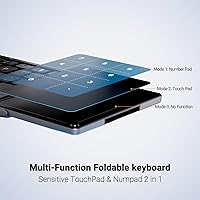
The iClever BK18 Foldable Bluetooth Keyboard is a harder sell for professionals who depend on a true dedicated numpad throughout the workday — the Fn + Space toggle that switches the touchpad into number-entry mode is workable for occasional use, but it adds real friction for anyone doing continuous data entry. Touch typists who have spent years on a full-size keyboard will face a genuine adjustment period: the 15mm key pitch is 3mm narrower than the laptop standard, and that gap registers immediately in the hands before muscle memory catches up. Anyone who regularly works in dim environments will also find the lack of backlighting a daily irritant rather than a minor omission. The board has no spill resistance, which carries real risk on a crowded café table. And if you own an iPad mini, stop here — the device is explicitly incompatible, a detail that is easy to miss in the listing before purchase.
Specifications

  • Weight: The keyboard weighs 7.5 oz (220 g), keeping bag load negligible even for daily carry.
  • Dimensions: Listed product dimensions are 7.27″ L x 3.74″ W x 0.67″ H; the tri-fold mechanism opens to a full typing surface and collapses to a 0.67″ thickness when closed.
  • Key Count: The layout includes 63 keys, covering alphanumeric, modifier, and function rows without a dedicated numpad column.
  • Key Pitch: Each key has a 15 mm center-to-center pitch, which is 3 mm narrower than the 18 mm standard found on most laptop keyboards.
  • Connectivity: Connects exclusively via Bluetooth 5.0; there is no USB receiver option and no wired connection mode of any kind.
  • Device Pairing: Supports simultaneous pairing with up to 3 devices, switchable via dedicated keyboard keys without re-entering Bluetooth menus.
  • Battery: The built-in 210 mAh battery recharges via USB-C in approximately 2 hours.
  • Battery Life: Real-world active-use battery life is approximately 60 days; the 180-day figure in the specification sheet refers strictly to standby mode.
  • Charging Port: Charges via a USB-C port, compatible with standard cables widely available for modern devices.
  • Touchpad: A built-in touchpad handles cursor control, and pressing Fn + Space toggles it into a numpad entry mode when number input is needed.
  • Noise Level: Key actuation is rated under 50 dB, placing it in the same quiet range as a typical laptop keyboard.
  • Backlighting: The keyboard has no backlighting; all keycaps are non-illuminated and rely entirely on ambient light.
  • Spill Resistance: The board has no water or spill resistance rating and should be kept away from liquids at all times.
  • Material: The housing is made from Acrylonitrile Butadiene Styrene (ABS) plastic with a gray bottom shell and a black top cover and keycaps.
  • Compatibility: Supports Windows 10 and later, macOS 10.13 and later, iOS on iPhone 13 and later, and Android 8.0 and later; iPad mini is explicitly not supported.
  • In-Box Contents: The package includes the keyboard and a soft carrying pouch for travel storage and basic protection.

Related Reviews
iClever BK08 Foldable Bluetooth Keyboard
77%
88%
Build Quality
93%
Portability & Form Factor
74%
Typing Experience
71%
Touchpad Performance
78%
Multi-Device Pairing
More
iClever BK05 Foldable Bluetooth Keyboard
79%
93%
Portability
88%
Build Quality
78%
Typing Experience
91%
Multi-Device Connectivity
86%
Battery Life (Backlight Off)
More
iClever BK20 Bluetooth Keyboard
80%
83%
Bluetooth Connectivity
78%
Typing Experience
62%
Build Quality
81%
Battery Life
86%
Numeric Keypad Usability
More
GEODMAER Foldable Bluetooth Keyboard
82%
93%
Portability
71%
Typing Experience
88%
Multi-Device Switching
63%
Touchpad Usability
91%
Battery Life
More
iClever BK10 Bluetooth Keyboard
79%
83%
Typing Feel
78%
Multi-Device Switching
61%
Battery Life
71%
Build Quality
67%
Key Stability & Longevity
More
iClever BK50 Compact Bluetooth Keyboard
79%
83%
Typing Experience
91%
Portability
88%
Multi-Device Switching
78%
Battery Life
82%
Build Quality
More
Geyes GK608 Foldable Bluetooth Keyboard
75%
93%
Portability
81%
Build Quality
58%
Typing Experience
77%
Dual Device Connectivity
84%
Value for Money
More
Samsers KF01 Foldable Bluetooth Keyboard
80%
93%
Portability & Form Factor
81%
Key Feel & Typing Comfort
63%
Build Quality & Durability
76%
Bluetooth Connectivity
89%
Battery Life
More
PuechAxe B088BL Foldable Bluetooth Keyboard
76%
93%
Portability
71%
Typing Experience
74%
Build Quality
86%
Multi-Device Pairing
67%
Battery Life
More
ProtoArc XK01 Foldable Bluetooth Keyboard
75%
93%
Portability
81%
Build Quality
69%
Typing Experience
88%
Multi-Device Switching
18%
Backlight
More

FAQ

No, it does not — and this trips up a lot of buyers who discover it only after purchase. iPad mini is explicitly excluded from the compatibility list. It does pair with the standard iPad (10.2-inch), iPad Air, and iPad Pro, so if you're on any of those models you're covered.

It's a toggle, not a dedicated numpad row. Pressing Fn + Space switches the built-in touchpad into a numpad input mode. For occasional number entry that works reasonably well, but if your workflow depends on constant numpad access, that extra keypress will add up to real friction over the course of a day.

Around 60 days of active daily use is a realistic expectation. The 180-day figure you see in the spec sheet refers to standby time — meaning the keyboard sitting idle and powered on, not being typed on. When it does need a charge, USB-C refills it in roughly 2 hours.

No. The BK18 is Bluetooth-only with no wired fallback and no USB receiver. If the battery runs out and you don't have a charger available, you'll need to wait for it to recharge before using it again. Given the 60-day active life, planning ahead usually avoids this scenario.

There are dedicated device-switching keys built into the keyboard. You press the key assigned to the device you want, and the connection transfers within a couple of seconds — no need to open Bluetooth settings on either device. It's one of the more convenient aspects of this folding keyboard for anyone juggling a laptop, tablet, and phone.

It depends on your typing speed and how set your muscle memory is. The 15 mm pitch is 3 mm narrower than the 18 mm standard on most laptops — that gap is noticeable immediately. Most casual typists adapt within a week or two of regular use. Fast touch typists who rely heavily on muscle memory for accuracy tend to find the adjustment slower and more frustrating, so it's worth factoring in if speed matters.

Yes, any Android device running version 8.0 or later should work. Setup is the same as connecting any Bluetooth peripheral — put the keyboard into pairing mode and connect from your device's Bluetooth settings. Switching back to it from another paired device uses the dedicated key on the board.

Yes, this is a genuine strength. The keys are rated under 50 dB, which is comparable to a quiet laptop keyboard. In practice, people sitting near you in a library or open office are unlikely to be bothered by it.

The hinge is designed for regular use, but it is made from ABS plastic rather than metal, so long-term wear is a fair concern for anyone who folds and unfolds multiple times a day. Storing it in the included pouch rather than loose in a bag — where it can catch on other items — is the simplest way to reduce stress on the mechanism over time. Some buyers who have used it heavily daily have noted questions about longevity, so it's something to keep in mind if you need a keyboard that will last years under hard use.

For that specific use case, yes, it holds up well. If you're writing anything longer than a few sentences on an iPhone regularly, switching from thumb-typing to a physical keyboard makes a noticeable difference in both speed and comfort. The touchpad lets you reposition your cursor without reaching back to the screen, which is a small convenience that adds up. Just confirm your iPhone is model 13 or later, since that's the lower end of the supported range.