Overview

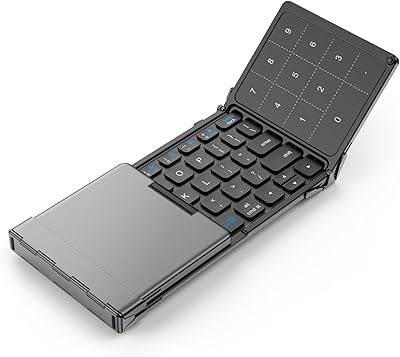
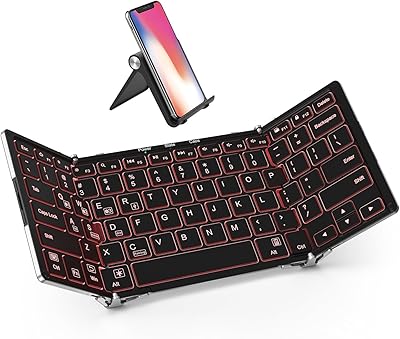
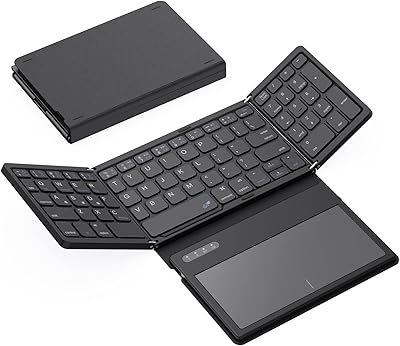
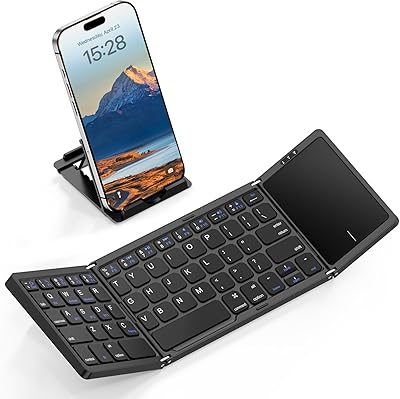
The iClever BK08 Foldable Bluetooth Keyboard has been quietly holding its ground in the travel keyboard market since 2016, and its sustained sales rank makes clear this is no flash-in-the-pan accessory. It folds into three compact panels that slip into a back pocket or small bag, targeting the kind of person who wants a real typing surface without lugging a full laptop. The scissor-switch mechanism sets it apart from the mushy membrane boards that dominate this price tier, and the built-in touchpad means you have a self-contained input setup the moment it unfolds. Mid-range in price, above average in ambition.
Features & Benefits

The BK08 pairs with up to three devices over Bluetooth 5.0, and switching between them takes a single tap — genuinely useful when your day involves a phone, a tablet, and a laptop. The aluminum base resists the flex you would expect from a hinged plastic keyboard, and at seven ounces the whole thing barely registers in a bag. A two-hour USB-C charge can carry you through weeks of use before you need to plug in again. The touchpad handles navigation and scrolling competently for travel situations, though it is not a substitute for a proper trackpad. One honest caveat: the keys run a bit smaller than a standard laptop board, so expect a short adjustment period.

Best For

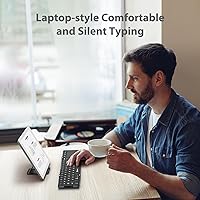
This folding keyboard is a natural fit for anyone who travels regularly and finds touchscreen typing frustrating but has no interest in carrying a full-size board. iPad and tablet users benefit most from the touchpad combo, which pushes a tablet noticeably closer to a laptop-style experience. Remote workers who rotate between coffee shops, coworking spaces, and home will appreciate one peripheral that pairs with everything. Smartphone typists drafting longer emails or notes on their phone will also find it worthwhile. If you work primarily at a fixed desk, this pocket-sized keyboard is not the right tool — it is built for the person who is rarely in the same place twice.

User Feedback

Across a substantial pool of buyer reviews, the BK08 earns consistent praise for build quality that catches people off guard — the aluminum construction regularly surprises buyers accustomed to flimsy travel keyboards at similar prices. Touchpad responsiveness comes up as a positive more than you might expect for a folding board. That said, typists with larger hands flag the compact key spacing as something that genuinely takes time to adjust to, not just a minor quirk. Bluetooth reconnect speed when switching devices is inconsistent for some users, and the lack of backlighting is a real drawback if you type in dim environments. Samsung DeX users should be aware upfront that touch support is not available.

Pros

  • Tri-fold aluminum construction feels genuinely solid, not plasticky, for its price tier.
  • The built-in touchpad removes the need to pack a separate travel mouse.
  • Pairs with up to three devices and switches between them with a dedicated hotkey.
  • Scissor-switch keys provide a crisper, more responsive feel than the membrane boards common at this price.
  • USB-C charging is fast and uses the same cable as most modern devices — no proprietary adapters needed.
  • Battery runtime in real-world use comfortably covers weeks of travel without needing a top-up.
  • Broad OS compatibility means one keyboard works across iPhone, iPad, Android, Windows, and Chromebook.
  • At roughly seven ounces, it adds almost nothing to a bag or jacket pocket.
  • Auto-sleep on fold means you never have to remember to turn it off manually.
  • The 12-month warranty provides reasonable peace of mind for a travel peripheral.

Cons

  • Compact key size requires a real adjustment period — large-handed typists may never fully adapt.
  • No backlighting makes it impractical in dim cafés, overnight flights, or low-light rooms.
  • Bluetooth reconnect lag when switching devices can interrupt workflow during rapid task-switching.
  • Keycap legends show visible wear after several months of heavy daily use.
  • No wired mode means a dead battery leaves you completely without input until it recharges.
  • The touchpad, while functional for travel, is noticeably limited for fine cursor work or multi-finger gestures.
  • Samsung DeX touch support is absent, which is a hard block for users in that workflow.
  • The 65-key layout omits a dedicated numpad and compresses function-key access to a secondary layer.
  • Folding and unfolding requires a flat surface and two hands, which slows setup in cramped or standing situations.
  • There is no carrying case included, so protecting it in a busy bag falls entirely on the buyer.

Ratings

The iClever BK08 Foldable Bluetooth Keyboard has been scored by our AI system after processing verified buyer reviews from multiple global markets, with spam, incentivized, and bot-flagged submissions actively filtered out before any score was calculated. The results reflect a genuine cross-section of real-world use — from daily commuters typing on their iPads to remote workers hot-desking across three devices. Both the strengths that keep this folding keyboard ranked near the top of its category and the pain points that have frustrated a meaningful share of buyers are transparently represented below.

Build Quality
88%
The aluminum base consistently surprises buyers who expect a flimsy hinge mechanism. Reviewers coming from all-plastic folding keyboards describe it as noticeably more rigid, and several long-term owners report the hinges holding up well after more than a year of daily folding and unfolding.
The ABS plastic top cover attracts light scratches over time, which bothers buyers who carry it loose in a bag. A small number of reviewers also note that the hinge alignment can drift slightly after extended heavy use, though this appears to be a minority experience.
Portability & Form Factor
93%
Fitting into a back pocket is not marketing hyperbole — buyers regularly mention pulling it out on plane tray tables and café counters where a standard keyboard would be impractical. The tri-fold design keeps the footprint genuinely small without the keyboard feeling like a toy when unfolded.
A few users find the folding and unfolding process requires two hands and a flat surface, which can be slightly awkward when you are already seated and trying to get set up quickly. The folded thickness is also a touch deeper than some competing two-fold designs.
Typing Experience
74%
26%
The scissor-switch mechanism delivers a noticeably crisper keystroke than the membrane boards common at this price point. Reviewers who type frequently — journalists, students, remote workers — describe it as genuinely usable for extended sessions once the key spacing is familiar.
The compact key size is the single most recurring complaint in the review pool. Typists with larger hands describe an adjustment period of days to weeks, and some never fully adapt. Accuracy errors are common in the first few sessions, and this is not a keyboard you can pick up and type on at full speed from day one.
Touchpad Performance
71%
29%
For a folding keyboard, the built-in touchpad clears a low bar and then some. Buyers using it with an iPad find it functional for everyday tasks like scrolling through documents, clicking links, and basic navigation — enough to avoid carrying a separate mouse on short trips.
Comparing it to a laptop trackpad is where it falls short, and a number of reviewers make that comparison explicitly. Fine cursor control and multi-finger gestures are inconsistent, and a few users report the touchpad becoming less responsive in cooler ambient temperatures.
Multi-Device Pairing
78%
22%
Pairing three devices and switching between them via dedicated hotkeys works reliably for most users. Professionals who cycle between a work laptop, a personal phone, and a tablet during the day find this feature genuinely reduces friction compared to carrying device-specific peripherals.
Reconnect speed when switching is the weak point — some users report a one-to-three second lag before the new device registers input, which becomes annoying during rapid task-switching. A smaller subset describe occasional pairing drops that require re-initiating the Bluetooth connection from scratch.
Battery Life
86%
Real-world battery performance aligns closely with the advertised runtime, which earns trust from reviewers who have been burned by inflated battery claims before. The auto-sleep-on-fold behavior means casual users can go weeks between charges without thinking about it.
Heavy users who keep the keyboard open for long desktop-replacement sessions drain it faster than the headline figure suggests. The battery is also not user-replaceable, so long-term degradation over years of ownership is a valid concern for buyers planning extended use.
Charging & Connectivity
89%
USB-C charging is straightforwardly convenient in 2024 — buyers appreciate not needing a proprietary cable or AA batteries. Reaching a full charge in roughly two hours is fast enough that plugging in during lunch does not disrupt a workday meaningfully.
There is no wired typing mode, which means if the battery is fully depleted mid-session you are stuck waiting rather than plugging in and continuing. Buyers who occasionally need a wired fallback for corporate IT environments should note this limitation before purchasing.
OS & Device Compatibility
82%
18%
The adaptive key mapping covers a genuinely broad device range, and reviewers switching between iOS, Android, and Windows in the same day report that the keyboard adjusts without manual reconfiguration. Chromebook support is a bonus that a small but appreciative subset of buyers highlights specifically.
Samsung DeX users with touch-mode workflows are out of luck — the incompatibility is a firm limitation, not a minor quirk. A handful of older Android devices also report inconsistent cursor behavior with the touchpad, suggesting compatibility is not perfectly uniform across the Android ecosystem.
Key Layout & Shortcuts
67%
33%
The 65-key layout includes dedicated shortcut keys for common OS functions, and regular users find that muscle memory for those shortcuts builds over time. The QWERTY arrangement is standard enough that there is no relearning curve beyond the size adjustment.
Sixty-five keys means real estate had to be sacrificed somewhere — function keys are accessed via a secondary layer, and the compressed layout omits dedicated navigation and numpad keys that some power users rely on. Buyers who do heavy spreadsheet work will notice the missing numpad almost immediately.
Value for Money
83%
At its price point, this folding keyboard bundles a touchpad, aluminum construction, multi-device support, and USB-C charging in a way that undercuts most comparably specified competitors. For buyers who have priced out alternatives, it tends to land as the pragmatic choice.
Budget-focused buyers occasionally feel the price is a stretch for a keyboard with no backlighting and compact keys. A few reviewers note that promotional discounts appear regularly, and those who bought at full price during a price spike feel the value equation is less convincing at those levels.
Setup & Ease of Use
84%
Initial Bluetooth pairing is described as fast and frustration-free across most major devices. The keyboard wakes on the first keypress after unfolding, which feels intuitive and removes an extra step that some competing boards require.
The manual is minimal, and figuring out the multi-device pairing sequence and OS-switching shortcuts takes trial and error for less tech-savvy buyers. A small number of reviewers report needing to consult online resources to unlock functionality that should have been documented clearly out of the box.
Backlighting
31%
69%
The absence of backlighting is intentional and contributes to the extended battery life, which is a trade-off some buyers consciously accept. Reviewers who primarily work in well-lit environments report that the lack of backlighting never comes up as an issue in daily use.
For users who type in dim cafés, on overnight flights, or in bed at night, no backlighting is a genuine dealbreaker. This is the category with the sharpest divide in the review pool — it barely matters to some buyers and completely disqualifies the keyboard for others.
Noise Level
76%
24%
The scissor-switch mechanism produces a quieter keystroke than mechanical keyboards, and buyers who use it in shared office environments or libraries report no complaints from nearby colleagues. The click is tactile enough to feel responsive without being distracting.
Compared to quiet-optimized membrane keyboards, the BK08 is audibly present. A handful of reviewers working in very quiet shared spaces — late-night library study, open-plan offices with strict quiet policies — note it draws more attention than they would prefer.
Durability Over Time
72%
28%
Long-term reviewers who have owned the keyboard for a year or more generally report it holding up to daily commute conditions. The reinforced hinges appear to be a genuine engineering investment rather than a marketing claim, based on multi-year owner feedback.
Keycap legends show visible wear after six to twelve months of heavy use, particularly on the most frequently pressed keys. The folding mechanism, while solid initially, shows increasing looseness in some long-term units — not a failure, but a gradual degradation that affects the premium feel.

Suitable for:

The iClever BK08 Foldable Bluetooth Keyboard was built for people whose work follows them around, and it shows. Frequent travelers who need to draft real documents on a plane tray or at a hotel desk — but refuse to pack a full laptop — will find this folding keyboard hits a practical sweet spot that larger portables cannot. iPad and tablet power users gain the most from the touchpad integration, since it effectively turns a tablet into a laptop substitute for light-to-medium workloads without requiring a separate mouse rattling around in the bag. Remote workers who rotate between home, cafés, and coworking spaces will appreciate having one peripheral that pairs with their phone, tablet, and laptop and switches between them without re-pairing rituals. Smartphone typists who regularly find themselves composing long emails or drafts on a phone screen will notice an immediate improvement in both speed and comfort once they adapt to the compact key spacing.
Not suitable for:

The iClever BK08 Foldable Bluetooth Keyboard is a poor fit for anyone who expects desktop-class typing comfort or precision cursor control. People with larger hands should think carefully before buying — the key spacing is genuinely compact, and while some users adapt, others never fully close the accuracy gap compared to a standard-sized board. If you regularly type in low-light conditions — late-night flights, dim coworking spaces, a dark bedroom — the complete absence of backlighting will frustrate you from day one, and no amount of habituation fixes that. Power users who depend on a full numpad for spreadsheet work or data entry will find the 65-key layout a constant obstacle. Samsung DeX users with touch-dependent workflows should avoid this one entirely, as the touchpad incompatibility is not a fixable software issue. Anyone wanting a wired fallback for corporate IT environments or latency-sensitive tasks should also look elsewhere, since Bluetooth-only connectivity is a firm constraint.
Specifications

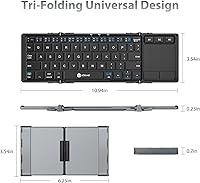
  • Folded Size: When closed, the keyboard measures approximately 6.25″ long by 3.54″ wide by 0.70″ thick — compact enough to slide into a back pocket or small pouch.
  • Open Size: Fully unfolded, the typing surface extends to roughly 10.94″ in length while staying just 0.23″ thin on a flat surface.
  • Weight: The keyboard weighs 7 oz (201 g), which adds negligible bulk to a travel bag or jacket pocket.
  • Key Count: The layout includes 65 keys arranged in a standard QWERTY configuration, with function shortcuts accessible via a secondary layer.
  • Key Size: Individual keycaps measure 13–14 mm, which is noticeably smaller than a standard laptop keyboard and requires an adjustment period for most typists.
  • Switch Type: Keys use a scissor-switch mechanism, delivering a crisper and more tactile response than membrane alternatives common in this product category.
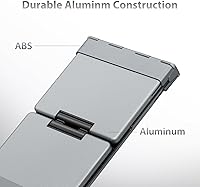
  • Materials: The bottom case is aircraft-grade aluminum for rigidity and durability, while the top cover uses ABS plastic to keep overall weight low.
  • Connectivity: Bluetooth 5.0 supports simultaneous pairing with up to three devices, switchable via dedicated hotkeys without re-pairing.
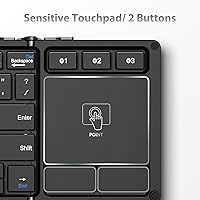
  • Touchpad: A built-in touchpad with two physical click buttons supports cursor navigation, scrolling, and clicking — eliminating the need for a separate travel mouse.
  • Battery: The 210 mAh lithium polymer battery is rated for approximately 60 days of typical use, with an auto-sleep function activating when the keyboard is folded.
  • Charging: Charging is handled via USB-C and reaches a full charge in roughly two hours; there is no wired typing mode.
  • OS Support: Compatible with iOS 18.0 and above, macOS 10.13 and above, Android, Windows, and Chromebook, with OS-adaptive key mapping.
  • Backlighting: The keyboard has no key backlighting, which affects usability in dim or low-light environments.
  • USB Receiver: There is no USB dongle or wireless receiver included; Bluetooth is the only connection method available.
  • Warranty: iClever covers the BK08 with a 12-month manufacturer warranty against defects in materials and workmanship.
  • Model Number: The official model designation is IC-BK08, which is useful for identifying the correct firmware documentation or contacting support.
  • Battery Type: The internal lithium polymer battery is built-in and not user-replaceable, so long-term battery degradation is a consideration for heavy users.
  • DeX Compatibility: Samsung DeX touch mode is explicitly not supported, which affects users who rely on that specific desktop-extension workflow.

Related Reviews

iClever BK18 Foldable Bluetooth Keyboard
84%
93%
Portability & Design
88%
Battery Life
90%
Multi-device Pairing
74%
Typing Comfort
92%
Compatibility
More
iClever BK05 Backlit Foldable Bluetooth Keyboard
86%
92%
Portability & Travel-Friendliness
89%
Multi-Device Connectivity
85%
Battery Life
90%
Build Quality & Durability
75%
Typing Comfort
More
iClever BK50 Bluetooth Keyboard
87%
88%
Typing Experience
91%
Multi-Device Support
94%
Battery Life
89%
Portability
85%
Build Quality
More
Geyes GK608 Foldable Bluetooth Keyboard
75%
93%
Portability
81%
Build Quality
58%
Typing Experience
77%
Dual Device Connectivity
84%
Value for Money
More
GEODMAER Foldable Bluetooth Keyboard
82%
93%
Portability
71%
Typing Experience
88%
Multi-Device Switching
63%
Touchpad Usability
91%
Battery Life
More
iClever BK20 Bluetooth Keyboard
80%
83%
Bluetooth Connectivity
78%
Typing Experience
62%
Build Quality
81%
Battery Life
86%
Numeric Keypad Usability
More
iClever BK10 Bluetooth Keyboard
79%
83%
Typing Feel
78%
Multi-Device Switching
61%
Battery Life
71%
Build Quality
67%
Key Stability & Longevity
More
Samsers KF06S Foldable Bluetooth Keyboard
88%
91%
Typing Comfort
88%
Key Responsiveness
95%
Portability
86%
Build Quality
92%
Battery Life
More
Samsers KF01 Foldable Bluetooth Keyboard
80%
93%
Portability & Form Factor
81%
Key Feel & Typing Comfort
63%
Build Quality & Durability
76%
Bluetooth Connectivity
89%
Battery Life
More
ProtoArc XK01 Foldable Bluetooth Keyboard
89%
91%
Typing Comfort
96%
Portability
88%
Connectivity Reliability
85%
Build Quality
93%
Durability of Hinges
More

FAQ

It genuinely does fit in a back jeans pocket or the front pocket of most cargo pants when folded — it is roughly the size of a large smartphone. Jacket pockets and bag side pockets are even more comfortable. The folded thickness is about 0.70″, so very slim bags may be a tighter fit, but it is not a gimmick.

The initial pairing for each device takes about a minute and only needs to be done once per device. After that, switching between your three saved devices uses a dedicated hotkey and typically connects within a couple of seconds, though some users report a short lag of one to three seconds on the reconnect.

You can pair both devices to the iClever BK08 Foldable Bluetooth Keyboard simultaneously — along with a third device if needed — and switch between them using the hotkeys. You cannot type on two devices at the same time, but swapping between them is fast enough for practical multi-device workflows.
It is genuinely functional for travel use — scrolling, clicking, and basic cursor navigation work reliably. What it is not is a replacement for the trackpad on a MacBook or a high-end laptop. Fine cursor work and complex multi-finger gestures are inconsistent, so if precise pointer control is critical to your workflow, temper your expectations accordingly.

Honestly, yes — this is worth thinking about before buying. The keycaps are smaller than a standard laptop keyboard, and the tighter spacing is the most common complaint among buyers who have larger hands. Some people adapt within a week or two; others never fully close the accuracy gap. If possible, compare the folded dimensions against your hand size before committing.

There is no backlighting of any kind on this keyboard, which is a firm design choice rather than an oversight. If you frequently type in dim environments — late-night flights, dark hotel rooms, or evening café sessions — this is a real limitation worth factoring into your decision. Touch-typing proficiency helps, but it does not fully compensate.

The key factors are the auto-sleep feature that activates whenever you fold the keyboard shut, combined with Bluetooth 5.0 efficiency. The 60-day figure assumes typical intermittent use rather than hours-long continuous typing sessions. Most users confirm the runtime is accurate for light-to-moderate daily use, though heavy all-day typists will see shorter intervals between charges.

It is compatible with Android tablets as well as iPads, though cursor support behavior can vary depending on the Android version and device manufacturer. Most modern Android tablets handle it well, but some older devices show inconsistent touchpad response. iOS and iPadOS tend to deliver the most consistent experience out of the three main platforms.

Unfortunately, no — there is no wired typing mode, so a depleted battery means you are waiting for it to recharge rather than continuing to work. The upside is that a full charge takes roughly two hours via USB-C, and the long battery life means most users are rarely caught off guard if they charge it periodically.

No carrying case is included with the keyboard. It ships without any protective sleeve or pouch, so if you plan to throw it into a bag with other items, picking up a small electronics pouch separately is worth doing to protect the surface from scratches over time.