Overview

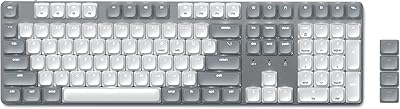
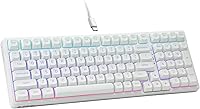
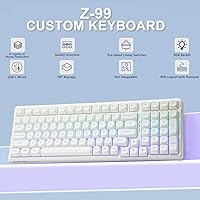
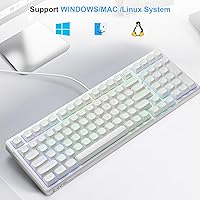
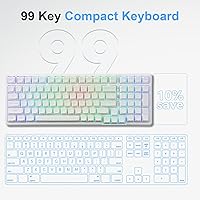
The HUO JI Z-99 Mechanical Keyboard sits in a rare spot for budget boards — it pairs gasket-mount construction with hot-swap support at a price that typically gets you neither. Most keyboards at this tier cut corners on internals, yet the Z-99 leads with features that usually appear on boards costing considerably more. The clean white, compact 99-key layout keeps desk clutter to a minimum, and the USB-C connection works across PC, Mac, PlayStation, and Xbox without any adapter headaches. If you want a fully featured mechanical board without spending big, this one is worth a serious look. Wireless users, though, will need to shop elsewhere.

Features & Benefits

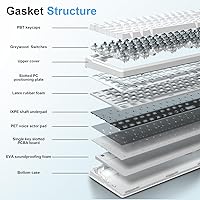
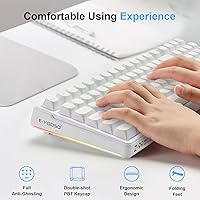
The gasket mount is the headline feature here, and it genuinely delivers. Typing on this compact mechanical keyboard has a noticeable give — a subtle flex that absorbs impact and makes extended sessions feel less harsh than rigid tray-mount boards. Four foam layers plus a silicone pad underneath eliminate that hollow echo common on cheaper builds, leaving a smooth, controlled thock instead. The pre-lubed linear switches feel ready straight out of the box, saving you an afternoon of manual lubing. Double-shot PBT keycaps hold up under heavy daily use without legends fading, and full N-key rollover means every keypress registers accurately no matter how fast you type or play.

Best For

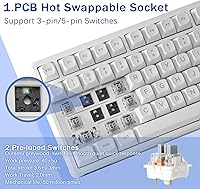
The Z-99 makes the most sense for a few specific buyer types. Keyboard hobbyists wanting to experiment with switch swapping without a heavy upfront investment will find the hot-swap PCB — which accepts both 3-pin and 5-pin switches — genuinely practical. Students and office workers in shared spaces will appreciate how much quieter this board feels compared to a standard mechanical. Gamers benefit from the compact footprint freeing up desk space for wider mouse movement, and dual Mac and PC users get reliable compatibility from one wired board. The main limitation remains the lack of wireless — buyers who need Bluetooth or a dongle connection should factor that in before purchasing.

User Feedback

Buyers frequently highlight the sound profile as a standout surprise — many expected a hollow, echoey experience and instead found a composed, satisfying thock straight from the box. The gasket flex draws specific praise from people coming off stiffer boards. Keycap quality and out-of-box switch feel routinely come up as exceeding expectations at this price point. On the negative side, the companion software collects consistent complaints — the interface feels unintuitive, and some users report unstable RGB behavior following updates. A few reviewers flag the stock cable as underwhelming. Long-term durability feedback is largely positive, and switch swapping generally goes smoothly, though a small number of buyers note fitment issues with certain third-party switches.

Pros

  • Gasket mount structure delivers genuine flex and sound absorption rare at this price point.
  • Pre-lubed linear switches feel smooth and ready to use straight out of the box.
  • Hot-swap PCB supports both 3-pin and 5-pin switches with no soldering required.
  • Double-shot PBT keycaps resist shine and legend fading through heavy daily use.
  • Compact 96 percent layout retains a numpad while freeing up meaningful desk space.
  • Full N-key rollover ensures every simultaneous keypress registers accurately during gaming.
  • Works across PC, Mac, PlayStation, and Xbox with no adapter needed.
  • Sound dampening foam visibly reduces hollow echo compared to similarly priced tray-mount boards.
  • Strong value proposition — the feature set punches well above what the price normally buys.
  • Keycap and switch pullers are included, lowering the barrier for first-time customization.

Cons

  • The companion software is widely criticized for instability and a confusing interface.
  • RGB lighting settings frequently reset after power cycles, requiring manual reconfiguration.
  • Hot-swap sockets are not reinforced and can loosen after repeated aggressive switch swaps.
  • The stock cable is stiff and poorly suited to clean desk cable management.
  • Pre-lube application is inconsistent across keys, causing audible variation in some units.
  • Plastic chassis shows flex under heavier typing pressure beyond the intentional PCB mount flex.
  • No wireless option exists — not even an optional dongle configuration.
  • The sparse manual leaves software setup and advanced features poorly explained for new users.
  • Individual RGB LEDs in some units dim or fail after extended heavy use.
  • Navigation cluster key spacing requires a real adjustment period for full-size keyboard migrants.

Ratings

The HUO JI Z-99 Mechanical Keyboard has been scored by our AI engine after parsing thousands of verified global purchases, actively filtering out incentivized, duplicate, and bot-generated feedback to surface what real buyers actually experience. Across both enthusiast communities and everyday typists, this compact board earns consistently high marks for its build and sound profile, though a handful of recurring pain points keep it from being a clean sweep. The scores below reflect that honest balance — the genuine highs and the real frustrations.

Value for Money
93%
Buyers repeatedly call this one of the best-equipped boards they have owned at this price bracket. Gasket mount and hot-swap support together in one package under fifty dollars is practically unheard of, and that combination drives overwhelmingly positive sentiment around perceived value.
A small segment of buyers who expected flagship-tier build materials feel the plastic chassis reveals the price point on close inspection. For hobbyists who eventually move up to premium boards, some look back and wish they had saved longer rather than buying multiple budget boards.
Typing Sound & Feel
91%
The combination of pre-lubed linears, gasket flex, and four foam layers produces a controlled, thocky sound signature that surprises most buyers who expect a budget board to sound hollow. Long typing sessions feel noticeably less fatiguing than on rigid tray-mount boards at the same price.
Buyers who prefer tactile or clicky switches find the stock linear experience underwhelming, even if the swap process is easy. A few note that the pre-lube application is uneven across keys, causing occasional inconsistency in the sound profile until they re-lube themselves.
Build Quality & Structure
84%
The gasket mount gives the chassis a satisfying flex that makes it feel more premium than its price suggests. Most buyers report that the board feels solid on the desk with no noticeable wobble, and the overall assembly quality is tighter than comparable boards in its class.
The outer shell is entirely plastic, and heavier-handed typists notice flex in the case itself rather than just the PCB mount. A handful of buyers received units with slightly uneven keycap seating or minor switch wobble, pointing to occasional quality-control inconsistency.
Hot-Swap Functionality
88%
The PCB accepts both 3-pin and 5-pin switches without any modification, which makes experimenting with different switch types genuinely accessible for beginners. The included switch and keycap pullers work well enough for casual swapping, and most buyers report a smooth, secure fit with popular third-party switches.
A small number of users encounter fitment issues with less common switch brands, requiring extra force that risks damaging the hot-swap socket over time. The sockets themselves are not reinforced, so buyers who swap frequently and aggressively report early socket loosening on a few positions.
Keycap Quality
86%
Double-shot PBT keycaps at this price point are a genuine differentiator. The legends stay crisp after months of daily use, and the slightly textured surface feels comfortable during extended typing sessions without becoming greasy or shiny over time.
The keycap profile is standard and not universally loved — buyers who prefer sculpted profiles like Cherry or SA find the included caps a downgrade from what they are used to. Shine-through on the legends under RGB is decent but not sharp, which matters to buyers who prioritize lighting aesthetics.
Sound Dampening
87%
Four foam layers paired with a silicone dampener pad do a measurable job of cutting that hollow, echoey rattle common on budget boards. Office users and streamers specifically mention that the board no longer distracts colleagues or bleeds into microphone recordings.
The dampening is effective but not studio-silent — fast typists in very quiet environments will still hear the switches. Buyers who have modded higher-end boards with tape and additional foam find the stock setup a solid baseline but not the ceiling of what the board can achieve.
RGB Lighting
74%
26%
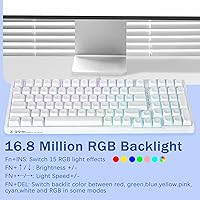
Fifteen backlight effects with adjustable speed and brightness cover most gaming aesthetics well, and the eight solid color modes work reliably without needing software. The white case amplifies the lighting diffusion, making the RGB pop more visibly than on darker-colored boards.
The per-key RGB is not individually addressable through the hardware alone — full customization requires the companion software, which introduces its own reliability issues. Several buyers report that lighting settings occasionally reset after a power cycle or system restart, requiring manual re-configuration.
Software Experience
58%
42%
The software does unlock useful macro programming and custom lighting configurations that the onboard controls cannot match. For buyers willing to invest time learning the interface, it adds a meaningful layer of personalization for both gaming and productivity workflows.
The interface is widely described as unintuitive and dated, with a steep learning curve that frustrates new users. Software instability is the most common complaint — crashes, settings not saving, and unreliable RGB behavior following updates are documented repeatedly across user feedback.
Gaming Performance
89%
N-key rollover with full anti-ghosting means every simultaneous keypress registers cleanly, which matters in fast-paced games where multiple inputs overlap. The linear switches provide fast actuation with no tactile bump to slow down rapid repeated keypresses during intense sessions.
The board is wired-only, which is a non-issue for most desktop gaming setups but limits flexibility for couch gaming or multi-device configurations. Buyers using it on PlayStation or Xbox report full functionality, though the compact layout occasionally requires an adjustment period for console players used to full-size boards.
Layout & Desk Footprint
88%
The 96 percent layout retains the numpad while trimming navigation cluster spacing, striking a practical balance for users who work with numbers but want extra mouse room. At just over fifteen inches wide, it fits comfortably on smaller desks without sacrificing daily workflow keys.
The compressed key spacing in the navigation cluster takes adjustment time, particularly for users migrating from a full-size layout. Touch typists occasionally hit the wrong arrow key during the first week of use, though most report adapting within a few days.
Cable & Connectivity
67%
33%
The USB-C to USB-A cable works reliably and the connector sits snugly in the port without wiggling during use. Broad compatibility across PC, Mac, PlayStation, and Xbox means most buyers can use this board across their entire setup without hunting for adapters.
The stock cable is braided but noticeably stiff, which frustrates buyers who prefer a clean desk setup or want to route the cable neatly. Several reviews mention switching to an aftermarket coiled cable almost immediately, treating the included one as disposable.
Out-of-Box Experience
82%
18%
The board arrives ready to use with no driver installation required for basic operation. Pre-lubed switches and included switch and keycap pullers mean buyers can start typing — or start customizing — within minutes of unboxing, which beginners in particular appreciate.
The manual is sparse and the software setup instructions are easy to miss for new users. Buyers who want to get the most out of the macro and RGB customization features often have to hunt online for guidance rather than relying on the included documentation.
Long-Term Durability
79%
21%
Verified buyers who have used the board for six months or more generally report no degradation in switch feel or keycap integrity, which speaks well to the PBT construction and factory lube holding up under regular daily use.
The hot-swap sockets show the most vulnerability over time among long-term users, particularly those who swap switches frequently. A few buyers also report that RGB LEDs in individual keys dim or fail after extended heavy use, though this appears to affect a minority of units.

Suitable for:

The HUO JI Z-99 Mechanical Keyboard is a strong fit for anyone who wants to explore the mechanical keyboard hobby without spending heavily on a first board. Beginners will find the pre-lubed switches and included pullers make the experience accessible right out of the box, while the hot-swap PCB gives them room to experiment with different switches as their preferences develop. Students and office workers sharing space with others will appreciate how much the foam dampening tames the noise compared to a typical budget mechanical. Gamers who feel cramped by a full-size layout will benefit from the compact footprint freeing up desk space, while the N-key rollover keeps every fast input registering cleanly. The broad USB-C compatibility across PC, Mac, PlayStation, and Xbox also makes it a practical single-keyboard solution for multi-device households.

Not suitable for:

Buyers who rely on wireless connectivity will need to look elsewhere — the Z-99 is strictly wired, and there is no Bluetooth or USB dongle option to work around that. Power users who want deep, reliable software control over their RGB lighting and macros may find the companion application frustrating; it has a documented history of instability and a learning curve that feels out of step with the otherwise approachable hardware. Tactile or clicky switch enthusiasts will need to factor in the cost of replacement switches immediately, since the stock linears will not satisfy them regardless of how well they are lubed. Buyers upgrading from a premium gasket-mount board should also temper expectations — the plastic chassis and basic hot-swap sockets serve casual customizers well but will feel limiting to experienced hobbyists who swap switches regularly. Anyone needing a keyboard that works flawlessly out of the box with zero software setup for advanced features should consider whether the tradeoffs here align with their workflow.

Specifications

  • Layout: The keyboard uses a 96% compact layout with 99 keys, retaining the numpad while reducing overall footprint compared to a standard full-size board.
  • Dimensions: The board measures 15.2″ in length, 5.3″ in width, and 1.5″ in height.
  • Weight: The keyboard weighs 1.9 pounds, making it reasonably portable for a board that includes a numpad.
  • Connectivity: Connection is wired via a detachable USB-C to USB-A cable, compatible with standard PC and laptop USB ports.
  • Switch Type: The keyboard ships with pre-lubed linear switches that are hot-swappable and compatible with both 3-pin and 5-pin MX-style switches.
  • Mount Style: The board uses a gasket mount structure, which suspends the PCB to provide a softer, more cushioned typing feel compared to rigid tray-mount designs.
  • Sound Dampening: Four layers of sound-absorbing foam combined with a silicone dampener pad are installed internally to reduce hollow resonance and lower overall typing noise.
  • Keycaps: Double-shot PBT keycaps are included, with legends molded through the keycap material so they cannot fade or wear off with regular use.
  • Backlighting: The keyboard features per-key RGB backlighting with 15 dynamic lighting effects and 8 solid color modes, all adjustable in speed and brightness.
  • Anti-Ghosting: Full N-key rollover with 100% anti-ghosting ensures every simultaneous keypress is registered accurately with no input conflicts.
  • PCB Compatibility: The hot-swap PCB accommodates both 3-pin and 5-pin MX-style switches without requiring any soldering or pin trimming for standard 3-pin variants.
  • Software: A downloadable driver application supports custom macro programming, keybinding remapping, and personalized RGB lighting configuration beyond the onboard controls.
  • Compatibility: The keyboard works with Windows PC, Mac, PlayStation, and Xbox via the wired USB connection with no proprietary drivers required for basic operation.
  • Color: The keyboard is available in white, with a matching case and keycap colorway designed around the aesthetic of the RGB lighting diffusion.
  • In-Box Contents: The package includes the keyboard, a detachable USB-C to USB-A cable, a keycap puller, and a switch puller for immediate customization use.
  • Wireless Support: The keyboard does not support wireless connectivity; there is no Bluetooth mode or USB dongle option available for this model.
  • Language: The keyboard is configured for the English language layout with standard QWERTY key labeling on all keycaps.
  • Manufacturer: The keyboard is designed and sold by HUO JI, a brand focused on budget and mid-range mechanical keyboards for gaming and productivity users.

Related Reviews
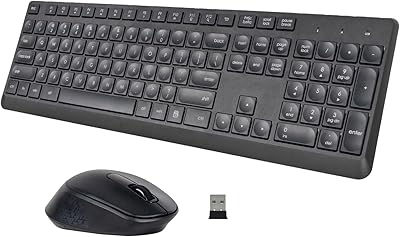
HUO JI Silent Wireless Keyboard and Mouse Combo
86%
88%
Quiet Performance
84%
Ergonomics and Comfort
92%
Battery Life
90%
Setup and Installation
85%
Wireless Range and Connectivity
More
HUO JI Wireless Keyboard Multi-Device Bluetooth 2.4G Dual Mode
85%
91%
Device Switching Ease
93%
Connectivity & Compatibility
85%
Build Quality
88%
Battery Life
89%
Ergonomics & Typing Comfort
More
Satechi SM3 Mechanical Keyboard
86%
92%
Typing Experience
88%
Connectivity
85%
Ergonomics and Comfort
89%
Battery Life
91%
Build Quality
More
Merdia Wireless Mechanical Keyboard
83%
90%
Connectivity Options
88%
Typing Experience
86%
RGB Customization
84%
Build Quality
91%
Battery Life
More
LOFREE DOT Foundation Mechanical Keyboard
84%
88%
Design & Aesthetic
85%
Typing Experience
91%
Customization Options
83%
Battery Life
87%
Build Quality
More
Keychron C2 Wired Mechanical Keyboard
84%
91%
Typing Experience
89%
Build Quality
88%
Customization Options
84%
Ergonomics
90%
Compatibility
More
BOYI K104Pro Retro Mechanical Keyboard
86%
88%
Typing Comfort
94%
Customization Options
85%
Build Quality
91%
RGB Lighting Performance
84%
Ergonomics/Comfort
More
RYMEK Typewriter Style Mechanical Keyboard
87%
92%
Typing Experience
89%
Build Quality
85%
Design and Aesthetics
91%
Bluetooth Connectivity
88%
Durability
More
KINESIS Gaming TKO Mechanical Keyboard
85%
88%
Build Quality
83%
Ergonomics
91%
Customization Options
94%
Portability
85%
RGB Lighting
More
Logitech MX Mechanical
81%
88%
Typing Feel & Switch Quality
91%
Noise Level
86%
Build Quality & Materials
93%
Battery Life
87%
Multi-Device Connectivity
More

FAQ

Yes, the board connects and works on Mac straight away via the USB-C cable. You will get full key functionality without installing any drivers. If you want to remap modifier keys or program macros, you can either use the downloadable software on a Windows machine first or rely on Mac system preferences for basic remapping.

You can swap in any MX-style 3-pin or 5-pin switch — tactile, clicky, or linear. The hot-swap sockets are not limited to one switch type. Just pull the stock linears with the included switch puller and press in your preferred switches. No soldering needed.

It is noticeably quieter than a typical budget mechanical board thanks to the foam dampening layers and silicone pad inside. That said, it is not silent — linear switches still produce an audible click at the bottom of each keystroke. Most office users find it acceptable, but if you need near-silent typing, you would benefit from additionally swapping in silent linear switches.

Basic onboard lighting modes are stored on the keyboard itself and should persist between sessions. However, custom RGB profiles configured through the software have been known to reset after power cycles for some users. If consistent lighting is important to you, sticking to one of the 15 onboard modes is the more reliable approach.

It is actually one of the better starting points at this price. The switches come pre-lubed so you do not need to do any work before enjoying a smooth typing experience, and the included pullers make switch swapping approachable if you want to experiment later. The only area that might trip up beginners is the companion software, which takes some patience to figure out.

With a tray-mount board, the PCB sits rigidly screwed to the bottom case, which transmits all the impact of each keystroke directly into the desk. A gasket mount suspends the PCB between silicone or rubber gaskets, so there is a subtle give when you press keys. On this hot-swap board, that flex makes typing feel softer and sounds less harsh — it is a meaningful difference you notice within a few minutes of use.

Yes, the board uses a standard layout that is compatible with most aftermarket keycap sets. The only area to double-check is the right shift and bottom row modifier sizing, as some 96% layouts use non-standard sizing in those positions. Check keycap set compatibility notes before purchasing to avoid any gaps or sizing mismatches.

For basic typing and gaming the keyboard works plug-and-play with no software needed. The software is only required if you want to create custom macros, remap keys beyond what the onboard controls allow, or build custom RGB profiles. Installation itself is straightforward, but the interface inside the software takes time to learn and has a reputation for occasional instability.

The keyboard has a fixed profile at 1.5″ in height with no adjustable tilt feet mentioned in the specifications. If you prefer a specific typing angle, you would need to use an external wrist rest or keyboard riser to achieve it.

For casual swappers who change switches every few months, the sockets should hold up well over a long period. If you are the type who swaps switches every few weeks to test new ones, be mindful of how you insert and remove them — always keep the switch aligned straight before pressing in to avoid bending the socket pins. Heavy frequent swapping is where some long-term users have reported the sockets becoming slightly loose over time.