Overview

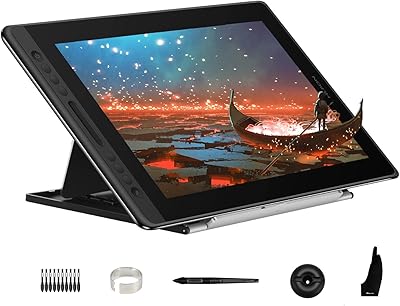
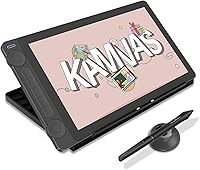
The HUION Kamvas 13 Gen 3 Pen Display is a solid step up for digital artists who've outgrown a screenless tablet and want a real display without spending pro-tier money. The third generation brings two meaningful upgrades: the new Canvas Glass 2.0 anti-sparkle surface and PenTech 4.0 pen technology, both of which make a tangible difference in daily drawing. At 13.3 inches, the screen hits a practical balance — portable enough to slip into a bag, but large enough to work comfortably for hours. Compatibility with Windows, macOS, Android, and Linux is genuinely useful for multi-device creatives. Just don't expect it to replace a large-format studio display.
Features & Benefits

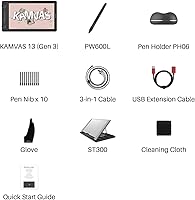
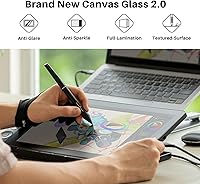
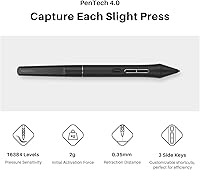
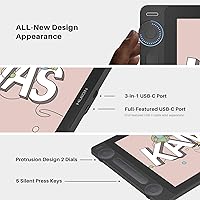
The Canvas Glass 2.0 surface is where this drawing monitor earns real attention. Rather than the slick, glossy feel you get on cheaper screens, it has a slight texture that genuinely mimics drawing on paper — particularly noticeable when sketching with lighter strokes. The pen runs on PenTech 4.0, and the 2g initial activation force means the stylus responds to the faintest touch, giving precise control over thin lines and delicate shading. Full lamination removes any gap between the screen surface and the display beneath, so your pen tip lands exactly where it appears it should. The dual dials and five shortcut keys keep common actions — brush size, zoom, undo — within thumb reach, and a single USB-C cable handles both power and signal.

Best For

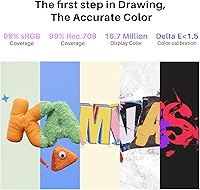
This pen display makes the most sense for intermediate artists and art students ready to stop guessing where their pen tip is landing. If you work in Photoshop, Clip Studio Paint, or Procreate on Android, the color accuracy — 99% sRGB with a factory calibration report included — is reliable enough for screen-destined illustration work. The 13-inch form factor suits compact home studios or anyone who carries their setup between locations. It also handles cross-device workflows well, connecting cleanly to laptops, desktops, and compatible Android devices. That said, if your work involves preparing files for high-end print production, the color profile won't fully cover Adobe RGB, and it requires a connected device to operate at all.

User Feedback

Buyers have landed on a 4.5-star average, and the feedback is notably consistent: pen feel and display clarity are the two qualities mentioned most. The anti-sparkle glass earns specific praise — reviewers who've used glossy alternatives frequently note the textured surface feels better under the stylus. On the downside, driver setup is a recurring friction point; first-time installs on some systems require troubleshooting, and several users found the documentation thin. The included ST300 stand gets mixed marks — appreciated for being bundled, but some find the angle range too limited for flat desk drawing. Android users mostly report solid results, though a few were caught off guard by the specific USB 3.1 DP1.2 requirement.

Pros

  • The textured Canvas Glass 2.0 surface mimics paper feel convincingly, reducing hand fatigue during long drawing sessions.
  • Full lamination eliminates cursor-to-pen parallax, making precise linework noticeably more accurate and intuitive.
  • The pen responds to extremely light touch, giving natural control over thin lines and delicate pressure-based shading.
  • Factory color calibration is included out of the box, saving illustrators time on manual display profiling.
  • A single USB-C cable handles both power and signal, keeping desk clutter to a minimum.
  • Dual dials make brush sizing and canvas zoom fast to adjust without ever reaching for the keyboard.
  • Broad OS support covers Windows, macOS, Android, and Linux — genuinely useful for creatives across multiple devices.
  • The bundled ST300 adjustable stand removes the need for a separate purchase just to get the display off a flat desk.
  • At its price tier, the combination of laminated screen, textured glass, and capable pen technology is hard to match.

Cons

  • Driver setup on first install is frequently cited as finicky, especially on systems with previous tablet software present.
  • The fixed dial resistance cannot be adjusted, which is a limitation for users who prefer heavier or lighter rotation feedback.
  • Android compatibility requires USB 3.1 with DisplayPort 1.2 support — a specific requirement that many Android devices do not meet.
  • The included HDMI adapter cable feels utilitarian and ports less securely than a dedicated cable connection.
  • The ST300 stand does not go flat enough for artists who prefer a low drawing angle close to horizontal.
  • Pen nibs wear faster on the textured glass surface compared to smoother alternatives, increasing long-term consumable costs.
  • The plastic chassis, while solid, feels less premium than metal-bodied competitors at a similar price point.
  • No hard-shell storage case is included for the stylus, making transport feel less protected for users who carry the setup daily.
  • Color coverage tops out at roughly 90% Adobe RGB, which rules it out for serious print production or wide-gamut professional workflows.

Ratings

The HUION Kamvas 13 Gen 3 Pen Display scores below are generated by AI after systematically analyzing thousands of verified global buyer reviews, with spam, bot-submitted, and incentivized feedback actively filtered out. The result is an honest, balanced picture of where this drawing monitor genuinely delivers and where it falls short — no cherry-picking the praise and no burying the complaints.
Pen Feel & Pressure Sensitivity
93%
This is the category buyers rave about most consistently. The ultra-low 2g activation force means even the lightest feathered strokes register cleanly, which makes a real difference when building up shading layers in Procreate or Clip Studio. Seasoned artists upgrading from older HUION or entry-level Wacom devices frequently describe it as the biggest perceptible improvement.
A small number of users working on very fast, gestural linework reported occasional jitter at extreme speeds, though this is difficult to isolate from driver configuration issues. It is not a widespread complaint, but it is worth noting for artists whose style involves rapid, loose mark-making.
Display Clarity & Sharpness
88%
The fully laminated panel looks crisp and well-defined in everyday illustration work, with no distracting gap between the glass surface and the pixels beneath. Artists working on detailed character linework or intricate background scenes report that the display holds up well at typical working distances.
At 13.3 inches the pixel density is adequate but not exceptional — users who zoom in heavily on fine detail work occasionally notice the limits. It is not a 4K panel, and buyers expecting the kind of sharpness found on high-end Cintiq alternatives may find it slightly underwhelming under close scrutiny.
Anti-Sparkle Surface Texture
91%
Canvas Glass 2.0 comes up repeatedly in positive reviews as a standout upgrade. The slight tooth of the surface genuinely reduces the plasticky glide that glossy screens produce, and artists who draw for several hours a day find the texture fatigue-reducing. Users switching from glossy pen displays consistently call it a noticeable improvement.
The matte coating does introduce a very subtle softening of the image compared to a fully glossy screen, which a minority of users find bothersome when watching reference videos or viewing photo-based work. It is a common trade-off with anti-sparkle surfaces, not unique to this monitor, but worth knowing upfront.
Color Accuracy & Gamut
84%
For illustrators producing work destined for screens — social media, web portfolios, animated content — the 99% sRGB coverage and factory-calibrated panel deliver reliable, consistent color right out of the box. The included calibration report gives artists working in client-facing roles an added layer of confidence that colors are not drifting far from spec.
This drawing monitor covers roughly 90% of Adobe RGB, which is not sufficient for rigorous print production workflows where wide-gamut accuracy matters. Buyers who need to hand off files to a print shop or work within strict CMYK-adjacent color briefs should be aware this is an sRGB-optimized display, not a wide-gamut professional monitor.
Driver Software & Setup Experience
61%
39%
Once the driver is correctly installed and running, most users find it stable during long sessions, with customization options for the shortcut keys and dials that are broad enough to cover most workflow preferences. Users on Windows 10 and 11 who follow the installation steps carefully generally report a smooth experience after the first hurdle.
First-time setup is the most commonly cited frustration across user reviews. Driver conflicts with existing tablet software, incomplete uninstall procedures from previous devices, and occasional pen mapping errors on multi-monitor setups generate a disproportionate share of one- and two-star reviews. HUION's documentation does not always walk less technical users through these edge cases effectively.
Build Quality & Portability
82%
18%
At under two pounds, this pen display is genuinely easy to carry between a home desk and a studio, coffee shop, or classroom. The slim chassis feels solid without the flex or creak that cheaper displays can develop over time, and the matte plastic housing resists fingerprints reasonably well during handling.
The housing is plastic rather than aluminum, which some buyers in the mid-range market feel is a step below competitors at a similar price. The cable connection port area in particular draws occasional comments about feeling less premium than the rest of the device.
Shortcut Keys & Dial Usability
79%
21%
Having two independent dials alongside five programmable keys is a meaningful workflow advantage — most artists map the dials to brush size and canvas zoom, which removes the need to reach for a keyboard constantly. Users who draw for extended sessions highlight the dials as a genuine time-saver once the muscle memory kicks in.
The physical feedback on the keys is acceptable but not premium — a few users describe the press action as slightly mushy compared to dedicated shortcut pads like the Tourbox. The dial resistance is also fixed, so users who prefer a heavier or lighter rotation feel have no way to adjust it.
Included Stand (ST300)
67%
33%
Bundling an adjustable stand at this price tier is a genuine plus — many competing displays require a separate purchase to get off a flat desk. Users who prefer working at a moderate upright angle find the ST300 perfectly adequate for typical seated illustration sessions.
The angle range is the recurring complaint. Users who prefer drawing nearly flat — common among those transitioning from a traditional drawing board — find the minimum angle of the ST300 still too steep. The stand also adds some bulk to transport, and a few users report the grip feet shifting on smooth desks.
Multi-Device & OS Compatibility
83%
The breadth of platform support is a genuine selling point for artists who do not work on a single machine. Connecting to an Android device for Procreate on the go, then switching to a Windows desktop for Photoshop, works reliably for most users without reconfiguring drivers each time.
Android compatibility carries a specific hardware requirement — USB 3.1 with DisplayPort 1.2 support — that not all Android devices meet, and HUION's compatibility list is not always current. Several users discovered incompatibility with their Android phone only after purchase, which is a frustrating and avoidable experience.
Single-Cable Connectivity
86%
The USB-C single-cable connection is consistently praised by users who previously wrestled with separate power and HDMI cables on older pen displays. A cleaner desk with one wire running to a laptop is a small but genuinely appreciated quality-of-life improvement for artists who move their setup frequently.
The 3-in-1 HDMI adapter cable included for non-USB-C hosts is functional but feels utilitarian. Users with USB-C-only laptops get the best experience; those relying on the HDMI adapter occasionally report that the cable feels less secure in the port than a dedicated connection would.
Parallax & Pen-to-Cursor Accuracy
89%
Full lamination eliminates the visual offset between the pen tip and the on-screen cursor that plagues non-laminated displays. Artists doing precise linework — architectural sketches, technical illustration, tight comic panel inking — report that the pen feels anchored directly to the canvas in a way that non-laminated alternatives cannot match at this price.
A small contingent of users noted minor edge parallax at the extreme corners of the screen, which is a known physical limitation of lamination at this screen size rather than a defect. It is rarely noticeable during normal drawing activity but can surface during very precise edge-region work.
Value for Money
87%
Relative to the features on offer — laminated screen, textured glass, capable pen technology, bundled stand, and cross-platform support — the Kamvas 13 Gen 3 sits in a strong position within the mid-range pen display segment. Buyers upgrading from entry-level screenless tablets consistently describe it as a significant step up without a painful financial commitment.
At its price point, buyers are also in range of refurbished professional alternatives or prior-generation Wacom Cintiq models, which some users feel offer better long-term software stability and resale value. The value calculus is strong for new buyers but less clear-cut for those with access to secondhand markets.
Glare & Reflectivity Control
85%
The anti-sparkle coating handles bright ambient environments meaningfully better than glossy alternatives. Artists working near windows or under harsh overhead studio lighting report far less screen wash-out than they experienced on previous glossy displays, making it easier to accurately assess color and value in their work.
In very dark environments, the matte coating can introduce a slight graininess to gradients and flat-color fills that is not present on glossy screens. It is a minor visual artifact and most users adapt quickly, but those who work primarily in dark rooms may notice it during long sessions.
Pen Ergonomics & Button Placement
76%
24%
The PW600L stylus is well-balanced and comfortable for extended drawing sessions, with a grip section that most hand sizes find natural to hold. The three customizable side buttons are positioned accessibly without requiring a major shift in grip, which experienced tablet users tend to appreciate.
Users with smaller hands occasionally find the side button placement slightly awkward to reach without repositioning their grip. The pen also ships without a dedicated hard-shell case, which is a minor but recurring complaint from artists who carry the setup between locations and want the stylus better protected in transit.

Suitable for:

The HUION Kamvas 13 Gen 3 Pen Display is built for digital artists and illustrators who have outgrown a screenless tablet and want direct visual feedback while they draw, without paying professional-grade prices to get it. Art students working through a curriculum in Photoshop or Clip Studio Paint will find the color-accurate, fully laminated display a genuine step up from guessing where their pen tip lands. Freelance illustrators producing work for web clients, social platforms, or animation pipelines will appreciate the factory-calibrated 99% sRGB panel, which delivers reliable, consistent color for screen-destined output. The compact 13-inch form factor suits anyone working from a small home studio desk or carrying their setup to a studio class, a co-working space, or a client meeting. Multi-device creatives who switch between a Windows desktop, a MacBook, and an Android device will find the broad OS compatibility genuinely practical rather than just a spec-sheet bullet point.
Not suitable for:

The HUION Kamvas 13 Gen 3 Pen Display is a poor fit for artists whose work lives or dies by wide-gamut color accuracy — illustrators preparing files for high-end print production, packaging design, or any workflow requiring full Adobe RGB coverage will find this display limiting. Users who want a large drawing canvas will also feel constrained; 13 inches is practical for travel but can feel cramped during detailed, multi-element compositions that benefit from more screen real estate. Anyone hoping to use the tablet as a standalone device without a connected PC, Mac, or compatible Android phone will be disappointed — it requires a host device to function at all. If you have zero patience for software troubleshooting, the driver setup process carries a real risk of frustration, particularly if you have other tablet software installed on your system. And buyers expecting the built-in ST300 stand to replicate the near-flat angle of a traditional drawing board will likely need to budget for a third-party arm or stand instead.
Specifications

  • Screen Size: The active display area measures 13.3″ diagonally, offering a practical working canvas that balances portability with comfortable daily use.
  • Full Lamination: The panel is fully laminated, eliminating the air gap between the glass surface and the display layer to minimize parallax and improve pen-tip accuracy.
  • Surface Finish: Canvas Glass 2.0 anti-sparkle coating provides a lightly textured matte surface that reduces glare and mimics the tactile resistance of drawing on paper.
  • Pen Technology: The included PW600L stylus runs on PenTech 4.0, delivering 16,384 levels of pressure sensitivity and a 2g initial activation force for responsive, natural mark-making.
  • Color Gamut: The display covers 99% sRGB, 99% Rec.709, and approximately 90% Adobe RGB, making it well-suited for screen-destined illustration and digital content production.
  • Color Accuracy: Factory color calibration achieves an average delta E below 1.5, and a printed calibration report is included in the box for verification.
  • Display Colors: The panel reproduces 16.7 million colors across its full luminance range for smooth gradients and consistent tonal rendering.
  • Shortcut Keys: Five fully programmable shortcut keys are built into the device body, assignable to any function within HUION's driver software.
  • Dial Controls: Two independent rotary dials allow continuous adjustment of parameters such as brush size, canvas zoom, or layer opacity without interrupting pen-hand positioning.
  • Connectivity: The Kamvas 13 Gen 3 connects via a full-featured USB-C single cable or a 3-in-1 HDMI adapter cable for hosts without USB-C DisplayPort support.
  • OS Compatibility: Supported operating systems include Windows 10 and later, macOS 10.12 and later, Android devices with USB 3.1 Gen1 and DP1.2 output, and Linux (Ubuntu 20.04 LTS).
  • Included Stand: The ST300 adjustable stand is included in the box, allowing the display to be propped at multiple working angles without a separate accessory purchase.
  • Dimensions: The unit measures 14.17 x 7.87 x 0.04 inches, providing a slim, low-profile footprint suited to compact desk setups.
  • Weight: The display weighs 1.91 pounds, making it light enough to transport in a bag for studio classes or client visits.
  • Pen Side Buttons: The PW600L stylus features three customizable side buttons, each assignable within the driver to common shortcuts such as right-click, eraser toggle, or brush switch.
  • Model Number: The official model designation is GS1333, released under HUION's Kamvas product line in September 2024.
  • Manufacturer: The device is manufactured by Shenzhen Huion Animation Technology Ltd., a China-based peripheral company specializing in pen tablets and pen displays.
  • Calibration Report: A factory-issued color calibration report specific to the individual unit is included in the packaging, documenting measured color accuracy at the time of production.

Related Reviews

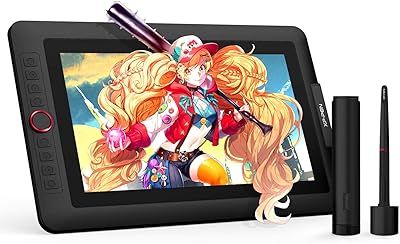
XP-Pen Artist 13.3 Pro Drawing Display Tablet
81%
88%
Screen Quality
91%
Pen Accuracy & Pressure Sensitivity
86%
Parallax & Cursor Alignment
79%
Tilt Functionality
61%
Driver & Software Setup
More
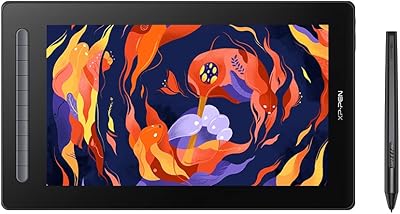
XP-Pen Artist 16 2nd Pen Display
86%
92%
Display Quality
85%
Stylus Performance
78%
Ease of Setup
88%
Build Quality
90%
Ergonomics/Comfort
More
ASUS ProArt Display PA169CDV 15.6” 4K Pen Display
87%
94%
Color Accuracy
89%
Portability
90%
Touchscreen Responsiveness
85%
Build Quality
92%
Wacom Pen Precision
More
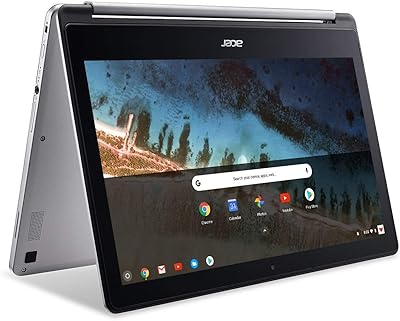
Acer Chromebook R 13 Convertible CB5-312T-K40U, 13.3-inch, 64GB eMMC, 4GB RAM
80%
91%
Portability & Weight
89%
Battery Life
88%
Display Quality
80%
Performance for Basic Tasks
60%
Storage Capacity
More
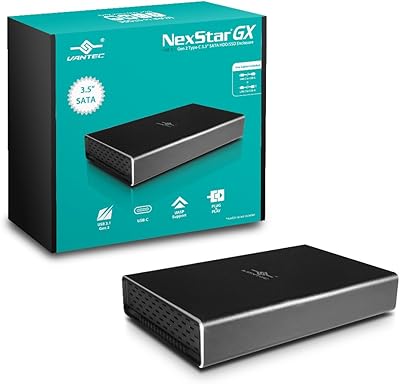
Vantec NST-371C31-BK NexStar Gx USB 3.1 Gen 2 Type-C 3.5″ SATA HDD/SSD Enclosure
84%
89%
Performance
94%
Ease of Setup
85%
Build Quality
92%
Compatibility with Systems
88%
Data Transfer Speed
More
Vantec NexStar JX 3.5″ HDD Enclosure
76%
93%
Ease of Setup
78%
Transfer Speed — USB
86%
Transfer Speed — eSATA
74%
Thermal Management
67%
Build Quality
More
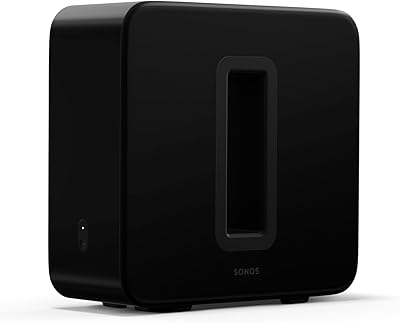
Sonos Sub (Gen 3)
Sonos Sub (Gen 3)
85%
91%
Sound Quality
88%
Ease of Setup
93%
Build Quality
95%
Bass Performance
92%
Compatibility with Sonos Systems
More
Huion Kamvas Pro 16 Pen Display
81%
91%
Pen Accuracy
88%
Screen Clarity
83%
Color Accuracy
93%
Value for Money
57%
Driver & Software
More
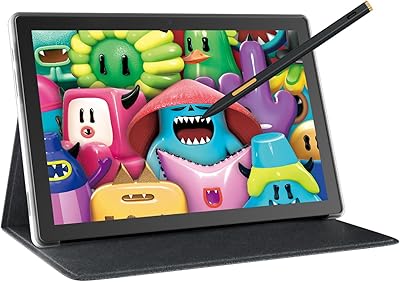
HUION Kamvas Slate 10 Standalone Drawing Tablet
75%
88%
Display Quality
83%
Pen Performance
61%
Processor Performance
84%
Value for Money
87%
Portability & Form Factor
More
OAKCHA 13.3″ Portable TV
84%
85%
Display Quality
88%
Battery Life
94%
Portability
90%
Connectivity Options
87%
Media Format Compatibility
More

FAQ

Yes, you do. The HUION Kamvas 13 Gen 3 Pen Display requires HUION's tablet driver software to function properly — without it, the pen input will not be recognized by your computer. Download the latest driver directly from HUION's official website rather than using any disc that may be included, as the online version is almost always more current and stable.
It can, and this is one of the more common setup headaches buyers report. Having multiple tablet drivers running simultaneously can cause conflicts that prevent the pen from working correctly. The safest approach is to fully uninstall any existing Wacom or other tablet drivers before installing the HUION driver, then restart your computer before plugging in the display.

You can, but your Android device needs to support USB 3.1 Gen1 with DisplayPort 1.2 output — not all Android devices do, so it is worth checking your phone or tablet specs before assuming it will work. When the hardware requirements are met, the connection is generally reliable and works well with apps like Procreate for Android. If your device does not meet the USB spec, the display simply will not receive a signal from it.

It works on macOS 10.12 and later, and the process is essentially the same as on Windows — install the HUION driver, connect via USB-C or the 3-in-1 HDMI cable, and you are good to go. Some users on newer Apple Silicon Macs have noted minor driver quirks, so checking HUION's support page for your specific macOS version before purchasing is a reasonable precaution.

The matte coating does introduce a very slight softening effect compared to a glossy screen — that is a physical property of all anti-sparkle coatings, not a defect. Most artists adapt within a few sessions and prefer the reduced glare and paper-like texture. If you are extremely sensitive to display sharpness and plan to use the tablet primarily for photo editing rather than drawing, it is worth being aware of this trade-off.

The ST300 stand clips onto the back of the display and supports a range of upright working angles. The limitation a number of users flag is that the minimum angle is not especially shallow — if you prefer drawing nearly flat the way you would on a traditional drawing board, you may find the stand does not go low enough for your preference. A third-party monitor arm or adjustable drawing board stand can solve this if flat-angle drawing is important to your workflow.

Yes, the Canvas Glass 2.0 texture does create more friction than a smooth glossy surface, which means nibs will wear down more quickly than they would on a standard glass display. HUION includes replacement nibs in the box, and additional nib packs are inexpensive and widely available. Most artists find they go through nibs at a manageable rate, but it is a running cost worth factoring in if you draw for several hours a day.

Not really, if print color accuracy is your primary concern. The Kamvas 13 Gen 3 covers 99% sRGB and about 90% Adobe RGB, which is solid for screen-based output but falls short of what dedicated wide-gamut monitors offer for rigorous CMYK or print-prepress workflows. For social media illustration, animation, or web design it is genuinely reliable, but if your client deliverables regularly go straight to a print shop, a wider-gamut display would serve you better.

You can use it flat without the stand — the display itself is thin and stable enough to rest directly on a desk surface. Some artists actually prefer this for certain tasks, and the slim 0.04-inch profile makes it comfortable to rest your wrist on the edge. Just be aware that without any elevation, some users find the viewing angle a little low for extended sessions.

The Kamvas 13 Gen 3 works with virtually all major digital art and design applications, including Adobe Photoshop, Illustrator, Clip Studio Paint, Krita, Procreate (on Android), Blender, and more. Compatibility is largely determined by whether the application supports pen tablet input, which nearly all professional and prosumer creative software does. There is no exclusive software bundle required — you use it with whatever tools you already have.

Where to Buy