Overview

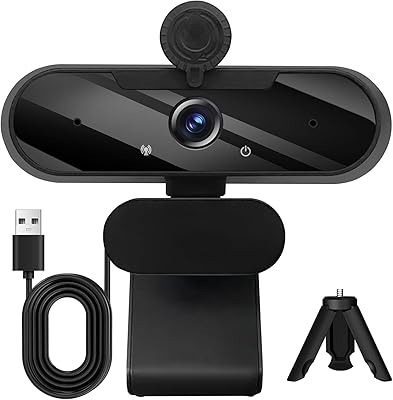
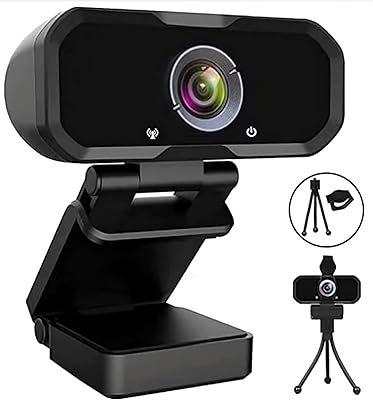
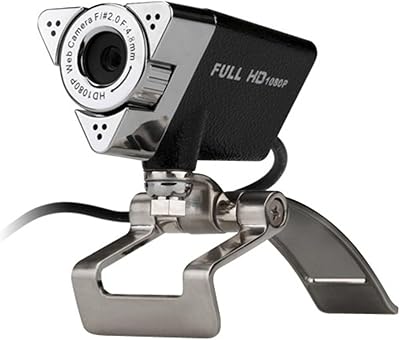
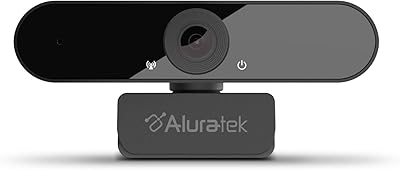
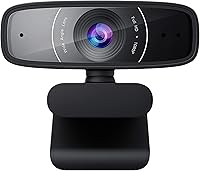
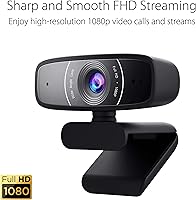
The ASUS Webcam C3 1080p HD USB Camera offers a simple yet effective solution for clear video communication. This webcam provides sharp 1080p HD resolution at 30 fps, making it ideal for video calls, virtual meetings, or content creation. Its wide field of view ensures everyone in the frame is visible, while the adjustable tilt and 360-degree rotation allow users to position the camera for the perfect angle. Whether for personal or professional use, this USB camera delivers flexibility and ease of use with no complicated setup.

Features & Benefits

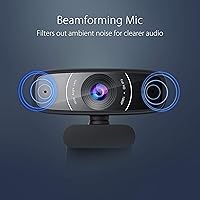
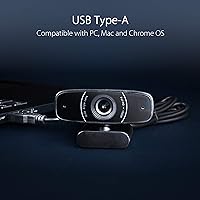
With its built-in microphone that offers noise reduction, this webcam ensures clear, crisp audio during calls. The camera's 1080p video quality at 30 fps enables smooth and lifelike video, which is crucial for both work and entertainment. Compatibility with major apps like Zoom, Skype, and Microsoft Teams allows users to integrate the camera seamlessly into their daily routines. Additionally, the webcam's plug-and-play USB connection means no need for complicated drivers, making it easy to set up on any PC, Mac, or Chrome OS device.

Best For

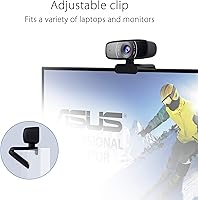
This webcam is an excellent choice for remote workers who rely on stable video quality for virtual meetings. It's also ideal for content creators or streamers who need an affordable solution for high-definition video without breaking the bank. The ASUS 1080p camera's adjustable features, such as tilt and rotation, make it versatile enough for group chats and one-on-one video calls. Whether you're in a home office, at a café, or in a studio, it provides flexibility and clear visuals for all types of users.

User Feedback

Many users appreciate the crisp video quality and smooth performance for professional calls, especially at this price point. The flexibility of tilt and rotation is frequently mentioned as a major advantage, making it easy to adjust the camera for different setups. However, some users have noted that while the microphone performs well, the audio quality may not be ideal for larger group calls. Overall, the webcam's simplicity and reliable video quality make it a popular choice among users who want good performance without the complexity.

Pros

  • This webcam offers crisp 1080p HD video, making it ideal for professional video calls.
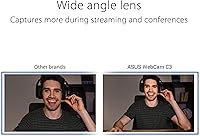
  • Its wide field of view ensures all participants are in frame, even during group calls.
  • The adjustable tilt and 360-degree rotation provide excellent flexibility for adjusting camera angles.
  • Built-in noise reduction helps ensure clear audio during video calls, even in moderately noisy environments.
  • It’s easy to set up with USB connectivity, making it a plug-and-play option for quick video conferencing.
  • The webcam is compatible with popular apps like Zoom, Skype, and Teams, offering great flexibility for remote work and meetings.

Cons

  • While video quality is sharp in most settings, some users report graininess in low-light environments.
  • The built-in microphone may not be sufficient for large group calls or environments with high ambient noise.
  • The plastic build quality feels less durable compared to higher-end models in the same price range.
  • Users looking for premium video and audio quality may find this device's performance somewhat limited.
  • There are occasional reports of the webcam's focus being less sharp during fast movement or when adjusting angles.
  • The webcam is not ideal for professional streamers or videographers who need superior audio-video fidelity.

Ratings

The ratings for the ASUS Webcam C3 1080p HD USB Camera are based on genuine, verified user feedback from various international sources, filtered for quality and authenticity. This comprehensive analysis takes into account user experiences across multiple languages and platforms, ensuring that only reliable reviews shaped the final scores. Both the strengths and pain points highlighted by real users have been carefully considered to provide a balanced perspective.

Video Quality
88%
Many users are impressed with the sharp 1080p video quality provided by this webcam. It delivers clear and vibrant visuals, making it ideal for video calls, streaming, and professional meetings. The video output remains stable even during extended use, with minimal lag or pixelation, earning praise for its performance in everyday tasks.
A few users mentioned that the video quality may not meet expectations in low-light conditions, with some reports of graininess or less-than-optimal clarity. While the resolution is good, those expecting superior performance in dim settings might be slightly disappointed.
Audio Quality
72%
28%
The built-in microphone with noise reduction performs decently in typical settings, with users appreciating its ability to filter out background sounds during calls. It offers clear audio for most video conferencing apps, making it a solid option for regular use in home offices or smaller workspaces.
However, several users reported that the microphone's audio quality struggles in larger group calls or noisy environments. The clarity can decrease with increased background noise, and some users felt that the sound lacked richness or depth compared to standalone mics.
Ease of Use
94%
This webcam is incredibly easy to set up and use right out of the box. With plug-and-play USB connectivity, users can quickly get it working across a wide range of devices, including PCs, Macs, and Chromebooks. The intuitive design and automatic installation process make it a hassle-free choice for those who need a straightforward solution.
Some users did mention minor frustrations with the software setup for specific applications, particularly with non-standard systems or older versions of video calling platforms. Though generally smooth, installation wasn't entirely trouble-free for everyone.
Field of View
85%
The wide field of view allows users to capture more of the room or surroundings, making it great for group video calls or live streaming. Reviewers liked that the larger capture area makes conversations feel more natural and dynamic, especially when talking with multiple participants.
However, a few users felt that the wide field of view could introduce some distortion, particularly on the edges of the frame. This might affect the overall visual quality if you're focused on a single subject or require a more confined shot for professional purposes.
Adjustability (Tilt/Rotation)
90%
The 360-degree rotation and adjustable tilt are standout features, offering great flexibility for users who want to customize their webcam's angle. This versatility is especially appreciated by those who need to quickly adjust the webcam between different setups, such as switching from a close-up to a wider shot during meetings or streams.
A handful of users noted that the adjustment mechanism could be a bit stiff, especially when rotating the camera frequently. While it provides great flexibility, a few found that it required extra effort to reposition the webcam smoothly.
Compatibility
89%
This webcam is compatible with a broad range of devices, including Windows PCs, Macs, and Chrome OS, making it a versatile choice for various setups. Users appreciate the plug-and-play nature of the webcam, which works seamlessly with popular video calling apps like Zoom, Skype, and Teams.
Some users encountered minor compatibility issues with older operating systems or less common platforms. Although it supports a wide range of devices, there were occasional reports of difficulty with specific software versions or older hardware configurations.
Price-to-Performance Ratio
92%
At its price point, this webcam offers excellent value for money. Users highlight its solid performance, clear video quality, and useful features, all while remaining affordable compared to higher-end models. It delivers a great balance between cost and functionality, making it a top choice for those on a budget.
While most users agree it's great for the price, a few pointed out that more expensive webcams might offer better overall audio quality or additional advanced features. However, for everyday use, this device provides more than enough performance for most users.
Setup and Installation
96%
Users consistently mention how quick and simple the setup process is. With no complicated software needed, the webcam works right after plugging it into a USB port. Whether you’re using it for casual video calls or streaming, it's ready to go in moments, saving time for users who need efficiency.
Although the setup is mostly smooth, a few users reported minor difficulties with software configuration for specific apps, but this was relatively rare. For most users, installation was seamless, so the overall experience remains highly positive.
Build Quality
80%
20%
The webcam is lightweight and compact, making it easy to transport and use across different locations. Many users appreciate its portability, especially those who need a webcam for travel or working in various spaces. Its solid build provides a feeling of reliability, even though it’s not made of premium materials.
Some users pointed out that the plastic construction feels somewhat flimsy compared to higher-end models. Although it's sturdy enough for everyday use, those looking for a more premium build might find it lacking in terms of durability and tactile feel.
Customer Support
78%
22%
When users needed support, many reported that customer service was responsive and helpful. Whether dealing with installation issues or technical queries, the support team was generally praised for their prompt replies and willingness to assist.
A few buyers had issues with slow response times or unclear instructions when reaching out to customer service. Though most interactions were positive, these occasional delays left some users frustrated and questioning the overall support experience.
Versatility for Different Uses
86%
The webcam is praised for its versatility in a variety of scenarios. Whether it’s used for professional video calls, casual streaming, or even online teaching, users find that it adapts well to different needs, providing excellent video and audio in various environments.
Some users noted that while the webcam is great for everyday use, it doesn’t quite match the performance of higher-end models in more demanding environments like professional streaming or high-end content creation. For some, it's a great all-rounder but lacks specialized features.
Noise Reduction Performance
75%
25%
The built-in noise reduction feature is useful for keeping background distractions at bay during calls and meetings. Users especially appreciate how it helps maintain audio clarity in quieter home environments.
However, some users felt that the noise reduction feature was not always effective in louder environments. It doesn't completely eliminate background noise, which can be problematic in group calls or bustling settings.
Long-Term Value
85%
Buyers see long-term value in this webcam, particularly because of its balance between performance and affordability. The quality-to-price ratio makes it an excellent investment for regular use, whether for remote work, content creation, or casual video calls.
A few users have expressed concerns about potential durability issues after prolonged use, particularly regarding the adjustability mechanism. While most users find it reliable, long-term performance under heavy use might be a concern for some buyers.

Suitable for:

The ASUS Webcam C3 1080p HD USB Camera is well-suited for remote workers, content creators, and casual video callers who need reliable, budget-friendly video quality. Its sharp 1080p resolution and wide field of view make it ideal for professional video calls, whether you’re working from home or participating in virtual meetings. Streamers and online educators who are looking for an affordable way to improve their video setup will also appreciate its smooth 30fps video performance and built-in noise reduction microphone. Additionally, its adjustable tilt and 360-degree rotation provide flexibility for users who need to easily adjust the camera angle, such as when switching between close-ups and wide shots during broadcasts or group calls.

Not suitable for:

This webcam may not be the best choice for users who need top-tier audio and video quality in highly demanding environments. While the video quality is good in normal lighting, users who require superior performance in low-light settings may find it lacking, as it tends to show graininess under certain conditions. Additionally, the built-in microphone, while useful for everyday calls, may not offer the depth or clarity needed for larger group meetings or in noisy spaces. Professional streamers or videographers who prioritize high-end audio and video performance might find this device's capabilities a bit limited. Similarly, those looking for premium build quality might feel the plastic construction falls short compared to higher-end models.

Specifications

  • Resolution: The webcam captures video at 1080p HD resolution, delivering clear and sharp visuals for video calls and streaming.
  • Frame Rate: It supports a frame rate of 30 frames per second, ensuring smooth video streaming and real-time communication.
  • Field of View: The webcam features a wide field of view, allowing for a broader capture area during video calls and conferences.
  • Tilt Adjustment: The camera has an adjustable tilt angle of up to 90°, providing flexibility in positioning the camera.
  • Rotation: It offers 360-degree rotation, allowing users to change the angle for optimal camera positioning.
  • Microphone: Equipped with a built-in microphone, the webcam features noise reduction for clearer audio during calls.
  • Connectivity: The webcam connects via USB, offering a simple plug-and-play setup for compatibility with most devices.
  • Compatibility: This webcam is compatible with Windows PCs, Mac OS, and Chrome OS, supporting popular video calling apps like Zoom, Skype, and Microsoft Teams.
  • Sensor Type: It uses a CMOS sensor, which is common for high-quality webcams, offering good performance in various lighting conditions.
  • Weight: The webcam weighs just 3.68 ounces, making it lightweight and easy to carry or mount on different setups.
  • Power: It is powered through the USB connection, eliminating the need for an external power source.
  • Dimensions: The webcam has a compact design that fits comfortably on most monitors or laptop screens without obstructing the view.
  • Build Material: The webcam is primarily made of plastic, which keeps it lightweight but may not be as durable as higher-end models.
  • Software Support: It is compatible with various video calling and streaming software, including Skype, Zoom, and Microsoft Teams.
  • App Support: This webcam supports apps such as Skype, Zoom, and Microsoft Teams, making it versatile for both personal and professional use.

FAQ

The ASUS Webcam C3 offers 1080p HD video at 30 frames per second, providing clear and smooth video output for calls and video streaming. It's great for professional calls, online meetings, and streaming setups.

Setting up this USB webcam is simple. Just plug it into an available USB port on your PC, Mac, or Chrome OS device. It works as a plug-and-play device, and no additional software is required for basic use with apps like Zoom or Skype.

Yes, the webcam is compatible with both Mac and Chrome OS, in addition to Windows PCs. It supports popular video calling apps such as Zoom, Skype, and Microsoft Teams across these platforms.

This webcam has a wide field of view, making it ideal for video calls and group meetings. The wide-angle lens allows more people to fit within the frame without having to adjust the camera frequently.

Yes, the webcam features an adjustable tilt (90°) and 360-degree rotation, allowing you to position the camera at the perfect angle for your needs, whether for video calls, streaming, or conferencing.

Yes, the ASUS Webcam C3 includes a built-in microphone with noise reduction, which helps to ensure clear audio during calls and video chats, even in moderately noisy environments.

While this webcam provides clear 1080p video, it's more suited for casual streaming and video calls rather than professional-grade broadcasts. It’s a great option for budget-conscious content creators, but those requiring higher-end video and audio might look for a more premium model.

In low-light conditions, the webcam's video quality may degrade, causing graininess. To improve performance, try using additional lighting in the room or adjust the webcam's position to minimize shadowy areas.

While the webcam is lightweight and portable, some users have noted that the plastic build could feel less sturdy compared to higher-end models. If you plan to carry it frequently, handle it with care to avoid wear and tear.

The built-in microphone is adequate for one-on-one video calls or small group meetings, but some users have mentioned that the audio quality may struggle with larger groups or in noisy environments. For better sound quality in large settings, an external microphone may be needed.