Overview

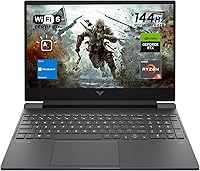
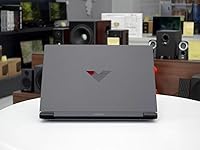
The HP Victus 15 (RTX 2050, Ryzen 5 7535HS) sits squarely in the budget gaming segment, pairing a dedicated NVIDIA GPU with a capable AMD processor at a price that doesn't require a second mortgage. The Ryzen 5 and RTX 2050 combination is the core draw here — you get real discrete graphics without climbing into mid-range pricing territory. The 144Hz FHD display is arguably the biggest surprise for this tier; most competitors at this price still ship 60Hz panels. Dressed in silver with a 0.93-inch profile, the Victus 15 doesn't scream gaming rig, which plenty of buyers will actually appreciate when carrying it into a lecture hall or a coffee shop.
Features & Benefits

The 144Hz anti-glare panel makes a real difference during fast-paced gameplay — motion looks noticeably crisper compared to the 60Hz displays still common at this price. The RTX 2050 handles lighter titles like Valorant, Fortnite, and older open-world games at 1080p without much fuss, though you should temper expectations for newer, graphically demanding releases. The Ryzen 5 7535HS juggles a game, a browser with a dozen tabs, and a Discord call without complaint. Having 16GB DDR5 RAM out of the box is genuinely refreshing in this segment, and the PCIe SSD means Windows loads fast enough that you won't be staring at a spinner every morning. Wi-Fi 6, HDMI 2.1, and a proper Ethernet port round out a well-considered connectivity setup.

Best For

This HP Victus 15 clicks best for college students who want one machine for everything — classes, streaming, and a gaming session after a long day. If you're moving up from a console or a laptop with integrated graphics, the jump to a dedicated GPU will feel meaningful. Remote workers doing occasional photo editing or light video work will find the processor and RAM more than adequate. It's also a smart pick for anyone who values brand reliability and a manufacturer warranty over chasing extra frames with a lesser-known alternative. What this budget gaming laptop is not is a replacement for a proper mid-range rig — go in with that understanding and satisfaction tends to follow.

User Feedback

Most buyers come away genuinely impressed by the display — the smooth 144Hz experience gets mentioned repeatedly as punching above its weight for the price. Thermals hold up reasonably well during lighter sessions, and the keyboard draws favorable comments for comfort given the slim chassis. Where sentiment shifts is under heavier loads: owners running demanding AAA titles report the RTX 2050 hitting its ceiling faster than expected, with frame rates dropping at higher settings. Battery life is a recurring sore spot — keeping the charger close is essentially non-negotiable during real use. Fan noise during extended gaming is another consistent mention. That said, most users feel the tradeoffs are reasonable given what they paid.

Pros

  • The 144Hz FHD display is a rare and welcome feature at this price point, making games look noticeably smoother.
  • 16GB DDR5 RAM out of the box is above average for budget gaming laptops and handles multitasking well.
  • The Ryzen 5 7535HS manages gaming, streaming, and background tasks simultaneously without obvious slowdown.
  • Wi-Fi 6 and a physical Ethernet port together cover every connectivity scenario students and remote workers need.
  • The slim 0.93-inch profile and neutral silver finish make this a laptop you can take anywhere without looking out of place.
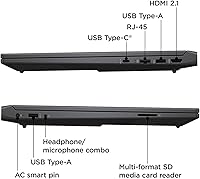
  • Port selection is genuinely practical — HDMI 2.1, USB-C, two USB-A ports, and RJ-45 cover most setups without a dongle.
  • Competitive and older open-world titles run well at 1080p, making the Victus 15 a capable entry point for PC gaming.
  • HP's established warranty and support network add real peace of mind for buyers who want backup if something goes wrong.
  • The backlit keyboard with a numeric keypad is a productivity bonus that remote workers and spreadsheet users will appreciate.

Cons

  • Battery life drops sharply under any real workload — the charger needs to come everywhere with you.
  • The RTX 2050 struggles with newer, graphically demanding AAA titles even at medium settings.
  • Fan noise ramps up significantly during sustained gaming sessions, which can be distracting in quiet environments.
  • 512GB fills up fast once Windows, games, and media are installed — external storage becomes a near-necessity.
  • The plastic chassis shows fingerprints easily and lacks the rigidity of aluminum-bodied competitors.
  • Some startup bloatware from HP slows down the first-boot experience and requires manual cleanup.
  • USB-C does not support Thunderbolt, limiting options for power users with high-speed accessories or eGPU setups.
  • The main keyboard cluster sits slightly off-center due to the numpad, which can frustrate touch typists and gamers.
  • Color accuracy on the display is average at best, making it a poor fit for any color-critical creative work.

Ratings

The HP Victus 15 (RTX 2050, Ryzen 5 7535HS) has been evaluated through a wide cross-section of verified buyer feedback collected globally, with our AI filtering out incentivized reviews, duplicate submissions, and bot activity to surface what real owners actually experience. The scores below reflect an honest picture of this budget gaming laptop — celebrating where it punches above its weight while calling out the areas that genuinely frustrate day-to-day users.
Gaming Performance
63%
37%
For competitive and mid-tier titles like Valorant, Rocket League, or older open-world games, the RTX 2050 delivers a playable 1080p experience that owners switching from integrated graphics find immediately satisfying. The 144Hz display makes the most of those frames when the GPU can sustain them.
Newer AAA titles at medium-to-high settings frequently expose the RTX 2050's 4GB VRAM ceiling, with users reporting noticeable frame drops in games like Cyberpunk 2077 or Alan Wake 2. Buyers comparing this to RTX 3060 or 4060 laptops will feel the gap clearly.
Display Quality
84%
The 144Hz FHD anti-glare panel is consistently praised as the standout feature for the price tier. Owners report that fast-paced games look noticeably sharper and smoother compared to the 60Hz displays common on competing budget laptops, and the anti-glare coating makes daytime use comfortable.
Color accuracy and brightness are adequate but not impressive — users doing any serious photo or video editing note that the panel lacks the vibrancy of IPS displays found on pricier machines. It covers a modest sRGB range that enthusiasts will find limiting.
CPU Performance
79%
21%
The Ryzen 5 7535HS handles everyday multitasking with ease — students running a game, browser tabs, Discord, and Spotify simultaneously report no meaningful slowdown. The 12-thread design keeps workflows smooth even when background processes pile up.
Under sustained all-core workloads like video encoding or compiling, the chip can throttle slightly as thermals build. It is not a concern for most buyers, but creative professionals expecting consistent peak performance across long render sessions may notice inconsistencies.
RAM & Multitasking
82%
18%
Shipping with 16GB DDR5 out of the box is genuinely above average for this price bracket, and users notice it. Switching between demanding applications feels snappy, and owners report comfortable headroom for having multiple browser sessions, a game, and a video call running simultaneously.
The RAM is soldered or in a configuration that not all users can easily upgrade, which limits long-term flexibility. A small number of technically experienced buyers flagged that dual-channel configuration matters and found their unit running in a less optimal memory setup.
Storage Speed
77%
23%
The PCIe M.2 SSD delivers fast boot times that owners coming from older HDD-based laptops find transformative. Application launches are snappy, and Windows 11 loads quickly enough that the machine feels responsive from the moment you open the lid.
512GB fills up faster than expected once Windows, a few games, and some media are installed. Several users recommend budgeting for an external drive early on, and some noted there is limited practical space for a large Steam library without micromanaging installs.
Battery Life
41%
59%
Under very light use — reading documents, watching a single video stream with brightness lowered — the Victus 15 can stretch to around four hours for some users. Those using it purely for productivity tasks away from a desk find it marginally acceptable for short outings.
Under any real workload, battery life drops sharply. Gaming on battery is essentially a non-starter, and even moderate multitasking sees users reaching for the charger well before a full school day ends. This is the most consistent complaint across owner feedback and should factor heavily into the buying decision.
Thermal Management
67%
33%
During lighter gaming sessions and everyday productivity work, thermals stay reasonable and the chassis remains comfortable to use on a desk. Owners doing coursework or watching content report no concerning warmth under normal conditions.
Extended gaming or heavy CPU workloads push temperatures into ranges where throttling becomes noticeable, and the bottom of the chassis gets warm enough to be uncomfortable on a lap. The cooling system does its job but is clearly tuned conservatively for a slim profile.
Fan Noise
58%
42%
At idle and during light tasks, the fans are nearly inaudible, making this budget gaming laptop pleasant to use in quiet environments like libraries or shared study spaces without drawing attention.
Under sustained gaming load, the fans ramp up to levels that multiple users describe as distracting — particularly noticeable during late-night sessions or in quiet rooms. Using headphones largely masks it, but it is a consistent complaint from owners who expected a quieter profile.
Build Quality
71%
29%
The silver plastic chassis feels more put-together than many competitors at this price, and the slim 0.93-inch profile gives it a cleaner look that works in professional or academic settings. The hinge feels sturdy and the overall assembly is solid for daily bag transport.
It is still plastic throughout, and users with experience handling aluminum-chassis laptops will notice the difference in rigidity. A few owners reported minor flex in the keyboard deck under firm typing pressure, and the lid shows fingerprints easily on the silver finish.
Keyboard & Typing Experience
74%
26%
The backlit keyboard with a numeric keypad is well-received for productivity use — students doing spreadsheet work and data entry appreciate the numpad inclusion, and key travel feels adequate for extended typing sessions. Backlighting evenness is good for the price.
The key feedback is slightly mushy compared to enthusiast-grade laptop keyboards, and the numpad forces the main key cluster off-center, which bothers touch typists who game with WASD. A handful of users also noted the trackpad feels average and they default to an external mouse.
Port Selection
81%
19%
The inclusion of HDMI 2.1, a physical Ethernet port, USB-C, and two USB-A ports covers nearly every real-world connectivity need without a dongle. Students plugging into dorm monitors and remote workers connecting to Ethernet for stable video calls both praise this layout.
There is no SD card slot, which is a minor inconvenience for content creators. USB-C does not support Thunderbolt, limiting its usefulness for high-speed external GPU docks or faster data transfer accessories that some power users might want.
Wireless Connectivity
78%
22%
Wi-Fi 6 delivers noticeably stable connections in congested environments like campus dorms or apartment buildings with many competing networks. Owners in those settings report fewer dropped connections and more consistent speeds compared to older Wi-Fi 5 machines.
Bluetooth connectivity drew occasional complaints about pairing stability with certain peripherals, particularly wireless headsets. Nothing dealbreaking, but a few users noted they had to re-pair devices more often than expected after sleep cycles.
Value for Money
83%
At its price point, the combination of a dedicated GPU, 144Hz display, 16GB DDR5, and a reputable brand name is hard to match. Buyers who have shopped the budget gaming laptop market recognize that most alternatives at this price sacrifice one of those features.
The value calculation shifts if your primary goal is raw gaming power — for the same money, a desktop GPU setup would dramatically outperform it. The trade-off is portability, and buyers who underestimate the RTX 2050 limitations often feel disappointed after the fact.
Software & Bloatware
61%
39%
Windows 11 Home runs cleanly once initial setup is done, and the HP software suite is lighter than some competitors. Users who spend twenty minutes removing unwanted applications report a noticeably cleaner experience afterward.
Out of the box, several HP-installed utilities and trial subscriptions load at startup and slow down the initial experience. It is a solvable problem but frustrating for buyers who expect a clean first boot, and less technically confident users may not know to address it.
HP Brand & Support
72%
28%
HP's established warranty and support network gives buyers confidence that a budget laptop from this brand comes with real recourse if something goes wrong. Users who needed support report generally positive experiences reaching resolution through HP's service channels.
Some users noted that HP's support chat can be slow to resolve hardware-specific issues, and warranty claim processing times drew criticism from a subset of owners. Premium support tiers cost extra, which adds to the total cost of ownership if needed.

Suitable for:

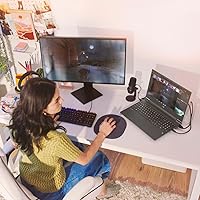
The HP Victus 15 (RTX 2050, Ryzen 5 7535HS) is a genuinely strong fit for college students who need one machine to handle everything — lectures, research, casual gaming after class, and the occasional light creative project. If you are stepping up from a console or a laptop with no dedicated GPU, the jump in gaming capability will feel real and meaningful without requiring a huge financial commitment. First-time PC gamers who mostly play competitive titles like Valorant, CS2, or Rocket League will get plenty of mileage out of this machine, especially paired with that 144Hz display. Remote workers or students who dabble in light photo editing or video work will appreciate the headroom that 16GB DDR5 and a capable processor provide for multitasking. Anyone who wants a reputable brand, a real warranty, and a laptop that doesn't look aggressively gamer-styled in a professional setting will find the Victus 15 fits that brief comfortably.
Not suitable for:

The HP Victus 15 (RTX 2050, Ryzen 5 7535HS) is the wrong choice for anyone whose primary goal is maxing out modern AAA titles — the RTX 2050 runs out of headroom quickly in demanding games, and buyers expecting RTX 3060 or 4060 performance will walk away frustrated. If you need to work untethered from a power outlet for most of the day, this is not the machine for you; battery life under real workloads is one of its most consistently criticized shortcomings. Serious content creators doing sustained video encoding, 3D rendering, or color-graded editing will hit both GPU and thermal limitations faster than they'd like. Buyers with a growing game library should also think hard about 512GB of storage — it fills up faster than expected, and external solutions add inconvenience. Finally, anyone sensitive to fan noise in quiet environments will find the cooling system gets loud enough under load to become a genuine distraction.
Specifications

  • Processor: AMD Ryzen 5 7535HS with 6 cores and 12 threads, running at a 3.3 GHz base clock and boosting up to 4.55 GHz with 16 MB cache.
  • Graphics: NVIDIA GeForce RTX 2050 dedicated GPU with 4GB GDDR6 video memory for handling 1080p gaming and light GPU-accelerated tasks.
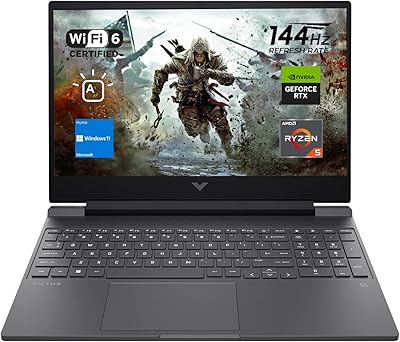
  • Display: 15.6-inch FHD (1920x1080) IPS-level anti-glare panel with a 144Hz refresh rate for smoother motion during gaming and everyday use.
  • RAM: 16GB DDR5 high-bandwidth memory installed, providing ample headroom for multitasking across gaming, browsing, and productivity applications.
  • Storage: 512GB PCIe Gen 4 M.2 NVMe SSD delivering fast boot times and quick application launches compared to SATA-based alternatives.
  • Operating System: Windows 11 Home comes pre-installed, offering modern interface features, improved multi-monitor support, and DirectX 12 Ultimate compatibility.
  • Wireless: Wi-Fi 6 (802.11ax) with Bluetooth combo adapter provides faster, more stable wireless connectivity in dense network environments.
  • Ports: Connectivity includes 2x SuperSpeed USB-A, 1x USB-C, 1x HDMI 2.1, 1x RJ-45 Ethernet, and a 3.5mm headphone/microphone combo jack.
  • Keyboard: Full-size backlit keyboard with integrated numeric keypad, offering a practical layout for both productivity work and gaming sessions.
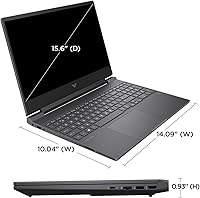
  • Dimensions: The chassis measures 14.09 x 10.04 x 0.93 inches, keeping the profile notably slim for a laptop with a dedicated GPU.
  • Weight: The unit weighs 5.1 pounds, which is manageable for daily commuting between classes or carrying to a coffee shop or office.
  • Battery: A single Lithium-Ion battery pack is included; real-world runtime under moderate workloads typically ranges from 3 to 5 hours.
  • Color & Finish: Available in a Silver colorway with a plastic chassis finish that maintains a professional, understated look compared to typical gaming aesthetics.
  • Webcam: Built-in webcam is included for video calls, virtual classes, and remote meetings without requiring an external peripheral.
  • Audio Output: A 3.5mm combo headphone and microphone jack allows direct connection to wired headsets without needing a USB audio adapter.
  • Optical Drive: No optical drive is included, consistent with the slim profile design and current industry standard for this laptop category.
  • Power Source: The laptop operates on AC power via the included adapter and onboard Lithium-Ion battery, with no proprietary fast-charge specification disclosed.
  • Platform: Built on the AMD Rembrandt-R platform, combining the Zen 3+ CPU architecture with RDNA 2 integrated graphics alongside the discrete RTX 2050.

Related Reviews
HP Victus 15 Gaming Laptop 64GB 2TB Ryzen 5 7535HS RTX 2050
86%
95%
Performance
92%
Gaming Experience
90%
Display Quality
94%
Memory & Storage
87%
Build Quality
More
HP Victus 15.6″ Gaming Laptop, AMD Ryzen 5 7535HS, 32GB RAM, 1TB SSD, RTX 2050
83%
90%
Performance
87%
Display Quality
68%
Thermals
82%
Portability
85%
Build Quality
More
HP Victus 16-e0010nr Gaming Laptop, NVIDIA GeForce RTX 3050, AMD Ryzen 5 5600H, 8GB RAM, 512GB SSD
81%
88%
Gaming Performance
92%
Value for Money
86%
Battery Life
85%
Display Quality
80%
Cooling Efficiency
More
Lenovo IdeaPad Slim 3 15″ Ryzen 5 7535HS 16GB 256GB SSD
86%
94%
Performance
91%
Multitasking Capability
88%
Display Quality
85%
Build Quality
90%
Portability
More
HP Pavilion 15.6″ Laptop, AMD Ryzen 5 5500U, 16GB RAM, 512GB SSD
83%
87%
Overall Performance
91%
Display Quality
89%
Multitasking Efficiency
78%
Battery Life
85%
Build Quality
More
Lenovo IdeaPad Gaming 3 15.6″ FHD Laptop - Ryzen 5 6600H, RTX 3050, 8GB RAM, 256GB SSD
82%
91%
Value for Money
87%
Gaming Performance
74%
Battery Life
79%
Display Quality
82%
Build Quality
More
HP Laptop 15-fc0099nr
71%
83%
Value for Money
71%
Performance
88%
Battery Life
61%
Display Quality
84%
Touchscreen Responsiveness
More
HP 15.6-inch Laptop 15-ef0021nr, Ryzen 3 3200U, 8GB RAM, 256GB SSD
82%
92%
Value for Money
85%
Performance
83%
Build Quality
89%
Portability
81%
Battery Life
More
HP Victus 15.6 i5 Gaming Laptop
82%
88%
Gaming Performance
85%
Multitasking & Productivity
91%
Display Quality
64%
Battery Life
70%
Portability
More
HP 15 Laptop, Ryzen 3 5300U, 8GB RAM, 256GB SSD
79%
91%
Value for Money
88%
Portability
85%
Battery Life
82%
Performance
65%
Display Quality
More

FAQ

It depends entirely on what you play. Competitive titles like Valorant, CS2, Fortnite, and Rocket League run well at 1080p and can take advantage of the 144Hz display. Where it struggles is with newer, graphically demanding AAA releases — games like Hogwarts Legacy or Cyberpunk 2077 at medium-to-high settings will push the RTX 2050 to its limits, often requiring you to drop settings significantly to get acceptable frame rates. Going in with that expectation makes it a satisfying machine; going in expecting RTX 3060 performance will leave you disappointed.

Honestly, it is one of the weakest points of this laptop. Under light tasks like note-taking or web browsing with the screen at moderate brightness, you might get 4 to 5 hours. Once you start gaming or running anything demanding, that drops considerably — some users report under 2 hours. Plan to keep the charger with you; treating this like an untethered device for a full day will let you down.

For most users it is tight, not impossible. Windows and pre-installed software eat into that space immediately, and a handful of modern games can each run 50 to 100GB. If you play multiple titles or store media locally, you will want an external SSD or USB drive fairly quickly. The good news is that external storage via USB is inexpensive, and the laptop does have an M.2 slot that a technician could potentially expand.

This is worth checking carefully before purchase. The Victus 15 has one soldered RAM slot and one upgradeable SO-DIMM slot in some configurations, though this can vary by region and batch. If upgrading is important to you, confirm the specific configuration you are buying before committing, or check HP's service manual for your exact model number.

It is a reasonable campus machine. At 5.1 pounds and 0.93 inches thick, it is not ultrabook-thin, but it fits in most backpacks without strain. The neutral silver finish means it does not look out of place in a lecture hall or library. Just keep the charger handy — the battery will not last a full day of classes on a single charge.

Under sustained gaming load, the fans get noticeably loud — several owners describe it as clearly audible in a quiet room. For casual gaming sessions or lighter workloads it is fine, but if you are sensitive to fan noise or game in shared spaces, you will want headphones on during longer play sessions.

Yes — the HDMI 2.1 port lets you connect to an external display at up to 4K resolution, and the USB-C port can also carry video output to compatible monitors. This makes it a practical setup for students who want a multi-screen workspace at home while still having a portable machine for class.

For casual edits — trimming clips, basic color adjustments, resizing photos — it handles the workload without drama. The 16GB DDR5 RAM and fast SSD keep things moving. Where it falls short is in color-critical work; the display covers a modest sRGB range and is not factory-calibrated, so professional photographers or colorists will find it limiting. For students learning Premiere or Lightroom, though, it is perfectly workable.

Yes, like most consumer Windows laptops, it ships with a handful of HP utilities, McAfee trial software, and a few Microsoft app promotions at startup. None of it is harmful, but some of it runs in the background and slows the initial experience. Spending 15 to 20 minutes uninstalling unwanted programs after setup makes a noticeable difference in how snappy the machine feels day-to-day.

The Victus 15 typically ships with HP's standard one-year limited hardware warranty covering manufacturing defects. HP also offers extended Care Pack warranties for purchase if you want longer coverage or accidental damage protection. Given that it is a budget laptop likely to be used heavily by students, investing in an extended warranty is worth considering, especially for accidental spill or drop coverage.