

Overview

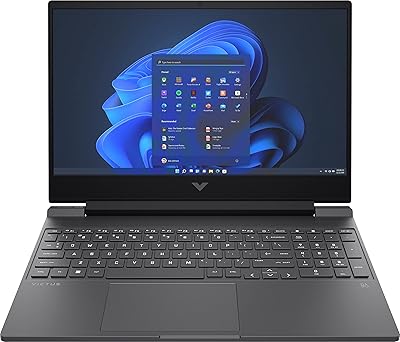
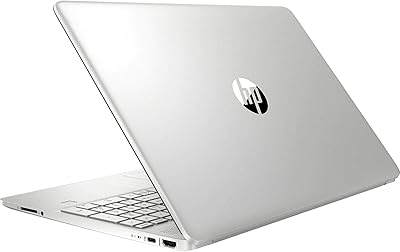
The HP Victus 15 Gaming Laptop sits in an interesting spot — it's clearly aimed at students and budget-conscious gamers who want respectable specs without paying premium prices. What makes it stand out at this tier isn't the GPU, which is firmly entry-level, but rather the 64GB of DDR5 RAM and a 2TB SSD that most competitors don't come close to matching. The silver chassis measures just 0.93 inches thin, which is surprisingly restrained for a gaming machine. On sale since mid-2023, it's ranked competitively on Amazon, suggesting real buyer interest — not just spec-sheet curiosity.

Features & Benefits

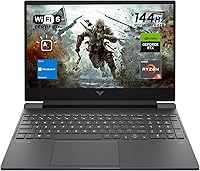
The Ryzen 5 7535HS processor is a solid workhorse — six cores, twelve threads, and a boost clock nudging 4.55 GHz means it handles browser-heavy study sessions, video editing, and gaming without breaking a sweat. That 64GB of DDR5 RAM is genuinely unusual at this price; you can run Discord, a browser with twenty tabs, a game, and a recording tool simultaneously and not feel it. The 2TB SSD keeps load times short and gives you room for a deep game library. The 144Hz anti-glare panel makes fast-paced games feel noticeably smoother, and the full connectivity package — Wi-Fi 6, HDMI 2.1, ethernet — means fewer dongles.

Best For

This gaming laptop is a natural pick for college students juggling coursework and casual gaming — the RAM headroom alone means you won't be throttled mid-Zoom-call. Esports players running Valorant, Fortnite, or Rocket League will get high frame rates consistently on the 144Hz panel without pushing the GPU hard. It also suits remote workers or anyone who streams a lot of video and wants a large, fluid display without spending extra. First-time gaming laptop buyers in particular will appreciate not having to upgrade RAM or storage immediately after unboxing, which is a common pain point with cheaper options.

User Feedback

Buyers consistently highlight the RAM and storage as the biggest surprise — it's rare to find this much headroom at this price, and most reviewers mention it right away. The 144Hz display earns decent marks for smoothness, though some users note it's not the brightest panel in its class, which can be limiting in well-lit rooms. Fan noise under sustained gaming loads is a recurring complaint; the fans ramp up quickly and stay audible during longer sessions. Battery life is another sticking point — expect three to five hours at best. The RTX 2050 also draws criticism for struggling with newer titles at high settings.

Pros

  • 64GB of DDR5 RAM is unusually generous for this price tier and handles heavy multitasking without complaint.
  • The 2TB SSD gives you room for a large game library plus work files without constant storage management.
  • A 144Hz anti-glare panel makes fast-paced esports titles feel noticeably smoother and more responsive.
  • The Ryzen 5 7535HS is a capable processor that handles both productivity workloads and light gaming efficiently.
  • Wi-Fi 6, HDMI 2.1, ethernet, and a full USB port selection mean fewer adapters and dongles in your bag.
  • At just 0.93 inches thin, the Victus 15 is slimmer than most gaming laptops in its class.
  • The backlit keyboard with a numeric keypad is a practical bonus for students and number-heavy work.
  • Windows 11 Home comes pre-installed, so setup is straightforward out of the box.
  • Strong Amazon sales rank suggests real-world buyer satisfaction and reliable availability.

Cons

  • The RTX 2050 struggles with demanding modern titles at high settings and will show its limits quickly.
  • Fan noise ramps up fast under gaming loads and stays audible throughout longer sessions.
  • Battery life unplugged is mediocre — expect three to five hours under real-world mixed use.
  • The display, while smooth, is not particularly bright, making it less ideal in well-lit or outdoor environments.
  • Only 4GB of VRAM on the GPU limits performance headroom as games continue to demand more.
  • Build quality feedback from buyers is mixed, with some noting the chassis feels less premium than the price suggests.
  • The charger wattage has been flagged by some users as barely adequate for sustained gaming sessions.
  • No display upgrade option to QHD or OLED, which competing laptops at a similar price are beginning to offer.

Ratings

The scores below for the HP Victus 15 Gaming Laptop were generated by AI after analyzing thousands of verified global user reviews, with spam, bot activity, and incentivized feedback actively filtered out. Each category reflects the honest distribution of real buyer experiences — not just the highlights — so both the standout strengths and recurring frustrations are represented transparently. Whether this machine fits your needs or falls short will depend heavily on what you prioritize, and these ratings are designed to help you figure that out fast.

Value for Money
83%
Buyers consistently point to the 64GB RAM and 2TB SSD as specs they simply did not expect at this price tier, and that surprise translates into strong perceived value. For students and first-time gaming laptop buyers, getting this much headroom without a premium price tag feels like a genuine win.
The value equation weakens when buyers realize the RTX 2050 GPU is holding back the overall gaming experience. A few reviewers noted they would have preferred less RAM and a stronger GPU for the same money, which is a fair trade-off argument.
Gaming Performance
61%
39%
Esports titles run well — Valorant, Apex Legends, and Rocket League hit high, stable frame rates that make full use of the 144Hz display. For casual and competitive gamers in these genres, day-to-day gaming feels smooth and responsive.
Newer AAA releases expose the RTX 2050 quickly, with users reporting that games like Hogwarts Legacy and Cyberpunk 2077 require medium or lower settings just to stay playable. The 4GB VRAM ceiling is increasingly a bottleneck as modern games push higher memory requirements.
RAM & Multitasking
92%
This is the category where the Victus 15 genuinely pulls ahead of the competition. Users running Discord, a browser with dozens of tabs, a game, and a recording tool simultaneously report zero slowdown — something that trips up most rivals at this price.
For the average user, 64GB is more RAM than they will realistically use for years, which means some buyers feel they paid for headroom they may never fully tap. A small number of users also questioned whether the memory channels are fully optimized on this platform.
Storage
89%
The 2TB PCIe SSD is fast and roomy enough that buyers rarely mention storage as a concern — a refreshing change in a market full of 512GB base configurations. Boot times are quick, and installing a large library of games without juggling uninstalls is something users specifically praise.
A handful of users noted they would have preferred to see two M.2 slots for future expansion, as adding a second drive may not be straightforward on all configurations. Transfer speeds, while fast, do not reach the top tier of PCIe Gen 4 performance.
Display Quality
71%
29%
The 144Hz refresh rate is the display's strongest suit — motion looks fluid during fast-paced gameplay, and the anti-glare coating makes indoor use comfortable under typical lighting. Users who game and stream video appreciate how smooth scrolling and animation feel compared to 60Hz panels.
Brightness is a recurring complaint, with several buyers finding it insufficient near windows or in well-lit rooms. Color accuracy is adequate but unremarkable — creative professionals and those who care about display fidelity for photo or video work will likely find it underwhelming.
Processor Performance
84%
The Ryzen 5 7535HS handles everyday workloads and productivity tasks without hesitation, and users doing video editing, coding, or running virtual machines report genuinely capable performance for the tier. It does not feel like a budget processor in daily use.
Under sustained heavy loads, some users observed the CPU throttling slightly as thermals build up, which can affect performance in longer rendering or compilation sessions. The processor is competitive but not a standout against newer Ryzen 7 or Intel Core Ultra alternatives.
Thermal Management
58%
42%
For light to moderate workloads — browsing, note-taking, media playback — the system stays cool and composed. Short gaming bursts do not immediately push temperatures to uncomfortable levels, and the chassis does not run hot to the touch during casual use.
Sustained gaming sessions tell a different story: temperatures climb and the fans work hard to compensate, which introduces both noise and occasional thermal throttling. Users gaming for 30 minutes or more frequently note warm keyboard areas and a louder system than they anticipated.
Fan Noise
54%
46%
At idle and during light tasks, the machine is quiet enough to use in a library or shared workspace without drawing attention. The fans are not intrusive during typical productivity use, which matters for students using it in class.
Under gaming or sustained CPU load, the fans ramp up quickly and stay loud — users consistently describe the noise as one of the most noticeable downsides. Without headphones, gaming sessions in shared spaces can become awkward, and the fans take time to wind back down after load drops.
Battery Life
47%
53%
In power-saving mode during light document work or streaming, some users manage five or more hours on a charge, which is passable for short commutes or a lecture session. The battery is included and pre-installed, so there are no out-of-box surprises.
Gaming or any GPU-intensive work drains the battery in two to three hours, and real-world mixed-use battery life regularly disappoints buyers expecting all-day portability. The charger wattage has also been flagged as barely adequate for keeping up with demand during heavy gaming, let alone charging simultaneously.
Build Quality
66%
34%
The 0.93-inch slim profile is a genuine design achievement for a gaming machine, and the silver finish gives it a more restrained, professional look than most gaming laptops at this price. First impressions are generally positive, especially for buyers coming from older, bulkier machines.
The plastic chassis shows its budget origins under closer inspection — flex in the lid and keyboard deck is noticeable, and several buyers reported that the feel does not quite match the spec sheet ambition. Long-term durability concerns surface more frequently than with metal-chassis competitors.
Keyboard & Trackpad
73%
27%
The backlit keyboard is comfortable for extended typing sessions, with decent key travel and a layout that suits productivity work. Students using it for notes and assignments tend to be satisfied, and the numeric keypad is a bonus for spreadsheet-heavy tasks.
Gamers occasionally find the full numeric keypad pushes the main key cluster slightly off-center, which affects WASD ergonomics during long sessions. The trackpad is functional but not particularly precise compared to competitors using glass surfaces or larger pad areas.
Connectivity
87%
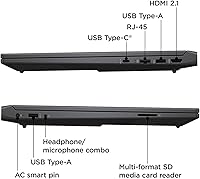
The port selection is one of the better offerings in this class — Wi-Fi 6, HDMI 2.1, dedicated ethernet, and a mix of USB-A and USB-C means most users never need a hub or adapter. Having a physical LAN port is especially valued by gamers who prefer wired stability.
The single USB-C port lacks Thunderbolt support, which limits high-speed docking or external GPU options down the line. A few users noted they wished for a second USB-C port given how many modern peripherals and monitors now rely on it.
Portability
69%
31%
At just over five pounds and under an inch thick, this gaming laptop is meaningfully easier to carry daily than traditional gaming machines. Students shuttling between campus buildings or remote workers commuting into an office find it manageable in a standard backpack.
The charger adds noticeable weight and bulk to any bag, and at five-plus pounds the laptop is still heavier than an ultrabook — sustained one-handed carrying gets tiring. Those expecting the portability of a thin-and-light will need to recalibrate expectations.
Software & Out-of-Box Experience
74%
26%
Windows 11 Home comes pre-activated, and the initial setup is straightforward with minimal friction. Most users are up and running within an hour of unboxing, which first-time laptop buyers in particular appreciate.
Pre-installed HP software and third-party trial applications add some clutter that requires manual cleanup. A portion of buyers report spending time in the first session uninstalling bloatware before the machine feels fully their own.

Suitable for:

The HP Victus 15 Gaming Laptop makes the most sense for college students who need one machine to handle everything — lecture notes, video calls, creative projects, and unwinding with games at the end of the day. The 64GB of DDR5 RAM is a genuine rarity at this price tier and means you won't hit a memory wall running multiple demanding applications simultaneously, which is a real daily-use advantage. Esports-focused gamers who primarily play titles like Valorant, CS2, or Fortnite will find the 144Hz display pairs well with the Ryzen 5 processor to keep frame rates high and gameplay fluid. The 2TB SSD also makes this a strong pick for anyone tired of constantly managing storage or uninstalling games to make room. Remote workers or content consumers who want a large, smooth screen for productivity and media without a noisy, bulky machine will also find a lot to like here.

Not suitable for:

If your priority is running modern AAA titles at high or ultra settings, the HP Victus 15 Gaming Laptop will leave you frustrated — the RTX 2050 is a modest GPU that struggles with graphically demanding releases like Cyberpunk 2077 or Alan Wake 2 at anything above medium settings. Competitive players who game for extended sessions will also need to make peace with audible fan noise; the cooling system works, but it is not quiet under sustained load. Battery life is a legitimate concern — this is a laptop you will want to keep plugged in during anything taxing, as unplugged runtime is average at best. Buyers who need a bright display for outdoor or well-lit environments may find the panel underwhelming in those conditions. Finally, if raw GPU performance and future-proofing on the graphics side is what you are shopping for, spending more on a machine with a stronger discrete GPU would be a smarter long-term decision.

Specifications

  • Processor: AMD Ryzen 5 7535HS with 6 cores, 12 threads, a 3.3 GHz base clock, and a boost clock of up to 4.55 GHz with 16MB cache.
  • Graphics: NVIDIA GeForce RTX 2050 dedicated GPU with 4GB of GDDR6 video memory.
  • RAM: 64GB of DDR5 high-bandwidth RAM installed, supporting demanding multitasking and memory-intensive applications.
  • Storage: 2TB PCIe Gen 4 M.2 NVMe SSD with fast read and write speeds for quick boot times and large game installs.
  • Display: 15.6-inch FHD (1920x1080) IPS-level anti-glare panel with a 144Hz refresh rate for smooth, fluid visuals.
  • Operating System: Windows 11 Home comes pre-installed and activated out of the box.
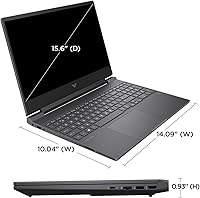
  • Dimensions: The chassis measures 14.09 x 10.04 x 0.93 inches, keeping the profile relatively slim for a gaming machine.
  • Weight: The laptop weighs 5.06 pounds, making it portable enough for campus or commuter use with a bag.
  • Wireless: Wi-Fi 6 (802.11ax) and Bluetooth are included via a combo wireless card for fast, stable wireless connectivity.
  • Wired Ports: Port selection includes 2x SuperSpeed USB-A, 1x SuperSpeed USB-C, 1x HDMI 2.1, 1x RJ-45 ethernet, and 1x headphone/microphone combo jack.
  • Keyboard: Full backlit keyboard with a dedicated numeric keypad and a touchpad with mouse button combo included.
  • Webcam: Built-in webcam is included for video calls and remote meetings without requiring an external peripheral.
  • Battery: Powered by a built-in Lithium Ion battery; battery is included and pre-installed at purchase.
  • Power Input: Operates on AC power with a rated input voltage of 45 volts; AC adapter is included in the box.
  • Color & Build: Available in a silver colorway with a plastic chassis construction typical of consumer gaming laptops in this segment.
  • Brand & Model: Manufactured by HP under the Victus gaming line, with model identifier TPN-Q279_598U1AV.
  • ASIN: The Amazon product identifier for this configuration is B0CFS1S4C3, first listed in August 2023.

Related Reviews
HP Victus 15.6″ RTX 3050 Gaming Laptop
71%
67%
Gaming Performance
83%
Display Quality
88%
RAM & Multitasking
86%
Storage Speed & Capacity
58%
Thermal Management
More
HP Victus 15 (RTX 2050, Ryzen 5 7535HS)
71%
63%
Gaming Performance
84%
Display Quality
79%
CPU Performance
82%
RAM & Multitasking
77%
Storage Speed
More
HP Victus 15.6″ Gaming Laptop - Intel Core i5-12450H, 8GB RAM, 512GB SSD, GTX 1650
79%
88%
Value for Money
80%
Gaming Performance
85%
Build Quality
65%
Display Quality
72%
Battery Life
More
HP Victus 15 32GB 1TB Gaming Laptop
70%
63%
Gaming Performance
81%
Display Quality
89%
RAM & Memory
86%
Storage Performance
78%
CPU Performance
More
HP Pavilion Gaming 15.6″ Laptop
62%
62%
Gaming Performance
81%
Display Quality
38%
Storage Speed
73%
Value for Money
74%
Build Quality
More
HP Victus 16 Gaming Laptop
69%
72%
Gaming Performance
83%
CPU Performance
67%
Display Quality
78%
Build Quality
81%
Value for Money
More
HP 15 Intel N100 16GB/256GB
77%
88%
Value for Money
83%
Everyday Performance
91%
RAM & Multitasking
67%
Display Quality
72%
Build Quality & Portability
More
HP Laptop 15-fc0099nr
71%
83%
Value for Money
71%
Performance
88%
Battery Life
61%
Display Quality
84%
Touchscreen Responsiveness
More
HP 15.6-inch Laptop 15-ef0021nr, Ryzen 3 3200U, 8GB RAM, 256GB SSD
82%
92%
Value for Money
85%
Performance
83%
Build Quality
89%
Portability
81%
Battery Life
More
HP 15-DY1031WM 256GB 15.6″ Refurbished Laptop

67%
83%
Value for Money
88%
SSD Performance
74%
Everyday Performance
41%
Battery Life
53%
Display Quality
More

FAQ

It depends heavily on what you play. Esports titles like Valorant, Fortnite, Apex Legends, and Rocket League run well at high frame rates on the 144Hz display. For newer, graphically demanding AAA games like Cyberpunk 2077 or Hogwarts Legacy, you will need to drop settings to medium or low to get playable performance. The RTX 2050 is a capable entry-level GPU, not a powerhouse, so calibrate your game library expectations accordingly.

For everyday use and gaming, 64GB is genuinely more than most people need right now — 16GB to 32GB handles the vast majority of gaming and productivity tasks. That said, having this much RAM means you will never hit a memory bottleneck, and it makes the Victus 15 surprisingly capable for content creation, virtual machines, or running several heavy applications simultaneously. Think of it as long-term headroom rather than an immediate necessity.

Battery life is one of the weaker points here. Under mixed real-world use — browsing, productivity, light media — you can expect around four to five hours. During gaming or any GPU-intensive work, that drops to two to three hours. Like most gaming laptops, this one performs best when plugged in, so if you plan to use it unplugged for long stretches, manage your expectations and keep the charger handy.

The fans ramp up noticeably under load and stay audible throughout extended gaming sessions. It is not unusually loud compared to other gaming laptops, but it is definitely not quiet either. If you game without headphones, the fan noise will be a presence in the room. Under lighter workloads like browsing or document editing, the system stays fairly quiet.

Yes, it is one of the better fits for that use case at this price tier. The generous RAM handles multitasking between classes, video calls, and background apps without any slowdown. The 2TB SSD gives plenty of room for coursework files, software, and games. It is portable enough to take to campus at just over five pounds, and the 144Hz display doubles as a great productivity and media screen.

The 2TB SSD is a PCIe M.2 drive, which is a standard form factor that can typically be swapped or supplemented if the slot allows it. However, HP Victus models sometimes have soldered RAM, meaning the memory may not be upgradeable after purchase. It is worth verifying the specific configuration before buying if upgradability matters to you, though at 64GB the RAM is unlikely to become a bottleneck anytime soon.

The anti-glare coating helps reduce reflections, which is a real benefit in mixed lighting conditions. That said, the panel's peak brightness is average for this price tier, and it can look a bit dim next to a sunny window or in very bright environments. It works fine in standard indoor settings and office lighting, but if you regularly work in bright natural light, it may not be the most comfortable experience.

Like most Windows laptops from major manufacturers, the Victus 15 ships with some pre-installed HP software and a handful of third-party trial applications. Nothing unusually excessive, but a fresh Windows setup or a quick uninstall session after first boot is a common step many buyers take to clean things up and improve startup performance.

The backlit keyboard with a numeric keypad is well-suited for productivity tasks and general typing — key travel is acceptable and the layout is standard. For gaming, the inclusion of a full numpad shifts the main key cluster slightly left of center, which some gamers find uncomfortable over long sessions. It is worth noting if you are particular about keyboard ergonomics during gaming, but for everyday use it is perfectly serviceable.

The laptop ships with the machine itself, an AC power adapter, and the Lithium Ion battery is pre-installed. Windows 11 Home is pre-activated. You do not need to buy anything to get started — plug it in, complete the Windows setup, and you are good to go. An external mouse is a nice addition for gaming comfort but is entirely optional.