Overview

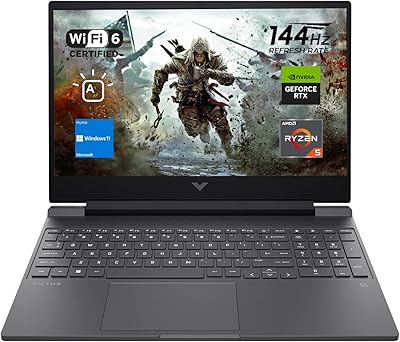
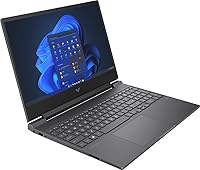
The HP Victus 15 32GB 1TB Gaming Laptop is HP's answer to gamers who want a solid mid-range machine without paying premium prices for specs they may not need. HP's Victus line has always targeted the budget-to-mid gaming crowd, and this configuration leans into that with a capable AMD Ryzen 5 7535HS processor — six cores, twelve threads, boosting up to 4.55GHz — that handles everyday workloads and gaming without breaking a sweat. The 15.6-inch 144Hz IPS display is a genuine standout at this price tier, offering smooth, anti-glare visuals that punch well above comparable budget options. That said, the RTX 2050 GPU is the honest ceiling here, and buyers should walk in with realistic expectations about what that card can actually do.

Features & Benefits

What makes this mid-range gaming laptop interesting isn't just any single spec — it's the combination. 32GB of DDR5 RAM is genuinely rare at this price point; most competitors ship with 16GB, so the headroom for multitasking, browser-heavy workflows, and future-proofing is a real advantage. The 1TB NVMe SSD loads games and applications quickly without the need for an immediate upgrade. On the display side, the 144Hz refresh rate feels noticeably fluid for esports titles. The RTX 2050 brings DLSS and ray tracing support, though with only 4GB of VRAM, heavier modern titles will require lowered settings to stay smooth. Connectivity is strong too — WiFi 6 and a physical Ethernet port cover both wireless and wired needs without compromise.

Best For

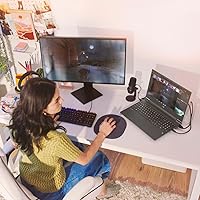
The Victus 15 hits a real sweet spot for college students and casual gamers who need one machine to handle coursework, streaming, and gaming without juggling multiple devices. Esports players chasing high frame rates in titles like Valorant, Fortnite, or CS2 will find the RTX 2050 genuinely capable at 1080p. The large RAM pool also makes it a decent pick for people doing light photo or video editing on the side. If you're moving up from an aging budget laptop and want to get into PC gaming without the complexity of building a desktop, this HP Victus 15 is one of the more complete out-of-the-box options in this price range — no upgrades needed right away.

User Feedback

Owners of this mid-range gaming laptop tend to be genuinely pleased with the display — the smoothness at 144Hz is one of the most consistently praised aspects across user reviews. Build quality and keyboard feel get mixed reactions; most find it acceptable for the price, but it doesn't feel as premium as pricier rivals. Fan noise is a common complaint during extended gaming sessions, with the system running audibly loud under sustained load. Battery life drops noticeably during gaming, sometimes under three hours, though light browsing and productivity tasks stretch it considerably further. Speakers and the webcam are functional but forgettable — exactly what you'd expect at this tier, and not a deal-breaker for most buyers.

Pros

  • 32GB of DDR5 RAM is rare at this price point, giving real headroom for multitasking and future-proofing.
  • The 144Hz IPS display delivers noticeably smooth visuals, especially for competitive esports titles at 1080p.
  • A 1TB NVMe SSD means fast boot times and plenty of game storage without needing immediate upgrades.
  • WiFi 6 and a physical Ethernet port offer flexible, reliable connectivity for home and campus use.
  • The Ryzen 5 7535HS handles everyday productivity, streaming, and multitasking with solid speed and efficiency.
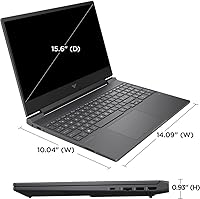
  • At under an inch thick and 5.1 pounds, the Victus 15 is manageable enough for daily commutes.
  • Windows 11 Home comes included — no extra operating system costs or setup headaches right out of the box.
  • The backlit keyboard makes late-night study sessions and gaming in low-light environments genuinely practical.

Cons

  • The RTX 2050's 4GB of VRAM struggles in modern AAA titles, forcing lower graphics settings to stay smooth.
  • Fan noise becomes noticeably loud during extended gaming or CPU-intensive tasks, which can be distracting.
  • Gaming battery life is short — expect roughly two to three hours before needing to plug back in.
  • The plastic chassis feels adequate but not premium, especially compared to similarly priced rivals.
  • Thermal throttling can occur under sustained heavy loads, limiting consistent performance during long gaming sessions.
  • The webcam is low quality and not well suited for professional video calls or content creation.
  • Built-in speakers are underwhelming — headphones are essentially a necessity for a decent audio experience.
  • Pairing 32GB of RAM with only a 4GB GPU creates a spec imbalance that will frustrate dedicated gamers.

Ratings

The HP Victus 15 32GB 1TB Gaming Laptop earned its scores through an AI-driven analysis of thousands of verified purchase reviews collected from global buyers, with spam, bot-generated, and incentivized feedback actively filtered before any rating was calculated. Each category reflects the honest distribution of real user sentiment — including the areas where this mid-range machine genuinely impresses and the pain points that appear consistently across independent buyer experiences. The goal is straightforward: give you a transparent, ground-level picture of what living with this laptop actually looks like.

Gaming Performance
63%
37%
For esports titles and less graphically demanding games, the RTX 2050 delivers genuinely smooth 1080p gameplay at medium-to-high settings. Competitive players running Valorant, CS2, or Apex Legends consistently report hitting high frame rates well above the display's 144Hz ceiling, making the fast panel feel worthwhile.
The 4GB VRAM ceiling becomes apparent quickly in modern AAA titles — Cyberpunk, Hogwarts Legacy, and similar games demand significant settings reductions just to stay playable. Users who expected the RTX branding to carry into high-fidelity gaming report frustration, especially when ray tracing features technically exist but cannot be enabled without severe frame rate penalties.
Display Quality
81%
19%
The 144Hz IPS panel is consistently praised as one of the strongest aspects of this machine at its price tier. Students and casual gamers alike note how smooth everything feels — not just in games, but scrolling through documents and streaming content. The anti-glare coating makes it genuinely comfortable during long indoor study or work sessions.
At 250 nits, brightness is adequate indoors but genuinely struggles near a bright window or in direct sunlight. Color accuracy, while decent for an entry-level IPS, is not calibrated for creative work — photo editors will notice its limitations fairly quickly. The panel also does not cover a wide color gamut, which matters for color-sensitive workflows.
RAM & Memory
89%
Thirty-two gigabytes of DDR5 RAM at this price point is genuinely unusual — most competitors still ship with 16GB, and the difference shows in real use. Running a game while Discord, a browser with many open tabs, and a music app all run in the background feels completely manageable with no noticeable slowdown.
The generous RAM creates a spec imbalance alongside the 4GB GPU — the graphics card runs out of VRAM long before system RAM ever becomes a bottleneck, making the memory headroom feel underutilized for gaming-focused buyers. Some configurations may also ship with memory soldered to the motherboard, removing any option to reconfigure or upgrade modules later.
Storage Performance
86%
The 1TB PCIe NVMe SSD makes a noticeable difference in everyday use — Windows boots quickly, games load faster than on budget SATA-based machines, and large file transfers complete without the long waits that plagued older HDD-equipped laptops. Users upgrading from slower drives consistently rate this as one of the most immediately satisfying aspects of the machine.
There is no confirmed secondary storage slot across all configurations, meaning users who accumulate large game libraries may find themselves managing space more carefully than expected over time. Sustained sequential write speeds can also taper off slightly compared to higher-end NVMe drives, though most everyday users are unlikely to encounter this under normal workloads.
CPU Performance
78%
22%
The Ryzen 5 7535HS handles everyday workloads with ease — opening multiple applications, running browser-based tools, video calls, and multitasking rarely cause any perceptible lag. In gaming scenarios where the processor carries the load for game logic or open-world simulation, it holds its own comfortably against comparable Intel alternatives at this price range.
The 7535HS does not offer the single-threaded muscle or peak multi-core output of higher-tier processors, which becomes apparent in demanding tasks like 4K video export or large compilation jobs. Users stepping down from a higher-end Intel or AMD chip may find the performance gap more noticeable in practice than the spec sheet implies.
Thermal Management
58%
42%
For shorter gaming sessions at moderate settings, the cooling system keeps chassis surface temperatures from becoming uncomfortably hot, and esports titles in particular tend to run cool enough that fans settle at a tolerable noise level. Brief productivity bursts rarely trigger the aggressive thermal response that extended gaming sessions do.
Under sustained heavy loads — extended gaming at high settings or simultaneous CPU and GPU-intensive tasks — the system throttles noticeably, with clock speeds dropping to keep temperatures in check. The resulting fan noise is a common and consistent complaint across user reviews, loud enough to be distracting in quiet environments like libraries or shared study spaces.
Build Quality
67%
33%
The slim 0.93-inch profile and matte black finish give the Victus 15 a reasonably clean look that does not stand out awkwardly in a classroom or coffee shop. Most users find the chassis holds together well under normal daily handling, with no significant creaking or alignment issues reported during routine opening and closing.
The all-plastic construction flexes noticeably when pressure is applied to the lid or keyboard deck — not a structural concern for careful users, but a clear indicator of where costs were trimmed. Users who have handled metal-chassis competitors like the ASUS TUF or Lenovo IdeaPad Gaming lines tend to rate this one lower in perceived build solidity.
Battery Life
54%
46%
For light use — browsing, note-taking, or streaming a lecture — the battery comfortably lasts through a typical class day without a recharge, with most users reporting around 5 to 6 hours of productivity-focused runtime. Students who study during the day and game at home in the evening generally find the battery division workable.
Switch to gaming and battery life drops to roughly 2 to 3 hours — sometimes less under heavy load — making unplugged gaming impractical. This is a recurring complaint in user reviews, especially from frequent travelers who hoped the machine would last a commute or an extended outing without needing the charger in tow.
Value for Money
77%
23%
The combination of 32GB DDR5 RAM and 1TB NVMe storage at this price makes the Victus 15 one of the more spec-generous options in its class. First-time PC gamers and students upgrading from aging machines consistently feel the overall package represents genuine value for what they spend.
The RTX 2050 tempers the value case for dedicated gamers — competing machines at a similar price sometimes offer a stronger GPU at the expense of less RAM or storage, which may be the smarter trade-off depending on priorities. Once the GPU becomes a consistent bottleneck, some buyers feel the price-to-performance ratio does not hold up as well as initially expected.
Keyboard & Trackpad
72%
28%
The backlit keyboard is comfortable enough for long writing sessions, with key spacing that most users find accommodating for both typing and gaming. Key travel feels adequate rather than mushy or uncomfortably shallow, and the backlighting is a practical convenience for late-night study or gaming in dimly lit environments.
The trackpad is serviceable but not a highlight — surface area is on the smaller side and tracking precision draws occasional criticism in user feedback. Those who spend extended time on productivity tasks without a mouse frequently wish for a larger, more responsive surface, and the single-zone keyboard backlighting offers no per-key customization.
Connectivity
83%
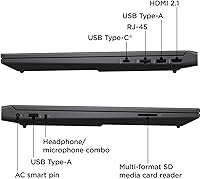
Having both WiFi 6 and a physical RJ-45 Ethernet port is a genuine advantage — users who game competitively or work from home can plug in directly for a stable, low-latency connection without needing a dongle. The three USB 3.0 ports and HDMI output cover most everyday peripheral and display needs without requiring a hub.
The absence of a USB-C port with Thunderbolt support is a noticeable gap for users who want to connect modern accessories or high-bandwidth peripherals. There is also no SD card reader, which is a frustrating omission for content creators who regularly transfer files from cameras or other recording equipment.
Audio Quality
48%
52%
For casual video calls, YouTube playback, and background music during study sessions, the built-in speakers produce enough volume to be audible in a quiet room. Users who are not particularly audio-sensitive find them passable for light entertainment when headphones are not immediately at hand.
The speakers are thin and tinny with almost no low-end presence — gaming audio, music, and movie soundtracks all suffer noticeably without external speakers or headphones. This is one of the most consistently flagged complaints in user reviews, with many buyers explicitly stating that headphones are effectively mandatory for any immersive listening experience.
Webcam Quality
43%
57%
The webcam is functional for its intended purpose — attending online classes, quick video check-ins, or basic calls in reasonably lit indoor environments. Users who video call infrequently and do not require high image fidelity will find it serviceable for those intermittent needs.
In anything less than ideal lighting, the webcam produces grainy, washed-out footage that is noticeably inferior to a standalone USB webcam or even a mid-range smartphone camera. Users relying on video for professional meetings or content creation consistently flag it as one of the machine's weakest and most disappointing components.
Portability
74%
26%
At 0.93 inches thin and 5.1 pounds, the Victus 15 sits on the lighter and slimmer end of 15.6-inch gaming laptops, making it genuinely feasible to carry in a standard backpack without feeling like dead weight. Students commuting between home and campus find it practical enough to bring alongside textbooks and other daily essentials.
Five pounds is still a meaningful amount to carry all day, and buyers transitioning from lighter ultrabooks will notice the difference on longer commutes or travel days. The charger adds extra bulk and weight to any bag, and the limited gaming battery life means it almost always needs to come along when serious use is planned.

Suitable for:

The HP Victus 15 32GB 1TB Gaming Laptop is a strong fit for college students and first-time PC gamers who need a versatile machine that handles both coursework and casual gaming without compromise. Esports enthusiasts focused on competitive titles like Valorant, CS2, or Fortnite will appreciate the 144Hz display and the RTX 2050's ability to push high frame rates at 1080p in less demanding games. The unusually generous 32GB of DDR5 RAM also makes it appealing for light content creators — people doing photo editing, video projects, or running multiple applications simultaneously without slowdowns. Anyone upgrading from an aging budget laptop will notice an immediate jump in everyday performance, from fast boot times to snappy app launches, thanks to the PCIe NVMe SSD. It's also a practical pick for buyers who want a plug-and-play Windows 11 setup that doesn't require immediate hardware upgrades or any technical tinkering out of the box.

Not suitable for:

Serious gamers chasing high-fidelity visuals in modern AAA titles like Cyberpunk 2077, Alan Wake 2, or Black Myth: Wukong should look elsewhere — the RTX 2050's 4GB of VRAM is a hard ceiling that forces significant compromises in graphics settings. The HP Victus 15 32GB 1TB Gaming Laptop is not the right choice for anyone expecting desktop-replacement performance or planning to run demanding creative workloads like 3D rendering or professional-level video editing. If fan noise bothers you during long sessions, be prepared: the cooling system works hard under load and is audible enough to be distracting in quiet environments like libraries or shared workspaces. Battery life during active gaming is modest at best, so frequent travelers or students relying on all-day unplugged use will need to keep the charger close. And if build quality and a premium feel are priorities, the plastic chassis will fall short of expectations set by higher-end gaming or business-class laptops.

Specifications

  • Processor: The AMD Ryzen 5 7535HS is a 6-core, 12-thread processor with a 3.3GHz base clock, a boost clock of up to 4.55GHz, and 16MB of cache.
  • Graphics Card: The NVIDIA GeForce RTX 2050 features 4GB of dedicated GDDR6 VRAM and supports hardware-accelerated ray tracing and DLSS upscaling.
  • RAM: The system ships with 32GB of DDR5 SDRAM installed as standard.
  • Storage: A 1TB NVMe SSD connected via a PCIe x4 interface serves as the primary drive, delivering substantially faster read and write speeds than traditional SATA or spinning-disk alternatives.
  • Display: The 15.6-inch IPS panel offers Full HD (1920x1080) resolution, a 144Hz refresh rate, an anti-glare coating, and a rated peak brightness of 250 nits.
  • Operating System: Windows 11 Home comes pre-installed and activated on the laptop.
  • Wireless: The built-in WiFi 6 (802.11ax) adapter provides faster wireless throughput and better performance in congested network environments compared to older WiFi standards.
  • Wired Network: A physical RJ-45 Ethernet port is included, enabling a stable, low-latency wired internet connection without an adapter.
  • Ports: Connectivity includes three USB 3.0 Type-A ports and one HDMI output for connecting an external monitor or display.
  • Keyboard: The full-size keyboard features integrated backlighting for comfortable use in low-light or dark environments.
  • Weight: The laptop has a total weight of 5.1 pounds (approximately 2.31 kg).
  • Dimensions: The chassis measures 14.09 x 10.04 x 0.93 inches (L x W x H), making it one of the slimmer profiles available in a 15.6-inch gaming laptop.
  • Battery: The system is powered by a single Lithium-Ion battery pack, which is included in the box at purchase.
  • Color: The laptop ships in a Black colorway with a matte plastic finish.
  • Brand Series: This model is part of HP's Victus sub-brand, a line specifically designed for the budget-to-mid-range gaming laptop segment.

Related Reviews
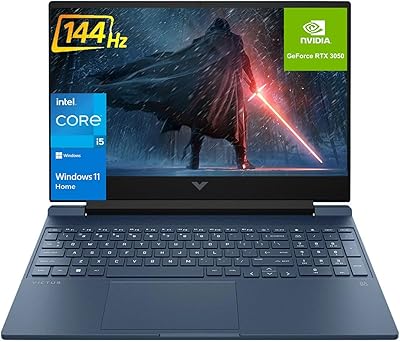
HP Victus 15.6″ RTX 3050 Gaming Laptop
71%
67%
Gaming Performance
83%
Display Quality
88%
RAM & Multitasking
86%
Storage Speed & Capacity
58%
Thermal Management
More
HP 15 G9 32GB 1TB Laptop
71%
83%
Value for Money
89%
RAM & Multitasking
86%
Storage Performance
51%
Processor Performance
74%
Display Quality
More
HP Victus 15 Gaming Laptop
72%
83%
Value for Money
61%
Gaming Performance
92%
RAM & Multitasking
89%
Storage
71%
Display Quality
More
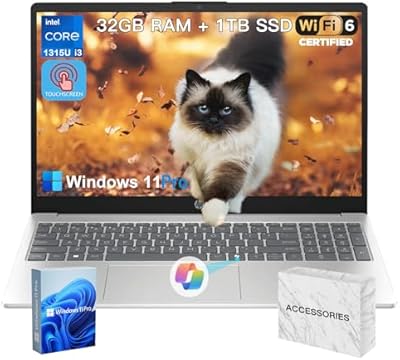
HP Pavilion Gaming 15.6″ Laptop
62%
62%
Gaming Performance
81%
Display Quality
38%
Storage Speed
73%
Value for Money
74%
Build Quality
More
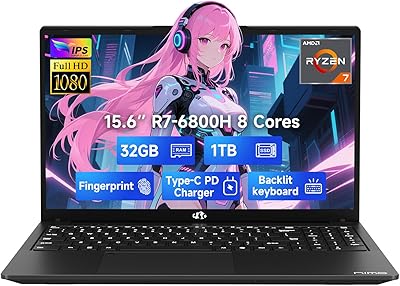
HP 15.6″ i3 1315U 1TB Touchscreen Laptop
76%
83%
Value for Money
76%
Performance
58%
Display Quality
88%
RAM & Multitasking
86%
Storage
More
HP Victus 15 (RTX 2050, Ryzen 5 7535HS)
71%
63%
Gaming Performance
84%
Display Quality
79%
CPU Performance
82%
RAM & Multitasking
77%
Storage Speed
More
NIMO N155L 32GB/1TB
NIMO N155L 32GB/1TB
72%
88%
Processing Performance
91%
RAM & Memory Experience
87%
Storage Speed & Capacity
58%
Gaming Capability
66%
Display Quality
More
Dell G5 15.6-inch Gaming Laptop 32GB/1TB
73%
74%
Gaming Performance
82%
Value for Money
89%
RAM and Multitasking
86%
Storage Performance
67%
Display Quality
More
HP 15.6″ i7-1355U Touchscreen Laptop
79%
88%
Everyday Performance
84%
Display Quality
81%
Touch Responsiveness
91%
RAM & Multitasking
86%
Storage Speed & Capacity
More
HP Victus 15.6″ Gaming Laptop - Intel Core i5-12450H, 8GB RAM, 512GB SSD, GTX 1650
79%
88%
Value for Money
80%
Gaming Performance
85%
Build Quality
65%
Display Quality
72%
Battery Life
More

FAQ

It can run them, but you will need to pull settings down considerably from the defaults. The RTX 2050 has only 4GB of VRAM, which is a meaningful constraint in graphically intensive titles released in the past couple of years. Expect playable frame rates at low-to-medium settings at 1080p, but high or ultra presets are largely off the table in those demanding titles.

It is a fair question, and honestly the RAM and GPU pairing is a bit unusual. For gaming alone, 16GB would be plenty — the extra RAM does not directly improve GPU-bound performance. Where it earns its keep is multitasking: running a game alongside a browser with many tabs, Discord, and a streaming app without slowdowns. It also provides more future-proofing than most competitors in this price range.

It depends heavily on what you are doing. Light tasks like web browsing, note-taking, or video streaming can stretch the battery to around 5 to 7 hours under normal conditions. During active gaming, that drops to roughly 2 to 3 hours, so if you plan to game away from an outlet, the charger should absolutely come with you.

It is one of the more well-rounded options in this price range for students who need one machine to do everything. The Ryzen 5 processor handles academic workloads, video calls, and multitasking without issue, while the 144Hz display and dedicated GPU make casual gaming genuinely enjoyable in the evenings. The slim profile and manageable weight make it reasonable to carry between classes or between home and campus.

Storage upgrades are generally possible through the M.2 slot, and with 1TB already installed, most users will not feel the need anytime soon. RAM is less straightforward — some Victus 15 configurations ship with memory that is soldered to the motherboard and cannot be swapped out, so check the service documentation for your specific unit before assuming it is user-upgradeable.

Under sustained gaming load, the fans become noticeably audible — this is typical for mid-range gaming laptops at this price, not a defect. It is not unusually loud compared to its peers, but it is loud enough that most people naturally reach for headphones during longer sessions. During light productivity use or browsing, the system runs much more quietly.

DLSS is genuinely useful here and worth enabling in any game that supports it, as it can recover meaningful performance with minimal visual downside. Ray tracing is technically supported by the hardware, but given the 4GB VRAM ceiling, enabling it in demanding games will hurt frame rates significantly. A practical approach is to use DLSS wherever available and leave ray tracing off unless you are playing an older, lighter title.

The 144Hz IPS panel on the HP Victus 15 32GB 1TB Gaming Laptop is genuinely one of its standout features, even outside of gaming. Colors are decent for an entry-level IPS screen, and the anti-glare coating makes it comfortable to use under indoor lighting. At 250 nits of rated brightness, it performs well indoors but can feel dim in very bright or sunlit spaces.

It is functional for daily carry, but the plastic chassis does flex more than you would see on a premium metal-bodied laptop. Using a padded sleeve or a proper laptop compartment in your bag will go a long way toward protecting it over time. Think of it as a practical workhorse rather than a refined premium device, and it will hold up well.

Esports and competitive titles are where this GPU is most comfortable — games like Valorant, CS2, Fortnite, Apex Legends, and Rocket League can deliver high, stable frame rates at medium-to-high settings on the 144Hz panel. Older single-player games and less demanding indie titles also run very well. Where it runs into trouble is with the latest graphically intensive releases, which typically need settings reduced to low or medium to stay playable.