

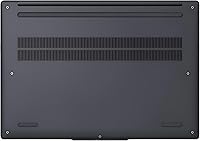
Overview

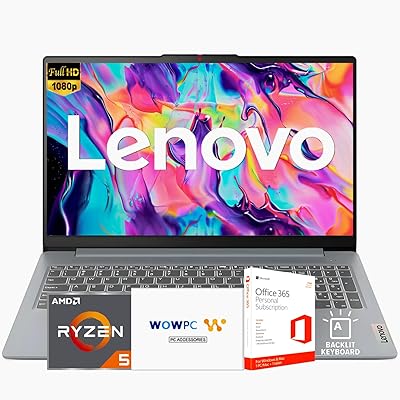
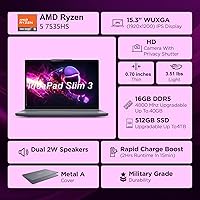
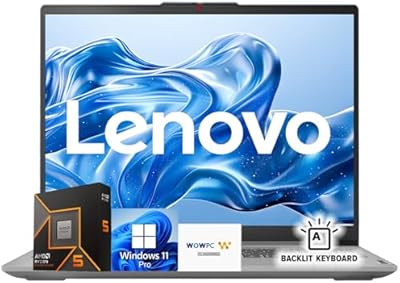
The Lenovo IdeaPad Slim 3 15 Laptop is a no-nonsense everyday machine aimed squarely at students and light business users who need solid performance without overspending. At under an inch thin and finished in an understated Luna Grey, it looks sharper than its price tier suggests — and military-grade build quality means it can handle the bumps of daily commutes or campus life without issue. The AMD Ryzen 5 7535HS gives it enough muscle for multitasking across browser tabs, video calls, and office work. Just keep expectations honest on the gaming side: the integrated graphics handle casual titles, but this is not a dedicated gaming machine by any stretch.

Features & Benefits

The AMD Ryzen 5 7535HS is the real workhorse here — six cores running up to 4.55GHz handle everything from juggling spreadsheets and video calls to light photo editing without breaking a sweat. Paired with 16GB of DDR5 RAM, this slim laptop keeps up with heavy browser sessions and multitasking better than most machines at this price. The 15.3-inch WUXGA IPS display is a pleasant surprise: the anti-glare coating earns its keep in bright offices, and the 1920x1200 resolution gives a little extra vertical room that standard 1080p screens don't. Storage is the one honest caveat — 256GB fills fast, so anyone planning to store large files locally should budget for an external drive or a bigger SSD swap.

Best For

This slim laptop punches above its weight for college students who live in Google Docs and Zoom calls. It's also a solid pick for remote and hybrid workers who need something portable enough to toss in a bag every morning but sturdy enough to survive real-world use. Light creative work — resizing images, editing short clips, or running design tools — is within reach, though heavy rendering will push its limits. Budget-focused buyers who care about brand reliability will appreciate getting a Lenovo machine with a current-generation processor and DDR5 memory at this price point. It also works well as a capable travel backup for anyone who would rather not risk their main machine on the road.

User Feedback

Buyers consistently highlight value for the price — most are impressed by how capable the IdeaPad Slim 3 feels given what they paid, particularly praising the display sharpness and the solid chassis. The full-size keyboard with a numeric keypad earns positive mentions from frequent typists, though the missing backlight is a recurring frustration for anyone who works in dim environments. The 256GB drive is the most common complaint: it fills up faster than expected, and there is broad consensus that the base storage should be larger. Fan noise under sustained load comes up occasionally, with some users noting it gets audible during heavier tasks. Against competing Windows laptops at similar prices, most buyers still consider this the better overall package.

Pros

  • The AMD Ryzen 5 7535HS delivers genuinely capable everyday performance well above what its price suggests.
  • 16GB of DDR5 RAM keeps multitasking smooth even with many browser tabs and apps open simultaneously.
  • The 15.3-inch anti-glare IPS display reduces eye strain in bright rooms and offers slightly more vertical screen space than standard FHD panels.
  • Military-grade build quality means this slim laptop can survive drops, tight bags, and the chaos of daily commuting.
  • Wi-Fi 6 and Bluetooth 5.3 keep wireless connections fast and stable across modern home and office networks.
  • USB-C charging with PD 3.0 support means you can top it up with a standard charger you likely already own.
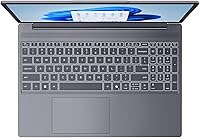
  • The full-size keyboard with a numeric keypad is genuinely comfortable for extended typing and spreadsheet work.
  • A physical privacy shutter on the webcam is a thoughtful, practical feature that many competing machines skip.
  • The IdeaPad Slim 3 consistently holds its own against similarly priced Windows laptops from competing brands.
  • Fast SSD boot times make the day-to-day experience feel snappy, even if the total capacity is modest.

Cons

  • 256GB of base storage fills up surprisingly fast — a larger SSD option would make this a much easier recommendation.
  • The webcam produces acceptable video for calls but lacks the clarity that has become standard on newer machines.
  • No keyboard backlight is a real drawback for anyone who works in low-light conditions, and it cannot be added later.
  • Fan noise becomes noticeable under sustained workloads like long video exports or heavy browser sessions.
  • Integrated graphics rule out modern PC gaming and any GPU-accelerated creative work at a practical level.
  • At 6 pounds, this slim laptop is not the lightest in its class — those who prioritize ultra-low weight have better options.
  • The 720p webcam resolution feels behind the curve compared to competing laptops now shipping with 1080p cameras.
  • No Thunderbolt port limits connectivity options for users who rely on high-speed external displays or fast docking stations.

Ratings

The Lenovo IdeaPad Slim 3 15 Laptop scores here reflect AI-driven analysis of verified global buyer reviews, with spam, bot submissions, and incentivized feedback actively filtered out before scoring. Ratings cover the full picture — what genuinely impresses everyday users and where real frustrations consistently surface — so you can make a confident, clear-eyed purchase decision.

Value for Money
88%
Buyers repeatedly note that this slim laptop punches well above its price bracket, delivering DDR5 memory, a current-generation AMD processor, and a reputable brand name at a cost where competitors often cut deeper corners. For students or first-time laptop buyers on a tight budget, the overall package feels genuinely competitive.
A handful of buyers feel the base storage undercuts the value proposition — spending extra on a larger SSD at checkout, or upgrading shortly after purchase, adds real cost that erodes the initial savings somewhat.
Performance
83%
The Ryzen 5 7535HS keeps up comfortably with the demands most users actually place on it: browser-heavy research sessions, video calls, spreadsheets, and light photo editing all run without meaningful slowdown. The DDR5 RAM contributes noticeably to snappy multitasking compared to older DDR4 machines at similar prices.
Users pushing sustained workloads — extended video exports, running virtual machines, or stacking resource-heavy applications — report that the processor throttles under thermal pressure and fan noise picks up noticeably, reminding you this is a mid-range chip in a slim chassis.
Display Quality
79%
21%
The 15.3-inch WUXGA IPS panel earns consistent praise for its anti-glare coating, which holds up well in bright offices and sunlit rooms where glossy displays become frustrating mirrors. The 1920x1200 resolution gives slightly more vertical real estate than a standard 1080p screen, which document and spreadsheet users genuinely appreciate.
Color accuracy and brightness fall short of what creative professionals expect — the 45% NTSC gamut and 300-nit peak are adequate for general use but limiting for photo or video work where color fidelity matters. A 60Hz refresh rate also feels dated compared to higher-refresh panels now appearing in this price range.
Build Quality
86%
The MIL-SPEC durability rating is not just a marketing badge here — buyers who commute daily or travel frequently report the chassis holds up well against the routine abuse of bag life. The slim profile does not translate to a flimsy feel, and the Luna Grey finish resists fingerprints better than glossy alternatives.
The lid and bottom panel flex slightly under deliberate pressure, and a few buyers note the plastic materials feel less premium than the durability rating implies. It is not fragile, but it does not feel as solid as aluminum-chassis competitors that cost more.
Keyboard & Typing Experience
71%
29%
The full-size layout with a numeric keypad is a practical advantage that frequent typists and spreadsheet users genuinely appreciate — it is relatively rare at this form factor and price. Key travel and feedback are adequate for long writing sessions without significant fatigue.
The complete absence of keyboard backlighting is a recurring dealbreaker in buyer feedback, particularly for students who work late and professionals in dim meeting rooms. This is a fixed hardware limitation with no workaround, and it is one of the more frequently cited purchase regrets.
Storage
52%
48%
The PCIe NVMe SSD delivers fast boot times and quick application launches, making the day-to-day experience feel responsive. For cloud-first users who store most files on Google Drive or OneDrive, the drive capacity is a less pressing concern.
256GB is simply not enough for most users beyond the first year of ownership — software, system updates, downloaded media, and project files accumulate quickly. This is the single most cited frustration across buyer reviews, and it is a hard limitation that requires either an early upgrade or constant file management.
Webcam Quality
58%
42%
The 720p camera produces acceptable image quality for standard video calls in well-lit environments, and the physical privacy shutter is a practical, security-minded feature that many competing machines at this price still omit. The integrated microphone captures voice clearly enough for everyday calls.
In anything less than ideal lighting, the image quality drops noticeably, and buyers accustomed to 1080p webcams on newer machines find the 720p output visibly soft. For remote workers whose video presence matters professionally, this camera is a weak point that may prompt them to add an external webcam.
Portability
77%
23%
At under an inch thick, the IdeaPad Slim 3 slides into a standard laptop sleeve or backpack without bulk, and USB-C charging means one less proprietary adapter to carry on the road. For commuters and students moving between locations daily, the slim form factor is a genuine practical benefit.
At 6 pounds, this slim laptop is not featherweight — there are thinner and lighter 15-inch machines on the market, and users who prioritize ultrabook-level portability may find the weight adds up on longer carry days.
Connectivity & Ports
81%
19%
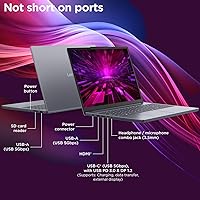
The port selection is well-rounded for a slim budget laptop: two USB-A ports, a USB-C with DisplayPort output, HDMI, an SD card reader, and a combo audio jack cover most everyday scenarios without immediately reaching for a hub. Wi-Fi 6 and Bluetooth 5.3 keep wireless performance current and reliable.
The HDMI port is version 1.4, which caps external display output at 4K 30Hz — a mild frustration for users connecting to newer monitors. The absence of Thunderbolt support limits high-speed docking options for users with more demanding peripheral setups.
Thermal Management
63%
37%
Under light to moderate use — the kind of workload most target buyers place on this machine daily — temperatures stay reasonable and the chassis does not become uncomfortable to use on a lap or desk.
Sustained heavier tasks push temperatures up noticeably, and the cooling system responds with fan noise that several buyers describe as distracting. The slim chassis limits thermal headroom, so users who regularly run the processor hard will experience throttling before long.
Software & Out-of-Box Experience
74%
26%
Windows 11 Home arrives in a reasonably clean state, and the inclusion of a dedicated Microsoft Copilot key adds a layer of AI-assisted productivity that some buyers find useful for everyday tasks right out of the box.
A handful of pre-installed Lenovo utilities and trial applications add minor bloat that new users often need to clean up before the machine feels fully their own. Nothing is unusual for this category, but it is a small friction point at first setup.
Wireless Performance
84%
Wi-Fi 6 support means this slim laptop takes full advantage of modern routers, delivering consistently fast and stable connections for video calls, large file transfers, and cloud-based work without the signal drops some older standards exhibit.
Bluetooth 5.3 performs reliably for peripherals and headphones in most scenarios, though a small number of buyers report occasional pairing inconsistencies with certain older Bluetooth devices — a minor issue rather than a systemic one.
Audio Quality
61%
39%
Speakers are adequate for casual video playback and background music during work sessions, and the 3.5mm combo jack performs reliably with wired headphones and headsets for calls and focused listening.
Speaker volume and bass depth are unremarkable — the audio output is thin and lacks punch at higher volumes, which is a common trade-off in slim budget laptops where chassis depth limits speaker size. Most users who care about audio quality will reach for headphones.

Suitable for:

The Lenovo IdeaPad Slim 3 15 Laptop is a strong fit for college students who spend most of their day in a browser, writing papers, attending virtual lectures, and jumping between apps — it handles that workload without complaint. Remote and hybrid workers who need a dependable daily driver that slides into a bag without adding much bulk will also feel well-served here. The slim chassis, military-grade construction, and USB-C charging make it genuinely travel-friendly, which matters if you are switching between home, a coffee shop, and an office regularly. Budget-conscious buyers who want a current-generation processor and DDR5 memory from a reputable brand — rather than gambling on a lesser-known label — will find this a smart, practical choice. It also works well as a capable secondary laptop for households that need an extra machine for kids' schoolwork or light home tasks.

Not suitable for:

The Lenovo IdeaPad Slim 3 15 Laptop is not the right call for anyone who needs serious graphical horsepower. The integrated AMD Radeon 660M can handle casual, older, or low-demand titles, but modern games at playable settings are largely out of reach — so dedicated gamers should look elsewhere. Content creators doing sustained video rendering, 3D modeling, or working with large RAW photo libraries will hit the ceiling on both the storage and the processor fairly quickly. The 256GB SSD is genuinely limiting for power users, and while it can be upgraded, that adds cost and effort that not everyone wants to deal with. Anyone who regularly works in dim environments — late-night study sessions, darkened conference rooms — will find the non-backlit keyboard a persistent annoyance. Finally, professionals who need Thunderbolt connectivity or a high-refresh-rate display for precision work should plan their budget higher.

Specifications

  • Processor: The AMD Ryzen 5 7535HS is a 6-core, 12-thread chip with a base clock of 3.3GHz and a boost clock reaching up to 4.55GHz, well-suited for everyday multitasking and light creative work.
  • RAM: 16GB of DDR5 SO-DIMM memory provides fast data throughput and comfortable headroom for running multiple applications simultaneously.
  • Storage: A 256GB PCIe NVMe SSD handles the operating system and core applications with fast read and write speeds, though total capacity is limited for heavy media storage.
  • Display: The 15.3-inch WUXGA IPS panel delivers a 1920x1200 resolution at 300 nits brightness with an anti-glare coating and a 60Hz refresh rate.
  • Graphics: AMD Radeon 660M integrated graphics handle light image editing, HD video playback, and casual low-demand gaming without a discrete GPU.
  • Operating System: Windows 11 Home (64-bit) comes pre-installed, with Microsoft Copilot accessible via a dedicated keyboard key.
  • Wireless: Wi-Fi 6 (802.11ax, 2x2) and Bluetooth 5.3 provide fast, modern wireless connectivity for home and office environments.
  • Ports: Connectivity includes 2x USB-A 3.2 Gen 1, 1x USB-C 3.2 Gen 1 with PD 3.0 and DisplayPort 1.2, 1x HDMI 1.4, 1x 3.5mm combo audio jack, 1x SD card reader, and 1x power connector.
  • Webcam: A 720p HD camera with a physical privacy shutter and integrated digital microphone supports video calls and remote meetings.
  • Keyboard: The full-size, non-backlit keyboard includes a numeric keypad and is designed for comfortable extended typing sessions.
  • Dimensions: The chassis measures 13.52 x 9.51 x 0.7 inches, making it notably thin for a 15-inch class laptop.
  • Weight: The laptop weighs 6 pounds, which is manageable for daily commutes but not the lightest option in this screen size category.
  • Build Standard: The chassis meets military-grade durability standards (MIL-SPEC referenced), offering resistance to drops and other physical stresses common during travel.
  • Charging: USB-C PD 3.0 charging support allows the laptop to be powered via a compatible USB-C charger in addition to the bundled power connector.
  • Color: The laptop is available in Luna Grey, a neutral, professional-looking finish that avoids the glossy surfaces prone to visible fingerprints.
  • Audio Jack: A single 3.5mm combo headphone and microphone jack is located on the chassis for wired audio accessories.
  • Optical Drive: No optical drive is included, consistent with the slim chassis design and current laptop industry standards.

Related Reviews
Lenovo IdeaPad Slim 3 15.3″ Laptop, Intel Core i5-13420H, 16GB RAM, 1TB SSD
85%
88%
Performance
81%
Display Quality
89%
Multitasking Capabilities
85%
Build Quality
77%
Battery Life
More
Lenovo Ideapad Slim 3 Laptop, AMD Ryzen 5 5625U, 16GB RAM, 2TB SSD, 15.6″ FHD, Windows 11 Pro
86%
92%
Value for Money
88%
Battery Life
85%
Display Quality
90%
Performance (General)
93%
Storage Capacity
More
Lenovo IdeaPad Slim 3 15.6″ Ryzen 5 5625U 16GB 512GB
75%
88%
Processor Performance
91%
Value for Money
74%
Build Quality & Durability
67%
Display Quality
86%
RAM & Storage
More
Lenovo IdeaPad Slim 3 Business Laptop, Ryzen 5 5625U, 16GB RAM, 1TB SSD
86%
88%
Performance
90%
Multitasking Capability
85%
Display Quality
86%
Keyboard Comfort
65%
Battery Life
More
Lenovo IdeaPad 3 15″ Touch Laptop
70%
83%
Value for Money
67%
Performance
54%
Display Quality
76%
Build Quality
79%
Keyboard & Trackpad
More
Lenovo Ideapad 3 Laptop, 15.6″, Intel Core i3, 12GB RAM, 256GB SSD
84%
92%
Value for Money
85%
Performance for Everyday Tasks
90%
Portability and Weight
75%
Display Quality
80%
Battery Life
More
Lenovo IdeaPad 3 Laptop, 15.6″, Intel Core i3-1115G4, 16GB RAM, 512GB SSD
83%
84%
Performance
91%
Value for Money
85%
Display Quality
76%
Battery Life
80%
Build Quality
More
Lenovo IdeaPad Slim 3 16″ Laptop
74%
83%
Everyday Performance
93%
RAM Capacity
86%
Storage Speed & Capacity
71%
Display Quality
74%
Build Quality
More
Lenovo IdeaPad Slim 3 16-inch 2TB Laptop
73%
88%
Value for Money
93%
Storage Capacity
84%
CPU Performance
71%
Display Quality
67%
Build Quality
More
Lenovo IdeaPad 3 15.6-inch Laptop
70%
78%
Performance
74%
Display Quality
62%
Build Quality
57%
Battery Life
83%
Value for Money
More

FAQ

Yes, it is genuinely well-suited for college use. The Ryzen 5 processor and 16GB of RAM handle coursework, video calls, research browsing, and document editing without issue. The slim, durable build also means it holds up to backpack life better than many budget machines.

The SSD can typically be upgraded since it uses a standard PCIe NVMe slot, which gives you a practical path to more storage down the line. RAM upgradeability depends on whether one or both slots are occupied at the factory — checking the service manual or opening the bottom panel will confirm this. If storage is a concern, budgeting for a larger SSD swap at purchase is worth considering.

It depends on your habits. For someone who stores files in the cloud, streams media, and keeps a clean machine, 256GB can work. But if you download a lot of software, store photos and videos locally, or install several large applications, you will likely feel the squeeze within a year. An external drive or early SSD upgrade helps a lot.

Only in a limited sense. The integrated AMD Radeon 660M handles older titles, less demanding indie games, and casual gaming reasonably well. Modern AAA games at acceptable frame rates are generally out of reach — this is not a gaming laptop in any meaningful sense, despite how it is sometimes marketed.

No, and that is one of the more commonly raised frustrations among buyers. The keyboard is full-size and comfortable to type on, but the lack of backlighting makes it difficult to use in dim environments. If you regularly work in low-light conditions, this is a genuine dealbreaker worth factoring into your decision.

It supports USB-C charging via PD 3.0, which means a compatible USB-C power adapter — including many phone chargers above a certain wattage — can top it up. It also has a traditional barrel-style power connector for the included adapter. The USB-C charging option is a genuinely convenient feature for travel.

It is better than you might expect at this price. The IPS anti-glare panel keeps things readable in bright rooms, and the 1920x1200 resolution gives a little more vertical space than a standard 1080p screen — which makes a real difference when you are reading long documents or working in split-screen. It is not a color-accurate panel for professional photo work, but for general use it is comfortable and clear.

For a budget-tier laptop, the construction is surprisingly reassuring. The MIL-SPEC durability rating means it has been tested against drops and physical stress, and the chassis does not flex excessively. It does not feel premium, but it does not feel fragile either — most buyers are pleasantly surprised.

During light tasks like web browsing, document editing, or streaming video, the fan is generally quiet or inaudible. Under heavier loads — sustained downloads, longer video rendering, or intense multitasking — it becomes audible. It is not exceptionally loud, but buyers doing sustained workloads regularly will notice it.

Yes, and it offers a couple of ways to do it. The HDMI 1.4 port covers most external displays and TVs directly. The USB-C port also supports DisplayPort 1.2 output, which works with monitors that accept USB-C or DisplayPort input via an adapter. This makes the IdeaPad Slim 3 a reasonable option for a dual-screen home office setup.

Where to Buy