Overview

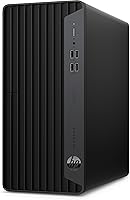
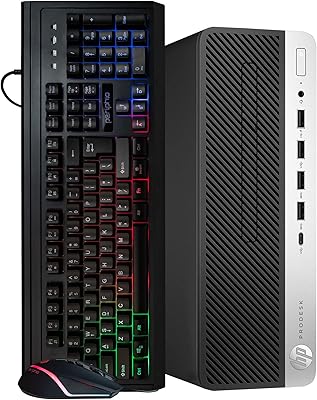
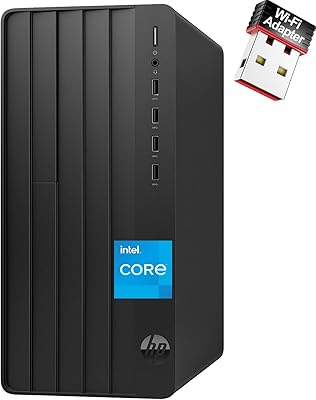
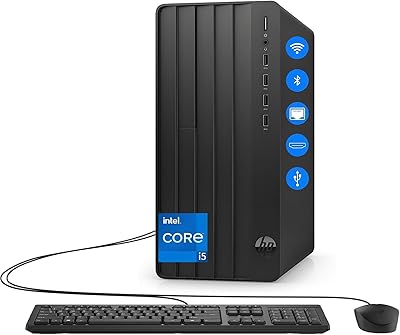
The HP ProDesk 400 G7 Tower Desktop is HP's mid-range business workhorse — built for offices, not gaming rigs. It belongs to a well-established line of commercial desktops that prioritize reliability and manageability over raw power or flashy aesthetics. The processor here is Intel's 10th-generation i5-10500 — capable, but no longer cutting-edge, and that context matters at this price point. What genuinely stands out are the 64GB of DDR4 RAM and a 2TB PCIe SSD, specs you rarely see bundled together at this tier. Integrated graphics keep it firmly in productivity territory, so walk in with the right expectations and this office desktop will reward you well.

Features & Benefits

The i5-10500 handles six cores with a boost up to 4.5GHz, which is more than enough for juggling a dozen browser tabs, video calls, and office software simultaneously. But the real story here is memory: 64GB of RAM at this price tier is genuinely rare. Most business desktops ship with 16GB — sometimes 32GB if you're lucky — so this gives the ProDesk 400 G7 a serious edge for power users running virtual machines or data-heavy spreadsheets. The 2TB PCIe SSD means fast boots and plenty of local storage, while the rear DisplayPort 1.4 and HDMI output make dual-monitor setups completely painless. Windows 11 Pro adds BitLocker and domain support, which IT teams will appreciate.

Best For

This HP business tower is a strong fit for small business owners, remote workers, and office teams who need a dependable daily driver — not one that requires constant maintenance or IT hand-holding. Dual-monitor users will appreciate the rear HDMI and DisplayPort combo straight out of the box. Students and educators also benefit from the generous RAM, which handles research tabs, video conferencing, and productivity apps without breaking a sweat. IT departments deploying multiple units will find Windows 11 Pro's domain-join and MDM compatibility genuinely useful. And if you're stuck on a five-year-old machine that crawls through basic tasks, upgrading to this office desktop will feel like a significant leap forward without veering into gaming-tier spending.

User Feedback

Most buyers come away impressed with the build quality — the ProDesk chassis feels solid and professional, not the flimsy plastic you sometimes get from cheaper alternatives. The SSD's boot and load speeds get consistent praise, and setup is genuinely straightforward for a business machine. That said, a few recurring criticisms are worth flagging. The USB WiFi adapter works but feels like an afterthought; competing desktops at this price often include built-in wireless. More significantly, buyers expecting light design work have been caught off guard by the integrated graphics — functional for basic display output, nothing more. And given the 10th-gen Intel processor, some feel the price-to-performance ratio doesn't fully hold up against newer platforms available today.

Pros

  • 64GB of DDR4 RAM is unusually generous for this price tier and handles heavy multitasking without complaint.
  • The 2TB PCIe SSD delivers fast boot times and plenty of room for local business files and data.
  • Windows 11 Pro comes pre-installed, making domain join and BitLocker setup straightforward for IT teams.
  • Built-in HDMI and DisplayPort outputs let you run dual monitors right away with no extra adapters.
  • The ProDesk chassis is well-regarded for durability and feels noticeably sturdier than budget consumer alternatives.
  • Six-core i5-10500 handles office productivity, video conferencing, and light multitasking comfortably.
  • Front USB-A ports running at 10Gbps are a practical perk for fast external drive transfers.
  • Quiet operation makes this office desktop unobtrusive in shared or home office environments.
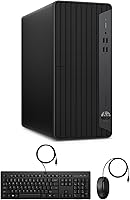
  • Keyboard and mouse included, so basic setup requires no additional purchases.
  • RJ-45 ethernet port supports wired network connections for stable, low-latency remote work.

Cons

  • The 10th-gen Intel CPU is aging, and rivals at this price now offer newer-architecture processors with better efficiency.
  • Integrated Intel UHD 630 graphics rule out any meaningful creative or visual workloads beyond basic display output.
  • The USB WiFi adapter is an add-on afterthought — built-in wireless would be a far cleaner solution.
  • No optical drive included, which can be a minor inconvenience for businesses still using physical media.
  • The price is harder to justify if you compare it against newer platforms with 12th or 13th-gen Intel chips.
  • Adding a discrete GPU later requires checking power supply headroom, which may limit upgrade flexibility.
  • USB WiFi adapters occupy a port and can be less stable than native wireless chipsets under heavy network load.
  • No Thunderbolt connectivity, which limits high-speed peripheral options for power users.
  • Long-term driver and firmware support for a 10th-gen platform will likely taper off sooner than current-gen alternatives.

Ratings

Our AI rating engine analyzed thousands of verified global purchases of the HP ProDesk 400 G7 Tower Desktop, actively filtering out incentivized reviews, duplicate submissions, and bot-generated feedback to surface what real buyers actually experience. The scores below reflect a balanced synthesis of both praise and frustration, giving you an honest picture of where this office desktop genuinely delivers and where it falls short.

Multitasking Performance
88%
The 64GB of DDR4 RAM is the single biggest reason buyers walk away impressed. Office workers running video calls alongside a full browser session, accounting software, and a shared cloud drive report that the machine keeps up without hesitation — a stark contrast to typical desktops at this tier that start stuttering once you push past a few apps.
Heavy CPU-bound tasks like compiling large codebases or batch-processing files can expose the age of the i5-10500, which occasionally shows its limits compared to newer six-core chips built on more efficient architectures. Users doing sustained heavy workloads sometimes notice the fans ramping up and a modest slowdown in responsiveness.
Storage Speed & Capacity
91%
The 2TB PCIe SSD earns consistent praise for boot times and file access speeds. Buyers migrating from older HDD-based machines describe the difference as dramatic — Windows loads in seconds, large file transfers are brisk, and the sheer 2TB capacity means most business users will never feel cramped even after years of accumulated files.
A small number of users noted the drive is not always the fastest PCIe SSD on the market, with sequential write speeds that trail premium NVMe options. For everyday business tasks this is irrelevant, but power users moving very large video or database files frequently may notice the ceiling.
Graphics Capability
41%
59%
For standard office output — running dual monitors, displaying spreadsheets, streaming video calls, or watching training content — the Intel UHD 630 does exactly what is required without any fuss. Buyers who knew what they were purchasing report no complaints for these core use cases.
This is the most common source of disappointment in buyer feedback. Users who assumed light Photoshop work, video trimming, or any GPU-accelerated creative task would be manageable were quickly let down. The integrated graphics have no dedicated VRAM and offer no hardware acceleration worth relying on — it is a real limitation that affects a meaningful portion of buyers.
Value for Money
67%
33%
The combination of 64GB RAM and a 2TB PCIe SSD at this price is genuinely hard to match from most competitors, and buyers focused purely on those specs feel they got a fair deal. For users who need that memory ceiling and storage headroom for business workflows, the value calculation makes sense.
Buyers who compare the processor generation against alternatives in the same price range frequently feel the sting of getting 10th-gen Intel when newer 12th and 13th-gen options are available elsewhere. The CPU platform age is the central value objection, and it is a legitimate one — especially for buyers thinking about longevity beyond three to four years.
Build Quality & Durability
84%
HP's ProDesk line carries a well-earned reputation in commercial settings, and buyers consistently describe the chassis as sturdy and professional-feeling. The metal frame gives the unit a solid presence under a desk, and users deploying multiple units in office environments note that the machines hold up well over time without chassis flex or port degradation.
The external plastic panels feel slightly less premium than the frame itself, and a few buyers noted minor fit-and-finish issues at the panel seams. It is not a build quality failure by any measure, but buyers coming from a premium all-metal workstation may notice the difference.
Connectivity & Ports
83%
The port layout covers most professional needs thoroughly. Having 10Gbps USB-A on the front panel is a practical touch that buyers who frequently connect fast external drives genuinely appreciate, and the combination of rear HDMI and DisplayPort for dual-monitor setups is clean and immediately usable without adapters.
There is no Thunderbolt port, which is a real omission for users in creative or data-heavy fields who rely on high-bandwidth peripherals. A handful of buyers also noted they wished the rear had more USB-A ports at higher speeds, particularly when connecting a mix of peripherals simultaneously.
Wireless Connectivity
58%
42%
The included USB WiFi adapter does work, and buyers who primarily use ethernet — which is the recommended setup for this machine — have no complaints at all. For occasional wireless use or desk setups without easy cable access, the adapter provides basic functional coverage.
The USB adapter approach is a consistent frustration in buyer feedback. It occupies a port, can be accidentally dislodged, and performs less reliably under congested network conditions compared to built-in wireless chipsets available on competing machines at similar price points. Several buyers recommend purchasing a PCIe WiFi card as a replacement.
Software & OS Readiness
87%
Windows 11 Pro arriving fully activated and ready to configure is something IT administrators and small business owners repeatedly highlight as a genuine time-saver. BitLocker, Remote Desktop, and domain join work as expected right out of the box, making fleet deployment or individual business setup straightforward.
Some users report the initial setup includes HP bloatware that needs to be removed before the machine feels clean and business-ready. It is a minor complaint and a common issue across pre-built desktops from major manufacturers, but buyers who expect a blank-slate Pro installation may spend time removing unwanted software.
Setup & Out-of-Box Experience
86%
Buyers consistently describe the unboxing and initial setup as fast and uncomplicated. The included keyboard and mouse mean the machine is usable immediately, and the port layout is logical enough that most non-technical users can connect monitors, peripherals, and ethernet without needing instructions.
A minority of buyers reported missing or damaged packaging on delivery, which is a fulfillment concern rather than a product flaw but still affects the out-of-box impression. A small number also noted the included keyboard and mouse feel basic — functional but not something most professionals would want to use long-term.
Noise & Thermal Management
79%
21%
During typical office workloads — browsing, document editing, video conferencing — the ProDesk 400 G7 runs quietly and stays cool. Buyers working in shared or home office environments appreciate that the machine does not intrude on focus or call audio even during long sessions.
Under sustained CPU load, such as large file operations or running multiple virtual machines simultaneously, the cooling fan becomes noticeably audible. It is not alarming, but users expecting near-silent operation under any condition may be mildly surprised during peak usage periods.
CPU Longevity & Future-Proofing
53%
47%
The i5-10500 handles all current productivity software without issue and will remain compatible with mainstream business applications for several more years. Buyers who simply need a stable, well-supported daily driver for the next two to three years will not feel the age of the platform in their workflow.
This is the ProDesk 400 G7's most significant long-term weakness. The 10th-gen Comet Lake architecture is two full generations behind current Intel platforms, which means reduced driver longevity, no support for newer memory standards, and an accelerating gap in per-core efficiency versus machines buyers could buy today at comparable prices.
Dual Monitor Support
89%
The pairing of HDMI 1.4 and DisplayPort 1.4 on the rear panel makes dual-monitor setup genuinely plug-and-play. Productivity-focused buyers who rely on extended displays for spreadsheet work, coding, or research consistently report that the dual-output configuration works flawlessly from the moment drivers load.
HDMI 1.4 caps output at 4K 30Hz, which is a limitation for buyers wanting to drive a high-refresh 4K display on the HDMI port specifically. Users with demanding display setups may need to route both monitors through DisplayPort or use an active adapter, adding a small amount of friction.
Upgrade Potential
61%
39%
The tower form factor gives this office desktop more internal upgrade room than a mini PC or all-in-one alternative. Users who want to add a low-profile discrete GPU or swap in additional storage down the road have more flexibility than the chassis size might suggest at first glance.
The stock power supply unit limits the GPU upgrade path to low-power cards only, and the 10th-gen platform means RAM cannot be upgraded to DDR5 or beyond. Buyers hoping to significantly extend the life of the machine through hardware upgrades will hit a ceiling imposed by the platform architecture more than the chassis itself.

Suitable for:

The HP ProDesk 400 G7 Tower Desktop is a smart pick for professionals and small teams who need a capable, no-drama daily workhorse. Remote workers juggling video calls, spreadsheets, and cloud apps will find the 64GB of RAM a genuine luxury — most competitors at this tier ship with a quarter of that. Educators and students who keep dozens of browser tabs open alongside research tools and document editors will also appreciate that headroom. IT administrators managing a business environment will value the Windows 11 Pro license, which brings domain join, BitLocker encryption, and remote desktop support right out of the box. The dual-display outputs via HDMI and DisplayPort make it easy to set up a proper two-monitor productivity workstation without buying extra adapters. If you are upgrading from a five-year-old machine that struggles with basic multitasking, this office desktop will feel like a meaningful step forward.

Not suitable for:

The HP ProDesk 400 G7 Tower Desktop is a poor match for anyone who needs graphics muscle — the Intel UHD 630 is strictly functional and will frustrate anyone hoping to do even light video editing, 3D rendering, or photo retouching at a professional level. Gamers should look elsewhere entirely; this machine was never designed for that workload and cannot be salvaged with a GPU upgrade unless you are comfortable with the technical effort and additional cost. Buyers who place a high premium on future-proofing should also think carefully: the 10th-gen Intel processor is a capable chip, but it is not a current-generation platform, which means it will reach the end of its practical lifespan sooner than a newer-architecture alternative at a similar price. Those relying on wireless connectivity as their primary network connection may find the USB WiFi adapter clunky compared to machines with built-in wireless. And anyone working in creative fields who needs Adobe Premiere, DaVinci Resolve, or similar applications to run smoothly should invest in a machine with a dedicated GPU instead.
Specifications

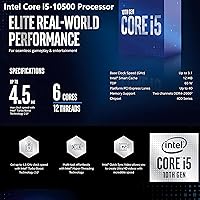
  • Processor: Intel Core i5-10500 six-core CPU running at 3.1GHz base frequency, boosting up to 4.5GHz with Intel Turbo Boost Technology and 12MB Smart Cache.
  • RAM: 64GB of DDR4 SDRAM installed, providing substantial headroom for multitasking, virtual machines, and memory-intensive business workflows.
  • Storage: 2TB PCIe SSD connected via PCIe x4 interface, delivering fast read and write speeds alongside generous local storage capacity.
  • Graphics: Intel UHD Graphics 630 integrated into the processor, suitable for standard display output and basic productivity tasks only.
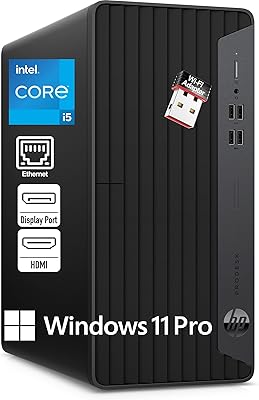
  • Operating System: Windows 11 Pro 64-bit pre-installed, including support for BitLocker encryption, domain join, and Microsoft Remote Desktop.
  • Form Factor: Compact tower chassis measuring 10.63 x 3.74 x 11.93 inches and weighing approximately 15 pounds.
  • Front Ports: Two USB-A ports at 10Gbps, two USB-A ports at 480Mbps, and one combination headphone and microphone 3.5mm audio jack.
  • Rear Ports: One HDMI 1.4 output, one DisplayPort 1.4 output, three USB-A ports at 5Gbps, two USB-A ports at 480Mbps, one RJ-45 ethernet jack, and one audio-out port.
  • Networking: Wired RJ-45 gigabit ethernet port built in, with a USB WiFi adapter included in the box for wireless connectivity.
  • Display Output: Supports dual-monitor configurations simultaneously via the rear HDMI 1.4 and DisplayPort 1.4 connections.
  • Included Items: Wired USB keyboard and wired USB mouse, both in black, are included alongside the USB WiFi adapter.
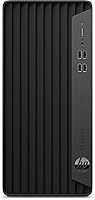
  • Color: Chassis is finished in matte black, consistent with HP's standard ProDesk commercial desktop aesthetic.
  • CPU Generation: Built on Intel's 10th-generation Comet Lake architecture, a mature and stable platform widely supported by current software and drivers.
  • Cache Size: Intel Smart Cache of 12MB shared across all six processor cores for improved multi-threaded responsiveness.
  • Optical Drive: No optical drive is included or built into this unit; external USB optical drives can be added separately if needed.

Related Reviews

HP ProDesk 400 G7
HP ProDesk 400 G7
76%
88%
Value for Money
82%
Performance & Speed
91%
RAM & Multitasking
86%
Storage Performance
58%
Graphics & Display Output
More
HP ProDesk 400 G9 SFF (32GB RAM, 1TB SSD)
79%
74%
Value for Money
53%
Processing Performance
88%
Storage Speed
82%
RAM & Upgradeability
81%
Build Quality & Design
More
HP Pavilion Tower Desktop, Ryzen 5 5600G, 32GB RAM, 1TB SSD
85%
88%
Performance
91%
Multitasking Capability
80%
Build Quality
85%
Ease of Setup
92%
Value for Money
More
HP ProDesk 600 G4 Desktop Computer | Intel Core i5 | 16GB RAM | 500GB SSD
84%
89%
Performance for Everyday Tasks
92%
Boot Time and SSD Performance
63%
Graphics Performance
87%
Build Quality
84%
Reliability
More
HP Pro Tower 290 G9 Desktop PC, Intel Core i3-13100, 16GB RAM, 512GB SSD
83%
85%
Performance
92%
Value for Money
81%
Build Quality
88%
Usability & Ergonomics
89%
Software/OS Experience
More
HP Pro Tower 290 G9 Desktop
76%
83%
Value for Money
74%
CPU Performance
91%
RAM & Multitasking
87%
Storage Speed
57%
Graphics & Display
More
HP Pro Tower 290 G9 Desktop (i5-12500, 32GB RAM, 1TB SSD)
81%
96%
Multitasking Capability
91%
Value for Money
88%
Port Selection
84%
Thermal & Acoustic Performance
93%
Boot Speed & Storage
More
HP 400 Backlit Wired Keyboard
77%
67%
Typing Experience
83%
Backlight Quality
71%
Build Quality
88%
Portability
86%
Connectivity & Compatibility
More
HP 22″ All-in-One Desktop (N100, 8GB DDR5, 128GB)
71%
78%
Value for Money
83%
Display Quality
67%
Performance / Everyday Speed
44%
Storage Capacity
91%
Setup & Ease of Use
More
Dell OptiPlex 7020 Tower i5-12500 32GB 1TB
77%
88%
Day-to-Day Performance
91%
Boot & Load Speed
83%
Value for Money
54%
Wireless Connectivity
61%
Condition Transparency
More

FAQ

Yes, and this is honestly where the ProDesk 400 G7 stands out most. With 64GB of RAM, you can have a video call running, a browser with 20-plus tabs open, a spreadsheet, and a PDF editor all going simultaneously without any real strain. Most desktops in this class ship with 16GB, so the memory headroom here is a genuine practical advantage.

The included USB WiFi adapter works, but it is worth being honest about its limitations. It occupies one of your USB ports and tends to be less stable under heavy network load compared to machines with a built-in wireless chipset. If you have the option to run an ethernet cable, that will give you a more consistent connection — and the RJ-45 port on the back handles that cleanly.

Yes, the rear panel has both an HDMI 1.4 port and a DisplayPort 1.4 port, so you can plug in two monitors right away without any adapters or additional hardware. This is a straightforward dual-monitor setup that most business users will find works perfectly out of the box.

It is a solid choice for that use case. Windows 11 Pro supports domain join, group policy management, BitLocker drive encryption, and mobile device management platforms, which are the tools most IT administrators rely on for centralized deployment. The HP ProDesk 400 G7 Tower Desktop is built around this kind of professional environment, so the software side is well-covered.
Technically it will launch and run those applications, but the experience will likely frustrate you. Intel UHD 630 integrated graphics offer no meaningful GPU acceleration for video rendering or color grading, which means tasks that would take minutes on a dedicated GPU machine could take much longer here. If video editing is a regular part of your workflow, you need a machine with a discrete graphics card.

The ProDesk chassis runs quietly under typical office workloads. The thermal design on HP's commercial desktops prioritizes low fan noise, and most users report that it blends into the background during everyday tasks like web browsing, document editing, and video calls. Under sustained heavy CPU load it will spin the fans up, but nothing that would be disruptive in a shared workspace.

The i5-10500 is a capable chip and handles office workloads, video conferencing, and multitasking without issue. That said, it is a 10th-generation processor on an aging platform, and competitors at similar price points are now offering 12th or 13th-generation Intel chips with better energy efficiency and longer support runways. It is not a dealbreaker for productivity use, but it is a real consideration if you are thinking about how long this machine will remain current.

Windows 11 Pro comes pre-installed and activated, so initial setup is just the standard Windows first-run experience — entering your Microsoft account or domain credentials and choosing your preferences. There is no separate license key to track down or installation media to deal with.

In theory, the ProDesk 400 G7 tower has a PCIe slot that can accept a discrete GPU, but there are practical limitations. The power supply unit in this machine is not designed for power-hungry graphics cards, so you would be limited to low-profile, low-power options. If you know from the start that you will need dedicated graphics, it is more cost-effective to buy a machine that already includes one rather than retrofitting this platform.

HP's ProDesk line has a well-earned reputation for solid build quality in office environments. The chassis uses a metal frame with plastic panels and feels noticeably more substantial than budget consumer desktops. It is not going to win any aesthetic awards, but it is the kind of machine that sits under a desk for years and simply keeps working, which is exactly what most business users want.