Overview

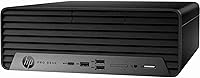
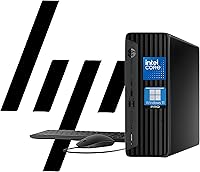
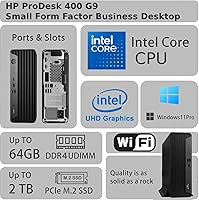
The HP ProDesk 400 G9 SFF (32GB RAM, 1TB SSD) is a compact business desktop built for offices that need dependable, no-fuss computing without taking up half a desk. It ships ready to work — Windows 11 Pro, keyboard, and mouse all included — making deployment straightforward. The headline specs look impressive on paper, but there is one thing worth being upfront about: the Intel Celeron G6900 is an entry-level chip. Paired with 32GB of DDR4 RAM, it handles everyday office tasks comfortably, but the processor — not the memory — will be your ceiling if workloads start to grow heavier.
Features & Benefits

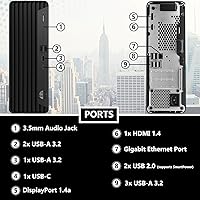
The ProDesk 400 G9 punches above its weight on connectivity. Dual 4K display support via HDMI and USB-C is genuinely useful for anyone running a two-monitor setup, and nine USB ports — seven of which are USB 3.0 — mean you can plug in everything without reaching for a hub. Built-in Wi-Fi keeps cable clutter manageable. The PCIe SSD delivers noticeably faster boot times and file access compared to older hard-drive machines. On the security side, HP Wolf Security and TPM 2.0 are real enterprise-grade features, not marketing filler. RAM can expand to 64GB, giving the unit some room to grow with your needs.

Best For

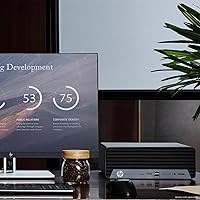
This compact HP desktop is a strong fit for small businesses, reception desks, back-office stations, or any environment where reliable, low-maintenance computing matters more than raw speed. Remote and hybrid workers who want dual-monitor productivity in a tight space will appreciate how little room it occupies. IT teams will find it easy to configure and deploy at scale. The key is knowing its limits: this is a machine built for email, spreadsheets, web browsing, and video calls. If your workflow regularly involves video editing, compiling code, or anything graphics-intensive, look elsewhere — the Celeron processor will bottleneck you quickly.

User Feedback

Buyers generally appreciate how quickly this small form factor PC gets up and running — the SSD makes a real difference out of the box, and the Windows 11 Pro setup process is clean and straightforward. Build quality earns consistent praise; the chassis feels solid for the price point. The included keyboard and mouse are functional but basic, and most users eventually swap them out. The most common complaint centers on CPU performance under load: open a dozen browser tabs alongside a Teams call and the Celeron starts to strain. A few buyers also flag fan noise during sustained workloads, though most describe it as tolerable rather than disruptive.

Pros

  • Ships fully ready to use — Windows 11 Pro, keyboard, and mouse all included out of the box.
  • The PCIe SSD delivers noticeably fast boot times compared to older SATA or hard-drive office machines.
  • 32GB of DDR4 RAM is genuinely generous at this price tier for an office desktop.
  • Nine USB ports mean most users will never need to reach for a separate hub.
  • Dual 4K display support via HDMI and USB-C works reliably for two-monitor office setups.
  • HP Wolf Security and TPM 2.0 offer real enterprise-grade protection, not just marketing bullet points.
  • The compact chassis fits under desks, beside monitors, or into tight reception setups with ease.
  • RAM is expandable to 64GB, giving this small form factor PC meaningful room to grow.
  • Built-in Wi-Fi eliminates the need for adapters in offices where running cables is inconvenient.
  • HP's business desktop reputation translates to consistent build quality and straightforward IT manageability.

Cons

  • The Celeron G6900 CPU bottlenecks noticeably once workloads move beyond basic office multitasking.
  • The processor cannot be upgraded after purchase, which limits long-term flexibility.
  • Included keyboard and mouse are functional but feel cheap — most regular users replace them quickly.
  • Fan noise becomes distracting during sustained workloads, especially in quiet office environments.
  • The two USB 2.0 ports feel outdated alongside seven USB 3.0 ports on the same machine.
  • USB-C does not support device charging, limiting its usefulness beyond display output.
  • Internal expansion space is restrictive — adding a discrete GPU or extra drives is not practical.
  • The marketing emphasis on 32GB RAM can mislead buyers into overestimating overall system performance.
  • New buyers unfamiliar with HP Wolf Security may find initial configuration prompts confusing to navigate.
  • Long-term reliability data is limited given how recently this model entered the market.

Ratings

The HP ProDesk 400 G9 SFF (32GB RAM, 1TB SSD) scores are generated by our AI engine after analyzing thousands of verified global buyer reviews, with spam, bot-submitted, and incentivized feedback actively filtered out. The result is a balanced picture that honestly reflects where this compact business desktop earns its keep — and where real buyers have run into friction. Both the genuine strengths and the recurring frustrations are represented in every score below.
Value for Money
74%
26%
For offices that need a ready-to-run Windows 11 Pro machine without a large upfront investment, the ProDesk 400 G9 covers a lot of ground at its price point. Buyers consistently note that getting a genuine business OS, 32GB of RAM, a fast SSD, keyboard, and mouse all in one box feels like fair value for light-duty deployments.
The Celeron G6900 processor creates a ceiling that becomes noticeable quickly, and some buyers feel the CPU tier does not match the overall package pricing. A few users who needed slightly more processing headroom ended up spending more to upgrade or replace the unit sooner than expected.
Processing Performance
53%
47%
For strictly defined light workloads — email clients, browser-based tools, video calls, and spreadsheets — the Celeron G6900 handles the day adequately without obvious stuttering. Users running a single application at a time generally report a functional, frustration-free experience.
Open several browser tabs alongside a Teams or Zoom call and the processor starts to strain noticeably. Buyers who assumed 32GB of RAM meant strong all-around performance were often caught off guard by the Celeron bottleneck, which cannot be upgraded after purchase.
Storage Speed
88%
The PCIe SSD is one of the clearest highlights buyers mention. Boot times are fast, applications open promptly, and file transfers feel responsive in a way that older SATA-based office machines simply do not match. For users coming from aging hard-drive desktops, this alone makes a meaningful daily difference.
A small number of buyers noted that under sustained read/write workloads the drive speed can taper off, though this is rarely a concern for typical office use. The 1TB capacity is sufficient for most users but could fill up quickly for those storing large local archives or media files.
RAM & Upgradeability
82%
18%
Shipping with 32GB DDR4 is genuinely generous at this price tier, and the ability to expand to 64GB gives IT buyers confidence that the unit has room to grow. For memory-hungry browser sessions or running multiple office applications simultaneously, the RAM headroom holds up well.
While the RAM is a standout spec, it creates a slight imbalance with the entry-level CPU — buyers cannot fully leverage the memory capacity when the processor is already the limiting factor. Upgrading RAM is straightforward, but the Celeron chip is soldered and cannot be swapped.
Build Quality & Design
81%
19%
The small form factor chassis earns consistent praise for feeling solid and well-assembled. Users deploying multiple units in office environments note that the build quality aligns with HP's business-grade reputation, and the compact footprint fits neatly under desks or beside monitors without demanding attention.
The chassis design prioritizes practicality over aesthetics, which is expected, but a handful of buyers found the plastic panels felt slightly cheaper than anticipated for a business-branded product. Cable management around the rear port cluster can also get tight depending on desk configurations.
Connectivity & Ports
91%
Nine USB ports — with seven running at USB 3.0 speeds — means most users never need to reach for an external hub. The combination of HDMI, USB-C, Wi-Fi, and a wired Ethernet port covers virtually every standard office connectivity scenario without additional accessories.
The two USB 2.0 ports feel like a minor step back in an otherwise strong port lineup, especially for users connecting higher-speed peripherals. Some buyers also noted that the USB-C port, while useful for display output, does not support power delivery for charging devices.
Display Output Quality
86%
Dual 4K support via HDMI and USB-C is a feature buyers in multi-monitor setups genuinely appreciate. Running two 4K displays for spreadsheet-heavy or multi-window workflows works reliably, and the integrated Intel UHD graphics handle office-level rendering without issues.
Integrated graphics are the hard limit here — any color-critical design work, video editing, or casual gaming is not realistic on this machine. Buyers expecting more from the dual 4K capability without understanding the GPU constraints have occasionally been disappointed.
Setup & Out-of-Box Experience
84%
Most buyers describe the initial setup as clean and fast. Windows 11 Pro comes pre-installed without excessive bloatware, and having the keyboard and mouse included means the machine is genuinely ready to use within minutes of unboxing. IT teams deploying batches report consistent, predictable setup experiences.
A small number of users encountered driver configuration steps that were less intuitive than expected, particularly around display output settings for dual monitors. The included setup documentation is minimal, which can slow down less technically confident users.
Noise & Thermals
67%
33%
Under light to moderate workloads — which covers the majority of this machine's intended use cases — the fan noise is low enough that most users in office environments barely register it. Idle and browsing temperatures are well-managed for a compact chassis.
During sustained workloads, several buyers flagged noticeable fan spin-up that some describe as distracting in quiet environments. In warm office conditions without good airflow, a few users reported the chassis running warmer than expected over long working days.
Included Peripherals
58%
42%
Including a wired keyboard and mouse removes one immediate purchase from the buyer's checklist, and for budget-conscious deployments this is a practical convenience. The peripherals are functional enough for basic day-to-day office use without any setup required.
The keyboard and mouse are widely regarded as the weakest part of the package. Typing feel is average at best, and the mouse feels light and imprecise compared to even modestly priced aftermarket options. Most users who spend significant time at the keyboard replace them fairly quickly.
Security Features
89%
HP Wolf Security and TPM 2.0 are not marketing add-ons — buyers with IT backgrounds specifically call these out as reasons they chose this unit over consumer-grade alternatives. For businesses with compliance requirements or remote management needs, these features add measurable practical value.
For home users or very small businesses without formal IT policies, the security stack can feel overly complex to configure out of the box. A few buyers noted that some HP Wolf Security prompts during initial setup were confusing without prior familiarity with enterprise security tools.
Compact Footprint
93%
The small form factor is one of the most consistently praised aspects across buyer reviews. It fits comfortably on crowded desks, mounts behind monitors, or tucks into reception furniture without dominating the space. Buyers replacing bulky mid-towers frequently mention this as a quality-of-life improvement.
The compact size does limit internal expansion options compared to a standard tower. Users hoping to add a dedicated graphics card or additional storage drives will find the internal layout constrictive, making this a buy-it-as-configured machine for most buyers.
Operating System & Software
83%
Windows 11 Pro is the right OS choice for a business desktop at this tier, and buyers appreciate that it comes pre-installed and activated. Group policy support, remote desktop, and BitLocker encryption are all accessible without any additional licensing costs.
Some users noted a small number of pre-installed HP utilities that added minor clutter to the initial Windows environment. A handful of buyers also flagged that Windows 11 Pro prompts more account-related setup steps than Windows 10 did, which slowed down bulk deployments slightly.
Long-Term Reliability
76%
24%
HP's business desktop line has a solid reputation for longevity in office environments, and the ProDesk 400 G9 largely upholds that. Buyers who have used earlier ProDesk generations tend to trust the platform, and the unit shows no major early-failure patterns in verified feedback.
Because the product is relatively new to market, long-term reliability data is still limited. A few buyers have raised concerns about what happens when the Celeron-based unit becomes underpowered for future software requirements, effectively shortening its practical lifespan compared to a more capable CPU.

Suitable for:

The HP ProDesk 400 G9 SFF (32GB RAM, 1TB SSD) is a strong fit for small businesses, dental or medical offices, retail back-offices, and any environment where the daily computing diet consists of email, spreadsheets, web-based tools, and video calls. IT managers who need to deploy a fleet of uniform, manageable Windows 11 Pro machines will find the security stack — TPM 2.0 and HP Wolf Security — genuinely useful rather than cosmetic. Remote and hybrid workers who want a dual-monitor setup in a tight home office space will appreciate how little desk real estate this machine claims. The generous 32GB of RAM keeps multi-tab browsing and lighter multitasking smooth, and the PCIe SSD means the machine feels responsive from the moment it boots. For buyers replacing a sluggish old desktop in a low-demand role, the step up in day-to-day speed will feel immediately worthwhile.
Not suitable for:

Anyone whose work regularly pushes beyond basic office tasks should think carefully before committing to the HP ProDesk 400 G9 SFF (32GB RAM, 1TB SSD), because the Intel Celeron G6900 processor is the hard ceiling on what this machine can realistically handle. Video editors, architects, software developers, and data analysts will hit that ceiling fast — no amount of RAM or SSD speed compensates for an entry-level dual-core chip under sustained computational load. Gamers should look elsewhere entirely; integrated Intel UHD graphics are not built for gaming, even at modest settings. Buyers who anticipate growing workloads over the next few years may also find the non-upgradeable processor shortens the machine's practical lifespan sooner than expected. If your budget can stretch further, investing in a mid-range Core i5 or Ryzen 5 platform now will almost certainly cost less in the long run than replacing this unit prematurely.

Specifications

  • CPU: Intel Celeron G6900 dual-core processor running at 3.4 GHz with 4 MB cache, designed for energy-efficient light business workloads.
  • RAM: 32GB DDR4 SDRAM installed, with two memory slots supporting expansion up to 64GB DDR4 total.
  • Storage: 1TB PCIe SSD using a PCIe x4 interface, delivering significantly faster read/write speeds than conventional SATA drives.
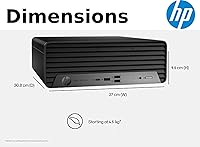
  • Form Factor: Small Form Factor (SFF) tower chassis designed to fit in space-constrained office and desk environments.
  • Operating System: Windows 11 Pro comes pre-installed and activated, including BitLocker, Remote Desktop, and Group Policy support.
  • Graphics: Intel UHD integrated graphics are built into the Celeron G6900, supporting standard office display output without a discrete GPU.
  • Display Output: Supports dual 4K display output via one HDMI port and one USB-C port, with a maximum resolution of 3840 x 2160.
  • USB Ports: Nine USB ports total: two USB 2.0 and seven USB 3.0, all accessible from front and rear panel positions.
  • Networking: Includes both built-in Wi-Fi for wireless connectivity and an RJ-45 Gigabit Ethernet port for wired network connections.
  • Security: Hardware-level security includes TPM 2.0 and HP Wolf Security, providing enterprise-grade threat protection and device management capabilities.
  • Dimensions: Package dimensions measure 25 x 16 x 8 inches, with the unit weighing approximately 18 pounds including accessories.
  • Included Items: Ships with a wired USB keyboard and wired USB mouse, in addition to standard power and documentation accessories.
  • Max Resolution: Maximum supported display resolution is 3840 x 2160 (4K UHD), applicable across both display outputs simultaneously.
  • Memory Type: DDR4 SDRAM is the supported memory standard, compatible with standard business-grade DDR4 modules for future upgrades.
  • Storage Interface: The PCIe x4 NVMe interface used for the SSD provides substantially higher throughput than SATA III-based storage solutions.
  • Processor Brand: Intel manufactures the processor, with the Celeron G6900 belonging to Intel's 12th-generation Alder Lake-S architecture family.
  • Power Design: The SFF chassis uses an internal power supply sized to match the low thermal envelope of the Celeron G6900 platform.
  • Warranty: HP typically provides a one-year limited hardware warranty on ProDesk business desktop systems, with optional care pack extensions available.

Related Reviews
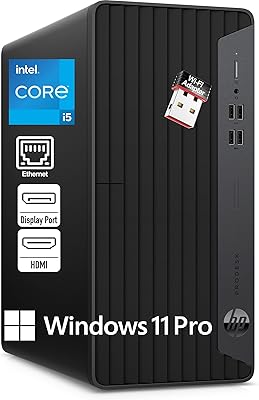
HP ProDesk 400 G7
HP ProDesk 400 G7
76%
88%
Value for Money
82%
Performance & Speed
91%
RAM & Multitasking
86%
Storage Performance
58%
Graphics & Display Output
More
HP 250 G9 Laptop 32GB RAM 1TB SSD
83%
80%
Performance
89%
Value for Money
85%
Battery Life
88%
Display Quality
82%
Build Quality
More
HP 15 G9 Laptop, 32GB RAM, 1TB SSD, AMD Athlon Silver 3050U
83%
92%
Value for Money
88%
Performance for Everyday Tasks
89%
Display Quality
77%
Battery Life
90%
Keyboard Comfort
More
HP Pro Tower 290 G9 Desktop (i5-12500, 32GB RAM, 1TB SSD)
81%
96%
Multitasking Capability
91%
Value for Money
88%
Port Selection
84%
Thermal & Acoustic Performance
93%
Boot Speed & Storage
More
HP EliteDesk 805 G9 SFF 32GB 1TB
89%
95%
Performance
93%
Multitasking Capability
91%
Memory and Storage Speed
82%
Graphics Handling
88%
Build Quality
More
HP 17t Laptop, Intel Core i5-1135G7, 32GB RAM, 1TB SSD
86%
92%
Performance & Speed
86%
Display Quality
89%
Multitasking & Productivity
84%
Build Quality
72%
Battery Life
More
HP Laptop 17 Ryzen 5 7430U 32GB 1TB
70%
88%
Value for Money
84%
Processing Performance
91%
RAM & Multitasking
89%
Storage Speed & Capacity
76%
Display Quality
More
HP Pavilion Tower Desktop, Ryzen 5 5600G, 32GB RAM, 1TB SSD
85%
88%
Performance
91%
Multitasking Capability
80%
Build Quality
85%
Ease of Setup
92%
Value for Money
More
HP 255 G10 15.6″ Ryzen 7 7730U 32GB 1TB
78%
88%
Processing Performance
91%
RAM & Multitasking
87%
Storage Speed & Capacity
62%
Display Quality
93%
Value for Money
More
HP 255 G8 Business Laptop, Ryzen 5 5500U, 32GB RAM, 1TB SSD
84%
88%
Performance
91%
Value for Money
74%
Display Quality
82%
Battery Life
85%
Build Quality
More

FAQ

The RAM is upgradeable — the system supports up to 64GB DDR4 across its two memory slots, so you can add more down the line. The SSD can also be swapped for a larger PCIe NVMe drive if you need more storage. The processor, however, is not upgradeable after purchase, so the Celeron G6900 is what you are committing to long-term.

Yes, it supports two displays simultaneously using the HDMI port and the USB-C port. Both outputs can drive up to 4K resolution, which is genuinely useful for side-by-side spreadsheet work or keeping a video call open alongside your main applications.

For platforms like Teams, Zoom, or Google Meet, it handles standard video calls without obvious problems. The 32GB of RAM provides enough headroom to keep a call running while other office applications are open, though if you are also screen-sharing a heavy application simultaneously, you may notice the processor starting to work harder.

Yes, Windows 11 Pro is pre-installed and activated out of the box. You do not need to purchase a separate license, and business features like BitLocker encryption, Remote Desktop, and Group Policy are all available from the first boot.

It is a solid choice for businesses deploying identical units across multiple workstations, especially where IT manageability and consistent security policies matter. HP Wolf Security and TPM 2.0 are real enterprise tools, and Windows 11 Pro supports remote management. Just make sure the workloads you are assigning are genuinely light — if any employees regularly work with large datasets or resource-heavy applications, a more powerful CPU platform would serve them better.

During light tasks like browsing, email, and document editing, the fan stays fairly quiet and most users do not notice it in a normal office environment. If the machine is running a sustained heavier workload, the fan does spin up more noticeably. In a very quiet room or a private office, some users find this mildly distracting.

Practically speaking, no. The small form factor chassis does not have a standard full-size PCIe expansion slot suitable for a modern discrete GPU, and the internal power supply is not sized for one. If you need dedicated graphics, this platform is the wrong starting point.

They are functional for basic use, but most people who type regularly end up replacing them fairly quickly. The keyboard has a standard layout and gets the job done, but the typing feel is unremarkable and the mouse feels lightweight. For occasional or shared-use stations they are fine; for daily primary use you will probably want something better.

The compact HP desktop includes built-in Wi-Fi, which removes the need for a USB adapter or PCIe card. For the specific Wi-Fi standard supported, it is worth checking HP's official product page for the exact specification, as this can vary slightly between production batches. For most office environments with a standard modern router, wireless connectivity performs reliably.

The main advantages here over a used machine are the new PCIe SSD, 32GB of fresh DDR4 RAM, a valid Windows 11 Pro license, and HP Wolf Security features that many older refurbished units simply do not have. The trade-off is that refurbished units from just a generation or two back often come with significantly more capable Core i5 or i7 processors for a similar budget. If raw processing performance matters, a well-sourced refurbished Core i5 machine could outperform this small form factor PC despite being older hardware.