


Overview

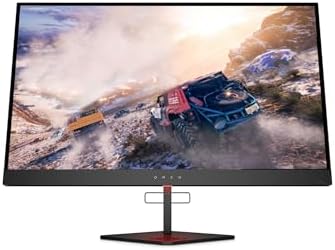
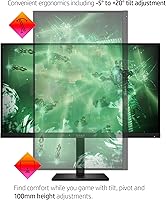
The HP OMEN 27q QHD Gaming Monitor sits in a genuine sweet spot — capable performance hardware at a price that does not require a second mortgage. Physically it is understated: a matte black chassis with slim bezels and a stand that adjusts for height and tilt without fighting you. Nothing flashy, but everything feels considered. This OMEN display is aimed squarely at PC gamers ready to leave 1080p behind, and at work-from-home users who want one screen to handle spreadsheets by day and fast-paced gaming by night. This review covers image quality, real-world performance, and whether the tradeoffs are actually worth it.

Features & Benefits

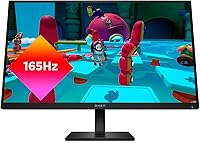
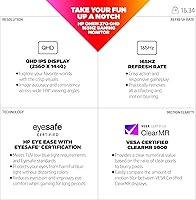
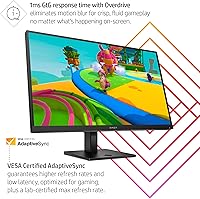
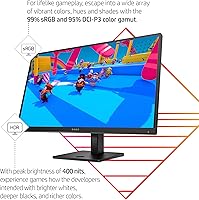
Step up from a standard 1080p screen to QHD and the difference is immediately obvious — sharper text, more workspace, and game worlds that look genuinely detailed without demanding a flagship GPU. The 27q runs at 165Hz, which makes fast-paced shooters feel noticeably more fluid than the 60Hz most users start on. Overdrive brings response time down to 1ms GtG, keeping motion blur in check during intense sequences. AMD FreeSync Premium handles adaptive sync well for Radeon owners, eliminating screen tearing cleanly. Color coverage spans close to full sRGB with strong DCI-P3 numbers, so images look rich out of the box. Peak brightness at 400 nits is solid for a typical room, though not HDR-grade.

Best For

This OMEN display makes the most sense for gamers who have decided QHD is the resolution they want but are not ready to stretch to 4K hardware costs. AMD GPU owners in particular get clean, tear-free performance through FreeSync Premium without paying extra for G-Sync compatibility. The 27q also suits people doing color-sensitive work — photo editing, light graphic design — who want one monitor to cover both jobs. It works well as a dual-purpose screen for remote workers who game after hours. Console players with newer hardware will appreciate the high refresh rate, and the four USB ports with built-in cable routing keep desk setups noticeably tidier.

User Feedback

Buyers have settled around a strong overall rating, with much of the satisfaction coming from the stand — people genuinely notice being able to dial in the exact height and tilt they need. Color accuracy also draws consistent praise, particularly from users who were not expecting much from a gaming-oriented panel. On the critical side, the glossy surface catches light in brighter rooms, which becomes noticeable depending on window placement relative to your desk. A handful of long-term owners note that maximum brightness, while comfortable in typical setups, falls short in sun-drenched spaces. Out-of-box experience reports are mostly positive, with few complaints about dead pixels or shipping damage.

Pros

  • QHD resolution on a 27-inch IPS panel offers a noticeable sharpness upgrade over 1080p without a massive GPU cost.
  • The 165Hz refresh rate makes fast-paced shooters and racing games feel fluid and responsive in a way that 60Hz simply cannot match.
  • AMD FreeSync Premium eliminates screen tearing cleanly for Radeon GPU owners with no extra configuration needed.
  • Color accuracy out of the box is strong for a gaming monitor, covering close to full sRGB and solid DCI-P3 numbers.
  • The ergonomic stand adjusts for both height and tilt, which buyers consistently call out as a standout practical feature.
  • Four USB ports and built-in cable management help keep desk setups organized without extra accessories.
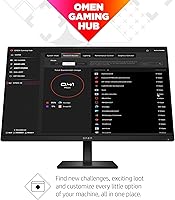
  • The OMEN Gaming Hub software lets users tweak display settings from a single interface across compatible devices.
  • Build quality is well-regarded by long-term owners, with few reports of premature failure or image degradation.
  • Out-of-box setup is straightforward, and most buyers report no dead pixels or calibration issues on arrival.

Cons

  • The glossy panel surface reflects overhead lighting and windows, which can become genuinely distracting in bright rooms.
  • Peak brightness is adequate for dim or controlled environments but falls flat for true HDR content or sunny workspaces.
  • Nvidia GPU users miss out on native adaptive sync benefits, leaving some of the display's performance on the table.
  • The OMEN Gaming Hub software, while useful, has drawn occasional complaints about stability and unnecessary background resource usage.
  • At 16-plus pounds, this OMEN display is not particularly easy to reposition frequently or move between setups.
  • The glossy screen also tends to show fingerprints and smudges more visibly than matte alternatives.
  • No built-in speakers mean you will need external audio hardware, which adds clutter for users who prefer a minimal setup.
  • Overdrive at maximum settings can introduce minor ghosting on some color transitions, requiring users to find the right balance.

Ratings

The HP OMEN 27q QHD Gaming Monitor earns a strong overall position in the mid-range gaming display market, and these scores reflect that — built by our AI after analyzing verified buyer reviews from multiple global sources, with spam, bot activity, and incentivized feedback actively filtered out. Each category score honestly captures where this OMEN display genuinely excels and where real users have run into friction. Nothing has been softened or inflated.

Image Clarity
88%
Buyers consistently praise the jump in sharpness compared to their previous 1080p screens — fine text, game textures, and UI elements all look noticeably more defined at this resolution on a 27-inch panel. For productivity tasks like reading dense documents or working with detailed spreadsheets, the extra pixel density pays off in a way users notice daily.
A small number of users noted that squeezing maximum clarity requires proper GPU scaling settings, and some found Windows DPI scaling slightly finicky at QHD during initial setup. Those coming from 4K panels will also feel the step down in pixel density.
Refresh Rate Performance
91%
The 165Hz experience in fast-paced shooters and racing titles draws near-unanimous praise from buyers who made the switch from 60Hz or 144Hz panels — motion looks noticeably more fluid and tracking moving targets feels more natural. Competitive players in particular call it a genuine upgrade that affects how gameplay feels, not just how it looks.
A handful of Nvidia GPU owners noted they cannot fully exploit the panel's top refresh rate without adaptive sync support, leaving some performance on the table. A few users also reported needing to manually enable 165Hz in their GPU control panel rather than having it set by default on first boot.
Color Accuracy
84%
The wide color coverage makes this OMEN display a pleasant surprise for buyers not expecting much from a gaming-focused panel — colors look rich and consistent out of the box, and photographers doing light editing work reported it holds up well against pricier alternatives. Skin tones and natural landscapes in games look genuinely lifelike rather than oversaturated.
Users doing professional-grade color grading work noted that factory calibration, while good, still benefits from fine-tuning with a hardware calibrator. A slight warmth bias was flagged by a few detail-oriented buyers, which may require minor adjustments in the on-screen display menu.
Brightness & HDR
61%
39%
In a dim home office or gaming setup with ambient backlighting, 400 nits is comfortable and consistent across the panel — buyers in controlled environments rarely felt the need to push the backlight to its ceiling. For most evening gaming sessions, the brightness level holds up without eye strain.
In sun-filled rooms or workspaces with overhead fluorescents, the brightness ceiling becomes a real practical limitation and buyers in those conditions flagged it clearly. The lack of true HDR certification means HDR-tagged content does not deliver the contrast or highlight punch that HDR-capable panels offer, which disappointments users who expected more.
Glare & Reflections
57%
43%
In a well-controlled lighting environment, the glossy surface does lend colors a slightly richer, punchier appearance compared to equivalent matte panels — users who game in dark rooms with bias lighting behind the screen rarely complained about reflections at all.
This is the most consistently cited pain point across buyer feedback: the glossy coating reflects overhead lights, windows, and lamps aggressively in anything but a dark room. Several buyers who did not research the panel surface before purchase expressed genuine regret, particularly those using the display in shared living spaces or bright offices.
Response Time
86%
With Overdrive enabled at the right setting, fast motion in competitive games stays clean and blur-free — buyers switching from slower IPS panels were noticeably impressed by how crisp tracking shots and panning environments felt during gameplay. For everyday desktop use and media consumption, motion looks natural and smooth.
Running Overdrive at maximum aggressiveness introduces a faint halo or ghosting artifact on some high-contrast moving edges, which detail-focused users picked up on fairly quickly. Finding the right Overdrive balance requires some experimentation, and the default out-of-box setting is not always optimal.
Adaptive Sync
79%
21%
AMD GPU owners using FreeSync Premium report genuinely tear-free gameplay across a wide range of frame rates, with no need for workarounds or third-party configuration — it just works once enabled in the driver settings. The implementation feels stable and consistent rather than flickering or cutting out at low frame rates.
Nvidia GPU users are the clear losers here — without confirmed G-Sync Compatible certification on this specific panel, tear-free gameplay is not guaranteed regardless of GPU generation. Several Nvidia owners reported variable results, with some getting partial adaptive sync and others seeing none at all.
Stand & Ergonomics
83%
The height and tilt adjustability on the 27q is a genuine highlight that buyers bring up unprompted — being able to raise or lower the panel to match seated eye level without needing a monitor arm matters enormously during long gaming or work sessions. The stand feels stable and does not wobble under normal desk use.
There is no swivel or portrait pivot adjustment, which limits flexibility for users who want a more elaborate dual-monitor setup or prefer occasional portrait orientation. A few taller users noted the height range still did not go high enough to reach their ideal position without additional risers.
Build Quality
81%
19%
Long-term owners describe the 27q as holding up well over time — no reports of hinge loosening, backlight bleed worsening, or panel yellowing after extended use. The plastics feel appropriately solid for the price tier, and the matte black finish resists visible scuffs and scratches under normal handling.
At this price point, buyers should not expect premium materials throughout — the back panel and stand arm have a slightly hollow feel when tapped. A handful of users noted that the bezel edges have minor rough seams that are noticeable up close during assembly.
Connectivity
78%
22%
Having four USB ports directly on the monitor means most buyers can plug in their keyboard, mouse, headset, and a spare device without reaching around to a tower — a small convenience that users frequently mention as more useful than expected day-to-day. The cable management channel through the stand keeps things reasonably tidy once set up.
The display input selection is adequate but not generous, and users with multiple source devices may find themselves wishing for an extra display input to avoid frequent cable swapping. A built-in USB-C video input would have made this display substantially more versatile for laptop users.
Setup Experience
85%
Buyers across skill levels describe assembly as quick and intuitive — the stand attaches without tools, cable routing through the stand takes minutes, and the monitor was producing a usable image within fifteen to twenty minutes of opening the box for most users. Dead pixel or calibration complaints on arrival are rare.
A small number of buyers had to manually configure resolution and refresh rate in their GPU control panel before the display ran at its full potential, which can feel like an unexpected hurdle for less technical users. The on-screen display button placement on the back edge is slightly awkward to navigate by feel alone.
Software (OMEN Hub)
63%
37%
For users who own multiple OMEN peripherals, the Gaming Hub software provides a genuinely convenient single interface for managing display settings, macro devices, and system monitoring without bouncing between multiple applications. The digital brightness and color controls work reliably when the software is running.
A consistent thread in buyer feedback is that OMEN Gaming Hub feels heavier than it should — some users reported noticeable background CPU or memory usage, and a few experienced crashes or failed launches on non-OMEN PCs. The software is entirely optional, but users who want its features may find the experience inconsistent.
Value for Money
87%
At its typical street price, the 27q delivers a specification sheet — high refresh rate, QHD resolution, IPS panel, wide color gamut, ergonomic stand — that would have cost significantly more just a few years ago. Buyers who compared it against similarly priced alternatives consistently felt they came out ahead in raw display performance per dollar.
The glossy panel and brightness ceiling are the two compromises that make the value case conditional — buyers who need a brighter or matte-surface display will find that addressing those limitations through accessories or alternatives costs more than the savings on the panel itself. It is excellent value, but only if the core tradeoffs fit your setup.

Suitable for:

The HP OMEN 27q QHD Gaming Monitor is a strong match for PC gamers who have outgrown 1080p but are not ready to invest in a 4K setup and the GPU horsepower that demands. AMD GPU owners in particular get a lot of mileage here, since FreeSync Premium works cleanly with Radeon cards to deliver tear-free gameplay without paying extra for proprietary sync technology. The wide color gamut also makes this OMEN display a surprisingly capable second monitor for photographers or designers who need reasonably accurate colors on a tight budget. Remote workers who game after hours will appreciate having one screen that handles spreadsheets and video calls just as comfortably as it handles fast-paced multiplayer sessions. The adjustable stand and built-in cable routing are small touches that genuinely matter when you are spending long hours at a desk.

Not suitable for:

Buyers chasing the absolute best image quality or ultra-bright HDR performance will find the 27q falls short of their expectations — 400 nits is comfortable under normal indoor lighting but nowhere near what dedicated HDR monitors deliver. If your workspace gets a lot of direct sunlight or overhead glare, the glossy panel surface is a real practical problem, not a minor annoyance, and a matte-panel alternative would serve you better. Nvidia GPU owners will still benefit from the high refresh rate, but they will not get the full adaptive sync experience that AMD users enjoy. Serious 4K content creators who need pixel-level precision or wide viewing angles for group review sessions may find the resolution limiting. The HP OMEN 27q QHD Gaming Monitor is also probably overkill for casual users who spend most of their time browsing or streaming at lower resolutions and would never push the refresh rate past 60Hz.

Specifications

  • Panel Type: The display uses an IPS (In-Plane Switching) panel, which provides consistent colors and acceptable viewing angles compared to TN alternatives.
  • Screen Size: The active display area measures 27 inches diagonally, a size well-suited for QHD resolution at typical desktop viewing distances.
  • Resolution: Native resolution is 2560x1440 (QHD), delivering noticeably sharper images than 1080p without the rendering demands of a 4K panel.
  • Refresh Rate: The panel supports a maximum refresh rate of 165Hz, enabling smoother motion in fast-paced games compared to standard 60Hz or 144Hz displays.
  • Response Time: With Overdrive enabled, the rated gray-to-gray response time reaches 1ms, reducing motion blur during rapid on-screen movement.
  • Color Coverage: The panel covers 99% of the sRGB color space and 95% of DCI-P3, offering accurate and vibrant color reproduction for both gaming and creative work.
  • Peak Brightness: Maximum brightness is rated at 400 nits, which is adequate for dim to moderately lit rooms but falls short of dedicated HDR display standards.
  • Aspect Ratio: The display uses a standard 16:9 widescreen aspect ratio, compatible with virtually all modern games, applications, and video content.
  • Adaptive Sync: AMD FreeSync Premium is supported natively, synchronizing the display refresh rate with compatible AMD GPU output to reduce tearing and stutter.
  • USB Ports: The monitor includes four USB-A ports in total, allowing direct connection of peripherals such as keyboards, mice, and headsets from the display itself.
  • Stand Adjustability: The included stand supports both height and tilt adjustment, allowing users to find an ergonomically comfortable viewing position without third-party accessories.
  • Cable Management: A built-in cable routing channel runs through the stand to help keep connected cables organized and off the desk surface.
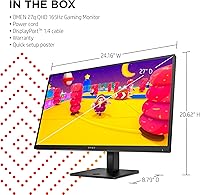
  • Dimensions: With the stand attached, the monitor measures approximately 24.16 inches wide, 8.79 inches deep, and 8.79 inches tall.
  • Weight: The complete unit including stand weighs approximately 16.34 pounds, making repositioning manageable but not effortless as a regular habit.
  • Screen Surface: The panel surface is glossy, which enhances color vibrancy but increases reflections under bright ambient lighting conditions.
  • Software: The monitor is compatible with OMEN Gaming Hub, HP's desktop application for adjusting display settings and managing connected OMEN ecosystem devices.

Related Reviews

KOORUI 27E3Q 27-inch QHD Gaming Monitor
76%
88%
Value for Money
83%
Image Quality
76%
Refresh Rate Performance
91%
Stand & Ergonomics
47%
HDR Performance
More
memzuoix 27-inch QHD 165Hz Gaming Monitor
70%
88%
Image Clarity
84%
Refresh Rate Performance
91%
Value for Money
82%
Adaptive Sync (FreeSync/G-Sync)
77%
Color Accuracy
More
OMEN X 27” 240Hz Gaming Monitor
85%
93%
Gaming Performance
91%
Display Quality
88%
Ergonomics & Adjustability
82%
Setup & Installation
89%
Build Quality
More
MSI Optix MAG274QRF 27″ QHD Gaming Monitor
86%
92%
Performance
90%
Display Quality
85%
Build Quality
87%
Ergonomics
80%
Color Accuracy
More
CUNPU 32-Inch Gaming Monitor QHD 165Hz
86%
93%
Display Quality
91%
Gaming Performance
85%
Build Quality
88%
Ergonomics and Adjustability
90%
Ease of Setup
More
FYHXele 27-inch 300Hz QHD Gaming Monitor
88%
94%
Performance for Gaming
91%
Display Quality
88%
Ergonomics and Adjustability
75%
Setup and Installation
85%
Build Quality and Durability
More
Gawfolk GF270L 27-inch 2K QHD Gaming Monitor
86%
91%
Display Quality
88%
Gaming Performance
94%
Color Accuracy
83%
Build Quality
87%
Value for Money
More
Samsung 27″ Odyssey QHD G65B Curved Gaming Monitor
80%
88%
Picture Quality
92%
Gaming Performance
78%
Build Quality
85%
Curved Display Experience
90%
Price to Performance Ratio
More
Samsung Odyssey G50D 32-inch QHD Gaming Monitor
78%
91%
Gaming Performance
88%
Image Sharpness & Clarity
83%
Color Accuracy & Vibrancy
79%
Panel Uniformity & Viewing Angles
58%
HDR Performance
More
Dell S2722DGM 27-inch Curved Gaming Monitor
81%
88%
Image Clarity
91%
Refresh Rate Performance
84%
Response Time
86%
Panel Curvature & Immersion
71%
Color Accuracy
More

FAQ

You can absolutely use the 27q with an Nvidia card — it will run at full resolution and refresh rate without any issues. However, FreeSync Premium adaptive sync is only officially supported on compatible AMD Radeon GPUs. Nvidia users will not get tear-free adaptive sync unless their specific card happens to support G-Sync Compatible mode, which is not guaranteed on this panel.

For most indoor setups — especially in rooms with controlled or moderate lighting — 400 nits is perfectly comfortable. Where it starts to feel limiting is in very bright rooms with windows directly behind or beside you. It is worth noting this panel is not HDR-certified, so do not expect dramatic contrast performance from HDR-tagged content.

Yes, the OMEN display connects to current-generation consoles through its HDMI port. Keep in mind that most consoles are still limited to 60Hz at high resolutions through their current firmware, so you will not be unlocking the full 165Hz ceiling from console alone. That said, the image quality and response time are still a solid upgrade over a typical TV setup.

The stand offers genuine height adjustment along with tilt, which puts it ahead of many monitors in this price range that only allow tilt. Most users find it easy to dial in a comfortable position without needing a monitor arm. If you do want a VESA mount arm, check compatibility before purchasing as not all aftermarket arms fit every mounting pattern.

Honestly, it depends on your room. If sunlight or a bright lamp hits the screen from the side or behind you, glare is noticeable and can be genuinely annoying during long sessions. If your desk faces away from windows or you can control your room lighting, it is much less of an issue. Buyers in bright, uncontrolled environments may want to look at a matte-panel alternative.

Most buyers report the colors look good right out of the box, especially for gaming. If you are doing color-sensitive design or photo editing work, running a basic calibration using your operating system tools or a hardware calibrator is still worth doing to nail accuracy. Out of the box it skews slightly vivid, which looks great for gaming but may not be ideal for precise creative work.

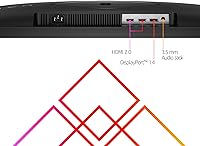
The connectivity setup includes the necessary display inputs for PC and console use, plus four USB-A ports that let you plug peripherals directly into the monitor rather than running cables all the way to your PC tower. The built-in cable management channel through the stand also helps keep things tidy once everything is connected.

No, the monitor works completely fine without installing OMEN Gaming Hub. The software is optional and mainly useful if you want to tweak display settings digitally or manage other OMEN peripherals from one place. Some users report it runs quietly in the background without issues, while a few find it slightly resource-heavy and prefer to skip it entirely.

The difference is real and worth appreciating. At 27 inches, 1080p starts to show visible pixel structure up close, while QHD at that size hits a pixel density where text and fine detail look noticeably crisper. For gaming, the extra resolution means you can see more environmental detail and UI elements more clearly. The tradeoff is that your GPU works harder, so make sure your hardware can comfortably push QHD frame rates before committing.

Assembly is straightforward — the stand clicks into the monitor base without tools in most cases, and cable routing through the stand takes just a few minutes. Most buyers report the whole process takes under fifteen minutes. The on-screen display menu for adjusting settings is accessible and reasonably intuitive compared to many gaming monitors in this category.

Where to Buy