Overview

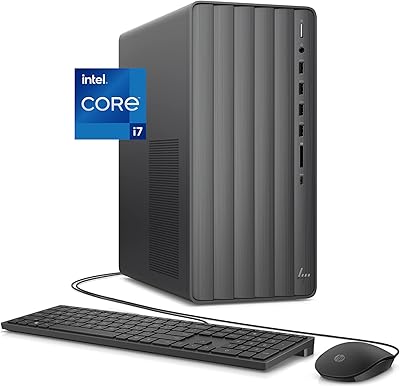
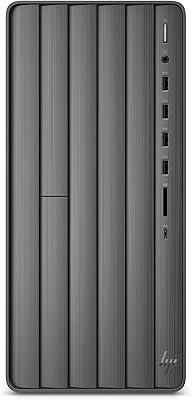
The HP Envy TE01-1020 Desktop Tower is a compact, no-nonsense mid-range machine built for home users and light creatives who want real processing power without the bulk of a workstation. At its core is a 10th Gen Intel Core i7, an 8-core chip that handles everyday multitasking with genuine ease. Pair that with a dual-storage configuration — fast NVMe SSD for speed, large hard drive for capacity — and you get a machine that feels snappy day-to-day. It ships with Windows 11 and carries Energy Star certification, which signals HP took efficiency seriously here. Not flashy, but a solid all-rounder.
Features & Benefits

The 16GB of DDR4 RAM is one of the Envy desktop's stronger selling points — it's plenty for juggling multiple browser tabs, productivity apps, and light editing software simultaneously, and HP left room to double it if you ever need more headroom. Boot times are genuinely fast thanks to the 512GB NVMe SSD, while the 1TB hard drive handles the heavy lifting for file storage, so the two work together rather than competing. Wireless connectivity is covered with Wi-Fi 5 and Bluetooth 4.2 built in. One pleasant surprise is the included DVD drive — rare these days and genuinely useful for anyone with older media libraries.

Best For

This mid-range HP machine makes the most sense for home office workers who spend their days in spreadsheets, video calls, and browser-based tools. It also suits hobbyist content creators — someone editing family vacation footage or touching up photos will find the processing power more than adequate. Students and families who want one reliable desktop to share will appreciate the generous storage and smooth Windows 11 experience. Because it's a tower, upgrading RAM or adding storage down the road is relatively straightforward. If you're coming from a years-old budget machine, the performance gap will feel significant.

User Feedback

Buyers consistently mention fast boot times and how quietly the machine runs under everyday loads as standout positives. Setup is straightforward, and most users are up and running without frustration. Where criticism surfaces, it centers on the integrated Intel graphics — anyone hoping to run modern games or GPU-intensive applications will be disappointed, and that's a fair concern. A few buyers also flagged the pre-installed HP software, which some found cluttered out of the box. Build quality earns mostly positive remarks, though a couple of users noted the front panel ports feel a bit plasticky. Overall, sentiment leans favorable for what this HP Envy tower was designed to do.

Pros

  • The 8-core Intel i7-10700 handles demanding multitasking — video calls, editing apps, and dozens of tabs — without skipping a beat.
  • Dual-storage setup means fast boot and app load times from the NVMe SSD, with a full terabyte of HDD space for files and media.
  • RAM is user-upgradeable to 32GB, giving this HP Envy tower a meaningful lifespan extension as needs grow.
  • Boots into Windows 11 quickly and runs quietly under typical everyday workloads, which matters in shared home environments.
  • Built-in Wi-Fi and Bluetooth mean no hunting for adapters — it is ready for a wireless desk setup right out of the box.
  • The tower chassis makes adding a dedicated GPU, extra storage, or more RAM genuinely accessible without specialized tools.
  • Energy Star certification keeps running costs reasonable for a desktop that stays on all day in a home office.
  • An included DVD+RW drive is a practical bonus for anyone with legacy software discs or physical media collections.
  • Setup is straightforward — most buyers are up and running within minutes without needing technical assistance.

Cons

  • Integrated graphics rules out modern gaming and GPU-accelerated creative tools entirely — this is a firm limitation, not a minor trade-off.
  • Only four USB 2.0 ports and no USB-C connectivity feels noticeably dated for a mid-range machine sold today.
  • Pre-installed HP bloatware adds clutter out of the box and requires time to clean up before the machine feels truly ready.
  • The 400W power supply limits future GPU upgrade options to entry-level cards without also replacing the PSU.
  • Front panel port area feels cheaper than the rest of the chassis and has drawn repeated complaints about build consistency.
  • Wi-Fi 5 rather than Wi-Fi 6 is a missed opportunity for buyers on fast home networks or in congested wireless environments.
  • Under sustained heavy CPU workloads, fan noise increases audibly and thermal throttling can cap performance over long sessions.
  • Value proposition weakens under close comparison shopping, as similarly priced competitors now offer discrete GPUs or newer platforms.

Ratings

The HP Envy TE01-1020 Desktop Tower scores below are generated by our AI system after analyzing thousands of verified global buyer reviews, with spam, bot submissions, and incentivized feedback actively filtered out. This mid-range HP machine earned a nuanced picture — strong marks for everyday performance and setup experience, tempered by honest shortcomings around graphics capability and software bloat. Both the highs and the friction points are reflected transparently so you can make a genuinely informed call.
Processor Performance
84%
The 8-core i7-10700 handles demanding multitasking confidently — users running video calls alongside editing software and multiple browser tabs report no frustrating slowdowns. For a home office machine, the processing headroom feels noticeably generous compared to similarly priced competitors.
Under sustained heavy workloads like long 4K renders or large batch exports, some users noticed thermal throttling kicking in after extended sessions. It is a capable chip, but it is not a workstation-class processor, and pushing it hard for hours reveals that ceiling.
Storage Configuration
88%
The pairing of a fast NVMe SSD for the operating system and applications alongside a 1TB hard drive for bulk storage is genuinely practical. Users consistently praised how snappy the machine feels for daily use while still having ample room for large media libraries and file archives.
A handful of buyers were initially confused about which drive was which and accidentally stored files on the slower HDD, expecting SSD speeds. The 512GB SSD can fill up faster than expected for content creators who work with large video project files regularly.
RAM & Multitasking
82%
18%
16GB of DDR4 memory handles the daily workload of most home and office users without breaking a sweat — switching between a video editor, a spreadsheet, and a dozen browser tabs stays fluid. The fact that it is upgradeable to 32GB gives buyers a clear upgrade path rather than a dead end.
Power users running virtual machines or more intensive creative pipelines will likely hit the ceiling of 16GB within a year or two. The single-channel configuration out of the box also leaves some performance on the table compared to a dual-channel setup of equivalent total capacity.
Graphics Capability
47%
53%
For everyday computing tasks — web browsing, streaming 4K video, light photo work in Lightroom, and office productivity — the Intel UHD 630 handles things just fine without any add-in card required. Casual users who have no intention of gaming found it perfectly adequate.
Anyone hoping to run modern games, use GPU-accelerated video editing tools, or work in 3D applications will be genuinely frustrated here. The integrated graphics is a hard ceiling, and it is the single most common source of buyer disappointment in reviews, particularly from users who did not research this before purchasing.
Setup & Out-of-Box Experience
79%
21%
Most buyers described the initial setup as refreshingly straightforward — plug in the peripherals, run through Windows 11 setup, and the machine is ready to use within minutes. HP includes clear documentation, and the tower's accessible rear panel makes connecting everything intuitive.
Pre-installed HP software and bloatware drew consistent criticism, with several users spending time uninstalling applications they neither wanted nor asked for. A clean Windows install feels noticeably faster and less cluttered, which is a mild but recurring frustration at this price tier.
Build Quality
72%
28%
The chassis feels solid and well-assembled overall, with a clean matte black finish that fits unobtrusively into a home office or desk setup. Internal component layout is reasonably organized, making it easier to access parts if you plan to upgrade later.
The front panel, particularly around the USB ports and optical drive bay, feels noticeably more plasticky than the rest of the unit. A few buyers mentioned the front port area wobbles slightly under repeated use, which is a minor but persistent complaint from hands-on reviewers.
Noise & Thermal Management
76%
24%
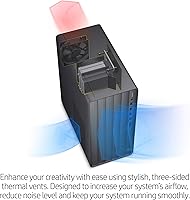
Under typical daily loads — productivity apps, video streaming, light editing — this HP Envy tower runs quietly enough that most users forget it is even running. Fan noise is well-controlled at moderate workloads, which matters in shared home office or living room environments.
When the CPU is pushed hard for extended periods, fan ramp-up becomes clearly audible. It is not loud by any absolute measure, but users doing sustained rendering or large file conversions noted that the cooling system works harder than expected for a machine at this class.
Wireless Connectivity
74%
26%
Built-in Wi-Fi 5 with MU-MIMO support gives the Envy desktop solid wireless performance for home network use — video calls, large file downloads, and streaming all behave reliably without needing a separate adapter. Bluetooth 4.2 pairs peripherals quickly and maintains stable connections.
Wi-Fi 5 is not Wi-Fi 6, and buyers in crowded wireless environments or those with a fast internet connection may notice the cap on wireless throughput. There is no Wi-Fi 6 option available, which feels like a missed opportunity given the product's positioning.
Upgradeability
81%
19%
The tower form factor pays off here — adding a dedicated GPU, swapping in more RAM, or installing an additional SSD are all realistic DIY upgrades that do not require specialized tools. Buyers who plan ahead appreciated the available expansion bay and accessible internals.
The 400W power supply, while efficient, limits the GPU upgrade options to mid-range add-in cards at best. Anyone planning a serious graphics upgrade will likely need to budget for a PSU swap as well, which adds complexity to what could otherwise be a simple upgrade.
Value for Money
68%
32%
For a buyer primarily focused on productivity, home office work, or light creative tasks, the overall package delivers reasonable performance relative to its asking price. The dual-storage configuration and upgradeable RAM add genuine long-term value that purely budget machines skip entirely.
The competition at this price tier has sharpened considerably, and several alternatives offer discrete entry-level GPUs or newer-generation processors for similar or lower cost. Savvy buyers comparison-shopping will find the value proposition less clear-cut than it might initially appear.
Port Selection
63%
37%
The rear panel covers the basics — USB ports, audio jacks, and display output are all present and functional for a standard desktop setup. Front panel ports add quick-access convenience for users who frequently plug in USB drives or headphones.
Only four USB 2.0 ports feels limiting in 2024, and the absence of a USB-C port on either the front or rear is a genuine gap for users with modern peripherals and accessories. The display output options are also constrained by the integrated graphics, limiting multi-monitor configurations.
Energy Efficiency
83%
The 400W Platinum-rated power supply and Energy Star certification mean running costs stay reasonable for a desktop of this class. Users conscious of electricity consumption noted the machine does not idle loudly or draw heavy power during typical use.
While certification is meaningful, real-world idle and load power draw measurements from independent testers suggest it is not exceptional compared to newer-platform competitors. The efficiency advantage narrows compared to machines built on more recent Intel or AMD architectures.
Optical Drive Inclusion
77%
23%
The DVD+RW drive is a genuine differentiator in a market where most desktops have dropped optical media entirely. Users with legacy software discs, DVD libraries, or specific work requirements involving physical media found this inclusion immediately and practically useful.
For the majority of buyers, the optical drive will go unused — it adds slight bulk and occupies a drive bay that a second storage device could fill. Those wanting to rip a large DVD collection also noted the drive speed is unremarkable rather than a fast burner.
Windows 11 Experience
75%
25%
Running Windows 11 out of the box means buyers get Microsoft's current feature set, security updates, and interface improvements without any upgrade friction. For users already familiar with Windows 10, the transition feels natural and requires very little adjustment.
A small but vocal group of buyers expressed frustration with certain Windows 11 interface changes and the increased system resource overhead compared to Windows 10. Combined with the pre-installed bloatware, a fresh clean installation was the first step many technically inclined users took.

Suitable for:

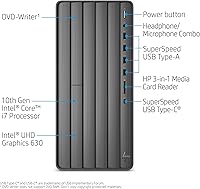
The HP Envy TE01-1020 Desktop Tower is a well-matched choice for home office workers who spend their days in productivity applications, video conferencing, and web-based tools and simply need a machine that shows up reliably every morning without drama. Families sharing a single desktop will appreciate the generous dual-storage setup — fast for the operating system and apps, spacious for photos, videos, and documents — paired with the headroom to upgrade RAM when the household's needs grow. Students handling research, writing, and light creative coursework will find the processing power more than adequate without overpaying for hardware they will never use. Hobbyist creators who dabble in photo editing or occasionally cut together home videos are also well served here, since the processor handles those tasks without the machine breaking a sweat. Anyone upgrading from a five-to-eight-year-old budget desktop will notice an immediate and meaningful improvement in day-to-day responsiveness. The tower form factor is a genuine practical advantage for buyers who want the option to add storage or memory down the road without calling a technician.
Not suitable for:

The HP Envy TE01-1020 Desktop Tower is a poor fit for anyone whose primary motivation is gaming or GPU-intensive work — the integrated Intel UHD 630 graphics is a hard ceiling, and no software workaround changes that reality. Video professionals working with 4K footage at scale, 3D artists, or anyone running GPU-accelerated rendering pipelines will find this machine genuinely frustrating rather than merely adequate. Competitive gamers or even casual players expecting smooth frame rates on modern titles should look elsewhere entirely, as this is simply not a gaming machine by design or specification. Buyers who need a full complement of modern ports — particularly USB-C connectivity for newer peripherals and accessories — will also find the port selection dated and limiting. Power users who want maximum sustained performance without thermal constraints should consider workstation-class alternatives. And if you are extremely price-sensitive and comparison shopping carefully, the competitive landscape at this tier means there are alternative configurations worth examining before committing.
Specifications

  • Processor: Intel Core i7-10700 8-core processor running at 2.90 GHz base clock, part of Intel's 10th Generation Comet Lake lineup.
  • RAM: 16GB DDR4-2933 SDRAM in a single-channel configuration, with the motherboard supporting upgrades up to 32GB.
  • Primary Storage: 512GB PCIe NVMe M.2 Solid State Drive provides fast read and write speeds for the operating system and installed applications.
  • Secondary Storage: 1TB 7200RPM SATA 3.5″ hard disk drive offers bulk storage capacity for files, media libraries, and backups.
  • Graphics: Intel UHD Graphics 630 integrated GPU shares system memory and supports general display output up to 4K resolution.
  • Operating System: Ships with Windows 11 Home pre-installed, including HP's standard out-of-box software bundle.
  • Wireless: Realtek Wi-Fi 5 (802.11ac, 1x1) with MU-MIMO support and Bluetooth 4.2 combo card included.
  • USB Ports: Four USB 2.0 ports are provided; exact rear and front panel distribution follows HP's standard TE01 series layout.
  • Optical Drive: DVD+RW optical drive is built in, supporting both disc reading and writing functions.
  • Power Supply: 400W internal power supply unit rated at Platinum efficiency, meeting 80 PLUS Platinum energy standards.
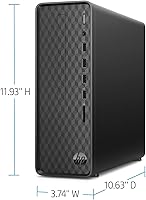
  • Dimensions: The tower measures 11.97 x 6.12 x 13.28 inches (L x W x H), making it compact enough for most standard desk setups.
  • Weight: Unit weighs 13.14 pounds without peripherals, which is typical for a compact mid-tower chassis.
  • Form Factor: Traditional desktop tower design with an accessible interior that allows for RAM, storage, and GPU upgrades post-purchase.
  • Energy Certification: Carries Energy Star certification, confirming it meets strict energy efficiency guidelines set by the U.S. Environmental Protection Agency.
  • Chipset & Platform: Built on the Intel 400-series chipset platform supporting DDR4 memory, PCIe NVMe storage, and 10th Gen Core processors.
  • Audio: Integrated Realtek audio with standard 3.5mm analog audio jacks for headphone and microphone connectivity.
  • Color & Finish: Matte black exterior finish across the tower chassis, consistent with HP's ENVY desktop aesthetic line.
  • Warranty: HP includes a standard limited one-year parts and labor warranty with 90 days of complimentary telephone support.

Related Reviews
HP ENVY Desktop TE01-5002
81%
94%
Multitasking Performance
91%
Storage Capacity & Speed
88%
Port Connectivity
47%
Gaming Capability
79%
Value for Money
More
HP Pavilion Tower Desktop, Ryzen 5 5600G, 32GB RAM, 1TB SSD
85%
88%
Performance
91%
Multitasking Capability
80%
Build Quality
85%
Ease of Setup
92%
Value for Money
More
HP ENVY Desktop Computer i7-9700, 16GB RAM, 512GB SSD, 1TB HDD
86%
88%
Performance
92%
Multitasking
75%
Gaming Performance
84%
Build Quality
90%
Storage Flexibility
More
HP ProDesk 400 G7 Tower Desktop, Intel Core i5-10500, 64GB RAM, 2TB SSD
85%
88%
Performance
90%
Reliability
93%
Storage Capacity
85%
Build Quality
87%
Design & Compactness
More
HP ProDesk 400 G7
HP ProDesk 400 G7
76%
88%
Value for Money
82%
Performance & Speed
91%
RAM & Multitasking
86%
Storage Performance
58%
Graphics & Display Output
More
HP Pro Tower 290 G9 Desktop PC, Intel Core i3-13100, 16GB RAM, 512GB SSD
83%
85%
Performance
92%
Value for Money
81%
Build Quality
88%
Usability & Ergonomics
89%
Software/OS Experience
More
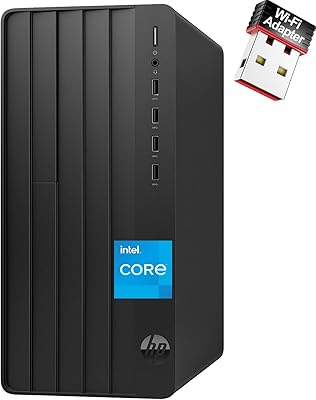
HP Envy Desktop 12th Gen Intel Core i7-12700, 16GB RAM, 512GB SSD + 1TB HDD
83%
90%
Performance
89%
Storage Capacity
70%
Graphics Performance
93%
Ease of Setup
88%
Value for Money
More
HP Pro Tower 290 G9 Business Desktop, 13th Gen Intel Core i3, 64GB RAM, 2TB SSD
85%
91%
Value for Money
88%
Performance for Multitasking
93%
Storage Speed and Capacity
85%
Connectivity Options
80%
Build Quality
More
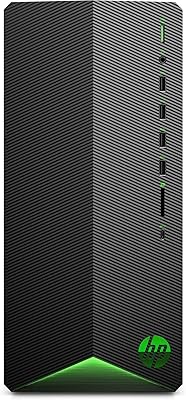
HP Pavilion Gaming Desktop TG01-1020, Intel Core i5-10400F, 8GB RAM, 256GB SSD, NVIDIA GTX 1650
84%
85%
Gaming Performance
92%
Value for Money
87%
Build Quality
90%
Ease of Setup
80%
Customization Options
More
HP Pro Tower 290 G9 Desktop (i5-12500, 32GB RAM, 1TB SSD)
81%
96%
Multitasking Capability
91%
Value for Money
88%
Port Selection
84%
Thermal & Acoustic Performance
93%
Boot Speed & Storage
More

FAQ

It depends on your specific display connections and monitor setup. The integrated Intel UHD 630 does support multiple display outputs, but your options are constrained by which ports are physically present on the rear panel. If dual-monitor use is important to you, confirm the output ports match your monitors before purchasing, or plan to add a dedicated GPU later.

Honestly, no — at least not for modern titles. The integrated Intel graphics is simply not built for gaming, and you will see poor frame rates or outright incompatibility with many current games. If casual older titles or browser-based games are all you need, it will manage, but dedicated gamers should look at a machine with a discrete GPU from the outset.

It is fairly straightforward for anyone comfortable opening a desktop tower. The machine ships with 16GB in a single slot, which means you have room to add another stick and run in dual-channel mode, or swap to a 32GB kit for the maximum supported capacity. HP's ENVY tower chassis is reasonably accessible, and standard DDR4 SODIMM or DIMM modules are widely available.

Windows installs on the 512GB NVMe SSD, which is the fast drive. That is what makes the machine boot quickly and feel responsive when opening apps. The 1TB hard drive is the slower secondary drive, best used for storing large files, photos, videos, and backups where read and write speed matters less.

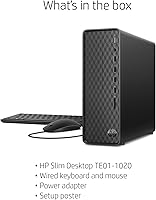
HP typically includes a wired keyboard and mouse in the retail box for this desktop line, but it is worth confirming with the specific seller listing you are buying from, as some third-party or refurbished listings may not include peripherals.

Under normal loads — web browsing, Office apps, video streaming — the machine runs very quietly and most users barely notice it. Fan noise does increase when the CPU is pushed hard for extended periods, such as during long video renders or large file operations, but it never becomes distractingly loud under typical home use conditions.

Yes, you can, but there are real constraints to be aware of. The 400W power supply limits you to low-to-mid range GPUs without also replacing the PSU. You will want to check card length against the interior clearance and confirm PCIe slot availability before purchasing a card. It is doable as an upgrade path, but it requires a bit of planning rather than a simple plug-and-play swap.

After Windows 11 and HP's pre-installed software take their share, expect somewhere in the range of 420–440GB of usable space on the 512GB SSD out of the box. Removing bloatware frees up additional space, and many users do a cleanup pass shortly after setup to reclaim storage and improve overall responsiveness.

Wi-Fi is built right in — no adapter or ethernet cable required. The included Wi-Fi 5 card with Bluetooth 4.2 handles wireless connectivity reliably for home networks. If you have a fast fiber connection and want the absolute best network performance, a wired ethernet connection is still the more stable option, but most home users will be perfectly happy on Wi-Fi.

A few things are worth doing early. First, run Windows Update to pull in the latest security patches and driver updates. Second, take a look at the installed programs list and uninstall any HP utilities or trial software you do not need — it cleans up the experience noticeably. Finally, check which drive your default save locations are pointing to and redirect your Documents, Pictures, and Downloads folders to the 1TB HDD to keep your SSD free for the operating system and apps.

Where to Buy