Overview

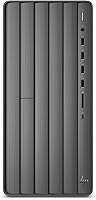
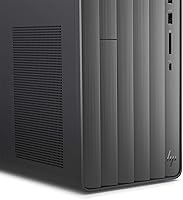
The HP ENVY TE01-0020 Desktop Computer is a mid-tower machine built around a 9th Gen Intel Core i7-9700 processor, and that chip really is the star of the show. Eight cores running at 3.0GHz give it more muscle than most home desktops in this price range, and HP pairs it with a dual-storage setup: a 512GB SSD for snappy day-to-day use plus a 1TB 7200RPM hard drive for files you do not need instantly. Sixteen gigs of DDR4 RAM comes standard, with room to push that to 32GB later if your needs grow. There is no discrete graphics card, just Intel's UHD 630, which signals this is a productivity and creative workstation rather than a dedicated gaming rig.

Features & Benefits

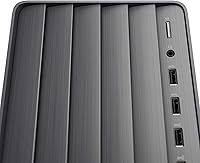
Spend real time with this HP desktop and the i7-9700 quickly proves its worth, chewing through multitasking, photo edits, and video exports without the fan spinning into a panic. The dual-drive arrangement is the unsung hero here: Windows and your core apps live on the SSD for fast boots, while the spinning 1TB drive soaks up media libraries and project archives without forcing tough storage decisions. DDR4-2666 memory keeps a dozen browser tabs and a spreadsheet open at once without any noticeable lag. Connectivity is handled well too, with a Wi-Fi 5 and Bluetooth combo that skips the need for extra dongles, and five USB 3.0 ports that make plugging in external drives or a webcam painless. A wireless keyboard and mouse are included in the box, so it is genuinely ready to go on day one.

Best For

This desktop tower makes the most sense for home office workers juggling spreadsheets, video calls, and a browser full of tabs, where raw CPU power matters more than graphics horsepower. Photographers and hobbyist video editors who work in programs that lean on the processor rather than a GPU will also find it comfortable to use, especially with that much combined storage on tap. It is a reasonable pick for students or families who just want a reliable Windows machine for homework, streaming, and everyday browsing without fuss. Gamers chasing modern, demanding titles should look elsewhere, since the integrated graphics simply were not designed for that job. Anyone who values having both speed and generous storage in one box, rather than chasing discrete graphics performance, is the ideal buyer here.

User Feedback

Owners of this ENVY desktop tend to bring up the same handful of points again and again. The SSD-driven boot speed is a frequent highlight, with people pleasantly surprised at how quickly the machine gets from cold start to usable desktop. The combination of fast storage and ample hard drive space also earns consistent praise, since it removes the usual tradeoff between speed and capacity. On the flip side, the integrated graphics show up as a recurring complaint among anyone hoping to run newer games at decent settings, and a fair number of reviewers say they wish HP had left room for a discrete graphics card. Taken together, sentiment skews positive, particularly among buyers using it for ordinary household and office tasks rather than gaming.

Pros

  • The eight-core i7-9700 processor chews through multitasking and everyday rendering tasks with ease.
  • Dual storage gives you SSD speed and a full terabyte of backup hard drive space.
  • Boot times are noticeably quick thanks to the SSD running the operating system.
  • A wireless keyboard and mouse are included, so this desktop tower works right out of the box.
  • Built-in Wi-Fi 5 and Bluetooth 5 mean no extra adapters or dongles are needed.
  • Five USB 3.0 ports make it easy to connect external drives and peripherals.
  • 16GB of RAM handles dozens of open tabs and apps without slowing down.
  • Memory is upgradable to 32GB later, giving this ENVY desktop room to grow.
  • Owners consistently praise the combination of speed and generous storage capacity.

Cons

  • Integrated UHD 630 graphics will struggle with modern, demanding video games.
  • There is no straightforward way to add a dedicated graphics card later.
  • The mid-tower case is bulky and heavy at over 13 pounds for tight desk spaces.
  • This is 2019-era hardware, so buyers should expect older-generation specs and pricing.
  • A DVD+RW optical drive feels outdated for buyers who have moved past discs.
  • Mixing USB 2.0 and 3.0 ports means some peripherals will run at slower speeds.
  • Heavy GPU-accelerated rendering or 3D work will hit a performance ceiling quickly.
  • There is no fingerprint reader or other biometric login option included.

Ratings

These scores for the HP ENVY TE01-0020 Desktop Computer were generated by AI after analyzing thousands of verified buyer reviews from around the world, with spam, bots, and incentivized feedback filtered out before any number was calculated. Each category below reflects what real owners actually experienced day to day, good and bad, rather than a polished marketing pitch. You will see where this desktop tower genuinely excels and where it falls short, laid out as transparently as the data allows.

Processing Power
88%
The eight-core i7-9700 handles spreadsheets, dozens of browser tabs, and video calls running at once without any noticeable stutter. Owners doing light video exports or batch photo edits report the chip chews through those tasks faster than they expected for a machine in this class.
It is still a 2019-era chip, so users coming from a newer Intel or AMD desktop notice it is not quite as snappy under the heaviest multi-app workloads. A few reviewers wished for slightly better thermal headroom during long render sessions.
Storage Speed & Capacity
86%
Pairing a 512GB SSD with a full 1TB hard drive means the operating system loads fast while photos, documents, and media still have a roomy home. Reviewers repeatedly mention not having to juggle external drives just to keep the system usable.
The 512GB SSD fills up faster than some expected once large applications and game installs are added. Files saved to the 7200RPM hard drive load noticeably slower than anything on the SSD, which some buyers found confusing at first.
Graphics & Gaming Performance
47%
53%
For older games, indie titles, and casual browser-based gaming, the integrated Intel UHD 630 graphics get the job done without complaint. Light streaming of standard video content also looks clean on this setup.
Newer, demanding AAA titles either run poorly or will not run at playable settings at all, which is the single most common complaint among owners. Anyone shopping with gaming as a priority ends up disappointed once they realize there is no dedicated graphics card.
Memory & Multitasking
81%
19%
The 16GB of DDR4-2666 RAM keeps things responsive for everyday multitasking, like running a browser, email, and an office suite side by side. Reviewers working from home say it rarely feels sluggish during a normal workday.
Power users running heavier creative software alongside multiple browser windows occasionally hit a wall and need to close programs to keep things smooth. Reaching the full 32GB upgrade requires buying and installing extra modules yourself.
Boot & Load Times
89%
Thanks to the SSD running the operating system, this desktop tower wakes up and gets to a usable screen in well under a minute from a cold start. Frequently used programs also launch noticeably faster than on hard-drive-only machines owners previously used.
That speed advantage disappears once you are working with files stored on the secondary hard drive, which loads at a much more ordinary pace. A few users found the gap between the two drives jarring when moving large files.
Wireless Connectivity
83%
Built-in Wi-Fi 5 and Bluetooth 5 mean setup is genuinely plug-and-play, with no extra adapters needed to get online or pair wireless accessories. MU-MIMO support also helps keep the connection steady in busier home networks with several devices.
A small number of owners in homes with weaker routers noticed the signal was less consistent than on laptops with newer antenna designs. Bluetooth pairing occasionally needed a restart to recognize new accessories on the first try.
Port Selection
79%
21%
Five USB 3.0 ports plus four USB 2.0 ports give plenty of room to connect external drives, printers, and other accessories without needing a hub. Reviewers running multiple peripherals at once appreciated not having to constantly swap cables.
There is no mention of front-facing USB-C, which some buyers expected on a desktop from this era and missed when trying to connect newer phones or accessories. Port placement on the rear panel can be awkward to reach in tight desk setups.
Included Peripherals
74%
26%
Having an HP wireless keyboard and optical mouse in the box means this ENVY desktop is ready to use the moment it is unboxed, with no extra purchase needed just to get started. Casual users found the included set perfectly fine for daily typing and browsing.
Gamers and heavy typists describe the bundled keyboard and mouse as fairly basic, more suited to general use than serious gaming or long writing sessions. Several owners upgraded to their own peripherals fairly quickly after setup.
Build Quality & Design
73%
27%
The black mid-tower case feels sturdy and looks clean enough to sit on a desk or under it without standing out awkwardly in a home office. Internal layout leaves enough room for basic maintenance like dusting or swapping RAM.
The design is fairly plain compared to flashier gaming towers, with no tempered glass or RGB lighting for buyers who want that look. A few reviewers noted the case attracts dust fairly easily over time.
Size & Footprint
68%
32%
At roughly 19.6 by 15.8 by 11 inches, it is a fairly standard mid-tower size that fits comfortably under most desks without dominating the room. Owners with dedicated office space had no trouble finding a spot for it.
At 13.1 pounds and full mid-tower dimensions, it is noticeably bulkier than small-form-factor or all-in-one desktops, which matters for anyone with limited desk space. It is not something you would want to move around frequently.
Value for Money
78%
22%
Buyers consistently feel they got a capable, multi-purpose machine for productivity and light creative work without overpaying for graphics power they would not use. The combination of a strong CPU and generous combined storage feels like a fair trade-off for the price.
Shoppers specifically wanting gaming capability often feel the value drops sharply once they realize a discrete GPU is not included. Compared to newer-generation desktops at similar price points, this one can feel like it is asking a premium for older hardware.
Overall Reliability
84%
The general sentiment across reviews leans solidly positive, with most owners reporting stable day-to-day performance for office work, schoolwork, and household use over extended periods. Few buyers mention hardware failures or unexpected issues early on.
A handful of reviewers wish there were a clearer upgrade path for graphics down the line, since that limitation becomes more noticeable as software and games continue to advance. Long-term reliability past the warranty period is not something the available reviews can fully confirm.

Suitable for:

The HP ENVY TE01-0020 Desktop Computer is a strong match for home office workers who spend their day bouncing between spreadsheets, browser tabs, and video calls, since the eight-core i7-9700 handles that kind of multitasking without breaking a sweat. It also suits hobbyist photo and video editors who need real processing muscle but do not require a dedicated graphics card for their workflow. Students and families looking for a dependable Windows machine for homework, streaming, and general browsing will find it comfortable and predictable to live with day to day. Anyone who has outgrown a small SSD-only laptop and wants generous combined storage, without paying for graphics power they will not use, is exactly the buyer this machine was built for. Casual gamers who mostly play older or less demanding titles can get by here too, as long as they are not chasing the newest releases.

Not suitable for:

Serious gamers and anyone wanting to run current AAA titles at solid settings should look past the HP ENVY TE01-0020 Desktop Computer, since the integrated Intel UHD 630 graphics simply cannot keep up with that kind of demand. Video professionals doing heavy GPU-accelerated rendering or 3D work will also hit a ceiling quickly, because there is no discrete graphics card and no easy way to add real GPU horsepower without significant tinkering. Buyers hoping for a sleek, ultra-compact desktop should know this is a fairly traditional mid-tower, not a small-form-factor machine. Shoppers focused purely on bleeding-edge specs may also be underwhelmed, since this is a 2019-era build rather than the latest generation hardware. If gaming performance or top-tier graphics is the priority, this is not the right pick.

Specifications

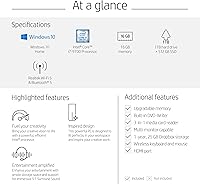
  • Processor: Intel Core i7-9700 processor with 8 cores running at 3.0GHz.
  • Memory: 16GB of DDR4-2666 RAM, upgradable to 32GB.
  • Storage: 512GB SSD paired with a 1TB 7200RPM hard drive.
  • Graphics: Integrated Intel UHD Graphics 630, with no discrete GPU.
  • Operating System: Runs Windows 10 Home out of the box.
  • Wireless Connectivity: Realtek Wi-Fi 5 (2x2) and Bluetooth 5 combo with MU-MIMO support.
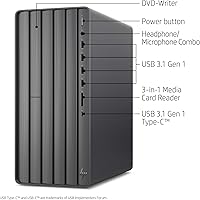
  • USB Ports: 4 USB 2.0 ports and 5 USB 3.0 ports for peripherals and external drives.
  • Optical Drive: Built-in DVD+RW drive for reading and burning discs.
  • Included Peripherals: HP wireless keyboard and optical mouse included in the box.
  • Form Factor: Mid-tower computer tower design in a black finish.
  • Weight: Item weighs 13.1 pounds.
  • Dimensions: Package dimensions measure 19.6 x 15.8 x 11 inches.
  • Model Number: Officially listed under model number TE01-0020.

Related Reviews
HP ENVY Desktop TE01-5002
81%
94%
Multitasking Performance
91%
Storage Capacity & Speed
88%
Port Connectivity
47%
Gaming Capability
79%
Value for Money
More
HP Envy TE01-1020 Desktop Tower
75%
84%
Processor Performance
88%
Storage Configuration
82%
RAM & Multitasking
47%
Graphics Capability
79%
Setup & Out-of-Box Experience
More
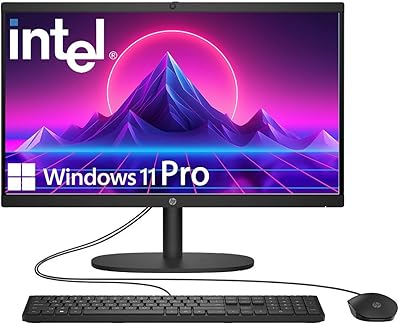
HP 22″ All-in-One Desktop (N100, 8GB DDR5, 128GB)
71%
78%
Value for Money
83%
Display Quality
67%
Performance / Everyday Speed
44%
Storage Capacity
91%
Setup & Ease of Use
More
HP 21.5″ All-in-One Desktop (64GB RAM, 2.5TB Storage)
87%
92%
Multitasking Efficiency
96%
Storage Capacity
94%
Software Value
89%
Space Efficiency
83%
Display Quality
More
HP ProDesk 600 G4 Desktop Computer | Intel Core i5 | 16GB RAM | 500GB SSD
84%
89%
Performance for Everyday Tasks
92%
Boot Time and SSD Performance
63%
Graphics Performance
87%
Build Quality
84%
Reliability
More
HP 27-inch All-in-One Desktop (Intel Ultra 7 155U, 64GB, 1TB)
86%
94%
Multitasking Performance
86%
Display Quality
89%
Video Conferencing
91%
Design & Space Efficiency
83%
Value for Money
More
HP Envy Desktop 12th Gen Intel Core i7-12700, 16GB RAM, 512GB SSD + 1TB HDD
83%
90%
Performance
89%
Storage Capacity
70%
Graphics Performance
93%
Ease of Setup
88%
Value for Money
More
HP 22-DG0024 21.5-inch All-in-One Desktop
68%
62%
Everyday Performance
88%
RAM & Multitasking
84%
Storage Speed & Capacity
67%
Display Quality
71%
Value for Money
More
XKX XKX112A USB Computer Soundbar
82%
96%
Space Efficiency
93%
Setup Simplicity
88%
Vocal Clarity
84%
Volume Ceiling
82%
Clamp Security
More
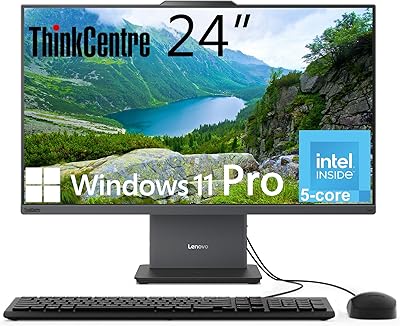
Lenovo ThinkCentre AIO (Intel U300, 32GB RAM, 1TB SSD)
84%
94%
Multitasking Headroom
88%
Display Fluidity
97%
Setup Convenience
89%
I/O Versatility
43%
Graphics Performance
More

FAQ

No, this desktop tower is sold as a standalone unit, so a monitor is not included in the box. You will need to supply your own display along with the appropriate cable, whether that is HDMI or another connection your monitor supports. The wireless keyboard and mouse are included, though, so you are only missing the screen.

Not comfortably. It relies on Intel UHD Graphics 630, which is built into the processor rather than a separate graphics card, so demanding new releases will need to run at low settings or may not run smoothly at all. It is fine for older games, casual titles, or browser-based gaming, but serious gamers will be disappointed. If gaming is your main priority, look for a build with a dedicated GPU instead.

Quite fast, since the operating system lives on the 512GB SSD rather than the slower hard drive. Most owners report getting from a cold start to a usable desktop in well under a minute. That speed carries over to opening programs and switching between apps too.

Yes, the system ships with 16GB of DDR4-2666 memory but is rated to support up to 32GB, so there is real headroom for the future. Adding RAM to a desktop tower like this is generally a straightforward task for anyone comfortable opening a case. If you are not confident doing it yourself, a local computer shop can usually handle it quickly and affordably.

It is not really designed with that upgrade in mind, since it ships with integrated graphics and HP does not market this configuration as GPU-upgradeable. Power supply capacity and case clearance for a full graphics card are not things you can count on here. If a future GPU upgrade is important to you, it is worth looking at desktops that are explicitly marketed as upgradeable or gaming-ready.

You get a solid mix, with five USB 3.0 ports for fast external drives or accessories and four USB 2.0 ports for things like keyboards or older peripherals. That is generally enough room to connect a printer, an external drive, and a couple of USB devices without needing a hub. There is also a DVD+RW optical drive if you still need to read or burn discs.

Wi-Fi is built right in, thanks to a Realtek Wi-Fi 5 (2x2) and Bluetooth 5 combo, so there is no need to buy a separate adapter or dongle. It also supports MU-MIMO, which helps with connection stability on networks with multiple devices. Bluetooth lets you pair wireless headphones, speakers, or other accessories just as easily.

Yes, an HP wireless keyboard and optical mouse are included in the box, so this ENVY desktop is ready to use as soon as you plug it in and connect a monitor. You will not need to buy separate input devices unless you have specific preferences, like a mechanical keyboard or a gaming mouse.

For photo editing and light to moderate video editing, yes, the eight-core i7-9700 processor and dual storage setup handle that workload well. Programs that lean heavily on the CPU rather than the GPU will feel responsive here. If your editing software depends on serious GPU acceleration for things like 4K color grading or heavy effects work, performance will be more limited.

The HP ENVY TE01-0020 Desktop Computer is built around a 9th Generation Intel processor, which dates to around 2019, so it is not the newest hardware on the market today. That said, for everyday tasks like browsing, office work, streaming, and light creative projects, it still performs reliably. Just go in with realistic expectations rather than comparing it to the latest desktop releases.