Overview

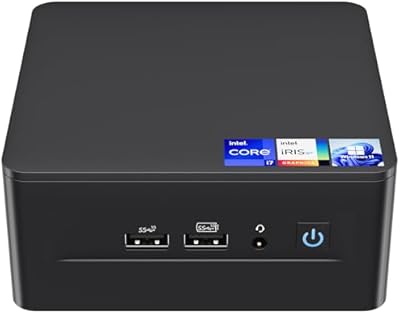
The ASUS NUC 12 NUC12WSHi7 16GB/512GB is a genuinely capable little machine that punches well above its physical weight. Built around Intel's 12th Gen hybrid core architecture, this mini PC ships ready to use with Windows 11 Pro, 16GB of dual-channel DDR4, and a fast 512GB NVMe SSD — no assembly required. It targets anyone who wants a full desktop experience without surrendering half their desk to a tower. Warranty coverage is split: Intel backs the barebone hardware for three years, while GEEK+ covers the RAM, SSD, and OS separately, also for three years.

Features & Benefits

The i7-1260P is where this compact desktop earns its price tag. Its hybrid 12-core design — four performance cores boosting to 4.7GHz alongside eight efficiency cores — handles everyday multitasking, video calls, and light content work without breaking a sweat. The Intel Iris Xe GPU is strong enough for 4K streaming and casual media work, though it is not built for serious gaming. The 2.5GbE Ethernet port is a genuinely useful inclusion, and Wi-Fi 6E keeps wireless connections fast. Perhaps most importantly, RAM expands to 64GB and a second M.2 slot means storage upgrades are straightforward down the line.

Best For

This mini PC fits a surprisingly wide range of buyers. Remote workers get a clean, powerful desk setup that connects to virtually any monitor or peripheral via Thunderbolt 4 and USB 3.2. IT teams deploying Windows 11 Pro across small offices will appreciate the out-of-box readiness. Home theater enthusiasts can push up to 8K output from a box smaller than most paperbacks. Students and educators benefit from the compact footprint without sacrificing real computing power. It also suits anyone who prefers to start lean and upgrade storage or memory incrementally rather than overpaying upfront for specs they may not immediately need.

User Feedback

Buyers consistently praise how responsive the NUC 12 WSH feels day-to-day, with fast boot times and smooth performance during typical office workloads. The port selection draws particular appreciation given the chassis size — most users find they rarely need a hub. On the downside, fan noise under sustained CPU load is a recurring complaint; this is not a silent machine when pushed. A handful of buyers noted that thermal throttling can surface during prolonged heavy tasks. Opinions on value are mixed — those coming from older desktops see it as excellent, while shoppers comparing against budget mini PCs find the premium harder to justify without needing the Pro OS or upgrade flexibility.

Pros

  • Ships with Windows 11 Pro pre-installed — no separate license purchase needed.
  • The 12th Gen i7-1260P handles multitasking, video calls, and productivity workloads confidently.
  • 2.5GbE Ethernet is a rare and genuinely useful inclusion at this form factor.
  • Wi-Fi 6E and Bluetooth 5.2 keep wireless connections fast and reliable with modern peripherals.
  • RAM is upgradeable to 64GB, giving this mini PC a longer useful lifespan than fixed-spec rivals.
  • Thunderbolt 4 opens the door to docks, fast external storage, and display expansion.
  • At under 1.5 pounds, this compact desktop fits virtually any desk, shelf, or media setup.
  • Supports up to 8K display output — well beyond what most users will ever need.
  • Dual three-year warranty coverage on both the barebone and components adds real peace of mind.
  • Port variety means most users will never need a USB hub for everyday peripheral setups.

Cons

  • Fan noise ramps up noticeably under sustained workloads, which bothers noise-sensitive users.
  • Thermal throttling has been reported during prolonged heavy CPU tasks, capping consistent peak output.
  • The split warranty between Intel and GEEK+ creates confusion about who to contact for specific issues.
  • No SD card slot limits appeal for photographers considering this as a compact editing station.
  • The secondary M.2 slot runs at PCIe Gen 3 speeds, a step down from the primary Gen 4 slot.
  • Buyers who do not need the Pro OS or 2.5GbE networking may feel they are overpaying for unused features.
  • Enclosed mounting locations like media cabinets can worsen thermal and fan noise issues.
  • Some users encountered driver or display handshake quirks when using less common monitor setups.
  • Legacy software compatibility edge cases can arise due to Windows 11 rather than the hardware itself.

Ratings

The ASUS NUC 12 NUC12WSHi7 16GB/512GB has been scored by our AI rating engine after processing verified buyer reviews from global markets, with spam, bot-generated, and incentivized submissions actively filtered out. The scores below reflect the honest consensus of real-world users across home office, business, and multimedia use cases. Both standout strengths and recurring frustrations are factored in with equal weight.

Everyday Performance
88%
Most users report snappy boot times and fluid multitasking across productivity apps, video conferencing, and browser-heavy workflows. The hybrid core architecture handles context switching well, so jumping between a spreadsheet, a Zoom call, and a dozen open tabs rarely causes hesitation.
Under sustained workloads like extended video exports or prolonged compilation tasks, some users notice the CPU pulling back slightly to manage heat. It is not a dealbreaker for typical office use, but buyers expecting consistent peak output for long stretches may be disappointed.
Build Quality & Chassis
83%
Buyers consistently describe the chassis as solid and well-finished for its size. The plastic and metal construction feels deliberately assembled rather than cheap, and the compact footprint — barely larger than a thick paperback — earns frequent praise from desk-space-conscious users.
A few buyers noted the chassis can feel warm to the touch during heavier workloads, which makes sense given the thermal density involved. The all-black design, while clean, attracts fingerprints and dust more visibly than some competing units with textured finishes.
Thermal Management & Fan Noise
61%
39%
Under light to moderate loads — web browsing, document editing, video streaming — the fan is largely unobtrusive and easy to forget about. Users who primarily run standard office workloads report that the machine runs quietly through most of their day.
Fan noise under sustained CPU load is the most commonly flagged complaint across reviews. Several buyers describe an audible ramp-up during prolonged tasks, and a subset report noticeable thermal throttling during extended heavy usage, which directly impacts the machine's appeal as a silent workstation.
Port Selection & Connectivity
91%
For a machine this small, the port layout is genuinely generous. Buyers praise having multiple USB 3.2 Gen 2 Type-A ports readily accessible on the front, alongside Thunderbolt 4 and a rear Type-A, meaning most users rarely need a hub even in multi-peripheral setups.
The absence of a built-in SD card reader is occasionally noted, particularly by photographers considering this as a compact editing workstation. A small number of buyers also wished for a second Thunderbolt port to simplify dual-display daisy-chaining without adapters.
Wireless & Network Performance
89%
Wi-Fi 6E delivers noticeably fast and stable wireless speeds in environments with a compatible router, and Bluetooth 5.2 handles keyboard, mouse, and audio peripherals without dropout issues. The inclusion of 2.5GbE Ethernet is a genuine differentiator that wired-first users appreciate deeply.
A small number of buyers report that Wi-Fi signal strength drops slightly when the unit is positioned inside a media cabinet or enclosed shelf. The 2.5GbE advantage is also moot without a compatible router or switch, so some users end up on standard gigabit regardless.
Display Output Capability
86%
Support for up to 8K output and multiple simultaneous displays is a strong point for a mini PC at this tier. Home theater users and multi-monitor office setups both benefit, and 4K streaming via the Iris Xe GPU plays back without stutter on well-optimized services.
Users attempting to run three or more displays simultaneously may encounter limitations depending on the combination of ports and adapters used. The integrated GPU also means color-critical work like photo retouching or video grading does not get the dedicated VRAM professionals typically prefer.
Integrated GPU for Media & Light Graphics
67%
33%
Intel Iris Xe handles everyday media tasks confidently — 4K YouTube, light photo editing, and presentations all run without complaint. For a mini PC aimed at office and home theater use, it covers the expected ground well and avoids the need for an external GPU in most scenarios.
Buyers who tested light gaming found the experience acceptable only for older or less demanding titles. Anything requiring consistent frame rates in modern games quickly exposes the limits of integrated graphics, and this compact desktop is simply not positioned for that workload.
Out-of-Box Setup Experience
84%
Arriving with Windows 11 Pro pre-installed and all key components already fitted, most buyers had the machine up and running within minutes. Driver installation was largely automatic, and the initial Windows setup process was described as straightforward by non-technical users.
A handful of buyers encountered driver quirks post-setup, particularly around display output when using less common monitor configurations. A small subset also noted that some bundled software felt unnecessary and required manual cleanup before the system felt truly ready.
Upgradeability & Expandability
87%
The ability to expand RAM up to 64GB and add a second M.2 drive gives this machine a longer useful life than most fixed-spec mini PCs at a similar price. Buyers who upgraded RAM post-purchase reported the process as accessible even for those with modest technical confidence.
The upgrade ceiling, while useful, still falls short of full desktop flexibility. The secondary M.2 slot is limited to PCIe Gen 3 speeds, which matters if buyers plan to add a high-performance secondary drive rather than just extra capacity storage.
Value for Money
72%
28%
Buyers upgrading from aging desktops or entry-level mini PCs tend to view this compact desktop as solid value given the processor tier, pre-installed OS, and upgrade path. The dual three-year warranty structure adds tangible peace of mind that cheaper alternatives rarely offer.
Shoppers comparing purely on hardware specs against budget mini PC alternatives often find the price harder to justify. Those who do not need Windows 11 Pro or the 2.5GbE port feel they are partly funding features irrelevant to their use case, which colors their value assessment negatively.
Warranty & After-Sales Support
74%
26%
The three-year Intel warranty on the barebone unit provides reassurance that the core hardware is backed by a major manufacturer. Buyers who have interacted with GEEK+ support generally describe response times as acceptable and resolution as reasonable for component-related issues.
The split warranty structure — Intel for the barebone, GEEK+ for RAM, SSD, and OS — confuses a meaningful number of buyers about who to contact when issues arise. A few users reported friction when determining which warranty covered their specific problem.
Size & Desk Footprint
93%
At under 1.5 pounds and roughly the size of a large coaster, this machine genuinely disappears on a desk or behind a monitor. Buyers in small apartments, shared offices, and living room setups consistently cite the form factor as one of their primary reasons for choosing it.
The compact size, while an obvious advantage, does constrain airflow in ways that directly contribute to the thermal complaints noted elsewhere. Buyers who mount the unit in enclosed spaces or tight media consoles may amplify those thermal and noise issues unintentionally.
Software & OS Experience
81%
19%
Windows 11 Pro out of the box is a genuine convenience for business buyers who would otherwise pay separately for a Pro license. Most users report a clean, bloatware-light installation that required minimal intervention before productive use.
A small number of buyers running specialized legacy software encountered compatibility edge cases tied to Windows 11 rather than the hardware itself. Those who preferred Windows 10 found the downgrade process requires additional effort that not all buyers anticipated.
Peripheral Compatibility
85%
Thunderbolt 4 opens the door to a wide range of docks, external GPUs, and high-speed storage enclosures, which meaningfully extends the machine's capabilities over time. Most standard USB peripherals worked immediately without driver intervention across the reviews analyzed.
Users relying on older USB-A only peripherals occasionally noted port competition given the mix of front and rear placement. A very small number of Thunderbolt dock configurations produced display handshake issues that required firmware or BIOS-level attention to resolve.

Suitable for:

The ASUS NUC 12 NUC12WSHi7 16GB/512GB is a strong fit for remote workers and home office professionals who want a capable, clutter-free desktop setup without sacrificing real computing power. IT managers deploying Windows 11 Pro across small business environments will appreciate that the machine arrives ready to configure straight out of the box, with no OS licensing hassle. Home theater enthusiasts can connect it directly to a 4K or even 8K display and use it as a capable media center that barely registers on a shelf or behind a TV. Students and educators who need a full-featured PC in a dorm room, classroom, or compact workspace will find the balance of performance and footprint genuinely practical. Buyers who prefer to invest incrementally — starting with 16GB of RAM and expanding later as budgets allow — will also benefit from the upgrade-friendly design, which supports up to 64GB and a second M.2 drive.

Not suitable for:

The ASUS NUC 12 NUC12WSHi7 16GB/512GB is not the right call for anyone whose primary use case involves gaming, GPU-accelerated creative work, or sustained heavy computation. The integrated Intel Iris Xe graphics handle everyday media tasks well, but they cannot realistically support modern gaming at playable settings or professional-grade video rendering with any consistency. Buyers who need a whisper-quiet machine for a recording studio, a shared bedroom, or an acoustically sensitive environment should also think carefully, since the fan becomes audible under load and thermal throttling has been reported during prolonged intensive tasks. If your workload regularly involves running virtual machines, large datasets, or professional applications that demand consistent peak CPU output for hours at a time, the thermal constraints of this compact chassis will likely frustrate you. Budget-conscious buyers who do not specifically need Windows 11 Pro or 2.5GbE networking may also find that more affordable mini PCs cover their needs without the premium price tag this unit commands.

Specifications

  • CPU: Intel Core i7-1260P 12th Gen processor with 12 cores (4 Performance + 8 Efficient) and a maximum turbo frequency of 4.7GHz on the P-cores.
  • Cache: 18MB Intel Smart Cache shared across all cores for faster repeated data access during multitasking.
  • TDP: The processor operates at a 35W TDP, balancing performance and thermal output within the compact chassis.
  • RAM: 16GB dual-channel DDR4 SODIMM at 3200MHz installed, expandable to a maximum of 64GB across two slots.
  • Storage: 512GB M.2 2280 PCIe Gen 4 x4 NVMe SSD installed, with a secondary M.2 2242 slot supporting PCIe Gen 3, SATA, and USB 3.2 Gen 2.
  • GPU: Intel Iris Xe Graphics with 96 execution units running at up to 1.40GHz, sharing system memory with no dedicated VRAM.
  • Display Output: Supports up to three simultaneous displays with a maximum resolution of 7680x4320 (8K) via Thunderbolt 4 and HDMI 2.1.
  • Wi-Fi: Intel Wi-Fi 6E AX211 module on M.2 slot supporting 802.11ax (Wi-Fi 6E) with integrated internal antennas.
  • Bluetooth: Bluetooth 5.2 is integrated via the same Intel AX211 module as the Wi-Fi adapter.
  • Ethernet: Intel i225-V controller providing a single 2.5GbE RJ45 port supporting 10/100/1000/2500 Mbps wired connections.
  • USB Ports: Three USB 3.2 Gen 2 Type-A ports (two front, one rear), one rear USB 3.2 Gen 2 Type-C (Thunderbolt 4), and two internal USB 2.0 headers.
  • Thunderbolt: One Thunderbolt 4 port (rear, Type-C) supporting up to 40Gbps data transfer, display output, and compatible docks.
  • Audio: 3.5mm front stereo headset jack with microphone support, plus up to 7.1 multichannel digital audio output via HDMI.
  • Operating System: Windows 11 Pro is pre-installed and activated, ready to use out of the box without additional licensing steps.
  • Dimensions: The unit measures 4.6 x 4.4 x 2 inches (117 x 112 x 51mm), making it one of the more compact full-featured mini PCs available.
  • Weight: The unit weighs 1.41 pounds (approximately 640g), light enough to mount behind a monitor using a VESA adapter.
  • Warranty: The barebone hardware is covered by Intel's three-year worldwide warranty, while RAM, SSD, and OS are covered by GEEK+ for three years separately.
  • Power Input: The machine is powered via an external power adapter; the internal components operate within the thermal and power envelope of the 35W CPU TDP.

Related Reviews
ASUS Vivobook 14 i3-1215U 16GB/512GB
75%
88%
Value for Money
82%
Performance & Speed
91%
RAM & Multitasking
61%
Display Quality
87%
Storage Capacity & Speed
More
Intel NUC 13 Pro NUC13ANHi5 (16GB RAM, 512GB SSD)
87%
89%
CPU Performance
94%
Port Selection & I/O
91%
Build Quality & Design
86%
Storage Expandability
92%
Networking & Wireless
More
ASUS Vivobook 16 Laptop, AMD Ryzen AI 5 3400U, 16GB RAM, 512GB SSD
79%
88%
Performance
90%
Display Quality
82%
Battery Life
75%
Build Quality
72%
Portability
More
Intel NUC 12 Pro NUC12WSHi7, 32GB RAM, 1TB SSD, Intel Core i7-1260P
88%
93%
Performance
89%
Build Quality
88%
Usability
92%
Connectivity
95%
Design & Size
More
ASUS ROG Ally 7″ 120Hz FHD Gaming Handheld, AMD Ryzen Z1 Extreme, 16GB RAM, 512GB Storage
86%
93%
Performance
90%
Display Quality
91%
Portability
60%
Battery Life
87%
Ergonomics
More
ASUS TUF Gaming F15 FX507VU-ES53, Intel Core i5-13500H, GeForce RTX 4050, 16GB RAM, 512GB SSD
85%
94%
Performance
92%
Gaming Experience
88%
Display Quality
89%
Cooling Efficiency
80%
Battery Life
More
ASUS ROG Strix G15 (2022) Gaming Laptop, Ryzen 7 6800H, GeForce RTX 3050, 16GB RAM, 512GB SSD
83%
89%
Performance
91%
Display Quality
92%
Cooling System
62%
Battery Life
70%
Portability/Weight
More
ASUS TUF Dash 15 (2022) Gaming Laptop, Intel Core i7-12650H, 16GB RAM, 512GB SSD, NVIDIA GeForce RTX 3060
83%
93%
Gaming Performance
89%
Build Quality
91%
Display Quality
80%
Portability
65%
Battery Life
More
ASUS TUF Gaming RTX5070 Ti OC 16GB
90%
96%
Gaming Performance
94%
Rendering & Content Creation
91%
Thermal Management
93%
Build Quality
89%
Noise Levels
More
SAMSUNG Galaxy Tab S10+ 12.4” 512GB
86%
94%
Display Quality
91%
Battery Life
88%
Performance
85%
Build Quality
90%
S Pen Functionality
More

FAQ

It ships with Windows 11 Pro pre-installed, 16GB of RAM, and a 512GB SSD already fitted, so you can plug in a monitor, keyboard, and mouse and be up and running almost immediately. You will need to supply your own peripherals and a display — those are not included.

Yes, both are user-upgradeable. The RAM slots accept standard DDR4 SODIMMs and support up to 64GB total across two slots. Adding a second M.2 drive is also straightforward — just note the secondary slot runs at PCIe Gen 3 speeds rather than Gen 4, so it is better suited for secondary storage than a primary high-performance drive. Most users with basic PC building confidence find the process manageable.

Under everyday workloads like browsing, video calls, and document editing, the fan is quiet enough that most people forget it is there. Where it becomes noticeable is during sustained heavy tasks — things like extended video exports or running multiple demanding applications simultaneously. If you need a near-silent machine around the clock, this compact desktop may not fully meet that expectation under load.

Casual and older titles can run at modest settings, but this machine was not designed with gaming as a primary use case. The Intel Iris Xe GPU handles everyday media and light 3D work, but modern games at high settings will push it past its limits quickly. If gaming is a priority, you would be better served by a mini PC with a discrete GPU option.

Yes, the NUC 12 WSH supports up to three simultaneous displays using the Thunderbolt 4 port and HDMI output in combination. Maximum resolution reaches up to 8K on a single display. Multi-monitor setups work well for productivity, though complex display configurations using adapters occasionally require some troubleshooting.

Intel covers the barebone unit — meaning the chassis, motherboard, and processor — for three years through their standard worldwide warranty program. GEEK+ separately covers the RAM, SSD, and Windows 11 Pro license for another three years. If you ever have an issue, the first step is identifying whether the problem relates to the core hardware or the components, then contacting the appropriate party.

It is genuinely well-suited for that use case. The machine supports 4K and even 8K display output, handles streaming services without stutter, and is small enough to hide neatly behind a TV or inside a media cabinet. Just make sure the cabinet has reasonable airflow, since restricting ventilation around the unit can push temperatures and fan noise higher than you would want during long movie sessions.

Yes, the Intel AX211 adapter supports Wi-Fi 6E, which operates on the 6GHz band for faster, less congested wireless performance. To take full advantage, your router also needs to support Wi-Fi 6E — if it does not, the machine will simply connect at standard Wi-Fi 6 or Wi-Fi 5 speeds, which is still perfectly functional for most home setups.

Technically yes, but it requires additional steps and is not officially supported by the manufacturer for this configuration. A small number of buyers have done it successfully, but you should be prepared for potential driver compatibility work and the fact that your warranty support may not extend to OS-related issues if you deviate from the pre-installed setup.

This is arguably where this compact desktop performs best. The i7-1260P handles simultaneous video conferencing, browser tabs, cloud apps, and background processes without meaningful slowdown during typical workdays. Users running standard productivity stacks — office suites, communication tools, light data work — consistently describe the experience as responsive and stable throughout the day.