


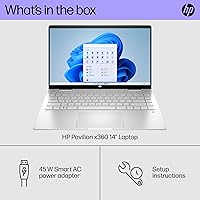


Overview
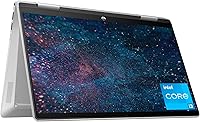
The HP Pavilion x360 14-inch 2-in-1 Laptop sits squarely in the mid-range convertible space, built for students and everyday home users who want genuine flexibility without stretching their budget. The defining feature is the 360-degree hinge, which lets you flip between laptop, tent, stand, and tablet modes depending on what the moment calls for — a genuine convenience, not a novelty. Inside runs Intel's 13th Gen Core i3-1315U, a meaningful step forward from the older budget chips it replaces. At 3.35 pounds in a silver chassis, this 2-in-1 Pavilion is light enough to carry daily without complaint. Just be clear-eyed going in: this is a capable everyday machine, not a performance workhorse.
Features & Benefits
The 14-inch FHD touchscreen is one of the first things you notice — sharp, responsive, and coated to cut glare in bright classrooms or open offices. Flipping into tent mode makes movie-watching or sketching with your fingers genuinely comfortable. The 256GB NVMe SSD keeps boot times brisk and apps snappy, a real upgrade over sluggish hard drives still found in cheaper machines. Eight gigabytes of DDR4 RAM keeps the HP x360 humming through a typical mix of browser tabs, spreadsheets, and video calls without visible slowdown. Battery life is rated at nine hours, and having Microsoft Office 2024 bundled in is a practical bonus for students right out of the box.
Best For
This convertible laptop is a natural fit for college students who move between classes, dorms, and libraries — needing one device that handles notes one hour and streaming the next. Remote workers or home users who want a compact, touch-friendly setup for video calls and document editing will find it plenty capable. It is also a solid first step for buyers moving on from aging, slow machines — the performance difference will feel significant. That said, if you need dedicated graphics for creative work or plan to run demanding software regularly, this machine will hit its ceiling. Prioritizing portability and versatility over raw power is the right mindset here.
User Feedback
Owners of the 2-in-1 Pavilion tend to praise the display brightness and clarity, along with how well the touchscreen tracks finger input without lag. The keyboard also earns consistent compliments for comfortable key travel during extended typing sessions. On the critical side, the 256GB storage gets flagged regularly — heavy users or anyone storing media locally will want an external drive or cloud subscription from day one. Real-world battery typically lands between six and seven hours under normal use, decent but short of the claimed nine. A few buyers have noted mild chassis flex under pressure, and the fan can spin up audibly when the i3 is pushed hard for sustained periods.
Pros
- The 360-degree hinge is genuinely useful, letting you shift between laptop, tent, and tablet modes with no hassle.
- A sharp, anti-glare FHD touchscreen holds up well in bright environments where glossy screens become a chore.
- The NVMe SSD makes boot times and app launches noticeably fast for a machine at this price tier.
- At 3.35 pounds, this convertible laptop is light enough to carry in a bag all day without wearing you out.
- Eight gigabytes of RAM keeps everyday multitasking — tabs, documents, video calls — running without visible stuttering.
- Microsoft Office 2024 comes bundled in, which saves students and home users a recurring subscription cost.
- The keyboard draws consistent praise for comfortable key travel during long typing sessions.
- Windows 11 Home runs well on this hardware for day-to-day tasks and has a clean, modern interface.
- The numeric keypad is a practical addition rarely found on 14-inch laptops at this size and price.
- The touchscreen is responsive and tracks input accurately, making the 2-in-1 modes feel purposeful rather than gimmicky.
Cons
- 256GB of built-in storage fills up fast — local media, large apps, or project files will push you to an external drive quickly.
- Real-world battery life tends to land between six and seven hours, noticeably short of the nine-hour rated figure.
- The i3-1315U slows down under sustained workloads — prolonged multitasking or large file processing reveals its limits.
- The fan spins up audibly when the processor is pushed hard, which can be distracting in quiet settings.
- Some owners report mild lid flex and chassis give under pressure, raising questions about long-term hinge durability.
- Port selection is thin — two USB 2.0 and one USB 3.0 — meaning a hub is almost essential for desk setups.
- Intel UHD integrated graphics cannot handle modern games or GPU-accelerated creative software at usable performance levels.
- USB 2.0 ports feel dated in 2024 and will bottleneck data transfers with external drives or accessories.
- No Thunderbolt or USB-C charging support limits flexibility compared to competitors in a similar price range.
- The HP x360 lacks a fingerprint reader or IR camera, so Windows Hello biometric login is not available.
Ratings
The scores below for the HP Pavilion x360 14-inch 2-in-1 Laptop were generated by our AI engine after analyzing thousands of verified global buyer reviews, with spam, bot submissions, and incentivized feedback actively filtered out. Each category reflects the honest consensus of real owners — students, remote workers, and everyday users — without smoothing over the friction points that matter to buyers making a real purchasing decision.
Everyday Performance
Display Quality
Touchscreen Responsiveness
Convertible Design
Battery Life
Storage Capacity
Build Quality
Keyboard & Trackpad
Portability
Thermal Management
Connectivity & Ports
Software & Out-of-Box Value
Value for Money
Suitable for:
The HP Pavilion x360 14-inch 2-in-1 Laptop is genuinely well-matched for college students who need one device to carry through a full day of classes, study sessions, and casual downtime — the convertible form factor earns its keep in lecture halls and cramped dorm desks alike. If you work from home and mostly live inside a browser, Office apps, and video calls, this machine handles all of that without frustration. First-time laptop buyers stepping up from an old, sluggish machine will notice an immediate and satisfying jump in responsiveness, thanks largely to the NVMe SSD. The anti-glare touchscreen makes it a pleasant companion in bright coffee shops or open-plan offices. Anyone who wants the option to flip into tablet or tent mode for reading, sketching, or streaming — without paying premium 2-in-1 prices — will find this HP x360 fits that need squarely.
Not suitable for:
The HP Pavilion x360 14-inch 2-in-1 Laptop is not the right tool if your workflow involves video editing, 3D rendering, gaming, or any CPU-intensive software — the i3-1315U will hit its ceiling quickly under sustained heavy loads, and there is no dedicated graphics card to fall back on. If you routinely store large media libraries, software installations, or project files locally, 256GB of storage will feel cramped sooner than you expect; budgeting for an external drive or relying heavily on cloud storage becomes a near necessity. Power users accustomed to i5 or i7 machines may find the performance gap noticeable during demanding multitasking. The port selection is also limited, so professionals who depend on multiple peripherals simultaneously will likely need a hub. And if chassis rigidity is a priority — say, you are rough with your gear or need a machine that survives years of heavy daily use — the mild flex reported by some owners is worth factoring in.
Specifications
- Display: 14-inch FHD IPS touchscreen with a 1920x1080 resolution and anti-glare coating for comfortable use in bright environments.
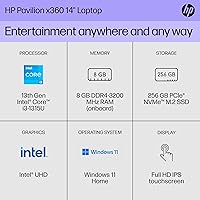
- Processor: 13th Generation Intel Core i3-1315U with up to 4.5GHz boost clock and 6 cores for efficient everyday computing.
- RAM: 8GB DDR4 SDRAM providing adequate bandwidth for typical multitasking workloads including browsing, office applications, and video calls.
- Storage: 256GB PCIe NVMe M.2 SSD delivering fast boot times and quick application launches compared to traditional hard drives.
- Graphics: Intel UHD integrated graphics handles everyday display tasks, light media playback, and casual streaming without a discrete GPU.
- Hinge Design: 360-degree convertible hinge enables four usage modes: laptop, tent, stand, and tablet, depending on the task at hand.
- Operating System: Windows 11 Home comes pre-installed, offering a modern interface and compatibility with current productivity and communication software.
- Battery: Integrated lithium-ion battery is rated for up to 9 hours of use per charge under manufacturer test conditions.
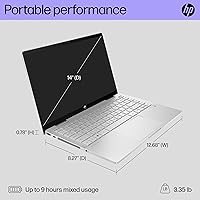
- Weight: The unit weighs 3.35 pounds, making it practical to carry in a backpack or bag throughout a full day.
- Dimensions: The chassis measures 12.68 x 8.27 x 0.74 inches, keeping the footprint compact enough for small desks and tray tables.
- Ports: Connectivity includes 2x USB 2.0 ports and 1x USB 3.0 port for connecting peripherals, drives, and accessories.
- Wireless: Supports Wi-Fi 802.11a/b/g/n/ac and Bluetooth for wireless internet access and peripheral pairing.
- Included Software: Microsoft Office 2024 is bundled with the machine, providing Word, Excel, and PowerPoint without an additional subscription at purchase.
- Special Features: Notable extras include a numeric keypad, a memory card slot, and the anti-glare touchscreen coating for added everyday utility.
- Color & Finish: Available in Silver with a standard plastic and metal composite build typical of the Pavilion mid-range product line.
Related Reviews
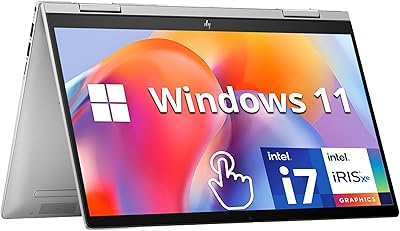
HP Envy x360 14″ 2-in-1 Laptop
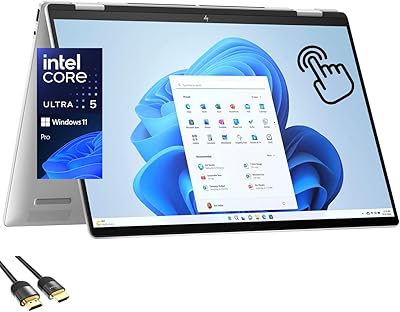
HP Envy x360 16-inch 2-in-1 Laptop (Core Ultra 5 125U, 16GB, 1TB)

HP OmniBook X Flip 14″ 2K Touch-Screen 2-in-1 Laptop, AMD Ryzen AI 7 3500U, 24GB RAM, 1.5TB Storage

HP 14-dq0020nr 14-Inch Laptop

HP Chromebook Plus x360 14-inch 2-in-1 Laptop
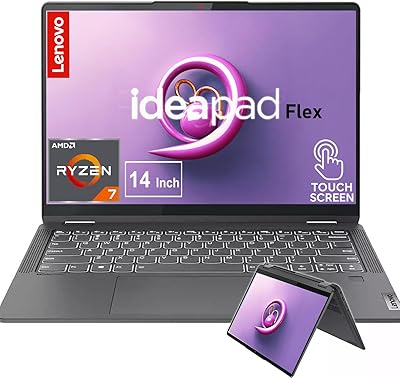
Lenovo IdeaPad Flex 5 14 1TB Laptop


HP 14 Celeron 14-inch Touchscreen Laptop

Dell 14 Plus Laptop DB14250-14-inch 2.5K, Intel Core Ultra 7, 16GB RAM, 1TB SSD
