Overview

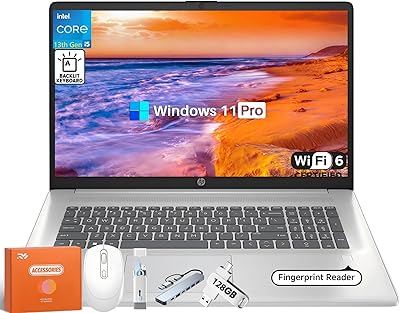
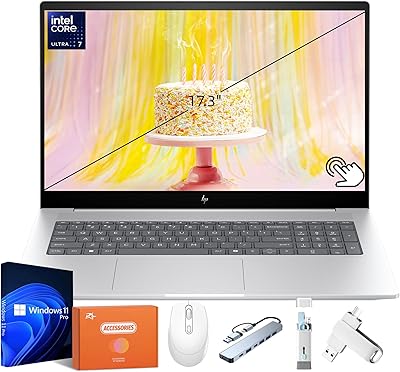
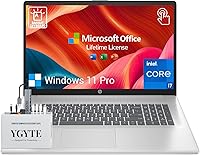
The HP Essential 17 Touchscreen Laptop sits in an interesting spot — large enough to feel like a desktop replacement, portable enough to move between rooms or take to a client meeting. This 17-inch HP laptop is built around a 13th Gen Intel Core i7 processor, 64GB of RAM, and a 1TB SSD, putting it firmly in mid-to-premium territory where buyers expect real performance, not just impressive-sounding specs. The 17.3-inch touchscreen is a genuine differentiator for professionals who juggle multiple windows or prefer navigating documents with a tap. Factor in the bundled accessories and pre-loaded lifetime Microsoft Office, and the overall package makes a credible case for its price.
Features & Benefits

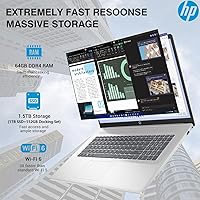
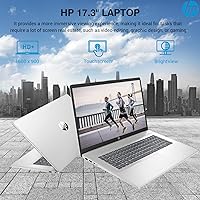
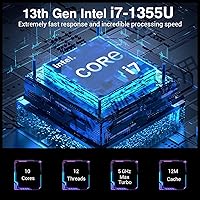
The processor headroom here is genuinely useful day-to-day. With 10 cores running up to 5.0 GHz, this large-screen business laptop handles busy workdays — dozens of browser tabs, video calls, large Excel files — without breaking a sweat. The 64GB of RAM is the real standout at this tier: at that capacity, you can run virtual machines, keep your CRM open alongside your inbox, and still not feel the machine slow down. Storage is a fast PCIe NVMe SSD, so boot times and file transfers are quick. The touchscreen works well for navigation, though the 1600x900 resolution on a 17-inch panel can look a little soft next to full HD displays at similar prices. Connectivity covers Wi-Fi 6, Bluetooth 5.3, USB-C, and HDMI.

Best For

This 17-inch HP laptop makes the most sense for people who genuinely need a big screen and serious processing power but are not ready to give up the laptop form factor. Remote workers and home-office professionals will appreciate having desktop-level multitasking without a tower and separate monitor. It is also a strong fit for small business owners and accountants who live inside spreadsheets — the backlit numeric keypad alone is worth something there. Students in data-heavy courses benefit from the generous RAM ceiling and screen space. And if you are coming from a five-year-old laptop that struggles with modern software, the performance jump here will feel significant. Windows 11 Pro and lifetime Office mean you are productive from day one.

User Feedback

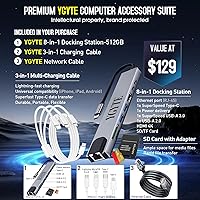
Buyers consistently praise the screen size and the sheer headroom that 64GB of RAM provides — for many, it is the first laptop they have owned that truly does not feel like it is holding them back. The included accessories — a docking station, charging cable, and Ethernet cable — are third-party bundle items rather than HP originals, but most users find them genuinely practical additions. The most common criticism centres on the display: 900p on a 17-inch screen is not sharp by today's standards, and some buyers at this price tier expected better. Battery life also falls short of the rated figure under real workloads. Those hoping to run GPU-intensive software will hit the limits of integrated graphics fairly quickly. Build quality and keyboard comfort, though, draw broadly positive remarks.

Pros

  • 64GB of RAM is genuinely rare at this price tier and handles heavy multitasking without compromise.
  • The 13th Gen Core i7 processor tackles demanding business software, video calls, and large files with ease.
  • A 1TB NVMe SSD delivers fast boot times and snappy file access that older HDD-based machines cannot match.
  • Pre-loaded lifetime Microsoft Office means you are ready to work straight out of the box.
  • The 17.3-inch touchscreen adds a practical navigation layer for document-heavy workflows.
  • Windows 11 Pro brings enterprise-grade security and remote desktop support for business users.
  • The backlit numeric keypad is a thoughtful inclusion for accountants and data-entry professionals.
  • Wi-Fi 6 and Bluetooth 5.3 keep connectivity current and reliable in modern office environments.
  • The bundled docking station, Ethernet cable, and charging cable add immediate desk utility.
  • Build quality and keyboard comfort draw consistently positive remarks from verified buyers.

Cons

  • The 1600x900 display resolution looks soft on a screen this size — full HD is now standard at this price.
  • Real-world battery life falls noticeably short of the manufacturer-rated figure under normal workloads.
  • Integrated Intel Iris Xe graphics rule out GPU-intensive tasks like 3D rendering or serious gaming.
  • At nearly 5 pounds with a large chassis, the HP Essential 17 is not a comfortable daily carry.
  • The bundled accessories — docking station, cables — are third-party items, not HP-certified hardware.
  • The 720p webcam is functional but underwhelming for professionals who rely heavily on video calls.
  • No optical drive may be an issue for users who still work with physical media.
  • The HDMI 1.4b port limits external display output compared to newer HDMI 2.0 or DisplayPort connections.

Ratings

Our scores for the HP Essential 17 Touchscreen Laptop are generated by AI after analyzing thousands of verified buyer reviews from global markets, with spam, bot activity, and incentivized feedback actively filtered out. The result is a balanced picture that honestly reflects where this large-screen business laptop genuinely delivers and where real users have run into frustration. Both the strengths and the trade-offs are weighted equally — so what you see here is the unvarnished consensus, not a highlight reel.
Performance & Speed
88%
Users upgrading from older machines consistently describe the responsiveness as a genuine step change — boot times are quick, application launches feel immediate, and running several demanding programs simultaneously rarely causes slowdown. The 13th Gen Core i7 handles busy workdays without the hesitation that plagues mid-range configurations.
A handful of power users noted that sustained heavy workloads — particularly extended video rendering or large database processing — can cause the fan to ramp up noticeably. Thermal throttling under prolonged peak load was occasionally mentioned in longer-term ownership reviews.
RAM & Multitasking
93%
The 64GB RAM configuration is the single most praised aspect across verified reviews. Users running CRM software, multiple browser sessions, and communication tools simultaneously report that the machine simply does not flinch — something many found impossible on their previous 8GB or 16GB laptops.
A small subset of users felt the memory was overkill for their needs and would have preferred the option to buy a lower-RAM configuration at a reduced price. There is also no clear upgrade path confirmation, which concerned buyers who wanted flexibility down the line.
Display Quality
61%
39%
The 17.3-inch screen size itself earns consistent praise — having that much real estate for spreadsheets, document editing, or split-screen work genuinely improves the day-to-day experience for most office users. The BrightView panel produces decent color for general business use.
The 1600x900 resolution is the most recurring criticism in reviews at this price tier. Text and images look noticeably softer than full HD panels, and users who spend long hours reading on screen find it tiring. Several buyers explicitly stated they wished they had known about this limitation before purchasing.
Touchscreen Usability
78%
22%
Touch response is accurate and fluid for document navigation, annotation, and quick scrolling tasks. Users who regularly review PDF reports or mark up documents found the touchscreen a practical addition that reduced how often they reached for the trackpad.
A portion of buyers admitted they rarely use the touch functionality after the first few weeks, particularly those coming from traditional laptop workflows. Fingerprint smudges on the glossy panel also drew repeated complaints from users who prefer a cleaner display surface.
Storage & File Access
91%
The 1TB NVMe SSD delivers fast read and write performance that users coming from HDD-based systems describe as transformative. Large file transfers, software installations, and cold boot times all benefit noticeably, and 1TB gives ample room for years of professional file accumulation.
A few users noted there is no optical drive, which matters more than expected when dealing with legacy media or certain enterprise software distributions. Some also flagged that the bundled docking station storage add-on, while useful, is a third-party accessory rather than integrated capacity.
Battery Life
57%
43%
Under very light use — primarily document editing and occasional web browsing with screen brightness kept moderate — some users did approach seven or eight hours, which is acceptable for a machine of this size and power level.
The manufacturer-rated 10.75 hours rarely materializes in real-world conditions. Users running typical mixed workloads — video calls, browser-heavy sessions, productivity software — consistently reported four to six hours before needing to plug in. Several buyers expressed frustration at the gap between marketing claims and everyday reality.
Keyboard & Typing Experience
84%
The full-size backlit keyboard with a dedicated numeric keypad earned strong marks from accountants, analysts, and data-entry professionals who consider the numpad a non-negotiable feature. Key travel and feedback were described as comfortable for extended typing sessions.
A few users found the key layout required a short adjustment period, particularly the positioning of certain function keys. The keyboard deck can flex slightly under firm typing pressure, which was noted by users who prefer a more rigid typing surface.
Build Quality & Design
74%
26%
The chassis feels solid enough for regular desk use and the occasional move between rooms or office locations. Most buyers described the build as sturdy and professional-looking, appropriate for a business environment without being flashy.
The all-plastic construction does not feel premium relative to the price point — users who have handled aluminum-bodied competitors noticed the difference immediately. The silver finish also attracts scratches more readily than some buyers anticipated.
Connectivity & Ports
82%
18%
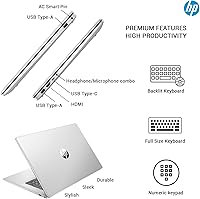
Wi-Fi 6 delivers noticeably faster and more stable wireless performance in congested environments, and the inclusion of Bluetooth 5.3 keeps peripheral pairing smooth. Having USB-C alongside dual USB-A ports covers most modern and legacy peripheral needs without requiring adapters.
The HDMI 1.4b port is a weak point — users trying to connect to 4K monitors or high-refresh displays found it limiting. Several reviewers also noted they would have appreciated an SD card slot integrated into the laptop itself rather than relying on the bundled dock.
Value for Money
69%
31%
The combination of a fast processor, unusually high RAM, a large NVMe SSD, lifetime Microsoft Office, and a bundle of accessories makes the overall package feel substantive. For buyers who would otherwise spend separately on Office licenses and a docking station, the bundled value is real.
At this price tier, the 1600x900 display and integrated-only graphics undercut the value argument for more discerning buyers. Competitors with full HD screens and discrete GPU options exist at similar or marginally higher prices, which makes this a harder sell for specification-conscious shoppers.
Webcam & Audio
67%
33%
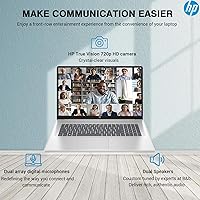
The physical privacy shutter on the 720p webcam was genuinely appreciated by privacy-conscious users, particularly those on frequent video calls in professional settings. Audio from the dual array microphones was described as clear enough for standard conferencing needs.
The 720p resolution looks dated for a laptop at this price — video quality in well-lit rooms is acceptable but not impressive, and in lower light conditions it degrades noticeably. Users who rely heavily on video calls for client-facing work often supplemented with an external webcam.
Thermal Management
63%
37%
Under moderate workloads — office tasks, browsing, video calls — the machine runs quietly and the chassis stays at comfortable temperatures. The cooling system is adequate for the day-to-day productivity workloads this laptop is designed around.
Under sustained heavy loads the fans become audible and the bottom of the machine gets warm enough to be uncomfortable on a lap. A number of users mentioned needing a laptop stand or cooling pad during longer intensive sessions, which adds cost and desk clutter.
Software & Out-of-Box Setup
86%
Windows 11 Pro and lifetime Microsoft Office being ready to use from the moment you power on resonated strongly with buyers who wanted to get to work immediately. The Pro edition also unlocked BitLocker encryption and remote desktop features that home-office professionals found directly useful.
Some users reported a modest amount of pre-installed software beyond Office and Windows that they had to manually remove. A small number of reviewers also noted that initial Windows setup required several rounds of updates before the system felt fully current and stable.
Portability
52%
48%
At just under 5 pounds and 0.81 inches thin, the machine is not unusually bulky for a 17-inch class laptop, and users who move it between a home office and a living room found it manageable for that kind of short-distance use.
Anyone hoping to carry this through an airport or commute with it daily will find the size and weight a genuine inconvenience. The large footprint also means standard laptop bags and backpacks often cannot accommodate it comfortably, which drew repeated frustration in travel-oriented reviews.

Suitable for:

The HP Essential 17 Touchscreen Laptop is built for productivity-first buyers who want the processing muscle of a workstation without committing to a desktop setup. Remote workers and home-office professionals will feel right at home here — the 17.3-inch screen gives you genuine breathing room when working across multiple apps, and 64GB of RAM means you can keep everything open without the machine slowing to a crawl mid-afternoon. Small business owners who spend their day inside accounting software, CRM platforms, or large spreadsheets will particularly appreciate the backlit numeric keypad and the sheer headroom this configuration offers. Students in data-intensive programs — analytics, finance, engineering — will find the combination of storage speed and RAM capacity genuinely useful for research-heavy workloads. If you are upgrading from a laptop that is three to five years old, the jump in responsiveness will be noticeable from day one, and the pre-loaded lifetime Microsoft Office removes one more thing to sort out before you can get to work.
Not suitable for:

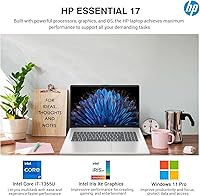
The HP Essential 17 Touchscreen Laptop is a poor fit for buyers who prioritize display sharpness, as the 1600x900 resolution on a 17.3-inch panel looks noticeably soft compared to the full HD screens now common at similar price points. Frequent travelers should also think carefully — at just under 5 pounds with a large footprint, this machine is not something you will want to carry through airports regularly. Anyone hoping to run GPU-heavy software — 3D rendering, AAA gaming, or serious video production — will run into the hard ceiling of integrated Intel Iris Xe graphics, which simply were not designed for that kind of workload. Battery life is another reality check: the rated 10.75 hours is an optimistic figure, and real-world use under any meaningful load will likely land noticeably lower. Finally, buyers looking for a slim, refined ultrabook aesthetic will find this large-screen business laptop leans more utilitarian than stylish.
Specifications

  • Display: 17.3-inch HD+ BrightView touchscreen with a 1600x900 pixel resolution.
  • Processor: Intel Core i7 13th Gen with 10 cores, 12 threads, and a maximum clock speed of 5.0 GHz.
  • RAM: 64GB DDR4 SDRAM for high-bandwidth multitasking across demanding applications.
  • Storage: 1TB PCIe NVMe M.2 SSD offering fast read/write speeds significantly quicker than traditional hard drives.
  • Graphics: Intel Iris Xe integrated graphics, sharing system memory rather than using a dedicated GPU.
  • Operating System: Windows 11 Pro pre-installed, with enterprise-grade security and remote desktop capabilities included.
  • Software: Lifetime Microsoft Office license pre-loaded on the device at no additional subscription cost.
  • Keyboard: Full-size backlit keyboard with a 10-key numeric keypad and soft-grey key styling.
  • Camera: HP True Vision 720p HD webcam with a physical privacy shutter and dual array microphones.
  • Wireless: Wi-Fi 6 (802.11ax) and Bluetooth 5.3 for fast, modern wireless connectivity.
  • Ports: Includes one SuperSpeed USB-C, two USB-A, and one HDMI 1.4b port for peripheral and display connections.
  • Battery Life: Manufacturer-rated battery life of up to 10.75 hours under optimized conditions.
  • Weight: 4.84 pounds, making it portable but better suited to desk use than frequent travel.
  • Dimensions: 15.78 x 10.15 x 0.81 inches, giving it a large footprint consistent with its 17-inch screen class.
  • Included Extras: Bundle includes a third-party 8-in-1 docking station with SD card reader and RJ-45 port, a 3-in-1 charging cable, and an Ethernet cable.
  • Audio: Stereo speakers with HP immersive HD Audio for clear sound during calls and media playback.
  • Security: Windows 11 Pro provides AI-powered threat protection and supports enterprise security policies.
  • Color: Silver finish across the chassis and lid.

Related Reviews
HP 17 17.3″ Touchscreen Laptop
61%
83%
Screen Size & Usability
76%
Touch Screen Performance
41%
Performance & Speed
38%
RAM Adequacy
53%
Storage & Space
More
HP 17.3″ Touchscreen Laptop
70%
74%
Value for Money
61%
Display Quality
58%
Performance
83%
Storage & Speed
78%
Touchscreen Usability
More
HP Laptop 17-cp2199nr
70%
83%
Value for Money
61%
Display Quality
78%
Performance & Speed
87%
Storage Performance
84%
RAM & Multitasking
More
HP 14″ Touchscreen Laptop, Intel Celeron N4020, 16GB RAM, 192GB Storage
79%
81%
Performance
65%
Display Quality
55%
Battery Life
73%
Build Quality
88%
Portability
More
HP Envy 17 Laptop, Intel Ultra 7, 64GB RAM, 4TB SSD
83%
92%
Performance
88%
Display Quality
80%
Battery Life
90%
Multitasking & Storage
65%
Portability
More
HP Laptop 17 Ryzen 5 7430U 32GB 1TB
70%
88%
Value for Money
84%
Processing Performance
91%
RAM & Multitasking
89%
Storage Speed & Capacity
76%
Display Quality
More
HP 17 17.3-inch Laptop
70%
74%
Value for Money
81%
Performance
52%
Display Quality
93%
RAM & Storage
61%
Build Quality
More
HP 17 Ryzen 5 64GB 2TB Laptop
72%
83%
Value for Money
78%
Performance
81%
Display Quality
88%
RAM & Multitasking
91%
Storage
More
HP 2023 17 Laptop, Intel Core i5-1335U, 16GB RAM, 512GB SSD
82%
92%
Display Quality
88%
Performance
72%
Battery Life
67%
Portability
89%
Value for Money
More
HP 15.6″ Touchscreen Laptop, Intel Core i3-1115G4, 16GB RAM, 1TB SSD
83%
91%
Value for Money
88%
Touchscreen Performance
85%
Battery Life
80%
Build Quality
92%
Storage Capacity
More

FAQ

It comes pre-loaded with a lifetime Microsoft Office license, so you do not need to purchase anything extra. You can start using Word, Excel, and the rest of the suite right after setup.

For most everyday users, 16GB or 32GB would be plenty — but if you regularly run multiple heavy applications at once, work with large datasets, or keep dozens of browser tabs open alongside your main software, the extra headroom genuinely makes a difference. It also means the machine should stay capable for many more years without feeling underpowered.

The touch response is smooth and works well for scrolling, tapping, and navigating documents without reaching for the trackpad. It is most useful if you frequently annotate files or prefer a more hands-on interaction style. That said, the 1600x900 resolution means the screen is not as sharp as a full HD panel, which some users notice on a display this size.

Yes, the HDMI port and USB-C connection both support external displays. Keep in mind the HDMI port is version 1.4b, which caps out at 1080p at 60Hz for external monitors, so if you are hoping to drive a 4K display, you may be limited depending on your monitor and cable setup.

Intel Iris Xe handles everyday tasks like photo editing, light video work, and casual gaming at modest settings reasonably well. Where it struggles is with 3D rendering, running modern games at high settings, or any GPU-intensive professional software. If those are regular parts of your workflow, a laptop with a dedicated GPU would serve you better.

Under light use — browsing, document editing, video calls — you might get close to that figure. Under more demanding workloads, expect something closer to five to seven hours. It is worth keeping the charger accessible if you are using it heavily throughout a full workday.

It can be a strong fit depending on the field of study. Students in data analytics, finance, engineering, or any discipline involving large files and software-heavy workflows will benefit from the RAM and processing speed. The large screen is also genuinely useful for research and writing. Students looking for something lightweight to carry between classes all day may find the size and weight less ideal.

The bundle includes an 8-in-1 docking station, a 3-in-1 charging cable, and an Ethernet cable. These are third-party accessories added by the seller, not HP-branded hardware. They are practical extras that most buyers find useful, but they are not covered under HP's own warranty.

HP's Essential series laptops typically have limited upgrade paths compared to more modular business-class machines. In many configurations the RAM is soldered to the motherboard, which means it cannot be swapped out. The SSD may be replaceable depending on the exact build. If upgradeability matters to you, it is worth confirming the specific model's internal layout before buying.

It is genuinely well-suited for that scenario. The large screen reduces the need for a separate monitor, the processing power handles video conferencing and productivity software without slowdown, and the numeric keypad is a nice touch for anyone dealing with numbers regularly. The main practical consideration is that you will want to keep it plugged in for most of the day if you are working intensively.