Overview

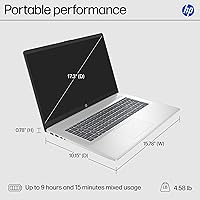
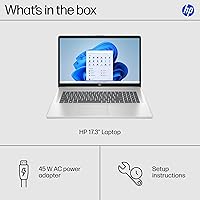
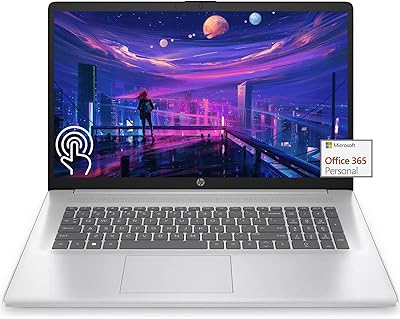
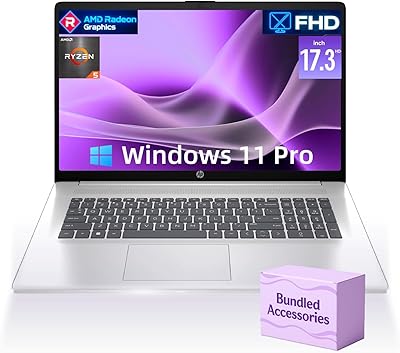
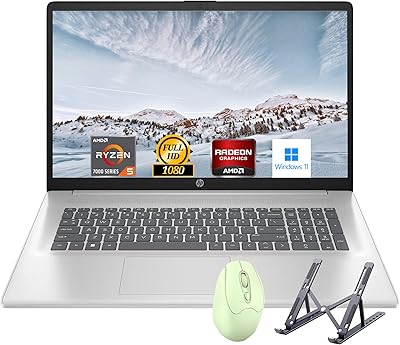
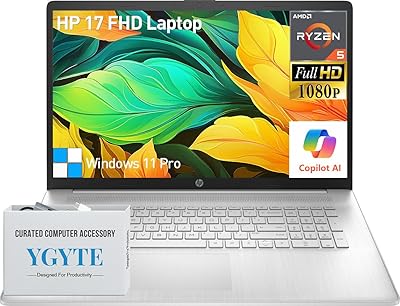
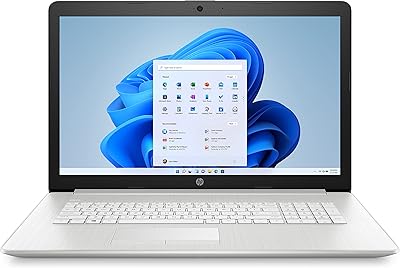
The HP Laptop 17-cp2199nr is a large-screen budget laptop aimed squarely at home users and students who want more screen real estate without spending a fortune. The 17.3-inch HD+ display is the headline feature here — it's roomy enough to make browsing, streaming, and working in multiple windows feel genuinely comfortable. Under the hood, the AMD Ryzen 5 7520U handles everyday tasks without breaking a sweat. At 4.58 lbs and just 0.81 inches thin, this HP 17-inch laptop is more portable than you might expect. Just be clear-eyed going in: this is a capable everyday machine, not a powerhouse.
Features & Benefits

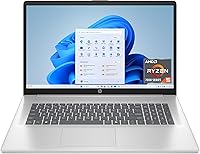
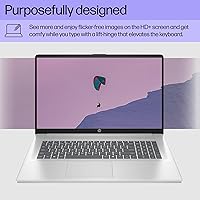
The anti-glare panel keeps reflections manageable indoors, though at 1600x900 on a 17.3-inch screen, things can look a touch soft — full HD would have been a nicer touch. That said, the Ryzen 5 7520U pairs well with 16 GB of LPDDR5 RAM, so juggling browser tabs, video calls, and documents never feels like a struggle. Boot times on the PCIe NVMe SSD are impressively quick compared to older hard-drive machines. The webcam includes a physical privacy shutter, which remote workers will genuinely appreciate. Connectivity is solid — Wi-Fi 6, Bluetooth, USB-C, and HDMI round out a practical, well-thought-out port lineup.

Best For

This HP 17-inch laptop is a natural fit for students who need a wide, comfortable screen for long study sessions, and for anyone doing a lot of video calling from home. Retirees or casual users who hate squinting at smaller displays will find the size refreshing. It also makes a strong upgrade for anyone still running an older HDD-based machine — the jump to NVMe SSD storage alone transforms everyday responsiveness in a way that's hard to overstate. That said, anyone expecting to do light gaming should know upfront that the integrated AMD Radeon GPU will be a real limiting factor.

User Feedback

Buyers generally respond well to the screen size and value — getting a 17-inch display with fast SSD storage and ample RAM at this price is hard to argue with. The most consistent critique, though, is the resolution. At 1600x900 on a panel this large, text and images aren't as crisp as users coming from full HD screens might expect. Battery life draws mixed reactions; while the rated figure hovers around 7 hours, real-world use with Wi-Fi active tends to land closer to 5 hours. Keyboard feel and build quality earn decent marks, and most buyers found the out-of-box Windows 11 setup reassuringly straightforward.

Pros

  • The 17.3-inch anti-glare display gives home users and students a genuinely comfortable screen for long daily sessions.
  • 16 GB of LPDDR5 RAM handles multitasking and browser-heavy workflows without breaking a sweat.
  • PCIe NVMe SSD delivers fast, responsive boot times that feel like a significant upgrade over older hard-drive machines.
  • Wi-Fi 6 support means stable, fast wireless performance even in crowded home network environments.
  • The physical webcam shutter is a practical privacy feature remote workers and students will use and appreciate.
  • At under an inch thin and 4.58 lbs, this large-screen HP is more portable than its size suggests.
  • Windows 11 Home setup is straightforward, with minimal bloatware compared to typical budget laptop competitors.
  • The full-size keyboard layout benefits from the generous chassis, giving typists comfortable key spacing for extended use.
  • AI noise reduction on the microphone makes video calls noticeably cleaner in busy or noisy home environments.
  • Value for money is a consistent standout — the combination of RAM, SSD, and screen size is hard to match in this price range.

Cons

  • The 1600x900 resolution looks noticeably soft on a screen this large, especially compared to full HD alternatives.
  • Real-world battery life regularly falls between 4.5 and 5.5 hours — well below the manufacturer-rated figure.
  • The USB-C port does not support charging or external monitor output, limiting its practical versatility.
  • Integrated graphics make any form of gaming, even older or casual titles, a frustrating experience.
  • The plastic chassis flexes under pressure, and the build does not feel as solid as pricier competitors.
  • RAM is soldered onboard, so there is no upgrade path if your needs grow over a multi-year ownership period.
  • The 250-nit brightness ceiling makes outdoor or bright-window use genuinely uncomfortable.
  • No SD card reader is included, which catches camera users and hobbyists off guard.
  • Speaker audio lacks depth and bass, making headphones or external speakers a practical necessity for media consumption.
  • Thermal management under sustained CPU load can cause noticeable performance dips during longer intensive tasks.

Ratings

Our AI rating system analyzed thousands of verified global buyer reviews for the HP Laptop 17-cp2199nr, actively filtering out incentivized, bot-generated, and spam submissions to surface what real everyday users actually experienced. The scores below reflect a balanced picture — genuine strengths are recognized, but recurring frustrations are not glossed over. Whether this large-screen HP earns a place on your shortlist depends heavily on your priorities, and this breakdown is designed to help you figure that out honestly.

Value for Money
83%
For buyers on a tight budget who need a large-screen Windows 11 machine with fast SSD storage and generous RAM, this HP 17-inch laptop punches noticeably above its price bracket. Getting 16 GB of LPDDR5 memory and a PCIe NVMe drive in this tier is genuinely hard to match.
A handful of buyers felt the 1600x900 screen resolution undermined the overall value proposition, since competing machines at similar prices have started offering full HD panels. If display sharpness matters to you, that gap is hard to ignore.
Display Quality
61%
39%
The 17.3-inch anti-glare panel is spacious and easy on the eyes for long indoor sessions — reading documents, streaming shows, or video calling all feel comfortable on this canvas. The non-reflective coating genuinely reduces eye strain under typical home or office lighting.
The 1600x900 resolution is the most polarizing aspect of this machine. On a screen this size, pixels are noticeably spread out, and users who have used full HD laptops will spot the softness in text and images almost immediately. Brightness tops out at 250 nits, making outdoor use frustrating.
Performance & Speed
78%
22%
Day-to-day tasks — browsing with many tabs open, streaming video, writing documents, joining video calls — run without any perceptible lag. The Ryzen 5 7520U handles light multitasking reliably, and users upgrading from older budget laptops reported a meaningful jump in responsiveness.
Push the processor into more demanding territory — video editing, running several heavy applications simultaneously, or anything CPU-intensive — and the thermal limits become apparent. This is not a machine built for sustained heavy workloads, and buyers expecting that will be disappointed.
Storage Performance
87%
The 512 GB PCIe NVMe SSD is one of the clear highlights of this build. Boot times are fast, apps open quickly, and users who migrated from HDD-based laptops consistently described the difference as dramatic. Everyday file operations feel snappy and responsive.
512 GB fills up faster than many users anticipate, especially once Windows updates, apps, and media accumulate. There is no optical drive, and external storage solutions will likely be necessary for users with larger media libraries or backup needs.
RAM & Multitasking
84%
16 GB of LPDDR5-5500 RAM is a legitimately strong spec at this price point, and buyers noticed. Running a video call alongside a spreadsheet and a browser with a dozen tabs open caused no slowdowns in typical use scenarios. It handles the daily chaos well.
The RAM is soldered onboard, meaning there is no upgrade path if you eventually need more. For most everyday users that will never matter, but power users who like to future-proof their machines may find this limiting over a three-to-four year ownership period.
Battery Life
59%
41%
Under light, controlled conditions — low screen brightness, minimal background tasks — users reported getting through a reasonably full workday on a single charge. For home-based use near an outlet, the battery is rarely a crisis.
The manufacturer-rated 7.15 hours is optimistic by real-world standards. With Wi-Fi active, moderate screen brightness, and normal use, most buyers reported actual runtimes landing between 4.5 and 5.5 hours. Heavy users found themselves reaching for the charger by early afternoon.
Build Quality & Design
71%
29%
The natural silver finish looks clean and professional for a budget laptop, and the sandblasted keyboard frame adds a tactile premium feel that buyers noticed. At 0.81 inches thin, the chassis is slimmer than the size suggests, making it easier to carry than expected.
The plastic body flexes more than some buyers would like, particularly around the display lid. At 4.58 lbs it is manageable, but it is not a laptop you would want to toss in a backpack daily. Build impressions are solidly mid-tier — functional, not refined.
Keyboard & Typing Experience
73%
27%
The full-size keyboard layout, aided by the generous 17-inch chassis, gives keys adequate spacing that touch typists appreciate. Users who write a lot — students drafting essays, remote workers handling emails — generally found the typing experience comfortable for long sessions.
Key travel is on the shallower side, and the tactile feedback is not particularly satisfying for users who prefer a more pronounced click. A small number of buyers also noted that the trackpad, while usable, felt less precise than they expected for day-to-day navigation.
Webcam Quality
76%
24%
The HP True Vision HD camera delivers clear, usable video in standard indoor lighting, and the AI noise reduction does a credible job filtering ambient background sounds during calls. The physical privacy shutter is a practical touch that remote workers and privacy-conscious users genuinely valued.
In low-light conditions the camera softens noticeably, which can make evening calls look grainy. It is firmly adequate rather than impressive — buyers coming from premium ultrabooks with better sensors may find it a step down.
Graphics & Visual Performance
44%
56%
For streaming HD video, casual image editing, and standard desktop use, the integrated AMD Radeon graphics handle the job without complaint. Users who only need visuals for everyday tasks will not feel constrained in normal scenarios.
Integrated graphics have hard limits, and anyone expecting to run games — even older or less demanding titles — will hit them quickly. Frame rates in most games are modest at best and unplayable at worst. This is not a gaming machine, and buyers should factor that in explicitly before purchasing.
Connectivity & Ports
79%
21%
Wi-Fi 6 support gives this large-screen HP a genuine networking advantage over older budget competitors, with faster and more stable wireless performance in congested home networks. The port lineup covers most practical needs — USB-C, two USB-A ports, HDMI, and an audio combo jack.
The USB-C port does not support charging or external display output, which limits its versatility compared to what buyers might expect. There is also no SD card reader, which surprises some buyers who use cameras or memory cards regularly.
Audio Quality
67%
33%
The spatial awareness microphone and AI noise reduction make voice input and video calls cleaner than many budget laptops in this range. For calls and casual media consumption, the speakers hold up reasonably well at moderate volume levels.
Speaker output lacks depth and bass, as is common on thin laptops in this category. Users who care about music or movie audio quality will likely want headphones or external speakers. The speakers are fine for casual use but fall short for anything immersive.
Setup & Out-of-Box Experience
81%
19%
Most buyers reported a smooth, uncomplicated Windows 11 Home setup experience. The system boots quickly from first power-on, and HP has kept bloatware relatively minimal compared to some competitors in this segment. Getting up and running takes under 20 minutes for most users.
A small number of buyers noted some pre-installed HP software that they preferred not to have, requiring a quick cleanup session after setup. Windows 11 itself has a short learning curve for users migrating from Windows 10, though most adapted quickly.
Upgrade Potential
38%
62%
The 512 GB SSD provides a decent starting point for most home users, and the out-of-box specs are strong enough that many buyers will not feel an urgent need to upgrade anything immediately after purchase.
The RAM is onboard and non-upgradeable, and storage expansion options are limited without opening the chassis. For a laptop buyers plan to keep for five or more years, the inability to add memory is a genuine long-term drawback that limits this machine's lifespan under evolving software demands.
Portability
66%
34%
For a 17-inch laptop, this HP is genuinely slimmer and lighter than the category average. Users who need to move it between rooms at home, or occasionally take it to a library or classroom, found it manageable without much complaint.
It is still a large, 4.58-pound machine and does not belong in the same conversation as ultrabooks when it comes to daily carry. The power adapter adds bulk, and users who commute with their laptops found this HP to be a noticeable physical commitment.

Suitable for:

The HP Laptop 17-cp2199nr is genuinely well-matched for anyone who spends most of their computing time on everyday tasks and values a large, comfortable display above all else. Students who read lengthy PDFs, draft essays, and attend online classes will find the spacious 17.3-inch screen far less fatiguing than smaller alternatives at similar price points. Retirees or home users who primarily browse the web, stream video, manage emails, and make video calls will get everything they need here without paying for specs they will never use. Remote workers who want a reliable desk-side machine with a solid webcam and decent noise-filtering microphone will also find this large-screen HP hits the right marks. Perhaps the most compelling case is for anyone still running an old laptop with a spinning hard drive — the jump to NVMe SSD storage alone makes the everyday experience feel transformative, and the 16 GB of RAM means multitasking stays smooth for years of typical home use.
Not suitable for:

The HP Laptop 17-cp2199nr is the wrong machine for buyers whose needs push past the boundaries of light, everyday computing. Anyone hoping to play modern games — even moderately demanding ones — will run into the hard ceiling of integrated AMD Radeon graphics almost immediately, and no amount of settings adjustment will change that fundamental limitation. Creative professionals who need to edit video, work with large photo libraries, or run resource-intensive software will find the Ryzen 5 7520U throttles under sustained load. The 1600x900 resolution is a real sticking point for users who have grown accustomed to full HD or higher-resolution displays — on a 17-inch panel, the pixel density is noticeably low, and sharp-eyed buyers will feel it daily. Battery life is another practical concern for anyone who needs genuine all-day portability away from an outlet; real-world runtime consistently falls well short of the rated figure. Finally, buyers who like to upgrade their hardware over time should look elsewhere, since the RAM is soldered directly to the board with no expansion path available.
Specifications

  • Screen Size: The display measures 17.3″ diagonally with an HD+ (1600x900) resolution and an anti-glare coating to reduce reflections in indoor environments.
  • Brightness: The panel has a rated brightness of 250 nits, which is adequate for typical indoor use but limiting in bright or outdoor conditions.
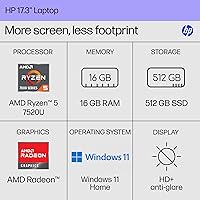
  • Processor: The AMD Ryzen 5 7520U runs at up to 4.3 GHz boost clock with 4 cores, 8 threads, and 4 MB of L3 cache for light-to-moderate workloads.
  • RAM: 16 GB of LPDDR5-5500 memory is soldered onboard, providing fast, power-efficient performance for multitasking and browser-heavy use.
  • Storage: A 512 GB PCIe NVMe M.2 SSD handles primary storage, offering significantly faster read and write speeds than traditional hard drives.
  • Graphics: AMD Radeon integrated graphics are included, sharing system memory rather than using a dedicated GPU, suitable for everyday visuals and media playback.
  • Operating System: Windows 11 Home comes pre-installed, offering the latest Microsoft interface and security features out of the box.
  • Webcam: The HP True Vision HD camera supports standard HD video with a built-in physical privacy shutter and AI-assisted noise reduction for clearer calls.
  • Wireless: Wi-Fi 6 (802.11ax) and Bluetooth are both supported, enabling fast wireless connectivity and peripheral pairing on modern home networks.
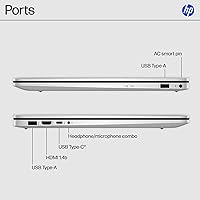
  • Ports: The port lineup includes one USB-C 5Gbps (data only), two USB-A 5Gbps ports, one HDMI 1.4b output, one headphone/microphone combo jack, and one AC smart pin connector.
  • Battery Life: HP rates battery life at approximately 7.15 hours under controlled conditions; real-world usage with active Wi-Fi and moderate screen brightness typically yields less.
  • Weight: The laptop weighs 4.58 lbs, which is on the lighter end for a 17-inch consumer laptop but still more substantial than compact ultrabooks.
  • Dimensions: The chassis measures 15.78 x 10.15 x 0.81 inches, keeping the profile relatively slim despite the large screen footprint.
  • Color & Finish: The exterior features a natural silver paint finish on the cover with a sandblasted in-mold roll keyboard frame for a textured, clean look.
  • Audio: The built-in microphone system uses AI noise reduction and spatial awareness to capture multidirectional sound more clearly during calls and recordings.
  • Color Gamut: The display covers 60% of the NTSC color spectrum, which is acceptable for general use but falls short for color-accurate creative work.
  • Optical Drive: No optical drive is included, so users who need to read CDs or DVDs will require a separate external USB drive.
  • Wireless Standard: The laptop supports the 802.11ax (Wi-Fi 6) standard, providing improved performance on congested networks compared to older Wi-Fi 5 devices.

Related Reviews
HP 17 Essential 17.3-inch Laptop, Core i7, 64GB RAM, 1TB SSD
83%
92%
Performance
88%
Display Quality
80%
Battery Life
65%
Portability
95%
Multitasking Ability
More
HP 17 Touchscreen Laptop
80%
89%
Value for Money
82%
Display Quality
80%
Performance for Everyday Tasks
77%
Battery Life
92%
Ease of Setup
More
HP Laptop 17 Ryzen 5 7430U 32GB 1TB
70%
88%
Value for Money
84%
Processing Performance
91%
RAM & Multitasking
89%
Storage Speed & Capacity
76%
Display Quality
More
HP Envy 17 Laptop, Intel Ultra 7, 64GB RAM, 4TB SSD
83%
92%
Performance
88%
Display Quality
80%
Battery Life
90%
Multitasking & Storage
65%
Portability
More
HP 17 Inch Laptop, Intel i5-1334U, 64GB RAM, 2TB SSD
83%
88%
Performance for Multitasking
91%
Display Quality
76%
Battery Life
82%
Build Quality
67%
Portability/Weight
More
HP 17 Laptop - AMD Ryzen 5 7430U, 64GB RAM, 2TB SSD
84%
88%
Performance
90%
Display Quality
75%
Battery Life
60%
Portability
83%
Build Quality
More
HP 2023 17 Laptop, Intel Core i5-1335U, 16GB RAM, 512GB SSD
82%
92%
Display Quality
88%
Performance
72%
Battery Life
67%
Portability
89%
Value for Money
More
HP 17 Business Laptop, 11th Gen Intel Core i3, 16GB RAM, 1TB SSD
82%
87%
Performance
90%
Display Quality
82%
Multitasking
76%
Battery Life
92%
Value for Money
More
HP 2025 17.3″ Laptop, Intel Core i3-N305, 16GB RAM, 1TB SSD
82%
88%
Value for Money
81%
Display Quality
85%
Performance
74%
Battery Life
90%
Storage Capacity
More
HP 17 Laptop PC 11th Gen Intel Core i3, 4GB RAM, 256GB SSD
78%
90%
Value for Money
85%
Display Quality
78%
Battery Life
70%
Performance for Multitasking
88%
Fast Charging
More

FAQ

Unfortunately, no. The 16 GB of LPDDR5 memory is soldered directly onto the motherboard, which means it cannot be swapped or expanded after purchase. For most everyday users the 16 GB is plenty, but if you tend to keep laptops for five or more years and run demanding applications, that fixed ceiling is worth factoring into your decision.

No on both counts, which is a common point of confusion. The USB-C port on this machine supports data transfer only at 5Gbps — it does not handle power delivery or DisplayPort output. For charging you will use the included AC smart pin adapter, and for an external display you will need to use the HDMI 1.4b port.

It is serviceable but noticeably soft compared to full HD screens, especially given the 17.3-inch panel size. Text in browsers and documents is readable without strain, but if you have been using a 1080p display recently, the step down is visible. It is most apparent with small text and detailed images rather than video streaming, where the difference is less jarring.

Only if your expectations are very modest. The integrated AMD Radeon graphics can handle older, lightweight titles at reduced settings, but anything released in the last few years will struggle to run smoothly. For casual gaming — think browser-based games, older indie titles, or retro emulation — it will get by. For anything more demanding, a dedicated GPU is really non-negotiable.

Plan for roughly 4.5 to 5.5 hours under typical conditions — Wi-Fi on, screen at a comfortable brightness, doing a mix of browsing, streaming, and document work. The manufacturer-rated figure of around 7 hours is achievable only under very controlled, low-demand scenarios. If you spend most of your time near an outlet, this will not be a problem at all.

It is genuinely decent for a budget laptop. In good indoor lighting, the HP True Vision HD camera produces a clear, stable image that works well for Zoom, Teams, or Google Meet calls. The physical shutter is a nice practical touch for privacy. Low-light performance softens noticeably, so if you frequently call in dim rooms, a clip-on webcam might be a worthwhile addition.

Compared to some budget Windows laptops, it is relatively restrained. There is some HP-branded software included, and a few third-party trial applications, but nothing that takes long to remove. Most buyers get through a quick cleanup session in under 15 minutes and find the system running cleanly afterward.

Yes, easily. The HDMI 1.4b port lets you connect directly to most TVs and monitors without any adapter. Keep in mind that HDMI 1.4b supports up to 1080p at 60Hz on an external display, so it will not drive a 4K monitor at full resolution. For everyday use with a standard external screen, it works without issue.

Better than you might expect on a budget machine. The large chassis gives the keyboard room to breathe with well-spaced keys, and most users find it comfortable for extended writing, emailing, or note-taking. Key travel is on the shallower side so it is not quite as tactile as premium keyboards, but fatigue during long sessions is not a common complaint among buyers.

It is a strong fit for that specific use case. The large screen makes reading and writing more comfortable during long study sessions, the 16 GB of RAM handles browser-heavy research without issue, and the webcam with noise reduction holds up well for online classes and group calls. Just make sure the student does not need it for gaming or graphic design, where the hardware limitations will surface quickly.