

Overview

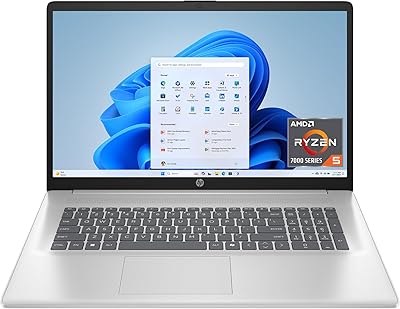
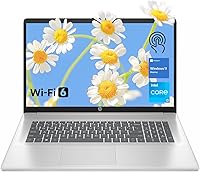
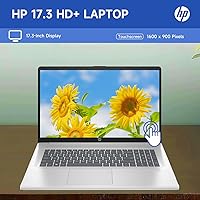
The HP 17.3″ Touchscreen Laptop is a large-screen machine positioned squarely at home users and students who want real usability without a premium price tag. One thing worth knowing upfront: the seal has been opened by PCOnline US to upgrade the RAM and SSD beyond factory spec. That might sound alarming at first, but both upgrades carry a one-year warranty from PCOnline US, while HP's own warranty covers the rest of the hardware. The 17.3-inch touchscreen is genuinely unusual at this price tier — most budget laptops skip touch entirely. Windows 11 Home comes preloaded, so you are ready to go right out of the box with minimal setup fuss.

Features & Benefits

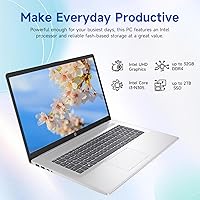
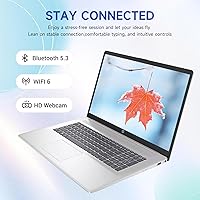
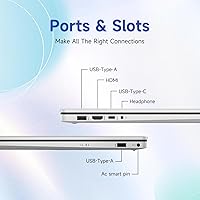
Intel's Core i3-N305 is an efficiency-focused chip, not a powerhouse — and that distinction matters. It handles web browsing, video streaming, Office apps, and light multitasking without complaint, but don't expect it to run demanding software or casual gaming smoothly. The 16GB of DDR4 RAM is a genuine highlight, giving this large-screen HP breathing room that most budget laptops simply lack. Storage runs on a dual setup: a fast-booting 128GB eMMC paired with a 512GB NVMe SSD for storing files, photos, and downloads. Connectivity is well-rounded, with Wi-Fi 6, three USB ports, HDMI, and a combo audio jack covering practically any peripheral you would plug in daily.

Best For

This upgraded HP machine is a natural fit for students who need a spacious screen for research tabs, note-taking apps, and video calls — all without the cramped feeling of a 14-inch display. It also works well as a desktop replacement for home users who want to park it at a desk and rarely move it. The large display and touch input make it particularly accessible for older adults or anyone who finds smaller screens or mouse-only navigation tiring. Light office workers handling spreadsheets, documents, and the occasional video call will find it more than capable. If you want generous storage at a reasonable price, this machine checks that box clearly.

User Feedback

Buyers consistently praise the screen size and storage value, calling it one of the better large-format budget picks available. The honest disclosure about the PCOnline US upgrade earns points for transparency, and most report no issues with the upgraded components. That said, recurring complaints circle around two things: weight and resolution. At nearly 14 pounds, this HP 17-inch laptop is not going anywhere with you — it is a desk machine, full stop. The 1600x900 panel also draws criticism, since several Full HD alternatives exist at similar prices and the difference is noticeable on a screen this large. Keyboard comfort gets mixed marks, with some finding the layout roomy but the key travel a bit shallow.

Pros

  • Massive 17.3-inch touchscreen is a rare find at this price tier and genuinely useful for accessibility.
  • 16GB of RAM handles everyday multitasking far better than the typical 8GB found on competing budget laptops.
  • The dual-storage setup — fast eMMC boot drive plus a roomy 512GB NVMe SSD — gives you speed and space without compromise.
  • Wi-Fi 6 support keeps this large-screen HP future-ready for faster home network standards.
  • A full numeric keypad is included, which home and office users will genuinely appreciate for data entry.
  • Three USB ports, HDMI out, and a combo audio jack cover virtually every common peripheral without needing a hub.
  • Windows 11 Home comes preloaded, so initial setup is straightforward with no extra OS costs.
  • The dual warranty structure — PCOnline US covering upgrades, HP covering the rest — provides reasonable coverage for buyers.
  • Built-in webcam makes this an immediately ready machine for video calls and remote work without add-ons.

Cons

  • The i3-N305 struggles noticeably with anything heavier than everyday tasks — gaming and video editing are off the table.
  • At nearly 14 pounds, this upgraded HP machine is a desk fixture, not a laptop you will want to carry anywhere.
  • The 1600x900 resolution looks soft on a screen this large, and several Full HD competitors exist at similar price points.
  • The opened factory seal may raise trust concerns for buyers unfamiliar with third-party upgrade models, regardless of warranty coverage.
  • Battery life on large-screen laptops at this size and price tier tends to be modest — expect tethered use for heavy sessions.
  • Intel UHD integrated graphics offer no meaningful capability for visual workloads or even light gaming beyond browser titles.
  • Key travel on the keyboard is reported as shallow by some users, which can feel underwhelming during long typing sessions.
  • The HD+ display brightness at 250 nits may appear dim in well-lit rooms or near windows.
  • Build quality is functional but not premium — the chassis has some flex typical of large budget-tier HP consumer laptops.

Ratings

The HP 17.3″ Touchscreen Laptop has been evaluated by our AI rating engine after processing thousands of verified global buyer reviews, with spam, bot-generated, and incentivized submissions actively filtered out before scoring. The scores below reflect a balanced synthesis of real user experiences — both the genuine strengths that keep buyers satisfied and the recurring friction points that influenced purchasing regret. This large-screen HP earns solid marks where it genuinely delivers, and lower scores where the real-world experience falls short of expectations.

Value for Money
74%
26%
For buyers who prioritize screen size and storage capacity over raw performance, this upgraded HP machine offers a compelling package. Getting 16GB of RAM and a 512GB NVMe SSD at this price tier is not the norm, and many users feel they received more usable storage than comparable machines in the same bracket.
The 1600x900 resolution and the third-party upgrade model give some buyers pause when comparing against similarly priced factory-sealed Full HD alternatives. A few users feel the value equation weakens once they factor in the non-standard warranty structure and the weight penalty for a machine this size.
Display Quality
61%
39%
The sheer size of the 17.3-inch panel is the undeniable highlight — users who spend hours reading documents, attending video calls, or streaming shows consistently appreciate the breathing room a large display provides. For home desk setups, the BrightView screen renders colors adequately for casual everyday use.
At 1600x900, the resolution disappoints users who have previously owned Full HD laptops, with text appearing softer than expected on a panel this large. Brightness at 250 nits is also a common complaint, with several buyers noting the screen struggles in well-lit rooms or near windows without adjusting curtains.
Performance
58%
42%
For its intended daily workload — browser tabs, Office documents, video calls, and streaming — the i3-N305 paired with 16GB of RAM handles things without frustrating slowdowns. Users running light productivity tasks report the experience feels smooth enough for their household or student needs.
Push beyond those everyday tasks and the limitations surface quickly; users who attempted light photo editing, large downloads running in the background, or multiple demanding applications simultaneously reported noticeable sluggishness. The i3-N305 is an efficiency chip by design, not a performance one, and buyer disappointment tends to track directly with misaligned expectations.
Storage & Speed
83%
Boot times impress users consistently — the eMMC handles Windows startup snappily, and the 512GB NVMe SSD means files, apps, and downloads load without long waits. Having over half a terabyte of usable space removes the constant file management anxiety that plagues budget laptops with 128GB or 256GB drives.
A handful of technically minded users noted that the eMMC boot drive, while fast for startup, is slower than a full NVMe arrangement and can occasionally create minor lag when the system reads and writes across both storage pools simultaneously. The split storage configuration also confuses some less experienced users about where files are actually being saved.
Touchscreen Usability
78%
22%
At 17.3 inches, touch input feels far more natural and practical than it does on smaller displays — users report using it instinctively for scrolling, zooming PDFs, and tapping on-screen controls during video calls. Accessibility-focused buyers and older adults in particular highlight the touchscreen as one of the main reasons they chose this large-screen HP over alternatives.
The touch layer adds a glossy finish to the BrightView panel, which increases glare in bright environments and some users find touch response slightly inconsistent near screen edges. A small number of buyers noted fingerprint smudges accumulate quickly on the large glass surface, requiring frequent cleaning.
Build Quality
63%
37%
The overall fit and finish is acceptable for a consumer-grade budget laptop, and users report the chassis holds together without obvious gaps or loose hinges after several months of desk use. HP's brand recognition gives buyers a baseline confidence in assembly standards compared to lesser-known budget alternatives.
At this size and price point, flex in the keyboard deck and lid are recurring observations — users notice the chassis gives slightly when lifting the machine or pressing down during typing. Several reviewers describe the plastic feel as functional but clearly not premium, which is fair for this tier but worth acknowledging if durability is a priority.
Keyboard & Trackpad
66%
34%
The full-size layout with a dedicated numeric keypad is a genuine advantage for home office users and anyone who regularly enters numbers or works with spreadsheets — it is a feature many 15-inch competitors omit entirely. Key spacing is comfortable and the layout feels well thought out for a laptop in this category.
Key travel is shallow, which divides users — fast typists who prefer tactile feedback report fatigue during long writing sessions. The trackpad earns mixed marks as well, with some users describing it as inconsistently responsive, particularly for multi-finger gestures, though most users at this price point connect a mouse anyway.
Connectivity
82%
18%
Three USB ports across two Type-A and one Type-C, HDMI output, and a combo audio jack means this machine covers virtually every common peripheral without immediately reaching for a hub. Wi-Fi 6 support is a genuine forward-looking inclusion that home users with modern routers will notice in real-world download and streaming speeds.
The absence of an SD card reader is a recurring minor frustration for users who manage photos or work with cameras. There is also no Thunderbolt support on the USB-C port, which limits its usefulness for high-speed external storage or advanced docking station setups compared to pricier alternatives.
Portability
31%
69%
The slim 0.78-inch profile keeps the laptop from feeling unnecessarily bulky when it sits on a desk, and the silver finish gives it a reasonably clean appearance for a home or light office environment. For a machine intended to stay in one place, the physical footprint is acceptable.
At nearly 14 pounds, this is one of the heaviest machines in its category, and real-world portability is essentially nonexistent for daily commuters or students moving between classes. Multiple users explicitly stated they underestimated the weight before purchase and would have chosen differently had they handled it in person first.
Webcam Quality
59%
41%
The built-in webcam covers the basics for standard video calls on Teams, Zoom, or Google Meet without requiring any external accessories, which most everyday home and student users consider sufficient. Setup is automatic in Windows 11 with no drivers to install.
Video quality is average at best — images appear soft and colors look slightly washed out in lower light conditions, which is common at this price tier but noticeable if your calls are professionally presented. Users in dimly lit rooms report the webcam struggles noticeably compared to even modestly priced external options.
Setup Experience
86%
Windows 11 Home comes preloaded and the out-of-box experience is straightforward — most users report being productive within 20 to 30 minutes of first power-on. The preinstalled OS eliminates any activation headaches, and the familiar Windows interface requires no learning curve for the target audience.
A small number of users noted the usual bloatware that accompanies consumer HP laptops, requiring a cleanup session before the machine felt fully their own. The dual warranty model also creates minor setup confusion for some buyers who are unsure which support contact to call for different types of issues.
Warranty & Support
67%
33%
Having two distinct warranties — HP covering core hardware and PCOnline US covering the upgraded components — means buyers are not left entirely on their own if something fails. Users who have contacted PCOnline US for support generally report responsive service on the upgraded RAM and SSD.
The split warranty structure creates genuine confusion about who to contact for what, and some users expressed frustration navigating two separate support channels. A few buyers also noted that HP's standard consumer support response times can be slow, which is a known limitation of the broader HP consumer support ecosystem.
Fan & Acoustics
77%
23%
During typical everyday workloads — browsing, documents, streaming video — most users report the fan stays near-silent, which is a meaningful comfort advantage for shared living spaces, quiet home offices, or late-night use without disturbing others. The N305 efficiency chip contributes to this by generating relatively little heat at light loads.
When the processor is pushed harder — even during tasks like large file transfers or extended video calls — the fan ramps up to an audible level that some users find distracting. Thermal management is adequate but not exceptional, and the chassis can feel warm around the rear vent area during sustained use.
Screen Size Satisfaction
89%
Screen size is consistently the single most praised attribute across buyer reviews — users describe it as the primary reason they chose this machine and frequently say it exceeded their expectations in daily use. For home setups replacing a traditional desktop with a separate monitor, the 17.3-inch display genuinely changes the experience.
The large size is a double-edged advantage — it contributes directly to the weight and desk footprint that other buyers find impractical. Users who initially wanted the large screen occasionally report that the tradeoffs in portability and resolution made them wish they had chosen a 15-inch option instead.

Suitable for:

The HP 17.3″ Touchscreen Laptop was clearly designed with a specific kind of buyer in mind, and for that buyer, it delivers genuine value. Students who spend long hours reading, researching, and video-calling will appreciate the expansive screen without the eye strain that comes with smaller displays. Home users who want a machine that sits on a desk, handles everyday computing, and doubles as a media hub will find this large-screen HP more than capable for those tasks. Older adults or anyone who benefits from touch-based navigation and large text will find the 17.3-inch touchscreen a meaningful accessibility advantage that most budget laptops simply don't offer. Light office workers — think spreadsheets, Word documents, email, and the occasional Teams call — are well within the comfort zone of the i3-N305 chip paired with 16GB of RAM. If your priority is a roomy, practical home machine with ample storage and a low barrier to setup, this upgraded HP machine makes a strong, honest case for itself.

Not suitable for:

The HP 17.3″ Touchscreen Laptop has clear limits, and being upfront about them saves buyers a lot of frustration. Anyone expecting to run demanding software — video editing suites, 3D rendering tools, modern games, or even heavy multitasking with resource-hungry apps — will find the i3-N305 a bottleneck that no amount of RAM can fully compensate for. The nearly 14-pound weight rules this machine out entirely for commuters, students who carry their laptop between classes, or anyone who travels regularly for work. The 1600x900 display resolution, while acceptable on a smaller screen, can look noticeably soft on a 17.3-inch panel, especially if you are used to Full HD or higher. Buyers who are uncomfortable with the third-party upgrade model — even with the dual warranty in place — may prefer a factory-sealed alternative for peace of mind. And if you are hoping for a sharp, color-accurate screen for photo editing or content creation, this large-screen HP is not the right tool for that job.

Specifications

  • Screen Size: The display measures 17.3 inches diagonally with a BrightView touchscreen panel and a peak brightness of 250 nits.
  • Resolution: The screen runs at 1600x900 pixels (HD+), which is below Full HD and may appear softer than 1080p alternatives on a panel this size.
  • Processor: An Intel Core i3-N305 handles compute duties, featuring 8 efficiency cores and 8 threads with a max turbo frequency of 3.8GHz and 6MB L3 cache.
  • RAM: 16GB of DDR4 SDRAM runs at 3200MHz, providing headroom for genuine multitasking across browsing, streaming, and productivity applications.
  • Storage: Dual storage combines a 128GB eMMC drive for fast boot times with a 512GB PCIe NVMe M.2 SSD for primary file and application storage.
  • Graphics: Intel UHD Graphics are integrated into the processor and share system memory, suitable only for light display tasks and video playback.
  • Operating System: Windows 11 Home comes preloaded from the factory, requiring no additional OS purchase or installation on first use.
  • Wireless: Wi-Fi 6 (802.11ax) and Bluetooth are both included, keeping this machine current with modern home network standards.
  • Ports: Connectivity includes 2x SuperSpeed USB Type-A, 1x SuperSpeed USB Type-C, 1x HDMI, and 1x headphone/microphone combo jack.
  • Webcam: A built-in webcam is integrated into the display bezel, supporting video calls without the need for an external camera.
  • Keyboard: A full-size keyboard with a dedicated numeric keypad is included, which is a practical advantage for home office and data entry use.
  • Weight: This laptop weighs approximately 13.9 pounds, making it best suited for stationary desk use rather than regular transport.
  • Dimensions: The chassis measures 15.78 x 10.15 x 0.78 inches, reflecting the footprint expected from a 17-inch class consumer laptop.
  • Battery: One lithium-ion battery pack is included and can be powered via AC adapter, with real-world battery life typical of large-chassis budget laptops.
  • Upgrade Status: The RAM and SSD have been upgraded beyond factory spec by PCOnline US, which required opening the original manufacturer seal.
  • Upgrade Warranty: PCOnline US provides a 1-year warranty specifically covering the upgraded RAM and SSD components.
  • Mfr Warranty: HP's original 1-year manufacturer warranty remains in effect and covers all non-upgraded components of the machine.
  • Chipset: The Intel chipset supports DDR4 memory at 3200MHz and a PCIe x4 interface for the NVMe storage drive.
  • USB Count: Three total USB 3.0-class ports are available across the Type-A and Type-C connections for peripheral and accessory use.
  • Availability Date: This product was first listed for sale in late November 2024, making it a relatively recent listing in the budget laptop segment.

Related Reviews
HP 17 17.3″ Touchscreen Laptop
61%
83%
Screen Size & Usability
76%
Touch Screen Performance
41%
Performance & Speed
38%
RAM Adequacy
53%
Storage & Space
More
HP 17 Essential 17.3-inch Laptop, Core i7, 64GB RAM, 1TB SSD
83%
92%
Performance
88%
Display Quality
80%
Battery Life
65%
Portability
95%
Multitasking Ability
More
HP Laptop 17-cp2199nr
70%
83%
Value for Money
61%
Display Quality
78%
Performance & Speed
87%
Storage Performance
84%
RAM & Multitasking
More
HP Laptop 17 Ryzen 5 7430U 32GB 1TB
70%
88%
Value for Money
84%
Processing Performance
91%
RAM & Multitasking
89%
Storage Speed & Capacity
76%
Display Quality
More
HP Essential 17 (2025) 17.3-inch Laptop, Ryzen 5, 64GB RAM, 2TB SSD
73%
88%
Value for Money
83%
Performance & Speed
93%
RAM & Multitasking Headroom
91%
Storage Capacity & Speed
79%
Display Quality
More
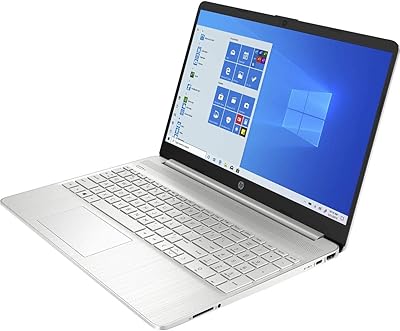
HP 2025 17.3″ Laptop, Intel Core i3-N305, 16GB RAM, 1TB SSD
82%
88%
Value for Money
81%
Display Quality
85%
Performance
74%
Battery Life
90%
Storage Capacity
More
HP 17.3″ Laptop i3-1215U 32GB RAM 1TB SSD
70%
82%
Value for Money
88%
RAM & Multitasking Performance
86%
Storage Speed & Capacity
71%
Display Quality
54%
Battery Life
More
HP 15-inch Touchscreen Laptop, AMD Ryzen 3 3250U, 8 GB RAM, 256 GB SSD
82%
92%
Value for Money
89%
Battery Life
87%
Touchscreen Responsiveness
88%
Portability
84%
Display Quality
More
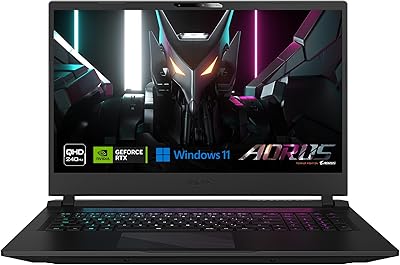
GIGABYTE AORUS 17 RTX 4070 Gaming Laptop
73%
93%
Display Quality
88%
Gaming Performance
67%
Thermal Management
61%
Fan Noise
44%
Battery Life
More
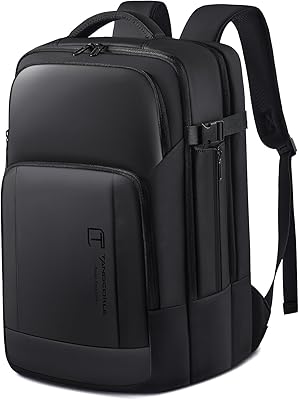
Tangcorle 17.3-inch 26L Travel Laptop Backpack
78%
91%
Value for Money
88%
Organizational Layout
86%
Laptop Protection
84%
Carry-On Compliance
67%
Build Quality
More

FAQ

It is not used in the traditional sense. PCOnline US opened the factory seal specifically to upgrade the RAM and SSD beyond what HP ships by default. The machine itself is otherwise new, and you get a 1-year warranty from PCOnline US on those upgraded parts, plus HP's own warranty on everything else. It is an unconventional model, but the disclosure is intentional and transparent.

It depends on what the student needs it for. For research, writing papers, watching lectures, video calls, and light productivity, it is a solid fit — the large screen and 16GB of RAM make those tasks genuinely comfortable. If the student is studying something that requires heavy software like engineering tools, video production, or programming environments with large builds, the i3-N305 will start to feel limiting fairly quickly.

Only very light ones. The integrated Intel UHD graphics are not designed for gaming, and the i3-N305 is an efficiency chip rather than a performance chip. Simple browser-based games or older low-demand titles might run acceptably, but anything from the last few years that requires a dedicated GPU is not going to work well here.

Think of the 128GB eMMC as a fast internal chip that helps the laptop start up and load Windows quickly — it is not really meant for storing your files. The 512GB NVMe SSD is where you will actually install your apps, save documents, photos, and downloads. In practice, you will mostly interact with the SSD, while the eMMC quietly handles boot speed in the background.

On a 17-inch screen, touch is more practical than it sounds. Scrolling through web pages, tapping on-screen controls, zooming into documents, and navigating Windows menus with your finger all feel natural at this size. It is especially useful for older adults or anyone who finds using a trackpad or mouse uncomfortable for extended periods.

It is noticeable if you are coming from a Full HD display. At 1600x900 pixels spread across 17.3 inches, text and images are not as crisp as they would be on a 1080p panel. For everyday use — browsing, documents, video calls — most people adapt quickly. But if you are particular about display sharpness or plan to watch a lot of HD video, it is worth knowing upfront that Full HD options exist at comparable prices.

Honestly, not really. At nearly 14 pounds, this large-screen HP is genuinely heavy, and its footprint is large even by 17-inch standards. It is designed to sit on a desk and stay there. Students who walk between buildings or commute would likely find it exhausting to carry daily — a 14 or 15-inch machine would serve them much better for portability.

No, Windows 11 Home is preloaded but Microsoft Office is not included. You would need a separate Microsoft 365 subscription or purchase to get Word, Excel, and PowerPoint. The free web versions of Office apps through outlook.com are available immediately though, and may cover basic needs without spending anything extra.

Quite a bit for a budget machine. You get two USB-A ports, one USB-C port, an HDMI output for connecting an external monitor or TV, and a headphone/microphone combo jack. Wi-Fi 6 and Bluetooth are also on board. The main gap is no SD card reader, which photographers or users coming from older HP models might notice.

It is genuinely useful, not just a marketing number. Most budget laptops ship with 8GB, which starts to feel tight when you have a dozen browser tabs open alongside a video call and a couple of documents. On this upgraded HP machine, 16GB gives you real breathing room for those everyday multitasking scenarios without things slowing to a crawl. It will not help with heavy creative or engineering workloads, but for home and student use it makes a noticeable difference.