Overview

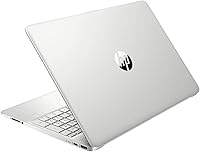
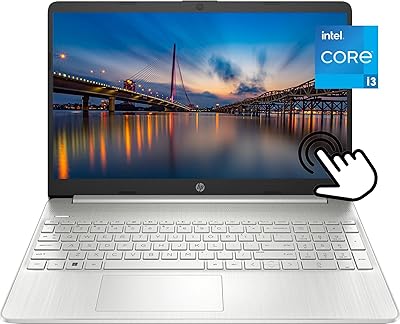
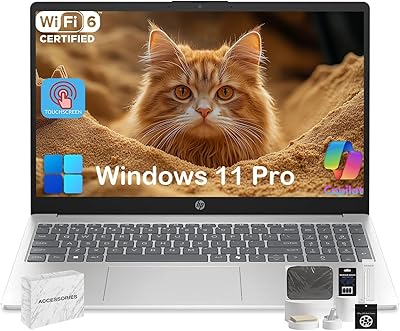
The HP 15-ef1020nr 15.6-inch Touchscreen Laptop is an older-generation budget machine that HP has kept in circulation because it hits a practical sweet spot for everyday users. Launched in early 2020, it runs Windows 11 Home in S Mode — which means a locked-down app environment by default, though you can exit S Mode for free if you need more flexibility. The AMD Ryzen 3 3250U processor is modest but capable enough for browsing, streaming, and light office work. With its natural silver finish and slim bezels, it looks more polished than most laptops in this price range, which counts for something when you're handing it to a teenager or setting it up on a desk.
Features & Benefits

The 256 GB NVMe SSD is probably the single biggest selling point here — this laptop boots up quickly and opens files without the sluggishness you would expect at this price. Eight gigabytes of DDR4 RAM keeps day-to-day tasks running smoothly; just don't expect it to handle video editing or a dozen open browser tabs without protest. The touchscreen is a genuine bonus, useful for scrolling through notes or navigating apps with a tap rather than a trackpad click. Battery life is rated at over nine hours, which holds up reasonably well in light-use scenarios. HP's built-in BIOS protection quietly monitors system health in the background — a small but reassuring feature for less tech-savvy users.

Best For

This budget HP laptop is well matched to a specific type of buyer — someone who needs a functional, no-fuss Windows machine without a steep price tag. Students are the obvious fit: the touchscreen helps with note-taking apps, the 15.6-inch screen gives enough room for split-window studying, and the SSD keeps things snappy between classes. It also works well as a first laptop for a younger kid or as a home office backup machine for light tasks like email, video calls, and document editing. Seniors who want something straightforward and secure out of the box will appreciate S Mode's guardrails. If you're after raw power for gaming, programming, or creative work, look elsewhere.

User Feedback

Buyers who pick up the 15-ef1020nr generally come away satisfied with the SSD speed and responsive touchscreen, both of which punch above their weight at this price point. The most consistent complaint, though, is the display resolution — 1366x768 on a 15.6-inch screen looks noticeably soft, especially if you're used to a sharper panel. The non-upgradable RAM doesn't bother most casual users, but it's a real ceiling for anyone hoping to grow into the machine over time. Build quality gets mixed reviews: the chassis feels solid enough for daily use but flexes a bit under pressure. Real-world battery life lands closer to six or seven hours under normal use — good, but short of HP's official estimate.

Pros

  • The NVMe SSD makes boot times and app launches noticeably fast for a laptop in this price range.
  • A touchscreen at this price tier is rare and genuinely useful for students and casual users.
  • Windows 11 Home in S Mode provides a clean, low-maintenance experience right out of the box.
  • At under 4 pounds, this HP touchscreen laptop is easy to carry between rooms or classes.
  • HP BIOS Protection adds a layer of automatic system health monitoring most budget laptops skip.
  • Rated battery life exceeds nine hours, making it a solid option for all-day light use away from an outlet.
  • The natural silver chassis and slim bezels look more premium than the price tag suggests.
  • Reliable 802.11ac Wi-Fi and Bluetooth connectivity cover all standard home and classroom needs.
  • The 15.6-inch screen gives a comfortable amount of workspace for documents, video, and browsing.
  • ENERGY STAR and EPEAT Silver certifications reflect a thoughtful approach to energy and materials.

Cons

  • The 1366x768 resolution looks noticeably soft on a 15.6-inch panel — a real step down from 1080p competitors.
  • RAM is soldered and non-upgradable, so 8 GB is the hard ceiling for the lifetime of the machine.
  • The Ryzen 3 3250U is a 2019 dual-core chip that struggles with anything beyond light multitasking.
  • S Mode restricts app installs to the Microsoft Store, which catches some buyers off guard post-purchase.
  • Real-world battery life tends to land closer to six or seven hours under typical use, not the rated nine-plus.
  • The chassis flexes slightly under pressure, which is noticeable if you pick it up by a corner.
  • Only two USB ports total limits connectivity without a hub for users with multiple peripherals.
  • Integrated AMD Radeon graphics cannot handle modern games or GPU-accelerated creative software.
  • Speaker output is thin and low-volume — fine for a quiet room, poor for shared spaces or video calls.
  • Being a 2020-era model, it may feel dated faster than a newer-generation budget laptop bought today.

Ratings

Our AI-generated scores for the HP 15-ef1020nr 15.6-inch Touchscreen Laptop are based on a continuous analysis of verified global buyer reviews, with spam, incentivized submissions, and bot activity actively filtered out before scoring. Each category reflects what real users — students, parents, seniors, and everyday home workers — consistently praised or complained about across thousands of purchase experiences. Both the strengths and the honest frustrations are built into every number you see below.
Value for Money
78%
22%
For buyers who need a functional Windows laptop with SSD speed and a touchscreen without crossing into mid-range pricing, this budget HP laptop delivers a lot per dollar. The NVMe SSD alone is a feature many competitors at this price replace with a sluggish hard drive, which makes the day-to-day experience feel considerably more premium than the tag suggests.
The aging Ryzen 3 3250U processor and non-upgradable RAM mean the value proposition has a relatively short shelf life. Buyers who keep laptops for four or five years may find it feels underpowered sooner than they expected, which chips away at the long-term return on the purchase.
Performance
61%
39%
For the tasks this machine was designed around — browsing, streaming, video calls, and Microsoft 365 — the Ryzen 3 3250U handles the load without constant complaints. Users doing schoolwork or light home office tasks rarely hit a wall during typical daily sessions.
Push it past the basics and the dual-core chip starts to struggle. Multiple open tabs alongside a video call, or any moderately demanding application, leads to noticeable slowdowns. Users who expected more headroom have been vocal about how quickly the processor reaches its limits.
Display Quality
53%
47%
The 15.6-inch screen size gives a comfortable amount of workspace for documents and browser windows, and the BrightView panel handles indoor lighting reasonably well without excessive glare in most home environments.
The 1366x768 resolution is the most frequently cited disappointment in user feedback, and it is hard to argue against the criticism. On a screen this size, the pixel density is low enough that text and images look visibly soft — a real step down compared to 1080p panels now common even at similar price points.
Touchscreen Responsiveness
82%
18%
The touchscreen earns consistent praise from students and casual users who appreciate being able to tap through apps, scroll web pages, or interact with note-taking tools without relying solely on the trackpad. At this price tier, having a responsive touch layer at all is a meaningful differentiator.
There is no stylus or active pen support, which limits its usefulness for precise handwriting or annotation tasks. A small number of users also noted minor calibration drift near screen edges after extended use, though this appears to be isolated rather than widespread.
Battery Life
69%
31%
For light daily use — a school day of note-taking, some streaming, and browsing — the battery comfortably gets most users through six to seven hours without needing a charger. That is a reasonable result for a budget 15-inch machine and enough for a standard class schedule or work-from-home morning.
HP rates the battery at over nine hours, and real-world use consistently falls well short of that figure. Users who expected to go a full day unplugged during heavier sessions were frequently disappointed, and the gap between rated and actual battery performance comes up regularly in critical reviews.
Build Quality
63%
37%
The chassis looks cleaner and more put-together than many competitors at this price, with the natural silver finish and slim bezels giving it an appearance that does not immediately read as bargain-bin. Most users handling it day-to-day for school or home tasks find it holds together fine under normal conditions.
The plastic body flexes noticeably when pressure is applied to the lid or the keyboard deck, and a handful of users reported creaking around the hinge area after several months of use. It is not a fragile machine, but it does not inspire confidence if dropped or handled roughly.
Keyboard & Trackpad
66%
34%
Everyday typing — emails, class notes, short documents — is comfortable enough on the keyboard, and key travel is acceptable for a slim budget laptop. Most users who are not coming from a high-end machine find little to complain about for casual writing tasks.
Extended typing sessions reveal a keyboard that feels a bit shallow and imprecise, and a vocal minority of reviewers noted flex under the central keys. The trackpad is serviceable but lacks the smoothness of more premium surfaces, with some users noting inconsistent response near the corners.
Storage & Speed
84%
The 256 GB PCIe NVMe SSD is one of the strongest practical upsides of this machine — boot times are quick, apps launch without delay, and file transfers feel snappy compared to budget laptops that still ship with hard drives. This is a tangible upgrade that everyday users notice from day one.
256 GB fills up faster than many buyers anticipate, particularly students who download course materials, videos, and apps over time. There is no secondary storage slot confirmed for easy expansion, so users who outgrow the internal drive have to rely on external options.
Software & OS Experience
71%
29%
For non-technical users and families, Windows 11 Home in S Mode provides a clean, low-clutter starting point that is harder to accidentally break with unwanted software. The setup process is straightforward and the system runs lean, which helps preserve what processing power the hardware offers.
S Mode catches a meaningful number of buyers off guard — the inability to install Chrome, Steam, or common third-party apps without first switching out of the mode frustrates users who did not read the fine print. Exiting S Mode is easy and free, but it should not be a surprise discovery after unboxing.
Connectivity
72%
28%
Wi-Fi 5 and Bluetooth cover all standard home and classroom needs without issue, and the connection stability reported by users in normal home network environments is solid. For a student moving between a dorm, library, and home, the wireless performance is reliable enough to rarely be a talking point.
The port selection is genuinely limited — two USB-A ports and a headphone jack is thin for a 15-inch laptop, with no USB-C or HDMI out listed in the official specs. Users who need to connect a monitor, a USB hub, or multiple peripherals simultaneously will need a separate adapter from day one.
Audio Quality
55%
45%
For background music during study sessions or casual video watching in a quiet room, the built-in stereo speakers are adequate. Users with modest expectations for laptop audio generally report no strong complaints when volume demands are low.
Crank the volume for a movie or a video call in a moderately noisy environment and the speakers reveal their limits — output is thin, lacks bass, and distorts slightly at higher levels. Several users specifically mentioned needing headphones or an external speaker to make video calls comfortable for both parties.
Portability
79%
21%
At 3.75 pounds and with a profile that slides into most 15-inch laptop bags without issue, this HP touchscreen laptop is easy to carry daily between school and home. Students who commute between campus buildings or work from different rooms at home appreciate that it does not add meaningful weight to a bag.
It is not the slimmest or lightest 15-inch option available, and buyers used to ultrabooks will notice the extra bulk. The power adapter adds additional weight to a travel bag, and the brick is not particularly compact.
Setup & Ease of Use
81%
19%
Out-of-box setup is quick and approachable, which matters for the seniors, parents, and first-time laptop buyers who make up a significant portion of this machine's audience. HP's BIOS protection and the streamlined S Mode environment mean most users are up and running with minimal friction.
The S Mode restriction surprises users who assume a Windows laptop will behave like any other Windows laptop from the start. A small number of users also reported confusion navigating the switch out of S Mode, which requires a Microsoft account step that is not immediately obvious.
Thermal Management
64%
36%
Under light workloads — document editing, video streaming, or basic browsing — the laptop stays cool and the fan noise is minimal. For its intended use case, thermal performance is unobtrusive and unlikely to be a daily irritant.
When the processor is pushed harder, the fan ramps up audibly and the bottom of the chassis gets warm in ways that make lap use uncomfortable over longer sessions. The thermal design is adequate for light use but not built for sustained load, which reinforces the need to match expectations to the hardware.

Suitable for:

The HP 15-ef1020nr 15.6-inch Touchscreen Laptop was built for buyers whose daily computing needs are straightforward — and for that audience, it delivers real value. Students are the clearest fit: the touchscreen makes note-taking apps more practical, the NVMe SSD keeps things responsive between classes, and the 15.6-inch screen gives enough workspace for a browser and a document side by side. Parents shopping for a first laptop for a middle or high schooler will appreciate the S Mode setup, which limits app installs to the Microsoft Store by default and reduces exposure to unwanted software. Seniors or non-technical users who just need a reliable machine for email, video calls, and light document work will find it easy to set up and maintain. It also works well as a household secondary laptop — something to grab off the couch for quick tasks without worrying too much about wear and tear.
Not suitable for:

The HP 15-ef1020nr 15.6-inch Touchscreen Laptop has a defined ceiling, and buyers who push past it will feel frustrated quickly. The Ryzen 3 3250U is a dual-core processor from 2019 — it handles light multitasking fine, but it will slow down noticeably under heavier workloads like video editing, programming, or running multiple demanding applications at once. The 8 GB of RAM is soldered to the board and cannot be upgraded, which means this machine has limited room to grow with you over the years. The 1366x768 display resolution is a genuine drawback on a screen this size — text and images look soft compared to even modestly priced competitors offering 1080p panels. Gamers, creative professionals, and anyone who spends long hours staring at a screen for detailed work will likely find both the processor and the display underwhelming. If you anticipate needing more power or a sharper screen within a year or two, it is worth spending more upfront for better hardware longevity.

Specifications

  • Processor: AMD Ryzen 3 3250U dual-core processor with a base clock of 2.4 GHz and a max boost clock of up to 3.5 GHz.
  • RAM: 8 GB DDR4-2400 SDRAM, soldered directly to the motherboard and not upgradable after purchase.
  • Storage: 256 GB PCIe NVMe M.2 SSD, offering faster read and write speeds than a traditional hard drive.
  • Display: 15.6-inch HD SVA BrightView WLED-backlit touchscreen with a resolution of 1366x768 pixels and a micro-edge bezel.
  • Operating System: Windows 11 Home in S Mode, which restricts app installs to the Microsoft Store unless S Mode is manually disabled.
  • Graphics: AMD Radeon integrated graphics, sharing system memory and suited for everyday visual tasks rather than gaming or rendering.
  • Battery Life: Rated up to 9.25 hours on a single charge under HP test conditions; real-world use typically falls between six and eight hours.
  • Wireless: 802.11b/g/n/ac (Wi-Fi 5) and Bluetooth are included for standard home, school, and office wireless connectivity.
  • Ports: Two USB 3.0 ports and one 3.5 mm combo audio jack are available; no USB-C or HDMI port is listed in the official specs.
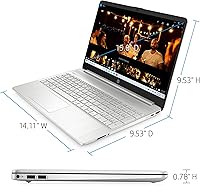
  • Weight: The laptop weighs 3.75 pounds, making it manageable for daily transport between home, class, or an office.
  • Dimensions: Overall dimensions are 14.11 x 9.53 x 9.53 inches, fitting within a standard 15-inch laptop bag or backpack sleeve.
  • Security: HP BIOS Protection automatically monitors system integrity and can recover the laptop from certain bootup failures without user intervention.
  • Display Materials: The display uses a mercury-free WLED backlight and arsenic-free glass, meeting low-halogen environmental standards.
  • Certifications: This laptop carries ENERGY STAR certification and is registered as EPEAT Silver, reflecting third-party environmental performance standards.
  • Audio: Stereo speakers are built in with HP Audio tuning; a single combo audio-out jack supports headphones or a headset.
  • Optical Drive: No optical drive is included; disc-based media requires an external USB DVD or Blu-ray drive purchased separately.
  • Power: The laptop is powered by an included lithium-ion battery pack and ships with an AC adapter for wall charging.
  • Chipset: The AMD chipset handles both CPU and GPU functions in a unified architecture with no discrete graphics card.

Related Reviews

HP 15.6-inch Laptop 15-ef0021nr, Ryzen 3 3200U, 8GB RAM, 256GB SSD

82%
92%
Value for Money
85%
Performance
83%
Build Quality
89%
Portability
81%
Battery Life
More
HP 2020 15 15.6″ HD Touchscreen Laptop, Intel Core i5-1035G1, 16GB RAM, 512GB SSD
82%
89%
Performance
75%
Display Quality
90%
Portability
80%
Battery Life
85%
Build Quality
More
HP 15-fc0502nr Ryzen 7 512GB Laptop
73%
83%
Everyday Performance
86%
Value for Money
74%
Build Quality
61%
Display Quality
88%
Storage Speed
More
HP 15.6″ Touchscreen Core i3 16GB Laptop
75%
81%
Everyday Performance
58%
Display Quality
83%
Touchscreen Responsiveness
86%
RAM & Storage
54%
Battery Life
More
HP 15-fd0012nr 15.6-Inch Laptop
73%
77%
Performance
59%
Memory & Multitasking
84%
Storage Speed
68%
Display Quality
73%
Battery Life
More
HP 15-fc0047wm 64GB 4TB Touchscreen Laptop
76%
88%
Performance & Speed
93%
RAM & Multitasking
91%
Storage Capacity
76%
Display Quality
82%
Touchscreen Responsiveness
More
HP 15.6″ i3 1315U 1TB Touchscreen Laptop
76%
83%
Value for Money
76%
Performance
58%
Display Quality
88%
RAM & Multitasking
86%
Storage
More
HP 15.6″ Touchscreen Laptop, Intel Core i3-1115G4, 16GB RAM, 1TB SSD
83%
91%
Value for Money
88%
Touchscreen Performance
85%
Battery Life
80%
Build Quality
92%
Storage Capacity
More
HP 15.6-inch Laptop, AMD Ryzen 7 5700U, 8GB RAM, 256GB SSD
81%
89%
Value for Money
91%
Battery Life
88%
Portability
87%
Processor Performance
71%
Display Quality
More
HP 15.6″ Touchscreen Laptop (i3-1315U, 64GB, 2TB)
70%
62%
Value for Money
88%
RAM & Multitasking
91%
Storage Capacity
41%
Display Quality
67%
Processor Performance
More
HP 15.6 i7-1255U 64GB Touchscreen Laptop
75%
88%
Multitasking Performance
91%
RAM & Storage Value
74%
Display Quality
62%
Seller Upgrade Trust
61%
Battery Life
More

FAQ

No, it does not come with a full version of Microsoft Office pre-installed. You will find Microsoft 365 offered as a trial, but a paid subscription or one-time purchase is required for continued use. As an alternative, the free web versions of Word, Excel, and PowerPoint work fine through a browser.

Out of the box, Windows 11 Home in S Mode only allows installs from the Microsoft Store, which means Chrome, Firefox, and most third-party apps are blocked by default. However, you can switch out of S Mode for free through Windows Settings — it takes about two minutes and the change is permanent. Just note that once you leave S Mode, you cannot go back.

Unfortunately, no. The 8 GB of DDR4 RAM is soldered directly onto the motherboard, which means it cannot be replaced or expanded. For light everyday use this is rarely an issue, but if you anticipate needing more headroom down the line, it is worth factoring that limitation into your decision before buying.

The touchscreen is responsive and works well for casual navigation, scrolling, and touch-based apps. It is not a precision stylus experience — there is no pen support — but for tapping through menus, pinching to zoom, or using note-taking apps with your finger, it performs reliably and is a genuine bonus at this price point.

For a student or light home user, 256 GB is workable but not generous. If you store a lot of photos, videos, or downloaded content locally, you may feel the squeeze within a year or two. The good news is that external USB drives and microSD cards are affordable and easy to add, which can extend storage capacity without any technical skill required.

Yes, for video calls it performs well. The built-in Wi-Fi, webcam, and microphone handle Zoom, Microsoft Teams, and Google Meet without issue under normal conditions. The speakers are on the quieter side, so using headphones or an external speaker for calls in noisy environments is a good idea.

This is one of the more honest trade-offs to know about upfront. The 1366x768 resolution on a 15.6-inch screen produces a noticeably softer image compared to a 1080p display. Text and icons are readable, but if you are used to a sharper panel — or if you plan to watch a lot of video content on it — the difference is visible. For basic document work and browsing it is acceptable, but it is not a strong point of this machine.

HP rates it at just over nine hours, but real-world use tends to land somewhere between six and eight hours depending on screen brightness, what you are running, and whether Wi-Fi is active. For a school day of note-taking and light browsing, it will typically get you through without needing to plug in. Heavy streaming or multitasking will drain it faster.

Not really. The integrated AMD Radeon graphics and dual-core Ryzen 3 processor are not built for gaming workloads. Very casual, older, or browser-based games may run acceptably, but modern titles will struggle. If gaming is a priority, even a modest step up in processor and a dedicated GPU will make a significant difference.

It is solidly built for a budget laptop, though it is not a rugged machine. The chassis is plastic, and there is a small amount of flex in the lid if you press it, which is typical at this price. Day-to-day handling for school or home use holds up fine, but it would not stand up well to drops or heavy bag-tossing. A sleeve or padded case is a worthwhile addition.