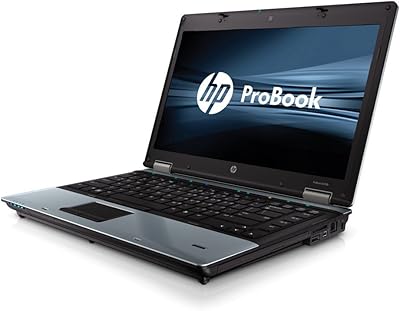
Overview
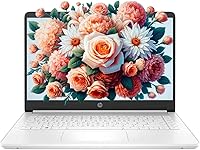
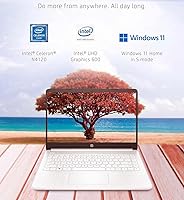
The HP 14-inch N4120 Laptop sits in a crowded budget category, but it makes a reasonable case for itself with an unusually generous 16GB of RAM and a bundled one-year Office 365 subscription — two things you don't often see at this price tier. Storage is the obvious compromise: 64GB of eMMC is tight, though the included 256GB microSD card helps bridge that gap. The compact 14-inch frame and clean white finish make it feel less plasticky than expected. It ships in Windows 11 S mode, which limits app installs to the Microsoft Store, but switching to full Windows 11 is a straightforward five-step process that requires no technical knowledge whatsoever.
Features & Benefits
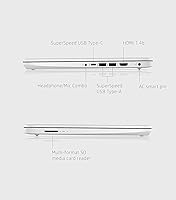
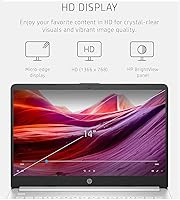
The Intel Celeron N4120 is a quad-core chip that handles web browsing, video calls, and light document work without fuss — just don't expect it to power through video editing or demanding workloads. What keeps this entry-level machine running reliably is the 16GB DDR4 RAM, which is genuinely uncommon at this price and noticeably reduces sluggishness when juggling multiple browser tabs. The 14-inch display at 1366x768 won't impress anyone used to higher-resolution screens, but it's bright enough for indoor work. Wi-Fi 6 support is a welcome modern touch. The port lineup — USB-C, two USB-A, HDMI, and a headphone jack — covers most everyday connectivity needs without requiring additional adapters.
Best For
This HP budget laptop is a natural fit for students in K-12 or college who spend most of their time in a browser, writing papers, or attending online classes. It's equally suited to small business owners or remote workers who live inside Microsoft 365 apps — and the included subscription year makes that value even more direct. Families looking for a reliable second laptop for lighter household use will appreciate the low entry cost and tidy design. If raw processing speed isn't your top priority, this machine's RAM headroom and modern wireless capability make it a stronger everyday pick than many similarly priced alternatives on the market.
User Feedback
Buyers consistently highlight snappy multitasking as a pleasant surprise, crediting the ample RAM for keeping things moving even with several tabs open simultaneously. The main gripe is predictable: 64GB of built-in storage fills up fast, and while the microSD expansion helps, it runs slower than true SSD storage — something worth knowing before committing. A few users note the keyboard is acceptable but not particularly satisfying, and the build feels light in both senses of the word. Battery life lands around six to seven hours for typical use, which is workable. Outdoor visibility is limited; the display struggles in direct sunlight. Overall, feedback skews positive for the price, with storage being the one consistent sticking point.
Pros
- 16GB of DDR4 RAM is unusually generous for this price tier and keeps multitasking surprisingly smooth.
- Wi-Fi 6 support means fast, future-ready wireless connectivity that most budget laptops skip entirely.
- The included 256GB microSD card meaningfully extends storage without any additional cost.
- A bundled one-year Microsoft 365 subscription adds real practical value for students and office users.
- The compact 14-inch form factor makes it easy to carry between classrooms, offices, or rooms at home.
- Port selection is well-rounded, with USB-C, two USB-A ports, HDMI, and a headphone jack all included.
- Switching out of Windows 11 S mode is straightforward and requires no technical skill.
- The clean white design looks less utilitarian than most machines in this price range.
Cons
- 64GB of internal eMMC storage runs out fast, especially once Windows updates and apps take their share.
- The Celeron N4120 processor struggles noticeably with anything beyond light, everyday computing tasks.
- The microSD card expansion is slower than built-in SSD storage, which affects file access and app performance.
- Display resolution of 1366x768 looks soft and pixelated compared to modern 1080p screens.
- Screen brightness is insufficient for comfortable use in sunlit environments or near bright windows.
- Keyboard feel is mediocre at best — functional for occasional typing but tiring during extended sessions.
- Build quality feels lightweight in a way that raises questions about long-term durability.
- Battery life around six to seven hours is workable but falls short for full-day use without a charger nearby.
- Windows 11 S mode restricts app installs out of the box, which can catch less tech-savvy buyers off guard.
Ratings
Our AI rating system analyzed thousands of verified global purchases of the HP 14-inch N4120 Laptop, actively filtering out incentivized reviews, repeated submissions, and bot activity to surface what real buyers actually experience day to day. The scores below reflect both the genuine strengths that keep this machine popular in its category and the honest pain points that have frustrated users — nothing is glossed over.
Value for Money
Multitasking Performance
Storage Capacity
Display Quality
Processor Speed
Build Quality
Keyboard & Typing Experience
Wireless Connectivity
Port Selection
Battery Life
Software & OS Experience
Webcam Quality
Portability
Setup & Ease of Use
Suitable for:
The HP 14-inch N4120 Laptop is built for buyers whose daily computing needs revolve around browsing, documents, video calls, and email — not performance-intensive tasks. Students in middle school, high school, or college will find it capable enough for homework, research, and virtual classes without breaking the budget. The bundled one-year Microsoft 365 subscription is a genuinely practical addition for anyone already living inside Word, Excel, or Teams. Remote workers and small business owners who need a lightweight, portable machine for client communications and spreadsheets will also get solid mileage out of it. Households wanting a dependable secondary device for casual use — streaming a show, filling out forms, light web browsing — will appreciate how little hassle this machine demands day to day.
Not suitable for:
Buyers who need real processing muscle should look elsewhere; the Celeron N4120 chip is capable but limited, and anyone running creative software, compiling code, gaming, or handling large datasets will hit a ceiling quickly. The 64GB eMMC internal storage is a persistent frustration — it fills up fast, and while the included microSD card adds space, it is not a substitute for the speed of a proper SSD. The 1366x768 display resolution will feel noticeably dated to anyone coming from a modern 1080p screen, and outdoor use in direct sunlight is genuinely difficult. Buyers expecting a premium typing experience will likely be disappointed by the keyboard, which is functional but unremarkable. If you anticipate needing apps outside the Microsoft Store and aren't comfortable walking through the S mode switch process, the out-of-box software restrictions could feel limiting right away.
Specifications
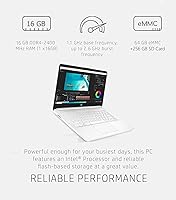
- Processor: Intel Celeron N4120 quad-core CPU runs at a 1.1GHz base frequency and bursts up to 2.6GHz, with 4MB cache.
- RAM: 16GB DDR4 SDRAM running at 3200MHz provides ample headroom for multitasking at this price tier.
- Internal Storage: 64GB eMMC flash storage handles the operating system and core apps, though it fills up quickly with heavy use.
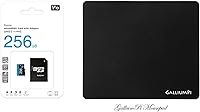
- Storage Expansion: A 256GB microSD card is included in the box and slots into the built-in microSD reader for extra file storage.
- Display Size: The 14″ BrightView screen features a narrow-bezel design suited for everyday work and video streaming indoors.
- Resolution: The display outputs at 1366x768 pixels, which is standard HD but below the 1080p resolution common on newer laptops.
- Graphics: Intel UHD Graphics 600 is integrated into the chipset and handles light visual tasks, web content, and video playback.
- Operating System: Windows 11 Home ships in S mode by default, restricting app installs to the Microsoft Store until manually switched off.
- Wireless: Wi-Fi 6 (802.11ax) is supported, enabling faster and more reliable wireless connections on compatible routers.
- Ports: Connectivity includes one USB-C 3.1, two USB-A 3.1 ports, one HDMI output, one combo headphone/microphone jack, and one microSD slot.
- Webcam: A built-in webcam is included, making this machine ready for video calls and virtual classes without additional accessories.
- Weight: The laptop weighs 3.84 pounds, keeping it light enough for daily transport between home, school, or the office.
- Dimensions: Packaged dimensions measure approximately 17.63 x 12.01 x 2.83 inches, reflecting a slim and portable overall profile.
- Battery: A single lithium-ion battery is included and pre-installed; typical real-world battery life lands around six to seven hours.
- Bundled Software: A one-year Microsoft 365 subscription is included, covering Word, Excel, PowerPoint, and OneDrive cloud storage access.
- Color: The chassis is finished in Snowflake White, giving it a cleaner, more modern look than typical budget laptops.
- Processor Brand: Intel manufactures the CPU and integrated graphics, both operating under the Intel UHD 600 graphics architecture.
- Memory Type: DDR4 SDRAM is the installed memory standard, offering reliable bandwidth for running multiple applications simultaneously.
Related Reviews
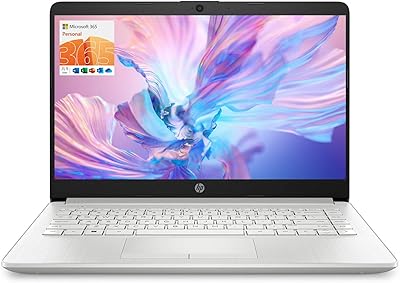
HP TPN-Q221 14″ Laptop

HP 14-dq0020nr 14-Inch Laptop


HP 14 Celeron 14-inch Touchscreen Laptop

HP Chromebook 14a 14-inch Laptop
HP 15-inch N4120 16GB Laptop
HP 14-dq0054dx 16GB 14-Inch Laptop

HP Chromebook 14 AMD A4 Laptop
HP Stream 14-inch Laptop
HP 14-inch Intel Core i7 Laptop