Overview

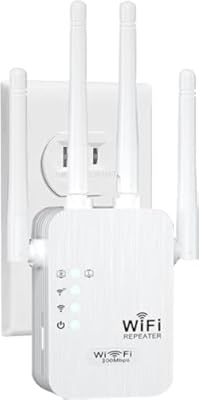
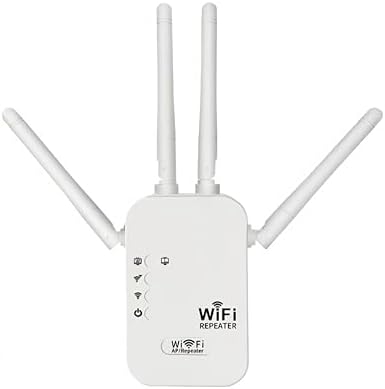
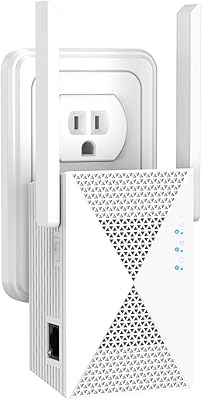
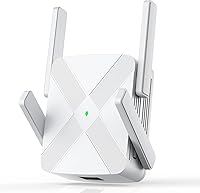
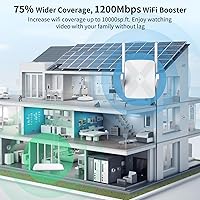
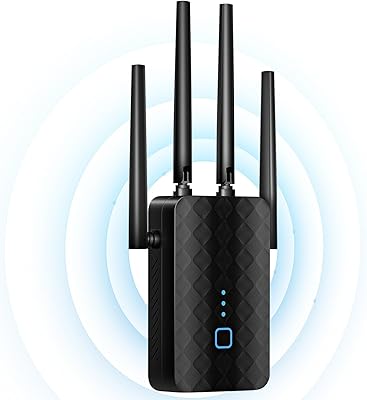
The FjUoLzgK M-97G WiFi Extender arrived late 2025 as a budget-conscious option for anyone tired of watching videos buffer in the back bedroom or losing signal in the garage. The brand isn't a household name yet — worth keeping in mind — but with over 1,000 Amazon ratings averaging 4.3 stars in just a few months, this signal booster has earned enough real-world feedback to take seriously. It plugs directly into a wall outlet, sports four external antennas, and claims coverage up to 10,000 square feet. That number deserves some skepticism — open-plan, single-story homes will fare better than multi-story builds with thick concrete walls.

Features & Benefits

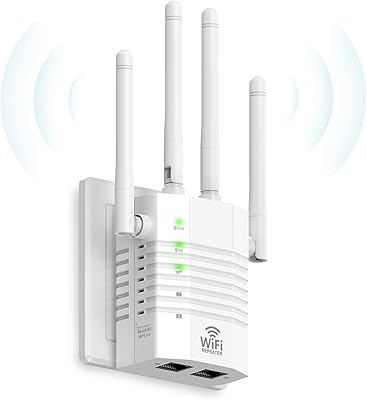
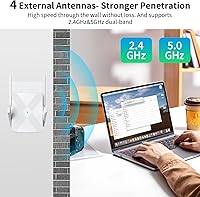
The hardware here punches reasonably well for its price tier. Running dual-band Wi-Fi — 2.4GHz for range and 5GHz for speed — means devices can connect to whichever band suits them best, rather than competing on a single channel. The four antennas help maintain a stable link even when walls or furniture are in the way. One standout practical addition is the built-in Ethernet port, which lets you hardwire a desktop, smart TV, or game console that's too far from your router. Setup leans heavily on simplicity: a one-tap process gets most users connected in minutes. AP mode adds flexibility if you ever need to extend a wired connection rather than rebroadcast an existing wireless signal.

Best For

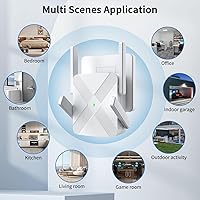
This range extender makes most sense for people dealing with dead zones in large homes — think long ranch-style layouts, homes with detached garages, or apartments where the router sits at one end and the bedroom is at the other. It's also a solid pick for renters who can't run Ethernet cables through walls but need a reliable wired drop somewhere specific. Households streaming on several screens at once will appreciate the dual-band setup keeping congestion manageable. Less ideal for anyone in a multi-story home with older construction, where walls tend to absorb signal and the advertised coverage figure may fall noticeably short.

User Feedback

Buyer sentiment skews positive, with easy setup being the most consistent praise — many users say they were connected in under five minutes. Noticeable signal improvement in previously weak areas is another recurring theme. Where things get more mixed is around coverage range: a fair number of buyers report that real-world results fall short of the advertised figure, especially in homes with multiple floors or dense walls. A few noted the 5GHz band weakens quickly with distance, performing better only close to the extender. Long-term reliability is harder to judge given the brand's short track record, though dropouts and disconnects do surface occasionally in the reviews.

Pros

  • One-tap setup gets most users connected in under five minutes with no networking knowledge required.
  • The built-in Ethernet port lets you hardwire a TV, console, or desktop in a room far from your router.
  • Dual-band operation keeps 2.4GHz and 5GHz traffic separated, reducing congestion across connected devices.
  • Compact wall-plug design stays out of the way and does not block adjacent outlets in most standard setups.
  • Works with virtually any router or gateway thanks to broad 802.11ac and b/g/n compatibility.
  • Over 1,000 verified ratings averaging 4.3 stars suggests consistent buyer satisfaction for everyday home use.
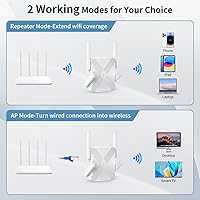
  • AP mode adds flexibility for extending a wired network into wireless coverage without a separate access point.
  • This signal booster delivers a noticeable improvement in rooms that previously struggled to hold any connection at all.
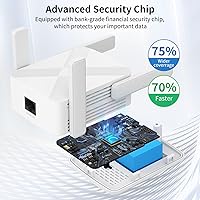
  • WPA/WPA2 support with a dedicated security chip covers baseline home network protection without extra configuration.
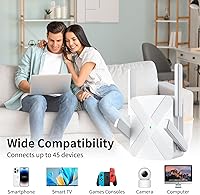
  • Supports up to 45 devices simultaneously, comfortably covering a busy household without hitting device limits.

Cons

  • Real-world coverage in homes with multiple floors or thick walls falls well short of the 10,000 sq ft claim.
  • The 5GHz band weakens quickly with distance, leaving the slower 2.4GHz band to carry most of the load at range.
  • Intermittent dropouts after extended uptime have been reported, suggesting firmware stability still needs work.
  • The brand has no established long-term support history, making warranty and update reliability hard to predict.
  • Only a single Ethernet port is included, which limits hardwired connections to one device at a time.
  • The plastic build feels lightweight and some users report the antennas wobble more than expected over time.
  • Switching between Repeater and AP modes requires navigating the admin interface, which is less intuitive than initial setup.
  • No WPA3 support means this range extender lags behind the current security standard for home networks.
  • Smart home and IoT devices with strict band requirements occasionally struggle to maintain a stable connection.
  • Users on routers with non-standard configurations may need manual admin access to complete setup successfully.

Ratings

The FjUoLzgK M-97G WiFi Extender has been evaluated using AI-driven analysis of verified global buyer reviews, with spam, bot-generated, and incentivized feedback actively filtered out to ensure accuracy. Scores reflect real-world user experiences across a range of home environments and use cases. Both the genuine strengths and the recurring frustrations are represented here without bias.

Ease of Setup
91%
The one-tap setup process is consistently the most praised aspect across reviews. Users with no networking knowledge report getting connected in under five minutes, with the LED indicator making it easy to confirm a solid connection without any guesswork.
A small portion of users encountered issues when connecting to routers with non-standard configurations or older firmware, requiring a manual login to the admin panel. Those expecting zero troubleshooting in every scenario may occasionally hit a wall.
Signal Coverage
67%
33%
In open single-story homes and large apartments, this range extender delivers a meaningful boost, pushing usable signal into rooms that previously had none. Buyers in ranch-style layouts and wide open-plan spaces tend to report the strongest results.
The 10,000 sq ft claim is a stretch for most real homes. Multi-story houses, older builds with thick plaster or concrete walls, and homes with many obstructions consistently see coverage fall noticeably short of the advertised figure, which frustrates buyers who took that number at face value.
5GHz Band Performance
62%
38%
Close to the extender — within one or two rooms — the 5GHz band delivers noticeably faster speeds that handle 4K streaming and video calls without much trouble. Devices that automatically select the faster band benefit most from this setup.
The 5GHz signal degrades quickly with distance, which is typical for that frequency but still catches buyers off guard here. Users who placed the extender hoping to push high-speed connectivity across a large space found the 2.4GHz band doing most of the heavy lifting.
2.4GHz Band Reliability
78%
22%
The 2.4GHz band holds up well across longer distances and through multiple walls, making it the workhorse for smart home devices, phones, and tablets spread across a wider area. Most buyers find it stable enough for casual browsing and streaming standard-definition content.
At 300Mbps maximum, it won't satisfy anyone doing large file transfers or high-bandwidth activities at range. It is a solid fallback band, but users expecting both bands to perform equally at distance will find this one more dependable yet more limited.
Ethernet Port Utility
83%
The built-in Ethernet port is a legitimately useful addition at this price point. Buyers who hardwired a smart TV, desktop PC, or game console in a far room reported stable, low-latency connections that wireless bridging alone would not have provided.
Only a single Ethernet port is included, so users hoping to wire up multiple devices at the same location need a separate switch. A handful of reviews also noted the port felt slightly loose after repeated cable swapping, raising mild durability questions.
Value for Money
84%
Relative to dual-band extenders with Ethernet ports from more established brands, this signal booster comes in at a price that is hard to argue with for the feature set. For budget-conscious buyers who just need dead zones covered, the cost-to-benefit ratio is genuinely solid.
Buyers who compare it against premium extenders or mesh nodes will find the performance gap justifies the price difference in larger or more complex homes. If your home genuinely needs blanket dual-band coverage, spending more upfront may save headaches later.
Build Quality & Design
72%
28%
The compact wall-plug form factor keeps it unobtrusive, and the four external antennas feel reasonably sturdy for the size. It sits flush enough against a wall outlet that it does not block adjacent sockets in most standard configurations.
The plastic housing feels lightweight, which some users interpret as cheap. A few reviewers noted the antennas wobble more than expected, and there is some concern about how the unit holds up after months of continuous use given the brand's limited track record.
Device Compatibility
81%
19%
Support for 802.11ac and backward compatibility with older b/g/n standards means this range extender works with virtually any router or gateway most households would own. Buyers connecting a mix of older laptops, phones, smart TVs, and gaming consoles report no notable compatibility issues.
Occasional reports of specific smart home devices — particularly certain IoT gadgets with strict band requirements — struggling to maintain a stable handoff. These cases are not widespread but worth noting for homes with large numbers of low-power connected devices.
Connection Stability
69%
31%
For everyday tasks like browsing, video calls, and standard-definition streaming, the connection holds steady in most home environments tested by reviewers. Users in apartments or smaller homes particularly report minimal interruptions during normal daily use.
Intermittent dropouts are a recurring complaint, especially during extended use over several hours or after the device has been running for days without a restart. This is not universal, but it appears often enough in reviews to suggest the firmware may benefit from further refinement.
Security Features
76%
24%
WPA/WPA2 support covers the baseline security most home users need, and the inclusion of a dedicated security chip adds a layer of reassurance that not all extenders in this price range bother with. Most buyers found the default security settings adequate without any manual adjustment.
There is no mention of WPA3 support, which is becoming the new standard for home network security. Security-conscious users or those on newer routers already running WPA3 will notice the gap, even if it does not present an immediate practical risk for average home use.
Multi-Device Performance
73%
27%
The extender handles a household mix of phones, a laptop, and a streaming device simultaneously without obvious slowdowns in close-to-mid range conditions. For families with moderate device counts, the 45-device ceiling is rarely a practical limitation.
Under heavier simultaneous load — multiple 4K streams, active gaming, and file downloads happening at once — some users report the connection becoming sluggish. The hardware is capable for light-to-moderate multi-device scenarios but is not built for bandwidth-intensive households.
Brand Trust & Support
58%
42%
A 4.3-star average across more than 1,000 reviews in just a few months is a reasonable early signal that most buyers are satisfied. Some users report receiving responsive replies to setup questions through Amazon messaging.
FjUoLzgK is a relatively unknown brand with no established support infrastructure, long-term firmware update history, or warranty reputation to draw on yet. Buyers who prioritize after-sale support or expect multi-year software updates should factor this uncertainty into their decision.
AP Mode Functionality
74%
26%
Buyers who used AP mode to extend a wired network into wireless coverage found it worked cleanly, creating a separate access point without conflicting with the main router. It is a practical option for setups where a wired drop exists but wireless coverage is missing.
Switching between Repeater and AP mode requires accessing the admin interface, which some users found less intuitive than the initial one-tap setup suggested. The documentation included is minimal, and a few buyers were unaware the AP mode feature existed at all.

Suitable for:

The FjUoLzgK M-97G WiFi Extender is a practical pick for renters and homeowners dealing with persistent dead zones in large, single-story spaces where running Ethernet cable through walls simply isn't an option. If your router sits at one end of a long apartment or ranch-style home and your bedroom, home office, or living room struggles to hold a stable signal, this range extender can make a genuine difference without requiring any technical knowledge to set up. It's also a smart choice for households that need a quick, affordable fix — families streaming on multiple devices, students video calling from a back room, or anyone who just wants plug-and-play convenience rather than a complicated mesh network overhaul. The built-in Ethernet port adds real practical value for anyone who wants to hardwire a smart TV, desktop, or gaming console in a room too far from the main router. Budget-conscious buyers who want dual-band coverage without paying premium prices for a well-known brand will find the feature-to-cost ratio here genuinely competitive.

Not suitable for:

The FjUoLzgK M-97G WiFi Extender is not the right tool for multi-story homes, older builds with thick concrete or brick walls, or any environment where the signal has to fight through multiple dense obstructions — in those cases, the advertised coverage figure will likely disappoint. Power users who rely on consistent high-bandwidth activities like competitive online gaming, 4K multi-room streaming, or large file transfers across the network will hit the hardware's ceiling faster than casual users. Anyone who depends heavily on the 5GHz band at distance should look elsewhere, as that frequency drops off quickly beyond a room or two. Buyers who prioritize brand reputation, long-term firmware support, or an established warranty service record should factor in that this manufacturer is still relatively new and unproven on those fronts. If your home already suffers from chronic Wi-Fi issues rooted in a weak router or ISP-side problems, adding a repeater will amplify those problems rather than solve them.

Specifications

  • Model Number: The unit is designated M-97G under the FjUoLzgK product line.
  • Dimensions: The extender measures 3.74 x 3.14 x 3.54 inches, making it compact enough to plug into a standard wall outlet without blocking adjacent sockets in most cases.
  • Weight: The unit weighs 5.2 ounces, which is typical for a wall-plug extender with external antennas.
  • Wi-Fi Standard: It operates on 802.11ac (Wi-Fi 5) and is backward compatible with 802.11b, 802.11g, and 802.11n devices.
  • Frequency Bands: Dual-band operation covers both 2.4GHz and 5GHz frequencies simultaneously without cross-band interference.
  • Max Throughput: Combined maximum throughput is rated at 1200Mbps across both bands under ideal conditions.
  • 2.4GHz Speed: The 2.4GHz band is rated for up to 300Mbps, suited for longer-range connections and lower-bandwidth devices.
  • 5GHz Speed: The 5GHz band delivers up to 867Mbps, designed for faster short-to-mid-range connections.
  • Antennas: Four external antennas are fitted to improve signal distribution, range, and stability across the coverage area.
  • Coverage Claim: The manufacturer claims coverage of up to 10,000 sq ft, though real-world results vary significantly based on home layout and wall construction.
  • Device Capacity: The extender supports up to 45 connected devices simultaneously across both frequency bands.
  • Ethernet Port: One 10/100Mbps Ethernet port is included for hardwiring a single device directly to the extended network.
  • Operating Modes: Two operating modes are available: Repeater mode for extending an existing wireless network, and AP mode for converting a wired connection into a wireless access point.
  • Security Protocols: WPA and WPA2 encryption protocols are supported, backed by a dedicated onboard security chip.
  • Setup Method: Initial configuration uses a one-tap setup process accessible via a mobile browser or app without requiring advanced network knowledge.
  • LED Indicator: A built-in LED indicator provides visual feedback on connection status and signal strength during and after setup.
  • Power Source: The unit is powered directly via a standard wall outlet through its integrated plug, with no external power adapter required.
  • First Available: The product became available for purchase in October 2025, making it a relatively recent market entry.

Related Reviews
Zelikovitz WiFi Extender M-97A
87%
94%
Setup & Installation
88%
Signal Strength
92%
Value for Money
90%
Compatibility with Routers
86%
Performance in Large Spaces
More
WAVLINK AX3000 WiFi 6 Outdoor WiFi Extender
87%
94%
Outdoor Coverage
89%
WiFi Performance
90%
Weatherproof Build
86%
Installation Ease
88%
Signal Penetration
More
Hyzom WiFi Extender
Hyzom WiFi Extender
83%
89%
Coverage Range
85%
Signal Stability
83%
Device Capacity
91%
Setup & Installation
78%
Build Quality
More
Xilkoze WiFi Extender
86%
91%
Setup and Installation
88%
WiFi Coverage
84%
Performance (Speed and Stability)
92%
Compatibility with Devices
78%
Signal Range in Large Homes
More
MIKKOA WiFi Extender 1200Mbps
85%
91%
WiFi Range and Coverage
88%
Setup and Installation
85%
Performance and Speed
82%
Build Quality and Durability
90%
Compatibility with Devices
More
Linksys RE7000 WiFi Extender
86%
89%
Ease of Setup
87%
Performance (Range & Speed)
91%
Dual-Band Connectivity
83%
Gigabit Ethernet Port
95%
Compatibility with Routers
More
Speedwave WiFi Extender 2025
84%
91%
WiFi Coverage
94%
Ease of Setup
88%
Dual-Band Performance
85%
Connection Stability
74%
Speed Consistency
More
Cyseed WiFi Extender
73%
91%
Ease of Setup
67%
Signal Coverage
62%
Speed Performance
74%
Device Capacity
83%
Operating Mode Flexibility
More
AOOEPU WiFi Extender 1200Mbps
85%
88%
WiFi Coverage
94%
Ease of Setup
85%
Speed & Performance
80%
Reliability
82%
Device Capacity Support
More
YKMBFEQC 300Mbps WiFi Extender
83%
93%
Ease of Setup
85%
WiFi Coverage Range
88%
Dual-Band Performance
80%
Signal Stability
87%
Compatibility with Devices
More

FAQ

It is compatible with virtually any standard wireless router or gateway that supports 802.11b, g, n, or ac. That covers the vast majority of home routers sold in the past decade. The only edge cases tend to be routers running highly customized firmware or enterprise-grade equipment with strict client filtering.

Not at all. The one-tap setup walks you through the process via a mobile browser, and most users are connected within five minutes. You basically plug it in, connect your phone to its temporary network, and follow a short on-screen guide. If you can set up a new phone, you can handle this.

The sweet spot is roughly halfway between your router and the dead zone you're trying to cover — not inside the dead zone itself. Placing it too far from the router means it picks up a weak signal to begin with, which limits how much it can help. A central hallway or a room adjacent to the problem area usually works well.

By default in Repeater mode, it creates a new network name that you connect to separately. Some routers and extender configurations allow you to use the same SSID, but your devices may not always hand off automatically between the router and extender. It is worth setting a distinct name to give yourself manual control over which signal you join.

Honestly, that number reflects ideal open-space conditions and should be taken as a ceiling rather than a guarantee. In a two-story home with multiple rooms and standard drywall, expect noticeably lower effective coverage. It will still help, but plan for maybe half that figure in a typical multi-floor layout with walls between floors.

Yes, that is one of the more practical use cases for this signal booster. You can connect a console, smart TV, or desktop via the Ethernet port while simultaneously extending wireless coverage to other devices on the same network. Just keep in mind there is only one Ethernet port, so you can hardwire a single device at a time.

For a typical home network, WPA2 support is adequate and covers the standard most home users need. There is no WPA3 support, which is worth noting if your router already runs WPA3 and security is a priority for you. For the average household, the included security features are sufficient for day-to-day protection.

It can, depending on how your smart devices handle band switching. Some IoT devices, especially older or budget-tier ones, struggle when they connect to an extender that broadcasts on both 2.4GHz and 5GHz under similar network names. If you are having trouble, try creating a separate 2.4GHz-only SSID for your smart home gear through the admin settings.

This is one area where buying from a lesser-known brand carries real risk. There is no well-established support infrastructure, and the brand has a limited track record for firmware updates or warranty follow-through. That said, the Amazon purchase process does give you standard return options within the usual window, and several buyers have reported getting helpful responses through Amazon messaging.

All Wi-Fi extenders introduce some speed reduction by nature — they receive and then re-transmit the signal, which adds latency and can cut throughput by 30 to 50 percent in some scenarios. This range extender is no different. For streaming, browsing, and casual use you won't notice much, but for high-speed transfers or latency-sensitive gaming, the wired Ethernet port on the extender is a much better option than relying on the repeated wireless signal.