Overview

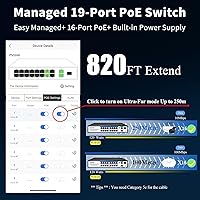
The Goalake 19-Port 240W Managed PoE Switch sits in an interesting spot — it offers a port count and feature set that would typically cost considerably more, packed into a fanless metal enclosure that won't disrupt a quiet office or server closet. Sixteen PoE+ ports, two Gigabit uplinks, and a combo SFP slot give you real flexibility for building out a small business or prosumer network. What's genuinely unusual at this price tier is the cloud-managed interface, which lets you monitor and configure the network remotely. The AI Extend mode, capable of pushing data and power across runs up to 250 meters, rounds out a surprisingly capable package.
Features & Benefits

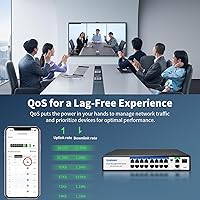
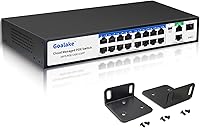
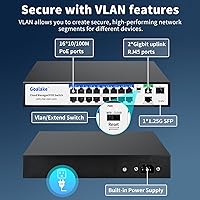
The 240W power budget spread across sixteen ports — up to 30W each — is enough to run a full array of cameras and access points without constantly worrying about headroom. This managed PoE switch supports IEEE 802.3af/at, so most standard PoE devices connect without issue. One important caveat: passive 24V PoE, commonly used by older Ubiquiti gear, is not supported, and those devices won't receive power through the switch. On the management side, you get 802.1Q VLAN segmentation, QoS prioritization, port mirroring, and storm control — a respectable toolkit. The 4KV lightning protection and over-voltage safeguards are genuinely useful for outdoor camera installs, and rack-mount ears come included in the box.

Best For

This managed PoE switch makes the most sense for small businesses, installers, and home network enthusiasts who need PoE across many devices without jumping to enterprise pricing. If you're running a multi-camera surveillance system — especially one spread across a large property where long cable runs are unavoidable — the 250-meter AI Extend capability is a real practical advantage. It's also worth considering for anyone who wants to segment traffic with VLANs or apply QoS without paying for a cloud management subscription. Unmanaged switch users ready to step up will find the feature set approachable. Those running a Ubiquiti passive PoE setup, however, should look elsewhere.

User Feedback

Buyers consistently point to quick, hassle-free setup as a highlight — most report the switch working straight out of the box with minimal configuration. The metal build also earns solid marks for a unit in this price range. Criticism tends to land on two fronts: the web management interface, while functional, lacks the polish and depth you'd find on TP-Link's Smart series or Netgear's ProSAFE line. A handful of users have noted that PoE delivery can feel inconsistent when most ports are loaded near capacity simultaneously. The one-year warranty is on the shorter side compared to competitors, and opinions on support responsiveness are mixed, ranging from quick resolutions to frustratingly slow follow-ups.

Pros

  • Sixteen PoE+ ports at this price point is genuinely rare and eliminates the need for a secondary switch in most small deployments.
  • The 240W power budget comfortably handles a full mix of cameras and access points under normal load conditions.
  • Cloud management with no subscription fee is an unexpected inclusion that adds real remote oversight value.
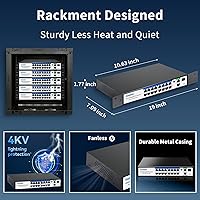
  • Fanless operation keeps the unit completely silent — ideal for offices, retail spaces, and home network closets.
  • AI Extend mode enables powered data runs beyond the standard 100-meter limit, saving installers extra hardware costs on large properties.
  • The all-metal chassis feels solid and durable, punching above its weight class in terms of build perception.
  • Rack-mount ears are included in the box, making clean 19-inch rack installation straightforward from day one.
  • 802.1Q VLAN and QoS support give budget-conscious buyers a genuine step up from fully unmanaged switches.
  • 4KV lightning protection is a meaningful safeguard for outdoor camera installations in storm-prone regions.
  • Plug-and-play behavior out of the box means most buyers have devices powered and online within minutes.

Cons

  • Passive 24V PoE devices receive no power from this switch — a dealbreaker for older Ubiquiti hardware users.
  • PoE delivery can become unstable when most ports are simultaneously loaded near their power ceiling.
  • The web management interface feels rough and inconsistent compared to TP-Link or Netgear alternatives at similar price points.
  • Advanced VLAN and QoS configurations can behave unpredictably, requiring trial and error to get right.
  • The included documentation is poorly translated and too thin to guide users through managed feature configuration.
  • Only a one-year replacement warranty is offered — noticeably shorter than the two- to three-year coverage from competing brands.
  • Support response times are inconsistent, with some buyers waiting days for replies on straightforward issues.
  • The single SFP slot limits fiber uplink flexibility for anyone needing redundant or multi-path fiber connectivity.
  • The chassis runs noticeably warm under sustained heavy load, which may raise reliability concerns in poorly ventilated spaces.
  • Real-world AI Extend performance varies depending on cable quality, and device compatibility at extended range is not clearly documented.

Ratings

The Goalake 19-Port 240W Managed PoE Switch has been evaluated by our AI system after processing verified buyer reviews from global marketplaces, with spam, bot activity, and incentivized feedback actively filtered out. The scores below reflect a candid picture of where this managed PoE switch genuinely delivers and where it falls short — no glossing over the rough edges.

Value for Money
91%
Most buyers feel the feature-to-price ratio is hard to beat in this segment. Getting VLAN support, cloud management, and a 240W power budget in a single unit — without a subscription fee — is something many users highlight as the primary reason they chose this switch over pricier alternatives.
A small but vocal group of reviewers feel the savings show up in the management interface and warranty length, which can make the value equation feel less compelling once you're past the initial setup phase and need deeper configuration or support.
Port Count & Layout
88%
Sixteen powered ports on a single unit at this price point is genuinely useful for small installers running a mix of cameras and access points. Buyers deploying eight to twelve cameras in a warehouse or retail space frequently mention not needing a secondary switch at all.
A few users noted that port spacing feels a little tight when using thicker PoE patch cables, and the single SFP slot, while welcome, is limiting if you need fiber redundancy across two uplinks.
PoE Power Delivery
72%
28%
Under moderate loads — say, eight to ten cameras drawing standard 802.3af power — the switch performs consistently and without notable drops. Buyers running basic surveillance setups report stable, uninterrupted power delivery across all connected devices.
When pushing toward full load with fifteen or sixteen active PoE devices simultaneously, a handful of users have reported occasional instability or ports throttling back power. This isn't universal, but it's frequent enough in reviews to warrant caution in high-density deployments.
Ease of Setup
89%
Out-of-the-box experience draws consistent praise. Most buyers report that plug-and-play operation works exactly as advertised — connected devices powered up and recognized within minutes, with no configuration required for basic use. Installers especially appreciate this for repeat deployments.
Getting into the managed features requires navigating the web interface or cloud portal, and a few less-experienced users found the initial login and discovery process unclear due to thin documentation in the included manual.
Management Interface
63%
37%
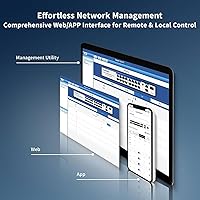
The cloud-based management portal works and does cover the essentials — VLAN assignment, port monitoring, QoS rules, and remote visibility into device status. For buyers who just want basic oversight of a small network without paying for a managed subscription elsewhere, it gets the job done.
Compared to TP-Link's EasySmart or Netgear's ProSAFE interface, the UI feels unpolished and occasionally inconsistent across browsers. Advanced users have flagged missing diagnostic tools and a lack of detailed traffic statistics that they'd expect from a managed switch at any tier.
Build Quality
83%
The all-metal housing earns real appreciation from buyers who've handled cheaper plastic alternatives. The unit feels solid and well-constructed for its weight class, and several users mention it fitting neatly into existing rack setups without any flex or alignment issues.
The finish on some units shows minor inconsistencies in paint or port labeling, and a small number of reviewers noted the rack ears feel slightly less robust than the chassis itself — functional, but not as confidence-inspiring as the main body.
Fanless Operation
87%
Silent operation is one of the most consistently praised aspects of this managed PoE switch. Users who've deployed it in small offices, reception areas, or home network closets specifically call out the absence of fan noise as a meaningful quality-of-life benefit over similarly priced alternatives.
Without active cooling, the chassis does get noticeably warm under sustained heavy load. A few buyers in warmer environments have mentioned the unit running hot to the touch, which raised reliability concerns even if no failures were directly reported.
AI Extend Range Mode
74%
26%
The extended cable range capability proves genuinely useful for outdoor and campus-style surveillance installs where running fiber isn't practical. Users powering cameras at the far end of a parking lot or across a large warehouse floor cite this as a feature that saved them a secondary network run.
The mode works at reduced speeds, and some buyers discovered that not all PoE devices behave reliably at the extended range limit. Real-world performance tends to vary by cable quality, and the documentation doesn't set clear expectations on compatible device behavior.
VLAN & QoS Features
69%
31%
For buyers stepping up from unmanaged switches, the availability of 802.1Q VLAN segmentation and QoS priority rules is a meaningful upgrade. Small business users separating camera traffic from general office data found the VLAN setup functional and reliable once configured.
The VLAN implementation is basic by managed switch standards, and experienced network administrators find the QoS granularity limited. Port-based VLAN tagging works, but more complex configurations — like tagged and untagged multi-VLAN scenarios — require patience and sometimes produce unexpected behavior.
Lightning & Surge Protection
81%
19%
The 4KV lightning protection specification resonates strongly with buyers in regions prone to electrical storms. Installers running outdoor cameras frequently mention this as a deciding factor, and the over-current and over-voltage port protection adds a layer of confidence for mixed-environment deployments.
There's no independent third-party verification of the protection spec in buyer reviews, so the 4KV claim is taken largely on faith. Users in high-lightning-risk areas may still want additional surge protection upstream as a precaution.
Rack Mount & Form Factor
84%
At just 1.8 inches high, this managed PoE switch occupies minimal rack space — a genuine advantage when slots are at a premium in small network closets or telecom cabinets. The included mounting ears are a nice touch that saves buyers an extra accessory purchase.
The unit is technically a 1U half-rack-width design, so it needs a shelf or bracket adapter to sit cleanly in a standard 19-inch rack without the included extensions, which a few buyers found mildly inconvenient compared to full-width alternatives.
Device Compatibility
76%
24%
Standard 802.3af/at PoE devices — modern IP cameras, Ubiquiti UniFi APs running active PoE, Cisco access points — connect and draw power without issue. Buyers with current-gen equipment rarely report compatibility problems.
The lack of passive 24V PoE support is a real sticking point for anyone running older Ubiquiti hardware like early NanoStation or Rocket units. This limitation isn't prominently disclosed on the product page and has caught several buyers off guard after purchase.
Warranty & After-Sales Support
57%
43%
When support does respond, several buyers report satisfactory resolutions — replacement units dispatched without excessive pushback, and technical questions answered adequately for basic configuration issues.
A one-year warranty is noticeably shorter than the two- to three-year coverage common among TP-Link and Netgear managed switches. Response times from the support team are inconsistent, with some buyers waiting several days for a reply — a concern for anyone using this in a business-critical environment.
Documentation & Setup Guides
61%
39%
Basic installation is straightforward enough that most users don't need the manual at all for plug-and-play use. The LED indicator layout is intuitive, and port status is easy to read at a glance once the unit is running.
The included documentation is thin and translated imperfectly, which creates friction when users try to configure managed features. Several reviewers had to rely on online forums or third-party guides to complete VLAN or QoS configuration, suggesting the official materials need meaningful improvement.

Suitable for:

The Goalake 19-Port 240W Managed PoE Switch is a strong fit for small business owners, security installers, and prosumer network builders who need to power and manage a large number of PoE devices without stretching into enterprise-tier pricing. If you're putting together a surveillance system with ten or more IP cameras — especially across a property where cable runs extend well beyond the typical 100-meter limit — the AI Extend mode is a practical, money-saving feature that eliminates the need for intermediate switches or media converters. Home office users or small IT teams who want basic network segmentation through VLANs and some traffic prioritization via QoS will find the managed feature set genuinely useful, even if it's not the most sophisticated implementation on the market. The fanless, metal-body design makes it a natural fit for server closets, reception desks, or any environment where fan noise is unwelcome. Installers who do repeat deployments will also appreciate how quickly the unit comes online — plug it in, connect your devices, and you're running without a lengthy configuration session.
Not suitable for:

The Goalake 19-Port 240W Managed PoE Switch is not the right choice for anyone running older Ubiquiti hardware — NanoStations, Rockets, or other gear that depends on passive 24V PoE — because this switch simply won't power those devices, and that's a hard limitation with no easy workaround. Network administrators managing complex enterprise environments will quickly find the management interface underwhelming; it lacks the diagnostic depth, traffic analytics, and configuration granularity available in TP-Link's Smart series or Netgear's ProSAFE lineup. If your deployment involves fifteen or sixteen PoE devices all drawing near-maximum wattage simultaneously, the power delivery can become inconsistent, making this a risky choice for high-density, power-intensive setups where reliability is non-negotiable. Buyers who value long-term warranty coverage and fast, dependable manufacturer support should also think carefully — the one-year replacement policy is noticeably shorter than what established competitors offer, and support response times have been uneven based on real buyer experiences. For mission-critical business infrastructure where downtime is costly, the combination of limited warranty and a less-proven brand may not inspire sufficient confidence.
Specifications

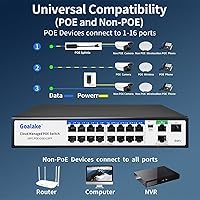
  • Total Ports: The switch provides 19 ports total: 16 PoE+ data and power ports, 2 Gigabit Ethernet uplink ports, and 1 combo SFP slot.
  • PoE Standard: All 16 PoE ports comply with IEEE 802.3af and 802.3at standards, supporting active PoE devices up to 30W per port.
  • PoE Power Budget: The total combined PoE power output is 240W, shared across all active PoE ports simultaneously.
  • Per-Port Power: Each individual PoE port can deliver a maximum of 30W, sufficient for high-powered access points and PTZ cameras.
  • Uplink Speed: The two dedicated uplink ports operate at auto-negotiated 10/100/1000 Mbps, providing full Gigabit throughput to upstream network equipment.
  • SFP Slot: One 1.25G combo SFP slot is included, allowing optional fiber uplink connectivity to a core switch or router.
  • AI Extend Range: When AI Extend mode is enabled, the switch can transmit data and PoE power over a single cable run of up to 250 meters.
  • VLAN Support: The switch supports 802.1Q port-based VLAN tagging for network segmentation across connected devices.
  • Management Type: This is a smart managed switch with a cloud-based web interface that supports remote configuration and network monitoring without a recurring subscription.
  • Lightning Protection: Built-in 4KV surge protection guards all ports against lightning strikes and power transients in outdoor or mixed-environment deployments.
  • Cooling System: The unit uses a fully passive, fanless cooling design, producing zero operational noise under normal working conditions.
  • Housing Material: The enclosure is constructed from metal, providing structural rigidity and passive heat dissipation for the internal components.
  • Form Factor: The switch is rack-mountable in a standard 19-inch rack using the included mounting ear extensions.
  • Dimensions: Physical dimensions measure 10.6″ in length, 7″ in width, and 1.8″ in height, occupying a compact 1U rack profile.
  • Weight: The unit weighs 2.97 pounds (1.35 kg), making it lightweight enough for easy single-person installation.
  • Input Voltage: The switch operates at 48V DC via a built-in industrial power supply included with the unit.
  • Advanced Features: Supported management features include QoS prioritization, port mirroring, storm control, static MAC address binding, and auto MDI/MDI-X detection.
  • Flow Control: The switch supports IEEE 802.3X full-duplex flow control and backpressure half-duplex flow control for traffic management.
  • Passive PoE: Passive 24V PoE is explicitly not supported; devices requiring passive PoE will need an independent power source or an active PoE splitter.
  • Warranty: Goalake includes a one-year replacement warranty from the order date, with technical support available during that period.

Related Reviews
Goalake 10-Port Managed PoE Switch

76%
93%
Value for Money
88%
Ease of Setup
61%
Port Speed Performance
74%
PoE Power Budget
67%
Cloud Management App
More
YuLinca 6-Port Gigabit PoE Switch with 4 PoE+ Ports
87%
95%
Ease of Installation
88%
PoE Functionality
91%
Build Quality
87%
Performance and Speed
94%
Fanless Operation (Noise)
More
Binardat F19-163GSP 19-Port POE Switch
83%
93%
Ease of Setup
88%
Performance & Reliability
90%
Noise Level (Fanless Design)
85%
POE Power Delivery
82%
Build Quality
More
STEAMEMO 16-Port 240W PoE+ Unmanaged Switch
79%
91%
Value for Money
93%
Ease of Setup
78%
PoE Power Delivery
63%
Port Speed Performance
87%
Build Quality
More
D-Link DGS-1100-05PDV2 5-Port Gigabit PoE Managed Switch
82%
92%
Value for Money
88%
Ease of Setup
90%
Quiet Operation
85%
PoE Functionality
87%
Energy Efficiency
More
TP-Link Festa FS352GP 52-Port Gigabit Smart Managed PoE Switch
84%
87%
Performance
91%
Ease of Setup
89%
PoE+ Power Delivery
92%
Cloud Management Experience
85%
Build Quality
More
TP-Link TL-SG2218P Smart Managed PoE Switch
82%
78%
PoE Performance
88%
Omada SDN Integration
83%
Web Interface & Usability
86%
Build Quality
81%
Fan Noise
More
QNAP QSW-M2116P-2T2S 20-Port 10GbE PoE++ Managed Network Switch
86%
93%
Performance & Speed
89%
PoE Support
91%
Ease of Setup
88%
Build Quality & Durability
90%
Management Interface (QSS)
More
D-Link DGS-1100-08PV2 8-Port Gigabit Smart Managed PoE+ Switch
87%
85%
Performance & Reliability
88%
PoE Power Delivery
90%
Ease of Setup
91%
Fanless Design & Noise Levels
87%
Value for Money
More
TP-Link TL-SG2428P Jetstream 24-Port Gigabit Smart Managed PoE Switch
84%
89%
Value for Money
70%
Ease of Setup
93%
PoE+ Performance
85%
Security Features
92%
Network Management (Omada SDN)
More

FAQ

Unfortunately, no. Those older Ubiquiti devices use passive 24V PoE, which this switch does not support. It only delivers power to active IEEE 802.3af/at PoE devices. If you need to power passive PoE equipment, you would have to use a separate active PoE injector or splitter for each affected device.

When you enable AI Extend on a port, the switch drops the data rate down to allow the signal and power to travel reliably over a much longer cable run — up to 250 meters. It is best used for cameras or access points at the far end of a parking lot, a large warehouse, or across a building perimeter where running fiber is not practical. Just note that cable quality matters here; cheap or damaged cable will limit how well extended mode performs in practice.

Yes, the cloud management interface is designed for remote access, so you can log in and check port status, adjust settings, or troubleshoot without being physically present. That said, the portal is fairly basic compared to what you get from TP-Link Omada or Netgear ProSAFE — expect to handle the essentials competently, but do not count on deep diagnostic tools or detailed traffic graphs.

The switch has over-current and over-voltage protection that should prevent damage, but the 240W total budget is shared across all active PoE ports. If you load fifteen or sixteen devices simultaneously and several of them are drawing close to their maximum wattage, you may see some ports throttle back or become unstable. For heavily loaded setups, it is worth calculating your total expected PoE draw before committing to this switch.

Yes, the mounting ear extensions for a standard 19-inch rack are included in the box alongside the power cord and user manual. You should not need to purchase separate rack hardware for a basic installation.

It is fanless, so there is no fan noise at all — which makes it genuinely suited for quiet environments like offices, reception areas, or home network closets. The metal chassis does get warm under load since that is how heat escapes without a fan, but it produces no audible sound during normal operation.

Yes, the switch supports 802.1Q VLAN tagging, which allows you to segment camera traffic onto its own isolated network separate from your general office data. The configuration is accessible through the web management interface. Simple port-based VLAN setups work reliably; more complex tagged multi-VLAN scenarios may require some trial and error since the interface is not the most intuitive.

For basic plug-and-play use, most buyers are up and running in under ten minutes — connect power, plug in your PoE devices, and they come online automatically. Getting into the managed features like VLANs or QoS takes longer, and the included manual is thin, so you may need to look for guidance online. The initial experience is genuinely straightforward; it is the deeper configuration where less-experienced users hit friction.

The combo SFP slot accepts standard 1.25G SFP modules for fiber uplink connectivity. You only need one if you want to connect the switch to a fiber backbone or use a fiber run to an upstream switch or router. For most small business or home deployments, the two standard Gigabit copper uplinks are sufficient and the SFP slot can simply go unused.

One year is honestly on the shorter side — most competing managed switches from TP-Link or Netgear offer two to three years of coverage. Within the warranty period, Goalake offers replacement units and technical support, and buyers who have needed to use it report mixed experiences with response times. After the warranty expires, you are on your own for repairs or replacement, which is worth factoring in if you are deploying this in a business-critical environment.