Overview

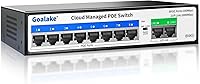
The Goalake 10-Port Managed PoE Switch sits in an interesting spot — it's a budget-priced unit that still offers managed networking features typically reserved for pricier hardware. For a small home office, a DIY home lab, or a modest security camera setup, that combination is hard to ignore. The fanless metal enclosure keeps things quiet and compact enough to tuck onto a shelf or wall-mount in a utility closet. It's aimed squarely at people who need basic network control without the overhead of enterprise gear — think small business owners, camera installers, and first-time network builders who want real management without a steep learning curve.
Features & Benefits

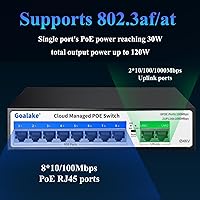
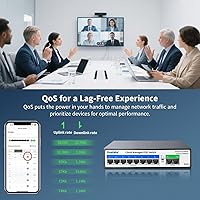
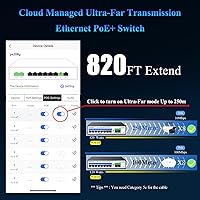
On the port side, this PoE switch gives you eight PoE+ ports running at 100Mbps each, alongside two full-gigabit uplinks to your router or NAS. That 100Mbps cap is worth flagging upfront — it handles standard 1080p cameras and VoIP phones without issue, but if you're planning to push 4K streams or run a heavy NVR, you'll want to factor that in. The total power budget is shared across all ports, so running six or more devices simultaneously requires some planning. You also get VLAN segmentation, QoS prioritization, port mirroring, and cloud-based access — all legitimate tools. An extend mode can push signal further than typical, though real-world reach varies with cable quality.

Best For

This 10-port switch hits its stride in small-scale network deployments — a home security setup with four to six IP cameras, a small office with wireless access points to power, or a home lab where VLAN separation between networks actually matters. The fanless operation makes it a natural fit for living spaces or front-office environments where noise would be disruptive. If you're new to managed switches, the cloud app and web interface lower the barrier considerably — no command line required. The built-in surge protection also makes it a reasonable pick for installations where cameras are mounted outdoors and exposed to the elements.

User Feedback

Early buyers of the Goalake managed switch tend to highlight how straightforward the initial setup is — most report having devices powered and online within minutes. The quiet, fanless operation draws consistent positive mentions, particularly from users who placed it in a home office or bedroom closet. Where opinions get more mixed is around the cloud management app, with some finding it intuitive and others noting occasional connectivity hiccups. A few reviewers flagged the 100Mbps PoE port speed as a real limitation when pairing with higher-resolution cameras. Long-term durability data is still thin given the product's relatively recent launch, so reliability over time remains something to watch.

Pros

  • Managed features like VLAN and QoS are genuinely rare at this price tier, making it exceptional value for budget-conscious buyers.
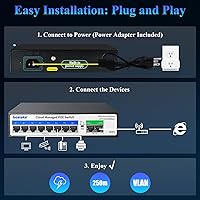
  • Plug-and-play setup means most users can have devices powered and running within minutes, no IT background required.
  • The fanless metal build keeps operation completely silent — a real plus for home offices or living spaces.
  • Cloud management app lets you monitor and tweak network settings remotely without being on-site.
  • Built-in surge protection offers a meaningful safety layer for outdoor camera installations exposed to the elements.
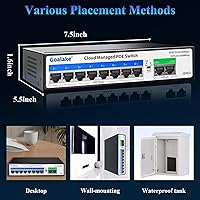
  • Wall-mount or desktop flexibility makes placement easy in tight or unconventional spaces.
  • The extend mode can push PoE signal across longer cable runs, useful for covering larger properties without signal repeaters.
  • A one-year replacement warranty provides reasonable peace of mind for a budget-tier networking device.
  • Compact footprint and low weight make it easy to relocate or reposition as your setup evolves.
  • Supports a solid range of standard PoE-powered devices including cameras, access points, VoIP phones, and more.

Cons

  • The 100Mbps speed on PoE ports can bottleneck high-resolution camera streams, especially in 4K or multi-stream NVR setups.
  • Shared power budget across all ports requires careful planning — maxing out every port simultaneously may not be feasible.
  • The brand has limited long-term reliability data given how recently this product entered the market.
  • The cloud management app has drawn mixed feedback, with some users reporting occasional connectivity inconsistencies.
  • Uplink ports are limited to just two, which may constrain more complex or multi-switch network topologies.
  • No CLI access means experienced network administrators will find the management options too restrictive for advanced configurations.
  • Extend mode performance degrades at longer distances and is dependent on cable quality, which the product page understates.
  • As a lesser-known brand, community support resources, firmware update history, and long-term software maintenance are uncertain.
  • Only a single power cord is included — no rack-mount ears or additional mounting hardware beyond basic wall-mount capability.

Ratings

The Goalake 10-Port Managed PoE Switch was evaluated by our AI rating engine after parsing verified buyer reviews from multiple global marketplaces, with spam, bot activity, and incentivized feedback actively filtered out to ensure accuracy. Scores reflect the honest consensus of real-world users across a range of home, small office, and security camera deployment scenarios. Both the genuine strengths and the recurring pain points are transparently factored into every category below.
Value for Money
93%
Buyers consistently describe this PoE switch as punching well above its price class, particularly because managed features like VLAN and QoS are rarely available at this cost tier. For users who just need a dependable powered switch for a home camera setup, the price-to-capability ratio is hard to argue with.
A handful of reviewers note that the savings come with trade-offs in port speed and brand maturity — factors that may generate additional costs down the line if the setup needs upgrading sooner than expected.
Ease of Setup
88%
Most buyers, including self-described beginners, report being up and running within minutes straight out of the box. The plug-and-play behavior works without touching any settings, which is exactly what non-technical users need when wiring up cameras or access points.
Some users who tried to configure VLANs or QoS rules via the web GUI found the interface less intuitive than expected, with a learning curve that catches beginners off guard once they move beyond basic connectivity.
Port Speed Performance
61%
39%
For standard 1080p IP cameras, VoIP phones, and wireless access points, the 100Mbps PoE ports handle day-to-day traffic without any noticeable issues. Users with modest camera systems report smooth, uninterrupted footage and reliable data transfer.
The 100Mbps ceiling is a genuine bottleneck for anyone running 4K cameras or high-bitrate NVR systems. Several buyers only discovered this limitation after purchase, leading to frustration when their higher-resolution setup underperformed expectations.
PoE Power Budget
74%
26%
Users running four to six standard cameras or access points report no power-related issues at all — the available wattage handles typical small-network loads comfortably without throttling or device dropouts.
Buyers who tried to push all eight ports with power-hungry devices simultaneously ran into budget constraints, with some reporting devices cycling off unexpectedly. The shared nature of the power pool is not prominently communicated, catching some users off guard.
Cloud Management App
67%
33%
Remote network visibility is genuinely useful for small business owners who want to check on their camera or office network without being on-site. When it works well, users appreciate seeing port status, traffic data, and device connections from a phone.
Reliability of the app is the most commonly cited frustration — several users report intermittent connectivity drops, slow refresh times, or occasional difficulty re-connecting after the switch reboots. For a feature marketed as a key differentiator, this inconsistency is a meaningful weak point.
Build Quality
81%
19%
The all-metal enclosure feels solid and noticeably more substantial than plastic-bodied switches in the same price range. Buyers who wall-mounted the unit comment positively on how sturdy it feels once installed, with no flex or rattling.
While the metal shell is reassuring, the Goalake managed switch is still a budget product and some users note that port connectors and LED indicators feel less refined than comparable units from more established networking brands.
Noise & Fanless Operation
94%
Completely silent operation is one of the most uniformly praised aspects across buyer reviews. Users who placed this switch in home offices, living spaces, or bedroom server corners specifically called out the lack of fan noise as a deciding factor and a genuine relief in daily use.
A very small number of users in warmer climates or poorly ventilated enclosures noted the chassis getting warm under sustained load, which is an inherent trade-off of passive cooling — though no thermal failures were commonly reported.
VLAN & QoS Features
72%
28%
For users who understand what VLANs are and why they matter — like separating camera traffic from a main office LAN — the 802.1Q support works as advertised. Home lab users also appreciated being able to experiment with QoS without paying for enterprise gear.
The implementation feels basic compared to more polished managed switches, and documentation on how to actually configure these features is thin. Users with no prior managed networking experience often needed to seek outside guides to get VLAN rules working correctly.
Extend Mode Range
69%
31%
For users with distant outdoor cameras that would otherwise require a secondary switch or signal booster, the extended cable reach mode offers a practical workaround that saves both money and installation complexity.
Real-world results vary significantly based on cable quality and environment, and the substantial throughput reduction at longer runs is not clearly communicated upfront. Several buyers expected full performance at extended range and were disappointed by the actual result.
Lightning & Surge Protection
83%
Security camera installers running cables to outdoor locations specifically highlighted the built-in surge protection as a meaningful differentiator. It provides a layer of protection that many competing budget switches omit entirely, and the dual-level design adds credibility to the claim.
There is limited independent verification of the protection rating under real-world lightning conditions, and buyers in high-risk areas may still want an additional external surge protector for critical equipment as a belt-and-suspenders approach.
Web GUI Usability
66%
34%
Users comfortable with basic networking concepts found the web interface functional and logically organized for day-to-day monitoring tasks. Accessing port statistics and toggling basic settings is straightforward once the interface layout is familiar.
The GUI design feels dated, and several users flagged inconsistent behavior between browser types. Advanced configuration tasks like setting up multiple VLANs require a level of patience that the interface does not always reward, especially for first-time managed switch users.
Mounting Flexibility
78%
22%
The ability to switch between wall-mount and desktop placement without additional brackets is genuinely convenient during initial setup. Users appreciated being able to test it on a desk before committing to a permanent wall installation.
No rack-mount ears are included, which limits options for users who want to integrate this switch into a standard networking cabinet. The wall-mount hardware provided is minimal, and some reviewers found the included mounting solution less sturdy than ideal for heavier installations.
Compatibility
86%
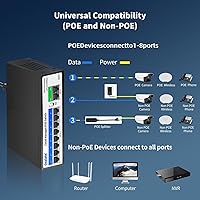
Buyers report broad compatibility with IP cameras, wireless access points, VoIP phones, and standard computers across a wide range of brands. The IEEE standard compliance means most PoE-capable devices connect and power up without any configuration adjustments.
Passive PoE devices — common in some older camera systems and certain budget access points — do not receive power from this switch, a limitation that trips up buyers who are not familiar with the distinction between active and passive PoE.
Long-Term Reliability
63%
37%
Early adopters who have been running this 10-port switch for several months report stable performance without unexpected failures, which is encouraging for a newer product from a less-established brand.
The product launched in early 2025, meaning there is simply not enough long-term data to assess multi-year durability with confidence. Brand track record and firmware update cadence are also unknowns, which introduces real uncertainty for buyers expecting a five-plus year lifespan.
After-Sales Support
71%
29%
The one-year replacement warranty is a reasonable commitment for this price tier, and some buyers report positive experiences getting replacements processed through Amazon without significant friction.
Direct manufacturer support response times and the depth of technical assistance available are inconsistent based on buyer feedback. Users who encountered firmware or configuration issues found the support resources thin compared to more established networking brands.

Suitable for:

The Goalake 10-Port Managed PoE Switch is a practical fit for anyone building or expanding a small network on a limited budget without wanting to sacrifice all management capability. Home users running a handful of IP cameras around their property will find the per-port power delivery and extended cable reach genuinely useful for covering larger areas without extra hardware. Small business owners who need to segment guest Wi-Fi from internal traffic using VLANs — but have no interest in learning enterprise-grade CLI tools — will appreciate the web GUI and cloud app approach. Security camera installers looking for a compact, wall-mountable unit that can sit quietly in a utility room or hallway closet without generating fan noise will find this switch a natural choice. It also suits first-time home lab builders who want hands-on exposure to managed networking concepts like QoS and port mirroring at a price point where the learning curve is low-stakes.
Not suitable for:

The Goalake 10-Port Managed PoE Switch is not the right tool if your camera system relies on high-resolution 4K feeds or if you're running a network video recorder that demands sustained high-throughput on every port — the 100Mbps ceiling on the PoE ports is a real constraint in those scenarios, not a minor footnote. Anyone managing a growing office network where reliability history and long-term vendor support matter should be cautious; this is a relatively new product from a lesser-known brand, and multi-year durability data is simply not available yet. Power users who want granular CLI control, advanced routing features, or integration with professional network management platforms will quickly outgrow what this switch offers. If you're powering eight devices simultaneously that each draw close to the per-port maximum, the shared power budget may become a limiting factor, so high-density deployments with power-hungry endpoints are a poor match.
Specifications

  • PoE Ports: Eight 100Mbps ports support IEEE 802.3af/at Power over Ethernet, delivering up to 30W per connected device.
  • Uplink Ports: Two dedicated Gigabit uplink ports connect this switch to a router, NAS, or upstream network infrastructure at full 1Gbps speed.
  • Power Budget: The shared PoE power pool across all eight powered ports totals 120W, requiring load planning when running many high-draw devices simultaneously.
  • Enclosure: The chassis is constructed from metal with a fanless passive cooling design, making it completely silent during normal operation.
  • Dimensions: The unit measures 7.5″ long by 5.5″ wide by 1.6″ tall, making it compact enough for shelf, desktop, or wall placement.
  • Weight: At 1.98 pounds, the switch is light enough to wall-mount without heavy-duty fixings.
  • Mounting Options: Supports both flat desktop placement and wall mounting, with no rack-mount ears included.
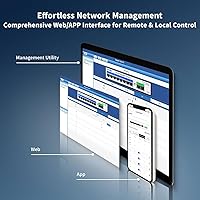
  • Management: Network configuration is accessible via a web-based GUI, a cloud management app, and free companion software — no command-line interface is available.
  • Supported Features: Managed capabilities include 802.1Q VLAN segmentation, QoS prioritization, port mirroring, storm control, static MAC addressing, and auto MDI/MDI-X.
  • Flow Control: Supports IEEE 802.3X full-duplex flow control and backpressure-based half-duplex flow control for congestion management.
  • Extend Mode: An optional extend mode can push PoE signal up to 250 meters under favorable cable conditions, though throughput is reduced at longer distances.
  • Lightning Protection: Dual-level 4KV surge protection is built in to help safeguard connected devices and the switch itself from electrical spikes.
  • PoE Standard: Compliant with IEEE 802.3af and 802.3at, making it compatible with standard PoE and PoE+ powered devices.
  • Warranty: Covered by a one-year replacement plan from the order date, with customer support provided by the manufacturer.
  • In the Box: Package includes the switch unit, one power cord, and a printed user manual — no additional mounting hardware or patch cables are included.

Related Reviews
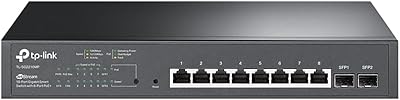
TP-Link TL-SG2210MP Jetstream 10-Port Gigabit Smart Managed PoE Switch
86%
91%
Value for Money
88%
Performance
93%
Ease of Setup
85%
Build Quality
89%
PoE Power Delivery
More
MokerLink POE-G082G 10-Port Gigabit PoE Switch
78%
94%
Ease of Setup
88%
PoE Reliability
83%
Build Quality
91%
Value for Money
71%
Thermal Management
More
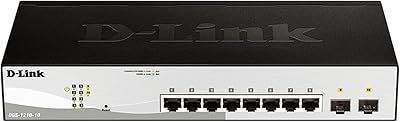
D-Link DGS-1210-10 10-Port Gigabit Smart Managed Switch
88%
88%
Performance & Speed
91%
Build Quality
85%
Ease of Setup
94%
Fanless Design (Noise Level)
90%
Security Features
More
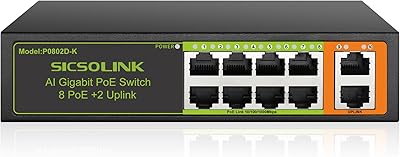
SICSOLINK 10-Port PoE+ Switch
85%
91%
Value for Money
96%
Ease of Installation
84%
Build Quality
89%
Performance Reliability
93%
Noise Level
More
YuLinca 6-Port Gigabit PoE Switch with 4 PoE+ Ports
87%
95%
Ease of Installation
88%
PoE Functionality
91%
Build Quality
87%
Performance and Speed
94%
Fanless Operation (Noise)
More
NICGIGA NOS-FS0820GP 10-Port Outdoor PoE Switch
77%
93%
Ease of Setup
87%
Weatherproofing
84%
PoE Reliability
79%
Build Quality
82%
Lightning Protection
More
Goalake 19-Port 240W Managed PoE Switch
77%
91%
Value for Money
88%
Port Count & Layout
72%
PoE Power Delivery
89%
Ease of Setup
63%
Management Interface
More
YuLinca G1002G 8-Port PoE Gigabit Switch
79%
94%
Ease of Setup
89%
Value for Money
82%
PoE Performance
76%
Build Quality
67%
Thermal Management
More
NETGEAR GS110TP 8-Port PoE+ Gigabit Smart Switch
83%
88%
PoE Reliability
83%
Build Quality
79%
Web Management Interface
61%
NETGEAR Insight Cloud App
74%
VLAN & Segmentation
More
TP-Link TL-SG2218P Smart Managed PoE Switch
82%
78%
PoE Performance
88%
Omada SDN Integration
83%
Web Interface & Usability
86%
Build Quality
81%
Fan Noise
More

FAQ

This PoE switch works with any camera that supports the IEEE 802.3af or 802.3at standard, which covers the vast majority of IP cameras on the market today. Brand doesn't matter — if your camera is PoE-compatible, it should work. The one caveat is passive PoE devices, which are not IEEE-compliant and won't receive power from this switch without an active PoE splitter in between.

For standard 1080p cameras, 100Mbps is more than enough — you'd typically use only a fraction of that per camera. Where it starts to matter is with 4K cameras or setups where multiple high-bitrate streams run simultaneously to an NVR. If your system is 4K-heavy, you'll want to check your camera's actual bandwidth requirements against what this switch can deliver per port before committing.

The total PoE power available is shared across all ports, so if every device demands the maximum per-port draw simultaneously, the switch will prioritize ports based on connection order and may throttle or shut off power to lower-priority ports. In practice, most devices like cameras and access points draw well under the per-port maximum, so this becomes an issue mainly in dense, high-draw deployments. It's worth adding up the actual power draw of your devices before assuming full capacity is always available.

Not at all. Out of the box it functions as a standard plug-and-play switch — just connect your devices and they'll get power and data immediately without any configuration. The web GUI and cloud app are designed for users who want to go further with VLANs or QoS but aren't comfortable with command-line tools. Most users report having everything up and running within a few minutes.

Extend mode reduces port speed to push the PoE signal further than the standard 100-meter Ethernet limit — up to around 250 meters under ideal conditions with quality cabling. It's a useful feature for reaching distant outdoor cameras without installing a secondary switch, but results vary with cable quality and environmental factors. Treat the 250-meter figure as a ceiling, not a guarantee, and use good-quality Cat5e or Cat6 cable for best results.

Yes — all ports pass data regardless of whether a device is PoE-compatible. If you plug in a standard laptop or printer, the switch simply won't send power to it, which is harmless. The device will communicate on the network just fine, it just won't receive any electrical power through the cable.

Yes, the cloud management interface is designed specifically for remote access. As long as the switch is connected to the internet, you can log into the management platform from anywhere to check port status, adjust configurations, or troubleshoot. Some users have noted the app experience can be inconsistent at times, so it's worth testing remote access thoroughly after setup.

Fanless metal switches like this one rely on the metal chassis itself to dissipate heat passively. For typical home or small office loads, this works well and the unit should remain cool to warm, not hot. In very high-ambient-temperature environments or fully enclosed cabinets with no airflow, heat could become a concern — make sure there's at least some passive ventilation around the unit.

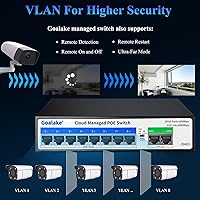
It does support 802.1Q VLAN tagging, which lets you logically separate network traffic — for example, keeping security cameras on an isolated network away from your main computers. Setting it up through the web interface is reasonably straightforward if you understand the basic concept of VLANs. It's not as polished as enterprise-grade tools, but for separating IoT or camera traffic from your main LAN, it gets the job done.

The warranty covers defective units within the first year from your order date, with the manufacturer offering replacements rather than repairs. Support is handled directly by Goalake. As with many emerging brands, response times and support quality can vary, so it's worth keeping your order confirmation handy and reaching out through Amazon if direct contact proves slow.