Overview

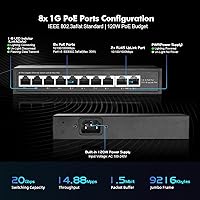
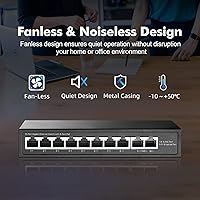
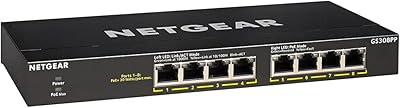
The YuLinca G1002G 8-Port PoE Gigabit Switch is a compact, unmanaged switch designed for home users and small offices that want to power PoE devices without buying a separate injector. Plug it in, connect your devices, and it just works — no login portals, no configuration files. The housing is all metal, which feels noticeably solid for the price, and because there is no fan, it runs completely silently. Eight ports share a combined 120W PoE budget, with two additional gigabit uplinks for your router or main switch. A genuinely practical piece of kit at this tier.
Features & Benefits

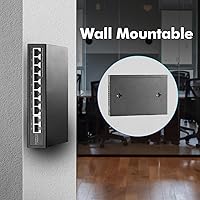
Every port on this fanless network switch tops out at gigabit speeds, and with a 20Gbps switching fabric underneath, you will not hit a bottleneck even if multiple devices are pulling data at once. The built-in power supply is a real convenience — unlike cheaper switches that ship as bare units and require a separate injector, everything you need is already inside the box. Auto MDI/MDI-X means any cable works in any port without fussing over crossover types. Each port has its own LED so you can immediately see what is active. Wall-mount brackets are included, which is a thoughtful touch at this price.

Best For

This PoE switch is a natural fit for anyone setting up a small camera system, adding a few wireless access points, or building out a basic smart-home network. If you are powering standard 802.3af or 802.3at devices — IP cameras, VoIP handsets, or similar — it handles them without complaint. That said, be aware of one important limitation: if you try to run all eight ports near their 30W maximum simultaneously, you will exceed the 120W shared budget. Also, this switch does not support passive 24V PoE, so Ubiquiti gear relying on that standard will not get power here. For everyone else, it is a practical, no-hassle choice.

User Feedback

Buyers consistently highlight two things: how easy the setup is and how quiet it runs in practice. Most people seem to install it, plug in their cameras or access points, and never think about it again — which is exactly what you want from an unmanaged switch. The metal chassis earns appreciation given the price, though a few reviewers note it does run warm under a sustained full load, so ventilation around the unit matters. Long-term reliability reports are mostly positive after several months of continuous operation. The per-port LEDs are generally praised for being clear and easy to read at a glance.

Pros

  • Plug-and-play setup means most users are fully running in under five minutes with zero configuration.
  • The all-metal case feels noticeably more durable than plastic alternatives at this price tier.
  • Completely silent operation makes it easy to place in living spaces or quiet office environments.
  • Built-in power supply eliminates the need for a bulky external adapter or separate PoE injector.
  • All 10 ports run at true gigabit speeds, so there is no speed penalty for connecting older 100Mbps devices.
  • Per-port LED indicators make it easy to diagnose connectivity issues at a quick glance.
  • Supports both 802.3af and 802.3at standards, covering the vast majority of consumer and prosumer PoE devices.
  • Wall-mount and desktop placement options give real flexibility for tight or unconventional spaces.
  • Auto MDI/MDI-X on every port means any patch cable works without worrying about crossover compatibility.
  • Solid value for anyone who needs PoE capability on a tight hardware budget.

Cons

  • The 120W power budget is shared, so loading all eight ports with high-draw devices simultaneously can cause power drops.
  • No management interface means zero visibility into traffic, port utilization, or network errors.
  • VLANs and QoS are completely unsupported, which rules it out for any network requiring traffic segmentation.
  • Passive 24V PoE devices — common in older Ubiquiti gear — will not receive power from this switch.
  • The unit can run noticeably warm under sustained full-PoE load, so placement in a confined or enclosed space is risky.
  • Only a 2K MAC address table limits scalability in environments with many networked devices.
  • No dedicated console or web UI makes troubleshooting a guessing game when something goes wrong.
  • Long-term reliability data from the brand is thinner than for more established networking manufacturers.

Ratings

The scores below reflect AI analysis of verified global buyer reviews for the YuLinca G1002G 8-Port PoE Gigabit Switch, with spam, bot-generated, and incentivized feedback actively filtered out to ensure accuracy. Each category captures the honest consensus from real-world users across home, small-office, and DIY networking deployments. Both the strengths that earned repeat buyers and the friction points that frustrated others are transparently represented in every score.

Ease of Setup
94%
Buyers consistently describe setup as genuinely effortless — unbox, plug in the power cable, connect devices, and everything negotiates automatically. Network beginners especially appreciate having no login screen, no app to install, and no instructions to decode. It simply starts working.
Because it is entirely unmanaged, users who later need to adjust anything — even something minor like checking port status — have no interface to turn to. For a small number of buyers who expected at least a basic web UI, the zero-config nature felt more like a limitation than a feature.
Value for Money
89%
Getting eight PoE+ ports, a built-in power supply, and a metal enclosure at this price point is genuinely hard to argue with. Most buyers feel the switch punches above its weight relative to what comparable units cost just a few years ago, particularly for home camera or access point setups.
A handful of users point out that the savings feel less clear-cut once they factor in the limited MAC table and lack of any management features — both of which can force an upgrade sooner than expected for growing networks. The value equation is strong for small, static setups but weakens quickly beyond that.
PoE Performance
82%
18%
Under realistic loads — three or four cameras plus an access point — this fanless network switch delivers stable, consistent power without dropouts. Users running standard 802.3af devices report that ports stay live for months without intervention, which is exactly what a set-and-forget home system requires.
The shared 120W budget becomes a real constraint when buyers try to load six or more high-draw devices simultaneously. Several users report ports cycling or dropping power intermittently under heavy combined load, which is a predictable consequence of the power ceiling rather than a defect, but still catches people off guard.
Build Quality
76%
24%
The all-metal case is the first thing users notice and comment on positively, especially after handling plasticky competitors. For a budget-tier switch, it feels reassuringly solid in hand, and the finish holds up well after months of continuous operation on a shelf or wall.
While the chassis is metal, the internal components are clearly built to a cost, and some long-term users note that the housing can develop warmth that feels more intense than expected on the underside. The port connectors feel adequate rather than robust — nothing alarming, but not the tight tolerances you get from premium networking brands.
Thermal Management
67%
33%
For light to moderate workloads, the passive cooling approach works well enough. Users running four or five mid-draw devices in an open, ventilated spot report the unit staying warm but manageable, and the complete absence of fan noise is genuinely appreciated in bedroom or living room deployments.
Under sustained full-port PoE load, multiple buyers report the unit getting uncomfortably hot — hot enough to be a concern in a poorly ventilated cabinet or closet. The side vents need clear airspace to function, and a few users who ignored this experienced thermal throttling or unexpected reboots over time.
Port Count and Layout
86%
Having eight PoE ports plus two dedicated uplinks in a single compact unit covers the majority of small home and office scenarios without needing a second switch. The physical layout keeps data uplinks clearly separated from PoE device ports, which makes cabling intuitive even for first-time installers.
Ten ports total will feel limiting fairly quickly for anyone whose network grows beyond a handful of devices. The uplink ports are standard gigabit only — there is no SFP or 2.5G option — which means the switch can become a throughput bottleneck on faster broadband connections feeding multiple busy clients.
Noise Level
97%
This is one area where the switch is virtually perfect for its intended use case. With no fan whatsoever, it produces absolutely zero operating noise under any load condition, making it an ideal choice for desks, reception areas, and home entertainment setups where silence is a genuine priority.
There is essentially nothing negative to say about noise specifically — the fanless design delivers exactly what it promises. The only indirect trade-off is that eliminating the fan puts more thermal responsibility on the metal chassis and ambient airflow, which circles back to placement considerations.
Long-Term Reliability
73%
27%
A solid portion of buyers report the switch running continuously for a year or more without a single reboot or port failure, which is encouraging for a product at this price. For straightforward home camera and access point setups with stable power, it tends to just sit quietly and do its job.
There is a noticeable subset of reviews describing failures or port degradation after twelve to eighteen months of heavy use, which is a shorter lifespan than comparable units from more established networking brands. Brand support and warranty resolution have also drawn criticism from buyers who needed post-purchase assistance.
LED Indicators
83%
The per-port LEDs are bright, clearly visible in normal room lighting, and give an immediate read on which ports are active and passing traffic. Users troubleshooting basic connectivity issues — like a camera that went offline — find them genuinely useful for quick diagnostics without any tools.
The indicators only show link and data activity — there is no visual distinction between 10Mbps, 100Mbps, and 1Gbps link speeds, which some users find frustrating when trying to confirm that a device has negotiated a full gigabit connection. A speed indicator LED would have added meaningful practical value.
PoE Compatibility
71%
29%
For devices using standard 802.3af or 802.3at — the vast majority of IP cameras, access points, and VoIP phones sold today — compatibility is broad and reliable. Users rarely encounter power negotiation issues with mainstream brands like Hikvision, Dahua, or Cisco phones.
The lack of passive 24V PoE support is a meaningful limitation that catches buyers off guard, particularly those in the Ubiquiti ecosystem where older hardware relies on non-standard passive power. There is no workaround available on this switch, meaning affected users must return it or use separate injectors for incompatible devices.
Physical Footprint
88%
At roughly the size of a thick paperback book, this PoE switch tucks neatly onto a shelf, behind a monitor, or onto a wall bracket without dominating the space around it. Users with cramped server corners or small home office setups specifically call out the compact dimensions as a deciding factor in their purchase.
The compact size does come with the trade-off of limited port spacing, which can make plugging in several bulky RJ45 connectors or right-angle adapters simultaneously a tight squeeze. Users with thick or stiff patch cables occasionally report difficulty getting all ports cleanly seated side by side.
Cable Flexibility
91%
Auto MDI/MDI-X on every port means users can grab any patch cable from their drawer — straight-through, crossover, old or new — and it will work without thought. This is a small but genuinely appreciated convenience, especially for non-technical buyers who would not know the difference between cable types anyway.
There is very little to criticize here from a practical standpoint. The auto-sensing works as advertised across all tested cable types, and no buyers report compatibility issues related to cable type specifically. The 100-meter distance limit is standard and well-documented.
Mounting and Placement
84%
Shipping with both desktop rubber feet and wall-mount hardware is a thoughtful move that eliminates a common frustration with budget switches. Wall-mounting it near a patch panel or camera DVR saves desk real estate and keeps the installation looking tidy, and the unit is light enough that basic wall anchors hold it securely.
The wall-mount bracket is functional but basic — the screw spacing is fixed, and users with non-standard stud or anchor configurations occasionally need to improvise. A few buyers also note that wall mounting positions the ventilation slots in a way that slightly reduces airflow compared to horizontal desktop placement.
Network Management
31%
69%
For buyers who explicitly want a zero-touch switch — particularly beginners or anyone who just needs devices connected and powered — the complete absence of management is not a drawback at all. It removes complexity entirely and means there is nothing to misconfigure, lock yourself out of, or update.
For anyone who needs VLANs, QoS, port mirroring, SNMP monitoring, or even basic traffic visibility, this switch simply has nothing to offer. There is no web interface, no app, and no CLI — ever. Users who discover this limitation after purchase often feel it should have been made more prominent in the product listing.
Packaging and Documentation
69%
31%
The switch arrives well-protected, and the included power cable, mounting hardware, and a basic multilingual guide cover the essentials for most buyers. Everything needed for a first installation is in the box, which is convenient for users who just want to get started immediately.
The included documentation is sparse and relies heavily on diagrams rather than explanatory text, which can leave less experienced users uncertain about edge cases like the 120W power budget or passive PoE incompatibility. A more informative quick-start card would go a long way for the target audience of network beginners.

Suitable for:

The YuLinca G1002G 8-Port PoE Gigabit Switch is a strong match for home users and small-office setups where simplicity and silence matter more than advanced management features. If you are installing a handful of IP cameras around your property, adding wireless access points to extend your Wi-Fi coverage, or powering a few VoIP desk phones, this switch handles all of those scenarios without requiring you to touch a single configuration screen. It is particularly well-suited to network beginners who just want something that works the moment it is plugged in — no CLI, no web interface, no learning curve. The fanless design also makes it a natural choice for living rooms, reception areas, or any space where the hum of a cooling fan would be genuinely annoying. DIY smart-home builders who need to consolidate several PoE devices into one tidy, wall-mountable unit will find it a practical and affordable solution.
Not suitable for:

Buyers with more demanding or specialized networking needs should look elsewhere before committing to this fanless network switch. The 120W total power budget is shared across all eight PoE ports, which means running six or more high-draw devices simultaneously — such as PTZ cameras or dual-band access points pulling close to 25W each — can push the switch past its limits and cause ports to drop power. There is also no management interface of any kind, so if you need VLANs, QoS prioritization, port mirroring, or traffic monitoring, this unit simply cannot provide them. Ubiquiti users relying on passive 24V PoE devices should be especially cautious, as this PoE switch only supports the 802.3af and 802.3at standards and will not supply power to passive 24V hardware. Larger deployments with more than eight powered devices will also need to look at a higher-capacity switch. Finally, anyone who prioritizes enterprise-grade reliability or needs a warranty-backed managed solution for a business-critical environment will likely want a more established brand at a higher price point.

Specifications

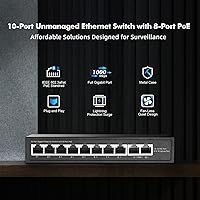
  • Total Ports: The switch includes 10 gigabit ports in total: 8 PoE+ ports for powered devices and 2 uplink ports for connecting to a router or upstream switch.
  • Switching Capacity: The internal switching fabric runs at 20Gbps, which is enough headroom for all 10 ports to operate at full gigabit speed simultaneously without congestion.
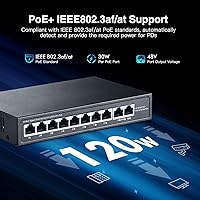
  • PoE Standards: Ports 1 through 8 support both IEEE 802.3af (up to 15.4W per port) and IEEE 802.3at (up to 30W per port), covering the majority of modern PoE devices.
  • PoE Power Budget: The total shared PoE output is capped at 120W across all eight powered ports, meaning average available power per port decreases as more devices are connected.
  • PoE Output Voltage: PoE ports deliver a nominal output voltage of 48V DC (operating range 44–57V), which is standard for 802.3af and 802.3at compliant devices.
  • Input Voltage: The built-in power supply accepts universal AC input from 100V to 240V, making it compatible with standard wall outlets in most countries.
  • Dimensions: The unit measures 180 x 120 x 32mm (approximately 7.1″ x 4.7″ x 1.3″), making it compact enough for desktop use or discreet wall mounting.
  • Weight: The switch weighs 0.71kg (1.76 lbs), which is light enough for wall mounting without requiring heavy-duty fixings.
  • Case Material: The enclosure is constructed from metal, which aids passive heat dissipation and provides better physical durability than typical plastic housings in this price range.
  • Cooling: The switch uses entirely passive fanless cooling with dual side vents, producing zero noise during operation under normal load conditions.
  • Packet Forward Rate: The forwarding rate is 14.88Mpps, which is sufficient to handle full line-rate traffic across all gigabit ports without introducing latency.
  • MAC Address Table: The switch maintains a MAC address table of up to 2,000 entries, suitable for small home or office networks with a limited number of connected devices.
  • Jumbo Frames: Jumbo frame support is limited to 2,048 bytes, which is below the standard 9,000-byte jumbo frame used in some NAS or high-throughput environments.
  • Cable Standard: All ports support Cat5 or higher UTP cabling at gigabit speeds over runs up to 100 meters (approximately 328 feet).
  • Auto MDI/MDI-X: Every port automatically detects cable type and adjusts accordingly, so straight-through and crossover cables are both accepted without any manual configuration.
  • LED Indicators: The front panel includes a PWR indicator for power status and individual green link/data LEDs for each of the 10 ports.
  • Mounting Options: The switch supports both flat desktop placement and wall mounting, with the necessary hardware included in the box.
  • Operating Temperature: The unit is rated for operating temperatures between -10°C and 50°C (14°F to 122°F), covering typical indoor environments.
  • Management: The switch is entirely unmanaged with no web interface, mobile app, or CLI access — configuration is automatic and requires no user intervention.
  • Network Protocols: Supported protocols include IEEE 802.3 (10Base-T), IEEE 802.3u (100Base-TX), IEEE 802.3ab (1000Base-T), and IEEE 802.3x for flow control.

Related Reviews

YuLinca 6-Port Gigabit PoE Switch with 4 PoE+ Ports
87%
95%
Ease of Installation
88%
PoE Functionality
91%
Build Quality
87%
Performance and Speed
94%
Fanless Operation (Noise)
More
BV-Tech POE-SW802G 8-Port Gigabit PoE+ Switch
79%
94%
Ease of Setup
88%
PoE Reliability
67%
Power Budget
61%
Build Quality
91%
Value for Money
More
LINOVISION POE-SW508G Industrial 8-Port PoE++ Switch
77%
91%
Power Delivery
88%
Build Quality
93%
PoE Watchdog
84%
Installation Ease
86%
Thermal Performance
More
Loocam 8-Port Gigabit PoE Switch
81%
92%
Ease of Setup
88%
PoE Power Budget
85%
Performance Stability
90%
Noise Level
80%
Build Quality
More
Cqenpr 8-Port Gigabit PoE Switch
87%
91%
Value for Money
89%
Ease of Setup
86%
Performance & Reliability
88%
Build Quality & Durability
92%
Outdoor Suitability
More
MokerLink 8-Port Outdoor Gigabit PoE Switch
81%
93%
Ease of Setup
84%
Build Quality
81%
PoE Performance
77%
Weather Resistance
89%
Gigabit Throughput
More
Reidubo 8-Port Gigabit PoE Switch 120W
86%
92%
Value for Money
89%
Ease of Setup
90%
Power Delivery
88%
Build Quality
85%
Performance Stability
More
YuanLey 8-Port 120W Gigabit PoE Switch
80%
91%
Value for Money
94%
Ease of Setup
78%
PoE Power Delivery
83%
Build Quality
74%
Thermal Performance
More
TRENDnet TPE-TG82G 8-Port Gigabit PoE+ Switch
86%
88%
Performance and Reliability
91%
Ease of Setup
83%
Power Efficiency
85%
Build Quality
89%
Compatibility with PoE Devices
More
NETGEAR GS308PP 8-Port PoE+ Gigabit Ethernet Switch
85%
93%
Setup & Installation
88%
Performance & Reliability
90%
PoE+ Functionality
84%
Build Quality & Design
91%
Noise Level (Fanless Design)
More

FAQ

Not at all. This is a fully unmanaged switch, which means you plug in the power cable, connect your devices with network cables, and it starts working automatically. There is no app, no web interface, and no configuration file to deal with — it just runs.

Technically yes, but there is an important caveat: the total PoE output across all eight ports is capped at 120W. If you connect eight devices that each draw close to 30W — like demanding PTZ cameras — you will exceed that budget and the switch may cut power to some ports. For typical home setups with standard IP cameras or access points drawing 10–15W each, running all eight simultaneously is usually fine.

No, and this is a genuine gotcha worth knowing upfront. The YuLinca G1002G 8-Port PoE Gigabit Switch only supports standard 802.3af and 802.3at PoE, not passive 24V PoE used by some older Ubiquiti hardware. Connecting a passive 24V device will not damage it — it just will not receive power through the cable.
It is completely silent. There is no fan at all — the metal case handles heat dissipation passively through ventilation slots on the sides. As long as you are not running it in a confined, unventilated space at full load for extended periods, you will never hear it.

Under a light to moderate load — a few cameras and an access point — it stays comfortably warm but not concerning. Users who load all eight ports heavily report it gets noticeably hot to the touch. Make sure there is some airflow around it and avoid tucking it tightly inside a cabinet with no ventilation.

No. Every port on the switch has auto MDI/MDI-X, which means it automatically figures out what type of cable you have plugged in. Any standard patch cable will work in any port — no crossover cables needed.

Yes, wall mounting is supported and the necessary mounting hardware is included in the box. The unit is light enough at under 1kg that a basic wall installation is straightforward.

Anything that draws power using the standard 802.3af or 802.3at protocol will work fine — IP cameras, Wi-Fi access points, VoIP desk phones, small LED lighting systems, and similar devices. As long as the device is not relying on passive 24V PoE or a proprietary power standard, you should be good.

It is better than you might expect at this price point. The metal case gives it a solidity that plastic budget switches often lack, and the LED indicators are clear and well-placed. That said, it is still a budget-tier product — the internal components are functional rather than enterprise-grade, so do not expect the same longevity you would get from a Netgear or TP-Link Pro unit.

The two uplink ports are standard gigabit Ethernet ports with no PoE — they are meant for connecting to your router or a larger upstream switch. If you need more than eight PoE endpoints plus two uplinks, you will need a larger switch, as this fanless network switch is designed for compact, small-scale deployments.