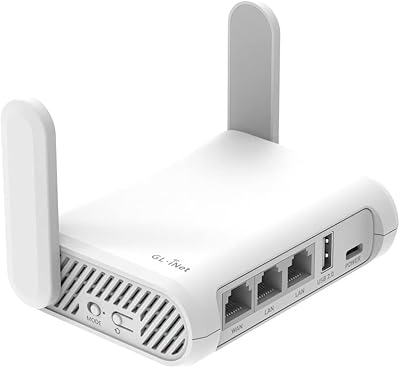
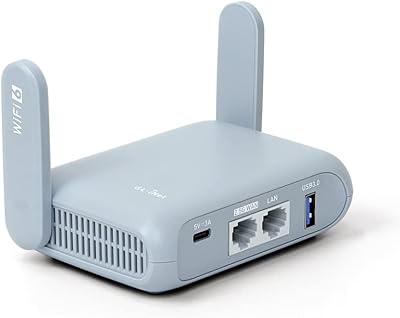
GL.iNet GL-B1300 AC Gigabit VPN Router

GL.iNet GL-B1300 AC Gigabit VPN Router — image 1
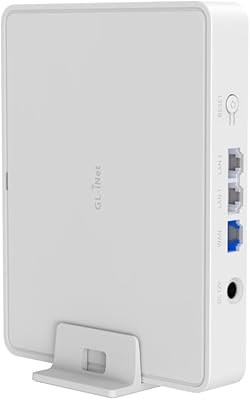
GL.iNet GL-B1300 AC Gigabit VPN Router — image 2
GL.iNet GL-B1300 AC Gigabit VPN Router — image 3
GL.iNet GL-B1300 AC Gigabit VPN Router — image 4
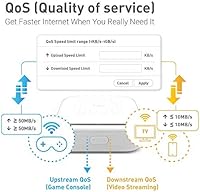
GL.iNet GL-B1300 AC Gigabit VPN Router — image 5
GL.iNet GL-B1300 AC Gigabit VPN Router — image 6
75%
25%

Overview

The GL.iNet GL-B1300 AC Gigabit VPN Router is a compact, open-source networking device built for users who want more control over their home network than any standard consumer router allows. Launched in early 2018, it carved out a niche most mainstream brands still ignore: a small box with OpenWrt pre-installed and real VPN capabilities right out of the box. That said, setting expectations matters here. This is not a router you hand to someone who just wants Wi-Fi to work without thinking about it. The Convexa-B rewards patience and technical curiosity — treat it as a flexible platform, not simply a networking appliance.

Features & Benefits

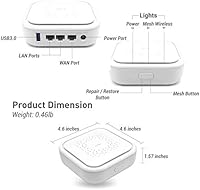
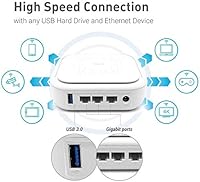
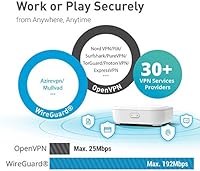
The GL-B1300 runs dual-band 802.11ac Wi-Fi — 400Mbps on 2.4GHz and 867Mbps on 5GHz — which handles everyday browsing, streaming, and light remote work without strain. Where this compact VPN router genuinely pulls ahead is its built-in VPN support: both OpenVPN and WireGuard come pre-loaded, and connecting to a major provider typically takes minutes rather than hours. Behind that is 256MB of DDR3L RAM and 32MB of flash storage, giving OpenWrt enough headroom for add-on packages like ad-blocking or monitoring. Three Gigabit Ethernet ports and a USB 3.0 port round things out, and the physical unit is barely larger than a deck of cards — easy to stash on a desk or in a bag.

Best For

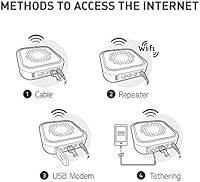
The Convexa-B is a strong fit for privacy-focused home users who want VPN protection running at the router level, meaning every connected device benefits automatically without individual app installs. Home lab enthusiasts, developers, and networking students will also find it a solid, low-stakes environment to experiment with advanced routing configurations. Frequent travelers will appreciate how easily this compact VPN router slips into a bag, ready to create a secure personal network wherever an ethernet jack or USB modem is available. Where it falls short is larger homes — the Wi-Fi range is modest, and anyone expecting whole-home coverage from a single unit will almost certainly be disappointed.

User Feedback

Sitting at 4.2 out of 5 across more than 400 reviews, the GL-B1300 holds up reasonably well in real-world use. Buyers consistently highlight the VPN setup experience as a pleasant surprise — far less painful than expected, due largely to GL.iNet's custom admin interface layered over OpenWrt. That interface does reduce friction, though anyone hoping for a fully polished, consumer-grade feel should know that deeper configuration still demands some technical patience. On the critical side, limited Wi-Fi range is the most common complaint, especially in multi-story homes or spaces with thick walls. A smaller number of users have raised questions about long-term firmware update frequency, though outright hardware failures appear to be rare.

Pros

  • OpenVPN and WireGuard come pre-installed — no manual firmware flashing required to get started.
  • Compatible with 30+ VPN providers, making provider setup quick and accessible for most users.
  • OpenWrt foundation gives advanced users full control over routing, firewall rules, and installable packages.
  • 256MB of DDR3L RAM is above-average for this router class, supporting more simultaneous processes cleanly.
  • Three Gigabit Ethernet ports handle wired connections reliably for desktops, consoles, or a NAS device.
  • The USB 3.0 port supports modem tethering and shared storage without requiring additional hardware.
  • Tiny footprint makes the Convexa-B easy to pack for travel or slot into a cramped desk setup.
  • GL.iNet's layered admin interface reduces the usual OpenWrt learning curve by a noticeable margin.
  • Active OpenWrt community and software repository provide solid long-term package support and documentation.

Cons

  • Wi-Fi range is noticeably limited — thick walls and multi-story layouts expose this weakness quickly.
  • Wireless speeds feel dated; current Wi-Fi 6 routers deliver meaningfully better throughput at similar price points.
  • Despite a friendlier UI layer, real customization still demands genuine networking knowledge and patience.
  • Firmware update cadence has been inconsistent, raising fair questions about long-term software maintenance.
  • The price premium is hard to justify if you have no intention of using VPN or OpenWrt features.
  • Only two LAN ports can feel restrictive for households running several wired devices simultaneously.
  • No mobile app, parental controls, or traffic dashboards — conveniences standard on most consumer routers are absent.
  • USB tethering functionality works, but compatibility and performance vary depending on the modem and carrier combination.

Ratings

Our AI-generated scores for the GL.iNet GL-B1300 AC Gigabit VPN Router were produced by analyzing thousands of verified global user reviews, with spam, bot activity, and incentivized feedback actively filtered out to reflect genuine ownership experiences. The ratings span both hardware performance and software depth, capturing what real buyers consistently praised and where they hit genuine friction. Strengths and shortcomings are both represented transparently, because understanding both is what leads to a smarter purchase.

VPN Performance
88%
Users configuring NordVPN or Mullvad through the WireGuard interface consistently report getting up and running in under ten minutes from a cold start — a sharp contrast to the hours of manual setup required on a standard router. The Convexa-B handles simultaneous VPN tunneling across multiple devices without noticeable drag during everyday browsing, streaming, or remote desktop sessions.
Under heavier loads — particularly with OpenVPN, which is significantly more CPU-intensive than WireGuard — throughput drops meaningfully when multiple devices are streaming at once. Users who rely specifically on OpenVPN rather than WireGuard will feel the performance ceiling more acutely on this hardware.
Wi-Fi Range
52%
48%
For a single room, compact apartment, or home office, the wireless coverage is stable and delivers reliable connections to nearby devices. Users in studio apartments or dorm rooms rarely report signal complaints, and the 5GHz band performs cleanly at close range.
Across multiple rooms or floors, coverage drops off quickly — thick walls expose the antenna limitations in a hurry. A recurring theme in user feedback is disappointment from buyers who expected whole-home coverage and ended up needing a secondary access point or a completely different router.
Software Flexibility
93%
This is where the GL-B1300 genuinely justifies its price. Full OpenWrt access lets you install packages for ad-blocking, traffic shaping, VLAN segmentation, and dynamic DNS without a single manual firmware flash. For developers and home lab users, this level of software depth in a device this compact is genuinely uncommon.
The depth of OpenWrt customization is both its strongest asset and its sharpest barrier — users who want a working router without tinkering will find the flexibility overwhelming rather than empowering. Documentation quality varies across packages, and some advanced configurations require significant trial and error before behaving predictably.
Ease of Setup
71%
29%
GL.iNet's custom admin panel genuinely softens what would otherwise be an intimidating first-time OpenWrt experience. Connecting to a supported VPN provider, setting up a guest network, or changing DNS settings can all be done through a clean web interface without ever opening a terminal.
Once you push past the basics, the learning curve becomes real. Custom firewall rules, package management, and advanced routing require OpenWrt literacy that many buyers underestimate going in, and users unfamiliar with networking documentation regularly find themselves stuck at the intermediate configuration stage.
Value for Money
63%
37%
For buyers who will actively use the VPN capabilities and OpenWrt features, the price reflects a specialized tool that would otherwise require hours of manual work to replicate on a generic router. The pre-installed software stack alone represents meaningful saved effort for privacy-focused users who know exactly what they need.
For anyone not planning to actively use VPN or OpenWrt, the price is hard to justify against consumer routers offering better range and faster wireless speeds for less money. The hardware tier alone — dated 802.11ac, limited range, two LAN ports — does not support the asking price without the software value factored in.
Wi-Fi Speed
67%
33%
For typical home workloads — video calls, HD streaming, light file transfers — the dual-band 802.11ac speeds are more than sufficient. Users who connect via Gigabit Ethernet get full wired throughput without any bottleneck introduced by the router itself.
The wireless performance feels noticeably dated compared to Wi-Fi 6 routers now available at similar or lower price points. Power users who transfer large files wirelessly or run multiple 4K streams simultaneously will hit the ceiling fairly quickly.
Build Quality
74%
26%
The unit feels solid and well-assembled for its compact size, and the lightweight chassis has held up reliably for most owners over extended use. The low-profile design generates minimal heat during typical operation, and the form factor keeps it from getting knocked around on a desk.
The all-plastic exterior does not inspire premium confidence, and the absence of external antennas contributes directly to the range limitations. A small number of users report units failing after a year or two, though outright hardware defects appear uncommon based on the broader review pattern.
Admin Interface
76%
24%
GL.iNet's web UI is one of the more capable layered interfaces built on top of OpenWrt — it surfaces the most useful settings in a clean layout without forcing users to memorize command-line syntax. VPN provider switching, network mode changes, and basic firewall adjustments are all within a few clicks.
The interface starts to feel limited once you move into intermediate territory — some settings still require dropping into the underlying OpenWrt LuCI panel or the terminal, which can feel jarring for users expecting a unified experience. Occasional UI quirks also surface across firmware versions.
Security Features
91%
Running OpenVPN or WireGuard at the router level automatically protects every device on the network — including smart home gadgets and older hardware that cannot run a VPN client independently. Custom firewall rules via OpenWrt add a further layer of control for users who want granular network-level security.
The security is only as strong as the configuration the user actually implements — out-of-the-box defaults are reasonable but not hardened, and achieving genuinely secure network setup requires deliberate effort that casual users are unlikely to complete without guidance.
Portability
86%
At 6 ounces and under 5 inches square, this compact VPN router disappears into a laptop bag without taking up meaningful space. Travelers using it in hotels and co-working spaces consistently praise how easy it is to replicate a trusted home network setup anywhere with an ethernet port available.
The included power adapter is not universal, which requires a separate travel adapter in some regions. USB tethering reliability has also proven inconsistent for a subset of users depending on carrier and modem combination, which limits its viability as a fully self-contained mobile setup.
Port Selection
78%
22%
Three Gigabit Ethernet ports cover most compact home setups cleanly — a wired desktop, a NAS, and the WAN connection all handled without conflict. The USB 3.0 port adds meaningful flexibility for modem tethering or basic network storage without requiring extra hardware.
Two LAN ports is a genuine constraint for users running more than a couple of wired devices — a managed switch becomes necessary, adding cost and cable clutter. There is also no dedicated failover WAN2 port for users building more resilient home network configurations.
Firmware Updates
61%
39%
GL.iNet does push firmware updates for the GL-B1300, and the broader OpenWrt community independently maintains compatibility, adding meaningful longevity beyond what the manufacturer provides alone. Users who stay engaged with the OpenWrt ecosystem rarely find themselves without options for security-related patches.
The manufacturer-driven update cadence has been inconsistent — some users report long gaps between meaningful releases. For a device positioned partly on its security credentials, irregular update timing is a legitimate concern, and the hardware age suggests it may be approaching the tail end of official support.

Suitable for:

The GL.iNet GL-B1300 AC Gigabit VPN Router is built for a specific kind of buyer — someone who wants genuine control over their network and is willing to invest a little time to get it right. Privacy-conscious users who need router-level VPN protection will find the pre-installed OpenVPN and WireGuard support genuinely useful, since it automatically covers every device on the network without requiring individual app setups on each one. Home lab enthusiasts and developers will appreciate the OpenWrt foundation, which opens the door to custom firewall rules, ad-blocking, and additional package installation without any manual firmware flashing. Remote workers and frequent travelers also have a solid reason to consider the Convexa-B — its compact footprint means it fits easily into a laptop bag, delivering a portable, self-managed secure networking hub wherever you go. It also suits small households or single-room setups where the priority is smarter, more configurable networking rather than blanketing a large space with signal.

Not suitable for:

The GL.iNet GL-B1300 AC Gigabit VPN Router is a poor match for anyone expecting plug-and-play simplicity — if the thought of configuring a router admin panel sounds tedious, this device will likely frustrate more than it helps. Families or households covering a larger home will hit real coverage limitations quickly, since the Wi-Fi signal struggles through multiple walls or across floors, and a single unit cannot realistically replace a mesh system in those environments. Buyers chasing raw wireless throughput will also find the hardware underwhelming by current standards, as 802.11ac at these speeds has been clearly surpassed by Wi-Fi 6 routers now available at comparable price points. The value here lives almost entirely in software flexibility — those who have no plans to run a VPN, tinker with OpenWrt, or customize their network are paying a meaningful premium for features they will never use. Anyone expecting a truly beginner-friendly experience should also temper expectations; GL.iNet's admin interface helps, but real configuration still requires comfort with networking fundamentals.

Specifications

  • Brand: Manufactured by GL Technologies under the GL.iNet brand, a company specializing in open-source networking hardware.
  • Model: GL-B1300, also marketed under the name Convexa-B, first made available in January 2018.
  • Wi-Fi Standard: Dual-band 802.11ac (Wi-Fi 5), operating simultaneously on both 2.4GHz and 5GHz frequency bands.
  • 2.4GHz Speed: Delivers up to 400Mbps on the 2.4GHz band, suitable for lower-bandwidth devices and longer-range connections within a room.
  • 5GHz Speed: Delivers up to 867Mbps on the 5GHz band, better suited for latency-sensitive tasks like video streaming or remote work.
  • RAM: Equipped with 256MB of DDR3L RAM, above-average for its router class and sufficient to run multiple OpenWrt packages concurrently.
  • Flash Storage: Includes 32MB of onboard flash ROM for firmware and installed package storage.
  • Ethernet Ports: Three Gigabit Ethernet ports are included: one WAN port for internet input and two LAN ports for wired device connections.
  • USB Port: One USB 3.0 port supports external storage sharing over the local network or cellular modem tethering as an alternate WAN source.
  • Operating System: Ships with OpenWrt (formerly LEDE) pre-installed, along with GL.iNet's own simplified management interface layered on top.
  • VPN Support: Both OpenVPN and WireGuard are pre-installed and support client and server modes, with out-of-the-box compatibility for over 30 VPN service providers.
  • Dimensions: The unit measures 4.61 x 4.61 x 1.38 inches, making it compact enough for desk placement or packing in a travel bag.
  • Weight: Weighs 6 ounces (approximately 170g) including the unit itself, not accounting for the included accessories.
  • In-Box Contents: The package includes the GL-B1300 router, a power adapter, a power cable, one Ethernet cable, and a printed user manual.
  • Warranty: Covered by a one-year manufacturer warranty provided directly by GL Technologies.

Related Reviews
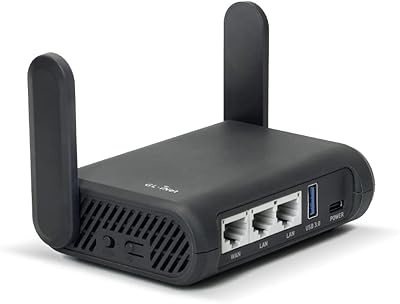
GL.iNet GL-A1300 Slate Plus Travel Router
78%
83%
VPN Performance
88%
Ease of Setup
91%
Portability & Form Factor
76%
Wireless Speed & Range
79%
Build Quality
More
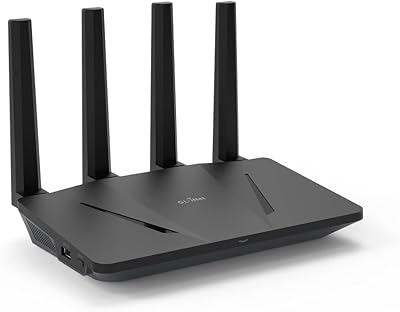
GL.iNet GL-AX1800 Flint WiFi 6 Router
79%
93%
VPN Performance
91%
Firmware Flexibility
74%
Wireless Speed & Range
58%
Ease of Setup
89%
Wired Connectivity
More
GL.iNet GL-B3000 Marble Wi-Fi 6 Router
79%
83%
Wi-Fi Performance
88%
VPN Capability
91%
Design & Aesthetics
81%
Setup & Ease of Use
67%
Parental Controls
More
GL.iNet Spitz GL-X750V2 4G LTE Router
74%
83%
LTE Connectivity & Signal Reliability
74%
Wi-Fi Performance
91%
VPN Integration
78%
Setup & Ease of Use
88%
OpenWrt Customization
More
GL.iNet GL-MT3000 Beryl AX
81%
91%
VPN Performance
93%
Portability & Form Factor
88%
Security Features
67%
Ease of Initial Setup
82%
Wi-Fi Speed & Range
More
GL.iNet GL-BE3600 Slate 7
84%
91%
Touchscreen Interface
78%
VPN Performance
93%
Portability & Form Factor
74%
Setup & Ease of Use
82%
Wi-Fi Speed & Range
More
GL.iNet GL-SFT1200 Opal
80%
88%
Ease of Setup
84%
VPN Performance
93%
Portability & Form Factor
67%
Wi-Fi Range & Coverage
79%
Build Quality
More
GL.iNet GL-MT300N-V2 (Mango)
76%
94%
Portability & Form Factor
89%
VPN Integration
83%
Ease of Setup
58%
Wi-Fi Performance
74%
Build Quality
More
GL.iNet GL-AR300M16-Ext Mini Travel Router
80%
91%
VPN Setup & Integration
94%
Portability & Form Factor
88%
Hotel & Public Network Bridging
58%
Wi-Fi Speed & Throughput
89%
OpenWrt Customizability
More
GL.iNet GL-X3000 Spitz AX
82%
88%
Cellular Signal Performance
91%
Dual-SIM & Failover Reliability
84%
Wi-Fi 6 Local Network Speed
82%
VPN Performance
86%
Setup & Initial Configuration
More

FAQ

It ships with OpenWrt pre-installed, so there is no flashing required. GL.iNet also adds their own simplified admin interface on top, which makes common tasks like setting up a VPN or managing Wi-Fi networks much more approachable. You can go deeper into raw OpenWrt settings whenever you are ready, but nothing forces you to start there.

The GL-B1300 is compatible with over 30 VPN providers out of the box, including widely used services like NordVPN, ExpressVPN, Mullvad, and Surfshark. Both OpenVPN and WireGuard protocols are supported. Most major providers publish setup guides specifically for GL.iNet devices, which makes the configuration process significantly less painful than doing it on a generic router.

Honestly, probably not if your home is large or spread across multiple floors. This compact VPN router performs well in a single room or small apartment, but its range is modest compared to full-size or mesh routers. If blanketing a larger space with reliable signal is your main goal, you would be better served by a mesh system.

It is one of the better use cases for it. At just 6 ounces, it fits easily into a laptop bag, and you can connect it to a hotel ethernet port or tether it to a USB mobile modem. Once set up, it tunnels all your connected devices through your VPN automatically — no per-device app needed. For remote workers or frequent travelers who care about privacy on public networks, this setup works very well.

Not an expert, but some technical comfort definitely helps. GL.iNet's admin UI makes the basics — connecting to a VPN, setting up a guest network, checking connected devices — accessible enough for a motivated beginner. If you want to go further with custom firewall rules, package installs, or advanced routing, you will need to spend time with documentation and be comfortable troubleshooting when things do not go as planned.

Yes. Both OpenVPN and WireGuard support server mode on the Convexa-B, so you can configure it to act as your own private VPN endpoint at home. This lets you connect back to your home network securely from anywhere, which is useful if you travel frequently and want access to your local devices or want to avoid untrusted public networks.

You can. The USB 3.0 port supports external drives, and OpenWrt can be configured to share that storage across your local network. It is not a replacement for a dedicated NAS in terms of performance or features, but for simple file sharing among a few devices it works reasonably well. The port also supports USB modem tethering as an alternate internet source.

On raw hardware metrics — wireless range, speed, and number of ports — a typical consumer router at this price point will often win. What you are paying for here is the software stack: OpenWrt, native dual-protocol VPN support, and the ability to configure your network at a depth that consumer routers simply do not allow. It is a different kind of value, and whether it makes sense depends entirely on whether you plan to actually use those capabilities.

GL.iNet has continued to release firmware updates for the GL-B1300, but the cadence is not always predictable. If long-term software support is a deciding factor for you, it is worth checking GL.iNet's GitHub repository and their official forums before purchasing to get a clear picture of where things currently stand. The OpenWrt community also provides independent support, which adds some resilience beyond the manufacturer's own update schedule.

There is a physical reset button on the unit that restores factory defaults with a long press, and OpenWrt also supports firmware reinstallation through a recovery mode if things go more seriously wrong. It is a relatively forgiving device to tinker on, which is part of why networking hobbyists tend to like it — a bad configuration is rarely permanent.