Overview

The GL.iNet GL-AR300M16-Ext Mini Travel Router has been quietly doing its job since 2017 — turning sketchy hotel Ethernet ports and airport Wi-Fi into a private, encrypted connection you can actually trust. It weighs about as much as a few coins, slips into any pocket or bag, and costs less than a decent dinner in most cities. That combination of open-source flexibility and genuine portability is rare at this price tier. It skews toward users who enjoy tinkering, but even if you just want to plug in and connect through a VPN, the web interface is straightforward enough to get you running in minutes.
Features & Benefits

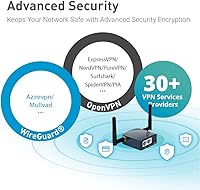
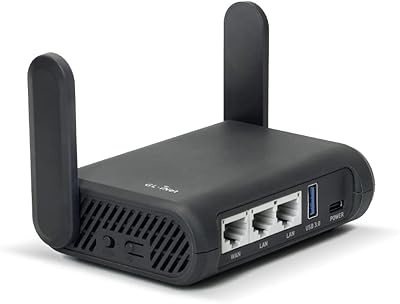
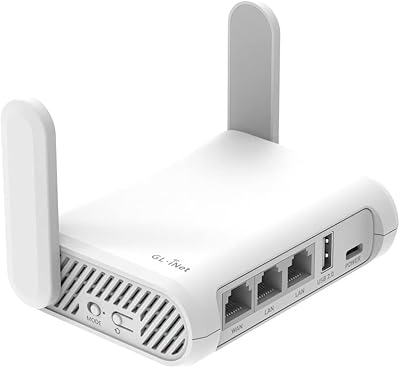
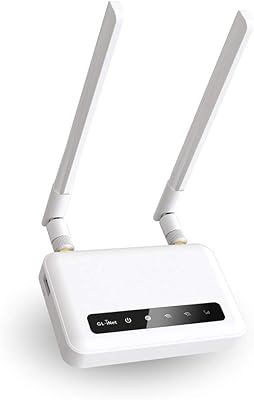
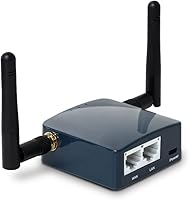
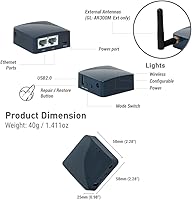
What makes the GL-AR300M16-Ext stand out is not any single spec — it is the combination. The router runs OpenWrt, an open-source operating system that lets you install custom firmware, run network-level ad blockers, or reconfigure traffic routing in ways factory routers simply won't allow. Both OpenVPN and WireGuard come pre-installed, so connecting to your existing VPN service takes minutes rather than a tech support session. Two detachable antennas deliver noticeably better range than competitors with internal antennas, and the dual Ethernet ports let you feed it a wired hotel connection while broadcasting Wi-Fi to all your devices. Power it from a USB port or power bank — no wall adapter required.

Best For

This pocket router is a natural fit for frequent travelers who check into a new hotel every few nights and don't want to wrestle with login portals or expose their devices to shared networks. Remote workers who run their own VPN server at home will find it especially useful — this travel router becomes a portable client that reconnects you to your home network wherever you land. Tech hobbyists who enjoy experimenting with network configurations will appreciate the OpenWrt platform and available GPIO pins for hardware projects. That said, if you stream 4K video or transfer large files over Wi-Fi regularly, the single-band 2.4GHz radio will feel limiting — this device is built for secure browsing, not raw throughput.

User Feedback

Across nearly 2,000 ratings, the GL-AR300M16-Ext holds a 4.3-star average, a solid result for a product this niche. Buyers consistently praise how quickly a VPN connection comes together through the web interface, and many note that hotel network bridging works without fuss. Build quality earns positive mentions too — it feels sturdy given its size. The main complaint centers on speed: single-band 2.4GHz won't impress anyone who streams or video calls heavily. A handful of users flag the firmware upgrade path as well — if you're still on v3.x firmware, an intermediate update is required before reaching the latest version, and that step is easy to miss. Technical users rate it higher; plug-and-play shoppers are sometimes disappointed.

Pros

  • OpenVPN and WireGuard are both pre-installed, so connecting to your existing VPN service takes minutes.
  • Weighing under 40 grams, this pocket router genuinely disappears into any travel bag or jacket pocket.
  • Powered by USB, so a laptop port or power bank is all you need — no wall adapter to pack or forget.
  • Two detachable external antennas provide noticeably better range than competing routers with internal antennas.
  • A single hotel network login covers all your devices at once, eliminating repeated captive portal interruptions.
  • OpenWrt support opens up advanced customization — network-level ad blocking, custom routing rules, and more.
  • Compatible with 30+ VPN providers out of the box, making it easy to use alongside an existing subscription.
  • Dual Ethernet ports allow simultaneous wired input and wired or wireless output in the same compact unit.
  • The 2-year warranty is reassuring for a sub-40-dollar device that travels as frequently as its owner.
  • A strong, active community around both GL.iNet and OpenWrt means troubleshooting resources are widely available.

Cons

  • Single-band 2.4GHz only — no 5GHz option means reduced speeds in congested hotel Wi-Fi environments.
  • Upgrading from older v3.x firmware requires an intermediate step that is easy to miss and poorly communicated.
  • Antenna connectors can loosen over time with repeated packing, unpacking, and reattachment during frequent travel.
  • Both Ethernet ports top out at 100Mbps, which limits wired performance even when faster upstream connections are available.
  • Repeater mode signal quality degrades more than expected when the upstream Wi-Fi source is already weak.
  • Some captive portal systems used by larger hotel chains can interrupt the bridged connection unexpectedly.
  • Low-output USB ports on older laptops may cause intermittent restarts under heavy VPN processing load.
  • Official documentation does not always keep pace with firmware updates, leaving some configuration questions unanswered.
  • The full OpenWrt interface, needed for advanced settings, has a steeper learning curve and feels inconsistent alongside the main GL.iNet UI.
  • Power banks with auto-shutoff features can cut power to the router during idle periods, disrupting active VPN sessions.

Ratings

The GL.iNet GL-AR300M16-Ext Mini Travel Router has been scored by our AI system after analyzing thousands of verified global buyer reviews, with spam, bot activity, and incentivized submissions actively filtered out. Scores reflect the honest distribution of real-world experiences — the genuine strengths travelers praise and the frustrations that show up repeatedly across regions and use cases. Nothing has been smoothed over.
VPN Setup & Integration
91%
Getting a VPN running on this travel router is genuinely fast — most users report being connected through OpenVPN or WireGuard within minutes of first boot, with no command-line knowledge required. Compatibility with over 30 VPN providers means most buyers can use their existing subscription without any workarounds.
A small portion of users struggled when their VPN provider used less common authentication configurations, requiring manual file imports. Those unfamiliar with VPN concepts altogether occasionally found the initial setup terminology confusing despite the clean interface.
Portability & Form Factor
94%
At roughly 40 grams and barely larger than a matchbox, this pocket router genuinely disappears into a jacket pocket or laptop bag. Travelers consistently mention it as one of the least intrusive pieces of gear they carry, and the USB power option means one less charger brick in the bag.
The two detachable antennas, while useful for range, add noticeable bulk when attached and can feel fragile during frequent packing and unpacking. A small number of users reported antenna connector wear after extended travel use.
Hotel & Public Network Bridging
88%
Connecting to a hotel network — whether via Ethernet drop or the lobby Wi-Fi — and rebroadcasting it privately to all your devices works reliably in the vast majority of reported cases. Users particularly value only having to accept the hotel captive portal once, across all their devices simultaneously.
Some captive portal systems, particularly those used by larger hotel chains with aggressive session management, occasionally interrupted the bridge connection and required re-authentication. A handful of users in regions with heavily filtered networks reported inconsistent repeater mode stability.
Wi-Fi Speed & Throughput
58%
42%
For everyday travel tasks — browsing, email, video calls, and secure file access — the 300Mbps 2.4GHz radio is more than adequate. Users who primarily need a safe, private pipe rather than raw bandwidth tend to have no complaints.
Single-band 2.4GHz is a real ceiling, and buyers who expected strong streaming or large file transfer performance were frequently disappointed. In crowded hotel environments where the 2.4GHz band is heavily congested, real-world speeds can drop noticeably, and there is no 5GHz band to fall back on.
OpenWrt Customizability
89%
OpenWrt is a full Linux-based router operating system that lets users install packages, configure advanced routing rules, run ad blockers at the network level, and modify the device far beyond what any closed-firmware router allows. Tech-savvy buyers treat this as one of the primary reasons to choose the GL-AR300M16-Ext over cheaper alternatives.
For buyers who have never encountered OpenWrt before, the depth of options can be overwhelming if they wander beyond the GL.iNet simplified interface. Community documentation is thorough but scattered, and troubleshooting edge-case configurations often requires forum research.
Firmware Update Experience
61%
39%
GL.iNet actively maintains firmware updates, and the v4.x line brought meaningful UI improvements and broader VPN provider support. Users who keep their firmware current report a noticeably more polished experience compared to older releases.
The requirement to pass through a specific intermediate firmware version when upgrading from v3.x to the latest release trips up a meaningful number of users. Those who skipped this step encountered bricked configurations or failed updates, and the upgrade path is not prominently communicated in the packaging or quick-start guide.
Build Quality & Durability
76%
24%
The plastic enclosure feels more substantial than the price suggests, and the overall assembly is tight enough that most frequent travelers report no issues after months of weekly packing and unpacking. The compact footprint also means fewer stress points from being jostled in a bag.
The antenna connectors are the weakest link — repeated detachment and reattachment over time leads to loosening in some units. A few users also noted that the casing shows scuff marks easily, though this is cosmetic rather than functional.
Web Interface Usability
83%
GL.iNet's custom interface sits on top of OpenWrt and presents a much cleaner experience than raw OpenWrt alone. Core tasks like switching modes, entering VPN credentials, or checking connected devices are accessible without any networking background.
Some advanced settings require dropping into the full OpenWrt LuCI interface, which has a steeper learning curve and inconsistent styling. Users who are not technically inclined sometimes find the transition between the two interface layers disorienting.
Power Flexibility
87%
Being able to draw power from a laptop USB port or a standard power bank is a practical advantage that frequent travelers notice immediately — no hunting for a free outlet in a hotel room, and no dedicated adapter to forget at checkout. Almost any 5V USB source works reliably.
Power draw can occasionally be inconsistent with very low-output USB ports on older laptops, leading to intermittent restarts under heavy VPN load. A small number of users found that certain power banks with auto-shutoff features interrupted the router during idle periods.
Range & Signal Coverage
72%
28%
The two detachable external antennas give this travel router a measurable range advantage over competitors with internal antennas. In a standard hotel room or small apartment, coverage is consistent and users rarely report dead spots when positioned centrally.
Coverage does not scale well to larger spaces like suites, open-plan offices, or multi-room setups. The 2.4GHz band also faces interference from other devices in dense environments, which compounds the range limitations in busy urban hotels.
Value for Money
86%
The combination of VPN client and server support, OpenWrt, dual Ethernet ports, and detachable antennas at this price point is genuinely hard to match. Buyers coming from pricier travel routers frequently express surprise at how much capability is packed in for the cost.
The single-band radio and modest processor mean there is a performance ceiling that more expensive routers clear comfortably. Buyers who need 5GHz support or faster throughput will need to spend more, and the value equation shifts if those requirements are non-negotiable.
Multiple Operating Modes
79%
21%
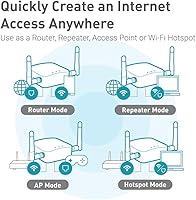
Switching between router, access point, and repeater modes is handled through the web interface without requiring a factory reset, which is a practical convenience when adapting to different hotel setups. Most users find the mode-switching reliable across environments.
Repeater mode performance degrades more noticeably than router mode when the upstream signal is weak, and there is no seamless automatic fallback between modes. A few users reported that mode changes occasionally required a manual reboot to apply cleanly.
Documentation & Support
68%
32%
GL.iNet maintains a reasonably active support forum and a growing knowledge base, and the community around OpenWrt itself is large enough that most questions have been answered somewhere. The included quick-start guide covers the basics adequately for first-time setup.
Official documentation lags behind firmware changes, and the firmware upgrade path issue in particular lacks clear in-box guidance. Users running into non-standard configurations often find themselves piecing together answers from multiple forum threads rather than a single authoritative source.
Ethernet Port Utility
82%
18%
Having two physical Ethernet ports on a device this small means you can feed in a wired hotel connection on one port and still have a LAN port available for a wired device — useful for users who prefer a stable wired connection for a work laptop alongside the Wi-Fi for phones and tablets.
Both ports are capped at 100Mbps, which is the limiting factor for users in hotels or offices with Gigabit infrastructure. In practice this rarely matters for travel workloads, but power users transferring large files over wired connections will notice the ceiling immediately.

Suitable for:

The GL.iNet GL-AR300M16-Ext Mini Travel Router was built for a specific kind of traveler, and for that person it genuinely delivers. If you check into a new hotel every few nights and have grown tired of exposing all your devices to unfamiliar networks, this travel router lets you plug into the room's Ethernet port — or connect to the hotel Wi-Fi once — and rebroadcast a private, VPN-secured network to everything you carry. Remote workers who run their own VPN server at home will find it particularly practical, since the GL-AR300M16-Ext can connect back to a home network automatically, making a Marriott in Munich feel like a home office extension. Tech-curious users who enjoy customizing network behavior will also appreciate the OpenWrt foundation, which is essentially a full open-source operating system for routers that unlocks far more control than any consumer router firmware typically allows. Budget-conscious buyers who want serious VPN router functionality without paying a premium price will find very few competitors that offer this much capability in a package this small.
Not suitable for:

The GL.iNet GL-AR300M16-Ext Mini Travel Router is genuinely the wrong tool for certain buyers, and it is worth being upfront about that. If your main concern is raw wireless speed — streaming 4K content, running large cloud backups, or video conferencing on a bandwidth-hungry platform — the single-band 2.4GHz radio will frustrate you, particularly in crowded hotel environments where that frequency band is already congested. Families traveling together who need to blanket a hotel suite with strong, fast Wi-Fi for multiple simultaneous streams should look at a more powerful dual-band or tri-band travel router instead. This pocket router also assumes a baseline of technical comfort; buyers who expect an entirely plug-and-play experience with zero configuration may find the setup process and occasional firmware decisions more involved than anticipated. The firmware upgrade path in particular — which requires an intermediate step when moving from older v3.x firmware to the current version — is a minor but real friction point that less technical users have found confusing. Anyone needing Gigabit wired speeds should also note that both Ethernet ports are capped at 100Mbps.
Specifications

  • Wi-Fi Speed: Supports wireless speeds up to 300Mbps on the 2.4GHz single-band frequency.
  • Frequency Band: Single-band 2.4GHz only; no 5GHz band is available on this model.
  • CPU: Powered by a Qualcomm Atheros QCA9531 processor clocked at 650MHz.
  • RAM: Equipped with 128MB of DDR2 RAM for handling routing and VPN workloads simultaneously.
  • Flash Storage: Includes 16MB of NOR Flash onboard, with expansion possible via the USB 2.0 port.
  • Ethernet Ports: Features two 10/100Mbps Ethernet ports, supporting simultaneous WAN input and LAN output.
  • USB Port: One USB 2.0 port supports both USB storage expansion and 3G/4G modem tethering.
  • Antennas: Comes with two detachable external Wi-Fi antennas for improved signal range and coverage.
  • Dimensions: Measures 58 x 58 x 25mm without antennas attached, making it pocket-sized for travel.
  • Weight: Weighs approximately 40 grams without antennas, lighter than most smartphones.
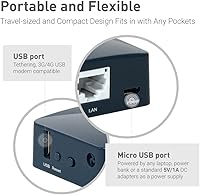
  • Power Input: Powered via USB at 5V/2A, compatible with laptop USB ports, power banks, and standard USB adapters.
  • Operating System: Comes with OpenWrt pre-installed, an open-source Linux-based router OS that supports deep customization and third-party packages.
  • VPN Support: OpenVPN and WireGuard are both pre-installed as client and server, with compatibility across 30+ major VPN service providers.
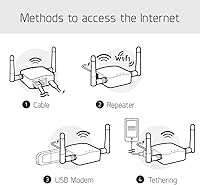
  • Operating Modes: Supports three network modes: router, wireless access point, and wireless repeater, switchable via the web interface.
  • EAP Support: Supports Extensible Authentication Protocol (EAP), enabling connection to enterprise Wi-Fi networks found in offices and universities.
  • Wireless Standard: Compliant with the IEEE 802.11b/g/n wireless communication standard at 2.4GHz.
  • Modem Compatibility: Compatible with 3G and 4G USB modems for cellular internet connectivity when Ethernet and Wi-Fi inputs are unavailable.
  • Warranty: Backed by a 2-year manufacturer warranty from GL Technologies.

Related Reviews

GL.iNet GL-MT300N-V2 (Mango)
76%
94%
Portability & Form Factor
89%
VPN Integration
83%
Ease of Setup
58%
Wi-Fi Performance
74%
Build Quality
More
GL.iNet GL-A1300 Slate Plus Travel Router
78%
83%
VPN Performance
88%
Ease of Setup
91%
Portability & Form Factor
76%
Wireless Speed & Range
79%
Build Quality
More
GL.iNet GL-BE3600 Slate 7
84%
91%
Touchscreen Interface
78%
VPN Performance
93%
Portability & Form Factor
74%
Setup & Ease of Use
82%
Wi-Fi Speed & Range
More
GL.iNet GL-MT3000 Beryl AX
81%
91%
VPN Performance
93%
Portability & Form Factor
88%
Security Features
67%
Ease of Initial Setup
82%
Wi-Fi Speed & Range
More
GL.iNet GL-SFT1200 Opal
80%
88%
Ease of Setup
84%
VPN Performance
93%
Portability & Form Factor
67%
Wi-Fi Range & Coverage
79%
Build Quality
More
GL.iNet GL-AXT1800 Slate AX
79%
93%
VPN Performance
81%
Wi-Fi Speed & Range
78%
Ease of Setup
86%
Build Quality & Portability
67%
Admin Interface & Usability
More
GL.iNet GL-AX1800 Flint WiFi 6 Router
79%
93%
VPN Performance
91%
Firmware Flexibility
74%
Wireless Speed & Range
58%
Ease of Setup
89%
Wired Connectivity
More
GL.iNet GL-B3000 Marble WiFi 6 Router
86%
88%
Performance
91%
Setup & Installation
85%
Security Features
80%
Parental Controls
94%
Design & Aesthetics
More
GL.iNet Spitz GL-X750V2 4G LTE Router
74%
83%
LTE Connectivity & Signal Reliability
74%
Wi-Fi Performance
91%
VPN Integration
78%
Setup & Ease of Use
88%
OpenWrt Customization
More
GL.iNet GL-X3000 Spitz AX
82%
88%
Cellular Signal Performance
91%
Dual-SIM & Failover Reliability
84%
Wi-Fi 6 Local Network Speed
82%
VPN Performance
86%
Setup & Initial Configuration
More

FAQ

Not really, though a little comfort with web interfaces helps. You plug the router into the hotel Ethernet port or connect it to the hotel Wi-Fi, open a browser, and follow a short setup wizard. Most users are up and running in under ten minutes. If you hit a captive portal login page, you handle that once through the router and all your devices are covered automatically after that.

Almost certainly yes. The GL-AR300M16-Ext supports both OpenVPN and WireGuard protocols, and most major VPN providers — including NordVPN, ExpressVPN, Surfshark, Mullvad, and many others — support at least one of those. You will typically download a configuration file from your VPN provider and upload it through the router's web interface, which takes just a few minutes.

Yes, that is one of its most practical features for travelers. It draws power from any standard 5V USB port, so your laptop, a phone charger, or a power bank all work fine. Just be aware that some older laptops with low-output USB ports may cause the router to restart under heavy VPN load, so a dedicated USB wall adapter or a power bank is a slightly more reliable option if you are doing intensive work.

That is exactly what this travel router is designed for. By connecting through a VPN tunnel, your actual data traffic is encrypted before it ever touches the public network. Other people on the same hotspot cannot sniff your connection. It does not make you completely invisible online, but it is a significant and meaningful layer of protection compared to connecting your devices directly.

Firmware updates are done through the web interface and are straightforward in most cases. The one thing worth knowing: if your unit is still running the older v3.x firmware, you cannot jump straight to the latest version. You need to install a specific intermediate release first — v4.3.7 — before updating to the newest build. GL.iNet documents this on their support site, but it is easy to miss if you just click update without checking. Follow the steps in order and you will be fine.

Yes. Both OpenVPN and WireGuard can run in server mode on this travel router, not just client mode. This is useful if you want to host your own VPN at home and connect back to your home network securely while traveling, rather than relying on a third-party VPN service. It requires a bit more configuration than the client setup, but the GL.iNet web interface makes the process accessible even without command-line experience.

For a standard hotel room, coverage is generally solid. The two detachable external antennas do give it a range advantage over routers with internal antennas. In a larger suite or a multi-room setup, coverage can get patchy toward the far end, especially since the 2.4GHz band does not penetrate walls as effectively as 5GHz would. If you need to cover a larger space reliably, a more powerful dual-band travel router would serve you better.

Absolutely. Even without VPN configured, this pocket router lets you connect all your devices through a single hotel network login, protects them from other guests on the same network, and gives you your own private Wi-Fi with a password you control. The GL.iNet GL-AR300M16-Ext Mini Travel Router also runs OpenWrt, which opens up options like DNS-level ad blocking and traffic monitoring that have nothing to do with VPN.
Yes, the USB 2.0 port supports 3G and 4G USB modems, which is handy when you are in a location without reliable fixed internet. Compatibility varies by modem model and carrier, so it is worth checking the GL.iNet compatibility list on their website before purchasing a specific dongle. Setup is handled through the same web interface as everything else.

Most frequent travelers report that the build is more solid than the price suggests, with no major structural issues after prolonged use. The area that tends to show wear first is the antenna connectors — repeated attachment and detachment over time can cause some loosening. Packing the antennas detached or using a small protective case helps extend the lifespan of those connections considerably.

Where to Buy