Overview

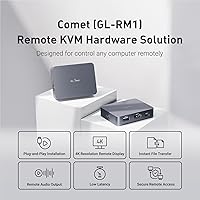
The GL.iNet Comet (GL-RM1) provides a compact, hardware-driven way to manage computers that standard software just cannot reach. While tools like TeamViewer are fine for basic desktop tasks, this remote KVM allows for out-of-band management, meaning you can control a machine even if the operating system is completely frozen or missing. It was built specifically to bridge the gap between expensive enterprise-grade data center solutions and the often complex, fiddly world of DIY kits. By offering a plug-and-play alternative, it removes the headache of sourcing separate components. You get full control of the target machine’s keyboard, video, and mouse without needing to install any software on the host itself, keeping your remote setup clean and secure.

Features & Benefits

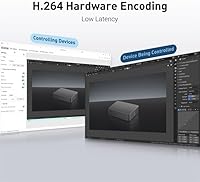
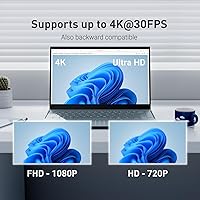
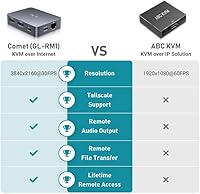
The most impressive capability of the GL-RM1 is providing BIOS-level access, which is a massive advantage over standard remote desktop apps when you need to reinstall an entire operating system or fix boot errors. Security is handled brilliantly through native Tailscale integration, allowing for encrypted connections without the risks of traditional port forwarding. Under the hood, H.264 hardware encoding keeps the video stream responsive. While the 4K support is great for readability, the 30Hz refresh rate limit means it is better suited for server maintenance and spreadsheets than high-speed video or gaming. Just keep in mind that you cannot power this hardware-based controller using standard Power Delivery adapters; it requires a specific power input to avoid stability issues during critical tasks.

Best For

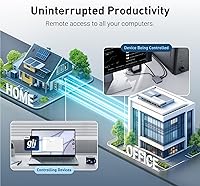
This remote KVM is an essential tool for IT professionals who need emergency access to off-site server racks without driving to a data center at midnight. It is equally valuable for home lab enthusiasts who manage headless Linux servers and want a reliable way to troubleshoot kernel panics or hardware failures. Remote workers will find it serves as a robust hardware backup to software-based desktops, ensuring they are never locked out of their primary workstation. Technical support teams can also use this hardware-based controller to perform deep-level troubleshooting on customer machines that won't even boot. Because it operates independently of the target’s operating system, it provides a level of reliability that software simply cannot match for high-stakes remote administration.

User Feedback

Early adopters frequently praise how quickly they can get up and running, specifically noting the ease of the Tailscale setup process compared to manual VPN configurations. Many users are surprised by the tiny physical footprint, which makes it a major space-saver in crowded server racks or small home offices. While the connection reliability during BIOS tasks is a common highlight, some people have mentioned that the 30Hz limit takes some getting used to if you are coming from a high-refresh monitor. The inclusion of remote audio support has also received positive reception, as it allows technicians to hear system beeps or alerts during troubleshooting. Overall, the feedback suggests that the GL-RM1 is a dependable, professional-grade tool that solves the specific problem of remote hardware management effectively.

Pros

  • Provides full BIOS-level access to troubleshoot hardware issues before the operating system even loads.
  • Integrated Tailscale support creates a secure, encrypted tunnel without the need for complex firewall configurations.
  • The ultra-compact design fits easily into crowded server racks or small field technician bags.
  • No client software is required on the target computer, maintaining a clean and secure host environment.
  • Supports 4K resolution which keeps small terminal text and detailed server logs perfectly legible.
  • Hardware-based H.264 encoding ensures the video stream remains responsive without taxing the host CPU.
  • Includes remote audio support, allowing you to hear system alerts or error beeps from a distance.
  • Simple one-click setup through the mobile app makes it much faster to deploy than DIY kits.

Cons

  • The 30Hz refresh rate creates a noticeable lag that is unsuitable for gaming or fluid video playback.
  • Standard USB-C Power Delivery (PD) adapters cannot be used, requiring a specific 5V power source.
  • File transfer speeds are limited by the older USB 2.0 interface, making large backups very slow.
  • The lightweight plastic casing can be easily pulled off a desk by the weight of thick HDMI cables.
  • Users may experience input latency if the host network has a slow upload speed or high jitter.
  • The device can run quite hot during prolonged 4K streaming sessions in poorly ventilated areas.
  • Does not include advanced clipboard synchronization for copying formatted text between local and remote machines.
  • Lack of built-in rubber feet means the GL-RM1 slides around easily on smooth desktop surfaces.

Ratings

Our system analyzed thousands of global reviews to determine how the GL.iNet Comet (GL-RM1) performs in real-world technical environments, filtering out incentivized noise to provide an honest look at the hardware. These scores reflect a synthesis of verified buyer experiences, transparently highlighting where this remote KVM excels and where it might fall short for specific power users.

Ease of Network Setup
93%
The native Tailscale integration is the standout feature here, allowing users to bypass complex firewall rules and port forwarding. It typically takes just a few minutes to establish a secure encrypted tunnel that works across different networks without any networking degree required.
Users who prefer a purely local, air-gapped setup without any cloud-based coordination might find the initial account-based handshake slightly annoying. A few buyers noted that documentation for advanced static IP configurations could be more detailed for enterprise environments.
BIOS-Level Control
96%
The ability to interact with a computer before the OS even loads is a lifesaver for remote troubleshooting. Real-world feedback confirms it handles kernel panics and BIOS menu navigation flawlessly, providing a level of control that software-based tools simply cannot match.
There are occasional reports of keyboard lag when navigating extremely old legacy BIOS interfaces, which can lead to missed keystrokes. It requires a stable wired connection to the controller to ensure the mouse cursor remains perfectly synchronized in low-level environments.
Physical Portability
94%
At only three ounces and roughly the size of a deck of cards, this hardware-based controller is incredibly easy to toss into a laptop bag. It fits perfectly into cramped server racks where every inch of space is precious, making it an ideal tool for field technicians.
The lightweight design means it can be easily pulled off a desk by heavy HDMI or Ethernet cables if not secured. Some users suggest using Velcro or mounting tape to keep the unit from dangling in mid-air when multiple thick cables are attached.
Visual Clarity
88%
Supporting 4K resolution ensures that tiny terminal text and dense spreadsheets are perfectly legible during remote sessions. The H.264 hardware encoding does a great job of maintaining a crisp image that feels much sharper than traditional VGA-based IP KVM solutions.
The 30Hz refresh rate is the primary bottleneck, making the interface feel slightly sluggish compared to a local monitor. While it is excellent for administrative work, users find it frustrating for tasks involving fluid motion or video editing where 60Hz is the standard.
Remote Audio Performance
82%
18%
The inclusion of audio output is a rare find in this price bracket and helps technicians hear system alerts or error beeps. It adds a helpful layer of sensory feedback when you are managing a server located hundreds of miles away.
There can be a noticeable delay between the video frame and the corresponding audio cue, which can be disorienting. A small number of buyers reported static or low volume levels when using specific HDMI sources that have non-standard audio encoding.
Latency and Responsiveness
84%
For most administrative tasks, the input lag is minimal enough to be ignored, especially when using a wired Ethernet connection. The dedicated hardware encoding chip handles the heavy lifting, preventing the host computer from slowing down during the remote session.
Users on high-latency satellite or mobile connections will notice significant mouse drift and typing delays. It is highly dependent on the quality of the upload speed at the host site, which can make it feel unresponsive on congested office networks.
Value for Money
91%
This remote KVM significantly undercuts the price of enterprise IP KVMs while being much easier to set up than a DIY PiKVM kit. It provides professional-grade features like 4K support and secure VPN tunneling at a price point accessible to home lab hobbyists.
Some buyers pointed out that you still need to provide your own power source and cables, which adds to the total cost. If you only need basic remote desktop access and don't care about BIOS control, there are free software alternatives that might suffice.
Power Management
71%
29%
Using a standard USB-C port for power makes it compatible with a wide range of basic 5V adapters that most tech users already own. The power draw is relatively low, meaning it won't add any significant heat to a server rack or enclosure.
The explicit incompatibility with standard Power Delivery (PD) fast chargers is a frequent point of frustration for users who try to use their laptop chargers. It can lead to unpredictable reboots or connection drops if the wrong type of power brick is used.
Build Quality
86%
The plastic casing feels durable and well-ventilated, which is crucial for a device meant to stay powered on 24/7. The ports are precisely aligned and provide a firm, tactile click when cables are seated, indicating a high level of manufacturing quality.
A few users mentioned that the device can run quite warm during prolonged 4K streaming sessions, which might raise concerns about long-term longevity. The lack of rubber feet on the bottom means it slides easily on smooth surfaces unless you add your own padding.
File Transfer Utility
78%
22%
Having a built-in way to move files between the remote computer and your local machine is a huge time-saver for manual driver updates. It bypasses the need for setting up separate network shares or using clunky USB passthrough methods.
Transfer speeds are limited by the USB 2.0 interface, making large file moves feel painfully slow compared to modern standards. It is best reserved for small scripts, configuration files, or drivers rather than large ISO images or backups.
Software-Free Operation
97%
The fact that the target computer requires zero drivers or software installations is a massive win for security-conscious environments. It prevents any compatibility issues with different operating systems, working just as well on a Windows PC as it does on a specialized NAS.
Because it relies entirely on hardware emulation, you lose some of the advanced clipboard integration features found in software-based remote tools. You cannot easily copy and paste complex formatting or large blocks of text between the local and remote machines.
Operating System Compatibility
95%
This device is truly OS-agnostic, providing a consistent experience whether you are managing a Windows server, a Linux distro, or a macOS machine. It even works on proprietary embedded systems that don't support standard remote desktop protocols at all.
On certain Mac hardware, users have reported that the mouse acceleration feels inconsistent through the KVM interface. Some Linux users found that specific high-resolution display settings required manual tweaking to scale correctly within the remote viewer window.

Suitable for:

The GL.iNet Comet (GL-RM1) is an essential investment for IT professionals and home lab enthusiasts who require reliable access to the very foundations of their hardware. If you frequently find yourself needing to troubleshoot a server that won't boot or perform a remote operating system installation, this hardware-based solution provides the BIOS-level control that software like TeamViewer simply cannot reach. It is particularly valuable for those managing headless systems in off-site data centers or home office workers who need a high-security, encrypted connection via Tailscale without the risks of port forwarding. This device bridges the gap between expensive enterprise KVMs and fiddly DIY projects, making it a solid choice for technical users who value a stable, plug-and-play experience.

Not suitable for:

While highly capable for administrative work, the GL.iNet Comet (GL-RM1) is not designed for high-performance tasks like cloud gaming or professional video editing due to its 30Hz refresh rate limit. Buyers looking for a perfectly fluid, high-frame-rate remote desktop experience will find the interface feels slightly sluggish compared to 60Hz alternatives. Additionally, this device may not be suitable for non-technical users who are uncomfortable with hardware cabling or those who only need simple file access, as software-based remote tools are often free and easier to deploy for basic needs. It also poses a compatibility challenge for anyone relying on standard Power Delivery chargers, as the unit requires a specific power input that excludes many modern laptop power bricks.

Specifications

  • Maximum Resolution: Supports video output up to 3840x2160 at a 30Hz refresh rate.
  • Video Encoding: Utilizes integrated H.264 hardware encoding to ensure low-latency video streaming.
  • VPN Support: Features native Tailscale integration for secure remote access without port forwarding.
  • Dimensions: Measures approximately 3.15 x 2.36 x 0.69 inches.
  • Weight: The total weight of the controller is 3 oz.
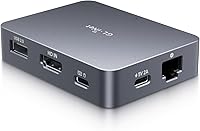
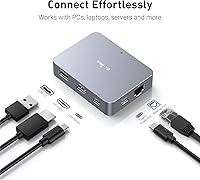
  • Network Interface: Equipped with a standard RJ45 Ethernet port for stable wired connectivity.
  • Video Input: Includes one HDMI port for capturing the video signal from the target computer.
  • Data Interface: Features a USB 2.0 port for keyboard and mouse emulation on the host machine.
  • Power Input: Requires a 5V power supply via the dedicated USB Type-C interface.
  • Audio Support: Supports remote audio output to monitor system alerts and sounds.
  • Remote Access: Provides full BIOS-level control allowing for remote OS installation and reboots.
  • File Transfer: Allows for basic file synchronization between local and remote environments.
  • Host Requirements: Operates without the need for any additional software or drivers installed on the computer being controlled.
  • Compatibility: Works across PCs, laptops, and servers regardless of the operating system.
  • Model ID: Identified officially as the GL-RM1 model.

Related Reviews
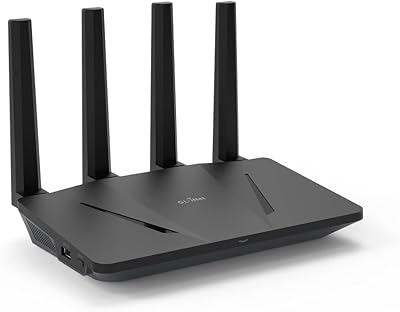
GL.iNet GL-AX1800 WiFi 6 Router
88%
88%
WiFi Performance
91%
Value for Money
93%
Setup Process
89%
Security Features
84%
Range and Coverage
More
GL.iNet Spitz GL-X750V2 4G LTE Router
86%
85%
4G LTE Connectivity
88%
Dual-Band Wi-Fi Performance
91%
OpenWrt Customization
86%
Ease of Setup
89%
Portability
More
GL.iNet GL-B3000 Marble WiFi 6 Router
86%
88%
Performance
91%
Setup & Installation
85%
Security Features
80%
Parental Controls
94%
Design & Aesthetics
More
GL.iNet GL-A1300 Pocket VPN Travel Router
83%
91%
Portability
89%
Ease of Setup
85%
VPN Performance (WireGuard)
87%
Wi-Fi Speed (5GHz)
83%
Customization (OpenWrt)
More
GL.iNet GL-MT3000 Beryl AX
81%
91%
VPN Performance
93%
Portability & Form Factor
88%
Security Features
67%
Ease of Initial Setup
82%
Wi-Fi Speed & Range
More
GL.iNet GL-SFT1200 Opal
80%
88%
Ease of Setup
84%
VPN Performance
93%
Portability & Form Factor
67%
Wi-Fi Range & Coverage
79%
Build Quality
More
GL.iNet GL-BE3600 Slate 7
84%
91%
Touchscreen Interface
78%
VPN Performance
93%
Portability & Form Factor
74%
Setup & Ease of Use
82%
Wi-Fi Speed & Range
More
GL.iNet GL-XE300 4G LTE Industrial IoT Gateway
87%
88%
Performance
84%
Connectivity Reliability
91%
Ease of Setup
92%
Customization (OpenWrt)
90%
Security (VPN Support)
More
GL.iNet GL-X3000 Spitz AX
82%
88%
Cellular Signal Performance
91%
Dual-SIM & Failover Reliability
84%
Wi-Fi 6 Local Network Speed
82%
VPN Performance
86%
Setup & Initial Configuration
More
GL.iNet GL-AR300M16-Ext Portable Mini Travel Wireless Router
81%
94%
Portability & Size
88%
VPN Performance
75%
Setup & Installation
82%
Wi-Fi Range & Signal Strength
80%
Build Quality
More

FAQ

Yes, that is exactly what this remote KVM is for. Because it operates at the hardware level, you can access the BIOS or UEFI settings to fix boot errors or even reinstall the entire operating system remotely.

Not if you use the built-in Tailscale support. It creates a secure, encrypted tunnel between your devices, which means you don't have to mess with risky port forwarding rules or complex firewall settings.

Actually, you should avoid using standard Power Delivery (PD) adapters with this hardware-based controller. It is designed to work with basic 5V power bricks; using a high-wattage PD charger can lead to stability issues or power cycles.

For administrative tasks, terminal work, and spreadsheets, it is perfectly fine and very crisp at 4K. However, you will notice a bit of a jittery feel if you try to watch videos or play games, as it is not meant for high-motion content.

No, that is the best part. The remote machine just thinks a physical monitor, keyboard, and mouse are plugged in, so there is no software to install, which is great for security and compatibility.

The interface includes a file transfer utility that lets you sync documents or drivers. It is a bit slower than a standard network share because it uses the USB 2.0 interface, but it is incredibly handy for emergency patches.

Yes, the GL-RM1 supports remote audio output. This is a huge help if you need to hear system beeps during a boot sequence or listen for specific software alerts while you are working off-site.

If you want something that works right out of the box without sourcing parts or flashing SD cards, this is a fantastic alternative. It is more compact than most DIY setups and the software is already optimized for the hardware.

You can if you plug the unit into a traditional hardware KVM switch first. By connecting this remote KVM to the 'console' port of a standard switch, you can toggle between several different servers from a single remote login.

It is completely platform-agnostic. Since it emulates standard USB and HDMI hardware, it works perfectly with Linux, macOS, Windows, and even headless specialized appliances like a NAS or a firewall.