Overview

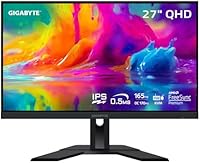
The GIGABYTE M27Q 27″ 1440p Gaming Monitor arrived in late 2020 and has quietly held its ground in a market that keeps throwing newer challengers at it. In a segment crowded with nearly identical specs on paper, the M27Q stood out early for pairing a Sharp-sourced IPS panel with a 165Hz refresh rate at a price most competitors couldn't match. It also carries a built-in KVM switch — a feature you rarely see at this tier — which makes it relevant well beyond pure gaming. This isn't a flagship; there's no OLED, no 4K, no G-Sync certification. What it is, though, is a capable all-rounder that continues to make sense for buyers who want real visual quality without flagship spending.

Features & Benefits

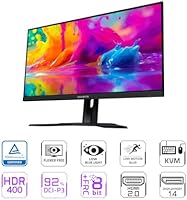
The SS IPS panel — sourced from Sharp — is what genuinely separates this 27-inch Gigabyte monitor from cheaper TN-based alternatives. Colors are rich and consistent across the entire screen, with 92% DCI-P3 coverage giving games and creative work alike a noticeably wider palette than standard sRGB panels. The 165Hz refresh rate keeps motion sharp, and while Gigabyte advertises 0.5ms response, that figure refers to MPRT — a backlight strobing measurement — not the actual pixel transition time, which runs closer to 4–5ms GtG. HDR400 support is present but modest; don't expect transformative HDR results. AMD FreeSync Premium handles adaptive sync reliably, and many Nvidia users report smooth operation, though official G-Sync certification is absent.

Best For

This 1440p gaming display hits a sweet spot for a few distinct buyer types. Competitive gamers upgrading from 1080p will immediately feel the jump in clarity at 2560×1440, especially paired with that 165Hz refresh. Designers and photographers on a tighter budget will appreciate the wide color gamut without paying for a professional-grade panel. The built-in KVM switch is genuinely useful if you're juggling two machines — picture a work laptop and a gaming PC on the same desk, both controlled by one keyboard and mouse without unplugging anything. Dual HDMI inputs make adding a current-gen console equally straightforward. Anyone already at 4K or chasing OLED contrast should look elsewhere, but for most people stepping up their setup, the M27Q is a smart, practical pick.

User Feedback

Across more than 2,000 ratings, the M27Q holds a steady 4.4-star average — a figure that has remained consistent over years of real-world ownership, which itself is a reliable indicator of durability. Buyers frequently highlight how strong the panel looks straight out of the box and how much they value the KVM functionality, often calling it an unexpected bonus. The complaints that surface most regularly center on the tilt-only stand — no height or swivel adjustment pushes many buyers toward a VESA arm purchase — and the OSD controls, which users across multiple reviews describe as sluggish and unintuitive. A smaller portion of buyers have encountered backlight bleed, pointing to occasional unit consistency issues. That said, outright dissatisfaction remains the clear minority.

Pros

  • Sharp-sourced SS IPS panel delivers vivid, accurate colors that beat most monitors in this price range.
  • 165Hz refresh rate keeps gameplay fluid and responsive without requiring a top-tier GPU.
  • 92% DCI-P3 color coverage makes the M27Q genuinely useful for casual creative work, not just gaming.
  • Built-in KVM switch lets you share one keyboard and mouse across two devices — a rare and practical bonus.
  • Dual HDMI 2.0 ports make it easy to keep a console and a PC connected at the same time.
  • Matte anti-glare coating handles reflections well in brightly lit rooms.
  • Wide 178-degree viewing angles mean colors stay consistent even when viewing from off-center positions.
  • Long sales history since 2020 with consistently strong ratings points to solid real-world reliability.
  • FreeSync Premium adaptive sync reduces screen tearing noticeably during fast gameplay.
  • Two USB 3.0 ports on the monitor add convenient hub functionality for peripherals.

Cons

  • The stock stand only tilts; there is no height or swivel adjustment without buying a separate VESA arm.
  • The 0.5ms response time is an MPRT figure — actual pixel GtG response is closer to 4–5ms, which some buyers find misleading.
  • OSD navigation is frequently criticized as slow and unintuitive, making display calibration more tedious than it should be.
  • HDR400 certification delivers only modest real-world HDR results; peak brightness and contrast improvements are minimal.
  • Backlight bleed has been reported across a noticeable share of units, suggesting some inconsistency in panel quality control.
  • DisplayPort 1.2 is the ceiling here — anyone planning a future GPU upgrade may find bandwidth headroom tighter than expected.
  • No official G-Sync certification means Nvidia GPU owners face a small but real compatibility risk with adaptive sync.
  • At 27 inches with a 1440p resolution, pixel density is good but not exceptional compared to smaller high-res alternatives.
  • No USB-C input limits flexibility for users working from modern laptops that rely on a single-cable connection.

Ratings

The scores below for the GIGABYTE M27Q 27″ 1440p Gaming Monitor were generated by our AI rating engine after analyzing thousands of verified global buyer reviews, with spam, bot activity, and incentivized feedback actively filtered out. Every category reflects the honest distribution of real user sentiment — strengths are credited where earned, and recurring pain points are weighted transparently into the final scores. The result is a balanced, data-grounded picture of exactly what buyers love and where this display falls short.

Color Accuracy
88%
The Sharp-sourced SS IPS panel consistently earns praise for delivering vivid, lifelike colors straight out of the box — something buyers upgrading from TN panels notice immediately. The 92% DCI-P3 coverage makes a real difference when watching films or working on photo projects, with greens and reds appearing notably richer than on standard sRGB displays.
Without factory calibration data included, some users find they need to manually adjust settings to get the most accurate results, which isn't always beginner-friendly. A small subset of reviewers noted slight color shift at extreme viewing angles despite the wide 178-degree spec, particularly in the upper corners of the panel.
Gaming Performance
86%
At 165Hz with FreeSync Premium active, fast-paced titles feel genuinely responsive — players moving from 60Hz monitors frequently call this the most impactful upgrade they've made. Motion clarity in competitive shooters and racing games is strong, and screen tearing is effectively eliminated when paired with a compatible AMD GPU.
The advertised 0.5ms response time is MPRT, not actual pixel GtG, which sits closer to 4–5ms — a distinction that matters to competitive players who assumed the lower figure. Nvidia users get adaptive sync working in most cases, but without official G-Sync certification, occasional micro-stutter has been reported on certain driver configurations.
Panel Uniformity
68%
32%
The majority of units display solid brightness uniformity across the center of the screen, which holds up well during long gaming sessions and everyday desktop use. In well-lit environments, most buyers report no visible hotspots or obvious brightness gradients during normal usage.
Backlight bleed is the most frequently cited quality-control concern across long-term ownership reviews, particularly visible in dark scenes or on dark-themed interfaces. The inconsistency appears unit-dependent — some buyers receive panels with negligible bleed, while others clearly got worse samples, pointing to manufacturing variability rather than a universal defect.
Value for Money
91%
Few monitors in this price bracket combine an IPS panel, 165Hz refresh, wide color gamut, and a built-in KVM switch — and that combination is exactly why the M27Q has held strong against newer competition since 2020. Buyers consistently describe feeling they got more than expected for what they paid, particularly when comparing specs sheet-to-sheet with pricier alternatives.
As the monitor market has matured, some newer competitors have crept closer in price while offering better stand ergonomics or improved HDR performance, slightly eroding the M27Q's value edge. Buyers who later discover the MPRT vs GtG distinction or the HDR400 limitations occasionally feel the spec sheet overpromised on two of its headline numbers.
KVM Functionality
83%
The built-in KVM switch is a legitimately useful feature for anyone running two machines — switching keyboard and mouse control between a work laptop and gaming PC through the monitor's OSD is something users describe as a daily convenience they didn't know they needed. It removes the need for a separate KVM box entirely for straightforward dual-device setups.
The KVM setup process is tied to the OSD menu navigation, which many users describe as slow and unintuitive — toggling between devices isn't always as quick or smooth as dedicated external KVM switches. A few buyers also noted the KVM behavior could be inconsistent when waking devices from sleep, requiring a manual source switch.
HDR Experience
52%
48%
HDR400 certification does produce a modest lift in bright highlights during gaming and streaming, and for users who have never used any HDR display before, the difference is at least perceptible in compatible content. Enabling HDR in Windows or on consoles works without additional configuration beyond the display settings menu.
The real-world HDR impact is underwhelming for anyone who has used a higher-tier HDR display — 400 nits peak brightness and no local dimming means blacks stay lifted and bright scenes lack punch. Most experienced users either leave HDR disabled or treat it as a minor checkbox rather than a selling point worth chasing.
Build Quality
74%
26%
The overall chassis feels solid and well-constructed for a mid-range monitor, with minimal flex in the panel and a clean matte finish that resists fingerprints and minor dust. The monitor has been on the market since 2020 and long-term owners rarely report structural degradation or build-related failures.
The stand feels noticeably less premium than the panel itself — it is purely functional rather than robust, and the tilt-only range leaves the desk setup feeling incomplete without an aftermarket arm. Several users also noted the plastic housing around the inputs shows minor scuffing more readily than expected over time.
Ergonomics & Stand
47%
53%
The included stand is stable and keeps the monitor firmly in place without wobble during typing or desk movement. VESA 100x100mm compatibility means upgrading to an aftermarket arm is straightforward for buyers who want full ergonomic flexibility.
Tilt-only adjustment is a genuine limitation — no height, swivel, or pivot means many users will be stuck at a non-ideal viewing height unless they buy a monitor arm separately, which adds both cost and setup effort. This is the single most common complaint across long-term reviews and is hard to overlook given how many competitors at this tier include height-adjustable stands.
OSD & Controls
53%
47%
All key display settings — including refresh rate switching, FreeSync toggle, and KVM control — are accessible through the OSD without needing third-party software. The physical button placement on the back-right edge is reasonably easy to reach once muscle memory sets in.
The OSD navigation itself is the M27Q's most consistently criticized user experience issue — response lag between button presses and menu movement makes adjustments noticeably tedious. Multiple reviewers describe simple tasks like changing input source or enabling Black Equalizer as requiring more patience than they should on a display at this level.
Connectivity
79%
21%
Dual HDMI 2.0 ports make it genuinely easy to keep both a gaming PC and a current-gen console connected simultaneously without unplugging anything. The two USB 3.0 ports on the monitor function as a handy hub for keyboards, mice, or flash drives, which pairs neatly with the KVM feature.
DisplayPort 1.2 is the bandwidth ceiling here, which limits headroom if you're planning a high-end GPU upgrade down the line and want to push above 165Hz or explore higher color depths. The absence of USB-C is an increasingly relevant omission for anyone with a modern laptop who wants a single-cable connection.
Out-of-Box Setup
82%
18%
Physical assembly is quick — the stand attaches without tools and the monitor is ready to use in a few minutes. Colors look strong with minimal adjustments required, which most buyers appreciate given that monitor calibration can be intimidating for first-time QHD purchasers.
The included documentation is fairly minimal, and buyers who want to get the most out of features like Black Equalizer or the KVM switch often need to seek out online guides or community forums for guidance. The power brick rather than an inline cable adds a small amount of desk cable management overhead.
Long-Term Reliability
81%
19%
With a sales history stretching back to late 2020, there is a meaningful pool of multi-year ownership data, and the picture is broadly positive — most units continue functioning without panel degradation or backlight issues over extended use. The monitor has maintained a stable 4.4-star rating across more than 2,000 reviews, which reflects consistent real-world satisfaction.
The backlight bleed complaints that appear at purchase tend to persist — this is not something that resolves itself over time, meaning buyers who receive a panel with noticeable bleed are effectively stuck with it. A small but recurring thread of unit-consistency concerns suggests quality control at the factory level has not been entirely uniform across production runs.
Glare & Reflection Control
84%
The matte anti-glare coating handles reflections effectively in typical home office and gaming setups, making the monitor comfortable to use near windows or under overhead lighting without the constant repositioning a glossy screen demands. Buyers working from home during daylight hours specifically call out the coating as a practical daily benefit.
The matte finish does introduce a faint haze over the image that some users find slightly softens perceived sharpness compared to glossy-coated panels, particularly noticeable when viewing static text or fine UI elements. This is a trade-off inherent to matte coatings rather than a defect, but buyers coming from high-gloss screens may take time to adjust.
Motion Clarity
77%
23%
At 165Hz with FreeSync active, on-screen motion in fast games is clean and tracking moving targets feels natural — most players find the balance between refresh rate and panel response time more than adequate for non-professional competitive play. The improvement over a typical 60Hz IPS panel is immediately obvious in everyday use.
Buyers who scrutinize the MPRT vs GtG distinction will note that actual pixel transitions are slower than the headline spec implies, which can manifest as mild ghosting behind fast-moving objects in darker scenes. Enabling the monitor's overdrive modes helps but can introduce inverse ghosting artifacts at the higher settings.

Suitable for:

The GIGABYTE M27Q 27″ 1440p Gaming Monitor is a strong match for anyone who wants a meaningful upgrade from 1080p without committing to the cost and GPU demands of 4K. Competitive gamers will appreciate the 165Hz refresh rate and wide-gamut IPS panel, which together make fast-paced titles look sharp and fluid without the washed-out colors typical of TN panels. Budget-conscious creators — photographers, streamers, or hobbyist designers — get genuinely wide color coverage at a price well below dedicated professional displays. The built-in KVM switch makes this 27-inch Gigabyte monitor especially useful for anyone running two machines from one desk, whether that's a work laptop alongside a gaming PC or a console paired with a desktop. Dual HDMI inputs add flexibility for hybrid PC-and-console households that want everything connected at once.

Not suitable for:

Buyers chasing the best possible image contrast should look elsewhere — this is an IPS panel, and while colors are strong, blacks are never going to match what a VA or OLED display delivers. The GIGABYTE M27Q 27″ 1440p Gaming Monitor also isn't the right call for Nvidia users who require certified G-Sync support, since the monitor carries only FreeSync Premium certification; most Nvidia GPUs will work in practice, but compatibility isn't guaranteed and some users do report minor issues. Anyone who prioritizes a fully ergonomic setup without buying extras should know the stock stand only tilts — height adjustment and swivel require a separate VESA arm purchase. Serious HDR enthusiasts will find DisplayHDR 400 underwhelming, as peak brightness and local dimming at this tier fall well short of a convincing HDR experience. If your GPU is already running at the high end and you're thinking about 4K as a next step, this 1440p display may feel like a lateral move rather than a true upgrade.

Specifications

  • Panel Type: Uses a Sharp-sourced SS IPS panel, offering wide viewing angles and accurate color reproduction compared to TN or standard IPS alternatives.
  • Screen Size: 27-inch diagonal display with a 16:9 aspect ratio and a matte anti-glare surface coating.
  • Resolution: 2560 x 1440 (QHD) native resolution, delivering noticeably sharper detail than 1080p at the same screen size.
  • Refresh Rate: Native 165Hz refresh rate, suitable for fast-paced gaming and smooth general desktop use.
  • Response Time: 0.5ms MPRT (Moving Picture Response Time), a backlight-strobing measurement; actual pixel GtG transition time is approximately 4–5ms.
  • Color Gamut: Covers 92% of the DCI-P3 color space, equivalent to approximately 140% of the standard sRGB gamut.
  • HDR Support: Certified to VESA DisplayHDR 400, representing entry-level HDR with a peak brightness of 400 nits.
  • Adaptive Sync: AMD FreeSync Premium certified, supporting variable refresh rates to reduce screen tearing; not officially G-Sync certified.
  • Viewing Angles: 178° horizontal and 178° vertical viewing angles, meaning colors and brightness remain consistent across wide off-axis positions.
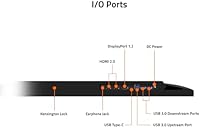
  • Connectivity: Includes 1x DisplayPort 1.2, 2x HDMI 2.0, and 2x USB 3.0 ports for broad device compatibility.
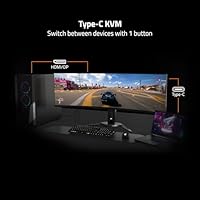
  • KVM Switch: Built-in KVM switch allows a single keyboard and mouse to control two connected devices without external hardware.
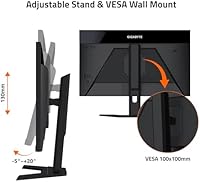
  • Stand Adjustment: Stock stand supports tilt adjustment only, ranging from minus 5° to plus 20°; no height, swivel, or pivot adjustment is included.
  • VESA Mounting: Compatible with standard VESA 100x100mm wall or arm mounts, allowing aftermarket ergonomic stand upgrades.
  • Panel Surface: Matte anti-glare coating reduces reflections in brightly lit environments without significantly impacting color vibrancy.
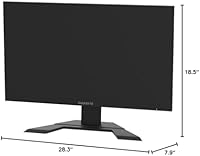
  • Dimensions: Measures 28.3 inches wide, 18.5 inches tall, and 7.9 inches deep with the stand attached.
  • Weight: Complete unit with stand weighs 8.8 pounds, making it straightforward to position and reposition on a desk.
  • Power Input: Operates at 19 volts via an external power adapter included in the box.
  • Release Date: First made available in October 2020, giving it a multi-year track record of real-world user ownership data.

Related Reviews
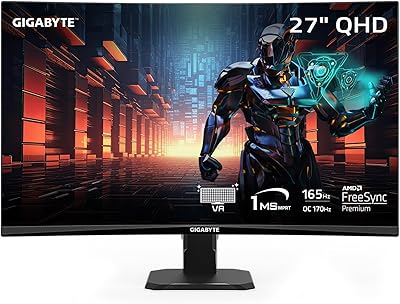
GIGABYTE GS27QC 27″ 165Hz 1440P Curved Gaming Monitor
84%
88%
Display Quality
91%
Gaming Performance
83%
Build Quality
85%
Color Accuracy
86%
Value for Money
More
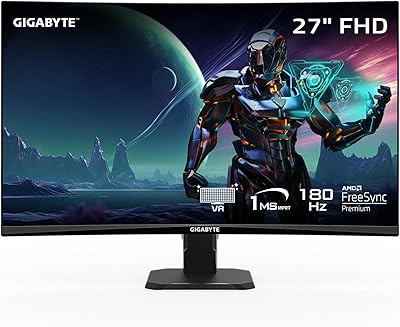
GIGABYTE GS27FC 27″ Gaming Monitor
86%
91%
Display Quality
96%
Refresh Rate Performance
95%
Response Time
88%
Color Accuracy
85%
HDR Performance
More
GIGABYTE GS27QA 27-inch QHD Gaming Monitor
78%
88%
Gaming Performance
91%
Image Clarity
79%
Color Accuracy
54%
HDR Experience
89%
Refresh Rate & Smoothness
More
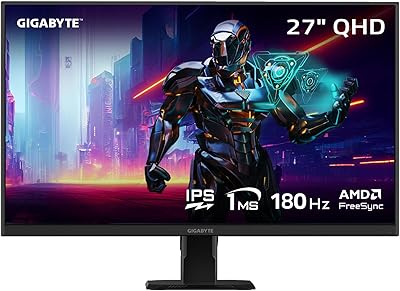
Amzfast AMZG27F6Q 27-inch 1440P Gaming Monitor
75%
88%
Value for Money
84%
Gaming Performance
86%
Image Clarity
79%
Color Accuracy
53%
HDR Quality
More
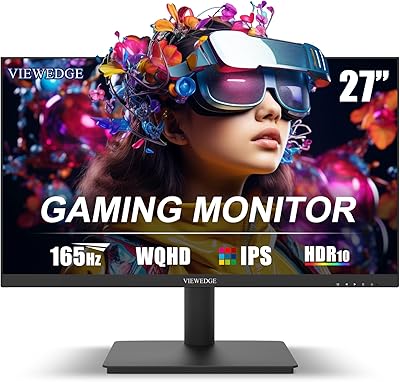
Viewedge CS27QK 27-inch Gaming Monitor
75%
88%
Value for Money
86%
Image Sharpness
83%
Refresh Rate Performance
81%
Color Vibrancy
74%
Motion Clarity
More
INFIEVO 27-Inch QHD 165Hz Gaming Monitor
76%
88%
Image Clarity
91%
Refresh Rate & Smoothness
93%
Ergonomic Stand
94%
Value for Money
52%
HDR Performance
More
ASUS VG27AQ3A 27-inch QHD Gaming Monitor
76%
91%
Image Sharpness & Clarity
88%
Refresh Rate Performance
86%
Motion Clarity & ELMB Sync
83%
Color Accuracy & Coverage
54%
HDR Performance
More
ASUS ROG Swift PG278Q 27″ 1440P Gaming Monitor
86%
93%
Display Quality
91%
Gaming Performance (Refresh Rate & Response Time)
88%
Ergonomics (Adjustable Stand)
90%
G-SYNC Functionality
77%
Color Accuracy
More
GIGABYTE AORUS FO27Q3 27″ QD OLED Gaming Monitor
88%
96%
Display Quality
92%
Performance (Gaming)
88%
Build Quality
94%
Color Accuracy
98%
Response Time
More
CUNPU RDF1DD 27-inch Curved Gaming Monitor
67%
82%
Picture Quality
91%
Design & Aesthetics
74%
Gaming Performance
78%
Value for Money
43%
Ergonomics
More

FAQ

It works for a lot of Nvidia users in practice — Nvidia has supported FreeSync displays through its Adaptive Sync compatibility program for several years now. That said, the M27Q is not officially G-Sync certified, so compatibility isn't guaranteed on every setup. Most people have no issues, but if certified G-Sync is a hard requirement for you, this display doesn't officially tick that box.

It's a bit of both, honestly. The 0.5ms figure refers to MPRT — Moving Picture Response Time — which measures how long a pixel appears on screen during backlight strobing, not how fast the pixel actually transitions between colors. The real pixel transition speed, measured as GtG, is closer to 4–5ms. That's still perfectly fine for gaming, but it's worth knowing what the advertised number actually represents.

Honestly, it's modest. DisplayHDR 400 is the lowest tier of VESA's HDR certification, with a 400-nit peak brightness and no local dimming. You'll notice some improvement in bright highlights, but don't expect the dramatic contrast you'd get from a higher-end HDR display. For most people, it's a nice extra rather than a headline feature.

The included stand only tilts — anywhere from minus 5 to plus 20 degrees. There's no height adjustment, swivel, or pivot built in. If you want proper ergonomic positioning, you'll want a VESA-compatible monitor arm, and this display does support the standard 100x100mm VESA pattern, so aftermarket options are plentiful.

Say you have a work laptop and a gaming PC both plugged into the monitor — one via HDMI, one via DisplayPort. The KVM switch lets you use the same keyboard and mouse for both machines and switch control between them through the monitor's OSD, without unplugging anything. It's genuinely convenient for anyone juggling two computers at the same desk, and it's rare to find this feature at this price point.

It's a solid option for casual creative work and hobbyist use. The 92% DCI-P3 coverage means colors are wide and vibrant, which is better than most monitors in this tier. That said, it's not factory calibrated for professional color-critical work, so if you're doing print production or professional photography where delta-E accuracy matters, a purpose-built display is a better fit.

Yes, both the PS5 and Xbox Series X support 120Hz output over HDMI 2.0, and this 27-inch Gigabyte monitor has two HDMI 2.0 ports. One thing to note: the monitor's native resolution is 1440p, but current-gen consoles typically output 120Hz at 1080p rather than 1440p — the PS5 in particular did not support 1440p output natively for a long time, though Sony has since added it. You'll want to check your console's current firmware for the latest resolution support.

The most frequently mentioned problems are backlight bleed on some units and the OSD controls, which many users find fiddly and slow to navigate. Backlight bleed varies between units — some owners report none at all, while others notice it in dark scenes or on dark desktop backgrounds. Given the monitor has been on the market since 2020, the long-term reliability picture looks generally positive, but panel-to-panel consistency is worth factoring in.

You'll want to use the DisplayPort 1.2 connection to hit the full 165Hz at 1440p — HDMI 2.0 maxes out at 144Hz at this resolution, so if every frame matters to you, DisplayPort is the right choice. A standard DisplayPort 1.2 cable is usually included in the box, but double-check your GPU's output ports before buying.

Matte coatings always involve a minor trade-off — they scatter light to cut glare, which can slightly soften the perceived sharpness compared to a glossy panel. On this 1440p gaming display, the effect is mild and most users don't find it distracting. In a well-lit room, the anti-glare benefit far outweighs the small reduction in perceived pop, especially compared to dealing with window reflections on a glossy screen.