Overview

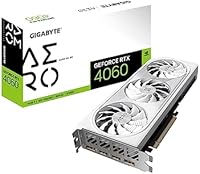
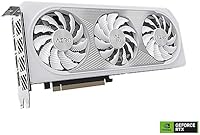
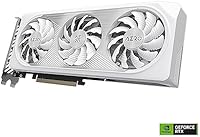
The GIGABYTE GeForce RTX 4060 AERO OC 8GB Graphics Card sits comfortably in the mid-range GPU tier, targeting 1080p gaming and occasional 1440p work without demanding a premium price. The card's white AERO shroud with triple WINDFORCE fans cuts a clean, distinctive figure inside a windowed case. Under the hood, NVIDIA's Ada Lovelace architecture brings a real efficiency jump over the previous Ampere generation — you get meaningfully lower power draw without sacrificing gaming performance. GIGABYTE positions this near the top of their RTX 4060 stack, and it shows in the build quality. One honest caveat worth noting upfront: the 128-bit memory bus has drawn scrutiny online, and that conversation is worth having before you buy.
Features & Benefits

Where this RTX 4060 AERO OC earns its keep is largely in the software stack. DLSS 3 Frame Generation can push frame rates noticeably higher in supported titles — think Cyberpunk 2077 or Alan Wake 2 — though it is worth being clear: this only works in games that have been updated to support it. The 3rd-gen RT Cores handle ray tracing more efficiently than anything from the Turing or Ampere era, making ray-traced lighting practical rather than a performance anchor. The WINDFORCE 3X cooling system keeps things genuinely quiet under load, and the Dual BIOS switch lets you toggle between a louder performance profile and a near-silent mode. At 17 Gbps effective memory speed, the 8GB GDDR6 holds up well across most current 1080p titles.

Best For

The GIGABYTE AERO OC makes the most sense for a few specific buyers. If you are still running a GTX 1060, 1070, or an RTX 20-series card, the performance-per-watt jump here is substantial and the driver experience is dramatically cleaner. Content creators who stream or export video will appreciate NVENC AV1 encoding, which NVIDIA's Ada cards handle far better than competing options at this price tier. The card's 11-inch length also makes it accessible for compact mid-tower builds where longer flagship cards simply will not fit. That said, if your primary goal is raw 1440p rasterization and you are not leaning on DLSS, there are competing cards worth considering — so match this one to the right use case.

User Feedback

Across nearly 500 ratings, this mid-range Ada card holds a 4.8 out of 5, and the feedback largely reflects a satisfied user base. Owners frequently highlight how quiet the card runs at idle and under everyday loads — a genuine plus for open-desk setups or home offices. Installation gets consistent praise too, with buyers describing a smooth out-of-the-box experience. On the critical side, the 8GB VRAM ceiling surfaces regularly in discussions about newer, texture-heavy titles pushed past medium settings. A smaller number of users report minor coil whine during GPU-intensive workloads. And the 128-bit bus limitation, while rarely a dealbreaker at 1080p, is a fair concern for anyone planning to push higher resolutions long-term.

Pros

  • Ada Lovelace architecture delivers a substantial efficiency improvement over previous-generation Ampere cards.
  • DLSS 3 Frame Generation provides a meaningful fps boost in a growing list of supported titles.
  • The WINDFORCE 3X triple-fan cooling keeps temperatures low and noise impressively quiet under sustained load.
  • Dual BIOS switch lets you choose between a performance profile and a near-silent fan curve with a physical toggle.
  • At 11 inches long, this RTX 4060 AERO OC fits comfortably in mid-tower cases where larger cards cannot.
  • NVENC AV1 encoding is a genuine upgrade for streamers and video editors working on a tighter budget.
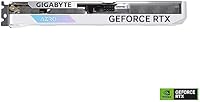
  • Clean white AERO shroud and RGB Fusion 2.0 support make it easy to match a GIGABYTE-themed build aesthetic.
  • Out-of-the-box installation is straightforward, with drivers loading cleanly and requiring minimal configuration.
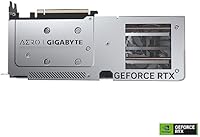
  • The metal backplate adds structural rigidity and a more premium feel than open-PCB designs at this price tier.
  • Rated 4.8 out of 5 across a large review base, reflecting consistently positive ownership experiences.

Cons

  • The 128-bit memory bus limits bandwidth headroom, which becomes noticeable when pushing beyond 1080p resolutions.
  • 8GB of VRAM can feel restrictive in newer, texture-heavy titles running at high or ultra settings.
  • DLSS 3 Frame Generation only works in specifically supported games, so its real-world value depends entirely on your library.
  • A minority of owners report intermittent coil whine during GPU-intensive workloads, which may bother sensitive users.
  • Raw rasterization performance at 1440p trails some competing cards available at a comparable price point.
  • The performance uplift is modest for anyone already running an RTX 3060 Ti or RTX 3070.
  • Long-term VRAM headroom may become a concern as game memory requirements trend upward over the next few years.

Ratings

Our AI rating system analyzed verified global user reviews for the GIGABYTE GeForce RTX 4060 AERO OC 8GB Graphics Card, actively filtering out incentivized submissions, bot activity, and outlier noise to surface what real buyers genuinely experience. Scores reflect both the card's genuine strengths and the recurring pain points that show up consistently across thousands of ownership reports. Nothing is glossed over — where users ran into friction, the scores and commentary reflect that honestly.

1080p Gaming Performance
88%
At 1080p, this RTX 4060 AERO OC handles the overwhelming majority of current titles at high to ultra settings with smooth, consistent frame rates. In games with DLSS 3 support, Frame Generation pushes perceived fluidity noticeably higher, making the experience feel punchy and responsive during fast-paced sessions.
Step outside the DLSS 3 supported title list and the raw rasterization numbers are competent but not class-leading — some competing cards offer better native frame rates at similar price points. The gap becomes more visible in CPU-light, GPU-bound scenarios where Frame Generation cannot compensate.
1440p Capability
63%
37%
With DLSS Quality mode active, the GIGABYTE AERO OC can push through many 1440p titles at playable frame rates, and the image quality remains respectable. For less demanding or older titles, native 1440p is achievable without much compromise.
The 128-bit memory bus creates a real bandwidth ceiling at 1440p, particularly in open-world games with dense geometry and high-resolution textures. Users who bought this card hoping to run demanding titles natively at 1440p ultra settings frequently reported disappointment once they hit that wall.
Thermal Performance
91%
The WINDFORCE 3X cooling system earns consistent praise across owner reports — even during hour-long gaming sessions in warm rooms, temperatures stay well within safe operating ranges. The semi-passive fan stop at idle is a quietly appreciated detail that makes the card feel refined during everyday desktop use.
A small number of users in poorly ventilated cases reported higher-than-expected temperatures, suggesting the cooler works best when the chassis has reasonable airflow. Under extreme ambient temperatures, the performance BIOS fan curve can become audible, though this is the exception rather than the rule.
Noise Level
89%
Quiet operation is one of the most consistently mentioned positives across owner feedback — at idle the fans stop entirely, and under moderate gaming loads the card stays nearly inaudible. The silent BIOS mode makes it particularly well-suited to living room builds or anyone sharing a space while gaming late at night.
A minority of owners report a faint coil whine during GPU-heavy workloads, which is unrelated to fan noise but can be irritating in a quiet environment. It is not universal, but it is consistent enough across reports that it warrants a mention before buying.
VRAM Headroom
61%
39%
For the core 1080p use case this card is designed around, 8GB of GDDR6 at 17 Gbps effective speed is adequate across most current gaming titles and handles everyday creative tasks like video editing timelines without issue. Texture streaming in mainstream titles runs smoothly without noticeable stutter in typical configurations.
Reports of VRAM pressure in newer, texture-heavy titles at high settings are recurring and credible — some games already push past 8GB at 1080p ultra, and that list will only grow. Buyers planning to keep this card for four or five years are taking on meaningful risk that VRAM becomes a bottleneck before the GPU itself does.
Build Quality
92%
The metal backplate, solid shroud construction, and overall fit and finish on the GIGABYTE AERO OC are consistently described by owners as feeling premium relative to the card's market tier. Nothing flexes, nothing rattles, and the AERO white aesthetic holds up well compared to cheaper plastic-heavy cooler designs.
The card adds meaningful weight to the PCIe slot, and a small number of users in larger cases noted visible GPU sag over time without a support bracket. This is a minor cosmetic issue rather than a functional one, but worth noting for owners building in cases without a sag bracket or riser.
DLSS 3 Implementation
83%
In supported titles, DLSS 3 with Frame Generation is a genuinely impactful feature — users gaming in Cyberpunk 2077, Hogwarts Legacy, or Alan Wake 2 noted significant smoothness improvements that make ray-traced settings feel viable on this mid-range Ada card. The image quality from DLSS Quality mode is convincing and holds up well on a 1080p or 1440p monitor.
The feature is gated entirely behind per-title developer implementation, so its value is directly proportional to your specific game library. Users who primarily play older titles, indie games, or competitive shooters outside the supported list get no benefit from Frame Generation at all, making it a situational rather than universal advantage.
Ray Tracing Performance
74%
26%
The 3rd-gen RT Cores make ray tracing noticeably more practical than what Turing or Ampere could deliver — turning on reflections and global illumination no longer feels like an automatic performance cliff in the way it once did. Paired with DLSS, ray-traced modes in supported titles are genuinely enjoyable at 1080p.
Without DLSS assistance, native ray tracing performance is still modest and will push frame rates into uncomfortable territory in the most demanding implementations. Users expecting to run full ray tracing natively at high frame rates will find this card falls short of what enthusiast-tier hardware can do.
Power Efficiency
93%
The Ada architecture's efficiency gains are real and measurable in daily use — owners coming from RTX 20-series or GTX 10-series cards frequently comment on how much lower their system power draw is, with this mid-range Ada card pulling significantly less wattage for comparable or better performance. Single 8-pin power requirements make it broadly compatible with older PSUs.
The efficiency story is most compelling as an upgrade from older hardware — buyers coming from an RTX 3060 Ti or 3070 will see a smaller efficiency delta that may not feel worth the investment on its own.
Driver Stability
88%
The plug-and-play installation experience is one of the most commonly praised aspects in owner feedback — drivers load cleanly, the card is recognized immediately, and most users report zero configuration friction out of the box. GIGABYTE's software suite for BIOS and RGB management is functional and straightforward.
A handful of users reported driver-related instability in specific game titles, though these cases appear tied to broader NVIDIA driver rollout issues rather than anything specific to this card. Keeping drivers updated generally resolves these edge cases for most owners.
Content Creation Value
79%
21%
The Ada-generation NVENC encoder with AV1 support is a meaningful differentiator for streamers and video editors at this price point — AV1 output at equivalent bitrates visibly outperforms H.264 in streaming quality, and hardware encoding leaves the CPU free for other tasks during live production.
For heavier creative workloads — complex compositing, 3D rendering, or machine learning tasks — 8GB of VRAM starts to constrain what the GPU can handle without offloading to system RAM. It is a solid streaming and light editing card, but not a workstation replacement.
Value for Money
72%
28%
For a buyer whose use case aligns squarely with 1080p gaming and DLSS 3-supported titles, the GIGABYTE AERO OC offers a well-rounded package at a mainstream price — solid cooling, good build quality, and meaningful software features that cheaper alternatives lack.
The 128-bit bus width and 8GB VRAM ceiling are hard to ignore when competing alternatives at similar prices offer wider memory buses and in some cases more VRAM. Buyers who scrutinize performance-per-dollar closely may find the value proposition less compelling than the strong user ratings initially suggest.
Ease of Installation
94%
Setup is about as frictionless as GPU installation gets — the card seats cleanly, the single power connector is easy to route, and NVIDIA's driver package handles the rest automatically. Even first-time builders in online forums frequently cite this card as a confidence-boosting, no-drama install.
The card's physical weight means some users had to carefully manage GPU sag during installation in larger cases, particularly if a support bracket was not already in place. Not a meaningful concern for most, but worth a moment's attention during the build process.
Aesthetics
86%
The clean white AERO shroud is a deliberate departure from the aggressive black-and-gray aesthetic common in this segment, and it photographs well in windowed builds — owners who went for an all-white or silver-and-white build theme specifically sought this card out for its look. RGB Fusion 2.0 adds controllable accent lighting that syncs reliably with other GIGABYTE components.
The white finish is a niche preference and will clash visually with a traditional dark-themed build. Users without other GIGABYTE components may also find the RGB Fusion software less compelling since cross-brand lighting sync is limited compared to ecosystems like ASUS Aura or MSI Mystic Light.

Suitable for:

The GIGABYTE GeForce RTX 4060 AERO OC 8GB Graphics Card is a strong match for 1080p gamers who are coming from a GTX 10-series or RTX 20-series card and want a meaningful jump in both performance and power efficiency without spending flagship money. If your gaming library leans toward titles that support DLSS 3 — and that list keeps growing — you will notice a real difference in how smooth things feel, since Frame Generation can add significant perceived fluidity on top of the base frame rate. Budget-conscious content creators also have good reason to consider this card: the Ada-generation NVENC encoder handles AV1 output well, which translates to better streaming quality or faster video exports at a reasonable wattage. Builders working with compact mid-tower cases will appreciate the 11-inch card length, which fits where many higher-end GPUs simply cannot. For anyone who values a quiet, cool-running system over chasing benchmark numbers, the WINDFORCE triple-fan setup and Dual BIOS silent mode make this a genuinely comfortable daily driver.
Not suitable for:

Buyers with ambitions beyond 1080p gaming should approach the GIGABYTE GeForce RTX 4060 AERO OC 8GB Graphics Card with realistic expectations. The 128-bit memory bus is a structural limitation that becomes more apparent at 1440p and above, where memory bandwidth starts to constrain performance in ways that no driver update or overclocking can fully address. Gamers who play demanding open-world titles at maximum texture settings may also find 8GB of VRAM tighter than they would like, particularly as newer releases continue to push memory requirements upward. If raw rasterization performance is your primary metric and you are comparing this card against alternatives at a similar or slightly higher price point, some competing options deliver more headroom for future-proofing. Power users running multiple high-resolution displays or planning to use this card for heavy GPU compute workloads will likely find themselves wanting more memory capacity and bus width sooner rather than later.
Specifications

  • GPU: The card is built on the NVIDIA GeForce RTX 4060 chip, using the Ada Lovelace architecture introduced in late 2022.
  • VRAM: 8GB of GDDR6 memory is onboard, running at an effective speed of 17000 MHz for fast texture and asset streaming at 1080p.
  • Memory Bus: The memory interface is 128-bit wide, which is a narrower bus than some competing cards in this price range and worth factoring into 1440p considerations.
  • RT Cores: Third-generation RT Cores handle ray tracing workloads more efficiently than previous Turing or Ampere hardware, making ray-traced titles more practical at this tier.
  • Tensor Cores: Fourth-generation Tensor Cores power DLSS 3, including Frame Generation support, which requires both a supported title and an RTX 40-series GPU to activate.
  • Cooling System: GIGABYTE's WINDFORCE 3X system uses three 80mm fans with alternate spinning blades to reduce turbulence and lower operating temperatures under sustained gaming loads.
  • Dual BIOS: A physical switch on the card toggles between a performance BIOS profile and a silent BIOS profile, giving users hardware-level control over fan behavior without software.
  • RGB Lighting: RGB Fusion 2.0 support allows the card's lighting to sync with other GIGABYTE components through the RGB Fusion software ecosystem.
  • Display Outputs: The card provides one HDMI port and three DisplayPort outputs, supporting up to four simultaneous displays.
  • Card Dimensions: The card measures 11.06″ in length, 4.49″ in width, and 1.5″ in thickness, occupying a dual-slot footprint in the chassis.
  • Card Weight: The card weighs 2.16 pounds, which is moderate for a triple-fan cooler design at this performance tier.
  • Backplate: A metal protection backplate is included on the rear of the PCB, adding structural support and protecting solder joints from flex damage.
  • Power Connector: The RTX 4060 has a TDP of 115W and typically uses a single 8-pin PCIe power connector, making it compatible with a wide range of existing power supplies.
  • Recommended PSU: NVIDIA recommends a minimum 550W power supply for a system built around this GPU, though most mid-range builds with a quality 500W unit will run it without issue.
  • API Support: The card supports DirectX 12 Ultimate, OpenGL 4.6, and Vulkan, covering all major modern gaming and compute APIs.
  • NVENC Encoder: The Ada-generation NVENC encoder supports AV1 hardware encoding, offering meaningfully better streaming quality or export efficiency compared to H.264 at equivalent bitrates.
  • Release Date: This card was first made available in June 2023, placing it in the initial wave of RTX 4060 models to reach the market.
  • PCIe Interface: The card uses a PCIe 4.0 x8 interface, which is backward compatible with PCIe 3.0 motherboards with minimal real-world performance impact at 1080p.

Related Reviews

Gigabyte RTX 4060 Ti Eagle OC GPU
82%
83%
Gaming Performance
88%
Thermal Management
84%
Noise Level
86%
DLSS 3 & Frame Generation
61%
VRAM & Memory
More
GIGABYTE GeForce RTX 4060 Ti Gaming OC 8GB Graphics Card
86%
92%
Performance
88%
Cooling Efficiency
89%
Value for Money
85%
Build Quality
91%
Ease of Setup
More
Gigabyte NVIDIA GeForce RTX 4060 Ti WINDFORCE OC 8GB Graphics Card
86%
90%
Gaming Performance
92%
Value for Money
89%
Ray Tracing & DLSS
88%
Cooling & Noise
85%
Installation & Setup
More
Gigabyte GV-N207SGAMING OC-8GD GeForce RTX 2070 Super Gaming OC 8GB Graphics Card
86%
91%
Gaming Performance
94%
Cooling Efficiency
87%
Ray Tracing Capabilities
89%
Build Quality
92%
Value for Money
More
GIGABYTE GeForce RTX 3050 Gaming OC 8GB Graphics Card
84%
91%
Value for Money
88%
Gaming Performance (1080p)
89%
Cooling Efficiency
84%
Build Quality
86%
Noise Level
More
GIGABYTE RTX 5060 Ti 8GB Graphics Card
84%
88%
1440p Gaming Performance
91%
DLSS 4 & AI Upscaling
66%
VRAM Capacity & Adequacy
93%
Thermal Performance & Cooling
86%
Noise Level
More
MSI RTX 4060 Ventus 2X Graphics Card
82%
88%
1080p Gaming Performance
83%
Thermal Management
91%
Noise Level
71%
1440p Gaming Performance
63%
VRAM Adequacy
More
ASUS ROG Strix GeForce RTX 4060 OC Edition 8GB Graphics Card
87%
91%
Gaming Performance
88%
Cooling & Noise Levels
94%
Ray Tracing & DLSS Support
90%
Visuals & Display Quality
85%
Setup & Installation
More
GIGABYTE GeForce RTX 4080 Gaming OC 16GB Graphics Card
87%
94%
Performance for 4K Gaming
91%
Cooling Efficiency
84%
Ease of Installation
78%
Value for Money
88%
Build Quality and Durability
More
GIGABYTE RTX 5070 Gaming OC 12GB GPU
83%
93%
Gaming Performance at 1440p
76%
4K Gaming Capability
91%
Thermal Performance
94%
DLSS 4 and Multi Frame Generation
89%
Build Quality and Construction
More

FAQ

For 1080p gaming at high settings, 8GB is still sufficient for the large majority of current titles. Where it gets tight is in a handful of demanding open-world games with very high texture packs at 1440p or above. If you are strictly gaming at 1080p and not running ultra texture mods, you are unlikely to hit the wall in most games today, though it is a fair thing to monitor as new releases push requirements higher.

NVIDIA's official recommendation is a 550W PSU for a full system built around this GPU. The RTX 4060 has a 115W TDP, which is quite modest, so a quality 500W unit is likely fine for a mid-range build. Just make sure you have a free 8-pin PCIe connector available.

No, it does not. Frame Generation is a feature that game developers have to specifically implement, so it only works in a supported title list that, while growing steadily, does not cover every game. On top of that, DLSS 3 Frame Generation is exclusive to RTX 40-series cards — if you have an older GPU you can still use DLSS 2 Super Resolution in many games, but the Frame Generation piece is locked to Ada hardware like this one.

Most owners describe it as genuinely quiet. At idle the fans can stop entirely in low-load scenarios, and under a sustained gaming session the WINDFORCE 3X setup keeps noise at a level most people would consider background hum rather than intrusive fan noise. Using the silent BIOS mode makes it even more subdued, with only a marginal thermal trade-off.

There is a small physical switch on the card itself, accessible before installation or with the side panel off. One position runs a performance BIOS with a more aggressive fan curve, and the other runs a silent BIOS that keeps fan speeds lower and quieter. You just flip it and reboot — no software required. It is a handy feature if your priorities shift between, say, a gaming session and late-night use.

At just over 11 inches long, the GIGABYTE GeForce RTX 4060 AERO OC 8GB Graphics Card is reasonably compact for a triple-fan design, and it fits in the vast majority of standard mid-tower and even some mini-tower cases. Check your case's maximum GPU length spec if you are in a smaller enclosure, but most mainstream cases list clearance well above 11 inches.
Yes, and the Ada NVENC encoder is a meaningful reason why. AV1 hardware encoding produces noticeably better quality than H.264 at the same bitrate, which matters if you are streaming on platforms that support AV1 or exporting for YouTube. For light video editing and color work at 1080p or even 4K timelines, this mid-range Ada card handles it well. Heavy effects-heavy workloads in applications like DaVinci Resolve will eventually outgrow 8GB, but casual to moderate creative use is well within range.

Honestly, the performance difference between a stock RTX 3060 and this card in raw rasterization is not dramatic enough to feel like a must-upgrade. Where you do gain ground is in power efficiency, DLSS 3 Frame Generation access, and the improved NVENC encoder. If those specific things matter to your use case, it is a reasonable step up. If you are chasing purely higher frame rates without DLSS, the real-world gaming gain at 1080p may disappoint relative to the cost.

Yes. The card has four display outputs — one HDMI and three DisplayPort — so you can run up to four monitors simultaneously. For a dual or triple monitor productivity setup this works well. For gaming across three screens at high resolution, keep in mind that multi-monitor gaming is bandwidth-heavy and will stress the 128-bit bus more than single-screen use.

The memory bus width determines how quickly the GPU can move data between the VRAM and the processing cores. A 128-bit bus is narrower than the 192-bit bus on the RTX 3060, and that difference shows up most at higher resolutions or in scenarios with very high texture memory throughput demands. At 1080p with standard settings it rarely creates a visible bottleneck, but at 1440p in demanding titles you may see the GIGABYTE AERO OC fall behind wider-bus alternatives more than the raw spec sheet would suggest.

Where to Buy