


Overview

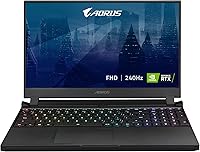
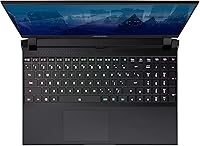
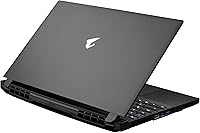
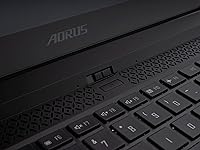
The GIGABYTE AORUS 15P XD Gaming Laptop sits in an interesting spot within GIGABYTE's gaming lineup — powerful enough to handle demanding titles with confidence, yet not positioned as an all-out flagship. Released in late 2021, it pairs an 11th Gen Intel Core i7 with an RTX 3070 Laptop GPU, a genuinely capable combination for 1080p gaming. The 240Hz refresh rate is where this gaming machine really shines for competitive players. AORUS has built a solid reputation for no-nonsense gaming hardware, and this model reflects that ethos — though buyers should understand it occupies a strong mid-to-high tier, not the very pinnacle of portable gaming performance.

Features & Benefits

The RTX 3070 Laptop GPU here runs at up to 130W — that's meaningful headroom that pushes frame rates well above what lower-wattage configurations can manage. In practice, you're looking at smooth 1080p performance across most modern titles at high settings, and DLSS support extends that further by using AI upscaling to recover frames without obvious visual cost. The 240Hz IPS panel is factory-calibrated and X-Rite Pantone certified, making it sharper and more color-accurate than typical gaming screens. The Gen4 NVMe SSD loads games fast, and with RAM expandable to 64GB, this AORUS laptop has meaningful upgrade headroom for the long haul.

Best For

This gaming machine is an obvious fit for competitive FPS players — anyone spending serious time in games where every millisecond of response time matters will appreciate having a 240Hz panel doing the heavy lifting. It also makes real sense as a dual-purpose daily driver for students or young professionals who need solid CPU performance for workloads like video editing or coding alongside gaming. The factory-calibrated display adds unexpected value for light creative work. At just under 5 pounds and a slim 1.06-inch chassis, the AORUS 15P XD is genuinely portable for a machine packing this much GPU power.

User Feedback

Owners of the AORUS 15P XD consistently praise its in-game responsiveness and how the display handles fast-paced titles — those frame rates are genuinely felt, not just a spec on paper. The SSD speed also gets regular positive mentions. That said, battery life is a recurring frustration; pushing the GPU hard drains the pack quickly, so desk use near an outlet is the realistic scenario. Fan noise under sustained load can get intrusive. Some users have flagged inconsistencies with GIGABYTE's Control Center software, from installation quirks to occasional driver conflicts. Chassis rigidity is generally rated as solid, though the trackpad receives mixed reviews.

Pros

  • The RTX 3070 Laptop GPU running at 130W delivers genuinely strong 1080p frame rates across demanding modern titles.
  • A 240Hz IPS panel with factory calibration is rare at this tier and benefits both gamers and light creatives.
  • DLSS support gives this gaming machine a meaningful frame-rate buffer in supported titles without visible quality loss.
  • The Gen4 NVMe SSD loads games and large files noticeably faster than older SATA or PCIe 3 drives.
  • RAM is upgradeable to 64GB, giving the AORUS 15P XD real longevity for future-proofing.
  • Wi-Fi 6 connectivity keeps online gaming stable even in dense network environments.
  • At under 5 pounds, this is a portable option for a laptop packing legitimate high-end GPU performance.
  • The 8-core i7-11800H handles multi-threaded workloads well beyond basic gaming, including video encoding and compilation tasks.
  • Anti-glare coating on the display makes it practical to use in brighter or varied lighting conditions.

Cons

  • Battery life under gaming load is short — realistically expect to stay near a power outlet during sessions.
  • Fan noise under sustained GPU load is intrusive and noticeable in quiet environments.
  • GIGABYTE Control Center software has a history of installation quirks and occasional driver conflicts reported by users.
  • The trackpad receives mixed feedback and may frustrate users who rely on it for productivity tasks.
  • Being a 2021-generation platform means newer CPU and GPU architectures have since passed it by in efficiency.
  • Thermal management can be inconsistent under prolonged heavy workloads, with some users reporting throttling during extended sessions.
  • The 1080p display cap means no upgrade path for buyers who later want higher-resolution gaming.
  • Only one audio output port limits flexibility for users running both headphones and external speakers simultaneously.

Ratings

The scores below for the GIGABYTE AORUS 15P XD Gaming Laptop were generated by our AI system after analyzing verified purchase reviews from buyers worldwide, with spam, bot activity, and incentivized feedback actively filtered out before any scoring was applied. The results reflect an honest synthesis of what real owners consistently praised and where they ran into genuine frustrations — nothing is glossed over. Both the strengths that make this machine worth considering and the trade-offs that might make you think twice are transparently baked into every score.

Gaming Performance
88%
At 1080p, the RTX 3070 running at its full 130W envelope pushes high frame rates in demanding titles that feel genuinely smooth — not just on paper. Gamers playing competitive shooters report that the GPU rarely feels like the limiting factor at this resolution, and DLSS support in compatible titles adds another layer of headroom.
Sustained gaming sessions over 30-plus minutes can introduce mild throttling as thermals climb, which some users noticed as slight frame-rate dips during extended play. The GPU ceiling also means 1440p gaming is possible but not the sweet spot this machine was tuned for.
Display Quality
91%
The 240Hz refresh rate combined with factory calibration is a genuinely rare pairing at this tier — competitive players feel the difference immediately in fast-paced titles, and the Pantone-certified accuracy makes the screen trustworthy for casual photo editing. Anti-glare coating holds up well in brighter rooms.
The 72% NTSC color gamut coverage, while good for gaming, falls short of what professional creatives expect from a calibrated panel. Users who later upgraded to a wide-gamut external monitor reported the built-in screen felt noticeably less vivid by comparison.
Processor Speed
84%
The i7-11800H handles multi-threaded workloads with confidence — video exports, code compilation, and running virtual machines alongside background apps all proceed without the CPU becoming an obvious bottleneck. Students using it as a daily driver praised how it kept up across demanding academic software.
Compared to 12th and 13th Gen Intel mobile chips that came after, the 11800H shows its age in efficiency rather than raw speed — it runs hotter and draws more power for equivalent performance. Light workloads still cause fans to spin up more than users expected.
Thermal Management
63%
37%
During shorter gaming bursts and productivity tasks, temperatures stay within acceptable ranges and the machine performs consistently. Users who adjusted fan profiles through GIGABYTE's software found they could keep thermals in check during moderate workloads without the fans becoming unbearable.
Extended gaming sessions push the chassis noticeably warm, especially around the keyboard deck and bottom panel. Several users reported throttling during hour-long-plus gaming runs, and the fan noise required to maintain those temps was frequently called out as the single biggest daily frustration.
Battery Life
41%
59%
For very light tasks — reading, streaming low-resolution video, or basic document work with the GPU idling — the battery is functional enough to get through a short meeting or commute without hunting for an outlet. It arrives with a full charge out of the box.
Under any real gaming load, owners consistently report the battery depletes within 1.5 to 2.5 hours, sometimes faster. This is not a machine you take to a LAN event expecting to game unplugged — the power brick is effectively a mandatory travel companion for anyone using it seriously.
Build Quality
76%
24%
The overall chassis feels solid and resists flex reasonably well during travel and daily handling. AORUS has put enough rigidity into the lid and base that most users felt confident tossing it in a bag without worrying about damage under normal conditions.
The build does not feel premium in the same way as some competitors at a similar price point — the plastic elements around the hinge and bottom panel attract fingerprints and feel less refined up close. A few owners noted slight creaking from the chassis after extended use.
Keyboard & Trackpad
67%
33%
The keyboard offers decent travel and tactile feedback for a gaming laptop, and most users found it comfortable for both gaming and long typing sessions. Backlighting is functional and visible in dim environments without being distracting.
The trackpad is the weaker link — multiple buyers described it as imprecise and inconsistent, particularly for fine cursor control during productivity work. Users who relied on it for anything beyond basic navigation frequently mentioned reaching for an external mouse within the first week.
Storage Speed
89%
The Gen4 NVMe SSD delivers noticeably fast boot times and near-instant game loading, which owners coming from older SATA-based systems found immediately impactful. Large file transfers and application installs complete quickly without sitting through long progress bars.
One terabyte fills up faster than many users anticipated once a library of modern games is installed, and while the drive is fast, adding a secondary drive requires opening the chassis. There is no easy external expansion shortcut beyond USB, which some found limiting.
Wi-Fi & Connectivity
82%
18%
Wi-Fi 6 keeps online gaming stable even in congested apartment or dormitory networks where older Wi-Fi 5 machines struggle with ping spikes. Users in dense living situations specifically called out improved connection reliability compared to their previous laptops.
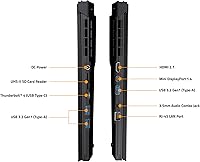
The port selection, while functional, is limited to three USB 3.0 Type-A ports and one audio jack with no SD card slot, which frustrated users who work with cameras or need more simultaneous connections. A USB hub becomes a practical necessity for productivity-heavy setups.
Software Experience
54%
46%
GIGABYTE Control Center does provide useful functionality once running — fan profile adjustments and performance mode switching are genuinely helpful for balancing noise and gaming output. Users who got it configured properly appreciated having that level of system control.
Getting there is the problem: installation errors, conflicts after Windows updates, and driver instability after fresh installs were recurring complaints across user feedback. New owners should expect to spend time troubleshooting the software ecosystem before the laptop runs smoothly.
Noise Levels
49%
51%
At idle and during light productivity tasks, the fans are quiet enough that this gaming machine can sit on a desk in a quiet room without drawing attention. The baseline noise floor is acceptable for everyday non-gaming use.
Under gaming load, the fan noise ramps up aggressively and becomes one of the most commented-on pain points across user feedback. Owners gaming in shared spaces — bedrooms, offices, dorm rooms — consistently cited it as disruptive enough that a headset became non-negotiable.
Value for Money
72%
28%
For buyers who find this at a reduced price relative to its original launch cost, the 240Hz calibrated display plus RTX 3070 at 130W is a genuinely competitive bundle that younger competitors do not always match at the same tier. It covers a wide range of use cases for a single purchase.
Priced against current-generation alternatives, the 2021 platform starts to look less compelling — newer CPUs offer better efficiency, and the battery and software shortcomings become harder to justify. Value depends heavily on how significantly the price has adjusted since launch.
Portability
77%
23%
At 4.8 pounds and just over an inch thick, the AORUS 15P XD travels more comfortably than most gaming laptops with comparable specs. Students who carried it between classes or offices noted it fit in a standard laptop bag without excessive strain.
The power adapter is large and adds meaningful weight to any travel bag, partially undermining the laptop's portability advantage. Anyone who needs to go fully mobile without the brick quickly realizes the battery limitation compounds the portability equation.
Display Refresh Rate
93%
A 240Hz panel makes a tangible difference in competitive gaming — enemies are sharper during fast movement, screen tear is virtually absent, and input responsiveness feels immediate in ways that 60Hz or 144Hz screens simply do not replicate. FPS players unanimously praised this spec.
The benefit is essentially exclusive to 1080p gaming; users who tried to push higher-resolution content through an external display noticed the internal panel remained fixed at 1080p. For those who care about resolution as much as refresh rate, the display ceiling will eventually feel restrictive.

Suitable for:

The GIGABYTE AORUS 15P XD Gaming Laptop is a strong match for competitive gamers who live and breathe high-refresh-rate play — if your go-to titles are fast-paced shooters or MOBAs where frame timing actually changes outcomes, the 240Hz display is a genuine advantage rather than a marketing number. Students and young professionals who want one machine that can handle both heavy gaming sessions and demanding productivity tasks like video rendering, coding, or photo editing will find the i7-11800H holds up well across both worlds. The factory-calibrated, Pantone-certified screen is a quiet bonus for anyone doing light creative work who doesn't want to invest in a separate monitor. If portability matters — hauling between a dorm, office, or LAN event — the sub-5-pound chassis makes this AORUS laptop notably easier to live with than bulkier competitors packing similar GPU firepower. Wi-Fi 6 support also makes it a solid pick for anyone in a crowded network environment where connection stability during online play matters.

Not suitable for:

The GIGABYTE AORUS 15P XD Gaming Laptop is not the right call for buyers who need all-day unplugged use — the battery drains quickly under any real load, and expecting more than a couple of hours of gaming away from an outlet will lead to disappointment. Buyers chasing the absolute cutting edge should also think carefully: this is a 2021-generation machine, and newer laptops have since introduced more power-efficient architectures and stronger GPU options at comparable price points, so value-conscious shoppers should weigh current alternatives. If you game primarily at 1440p or 4K and care deeply about resolution fidelity over raw frame rates, the 1080p-only panel will feel like a ceiling. Anyone who tends to game in quiet environments — a library, late at night in a shared space — should know the fans get loud under sustained load and there is no getting around that. Finally, users who prioritize a polished out-of-box software experience may find GIGABYTE's companion software requires some patience to configure correctly.

Specifications

  • Processor: Intel Core i7-11800H with 8 cores and 16 threads, clocking up to 4.6GHz under boost, part of Intel's 11th Gen Tiger Lake-H platform.
  • Graphics Card: NVIDIA GeForce RTX 3070 Laptop GPU with 8GB GDDR6 memory, a 1560MHz boost clock, and a maximum graphics power of 130W.
  • Display Size: 15.6-inch IPS-level anti-glare panel with a native 1920x1080 resolution and a 240Hz refresh rate.
  • Display Quality: The panel is X-Rite Pantone certified and individually factory-calibrated per unit, covering 72% of the NTSC color gamut.
  • RAM: 16GB DDR4 RAM installed at launch, with the system supporting expansion up to 64GB maximum.
  • Storage: 1TB PCIe Gen4 NVMe SSD, offering significantly faster sequential read and write speeds compared to previous-generation PCIe 3 drives.
  • Wireless: Wi-Fi 6 (802.11ax) is built in, providing faster throughput and better performance in network-congested environments than Wi-Fi 5.
  • Operating System: Ships with Windows 11 Home pre-installed out of the box.
  • USB Ports: Three USB 3.0 Type-A ports are available for peripherals, external drives, and accessories.
  • Audio Output: One dedicated audio-out port is included for connecting headphones or external speakers.
  • Weight: The laptop weighs 4.8 pounds, making it relatively portable for a 15.6-inch gaming machine with this level of GPU hardware.
  • Dimensions: The chassis measures 14 x 9.6 x 1.06 inches, keeping the profile slim relative to its performance tier.
  • Battery: One Lithium Polymer battery is included; battery capacity is optimized for performance-first use rather than extended unplugged sessions.
  • Optical Drive: No optical drive is included, which is standard for slim gaming laptops in this category.
  • Color: Available in Black, reflecting the AORUS line's consistent minimalist, matte gaming aesthetic.
  • DLSS Support: NVIDIA DLSS (Deep Learning Super Sampling) is fully supported, allowing AI-based frame-rate upscaling in compatible game titles.
  • Chipset Brand: NVIDIA serves as the graphics chipset brand, with Intel providing the platform chipset for the 11th Gen mobile architecture.
  • Release Date: This model was first made available in December 2021, positioning it as an 11th Gen Intel platform gaming laptop.

Related Reviews
GIGABYTE AORUS Master 16 Gaming Laptop
78%
96%
Display Quality
93%
Gaming Performance
74%
Thermal Management
88%
Build Quality
91%
CPU Performance
More
GIGABYTE AORUS 7 9KF-E3US513SH Laptop
84%
93%
Gaming Performance
90%
Display Quality
86%
Build Quality
72%
Battery Life
75%
Portability
More
GIGABYTE AORUS FO27Q3 27″ QD OLED Gaming Monitor
88%
96%
Display Quality
92%
Performance (Gaming)
88%
Build Quality
94%
Color Accuracy
98%
Response Time
More
GIGABYTE AORUS 17 RTX 4070 Gaming Laptop
73%
93%
Display Quality
88%
Gaming Performance
67%
Thermal Management
61%
Fan Noise
44%
Battery Life
More
GIGABYTE AORUS FO32U2 32-inch Gaming Monitor
80%
96%
Panel Image Quality
93%
Motion & Response Performance
91%
HDR Performance
92%
Color Accuracy
67%
Burn-in & Longevity Risk
More
MALLRACE LX15PRO Gaming Laptop
83%
91%
Value for Money
88%
Performance for Light Gaming
85%
Portability/Weight
63%
Battery Life
87%
Build Quality
More
GIGABYTE Z690 AORUS ULTRA
87%
93%
Performance
91%
Thermal Management
88%
Overclocking Stability
92%
Power Delivery
90%
Connectivity (Wi-Fi, LAN)
More
GIGABYTE X870 Gaming WiFi6 ATX Motherboard
81%
84%
Value for Money
91%
Connectivity & I/O
88%
Ease of Installation
74%
BIOS Experience
67%
VRM & Power Delivery
More
GIGABYTE Z690 AORUS PRO
87%
89%
Performance & Stability
91%
Overclocking Support
87%
Thermal Management
90%
Connectivity Options
85%
Ease of Setup
More
Alienware m18 AMD 18-inch Gaming Laptop
76%
93%
Gaming Performance
91%
Display Quality
84%
Thermal Management
88%
Build Quality
41%
Portability
More

FAQ

You are not stuck with 16GB. The AORUS 15P XD supports up to 64GB of DDR4 RAM, so there is meaningful room to upgrade down the line if your workloads demand it. Just make sure to match the correct DDR4 SO-DIMM spec when purchasing additional sticks.

Honestly, battery life is one of the weaker points of this gaming machine. Under gaming load, expect somewhere in the range of 1.5 to 2.5 hours depending on settings and GPU usage. For lighter tasks like browsing or document work, you can stretch it further, but this is fundamentally a plug-in-and-play machine for serious sessions.

Yes, it handles the majority of modern titles at high or ultra settings at 1080p with very playable frame rates. The RTX 3070 running at 130W is a capable GPU, and DLSS support in compatible titles gives you extra headroom to push quality settings without sacrificing smoothness.

Under sustained GPU load, the fans are noticeably loud — this is a common trade-off with thin, high-power gaming laptops. If you are gaming in a shared or quiet space, a headset will help mask it. Fan noise is less aggressive during light productivity tasks, but expect it to ramp up quickly once a demanding game starts.

It is actually better than most gaming displays for color work. The 15.6-inch panel is X-Rite Pantone certified and factory-calibrated on a per-unit basis, which is uncommon at this price range. It covers 72% of NTSC, so it is not a professional-grade wide-gamut screen, but it is reliable enough for photo editing, color grading for web content, and design work.

Yes, you can connect external displays via the available video output ports. Running an external 1440p or 4K monitor is a practical way to get higher-resolution gaming or creative work out of the RTX 3070 GPU if the built-in 1080p panel feels limiting for those use cases.

It is worth installing for fan profile and performance mode control, but some users have reported quirks during initial setup and occasional conflicts after Windows updates. The safest approach is to install it fresh, keep it updated, and avoid running third-party overlays alongside it until you confirm stability on your specific setup.

The i7-11800H is an 8-core processor that handles multi-threaded workloads well, so compiling code, running virtual machines, or exporting video timelines are all tasks it manages without struggling. Pair that with a fast Gen4 SSD and up to 64GB of possible RAM, and the AORUS 15P XD is a capable productivity machine, not just a gaming rig.

In practice, for most home networks the difference is modest unless you are on a congested network with many connected devices. Where Wi-Fi 6 genuinely helps is in environments like apartments, dorms, or offices where many devices compete for bandwidth — latency tends to stay more stable under those conditions compared to older Wi-Fi standards.

That depends on your priorities. This gaming machine is a 2021-gen platform, and newer Intel and AMD laptop CPUs have since improved power efficiency and performance-per-watt. If you find this AORUS laptop at a meaningfully reduced price, it still delivers strong 1080p gaming performance and holds up well. If it is priced close to current-gen alternatives, it is worth comparing against newer models before committing.