


Overview

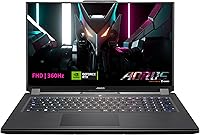
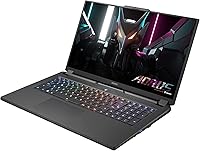
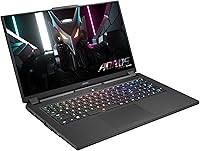
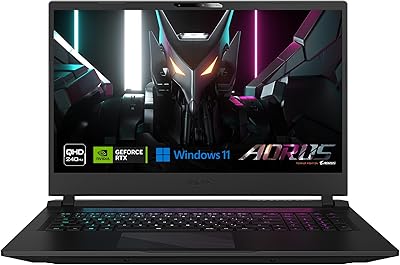
The GIGABYTE AORUS 7 9KF Gaming Laptop sits in a compelling spot in the market — powerful enough to handle modern gaming seriously, yet priced where real trade-offs still exist. GIGABYTE's AORUS line has built a solid reputation among gamers who want performance without paying flagship prices, and this 17.3-inch machine reflects that philosophy. The large display makes it best suited for desk use or occasional travel rather than daily commuting. It delivers strong 1080p gaming performance, but buyers should approach it as a capable mid-range option, not a no-compromise powerhouse. Honest expectations make for satisfied owners.

Features & Benefits

The display is honestly one of the strongest selling points here. A 360Hz refresh rate at 1080p with 100% sRGB coverage and TÜV Rheinland certification means colors are accurate and motion is buttery smooth — something you notice immediately in fast-paced shooters. Paired with an RTX 4060 Laptop GPU, the AORUS 7 9KF handles most modern titles at high settings without breaking a sweat. The i5-12500H is a notch below i7 territory, but for gaming it rarely feels like a bottleneck. Wi-Fi 6E and a Thunderbolt 4 port round out a connectivity package that's genuinely useful, not just a spec checkbox.

Best For

This AORUS gaming laptop is a natural fit for competitive FPS players who care more about frame rate than resolution. At 360Hz, titles like CS2, Valorant, or Apex Legends run with a responsiveness that lower-refresh screens simply can't match. College students will appreciate the large screen for both gaming and productivity, though the nearly 6-pound weight means it's not something you'll want to carry across campus every day. If you're coming from a GTX 1060 or 1650-era machine, the jump in performance will feel significant. Light streamers and video editors will also find it capable, provided the 512GB SSD doesn't fill up too fast.

User Feedback

Owners of this 17-inch GIGABYTE machine consistently praise how smooth gameplay feels on the 360Hz panel, and most agree the RTX 4060 punches above its weight for 1080p gaming. Fan noise under load comes up frequently, though — at peak performance, this machine gets loud, which is typical for slim gaming laptops in this class. Battery life is another common gripe; expect two to three hours of light use unplugged, so a power outlet nearby is a practical necessity. On the build side, the plastic chassis draws some criticism for feeling less premium than the spec sheet suggests. Many buyers also recommend adding a second SSD early on.

Pros

  • The 360Hz panel makes a noticeable difference in fast-paced competitive games where every frame counts.
  • RTX 4060 handles modern 1080p titles at high settings with solid, consistent frame rates.
  • 100% sRGB coverage and TÜV Rheinland certification mean colors are accurate out of the box.
  • Wi-Fi 6E delivers low-latency wireless performance that holds up well during online multiplayer sessions.
  • Thunderbolt 4 with Power Delivery adds real flexibility for external monitors and fast peripherals.
  • The Gen4 NVMe SSD loads games and applications noticeably faster than older SATA-based drives.
  • Dual-channel RAM configuration ensures the GPU is not memory-bandwidth starved during gaming.
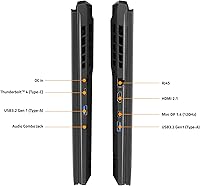
  • The AORUS 7 9KF offers a strong port selection, including HDMI 2.1 and Mini DisplayPort, for multi-display setups.
  • Upgrading RAM or adding a second M.2 SSD is straightforward for buyers willing to open the chassis.
  • The 17.3-inch screen size gives a genuinely immersive gaming experience without needing an external display.

Cons

  • Battery life under any real workload is poor — plan on staying close to a wall outlet.
  • Fan noise at peak load is loud enough to be distracting in quiet environments.
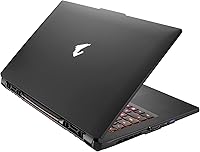
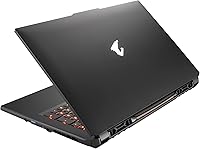
  • The plastic chassis lacks the rigidity and premium feel found on pricier competitors.
  • 512GB storage fills up quickly once you install a few modern AAA titles.
  • The i5-12500H trails behind i7 configurations in heavily threaded tasks and future-proofing.
  • At nearly six pounds, this AORUS gaming laptop is not well-suited for daily commuting or frequent travel.
  • Trackpad quality receives mixed feedback and may feel underwhelming compared to the display performance.
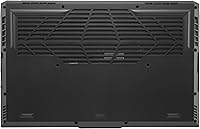
  • Thermal management under sustained load can push surface temperatures uncomfortably high.
  • The 1080p resolution, while ideal for 360Hz, may feel limiting for buyers who also use the laptop for media consumption.
  • No optical drive and a single audio combo jack limit legacy peripheral compatibility.

Ratings

The GIGABYTE AORUS 7 9KF Gaming Laptop scores below are generated by AI after analyzing thousands of verified buyer reviews from global markets, with spam, bot-submitted, and incentivized feedback actively filtered out. The ratings reflect the full picture — what this machine genuinely gets right and where real users consistently run into friction. Scores are weighted toward the experiences of verified purchasers who used the laptop over weeks and months, not first impressions.

Gaming Performance
88%
The RTX 4060 paired with a 360Hz display is a strong combination for 1080p gaming, and users repeatedly report smooth, high-frame-rate experiences in both esports and modern AAA titles. Competitive players in particular note that the hardware keeps up with the display's capabilities in fast-paced shooters.
A handful of users pushing the GPU in demanding open-world titles at max settings do report occasional frame dips that remind you this is not a top-tier GPU. The i5-12500H also shows its ceiling in CPU-bound scenarios, which can affect performance in simulation-heavy games.
Display Quality
91%
The 360Hz IPS panel with 100% sRGB coverage is one of the most praised aspects of this machine, with users calling it one of the smoothest displays they have used at this price point. TÜV Rheinland certification and accurate out-of-box colors make it genuinely suitable for both gaming and light creative work.
A small number of users note that at 1080p on a 17.3-inch screen, pixel density is lower than on smaller high-res panels, which can look slightly soft during non-gaming use. Brightness levels also drew mild criticism from buyers using the laptop in well-lit rooms.
Battery Life
41%
59%
When the laptop is deliberately throttled to a low-power profile for light tasks like note-taking or document browsing, a small number of users managed to stretch battery life to around three to four hours. The Thunderbolt 4 Power Delivery support means users have more flexibility in which charger they carry.
Under any real gaming load, battery life consistently lands between one and two hours, which is one of the most frequently cited frustrations across all reviewer pools. Even during light productivity use, most buyers report needing to plug in well before the end of a workday, making this a tethered-use machine in practice.
Build Quality
63%
37%
The chassis feels sturdy enough for desk use and occasional transport, and most buyers who use it primarily at home report no structural complaints after extended ownership. Hinge tension is generally praised as smooth without feeling loose.
The all-plastic construction is a recurring point of disappointment, especially at this price tier where some competitors offer at least partial metal builds. Users who handle the laptop frequently report visible flex in the lid and keyboard deck, and the overall feel does not match the premium positioning of the AORUS brand name.
Thermal Management
67%
33%
During moderate gaming sessions, thermals stay within acceptable ranges and the laptop does not throttle noticeably under typical esports workloads. GIGABYTE's fan control software gives users some flexibility to tune cooling behavior based on their environment.
Under sustained heavy loads, surface temperatures on the keyboard and bottom panel climb to levels that many users find uncomfortable for lap use. Several reviewers note that extended AAA gaming sessions push CPU temperatures high enough to trigger brief thermal throttling, which slightly affects consistency.
Fan Noise
54%
46%
In balanced or silent mode during light tasks, the fans are barely audible and do not interfere with everyday productivity work. Some users appreciate that the fan profile can be manually adjusted through the GIGABYTE software suite.
At full gaming load, the fans are loud enough to be clearly heard over in-game audio without headphones, and this is one of the most consistently mentioned complaints in verified reviews. Users working in shared spaces like dorms or offices specifically flag the fan noise as socially disruptive during longer sessions.
Storage
58%
42%
The Gen4 NVMe SSD delivers noticeably fast load times compared to older SATA drives, and users transitioning from previous-generation laptops appreciate the snappiness in both game loading and system responsiveness. The available M.2 expansion slot makes upgrading straightforward.
512GB fills up faster than most buyers anticipate — three or four large modern titles can consume the majority of the drive. A significant portion of reviewers recommend budgeting for a second SSD before or shortly after purchase, which adds to the total cost of ownership.
Connectivity & Ports
86%
The port selection is genuinely comprehensive for a gaming laptop, with Thunderbolt 4, HDMI 2.1, Mini DisplayPort, ethernet, and multiple USB-A ports all present. Users running multi-monitor desk setups specifically praise how little they need to rely on dongles.
The Mini DisplayPort output is capped at 120Hz, which can surprise users expecting full bandwidth for high-refresh external displays. A few buyers also note the USB-C landscape could be more generous given how many peripherals now rely on that connector type.
Wireless Performance
83%
Wi-Fi 6E support gives users noticeably stable and low-latency connections in environments with 6GHz routers, which competitive online gamers on modern home networks actively benefit from. Bluetooth 5.2 pairing with headsets and controllers is reported as reliable and consistent.
Users on older Wi-Fi 5 or Wi-Fi 6 routers do not see the full benefit of the Wi-Fi 6E capability, and a small number report occasional driver-related connectivity hiccups that required software updates to resolve.
Keyboard & Trackpad
61%
39%
The backlit keyboard receives reasonably positive feedback for gaming use, with users noting adequate key travel and responsive actuation during extended play sessions. Backlighting brightness is considered sufficient for low-light environments.
For productivity typing, the keyboard feel divides users, with several describing it as mushy compared to business-class laptops in a similar price range. The trackpad draws more consistent criticism — it is considered functional but imprecise, and most users default to an external mouse for both gaming and daily tasks.
Audio Quality
57%
43%
DTS:X Ultra processing adds some spatial depth to the built-in speakers that makes casual gaming and media consumption more enjoyable than bare stereo output. The built-in microphone performs adequately for voice chat without an external headset.
At just 2W per speaker, maximum volume is limited and bass response is minimal, which is typical for slim gaming laptops but still disappointing at this screen size. Most users treat the built-in speakers as a fallback rather than a primary audio option.
Portability
48%
52%
The 17.3-inch form factor is a deliberate trade-off that buyers who work primarily at a desk accept willingly, and those users rarely mention portability as a concern. The machine fits standard laptop backpacks designed for larger screens.
At nearly six pounds plus the weight of the power brick, daily commuting with this laptop becomes physically inconvenient quickly. Several university students who purchased it as a portable daily driver later expressed regret that they underestimated how much the size and weight would affect everyday carry.
Value for Money
79%
21%
For buyers who prioritize a high-refresh-rate display and RTX 4060 performance specifically for 1080p competitive gaming, the overall package offers a compelling return on investment relative to alternatives at the same price tier. Users who know exactly what they are buying — a desk-focused gaming machine — consistently rate it as a fair deal.
Buyers who discover the battery life, fan noise, or plastic build quality only after purchase often feel the value proposition weakens significantly for general-purpose use. The 512GB storage ceiling also means the actual out-of-box usable value is lower than the spec sheet implies without an additional storage investment.
Software & Drivers
66%
34%
GIGABYTE's Control Center software allows users to manage fan profiles, performance modes, and some display settings in one place, which more technically inclined buyers appreciate for fine-tuning the experience. Driver updates have been reasonably consistent since launch.
Several users report that the pre-installed software suite includes bloatware that needs to be manually removed for the best experience. A minority of buyers have encountered driver conflicts on first setup, particularly with GPU drivers, requiring manual intervention before gaming performance stabilized.

Suitable for:

The GIGABYTE AORUS 7 9KF Gaming Laptop is built for a specific kind of buyer, and if you fit the profile, it delivers real value. Competitive FPS and esports players who live and die by frame rates will find the 360Hz display a genuine advantage in titles like Valorant, CS2, and Apex Legends. College students who want one machine that handles both gaming sessions and coursework will appreciate the large screen and capable internals without needing a separate desktop. If you mostly game at a desk and only occasionally move the laptop between rooms or dorms, the size and weight are easy to overlook. Buyers upgrading from older GTX 10- or 16-series laptops will experience a meaningful generational jump in both GPU performance and connectivity options. Light content creators who stream or do occasional video editing alongside gaming will also find the RTX 4060 and fast Gen4 SSD a comfortable pairing.

Not suitable for:

The GIGABYTE AORUS 7 9KF Gaming Laptop is a harder sell for buyers who need a machine that travels frequently or runs untethered from a power outlet for more than a couple of hours. At nearly six pounds and with battery life that drains quickly under any real load, it is not a commuter-friendly device. Buyers chasing high-resolution gaming or who plan to run demanding creative workloads like 3D rendering or video production at scale will find the i5-12500H and 8GB VRAM start to show limits sooner than an i7 or RTX 4070 configuration would. Anyone expecting a premium, rigid build quality will likely be disappointed by the plastic chassis, which feels functional rather than refined. The 512GB SSD also becomes a genuine constraint the moment you start installing multiple modern AAA titles, so buyers without the budget or intention to add a second drive should weigh that carefully.

Specifications

  • Display Size: The screen measures 17.3 inches diagonally, using an IPS panel at a native FHD resolution of 1920x1080 pixels.
  • Refresh Rate: The display runs at 360Hz, designed for competitive gaming where high frame rates provide a tangible responsiveness advantage.
  • Color Accuracy: The panel covers 100% of the sRGB color space and holds TÜV Rheinland certification for display quality standards.
  • GPU: An NVIDIA GeForce RTX 4060 Laptop GPU with 8GB of GDDR6 memory handles graphics rendering across gaming and creative workloads.
  • CPU: The Intel Core i5-12500H is a 12th Gen hybrid-architecture processor with 12 threads, balancing performance and thermal efficiency.
  • RAM: 16GB of DDR4 RAM runs in a dual-channel configuration at 3200MHz, providing adequate bandwidth for gaming and multitasking.
  • Storage: A 512GB Gen4 M.2 NVMe SSD handles system storage, offering fast read and write speeds compared to older SATA-based drives.
  • Operating System: The laptop ships with Windows 11 Home pre-installed from the factory.
  • Wireless: Connectivity includes Wi-Fi 6E (802.11ax) and Bluetooth 5.2 for low-latency wireless networking and peripheral pairing.
  • Ports: The port selection includes one Thunderbolt 4 with Power Delivery, one HDMI 2.1, one Mini DisplayPort 1.4, two USB 3.2 Gen1 Type-A ports, one RJ45 ethernet jack, and one audio combo jack.
  • Dimensions: The chassis measures 15.7 inches long by 10 inches wide by 1.02 inches thick, making it a full-size desktop-replacement footprint.
  • Weight: The laptop weighs 5.95 pounds, which is typical for a 17-inch gaming chassis but notable for buyers expecting portability.
  • Audio: The built-in audio system includes two 2W speakers with DTS:X Ultra processing and a built-in microphone for voice communication.
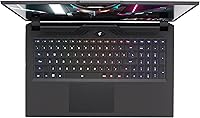
  • Keyboard: The keyboard includes per-key backlighting to support low-light gaming and typing environments.
  • Battery: The laptop is powered by a built-in lithium polymer battery pack; battery capacity is not officially published but real-world unplugged use is limited under gaming loads.
  • Power Input: The system accepts up to 230V input via its DC-in port, and the Thunderbolt 4 port also supports Power Delivery charging.
  • Expandability: The chassis supports user-accessible RAM slots and at least one additional M.2 slot, allowing buyers to upgrade storage after purchase.
  • Optical Drive: No optical drive is included; the chassis is disc-drive free by design, consistent with modern gaming laptop standards.

Related Reviews
GIGABYTE AORUS Master 16 Gaming Laptop
78%
96%
Display Quality
93%
Gaming Performance
74%
Thermal Management
88%
Build Quality
91%
CPU Performance
More
GIGABYTE AORUS FO27Q3 27-inch QD-OLED Monitor
85%
94%
Motion Clarity & Refresh Rate
96%
Contrast & Black Levels
91%
Color Accuracy
78%
Burn-In Protection
83%
Resolution & Sharpness
More
GIGABYTE AORUS 17 RTX 4070 Gaming Laptop
73%
93%
Display Quality
88%
Gaming Performance
67%
Thermal Management
61%
Fan Noise
44%
Battery Life
More
GIGABYTE AORUS FO32U2 32-inch Gaming Monitor
80%
96%
Panel Image Quality
93%
Motion & Response Performance
91%
HDR Performance
92%
Color Accuracy
67%
Burn-in & Longevity Risk
More
INLAND AMD Ryzen 7 7800X3D & GIGABYTE X670 Bundle
81%
93%
Gaming Performance
88%
Motherboard Build Quality
91%
Out-of-Box Compatibility
71%
Value for Money
74%
Thermal Management
More
ASUS TUF A16 Gaming Laptop
74%
84%
Gaming Performance
71%
Display Quality
83%
Build Quality
58%
Thermal Management
54%
Fan & Noise Level
More
ASUS TUF A15 Gaming Laptop, AMD Ryzen 7 7435HS, 64GB RAM, 2TB SSD
85%
92%
Gaming Performance
88%
Multitasking Capability
85%
Cooling System Efficiency
83%
Build Quality
70%
Portability
More
INLAND AMD Ryzen 7 7700X CPU & GIGABYTE B650 Gaming X AX V2 Motherboard
88%
94%
Gaming Performance
92%
Processor Speed
89%
Motherboard Stability
85%
Ease of Setup
90%
Overclocking Potential
More
KAIGERR TX16PRO 2025 Gaming Laptop, AMD Ryzen 7 5825U, 16GB RAM, 512GB SSD
86%
89%
Performance for Gaming
92%
Value for Money
86%
Portability
91%
Display Quality
88%
Multitasking Capability
More
NIMO N177B 17.3″ Gaming Laptop
73%
88%
Processing Performance
91%
RAM & Storage Speed
84%
Display Quality
58%
Gaming Capability
79%
Build Quality & Design
More

FAQ

Honestly, it depends on what you play. A few modern AAA titles can eat through 512GB surprisingly fast — some individual games top 100GB on their own. If you plan to keep a rotating library of big titles installed at once, you will likely want to add a second M.2 SSD. The good news is the chassis supports expansion, so it is a solvable problem rather than a permanent limitation.

In esports titles like Valorant, CS2, or Overwatch 2 at 1080p on lower settings, yes — the RTX 4060 can regularly push frame rates into the 300fps-plus range where the 360Hz display becomes genuinely useful. In heavier AAA titles, you will be well below that ceiling, but the display still performs well at whatever frame rate the GPU delivers.

It is a real limitation worth accepting upfront. Under gaming loads, expect roughly an hour or two before the battery drains. Even during light tasks like browsing or document work, you are unlikely to exceed four hours. This is a laptop that works best plugged in, and most buyers in this category plan accordingly.

Not for the vast majority of gaming scenarios. The i5-12500H is a 12-thread hybrid-architecture chip that handles gaming workloads without meaningful bottlenecking the RTX 4060. Where it shows limits is in heavily threaded workloads like 3D rendering, large video exports, or CPU-intensive simulations. For gaming and everyday productivity, it is more than adequate.

Yes, and the port options are genuinely flexible. You can connect an external display via HDMI 2.1 for up to 4K output, Mini DisplayPort 1.4 for up to 120Hz at higher resolutions, or through the Thunderbolt 4 port which supports DisplayPort Alt Mode. This makes it a solid choice for a dual-display desk setup.

Under sustained gaming load, the fans are audible — noticeably so in a quiet room. This is not unusual for a laptop pushing RTX 4060 performance in a relatively slim chassis, but it is worth knowing if you are sensitive to fan noise. Using headphones while gaming largely neutralizes the issue.

Yes. The AORUS 7 9KF uses socketed DDR4 SO-DIMM slots rather than soldered memory, which means you can upgrade beyond the stock 16GB if needed. The machine ships in a dual-channel 2x8GB configuration, so upgrading to 32GB with two 16GB sticks is a straightforward option down the road.

It is solid and functional, though the plastic chassis does not feel as premium as aluminum-bodied competitors. For desk use or light travel between rooms, it holds up well. If you are rough with your gear or expect the rigidity of a MacBook-style build, you will notice the difference. For the price tier, the build quality is acceptable rather than exceptional.

For light to moderate content creation — streaming gameplay, editing 1080p video, running OBS alongside a game — this AORUS gaming laptop handles the workload without major issues. The RTX 4060 supports NVENC hardware encoding, which keeps streaming performance efficient without taxing the CPU heavily. For professional-grade 4K video production or heavy 3D rendering, a more powerful CPU configuration would serve you better.

The main 17.3-inch built-in panel runs at up to 360Hz at 1080p. The Mini DisplayPort 1.4 output, when connected to an external display, is capped at 120Hz due to the specification of that particular port. The HDMI 2.1 and Thunderbolt 4 ports support higher bandwidth and can drive external monitors at higher refresh rates depending on the monitor's own capabilities.