Overview

The GAMDIAS NESO P1 Full Tower PC Case is built for the kind of builder who wants their rig to turn heads, not just run games. Its trapezoidal dual-chamber silhouette is genuinely unlike anything in a typical case lineup — angular where others are boxy, open where others are enclosed. What really sets this dual-chamber tower apart is its two-way orientation system: you can stand it vertically like a traditional tower or lay it horizontally as a desk display piece. This isn't a case you hide under a table. It's designed around the idea that your hardware deserves to be seen.
Features & Benefits

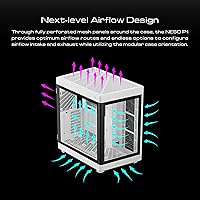
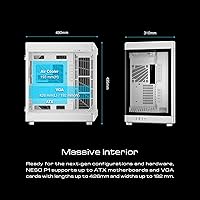
The dual-chamber layout is the centerpiece here — PSU, cabling, and other unglamorous hardware live behind a dedicated partition, keeping the main showcase zone clean and uncluttered. Switching between vertical and horizontal orientations involves swapping modular pedestals, which sounds fancier than it is: it's a physical repositioning of the base supports that takes planning but is manageable for anyone comfortable with a basic build. The one-touch panel access makes quick maintenance less of a chore than usual. Internally, the NESO P1 accommodates E-ATX boards, GPUs up to 426mm long, and AIO radiators up to 420mm. Perforated mesh panels support solid airflow, though real-world temperatures still depend heavily on how you configure your fans.

Best For

This panoramic gaming case makes the most sense for builders who treat their setup as part of their space — streamers, content creators, or enthusiasts who want a rig that functions as a visual centerpiece. If you're running an E-ATX or large ATX board with a flagship GPU, the generous clearances are genuinely useful, and the 420mm AIO support is a real advantage for heavy cooling builds. That said, this dual-chamber tower demands real estate — it's nearly 20 inches tall and weighs over 30 pounds, so desk space and furniture load capacity both matter. If you're working with a tight corner or compact shelf, look elsewhere. This case rewards builders who plan their space around the build.

User Feedback

With a 4.7-star average across roughly 100 ratings, buyer sentiment for the NESO P1 leans strongly positive — though that sample size is still modest enough to temper sweeping conclusions. Recurring praise centers on build quality and rigidity: buyers note the panels feel solid and overall construction exceeds expectations for the price bracket. The orientation swap draws attention too, with most finding it achievable if not effortless. On the downside, a handful of reviewers flag the cable routing learning curve — the dual-chamber concept is clever, but threading cables through the partition takes patience on a first build. A few also call out the sheer weight as a practical issue when moving or repositioning the case.

Pros

  • The trapezoidal dual-chamber design looks genuinely distinctive and stands out in any desk setup.
  • Panoramic multi-side tempered glass makes RGB builds and custom loops look dramatically better than single-window cases.
  • E-ATX support and 426mm GPU clearance means flagship hardware fits without compromise.
  • 420mm AIO radiator support gives serious cooling flexibility that most full towers do not offer.
  • The one-touch panel mechanism makes routine maintenance and upgrades noticeably less tedious.
  • Perforated mesh panels on multiple sides give real flexibility when designing intake and exhaust airflow paths.
  • The dual-chamber cable concealment keeps the visible build zone clean without heroic cable management effort.
  • Two-way orientation via modular pedestals lets you choose a vertical tower or horizontal display configuration at setup.
  • SPCC steel chassis feels rigid and well-constructed for the price, with solid panel fit right out of the box.
  • Buyers consistently note the build quality exceeds expectations, based on a 4.7-star average across verified purchases.

Cons

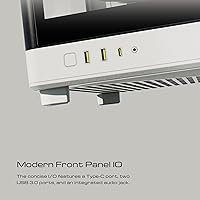
  • Front I/O is limited to two USB 2.0 and one USB 3.0 port — no USB-C, which feels outdated at this price.
  • The case ships with no included RGB fans or lighting strips despite heavy RGB emphasis in the product marketing.
  • Cable routing through the chamber divider has a real learning curve that frustrates less experienced builders.
  • At over 30 pounds, relocating or repositioning the NESO P1 after a full build is genuinely cumbersome.
  • Switching between vertical and horizontal orientation requires physical base reassembly — it is not a quick on-the-fly swap.
  • Some ABS plastic trim pieces feel noticeably cheaper than the steel chassis, creating an inconsistency in overall quality.
  • The white exterior shows fingerprints, smudges, and dust accumulation more visibly than darker case finishes.
  • Real-world thermal performance is heavily dependent on fan configuration — the mesh panels alone do not guarantee good airflow.
  • With around 100 ratings total, the review sample size is still too small to draw fully confident long-term reliability conclusions.
  • The sheer physical footprint makes this panoramic gaming case impractical for corner desks, tight shelves, or compact rooms.

Ratings

The GAMDIAS NESO P1 Full Tower PC Case earns its scores below from an AI-driven analysis of verified global buyer reviews, with spam, bot activity, and incentivized feedback actively filtered out before any score was calculated. The result is an honest picture of where this dual-chamber tower genuinely impresses and where real builders have run into friction. Both the highs and the frustrations are reflected here, so you can make a decision grounded in actual ownership experience.

Design & Aesthetics
93%
The trapezoidal dual-chamber form factor consistently draws praise from buyers who want their rig to look like a deliberate design choice rather than a beige box. Many describe it as a genuine conversation piece on a desk or in a streaming setup, with the panoramic glass panels showing off hardware from angles most cases simply do not offer.
A small number of buyers feel the angular silhouette can look polarizing in more neutral or minimalist room setups. The all-white colorway, while clean, shows dust and smudging more visibly than darker finishes, which bothers detail-oriented owners.
Build Quality & Materials
88%
The SPCC steel chassis feels rigid and well-finished for the price bracket, and buyers frequently note that the tempered glass panels arrive without flex or wobble. Panel fit and alignment are consistently described as tight and precise, which reflects a level of manufacturing care that stands out at this tier.
A handful of reviewers flag that some ABS plastic trim pieces feel noticeably lighter and less premium than the steel body, creating a minor inconsistency in perceived quality. A few buyers also reported minor shipping-related scuffs on corner trim, suggesting the packaging could be more protective.
Dual-Chamber Layout
86%
Separating the PSU and cabling from the main showcase compartment is the case's defining practical advantage, and most builders who invest the time to use it properly are genuinely satisfied with how clean the visible side looks. It makes a real difference for anyone who wants an RGB-lit build to look intentional rather than chaotic.
Getting cables routed neatly through the chamber divider takes more planning than a conventional case, and first-time builders in particular report spending extra hours figuring out the layout. There is not much room for error once components are installed, making adjustments after the fact more cumbersome than expected.
Orientation Flexibility
81%
19%
The ability to run the case in either vertical or horizontal orientation via modular pedestal swaps is a genuine differentiator that most buyers did not fully appreciate until they tried it. Streamers and desk-space-conscious builders find horizontal mode particularly practical, as it changes how the rig integrates with a workstation.
Swapping orientations is not a casual five-minute task — it requires partially disassembling the base supports and re-securing the case, which some buyers found unexpectedly involved. The process is manageable but not something most owners do repeatedly, so the flexibility is more of a one-time setup choice than an on-the-fly option.
Cable Management
69%
31%
The dedicated cable concealment chamber and built-in management hooks do provide a solid structural foundation for keeping wires out of the main view. Experienced builders who map out their cable runs before installing components tend to get results they are proud of, with the hidden chamber doing most of the heavy lifting.
The cable management process has a real learning curve, and several reviewers describe their first attempt as genuinely frustrating. Routing cables through the chamber divider in a way that still allows clean access to ports and connectors takes trial and error, and the tight tolerances in some routing channels leave little slack for thicker power supply cables.
Airflow Performance
74%
26%
The fully perforated mesh panels on multiple sides give builders real flexibility in configuring intake and exhaust paths, and buyers who installed a proper fan array report stable thermals even under sustained gaming loads. The open mesh design is a genuine structural advantage over cases with partially blocked front panels.
Airflow performance is highly configuration-dependent, and buyers who rely on the included setup without adding extra fans report underwhelming temperatures under load. The dual-chamber layout, while visually clean, can restrict some natural airflow paths depending on component placement, which requires thoughtful fan planning to compensate.
Interior Space & Clearances
91%
E-ATX motherboard support combined with GPU clearance up to 426mm and AIO support up to 420mm gives this panoramic gaming case among the most generous interior specs in its class. Builders running flagship-tier hardware — large boards, triple-slot GPUs, 360mm or 420mm radiators — consistently report fitting everything without compromise.
The sheer interior volume is only an advantage if you actually need it. Builders using mid-range hardware in a full ATX configuration may find the interior feels unnecessarily large, making cable runs longer and airflow harder to direct efficiently without a well-thought-out fan layout.
One-Touch Panel Access
82%
18%
The one-touch open mechanism gets consistent positive mentions from buyers who do regular maintenance or component swaps. Accessing the interior without unscrewing panels or fighting with tight thumbscrews is a small but genuinely appreciated quality-of-life feature during real-world use.
A few buyers note that after repeated use, the one-touch mechanism on their unit began to feel slightly less snug than when new, raising minor questions about long-term retention. The mechanism works well, but it is not as robust-feeling as a traditional thumbscrew panel on competing cases.
Tempered Glass Panels
87%
The panoramic multi-side glass coverage is one of the most consistently praised aspects by buyers who build for visual impact. The clarity of the glass is sharp, and the multi-angle viewing experience makes RGB lighting and custom water loops look significantly more dramatic than in single-window cases.
Glass panels of this size and number make the overall case heavier and more fragile in transit or during a move. A couple of reviewers reported hairline cracks on one panel after relocating the build, which is an inherent risk with full-coverage glass rather than a manufacturing flaw per se.
Front I/O & Connectivity
63%
37%
The front panel ports are positioned conveniently and are easy to reach in both orientations. For users who primarily connect peripherals through a hub or rear ports, the front I/O does everything it needs to without getting in the way.
Two USB 2.0 ports and a single USB 3.0 port is a noticeably lean front I/O spec for a case in this price range, especially given that most modern peripherals and storage devices benefit from USB 3.1 or Type-C speeds. The absence of a front-panel USB-C port in particular feels like a meaningful omission for builders in 2024 and beyond.
Size & Footprint
66%
34%
The generous dimensions are a direct enabler of the features buyers value most — the dual-chamber layout, large radiator support, and sweeping glass panels all depend on the case having real physical scale. For builders with open desk space or a dedicated PC corner, the footprint is an acceptable trade-off.
At nearly 20 inches tall and 30-plus pounds, the NESO P1 is simply not suited for compact setups or desks with limited surface area. Several buyers mention underestimating the physical presence of the case before it arrived, and a few returned it purely because of space constraints rather than any product flaw.
Ease of Assembly
71%
29%
The case ships with reasonably clear instructions and the physical mounting points are well-labeled for standard components. Experienced builders generally find the build process straightforward, with most component categories following familiar conventions despite the unconventional exterior form.
Less experienced builders frequently describe the dual-chamber routing and orientation setup as more involved than they anticipated. The modular pedestal system requires reading the documentation carefully, and a few buyers note that the instructions could be more detailed for the orientation-swap procedure specifically.
RGB Integration
76%
24%
The case is genuinely well-suited to RGB builds — the panoramic glass coverage and open interior mean that lighting effects from fans, strips, and coolers are visible from multiple angles simultaneously, which amplifies the visual payoff of any RGB investment significantly.
The NESO P1 does not include any RGB fans or lighting strips out of the box, which means the RGB potential visible in product imagery depends entirely on what the buyer installs. Some buyers felt this was implied by the marketing and were surprised by the bare-bones included accessories.
Value for Money
78%
22%
For a case that offers genuine structural differentiation — dual-chamber layout, two-way orientation, panoramic glass, and E-ATX support — the price sits at a point where buyers feel they are getting a distinctive product rather than paying a premium purely for branding. Most who prioritize aesthetics and build showcasing feel the cost is justified.
Buyers who care primarily about raw performance specs like fan count, front I/O ports, or included accessories may feel the value proposition is weaker, since several competitors at similar price points ship with more hardware out of the box. The premium here is clearly for the design concept, not the accessory package.

Suitable for:

The GAMDIAS NESO P1 Full Tower PC Case is purpose-built for enthusiast builders who treat their rig as a centerpiece rather than a utility box. If you are running an E-ATX motherboard, a flagship triple-slot GPU, or a 360mm to 420mm AIO radiator, the generous interior clearances mean you are unlikely to hit any hardware compatibility walls. Streamers and content creators who want their build visible on camera will find the panoramic glass coverage and dual-chamber cleanliness particularly rewarding — it is one of the few cases where the visual payoff is proportional to the investment. Builders with dedicated desk space or an open shelf setup will also get the most out of the two-way orientation system, since placing the case horizontally as a display piece genuinely changes how the hardware integrates with a workstation. If you enjoy the build process itself and do not mind investing extra time into thoughtful cable routing, this dual-chamber tower rewards that patience with results that most conventional cases simply cannot match.

Not suitable for:

The GAMDIAS NESO P1 Full Tower PC Case is a poor fit for anyone working with limited desk space or a compact setup — at nearly 20 inches tall and over 30 pounds, it demands both physical room and sturdy furniture to sit on. Budget-conscious builders or those assembling a practical mid-range system will likely find the design overhead excessive for hardware that does not need or benefit from the expansive interior. If you prioritize front-panel connectivity, the lean I/O — two USB 2.0 ports and a single USB 3.0, with no USB-C in sight — will feel like a step backward compared to competing cases at similar price points. First-time builders who are still learning the fundamentals of cable management may find the dual-chamber routing system more frustrating than helpful, adding unnecessary complexity to an already involved process. And if you move your PC frequently, the combination of glass-heavy construction and significant weight makes this panoramic gaming case a genuinely impractical travel companion.
Specifications

  • Form Factor: Full tower design accommodating E-ATX, ATX, and Micro-ATX motherboards within a trapezoidal dual-chamber chassis.
  • Dimensions: The case measures 19.3 x 12.2 x 19.5 inches (LxWxH), making it a substantial footprint that requires dedicated desk or floor space.
  • Weight: Fully unloaded, the chassis weighs 30.2 lbs (13.74 kg), which increases significantly once components are installed.
  • Chassis Material: Primary structure is built from SPCC cold-rolled steel with ABS plastic used for trim and accent components.
  • Panel Material: Multi-side panoramic panels are constructed from tempered glass, providing wide-angle visibility of internal components.
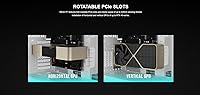
  • GPU Clearance: Supports graphics cards up to 426mm in length and 192mm in width, accommodating most current flagship triple-slot GPUs.
  • AIO Support: Radiator mounting accommodates all-in-one liquid coolers up to 420mm, supporting triple or larger fan radiator configurations.
  • PSU Mounting: Power supply is bottom-mounted within the dedicated secondary chamber, keeping it visually separated from the main component showcase area.
  • Orientation Modes: The case supports both vertical (traditional tower) and horizontal (flat display) orientations via repositionable modular pedestal supports.
  • Panel Access: Tempered glass panels feature a one-touch open mechanism that allows access to the interior without unscrewing fasteners.
  • Cooling Method: Cooling is air-based with support for fans and radiators; no liquid cooling loop components are included out of the box.
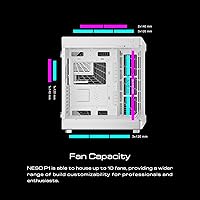
  • Airflow Design: Fully perforated mesh panels on multiple sides provide configurable intake and exhaust paths depending on fan placement choices.
  • Front I/O Ports: Front panel connectivity includes two USB 2.0 ports and one USB 3.0 port; no USB Type-C port is present.
  • Cable Management: Dual-chamber layout conceals PSU cables and peripheral wiring behind a structural divider, supported by integrated cable management hooks.
  • RGB Support: The case is RGB-ready and compatible with standard addressable RGB fans and lighting strips, though none are included in the package.
  • Motherboard Socket: Compatible with E-ATX boards up to standard E-ATX dimensions, as well as smaller ATX and Micro-ATX form factors.
  • Model Identifier: The official model designation is NESO P1 W, where W denotes the white colorway variant sold under the GAMDIAS brand.
  • Availability Date: The product was first made available for purchase in June 2023, making it a relatively recent entry in GAMDIAS's case lineup.

Related Reviews
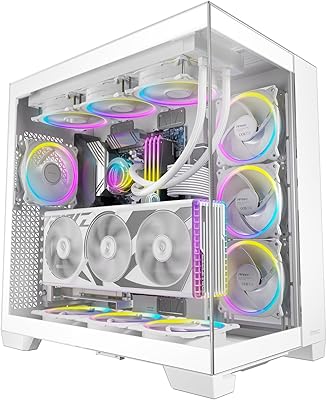
Antec C8 White Full-Tower PC Case
85%
89%
Cooling Performance
91%
Build Quality
88%
Ease of Assembly
93%
Design and Aesthetics
87%
Value for Money
More
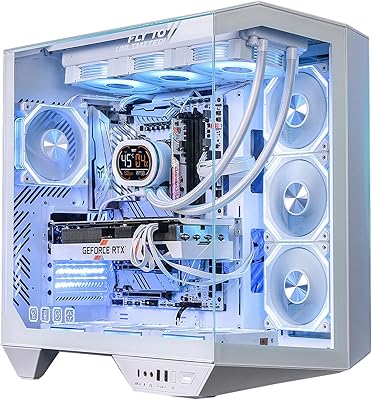
Antec Flux Pro White Full-Tower E-ATX Case
83%
91%
Build Quality
89%
Airflow Performance
93%
Cooling Headroom & Radiator Support
88%
Fan Inclusion & Value
92%
Design & Aesthetics
More
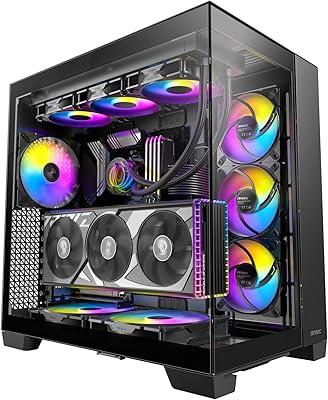
darkFlash DY470 Full-Tower ATX PC Case
80%
93%
Cable Management
78%
Build Quality & Materials
84%
Cooling Potential
91%
Aesthetics & Visual Design
89%
GPU Compatibility & Mounting
More
Antec C8 ARGB Full-Tower PC Case
80%
83%
Build Quality
88%
Thermal Performance
93%
Cooling Flexibility
91%
Aesthetics & Visual Design
74%
Cable Management
More
GAMDIAS GD-ATHENA M3 ATX Mid Tower Gaming PC Case
84%
88%
Cooling Performance
91%
Ease of Assembly
84%
Build Quality
87%
Cable Management
90%
Aesthetics
More
RUIX OV502 Mini-Tower PC Case
86%
88%
Cooling Performance
91%
Build Quality
89%
Ease of Assembly
62%
Cable Management
93%
Design and Aesthetics
More
SAMA V60 Mid Tower PC Case
80%
93%
Out-of-Box Cooling Value
78%
Airflow Performance
91%
AIO & Radiator Flexibility
88%
Tempered Glass & Aesthetics
71%
Build Quality & Materials
More
darkFlash DS900 ATX Mid-Tower PC Case
84%
89%
Cooling Performance
88%
Build Quality
91%
Ease of Installation
85%
Design & Aesthetics
92%
Value for Money
More
Corsair 7000D Airflow Full-Tower PC Case
80%
93%
Build Quality
91%
Airflow Performance
94%
Interior Space & Layout
89%
Cable Management
96%
Cooling Potential
More
Corsair FRAME 4000D RS Mid-Tower Case
82%
91%
Airflow Performance
88%
Build Quality
86%
Modularity & Upgradability
83%
Fan Mounting System
78%
GPU Compatibility
More

FAQ

It is a real, functional feature — not just a render on the product page. The NESO P1 ships with modular pedestal supports that you physically reposition to change the orientation. It does take some planning and minor reassembly to switch, but builders who have set it up horizontally report it works well as a flat desk display piece. Just make sure your desk can handle the weight and dimensions before committing to that layout.

More involved than a conventional case, honestly. The whole idea is that your PSU and cables live behind a divider so the main glass-side looks clean, which is great in theory — but routing cables through the partition neatly takes real patience, especially on a first build. Experienced builders tend to plan their cable runs before installing any components. If you go in without a plan, expect to spend extra time untangling and rerouting.

A 340mm GPU fits comfortably — the NESO P1 clears up to 426mm in length and 192mm in width, which covers virtually every flagship triple-slot card on the market today. Just double-check your specific card's dimensions against those numbers and you should be fine.

A 360mm AIO will fit without any issues — the case supports up to 420mm, so a 360mm radiator sits well within that range. You do not need to go all the way to 420mm unless you specifically want maximum cooling headroom. Either option works with the internal mounting layout.

Most buyers describe it as a genuinely useful feature for day-to-day access, and it works well for routine maintenance and component swaps. A small number of long-term owners mention it starts to feel slightly less snug after repeated use over many months, but it is not a common complaint in early-to-mid ownership. For most builders, it is a meaningful quality-of-life upgrade over thumbscrew panels.

No — the case does not ship with any pre-installed fans. The perforated mesh panels support a wide range of fan configurations, but you will need to purchase fans separately. Budget for at least two or three 120mm or 140mm fans to get adequate airflow, and more if you are pushing high-end hardware.

The case itself is RGB-compatible but does not include any RGB fans, strips, or a lighting controller out of the box. You can use any standard ARGB or RGB fans and strips that match your motherboard's headers or a third-party controller. The panoramic glass coverage means RGB effects look particularly vivid from multiple angles, so the investment in lighting pays off visually with this case.

Honestly, it is not a case you want to be relocating regularly. Empty it weighs over 30 pounds, and a fully built system — motherboard, GPU, cooler, PSU, drives — will push that considerably higher. The tempered glass panels also add fragility concerns during transport. If you need to move your PC frequently, this panoramic gaming case is a poor match for that use pattern.

No, and this is one of the more commonly noted limitations. The front I/O gives you two USB 2.0 ports and one USB 3.0 port — which is workable but dated for a case at this price point. If front-panel USB-C connectivity matters to you for fast storage or peripheral use, you will want to factor that gap into your decision.

The 4.7-star average across roughly 100 verified ratings is genuinely encouraging, and the feedback is consistent in what it praises and what it flags. That said, around 100 reviews is a modest sample compared to more established cases with thousands of ratings, so it is worth reading the individual feedback carefully rather than treating the aggregate score as fully settled. For a case released in mid-2023, the early reception is strong, but more time and reviews will give a clearer long-term picture of durability and satisfaction.

Where to Buy