
Overview

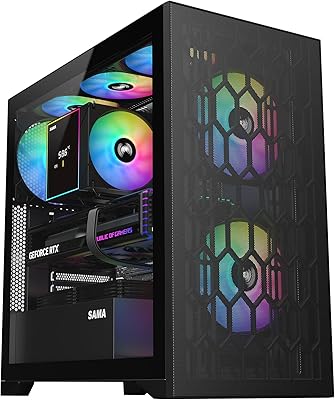
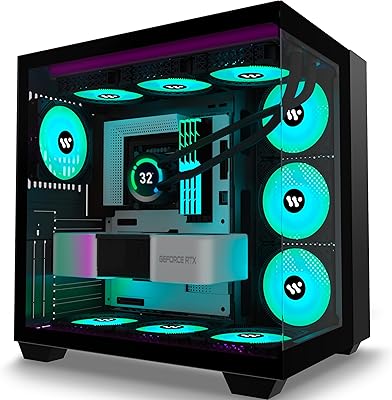
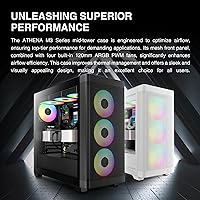
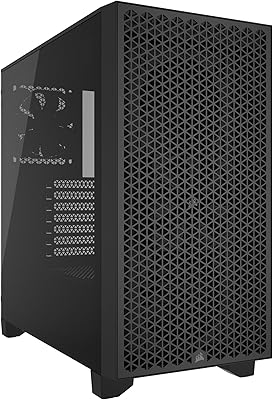
The GAMDIAS ATHENA M3 Mid Tower PC Case arrived in mid-2024 as one of the more ambitious offerings in its price bracket, packing E-ATX motherboard support into a chassis that most builders would expect to cost considerably more. The all-black exterior pairs a mesh-forward design with a tempered glass side panel, striking a balance between airflow and aesthetics that feels deliberate rather than accidental. It ranks in the top 100 of Amazon's computer case category — not bad for a product under a year old. Both black and white variants are available with identical internals, so the choice comes down to personal build aesthetic rather than specs.

Features & Benefits

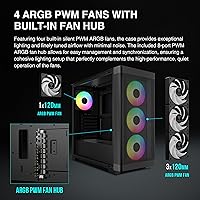
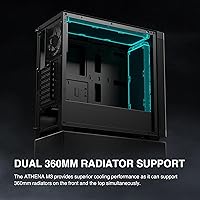
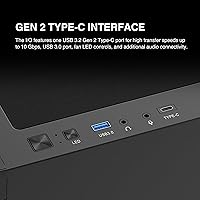
What stands out most about the Athena M3 is how much cooling headroom it offers. The case supports dual 360mm radiators simultaneously — one across the front, one on top — which is genuinely rare at this price tier and means you can run two AIOs without compromise. Four ARGB PWM fans come pre-installed, and the bundled 8-port fan hub means you are not hunting for splitter cables on day one. GPU clearance stretches to 420mm, so even current-generation flagship cards fit without drama. The front I/O includes USB 3.0 ports and a Gen 2 Type-C port, while PSU cables route cleanly through a bottom-mount shroud with up to 200mm of clearance.

Best For

This mid-tower case makes the most sense for builders who are serious about thermal performance and do not want to outgrow their chassis in a year or two. If you are planning a 360mm AIO and a long high-end GPU, the internal geometry supports that combination without the usual trade-offs. First-time builders will appreciate the included fans and hub, which trim down the parts list considerably. RGB enthusiasts get a synchronized lighting ecosystem out of the box without needing a separate controller. It is less ideal for anyone going compact or budget-focused; the sheer size assumes you are filling the space with hardware that actually justifies it.

User Feedback

With a 4.4-star average across nearly 650 ratings, the Athena M3 has earned a genuinely strong reception. Buyers consistently highlight the interior build quality for the price, and the fan hub gets called out repeatedly as a practical convenience win. On the critical side, some users find the instruction manual thin, which can trip up builders new to GAMDIAS panels. A handful of reviews note that the tempered glass panel removes easily but deserves a careful hand to avoid stressing the clips. ARGB sync with major motherboard software largely works, though a few users mention needing to check header compatibility or update software before everything lines up cleanly.

Pros

  • Dual 360mm radiator support on both the front and top panels is genuinely uncommon at this price.
  • Four ARGB PWM fans are included out of the box, saving a meaningful amount on initial build costs.
  • The bundled 8-port fan hub eliminates the need for separate splitters and keeps cable clutter under control.
  • E-ATX motherboard compatibility gives this mid-tower case more internal flexibility than most competitors nearby in price.
  • A 420mm GPU clearance means even current-generation large cards fit without any tray modifications.
  • The Gen 2 Type-C front port keeps the I/O panel relevant for modern peripherals and fast transfers.
  • A bottom-mounted PSU shroud with 200mm clearance handles large power supplies cleanly and hides bulk cabling.
  • Both black and white color variants are available with the same internal layout, offering real aesthetic choice.
  • Strong early sales rank and a 4.4-star average from hundreds of buyers suggest consistent quality control.
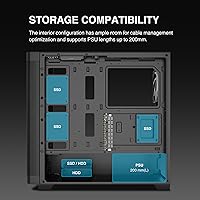
  • Up to four 2.5-inch SSD mounts plus two 3.5-inch bays give builders solid storage expansion options.

Cons

  • The included instruction manual is thin and can leave first-time builders guessing on panel removal and fan hub wiring.
  • Tempered glass side panel clips require a careful hand; forcing them risks stress damage over repeated removal.
  • ARGB sync with motherboard software does not always work out of the box and may need a header compatibility check.
  • Panel rigidity feels noticeably lighter compared to cases at higher price tiers, which some builders find less reassuring.
  • Cable routing channels are adequate but tight; builders with thick, modular PSU cables may find the management fiddly.
  • At over 14 pounds before any hardware, the Athena M3 is not a case you will want to move around frequently.
  • Fan noise levels under load have drawn occasional criticism, suggesting the included fans prioritize airflow over acoustics.
  • The listed color in the Amazon description inconsistently references both black and white variants, which can confuse buyers before purchase.

Ratings

The scores below for the GAMDIAS ATHENA M3 Mid Tower PC Case were generated by our AI engine after analyzing hundreds of verified global buyer reviews, actively filtering out incentivized, repetitive, and bot-pattern submissions to surface what real builders actually experienced. Each category reflects both the genuine strengths and the friction points that came up repeatedly across different build types and skill levels. Nothing here is smoothed over — where users ran into real frustrations, the scores reflect that honestly.

Value for Money
91%
Buyers consistently flag this as one of the strongest arguments for choosing the Athena M3. Getting dual 360mm radiator support, four ARGB fans, and an 8-port hub at this price tier is genuinely unusual, and many reviewers noted they had budgeted for extras that turned out to be unnecessary.
A small number of buyers who came from premium case brands found the panel rigidity underwhelming relative to their expectations, feeling the value equation tilts toward feature count rather than material refinement. For those prioritizing feel over function, the calculus shifts slightly.
Cooling Capability
93%
The ability to run a 360mm AIO up front and a second 360mm on the top simultaneously is the headline feature that drives real purchase decisions, and builders putting high-TDP CPUs and GPUs in this case report temperatures that rival systems built in far more expensive enclosures. The mesh-forward front panel feeds the radiators efficiently.
The top radiator mount sits relatively close to E-ATX motherboard VRM heatsinks on some boards, and a handful of builders with particularly tall VRM coolers found clearance tighter than expected. Thick push-pull radiator configurations may also require careful measurement before committing.
Build Quality
74%
26%
For its price tier, the overall construction holds up well during a typical build — panels align properly, standoff positions are accurate, and the steel frame feels stable once components are installed. Most builders reported no rattling or flex issues during normal desktop use.
The side panels and some plastic trim pieces feel noticeably lighter than cases in higher price brackets, and a few users described the rear panel as slightly springy when pressing cables through routing holes. It is structurally sound, but the tactile feedback when handling it does not inspire confidence the way thicker steel would.
Interior Space & Layout
92%
The E-ATX-capable interior gives builders meaningful room to work, which makes a real difference when you are routing thick cables or installing a large AIO with 12 fans across two radiators. Reviewers doing high-end custom builds frequently commented that working inside this case felt less cramped than competing mid-towers.
The generous interior size also means the case has a large physical footprint that not every desk or shelf can accommodate. Builders in compact setups occasionally noted that the trade-off for all that internal room is an enclosure that dominates the workspace more than they anticipated.
Cable Management
67%
33%
The PSU shroud does a good job hiding power supply cabling from the main chamber view, and the dedicated routing channels keep the behind-motherboard-tray area reasonably organized for a mid-range case. Builders using slim or flat modular cables reported clean results with minimal effort.
The routing channels behind the motherboard tray are not particularly deep, which becomes a problem with thick stock cables from budget or mid-range PSUs. Several reviewers noted that getting the side panel closed cleanly required re-routing or compressing cables more than once, which is frustrating mid-build.
Included Fans
78%
22%
Having four 120mm ARGB PWM fans already installed is a genuine convenience, and the synchronized ARGB lighting out of the box looks impressive at startup without any additional purchases. For a first build, this alone removes a meaningful sourcing step from the process.
At full PWM speed, the fans produce noticeable airflow noise that some users found distracting in quiet environments. They are tuned for airflow performance rather than acoustics, so builders who work or game in silence may find themselves shopping for replacements sooner than expected.
Fan & RGB Hub
88%
The 8-port PWM and ARGB hub is one of the most praised secondary features in user reviews, largely because it reduces wiring complexity significantly. Instead of running individual fan headers to the motherboard, everything consolidates through one connection, which keeps the interior looking clean and organized.
The hub requires a SATA power connector and a 5V 3-pin ARGB header, and the cable lengths on some units were described as barely reaching certain motherboard layouts. A longer ARGB lead on the hub itself would have eliminated a common complaint entirely.
ARGB Software Compatibility
71%
29%
The vast majority of builders using ASUS, MSI, and Gigabyte motherboards reported successful synchronization with the respective RGB software suites after connecting the 5V header. When it works, the lighting integration feels polished and cohesive across all four fans.
Compatibility is not universal, and a notable subset of buyers had to update their motherboard firmware or RGB software before sync kicked in. Builders on less common board brands occasionally found no sync option at all and were limited to static lighting modes through the hub alone.
GPU Clearance
94%
A 420mm maximum GPU length means virtually every current consumer graphics card fits without any bracket removal or structural modification. Builders pairing this case with three-fan flagship cards consistently confirmed clean installation with room to spare for power connector routing.
While the length clearance is exceptional, the width clearance for very thick triple-fan cards with aggressive fin stacks can feel tighter than the length spec suggests. A small number of builders noted that certain oversized cards sat close enough to the front radiator fans to warrant a cable routing rethink.
Tempered Glass Panel
76%
24%
The full-length tempered glass side panel gives a complete, unobstructed window into the build, which makes the ARGB lighting setup look genuinely impressive once the system is running. Buyers report the glass itself is clear and thick enough to feel reasonably solid.
The clip mechanism requires a deliberate and careful motion to avoid stressing the attachment points, and a few users noted the panel wobbled slightly at one corner on their units. It is not fragile, but it is the kind of component you handle with attention rather than casually swinging open.
Front I/O
83%
The combination of two USB 3.0 Type-A ports and a Gen 2 Type-C port covers the connectivity needs of most modern peripherals, headsets, and fast storage drives without needing a hub. The Type-C port in particular was called out positively by builders using newer devices as a forward-thinking inclusion at this price.
The absence of a USB 2.0 header pass-through is a minor inconvenience for builders who still use older peripherals or RGB controllers that require it. The front audio jack was also flagged by a handful of users as producing slight interference with lower-quality motherboard audio implementations.
Assembly Experience
69%
31%
Experienced builders generally found the layout intuitive, with thumb screws, labeled fan hub ports, and a logical component sequence that makes a straightforward build feel well thought out. The pre-installed fans remove one of the more tedious installation steps entirely.
The included instruction manual is thin to the point of being unhelpful for newer builders, leaving steps like fan hub wiring, HDD cage configuration, and tempered glass removal undocumented or ambiguous. First-timers without access to video guides are likely to spend extra time troubleshooting what should be simple steps.
Aesthetic Design
86%
The all-black (or all-white) component matching across fans, cables, and connectors gives this mid-tower case a polished, cohesive look that is surprisingly hard to achieve at this price without buying color-matched parts separately. The mesh front and tempered glass combination photographs well and looks intentional rather than generic.
The exterior plastic trim around the front panel and top mesh uses a finish that attracts fingerprints and dust noticeably. Builders who keep their systems on a desk at eye level mentioned that the top panel in particular needs regular wiping to maintain the clean aesthetic the design promises.
Storage Options
72%
28%
The combination of two 3.5-inch and four 2.5-inch mount points covers the needs of most mainstream builds, and the SSD trays are straightforward to use without tools once the cage is in place. For NVMe-primary builders, the available 2.5-inch slots handle secondary storage cleanly.
The HDD cage placement can interfere with front radiator fan mounting in certain configurations, which forces builders to choose between maximum drive count and maximum front radiator thickness. This is a real trade-off that the product page does not communicate clearly enough.

Suitable for:

The GAMDIAS ATHENA M3 Mid Tower PC Case is built for builders who want serious cooling capacity without stepping into premium pricing territory. If you are planning a high-performance liquid-cooled system with a 360mm AIO and a long flagship GPU, this chassis accommodates both without requiring creative compromises or component swaps. Enthusiasts targeting E-ATX motherboards will particularly appreciate that the interior is genuinely sized for them, rather than technically compatible but practically cramped. First-time builders also land in a good spot here, since the included fans and integrated hub reduce the number of extra parts to source and simplify the initial setup considerably. RGB-focused builders get a ready-to-run synchronized lighting system from day one, which is a meaningful convenience at this price point. Both the black and white color variants offer identical internal specs, so you can match your build aesthetic without sacrificing any functionality.

Not suitable for:

The GAMDIAS ATHENA M3 Mid Tower PC Case is not the right call for anyone prioritizing a compact footprint or working within a tight desk or shelf space, since the chassis occupies a full mid-tower envelope and is not a case you tuck away easily. Budget builders assembling a basic office or media PC will find that the feature set here exceeds what their hardware actually needs, and a simpler, smaller case would serve them better. Users who prefer a minimalist, RGB-free aesthetic may find the built-in lighting ecosystem more of an obligation than a benefit, as disabling or bypassing it entirely can be fiddly. If you are planning to run a traditional tower air cooler and a modest mid-range GPU, the extra internal volume goes mostly unused, which may feel like overpaying for space. Buyers who expect a premium, thick-steel chassis comparable to cases at a higher price point may also be disappointed; at this tier, some panels lean toward the lighter side of solid.

Specifications

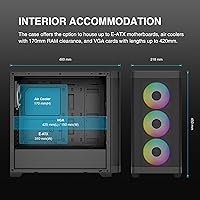
  • Form Factor: Mid-tower chassis compatible with E-ATX, ATX, Micro-ATX, and Mini-ITX motherboards.
  • Dimensions: The case measures 18.11 x 8.58 x 17.71 inches (L x W x H), occupying a standard full mid-tower footprint.
  • Weight: Bare chassis weighs 14.52 pounds (6.6 kg) before any components are installed.
  • Materials: Constructed primarily from steel and plastic with a tempered glass side panel for the main viewing window.
  • Included Fans: Four 120mm ARGB PWM fans come pre-installed, managed through the bundled 8-port PWM and ARGB fan hub.
  • Radiator Support: Supports up to 360mm radiators simultaneously on both the front and top mounting positions.
  • GPU Clearance: Maximum graphics card length is 420mm, accommodating current-generation flagship and dual-fan reference cards without modification.
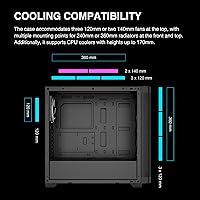
  • CPU Cooler Height: Tower air coolers up to 170mm tall fit within the chassis with the side panel closed.
  • PSU Clearance: Bottom-mounted PSU bay accepts power supply units up to 200mm in length with a dedicated shroud and routing channels.
  • Front I/O: Front panel includes two USB 3.0 Type-A ports and one USB 3.2 Gen 2 Type-C port alongside standard audio jacks.
  • Storage Bays: Supports two 3.5-inch drives and up to four 2.5-inch SSDs, with one configuration allowing one 2.5-inch plus one 3.5-inch in the HDD cage.
  • Expansion Slots: Seven PCIe expansion slots accommodate multi-GPU and high-profile card configurations on E-ATX motherboards.
  • Side Panel: Full-length tempered glass side panel provides an unobstructed view of internal components and installed lighting.
  • Color Options: Available in both all-black and all-white variants, each with color-matched fans, cables, and internal components.
  • PSU Mount: Power supply mounts at the bottom of the chassis in a dedicated shrouded compartment that conceals cabling from the main chamber.
  • Fan Hub: The included 8-port hub manages both PWM fan speed control and ARGB lighting synchronization from a single internal connection point.
  • Model Number: Officially designated as the GD-ATHENA M3, first listed on Amazon in August 2024.
  • Cooling Method: Primary cooling is air-based via included fans, with full liquid cooling support through dual 360mm radiator mounts.

Related Reviews

SAMA V60 Mid Tower PC Case
80%
93%
Out-of-Box Cooling Value
78%
Airflow Performance
91%
AIO & Radiator Flexibility
88%
Tempered Glass & Aesthetics
71%
Build Quality & Materials
More
Vetroo AL800 Mid Tower ATX PC Case
76%
78%
Build Quality
84%
Tempered Glass Panel
76%
Airflow Performance
61%
Fan Included & Expandability
69%
Cable Management
More
KEDIERS K4 ATX Mid Tower PC Case
80%
91%
Value for Money
93%
Aesthetic Design
74%
Build Quality
72%
Cooling Performance
84%
Ease of Assembly
More
Zalman S3 ATX Mid-Tower PC Case
74%
83%
Value for Money
71%
Build Quality
58%
Airflow & Cooling Performance
86%
Ease of Assembly
67%
Acrylic Side Panel
More
SAMA S40 Mid Tower ATX PC Case
79%
88%
Airflow Performance
83%
Included Fan Quality
79%
Build Quality & Finish
92%
GPU Compatibility
61%
Cable Management
More
Corsair FRAME 4000D RS Mid-Tower Case
82%
91%
Airflow Performance
88%
Build Quality
86%
Modularity & Upgradability
83%
Fan Mounting System
78%
GPU Compatibility
More
AMANSON H9 Mid-Tower ATX Gaming PC Case
76%
88%
Value for Money
81%
Airflow Performance
67%
Pre-Installed Fan Quality
63%
Build Quality
79%
Tempered Glass Panels
More
Corsair 3000D Airflow Mid-Tower PC Case
81%
93%
Airflow Performance
88%
Build Quality & Materials
91%
Thermal Management Design
84%
Cable Management
61%
Included Fans Quality
More
SAMA NEVIEW 4503 Mid Tower PC Case
76%
91%
Value for Money
78%
Build Quality
83%
Airflow Performance
76%
ARGB Lighting
82%
Hardware Compatibility
More
ANSAITE W9 Mid-Tower ATX PC Case
77%
88%
Value for Money
91%
RGB & Lighting Performance
74%
Airflow & Cooling Capacity
63%
Build Quality & Materials
84%
Cable Management
More

FAQ

Yes, the Athena M3 supports a 360mm radiator on the front and another on the top simultaneously. That said, you will want to check the thickness of your radiators plus fans, as very thick dual-radiator setups can get tight around the top mount depending on your motherboard's VRM heatsink height.

It genuinely fits. The interior was designed with E-ATX clearances in mind, so you are not wedging a large board into a chassis built around ATX. Standoff positions and cable routing channels account for the wider board footprint, though you should still verify your specific board's dimensions against the 18.11-inch case depth before ordering.

The included fan hub connects to a standard 5V 3-pin ARGB header on your motherboard, which allows control through software like ASUS Aura Sync, MSI Mystic Light, or Gigabyte RGB Fusion. Most modern boards handle this without issues, though a few users have noted needing a software update or checking header compatibility before everything syncs cleanly. If your board lacks a 5V ARGB header, you can still power the lighting but lose software control.

It comes off fairly easily once you get the hang of the clip system, but it does require a gentle, deliberate motion rather than pulling straight out. Most builders get comfortable with it after the first couple of installations. The panel is full-length and not particularly thin, so just avoid forcing it at an angle.

The instruction sheet is minimal, which is a fair criticism. For experienced builders, the layout is intuitive enough that you will not need much guidance. First-timers may want to supplement with a build video or the GAMDIAS product page, particularly for routing fan hub cables and understanding the HDD cage configuration.

They are not whisper-quiet. At full PWM speed they produce noticeable airflow noise, prioritizing cooling performance over acoustics. If you run them at a moderate curve through your motherboard or fan hub, the noise becomes much more reasonable for daily use. Builders who are very noise-sensitive may want to swap them out for quieter aftermarket options eventually.

A 340mm card gives you around 80mm of clearance to the front panel, which is actually comfortable for most builds. Cable routing in the PSU shroud area is tight with thick modular cables, so a flat or low-profile cable kit will make life easier behind the shroud. The dedicated routing channels are adequate but not exceptionally deep.

Yes, a white variant is available with all-white fans, cables, and internal components for a cohesive aesthetic. The internal dimensions, mounting positions, and feature set are identical across both color options, so your choice is purely about build theme.

CPU tower coolers up to 170mm tall fit with the side panel closed, which covers nearly all high-end air coolers on the market, including most 120mm and 140mm dual-tower designs. If you are right at the limit, check your cooler's exact height in the spec sheet rather than relying on rounded marketing figures.

Yes, the bottom PSU bay clears up to 200mm, so even longer fully modular units fit without a problem. Standard ATX PSUs in the 140 to 180mm range will have a little breathing room around them, which actually helps with heat dissipation and makes routing the modular cables slightly less cramped.