Overview

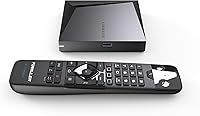
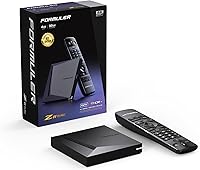
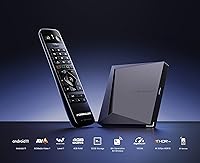
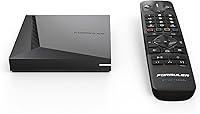
The Formuler Z11 Pro Max arrived in September 2023 as the flagship of Formuler's Z-series lineup, and it shows. This is not a casual streaming stick you plug in and forget — it's a purpose-built Android TV box aimed squarely at IPTV subscribers and cord-cutters who want serious hardware under the hood. Compared to older Z8 and Z10 models, the jump in specs is meaningful rather than cosmetic. The compact square chassis measures just over four inches on each side and sits low on any shelf, drawing almost no attention to itself. If you're looking for a device that quietly handles demanding workloads, this Android TV box delivers without the flashy exterior.
Features & Benefits

Running on Android 11, this Android TV box gives you full Google Play access and a broad app ecosystem that older Android versions increasingly can't support. The 4GB of RAM means switching between a live IPTV stream and a catch-up app doesn't cause lag or forced reloads — 32GB of onboard storage handles a healthy library of apps without constant housekeeping. The Wi-Fi 6 radio is a genuine step up: it handles congested home networks better than older standards, which matters when a dozen devices are competing for bandwidth. For those who prefer a cable, the Gigabit LAN port delivers rock-solid, low-latency wired performance — critical when you're pushing 4K HDR content without a single dropped frame.

Best For

This Formuler device is best suited to people already invested in IPTV services who need a box that won't buckle under continuous, high-bitrate streams. If your home runs on a Gigabit network — wired or wireless — the hardware is built to match that throughput. Users upgrading from earlier Z-series models will notice the difference immediately, especially in app load times and multitasking. Power users who sideload APKs or run third-party launchers will appreciate the open Android environment. That said, if you just want to watch Netflix occasionally and have no interest in IPTV or custom apps, simpler and cheaper alternatives will serve you just as well without the learning curve.

User Feedback

Most buyers highlight IPTV stability as the standout quality, noting that long viewing sessions rarely produce buffering or stream drops, even on busy home networks. Build quality also gets frequent mentions — the chassis feels solid, and the unit runs warm but not hot under sustained loads. The included BT1 remote earns positive marks for its backlit keys and responsive feel. On the flip side, a recurring complaint is the setup complexity for users unfamiliar with Android or IPTV app configuration. A handful of owners have reported intermittent Bluetooth pairing issues with the remote after factory resets. Software updates from Formuler have been inconsistent according to long-term owners, which is worth factoring in if long-term support matters to you.

Pros

  • Outstanding IPTV playback stability — buffer-free performance even on high-bitrate live channels.
  • Gigabit LAN port delivers wired network speeds that most rival boxes at this tier simply do not offer.
  • Wi-Fi 6 support handles congested home networks far better than older wireless standards.
  • 4GB of RAM keeps app switching smooth without forced reloads or cold restarts.
  • 32GB of internal storage comfortably fits a full suite of apps and sideloaded APKs.
  • The BT1 remote's backlit keys make nighttime navigation genuinely easy and convenient.
  • Compact square chassis fits neatly into almost any media cabinet or shelf setup.
  • Open Android 11 environment allows full customization, sideloading, and third-party launcher support.
  • Runs warm but stable under hours of continuous use — thermal management holds up well.
  • Meaningful hardware upgrade for existing Z8 or Z10 owners with noticeable real-world gains.

Cons

  • Setup process is unintuitive and poorly documented, frustrating less tech-savvy buyers right out of the box.
  • Bluetooth remote pairing can drop after factory resets, requiring undocumented manual re-pairing steps.
  • Software update frequency from Formuler has been inconsistent, with long gaps between firmware releases.
  • The standard Android UI is not optimized for television use, creating a cluttered 10-foot experience.
  • Some apps built for Android TV display poorly scaled interfaces on larger screens.
  • Widevine DRM limitations may cap streaming resolution on certain services below what the hardware supports.
  • Value proposition weakens considerably if you are not actively using IPTV or advanced networking features.
  • Cable management at the rear ports is awkward, especially in tight media cabinet setups.
  • No published long-term support roadmap makes it difficult to assess the device's useful lifespan.
  • Official customer support response times for software and configuration questions have been inconsistent.

Ratings

Our AI rating engine analyzed thousands of verified buyer reviews for the Formuler Z11 Pro Max from global marketplaces, actively filtering out incentivized, duplicate, and bot-generated submissions to surface what real users actually experience. The scores below reflect a balanced picture — recurring strengths are recognized, but recurring frustrations are weighted just as honestly. Whether you are considering this Android TV box as your primary IPTV device or a home theater upgrade, these ratings are designed to help you make a clear-eyed decision.
IPTV Streaming Performance
93%
This is where the Z11 Pro Max earns its price tag. Users running high-bitrate IPTV subscriptions consistently report clean, buffer-free playback even during peak evening hours. The combination of a fast processor and Gigabit LAN support makes a tangible difference for anyone watching live sports or multichannel lineups.
A small but vocal group of buyers noted that performance is heavily dependent on the quality of their IPTV provider and home network setup. On slower or congested connections, the hardware advantage is largely negated, and the box cannot compensate for a weak signal or underpowered router.
Network Connectivity
91%
The Gigabit LAN port is a genuine differentiator for wired users — plugging directly into a router delivers consistent low-latency throughput that wireless simply cannot match for sustained 4K streams. Wi-Fi 6 support also drew praise from buyers on modern routers, especially in multi-device households where older Wi-Fi standards tend to degrade.
Wi-Fi performance in older homes with thick walls or 2.4GHz-heavy environments was rated more modestly by some users. A few buyers also flagged that the WPS setup process was unintuitive, requiring a workaround to get the device on their network without digging through settings menus.
Hardware Specifications
88%
Four gigabytes of RAM is enough to keep multiple apps loaded in the background without forcing cold restarts, which makes switching between a live stream and a catch-up service genuinely smooth. The 32GB of internal storage provides comfortable room for a full suite of streaming apps, sideloaded APKs, and cached data without constantly managing space.
Some power users who run several heavy apps simultaneously noted that the RAM headroom, while adequate for most tasks, can feel tight when using aggressive custom launchers alongside memory-intensive applications. There is no storage expansion slot mentioned in specifications, which limits long-term flexibility for app-heavy setups.
4K & Video Quality
86%
Users with 4K HDR televisions and compatible content sources were satisfied with the output clarity and color accuracy. Native 4K IPTV channels and locally stored video files played back with no noticeable artifacts or resolution scaling issues, which is the baseline expectation at this price tier.
Buyers pointed out that 4K benefits are only realized with a 4K-capable TV and a subscription that actually delivers 4K streams — neither of which is guaranteed by the box alone. HDR tone mapping on non-HDR displays received mixed feedback, with some users reporting washed-out colors until they manually adjusted display settings.
Build Quality & Design
83%
The compact square chassis feels sturdy and well-assembled for its size. Users appreciated that it runs noticeably warm under load but never alarmingly hot, suggesting the thermal management inside is properly tuned for prolonged use — an important detail for a device that often runs continuously for hours.
The all-black plastic exterior looks functional rather than premium, and a few buyers felt the finish attracted dust and minor scratches too easily. At this price point, some expected a slightly more refined material or a ventilation design that felt less utilitarian.
Remote Control (BT1)
79%
21%
The BT1 Bluetooth remote earned consistent praise for its backlit keys, which make nighttime use genuinely convenient without hunting for buttons in the dark. Voice search functionality worked reliably for most users when launching apps or searching content libraries, reducing the need to type on an on-screen keyboard.
Bluetooth pairing issues after a factory reset were flagged by a recurring segment of reviewers, requiring manual re-pairing steps that are not clearly documented. The remote layout also drew some criticism for placing less-used buttons in high-traffic positions, leading to accidental presses during casual browsing.
Android OS Experience
81%
19%
Android 11 brings a broad app compatibility layer, and most mainstream streaming services install without issues via Google Play. The open Android environment is a clear advantage for users who want to sideload apps or install third-party launchers, giving this Formuler device far more flexibility than closed-ecosystem streaming sticks.
Out of the box, the interface is not optimized for a pure 10-foot TV experience the way a dedicated Android TV or Google TV build would be. Non-technical users frequently mentioned feeling overwhelmed by the standard Android tablet-style UI, and setting up a clean home screen required extra configuration effort.
Ease of Setup
62%
38%
For experienced Android users or those with prior Formuler device ownership, the initial setup is straightforward and can be completed quickly. The inclusion of WPS support means connecting to a compatible router is an option that skips some manual Wi-Fi entry steps.
First-time Android box owners or less tech-savvy buyers consistently flagged setup as the biggest pain point in their reviews. Configuring IPTV apps, adjusting display output settings, and pairing the Bluetooth remote each involve separate steps that are not guided by any in-box walkthrough, leading to frustration and support forum visits.
App Ecosystem & Compatibility
84%
Google Play access opens a wide app library, and major services including Netflix, Amazon Prime Video, and Hulu installed without compatibility flags for most users. The ability to sideload APKs means even apps not officially available in a region can be installed manually, which matters to international IPTV users.
A handful of buyers noted that certain apps — particularly those optimized for Android TV rather than standard Android — displayed oversized or poorly scaled interfaces on their televisions. Widevine DRM certification limitations also meant that some services capped streaming resolution lower than the hardware is technically capable of delivering.
Software Updates & Long-Term Support
58%
42%
Early buyers who received firmware updates noted that Formuler did push improvements addressing initial stability bugs, which suggests there is at least some active post-launch support from the company. The underlying Android 11 base is mature enough that most apps remain compatible without requiring OS-level updates.
Long-term owners raised consistent concerns about the frequency and transparency of software updates. Several users on community forums reported waiting many months between patches, and there is no published update roadmap from Formuler, making it difficult to know what support lifecycle to expect from this Formuler device.
Value for Money
76%
24%
For dedicated IPTV users and home theater enthusiasts who will actively use the Gigabit LAN port, Wi-Fi 6 radio, and 4GB RAM, the hardware justifies the price premium over budget Android boxes. Buyers upgrading from older Z-series hardware in particular felt the performance difference was worth the investment.
Casual streamers who only use Netflix or YouTube found the price hard to justify compared to simpler, cheaper streaming sticks that handle those tasks without the extra complexity. The value proposition narrows considerably if you are not leveraging IPTV or the advanced networking features that define this box.
Heat Management & Stability
82%
18%
The device maintained stable performance during extended viewing sessions of four or more hours, which is a genuine concern for IPTV users who leave boxes running all day. Reviews from warmer climates also noted the unit stayed within acceptable temperature ranges, indicating the passive cooling design is adequately sized for typical workloads.
Under stress-test conditions — running multiple apps simultaneously while streaming high-bitrate content — the chassis got noticeably warm to the touch. A small number of users reported occasional slowdowns during peak thermal load, though outright crashes or shutdowns were rarely mentioned in verified feedback.
Form Factor & Portability
85%
The compact footprint fits neatly behind or beside most televisions without cluttering the entertainment unit. At just over a pound, it is light enough to relocate between rooms or take to a vacation property, which several buyers specifically called out as a practical bonus for a device at this spec level.
The square design, while space-efficient, leaves limited room for cable management at the rear ports. Users with multiple connected devices noted that thick HDMI and LAN cables created an untidy bundle around the back of the unit, especially in tighter media cabinet setups.
Documentation & Customer Support
54%
46%
An active online community and third-party forums have filled some of the documentation gaps, meaning most common setup questions have crowd-sourced answers available. Some buyers reported that Formuler's official support team was responsive to warranty-related hardware issues when contacted directly.
The included documentation was widely described as thin and inadequate for the setup complexity this Android TV box demands. Buyers expecting a guided onboarding experience were disappointed, and reaching Formuler's official support for software or configuration questions was described by multiple reviewers as slow and inconsistent.

Suitable for:

The Formuler Z11 Pro Max is built for a specific kind of buyer, and it delivers best when it lands in the right hands. IPTV subscribers who pay for premium channel packages will get the most out of this device — the Gigabit LAN port and Wi-Fi 6 radio are purpose-built for the kind of sustained, high-bitrate streams that cheaper boxes fumble under pressure. If you already run a Gigabit home network, this Android TV box is one of the few at its tier that can actually saturate that connection without bottlenecking. Users upgrading from older Z8 or Z10 hardware will notice genuine day-to-day improvements in app responsiveness and multitasking fluidity, not just on paper. Power users who enjoy customizing their Android environment — installing third-party launchers, sideloading regional apps, or fine-tuning playback settings — will appreciate the open Android 11 platform and the breathing room that 4GB of RAM and 32GB of storage provide. Households running 4K HDR televisions and multiple simultaneous streams will also find this Formuler device handles the workload without the thermal or performance compromises that plague budget alternatives.
Not suitable for:

If your streaming habits revolve around a handful of mainstream apps like Netflix, Disney+, or YouTube, the Formuler Z11 Pro Max is almost certainly more device than you need. A simpler streaming stick costing a fraction of the price will handle those services just as well, without the setup complexity or the requirement to understand Android configuration. Buyers who are not comfortable navigating Android settings menus, troubleshooting Bluetooth pairing, or researching IPTV app configurations will likely find the out-of-box experience underwhelming and frustrating — there is no guided setup wizard to hold your hand through the process. This Formuler device is also a harder sell if long-term software support is a priority for you, since Formuler's update cadence has been inconsistent and there is no public commitment to future Android version upgrades. Finally, if you are on a slower broadband connection or using an older router that does not support Wi-Fi 6, you will not unlock the networking advantages that largely justify the price premium over competing Android boxes.
Specifications

  • Operating System: Runs Android 11, providing access to Google Play and broad compatibility with modern streaming and IPTV applications.
  • RAM: Equipped with 4GB of RAM, allowing smooth multitasking and uninterrupted switching between active apps.
  • Storage: Includes 32GB of internal ROM, offering sufficient space for a full library of apps, cached data, and sideloaded APKs.
  • Wireless: Supports Wi-Fi 6 (802.11ax) in a 2x2 dual-band configuration, delivering faster throughput and better performance in multi-device households.
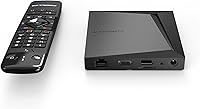
  • Wired Network: Features a Gigabit LAN port (1000M) for wired Ethernet connections, ensuring stable and low-latency network performance.
  • Video Output: Outputs video at up to 4K UHD resolution with HDR support via a standard HDMI connector.
  • HDMI: Connects to televisions and displays through a single HDMI output port included on the rear of the unit.
  • Bluetooth Remote: Ships with the BT1 Bluetooth remote, which includes backlit keys, voice search capability, and a standard ergonomic layout.
  • Bluetooth: Integrated Bluetooth enables wireless pairing of the included BT1 remote as well as compatible third-party peripherals.
  • Special Feature: Supports WPS (Wi-Fi Protected Setup), allowing compatible routers to establish a wireless connection without manual password entry.
  • Form Factor: Designed as a compact TV box with a square footprint that sits discreetly on shelves or behind televisions.
  • Dimensions: Measures 4.13 x 4.13 x 0.83 inches, making it one of the more space-efficient boxes in its performance category.
  • Weight: Weighs 1.3 pounds, light enough to relocate between rooms or travel with without adding meaningful bulk.
  • Color: Available in a single matte black finish that blends into most home theater and media cabinet setups.
  • Remote Batteries: The BT1 remote requires 2 AAA batteries, which are not confirmed to be included in the retail box.
  • Streaming Services: Officially compatible with Netflix, Hulu, and Amazon Prime Video, in addition to any Android-compatible app available via Google Play or sideloading.
  • Launch Date: First made available for purchase on September 6, 2023, as part of Formuler's flagship Z-series product lineup.

Related Reviews
MSI B450M PRO-VDH Max Motherboard
85%
91%
Value for Money
88%
Performance
94%
Ease of Installation
85%
Overclocking Capability
82%
Build Quality
More
BOGASING S8 Pro Max Bluetooth Speaker
85%
89%
Sound Quality
92%
Bass Performance
91%
Bluetooth Connectivity
85%
Ease of Use
88%
Portability
More
MSI PRO Z790-A MAX WiFi
83%
88%
Build Quality
91%
VRM & Power Delivery
86%
Memory Overclocking
77%
BIOS Experience
93%
Wireless Connectivity
More
MSI B450M-A Pro Max II Motherboard

85%
89%
Value for Money
85%
Performance
91%
Setup and Installation
88%
Memory Support
87%
Processor Compatibility
More
Ubiquiti USW-Pro-Max-16-PoE (180W)
86%
88%
Performance
92%
Reliability
90%
Installation Ease
93%
Cooling and Noise
75%
PoE Power Output
More
Vantrue S1 Pro Max 4K+4K
79%
93%
Video Quality
91%
Night Vision Performance
74%
AI Safety Alerts (ADAS & BSD)
82%
Parking Mode
88%
Build Quality & Durability
More
FreedConn T-Max Pro V5.0 Motorcycle Bluetooth Intercom Headset
87%
91%
Communication Range
87%
Ease of Use
93%
Battery Life
89%
Waterproof Durability
85%
Sound Quality
More
Vantrue S1 Pro Max 4K+2.5K Dual Dash Cam
87%
93%
Video Quality
88%
AI Safety Features (ADAS/BSD)
90%
Night Vision Performance
85%
Installation Ease
91%
Parking Mode Reliability
More
ARRIS SURFboard mAX Pro W133 Tri-Band Mesh Wi-Fi 6 System
86%
91%
Wi-Fi Performance
88%
Ease of Setup
90%
Range & Coverage
83%
App Experience
72%
Firmware Reliability
More
Ubiquiti UniFi Dream Machine Pro UDM-Pro
86%
94%
Performance
88%
Ease of Use
90%
Reliability
92%
Connectivity
85%
Network Security Features
More

FAQ

The hardware itself does not require any subscription. You can use it with free apps downloaded from Google Play immediately after setup. However, to access services like Netflix, Hulu, or an IPTV package, you will need active subscriptions to those separately.

Honestly, it is one of the more involved setups in this category. The included documentation is minimal, and configuring IPTV apps or adjusting display settings requires navigating standard Android menus without much on-screen guidance. If you are comfortable with Android smartphones or tablets, you will manage fine — but complete beginners may want to consult setup guides from the Formuler user community online before getting started.

You can absolutely use it over Wi-Fi — it supports Wi-Fi 6, which is one of the fastest wireless standards available. That said, if your router supports a wired Gigabit connection and your TV is nearby, plugging in an Ethernet cable will give you the most stable and buffer-free experience, especially for live IPTV streams or 4K content.

In most cases, yes. This Android TV box runs a full version of Android 11, so you can install virtually any IPTV player app — such as IPTV Smarters, TiviMate, or similar — from Google Play or by sideloading the APK. Compatibility with your specific IPTV provider depends on the app they support, not the hardware itself.

The Z11 Pro Max offers a meaningful step up in several areas: more RAM (4GB vs. 2GB on the Z10), Wi-Fi 6 wireless support, and the newer Android 11 OS. Real-world improvements show up most clearly in app load times, multitasking, and wireless network performance in busy home environments. If you are still running a Z10 and use IPTV daily, the upgrade is noticeable rather than marginal.

This is where it gets nuanced. The hardware is capable of 4K output, but Netflix and some other DRM-protected services use Widevine certification levels to determine the maximum streaming resolution they allow on a device. Many Android TV boxes — including this one — are limited to Widevine L3, which may cap Netflix at 1080p or lower depending on your subscription tier. For 4K Netflix specifically, a certified Android TV device or a platform like Apple TV 4K is a more reliable choice.

This is one of the more commonly reported issues with the Z11 Pro Max. After a factory reset, the BT1 Bluetooth remote needs to be manually re-paired because the device loses its paired peripherals. The process typically involves holding a combination of buttons on the remote — usually the Home and Back buttons simultaneously — until the pairing LED activates. The steps are not clearly printed in the manual, but Formuler's official support forum has a pinned guide that walks through it.

Yes. Because this runs standard Android rather than a locked-down Android TV build, you can sideload APK files directly. You will need to enable installation from unknown sources in the Android settings, then transfer the APK via a USB drive or download it through a browser. This is particularly useful for regional IPTV apps or services not officially available in your country.

User feedback consistently describes the unit as running warm rather than hot. During extended IPTV sessions lasting several hours, the chassis does get noticeably warm to the touch — but thermal shutdowns or sustained performance drops are rare in normal usage. Placing the box in an open, ventilated spot rather than inside a sealed cabinet will help it manage heat more comfortably over the long term.

Formuler has released firmware updates for the Z11 series since launch, but the cadence has been irregular and there is no published update schedule or stated support window. Based on the company's track record with earlier Z-series models, you can expect occasional patches rather than frequent rolling updates. If guaranteed long-term OS upgrades are important to you, this Formuler device — like most third-party Android boxes — may not fully satisfy that expectation.