Overview

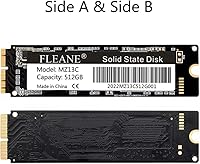
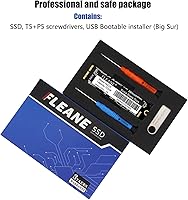
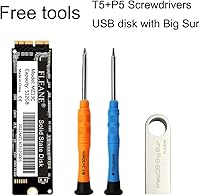
The FLEANE MZ13C 2TB Mac NVMe SSD exists to solve a specific, frustrating problem: you have a perfectly capable 2013–2019 Mac that Apple stopped selling storage upgrades for, and you don't want to spend thousands on a new machine just to get more space. This aftermarket Apple SSD uses a direct-fit proprietary connector, meaning no adapter cards, no wobble, no compatibility guesswork — it seats exactly like the original drive did. The bundle is practical: a bootable USB installer loaded with macOS Big Sur, two screwdrivers, and an installation guide all come in the box. Just know going in that this is a third-party aftermarket part, not an Apple-certified component, and your expectations should be calibrated accordingly.

Features & Benefits

Running on a PCIe 3.0 x4 NVMe interface with a Silicon Motion SM2263XT controller, the FLEANE 2TB drive delivers sequential reads around 1800 MB/s and writes near 1400 MB/s. For context, the original Apple SSDs in these machines typically peaked well below 1000 MB/s — so the real-world jump is substantial, not just a spec sheet footnote. The controller lacks a DRAM cache, which matters most under heavy sustained write loads, but for typical photo libraries, Final Cut timelines, or general daily use it holds up fine. Storage uses 3D TLC NAND, offering reasonable longevity for everyday workloads. Just don't expect MLC-grade endurance if you're doing constant high-volume video editing around the clock.

Best For

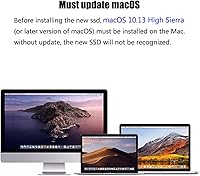
This Mac SSD upgrade is squarely aimed at people who want to squeeze more life out of a 2013–2015 MacBook Pro or Air, or a 2013–2019 iMac, without committing to a new Apple Silicon purchase. If your original drive is slow, failing, or simply maxed out at 256GB while your Lightroom catalog keeps growing, this is a logical fix. The included tools and bootable installer make it accessible to anyone comfortable following a disassembly guide. That said, if you're planning to resell the machine or need an OEM-matched Apple part, look elsewhere. This is also not the right fit for anyone running an OS older than macOS High Sierra — the drive requires EFI firmware present in that version or later to be recognized at all.

User Feedback

With a 4.4-star average across 83 ratings — a solid sample for such a niche part — the overall reception for this aftermarket Apple SSD leans positive. Most buyers report a noticeably faster machine after the swap, with macOS booting quicker and apps launching without the familiar wait. The bootable USB installer earns consistent appreciation; people genuinely use it rather than hunting down their own installation media. The complaint worth taking most seriously involves the EFI firmware prerequisite — users who skip updating their Mac's firmware before installing find the drive simply not recognized, accounting for several confused low-star reviews that are really installation errors. A handful also flagged that year-based matching alone isn't always reliable; verifying the EMC number beforehand prevents compatibility surprises.

Pros

  • Jumping from 256GB to 2TB internal storage is a dramatic, immediately felt improvement for media-heavy workflows.
  • Read speeds measurably outpace the original Apple SSDs these Macs shipped with, making daily use noticeably snappier.
  • The direct-fit proprietary connector installs cleanly with no adapter required — no wobble, no alignment issues.
  • Bootable USB installer included in the box is genuinely useful and saves real setup time.
  • Two screwdrivers in the bundle mean most buyers can start the install without sourcing specialty tools.
  • A 3-year warranty from a smaller brand is longer than many competitors offer in this niche.
  • 3D TLC NAND handles everyday mixed workloads — browsing, app use, photo editing — without throttling.
  • At 89.2 x 24 x 2mm and under two ounces, it fits identically to the original Apple blade with no case modifications.
  • Broad compatibility spans MacBook Air, MacBook Pro, iMac, Mac Pro, and Mac mini across nearly a decade of models.

Cons

  • The EFI firmware must be updated before installation or the drive simply won't appear — a step that trips up many buyers.
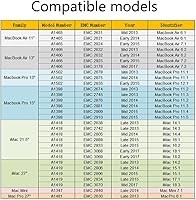
  • Year-based compatibility matching is not reliable enough; verifying the EMC number is a necessary extra step most listings bury.
  • No DRAM cache on the SM2263XT controller means sustained write performance under heavy continuous loads drops off noticeably.
  • 3D TLC NAND has lower write endurance than MLC alternatives, which matters if you frequently write and overwrite large video files.
  • Warranty support routes through FLEANE directly, with no retail chain backup if the brand becomes hard to reach.
  • Reported real-world speeds can fall short of the upper figures listed, depending on the specific Mac model and thermal conditions.
  • This aftermarket Apple SSD will likely flag as non-original during diagnostics, which complicates any future Apple Store service visits.
  • The bootable USB ships with macOS Big Sur, which may require an additional update step if you need a later OS version.
  • With only 83 ratings at the time of writing, the reliability track record over multiple years is still a relatively thin data set.

Ratings

The scores below reflect our AI-driven analysis of verified global buyer reviews for the FLEANE MZ13C 2TB Mac NVMe SSD, with spam, bot activity, and incentivized submissions actively filtered out before scoring. Every category captures both what users genuinely praised and the friction points that surfaced repeatedly across real-world installs. The result is an honest, balanced picture of where this aftermarket Apple SSD earns its reputation and where it asks more of the buyer.

Storage Capacity Value
93%
Going from a stock 128GB or 256GB blade to 2TB of internal storage is the single biggest reason buyers pull the trigger, and satisfaction here is nearly universal. Photographers keeping full-resolution Lightroom libraries local, and video editors no longer juggling external drives during projects, consistently call this the most impactful part of the upgrade.
A small number of buyers who already owned external NVMe enclosures questioned whether the internal jump was worth the installation effort versus just expanding external storage capacity at a lower cost. For light users, 2TB is more than they will realistically fill, making the capacity feel slightly over-specified for the price.
Read/Write Performance
81%
19%
Real-world read speeds land noticeably above what the original Apple SSDs in these machines delivered, and buyers report genuine improvements in boot times, app launch speed, and large file transfers. For a machine that once felt sluggish opening Final Cut or Capture One, the throughput jump is tangible enough that users describe it as giving their Mac a second life.
The DRAM-less SM2263XT controller shows its limits under sustained, consecutive heavy writes — speeds dip more than buyers expect when copying large batches of RAW files or ingesting long video footage in one sitting. Advertised peak figures also reflect best-case conditions; several users measured real throughput meaningfully below the listed ceiling on their specific Mac models.
Installation Experience
78%
22%
The 1:1 proprietary connector fit is consistently praised — users report the drive seats cleanly with no adapter wobble or alignment guesswork, which removes one of the most stressful variables in an internal Mac upgrade. Having both screwdrivers and a bootable USB installer in the box means most buyers can start and finish the job without sourcing additional parts.
The EFI firmware requirement is not prominently communicated at the point of purchase, and buyers who skip that step find the drive entirely invisible to macOS — generating frustrated low-star reviews that are really installation errors rather than hardware defects. A handful of users also found the printed installation guide too minimal for their specific iMac model, which involves display removal.
Compatibility Accuracy
71%
29%
Across the majority of supported MacBook Air, MacBook Pro, and iMac models, buyers confirm the drive fits and functions exactly as described when they verify their EMC number before ordering. The broad generational coverage — spanning 2013 through 2019 across multiple Mac lines — means this aftermarket Apple SSD addresses a wide pool of machines in a single SKU.
Year-based compatibility matching has caused real problems for a visible minority of buyers; Apple produced multiple board revisions within some model years, and the SSD interface spec is not always consistent across them. Users who matched by year alone without checking the EMC number occasionally received a drive that did not physically fit their specific machine.
Bootable USB Installer
84%
The included 16GB bootable USB loaded with macOS Big Sur is one of the most frequently mentioned positives in user feedback — buyers genuinely appreciate not having to locate a second Mac or fight with Apple's recovery tools to get the new drive initialized. It removes a step that has historically been a roadblock for less technical users attempting this kind of upgrade.
Big Sur is not the latest macOS release, so users who want to run a more current OS version need to perform an additional update after the initial install, which adds time and requires a stable internet connection. A few buyers with older compatible Macs also found that Big Sur pushed their machine harder than their preferred macOS version would have.
Build & Physical Fit
86%
At 89.2 x 24 x 2mm and under two ounces, the blade matches the original Apple SSD dimensions closely enough that users report zero case modification needed — it drops into the slot and the screwhole lines up without force. The physical construction feels solid in hand and does not show the flex or flex-point weakness that occasionally appears in cheaper third-party Mac blades.
A small number of buyers noted that the connector edge felt very slightly less snug than their original Apple SSD, though none reported actual connection failures as a result. There is also no visible quality indicator or certification mark on the drive itself, which makes some buyers uneasy about long-term reliability before they have accumulated usage time.
Thermal Performance
74%
26%
Under typical mixed workloads — web browsing, document editing, and moderate photo library use — this Mac SSD upgrade runs cool enough that thermal throttling is not a practical concern for most users. The SM2263XT controller manages heat reasonably well in the thermally constrained environments of MacBook chassis.
During extended sustained write operations, particularly on MacBook Pros where airflow is limited, several users reported that throughput dropped off more sharply than expected as the drive warmed up. iMac users tend to fare better due to more internal airspace, but MacBook owners doing intensive video work may see thermal-related performance variability.
Warranty & Support
62%
38%
A 3-year warranty period is longer than the coverage offered by many competitors in this niche aftermarket segment, which gives buyers meaningful protection against early hardware failure. FLEANE has responded constructively to warranty claims in a number of documented community cases, with replacements processed without excessive back-and-forth.
Support routes entirely through FLEANE directly, with no retail chain or platform-based escalation path if communication stalls — a real risk with smaller brands. Some users report slow initial response times, and the absence of a formal RMA tracking system makes it harder to monitor a claim in progress compared to dealing with a major storage brand.
NAND Endurance
68%
32%
For everyday mixed workloads — personal photo libraries, general file storage, and occasional video exports — 3D TLC NAND at 2TB capacity provides enough total bytes written headroom to serve most users for multiple years without hitting endurance limits. The drive's MTBF rating of 1 million hours is in line with consumer-grade NVMe drives in this category.
TLC NAND carries a lower per-cell write endurance ceiling than MLC, which is a relevant consideration for users who plan to use this drive as a continuous video capture or heavy editing scratch disk. There is no onboard DRAM cache to help manage write amplification, which puts slightly more wear on the NAND under sustained write-intensive patterns than a cached drive would.
Value for Money
77%
23%
When weighed against the cost of a new Apple Silicon Mac, the FLEANE 2TB drive represents a rational spend for extending the life of a machine that still performs well for its owner's needs. The bundled accessories add genuine tangible value rather than serving as empty box-filler, which makes the overall package feel fairly priced for the niche it occupies.
Buyers who later discover the EFI firmware requirement or a compatibility mismatch feel the purchase was poor value — not because of the drive itself, but because of inadequate pre-purchase information. A few users also noted that the price has fluctuated, and during higher-price windows the value proposition becomes harder to justify against external NVMe options.
macOS Compatibility
79%
21%
Once the EFI firmware update is confirmed, the drive works cleanly with macOS High Sierra through Ventura and beyond on supported hardware — buyers report no driver issues, no sleep-wake anomalies, and no unusual behavior under normal operating conditions. Time Machine backups, FileVault encryption, and Spotlight indexing all function without any workarounds.
The hard dependency on macOS High Sierra or later means anyone still running Sierra or an earlier OS must first update their system on the existing drive before the swap — an extra step that is not always obvious and has caused installation failures. Users hoping to run legacy OS versions intentionally will find this drive is simply incompatible with that configuration.
Documentation Quality
57%
43%
The included installation guide card covers the basic steps clearly enough for most MacBook Air and MacBook Pro models, and experienced DIY users report it serves as a useful quick reference alongside online teardown guides. The EMC number verification table available in the listing images is more thorough than what most competitors provide.
The physical guide is too brief for iMac disassembly, which involves suction cups, display adhesive strips, and more steps than a standard laptop teardown — users doing an iMac upgrade largely had to rely on third-party guides. The EFI firmware prerequisite is not called out in the printed materials at all, which is the most consequential omission given how frequently it causes failed installations.
Brand Reliability Perception
61%
39%
FLEANE has accumulated enough verified reviews in this specific product category to demonstrate that the drives are real, functional, and not counterfeit — which is a genuine concern in the aftermarket Apple SSD space where clone products exist. The 4.4-star average across 83 ratings is respectable for a niche component from a lesser-known manufacturer.
FLEANE lacks the brand recognition and long-term community track record that buyers can reference when evaluating multi-year reliability — there is simply not enough longitudinal data yet. Some buyers expressed discomfort investing in an internal drive upgrade from a brand with limited independent reviews outside of the Amazon listing itself.

Suitable for:

The FLEANE MZ13C 2TB Mac NVMe SSD is the right call for anyone sitting on a 2013–2019 Mac that still runs well but has run out of storage or is crawling on a dying original drive. If you shoot video, manage large Lightroom catalogs, or just hate constantly shuffling files to an external drive, jumping from a stock 128GB or 256GB blade to 2TB of NVMe storage is a genuinely useful upgrade rather than a marginal one. MacBook Air and MacBook Pro owners from the 2013–2015 era are the core audience here, but iMac users on the same generation stand to benefit equally. The bundle — bootable installer, screwdrivers, guide card — means you don't need a second machine or a trip to a parts store to get the job done. Anyone comfortable following an iFixit-style teardown guide will find this a manageable Saturday afternoon project with a meaningful payoff.
Not suitable for:

The FLEANE MZ13C 2TB Mac NVMe SSD is not the right tool if you're planning to resell your Mac, since buyers and appraisers often flag non-OEM storage components and it will not match Apple's original part numbers. If your Mac is still running macOS Sierra or earlier and you haven't updated the EFI firmware, the drive will not be recognized at all — this isn't a workaround situation, it's a hard requirement. Users who need enterprise-level endurance for continuous, high-intensity write workloads should look at drives with MLC NAND or a dedicated DRAM cache, as the DRAM-less SM2263XT controller has real limits under sustained heavy loads. Those expecting Apple Store-level warranty support will also be disappointed; warranty claims go through FLEANE directly, which works for some people and frustrates others depending on response time. Finally, if you're matching by year alone without verifying the EMC number for your specific Mac model, you risk ordering the wrong fit.
Specifications

  • Capacity: This drive offers 2TB of usable storage, a substantial increase over the 128GB or 256GB blades that most compatible Macs shipped with originally.
  • Interface: It connects via PCIe 3.0 x4 NVMe, the same interface protocol used by Apple in these Mac generations, requiring no protocol conversion.
  • Controller: The Silicon Motion SM2263XT controller manages read and write operations without a dedicated DRAM cache, relying instead on host memory buffer techniques.
  • NAND Type: Storage cells use 3D TLC NAND flash, which stacks layers vertically to achieve higher density at a cost-effective price point compared to MLC alternatives.
  • Sequential Read: Sequential read speed reaches up to 1800 MB/s under optimal conditions, though real-world figures on specific Mac models may vary slightly below this ceiling.
  • Sequential Write: Sequential write speed peaks at up to 1400 MB/s, with actual throughput depending on workload type, thermal conditions, and the host machine's PCIe lane allocation.
  • Form Factor: The drive uses a proprietary Apple blade form factor with a 1:1 connector match, installing directly without any adapter card or bracket.
  • Dimensions: The physical blade measures 89.2 x 24 x 2mm, matching the footprint of original Apple SSDs used in supported Mac models.
  • Weight: The drive weighs 1.76 ounces, consistent with other blade-style SSDs in this form factor.
  • MTBF: Mean time between failures is rated at 1 million hours, which is a standard reliability benchmark for consumer-grade NVMe SSDs in this class.
  • Power Supply: Operating voltage is 3.3V with a ±5% tolerance, consistent with the power delivery specs of supported Mac logic boards.
  • Minimum OS: macOS 10.13 High Sierra is the minimum required operating system, because that version carries the EFI firmware update necessary for the Mac to recognize this drive.
  • Warranty: FLEANE covers this drive with a 3-year warranty, handled through direct contact with the manufacturer rather than through a retail support chain.
  • Bundle Contents: Each unit ships with a 16GB USB bootable installer preloaded with macOS Big Sur, two screwdrivers sized for Mac disassembly, and a printed installation guide card.
  • Compatibility: Supported machines include MacBook Air 2013–2017, MacBook Pro 2013–2015, iMac 2013–2019, Mac Pro Late 2013, and Mac mini 2014.

Related Reviews

SanDisk 2TB SSD Plus M.2 NVMe SSD
86%
89%
Performance
92%
Ease of Installation
88%
Reliability
91%
Value for Money
90%
Capacity
More
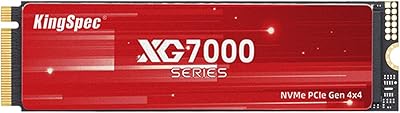
KingSpec XG7000 2TB NVMe M.2 SSD
81%
88%
Sequential Read Speed
84%
Sequential Write Speed
93%
Value for Money
91%
PS5 Compatibility
74%
Thermal Management
More
GiGimundo G7400 2TB NVMe SSD
76%
88%
Read Speed Performance
54%
Sustained Write Speed
91%
Gaming Load Times
83%
Value for Money
67%
Thermal Management
More
WD_BLACK SN7100 2TB NVMe SSD
85%
93%
Read & Write Performance
88%
Gaming Load Times
86%
Power Efficiency
84%
Thermal Management
91%
Value for Money
More
Fikwot FX550 2TB NVMe M.2 SSD
80%
88%
Sequential Read Speed
61%
Sustained Write Performance
86%
Value for Money
92%
Compatibility & Fit
77%
Thermal Management
More
TEAMGROUP MP44L 2TB NVMe M.2 SSD
79%
88%
Sequential Read Performance
83%
Sequential Write Performance
74%
Thermal Management
91%
Installation Experience
89%
Value for Money
More
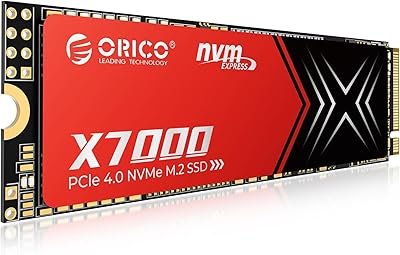
ORICO X7000 2TB NVMe SSD
79%
88%
Read & Write Performance
84%
PS5 Compatibility
91%
Thermal Management
93%
Installation Ease
82%
Value for Money
More
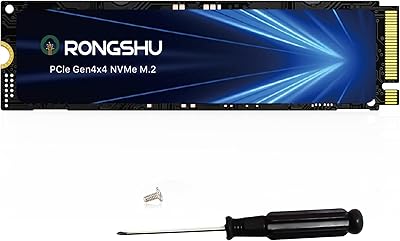
RONGSHU RP7000 2TB NVMe SSD
78%
88%
Read/Write Performance
91%
Value for Money
93%
PS5 Compatibility
74%
Thermal Management
67%
Endurance & Longevity
More
ORICO J10 256GB M.2 NVMe Internal SSD
76%
83%
Read Speed Performance
61%
Write Speed & Cache Behavior
88%
Heatsink Quality
74%
Compatibility
79%
Value for Money
More
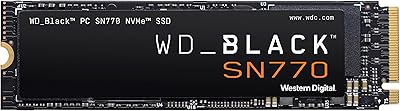
WD_BLACK SN770 2TB NVMe SSD
85%
91%
Read & Write Performance
93%
Value for Money
94%
Installation & Compatibility
88%
Long-Term Reliability
92%
Gaming Load Times
More

FAQ

There is one critical prerequisite: your Mac must already have macOS 10.13 High Sierra or later installed on a working drive before you swap in the FLEANE MZ13C 2TB Mac NVMe SSD. That OS version delivers an EFI firmware update that teaches your Mac how to talk to NVMe drives at this specification level. If you install this drive in a Mac still running Sierra or earlier, it will not appear at all — not even in Disk Utility. Update your firmware first, then do the swap.

Year alone is not always sufficient. Apple produced multiple MacBook Pro configurations in any given year, and the SSD connector and interface spec varied between them. The safest approach is to cross-reference your machine's EMC number, which is printed on the bottom of your Mac, against the compatibility table in the product listing. A year match that ignores the EMC number has led some buyers to receive a drive that physically does not fit their specific model.

Noticeably faster, in most cases. The original Apple SSDs in 2013–2015 MacBooks typically delivered sequential reads in the 700–900 MB/s range, while this aftermarket Apple SSD targets read speeds up to 1800 MB/s. In practice that difference shows up in boot times, application launches, and how quickly large files like video exports or photo library imports complete. Day-to-day responsiveness improves even before you account for the extra storage headroom.

For most supported models, the two included screwdrivers cover the pentalobe and Torx screws you'll encounter during disassembly. You may want an anti-static wrist strap if you're cautious about static discharge, though most home installations go fine without one. A clean, well-lit surface and a small container for the screws makes the process much smoother. If your specific model requires additional steps like removing a battery bracket, a spudger or plastic pry tool is handy but not usually included.

The bootable USB comes preloaded with macOS Big Sur. Once you've completed the installation and your Mac is running, you can upgrade to a later version through System Preferences or System Settings depending on your OS, as long as your Mac model supports the newer macOS release. Note that some 2013 Macs are not officially supported past certain macOS versions, so check Apple's compatibility list for your specific model before expecting to run the very latest OS.

It depends on your expectations. A 3-year coverage period is longer than many competitors offer in this niche, which is a genuine plus. The caveat is that warranty service means contacting FLEANE directly — there is no retail chain or Apple Store backing you up if things go sideways. Community reports on warranty responsiveness are mixed, as is typical for smaller direct-to-consumer brands. Keep your order details and any communication records organized in case you need to follow up.

For typical home and creative professional use, no. TLC NAND has lower write endurance than MLC on paper, but modern 3D TLC drives in the 2TB range carry enough total bytes written capacity to last many years under normal workloads. Where it matters more is if you are continuously writing and overwriting huge volumes of data — think daily 4K video ingests at scale or server-like write patterns. For photo editing, document work, and even occasional video projects, the longevity trade-off is not a practical concern.

Apple's warranty on hardware this age has almost certainly already expired, so that concern is largely academic for most buyers. That said, if you ever bring your Mac in for a repair, Apple technicians will note that the storage is a third-party component and may decline to service storage-related issues. This is a standard limitation of any aftermarket part, not unique to this Mac SSD upgrade specifically.

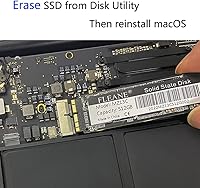
Cloning is an option, but it requires an intermediate step since you cannot clone to an internal drive that is not yet installed. The practical approach most users take is to install the new drive, boot from the included USB installer, perform a fresh macOS install, and then migrate their data using Migration Assistant from a Time Machine backup or from the old drive connected externally via an enclosure. A clean install tends to result in a healthier system than a direct clone from an aging drive anyway.

Yes, the installation process and compatibility requirements are the same. The proprietary Apple blade connector is consistent across the supported iMac, MacBook Air, and MacBook Pro generations, and the EFI firmware requirement applies regardless of machine type. The main practical difference with an iMac is that the disassembly process is more involved — you'll be removing the display panel, which requires suction cups and a bit more care than opening a laptop. Factor that in when deciding whether to tackle it yourself or hand it to a local repair shop.