Overview

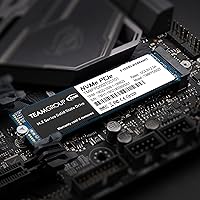
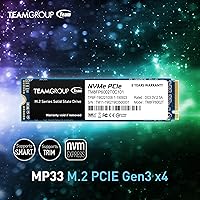
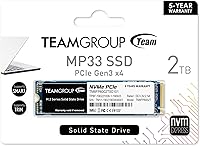
The TEAMGROUP MP33 2TB NVMe M.2 SSD sits comfortably in the budget-to-mid-range NVMe segment, offering a practical upgrade path for anyone still running a SATA drive or an aging hard disk. It uses the M.2 2280 form factor, which means it slots cleanly into virtually any modern Intel or AMD desktop or laptop without adapter headaches. One thing worth knowing upfront: this is a DRAM-less design, which affects sustained write performance under heavy workloads — though for typical everyday use, that rarely becomes a problem. With over 5,500 ratings and a 4.7-star average, its popularity speaks for itself in a crowded market.

Features & Benefits

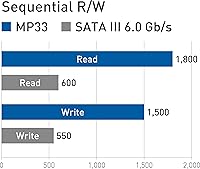
The MP33 2TB runs on a PCIe 3.0 x4 NVMe interface, hitting sequential reads of up to 1,800 MB/s and writes up to 1,500 MB/s — a significant jump over any SATA SSD. SLC caching helps burst performance feel snappy for day-to-day tasks like copying files or launching applications. The 2TB version carries a 1,000 TBW endurance rating, which is respectable at this price tier and should cover years of regular use. The drive's MTBF of 1,500,000 hours adds further confidence. The absence of a dedicated DRAM cache is the one honest caveat: once the SLC cache saturates, sustained write speeds do drop, so this is not the ideal pick for constant large-file transfers.

Best For

This M.2 SSD makes the most sense for budget PC builders and laptop upgraders who want NVMe performance without stretching into Gen4 territory. If you are gaming on a mid-range rig, the speed difference between this drive and a pricier Gen4 model is largely irrelevant in practice — games load fast either way. It is also a smart choice as a secondary drive in a desktop, where you need bulk storage rather than peak sustained throughput. First-time NVMe buyers coming from a hard drive will notice an immediate improvement in everything from boot times to application launches. Users doing heavy video editing or large database writes, however, will likely want a DRAM-equipped alternative.

User Feedback

Across more than 5,500 verified ratings, this TeamGroup NVMe drive holds a 4.7-star average — a figure that is hard to argue with at this capacity and price point. Most buyers highlight how straightforward installation is and report a noticeable speed boost coming from older storage. Value per gigabyte comes up repeatedly as a genuine selling point, especially when compared against better-known brands. That said, a subset of more technically inclined users flag the cache exhaustion behavior during prolonged large writes, which causes speeds to step down noticeably. A smaller number of reviews mention firmware update concerns and questions about long-term reliability, though these represent a minority voice against an otherwise satisfied user base.

Pros

  • Hits read speeds up to 1,800 MB/s — a dramatic step up from any SATA drive.
  • 2TB of usable space gives plenty of room for large game libraries and media collections.
  • A 1,000 TBW endurance rating is genuinely solid for a value-tier NVMe drive.
  • Fits any standard M.2 2280 slot, making laptop and desktop installation straightforward.
  • SLC caching keeps everyday file transfers and application launches feeling responsive.
  • Over 5,500 reviews averaging 4.7 stars reflects a broad, consistently satisfied user base.
  • Works across Intel and AMD platforms with no compatibility headaches.
  • Delivers competitive gigabytes-per-dollar value compared to better-known storage brands.
  • Lightweight and compact enough to fit in slim ultrabooks alongside desktop builds.

Cons

  • No dedicated DRAM cache means sustained write performance can drop significantly once the SLC buffer is exhausted.
  • Not the right choice for workloads involving frequent, large sequential writes like RAW video editing.
  • PCIe Gen3 bandwidth will be a ceiling for users on Gen4 platforms who want maximum throughput.
  • Some buyers have raised questions about long-term firmware support and update availability.
  • A small number of users report uncertainty around TeamGroup's after-sales support responsiveness.
  • Random read and write performance, while adequate, trails DRAM-equipped drives in latency-sensitive tasks.
  • The performance advantage over SATA diminishes noticeably during heavy, sustained workloads.
  • Less name recognition than dominant storage brands may give cautious buyers pause.

Ratings

The scores below were generated by our AI review engine after analyzing thousands of verified global purchases of the TEAMGROUP MP33 2TB NVMe M.2 SSD, with automated filtering applied to remove incentivized, duplicate, and bot-generated submissions. Each category reflects the full spectrum of buyer sentiment — not just the highlights — so both the genuine strengths and the recurring frustrations are represented honestly.

Value for Money
93%
This is where the MP33 2TB consistently earns its strongest praise. Buyers repeatedly note that the cost-per-gigabyte undercuts well-known brands by a meaningful margin, making it a go-to recommendation for budget builds where squeezing extra storage out of a fixed spend matters.
A small segment of buyers feel the value calculation shifts if the drive needs replacing within a few years, since warranty claims can involve shipping costs that erode the initial savings. Those comparing it against similarly priced DRAM-equipped alternatives also feel the gap in value narrows for write-intensive use cases.
Read Performance
86%
Real-world read speeds consistently impress users coming from SATA or hard drives — Windows loads noticeably faster, large game levels stream in quickly, and file browsing feels immediate. For the target audience, the up-to-1,800 MB/s ceiling delivers exactly the kind of snappiness they were hoping for.
Enthusiasts benchmarking against pricier Gen4 drives find the sequential read ceiling underwhelming, and random read performance in queue-depth-one scenarios trails DRAM-equipped NVMe options. This only shows up in synthetic tests or demanding server-style workloads, but informed buyers do flag it.
Write Performance
67%
33%
For typical write tasks — installing games, copying a folder of photos, saving documents — the SLC cache keeps things feeling responsive and well within acceptable range. Buyers doing occasional large file moves report speeds that still comfortably beat anything in the SATA world.
Once the SLC cache fills during a prolonged write session, speeds can fall sharply — a pattern that frustrates users transferring large video archives or doing disk-to-disk backups. This is the single most common technical complaint across the review base, and it is a genuine limitation worth weighing for anyone with write-heavy workflows.
Installation Ease
94%
First-time builders and laptop upgraders consistently highlight how straightforward the installation process is — the M.2 2280 format drops in cleanly, operating systems detect it instantly, and no additional drivers or configuration steps are required. Several reviewers specifically mention completing a full laptop swap in under ten minutes.
A handful of users running older systems report needing a BIOS update before the drive is recognized, which can catch less experienced builders off guard. There is no included mounting screw, which occasionally causes minor frustration when the motherboard does not provide one.
Compatibility
91%
Broad support for Intel and AMD platforms across multiple generations means most buyers can install this M.2 SSD without checking compatibility lists obsessively. It also works on Linux 2.6.33 and later, which earns appreciation from users running Ubuntu or Fedora as their daily driver.
The drive is limited to PCIe 3.0 speeds, so buyers with newer Gen4 platforms get no performance uplift over what they would see in a Gen3 system. A very small number of users on niche mini-PC or embedded platforms report M.2 key compatibility edge cases.
Build Quality & Form Factor
78%
22%
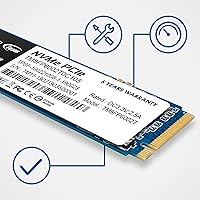
The physical construction feels solid for the price tier — the PCB is clean, components are well-seated, and the drive fits snugly into M.2 slots without flex or misalignment. Its 3.8mm height clears nearly every laptop chassis without clearance issues.
There is no protective label or heatspreader included, which some buyers see as a cost-cutting sign compared to premium alternatives. The bare PCB aesthetic also means the drive offers no thermal management aid out of the box, leaving users reliant on motherboard heatsinks or ambient airflow.
Thermal Management
71%
29%
Under typical gaming and everyday computing loads, operating temperatures stay comfortably within safe ranges and thermal throttling is rarely reported. Users in well-ventilated desktop cases describe stable thermals across extended sessions.
In passively cooled laptops or small form factor builds without dedicated M.2 heatsinks, temperatures climb more noticeably under sustained workloads. A subset of users reports that the drive gets warm enough to be uncomfortable to touch after prolonged use, though outright throttling events remain uncommon.
Long-Term Reliability
74%
26%
The 1,000 TBW endurance rating and a 1,500,000-hour MTBF figure give buyers a reasonable statistical foundation for confidence. Many reviewers who purchased early units report the drive still running without issue after two or more years of daily use.
A noticeable minority of reviews flag early failure experiences or drives that stopped being recognized after several months, which tempers confidence slightly. Concerns about firmware update availability and long-term software support from TeamGroup surface regularly enough to be worth acknowledging.
Software & Tooling
62%
38%
The drive works out of the box with widely available third-party utilities like CrystalDiskInfo and HD Sentinel, giving technically inclined users full access to S.M.A.R.T. health data. Basic health monitoring is accessible to anyone willing to use free tools.
TeamGroup's own SSD Toolbox has received mixed feedback — some users find it functional but basic, while others report installation issues or outdated interfaces that feel neglected compared to tooling from larger storage brands. There is no companion app for mobile monitoring or cloud-based health alerts.
Warranty & Support
68%
32%
A five-year limited warranty is a competitive offering at this price tier and gives buyers a reasonable safety net against premature failure. Buyers who have had smooth warranty interactions describe the process as manageable.
Customer support responsiveness is an area where TeamGroup draws criticism — several reviewers describe slow email turnaround times and difficulty navigating the RMA process, particularly for buyers outside of the United States. Regional warranty terms can also vary in ways that are not always clearly communicated at the point of sale.
Gaming Load Times
88%
Gamers switching from SATA or hard drives report highly satisfying improvements in level load times across titles like open-world RPGs and competitive shooters where asset streaming matters. The practical difference between this drive and a Gen4 alternative is minimal for gaming-specific read patterns.
Game installation and large patch update speeds are where the DRAM-less design makes itself felt, particularly for users managing libraries of 50GB-plus titles. Buyers expecting consistently high write speeds during game updates occasionally find the experience slower than benchmarks suggest.
OS Boot Performance
89%
Windows boot times drop dramatically compared to SATA or mechanical drives — users commonly report sub-15-second cold boots on modern hardware, and resume-from-sleep is nearly instant. This is one of the most frequently praised real-world improvements across the review base.
Boot performance benefits are largely indistinguishable from faster NVMe alternatives for most users, meaning buyers expecting a premium experience over other PCIe Gen3 drives may find the real-world delta smaller than expected. Post-boot application launch speeds, while good, show more variance depending on system RAM.
Packaging & Unboxing
57%
43%
The drive arrives adequately protected and ready to install — no elaborate packaging to wrestle with, which some buyers appreciate as a sign that cost savings are being passed to the product rather than the presentation.
Buyers accustomed to premium brands note the sparse packaging feels inexpensive and that there are no accessories included — no mounting screw, no migration software license, and no documentation beyond a basic sheet. For first-time builders, the lack of any setup guidance is a minor but real friction point.

Suitable for:

The TEAMGROUP MP33 2TB NVMe M.2 SSD is a practical fit for a wide range of everyday users who want a meaningful storage upgrade without overspending. PC builders putting together a mid-range gaming rig will find it hits a comfortable sweet spot — fast enough to load modern games quickly, capacious enough to hold a large library, and priced sensibly against the performance on offer. Laptop owners looking to replace a slow factory drive or a cramped 256GB SSD will appreciate the M.2 2280 compatibility, which covers the vast majority of consumer notebooks from the last several years. It also works well as a secondary drive in a desktop, where the primary NVMe handles the OS and the MP33 2TB takes on bulk game or media storage duties. First-time NVMe buyers upgrading from a hard drive or an older SATA SSD will notice an immediate, tangible difference in boot times and application responsiveness.

Not suitable for:

The TEAMGROUP MP33 2TB NVMe M.2 SSD is not the right call for users whose workflows regularly push large sequential writes over extended periods. Video editors working with high-bitrate RAW footage, data scientists running large database operations, or content creators frequently moving hundreds of gigabytes at a time will hit the limits of its SLC cache and see write speeds drop substantially once that buffer fills. The absence of dedicated DRAM also means this drive is less competitive in workstation-class environments where consistent, predictable I/O latency matters. Users who have already invested in a PCIe Gen4 platform and want to maximize that bandwidth should look at Gen4 drives instead, since this M.2 SSD will not take advantage of those faster lanes. Anyone requiring enterprise-grade reliability guarantees or who simply will not tolerate any uncertainty around long-term firmware support may also want to lean toward more established storage brands with a longer track record.

Specifications

  • Capacity: This drive offers 2TB of usable storage, suitable for large game libraries, media collections, and general-purpose computing.
  • Interface: It connects via PCIe 3.0 x4 with NVMe 1.3, delivering far higher throughput than any SATA-based SSD.
  • Form Factor: The M.2 2280 form factor measures 80mm in length, fitting the most common M.2 slot found in modern laptops and desktops.
  • Sequential Read: Peak sequential read speed reaches up to 1,800 MB/s under optimal conditions using CrystalDiskMark benchmarks.
  • Sequential Write: Peak sequential write speed reaches up to 1,500 MB/s, though this reflects performance while the SLC cache is active.
  • NAND Type: Storage cells use 3D TLC NAND flash, a widely adopted technology that balances density, cost, and reasonable write endurance.
  • Cache Design: The drive uses SLC caching to boost burst performance but has no dedicated DRAM, which affects sustained write speeds under heavy workloads.
  • Endurance: The 2TB variant is rated for 1,000 TBW (terabytes written), a solid endurance figure for a value-class NVMe drive.
  • MTBF: TeamGroup rates the mean time between failures at 1,500,000 hours, reflecting the manufacturer's confidence in long-term component reliability.
  • Dimensions: The drive measures 80 x 22 x 3.8 mm, making it compact enough to fit in slim laptops and small form factor desktop builds.
  • Weight: At just 0.212 oz, the drive adds virtually no meaningful weight to any system it is installed in.
  • Voltage: It operates at DC +3.3V, drawing power directly from the M.2 slot without requiring any additional connectors.
  • Storage Temp: The drive can be safely stored in temperatures ranging from -40°C to 85°C, well within the requirements of typical home and office environments.
  • OS Support: Compatible operating systems include Windows 11, 10, 8.1, 8, and 7, as well as Linux kernel version 2.6.33 and later.
  • Compatible Devices: The drive is designed for installation in both laptops and desktop PCs that feature an available M.2 2280 slot with PCIe support.
  • CPU Compatibility: The MP33 2TB supports both Intel and AMD platforms, covering the vast majority of consumer motherboards released in recent years.

Related Reviews
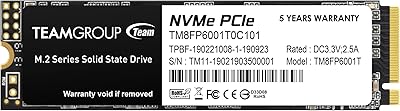
TEAMGROUP MP33 1TB M.2 PCIe NVMe SSD
84%
86%
Performance
88%
Read Speed
85%
Write Speed
91%
Ease of Installation
79%
Reliability
More
TEAMGROUP MP33 512GB NVMe SSD

76%
93%
Value for Money
81%
Read Speed Performance
58%
Sustained Write Performance
94%
Installation Ease
88%
Compatibility
More
SanDisk 2TB SSD Plus M.2 NVMe SSD
86%
89%
Performance
92%
Ease of Installation
88%
Reliability
91%
Value for Money
90%
Capacity
More
Vansuny 2TB NVMe M.2 Internal SSD

78%
88%
Value for Money
79%
Read/Write Speed
91%
PS5 Compatibility
74%
Thermal Management
93%
Installation Experience
More
GAMERKING 2TB M.2 NVMe Internal SSD
75%
78%
Read/Write Performance
82%
Value for Money
91%
Installation Experience
67%
Thermal Management
63%
Long-Term Reliability
More
fanxiang S770 2TB NVMe M.2 SSD
79%
88%
Sequential Read Speed
91%
PS5 Compatibility
86%
Value for Money
83%
Thermal Management
74%
Build Quality
More
PNY CS2230 2TB M.2 NVMe Internal SSD
80%
88%
Read/Write Performance
91%
Value for Money
94%
Installation Ease
67%
Thermal Management
89%
Compatibility
More
Fikwot FX910 2TB M.2 NVMe SSD
80%
88%
Read/Write Performance
91%
Thermal Management
93%
Installation Ease
84%
PS5 Compatibility
87%
Value for Money
More
Ediloca EN870 2TB NVMe M.2 SSD
78%
88%
Sequential Read Speed
79%
Sequential Write Speed
91%
Value for Money
93%
PS5 Compatibility
86%
Installation Ease
More
Fikwot FX991 2TB NVMe SSD
78%
88%
Sequential Read Performance
61%
Sustained Write Speed
93%
PS5 Compatibility
91%
Value for Money
82%
Thermal Management
More

FAQ

If your laptop has an M.2 2280 slot — which is the most common size in consumer notebooks — it should fit without any issues. Check your laptop's manual or manufacturer specs page to confirm it supports M.2 2280 and PCIe NVMe, not just SATA M.2, since those are different things.

Yes, the MP33 2TB works with both AMD and Intel platforms. As long as your motherboard has an M.2 slot running PCIe 3.0 x4 or PCIe 4.0, you are good to go. PCIe 4.0 boards are backward compatible, so the drive will simply run at Gen3 speeds.

A DRAM-less SSD does not have a small dedicated memory chip to manage the drive's internal mapping table. For most everyday tasks — booting Windows, launching games, browsing files — you will not notice the difference. Where it matters is during very long, sustained write sessions; once the SLC cache fills up, write speeds can dip noticeably. For gaming or general use, this is rarely a real-world problem.

In everyday use like booting, gaming, and loading applications, most people cannot tell the difference between a Gen3 and a Gen4 drive. Gen4 drives offer higher peak sequential speeds, which mainly benefits workloads like large file transfers or professional content creation. If you are building a gaming PC or upgrading a laptop, the price-to-performance case for Gen3 is still strong.

Absolutely. Windows 11 is fully supported, and installing it on this M.2 SSD will be noticeably faster than booting from a SATA or hard drive. You can use standard tools like the Windows Media Creation Tool or Rufus to get it set up.

After formatting, you can expect roughly 1.86TB of usable space. This is normal — storage manufacturers measure 1TB as 1,000GB, while your operating system measures it as 1,024GB, so there is always a small gap between advertised and displayed capacity.

No heatsink is included. For most laptop installations or light desktop use, you do not need one. If your motherboard includes an M.2 heatsink, feel free to use it — it can help in sustained workloads. For typical gaming or everyday computing, thermal throttling is rarely a concern with this drive.

TeamGroup offers a utility called the TeamGroup SSD Toolbox, which lets you monitor drive health, temperature, and remaining lifespan. You can also use widely trusted third-party tools like CrystalDiskInfo, which works perfectly with this M.2 SSD and gives you real-time S.M.A.R.T. data.

With a 1,000 TBW endurance rating, the drive is built to handle a substantial amount of writing over its lifetime. For a typical home user writing 20–30GB per day, that works out to well over a decade of use before approaching the rated limit. The 1,500,000-hour MTBF figure adds further confidence, though no drive carries a lifetime guarantee.

TeamGroup typically backs the MP33 series with a five-year limited warranty, though it is worth verifying the specific terms at the point of purchase since regional policies can vary. Keep your proof of purchase handy, as you will need it for any warranty claim.

Where to Buy