Overview
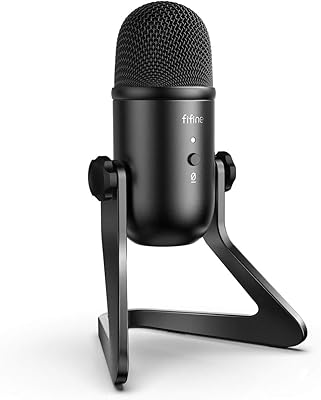
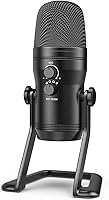
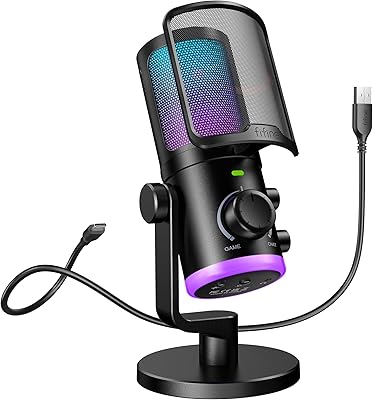
The FIFINE K690 sits in a sweet spot that most entry-level USB mics completely ignore — it offers genuine recording flexibility without forcing you to learn a new signal chain. At the heart of it is a three-capsule array, which is what makes four distinct pickup patterns possible from a single desktop unit. Plug it into any computer or PS4/PS5 and it works immediately; no drivers, no audio interface, no setup headaches. The all-metal housing gives it a broadcast-inspired look that holds up on camera, and for what you pay, the feature set is genuinely hard to match at this price point.
Features & Benefits
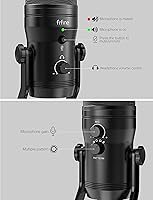
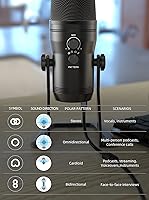
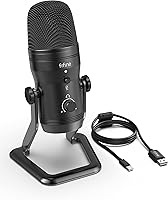
The most practical thing about the K690 is how much control you have without ever opening a software menu. Four pickup patterns — cardioid for solo recording, bidirectional for two-person conversations, omni for room audio, and stereo for a wider soundscape — are all switchable directly on the body. A gain knob and touch-mute button sit up front for instant mid-stream adjustments. Plug headphones into the 3.5mm jack and you hear yourself in real time with no audible delay, which makes a tangible difference when monitoring a live session. A 78 dB signal-to-noise ratio keeps background hiss noticeably low throughout.
Best For
This desktop microphone hits hardest for solo streamers and YouTubers who need reliable vocal isolation in less-than-perfect rooms — the cardioid pattern is the everyday workhorse here. Podcasters running two-person setups can flip to bidirectional and skip the second mic entirely, which is a real cost saver. Remote workers tired of sounding hollow on Zoom calls will notice an immediate improvement. ASMR creators tend to appreciate the stereo and omni options for building atmosphere. If you are not ready for the XLR-and-interface route yet, this USB mic covers most recording bases without the steep learning curve.
User Feedback
Buyers consistently point to vocal warmth and clarity as the standout quality, with many noting they sound noticeably more professional compared to a webcam or headset mic. The mute button earns frequent praise in streaming communities for exactly the reason you would expect. On the critical side, a recurring complaint is that the K690 is sensitive enough to pick up desk thumps and keyboard vibrations — placing it on a hard surface without a boom arm can introduce low-frequency rumble. The stereo and omni modes also reward quieter spaces; in echo-prone rooms they can feel underwhelming. Overall, satisfaction skews high for the price range.
Pros
- Four switchable pickup patterns cover solo, interview, group, and ambient recording without buying extra gear.
- Plug-and-play USB connection works instantly on PC, Mac, and PS4/PS5 — no drivers or setup required.
- The physical mute button and gain knob let you adjust mid-stream without touching your software.
- Zero-latency headphone monitoring helps you catch audio problems in real time, not after the take.
- All-metal construction feels and looks substantially more premium than the price suggests.
- Vocal warmth and presence consistently outperform other USB mics in the same price bracket.
- The detachable USB cable means a damaged lead is a cheap replacement, not a hardware problem.
- Bidirectional mode allows genuine two-person podcast recording with a single unit and no mixer.
Cons
- The included desktop stand transfers desk vibrations directly to the capsule — a boom arm is almost essential.
- The gain knob has a short throw, making precise fine-tuning frustratingly difficult.
- Stereo and omni modes expose room acoustics harshly, making them nearly unusable in untreated spaces.
- No USB-C cable is included, requiring an adapter for modern laptops with only USB-C ports.
- The touch-mute button can register accidental activations when adjusting the mic position mid-session.
- There is no companion software for EQ or tone shaping — you need a DAW to go beyond basic capture.
- Headphone output volume is on the modest side and may feel underpowered with higher-impedance headphones.
- The large footprint can feel intrusive on a crowded desk, and the stand offers no tilt adjustment.
Ratings
The scores below for the FIFINE K690 were generated by our AI engine after analyzing thousands of verified purchase reviews from buyers worldwide, with spam, bot activity, and incentivized feedback actively filtered out. Each category reflects real patterns we found across a broad cross-section of users — from bedroom streamers to remote professionals — so both the genuine strengths and the recurring frustrations are represented honestly.
Audio Clarity
Pickup Pattern Versatility
Build Quality
Ease of Setup
Headphone Monitoring
On-Body Controls
Noise Rejection
Value for Money
Vocal Performance for Streaming
Podcast Suitability
ASMR Performance
Design & Aesthetics
Compatibility & Connectivity
Long-Term Durability
Suitable for:
The FIFINE K690 is a strong fit for anyone stepping up from a built-in laptop mic or webcam audio without wanting to wrestle with audio interfaces, drivers, or complicated routing software. Solo streamers and YouTubers who record in cardioid mode will get clean, present vocal sound that holds up well in typical home setups, and the on-body mute button alone makes it a practical tool for live content. Podcasters who occasionally host a guest in the same room will appreciate being able to flip to bidirectional mode and capture both voices without a second mic or mixer. Remote workers who spend hours on video calls will notice an immediate and meaningful difference in how their voice comes across to colleagues. ASMR creators and ambient recorders who want to experiment with stereo and omni modes — without buying separate microphones — will find real value in the multi-pattern flexibility. For anyone who is not yet ready to commit to an XLR setup but wants noticeably better audio, this desktop microphone offers an unusually complete toolkit for the investment.
Not suitable for:
The FIFINE K690 is not the right tool for buyers who need broadcast-grade noise rejection in less-than-ideal acoustic environments — condenser capsules this sensitive will pick up mechanical keyboard clicks, HVAC hum, and desk vibrations in a way that dedicated dynamic mics or higher-end condensers handle more gracefully. Professional podcasters or voice-over artists who require pristine, low-noise recordings without post-processing will find the K690 hits a ceiling that its price tier cannot overcome. If your primary use case is a single cardioid pattern and nothing else, there are simpler, cheaper USB mics that perform comparably without the added bulk of a larger chassis. Buyers who have already invested in a proper XLR microphone and audio interface will find little reason to step backward to a USB-only solution. Anyone expecting to record in a live, noisy environment — on location, at an event, or in a shared workspace — will find the open condenser design works against them rather than for them.
Specifications
- Pickup Patterns: Supports four selectable polar patterns — cardioid, omnidirectional, bidirectional, and stereo — switchable directly on the microphone body.
- Capsule Design: Uses a three-capsule condenser array to enable the full range of pickup patterns from a single housing.
- Frequency Response: Captures audio across a range extending up to 18 kHz, covering the full spectrum of human speech and most instruments.
- Signal-to-Noise Ratio: Rated at 78 dB, providing a clean audio signal with a low noise floor suitable for voice recording and streaming.
- Connectivity: Connects via USB-A with a detachable cable; fully bus-powered and plug-and-play with no drivers or software installation required.
- Headphone Output: Features a 3.5mm headphone jack with zero-latency monitoring so you can hear your voice in real time while recording.
- On-Body Controls: Includes a microphone gain knob, a touch-sensitive mute button, and a separate headphone volume dial on the unit itself.
- Compatible Platforms: Works natively with Windows PCs, macOS laptops, and PlayStation 4 and 5 consoles without additional configuration.
- Body Material: Constructed from all-metal materials, giving the microphone a durable, premium feel compared to plastic-bodied alternatives in the same price range.
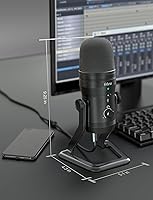
- Dimensions: Measures 8.94 x 6.97 x 6.57 inches, making it a full-sized desktop unit suited to a permanent desk position rather than portable use.
- Weight: Weighs 2.87 pounds, which contributes to desk stability but means it is not well suited for frequent travel or mobile setups.
- Power Source: Draws power entirely through the USB connection — no external power adapter, phantom power supply, or batteries are required.
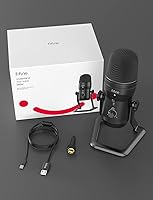
- Included Accessories: Ships with a desktop stand adapter, a detachable USB cable, and a printed user manual; no shock mount or pop filter is included.
- Color: Available in matte black, which pairs well with most streaming and home studio desk setups and reads cleanly on camera.
- Number of Channels: Outputs a single audio channel, meaning it records mono audio in most modes with stereo output available exclusively in stereo pattern mode.
- Form Factor: Designed as a table-array microphone intended to sit upright on a desk, ideally positioned at roughly mouth height for optimal capture.
Related Reviews
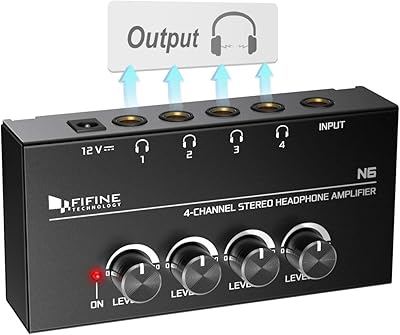
Fifine N6 4-Channel Headphone Amplifier
Fifine K054
FIFINE X3 Noise Canceling Over-Ear Headphones
FIFINE K683A
FIFINE AmpliGame AM6