Overview

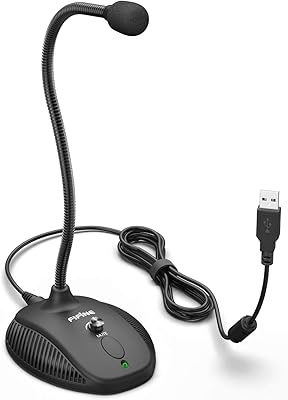
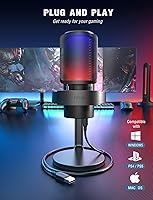
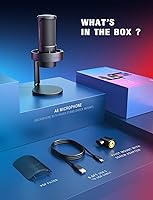
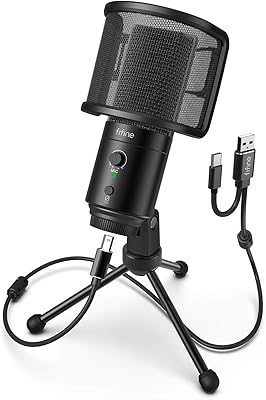
The FIFINE AmpliGame A8 is a budget USB condenser mic aimed squarely at gamers, streamers, and anyone stepping into podcasting without wanting to spend a lot. It connects via USB-C and works immediately on PC, Mac, or PS5 — no drivers, no setup headaches. That plug-and-play simplicity is one of its most genuine selling points. Currently ranked #35 in Computer Microphones on Amazon, it has clearly found an audience. The package ships with a shock mount, pop filter, and desk stand already included, which adds real practical value. It won't compete with a proper studio mic, but as an entry-level option, it covers the essentials surprisingly well.

Features & Benefits

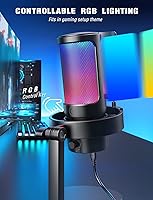
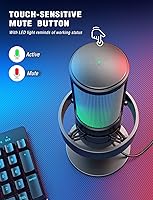
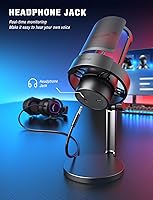
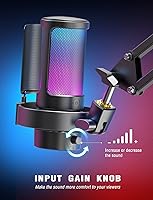
The cardioid pickup pattern on this USB gaming mic does a solid job of rejecting side noise — PC fan hum, keyboard clicks — though it performs best in a reasonably quiet space. The on-mic gain knob and tap-to-mute button are genuinely practical; you can adjust volume or cut audio mid-session without touching your computer. Plug headphones into the 3.5mm jack and you hear yourself in real time, which makes it easy to catch audio problems before your audience does. The detachable USB-C cable stretches 6.6 feet, giving you decent desk flexibility. Nine RGB color options add visual personality to a gaming setup without feeling like a gimmick.

Best For

This desktop condenser is a natural fit for anyone entering streaming or content creation for the first time. If you're going live on Twitch, recording YouTube commentary, or just want cleaner audio in Discord voice chat, it handles all of that without requiring an audio interface or any software configuration. PS4 and PS5 users get clean direct USB support, which not every mic at this price point delivers reliably. It also works well as a home office upgrade when your laptop's built-in mic keeps underwhelming on Zoom. Budget-conscious buyers will appreciate that accessories are included — no separate purchases needed to get a complete, functional setup on day one.

User Feedback

Buyers consistently point to sound clarity as a highlight for the price, and the physical controls earn particular praise from streamers who dislike tabbing out of games to adjust settings. Most people report the setup taking only a few minutes. On the downside, background noise pickup is a recurring issue for users in louder rooms — the cardioid pattern helps, but it is not a replacement for acoustic treatment. A few reviewers have noted that the plastic construction feels lightweight, and the shock mount can loosen with regular use. Against competitors like the Blue Snowball or HyperX SoloCast, the AmpliGame A8 tends to win on bundle value while trading blows on raw audio performance.

Pros

  • The FIFINE AmpliGame A8 ships with a shock mount, pop filter, and stand — a complete starter kit with no extra purchases needed.
  • Plug-in via USB-C and it works immediately on PC, Mac, and PS5 without installing a single driver.
  • The physical gain knob lets you adjust recording volume in real time without touching your computer.
  • A tap-to-mute button means you can cut your audio mid-game instantly — no alt-tabbing required.
  • The 3.5mm headphone jack provides zero-latency monitoring so you catch audio problems before your audience does.
  • Cardioid pickup pattern meaningfully reduces PC fan noise and ambient room hum during recordings.
  • Nine RGB color options and three lighting modes give the mic genuine visual personality in a gaming setup.
  • The 6.6ft detachable USB-C cable is long enough for flexible desk routing and cheap to replace if damaged.
  • Sound clarity at this price point regularly surprises buyers upgrading from webcam or laptop microphones.
  • Direct PS4 and PS5 USB compatibility makes this desktop condenser a rare practical option for console streamers.

Cons

  • The shock mount's locking mechanism tends to loosen with repeated adjustments and is not a replaceable part.
  • Background noise and room echo bleed through noticeably in untreated spaces, which the cardioid pattern cannot fully solve.
  • The mute button lacks clear tactile feedback, making accidental toggles during intense gaming sessions a real occurrence.
  • There is no visible mute status indicator that is easy to read from a normal seated distance.
  • Headphone monitoring output volume is low and insufficient for higher-impedance headphones without a separate amp.
  • The plastic body feels noticeably lightweight in hand, which raises durability questions for buyers who move or handle the mic frequently.
  • No companion app means zero hardware-level EQ, compression, or noise gate — all signal processing falls on the streaming software.
  • Xbox consoles are entirely unsupported, which is a meaningful omission given the size of that gaming audience.
  • The included USB-C cable feels stiff and thin, making clean cable management harder than it should be.
  • The pivot mount offers a limited range of angles, which can make positioning awkward on smaller or unconventionally arranged desks.

Ratings

Our AI rating system analyzed thousands of verified global purchases of the FIFINE AmpliGame A8, actively filtering out incentivized reviews and bot activity to surface what real buyers actually experienced day-to-day. The scores below reflect both the genuine strengths that keep this USB gaming mic consistently ranked in the top 40 of its category and the recurring pain points that buyers across skill levels have flagged. Nothing is glossed over — the wins and the frustrations are weighted equally.

Sound Clarity
78%
22%
For the price bracket, voice reproduction is noticeably cleaner than built-in laptop or webcam microphones. Streamers report that Discord and Twitch chat participants frequently comment positively on audio quality without knowing the mic's cost. Casual podcasters find it more than adequate for home recordings.
In back-to-back comparisons with the HyperX SoloCast or Blue Snowball iCE, the AmpliGame A8 can sound slightly thinner in the mid-range. Professional voice-over work or music recording would quickly reveal its entry-level ceiling, and it lacks the warmth that pricier condenser capsules deliver.
Noise Rejection
67%
33%
The cardioid pattern does a reasonable job of ignoring sounds coming from the sides and rear, which helps in typical gaming setups where a PC tower fan is humming nearby. Users in moderately quiet home offices report clean captures without much post-processing needed.
In untreated rooms with hard surfaces, echo and ambient noise bleed through more than buyers expect. Several reviewers noted that aggressive keyboard typing — especially mechanical switches — still gets picked up during recording sessions, which becomes noticeable on streams.
Build Quality
61%
39%
The metal grille and base give the mic a sturdier feel than its price suggests, and most buyers report no issues with the physical unit itself cracking or warping over months of regular desktop use. The overall footprint feels stable on a desk.
The plastic body components flex noticeably when handled, and the shock mount's locking mechanism tends to loosen over time with repeated adjustments. A handful of long-term owners have reported the pivot mount developing wobble, which requires occasional re-tightening to keep the mic positioned correctly.
Ease of Setup
94%
Plug it in via USB-C and it works — no driver installation, no software configuration required on Windows, Mac, or PS5. Buyers who describe themselves as non-technical consistently highlight this as the single biggest reason they are happy with the purchase. It is genuinely ready in under a minute.
A small number of users on older Mac OS versions or specific Linux distributions reported the device not being recognized immediately, requiring a port swap or reboot. The user manual is minimal, so troubleshooting beyond the basics is left to the buyer.
On-Mic Controls
86%
Having a physical gain knob and tap-to-mute directly on the mic body is a practical advantage that buyers genuinely use. Streamers especially appreciate muting mid-game without alt-tabbing, and the gain knob responds smoothly without jarring volume jumps.
The mute button does not provide strong tactile feedback, so in a heated gaming session some users have accidentally toggled it without realizing. There is also no LED status indicator for mute state that is clearly visible from a normal seated distance, which causes occasional confusion.
Headphone Monitoring
76%
24%
The 3.5mm headphone jack delivers genuinely zero-latency monitoring, letting streamers hear their own voice in real time to catch clipping or positioning issues before going live. Most users find the monitored signal clear and useful during longer recording sessions.
The headphone output volume is on the lower side, and users with higher-impedance headphones may find it insufficient without a separate amplifier. There is no dedicated monitoring volume control — you adjust through your system settings — which some buyers find fiddly.
RGB Lighting
82%
18%
Nine color options across three lighting modes give enough variety to coordinate with a broader gaming setup, and the dedicated RGB button makes switching modes fast without diving into software. The lighting is bright enough to be visible in a lit room, not just in the dark.
The RGB is a nice aesthetic touch but adds no functional value, and buyers who prefer a clean desk look cannot disable the lighting without holding the button each time after a restart — it does not remember your last state after being unplugged. A few users found the default cycling mode distracting during video calls.
Cable & Connectivity
83%
The 6.6ft detachable USB-C cable is genuinely long enough to route tidily around most desk setups, and the detachable design means a damaged cable is a cheap fix rather than a reason to replace the whole mic. USB-C feels appropriately modern compared to older Micro-USB competitors.
The cable included in the box feels slightly thin and stiff, which makes cable management a bit awkward. A few buyers noted the USB-C connection at the mic end feels marginally loose compared to the tight fit they expected, though no widespread reports of dropout issues have surfaced.
Pop Filter Effectiveness
73%
27%
The included external pop filter does reduce plosive sounds — those hard P and B consonant bursts — meaningfully for casual streaming and voice chat. Having it bundled saves buyers from a separate small purchase and it mounts cleanly onto the mic stand.
At the recommended 6 to 12-inch recording distance, stronger plosives still occasionally punch through, especially for louder speakers. The filter arm is not adjustable in angle, so finding the exact positioning requires some trial and error on initial setup.
Shock Mount Performance
68%
32%
Desk vibrations from typing or accidentally bumping the table are noticeably dampened compared to using the mic without any mount. For streamers who also type frequently — game chatters, writers — this is a meaningful reduction in rumble artifacts during recordings.
The shock mount's rubber bands are not replaceable as a standard part, so if they stretch or snap over time, the entire mount needs replacing. The mount also does not isolate extremely heavy impacts particularly well, and very forceful desk knocks still register in recordings.
Value for Money
89%
Factoring in the shock mount, pop filter, pivot mount, and stand that ship in the box, the total cost-per-component ratio is hard to argue with at this price. Buyers who priced out comparable bundles from competitors consistently rate the AmpliGame A8 as the better financial decision for a complete starter kit.
The value proposition weakens slightly if a buyer already owns accessories or prioritizes raw audio performance over the bundle. At the upper end of its price range, a few competing bare mics edge it out on pure sound quality when accessories are not a factor.
Platform Compatibility
87%
PC, Mac, PS4, and PS5 all work without additional setup, which makes this mic practical for households with mixed gaming and computer hardware. Console streamers in particular find direct USB compatibility without an audio interface a genuine convenience.
Xbox consoles are not supported due to USB audio compatibility limitations, which is a real gap given how many streamers use Xbox hardware. Some Chromebook users also reported inconsistent recognition, suggesting the compatibility list has edges that marketing does not fully disclose.
Microphone Positioning Flexibility
71%
29%
The pivot mount allows for angled positioning to bring the mic closer to the speaker without repositioning the entire base, which is handy on smaller desks. The thumbscrew adjustment is accessible and holds its position reasonably well during normal use.
The mic cannot be detached from its stand for boom arm mounting without a third-party adapter, which limits upgrade paths for buyers whose desk setups evolve over time. The range of pivot angles is also narrower than some competitors, making certain side-mounting positions awkward.
Software & Driver Experience
81%
19%
The total absence of required software is a feature in itself — no bloatware, no mandatory app to install, no account creation. The mic shows up as a standard audio device and works with any recording software immediately, from OBS to Audacity to browser-based tools.
Because there is no companion app, there is also no equalizer, compression, or noise gate that buyers can apply at the hardware level. Users who want any signal processing must rely entirely on their recording or streaming software, which adds a layer of complexity that not all beginners navigate easily.

Suitable for:

The FIFINE AmpliGame A8 is a strong fit for anyone stepping into streaming or content creation without wanting to spend heavily or wrestle with complicated audio gear. First-time Twitch and YouTube streamers will find it delivers a meaningful audio upgrade over any built-in microphone without requiring an audio interface or any software installation. Gamers who spend significant time in Discord, team chat, or game lobbies will appreciate the physical mute button and gain knob — both of which are genuinely practical during active sessions. PS4 and PS5 users benefit from direct USB plug-and-play compatibility that works without adapters or workarounds. Home office workers who need a quick, presentable microphone upgrade for Zoom or Teams calls will also find it more than adequate for daily use. Budget-conscious buyers who want a complete starter bundle — stand, shock mount, and pop filter included — without hunting down accessories separately will feel they got solid value here.

Not suitable for:

The FIFINE AmpliGame A8 is not the right choice for buyers who need professional-grade audio output or who plan to record music, voice-over work, or podcast content intended for commercial distribution. The cardioid pattern reduces side noise, but anyone recording in an untreated room with hard walls, loud HVAC, or a noisy household will still encounter audible background bleed that no polar pattern can fully compensate for. Buyers who already own a boom arm setup will find the mic's standard thread compatibility limited without a third-party adapter, which undercuts the convenience factor. Xbox console users are out entirely, as the USB audio compatibility simply does not extend to that platform. Buyers who prioritize long-term build durability over price will find the plastic components and loosening shock mount frustrating over extended daily use. Anyone who has already outgrown an entry-level mic and is looking for richer mid-range tone or more flexible signal processing should look at dedicated XLR condensers with an audio interface instead.

Specifications

  • Polar Pattern: Cardioid (unidirectional) pickup pattern focuses on sound directly in front of the mic while rejecting ambient noise from the sides and rear.
  • Connectivity: USB Type-C interface connects directly to host devices without requiring a separate audio interface or driver installation.
  • Cable: Includes a 6.6ft (2m) detachable USB-C to USB-A cable, allowing independent replacement if the cable is damaged.
  • Signal-to-Noise Ratio: Rated at 76 dB SNR, indicating a relatively clean signal with low self-noise suitable for voice recording and streaming applications.
  • Frequency Response: Captures audio across a 20 Hz to 20 kHz range, covering the full spectrum of human vocal frequencies and most instrument tones.
  • RGB Lighting: Features 9 selectable colors across 3 lighting modes, controlled by a dedicated button on the mic body without any software required.
  • Onboard Controls: Includes a continuous gain knob for real-time volume adjustment and a capacitive tap-to-mute button for instant audio cutoff.
  • Headphone Output: 3.5mm headphone jack on the mic body provides zero-latency direct monitoring of the live microphone signal during recording or streaming.
  • Dimensions: The complete assembled unit measures 8.66 x 5.91 x 3.94 inches, suited to standard desktop setups without occupying excessive space.
  • Weight: The microphone unit weighs approximately 500 g (1.1 lbs), providing a stable center of gravity on its included desk stand.
  • Materials: Body is constructed from Acrylonitrile Butadiene Styrene (ABS) plastic with metal components used for the grille and base reinforcement.
  • Power Source: Bus-powered via USB, meaning the mic draws all required power directly from the connected computer or console with no external power supply needed.
  • Platform Support: Natively compatible with Windows PC, macOS, PS4, and PS5 as a plug-and-play USB audio device with no driver installation required.
  • Included Accessories: Box contains the microphone, desk stand, shock mount, pivot mount, external pop filter, and a 6.6ft USB-C cable.
  • Microphone Type: Condenser capsule design offers higher sensitivity and broader frequency capture compared to dynamic microphones at a comparable price point.
  • Shock Mount: Integrated elastic suspension shock mount dampens low-frequency desk vibrations and incidental contact noise transmitted through the stand.
  • Pop Filter: Included external metal mesh pop filter attaches in front of the capsule to reduce plosive bursts caused by hard consonant sounds.
  • Stand Type: Weighted desktop base stand with pivot adjustment allows the mic angle to be repositioned without moving the entire unit.

Related Reviews
FIFINE AmpliGame A20
77%
91%
Value for Money
78%
Audio Clarity
54%
Bass Performance
88%
RGB Lighting
93%
Ease of Setup
More
FIFINE AmpliGame AM6
76%
83%
Voice Clarity
67%
Noise Cancellation
88%
Game/Chat Balance Control
91%
Ease of Setup
61%
Build Quality
More
AmpliGame V3
AmpliGame V3
76%
91%
Setup & Ease of Use
78%
Capture Quality
67%
HDMI Passthrough
86%
Port Selection & Connectivity
88%
Software Compatibility
More
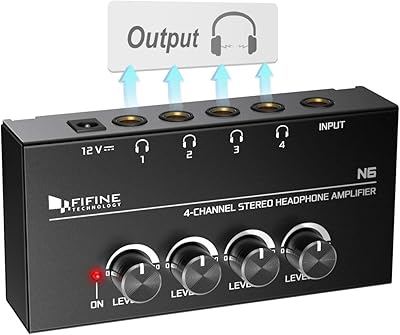
Fifine N6 4-Channel Headphone Amplifier
77%
88%
Audio Signal Clarity
93%
Individual Volume Control
76%
Build Quality
91%
Value for Money
84%
Ease of Setup
More
Fifine K054
Fifine K054
79%
93%
Value for Money
78%
Audio Clarity for Voice
96%
Ease of Setup
81%
Build Quality
88%
Mute Button & LED Indicator
More
JOWLURK A8 Mini Projector
80%
88%
Value for Money
91%
Portability & Size
84%
Connectivity & Streaming
78%
Display Quality
90%
Ease of Setup
More
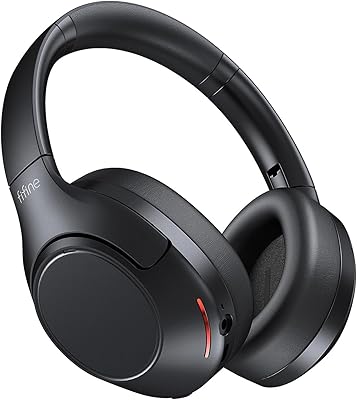
FIFINE X3 Wireless Bluetooth Headphones
82%
88%
Value for Money
94%
Battery Life
77%
Noise Cancellation
84%
Comfort & Fit
89%
Portability
More
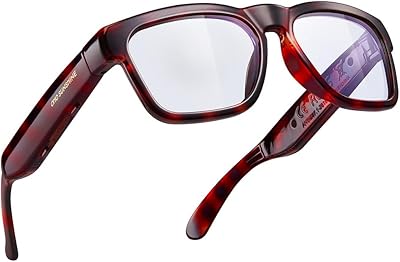
WOWRIO A8 Cycling Bluetooth Glasses
84%
88%
Audio Quality
80%
Comfort & Fit
91%
Battery Life
87%
Durability (Waterproofing)
85%
Wind Noise Reduction
More
OhO Smart Glasses A8 Pro
84%
87%
Value for Money
82%
Sound Quality
89%
Comfort & Fit
91%
Battery Life
65%
Durability
More
FIFINE K678
FIFINE K678
79%
78%
Audio Clarity
91%
Value for Money
83%
Build Quality
96%
Ease of Setup
67%
Gain Control
More

FAQ

Yes, it connects directly via the USB-C cable (or through a USB-A adapter to the PS5 front ports) and is recognized automatically as an audio input device. No settings changes or adapters beyond the included cable are needed for most PS5 setups.

No installation is required at all. The FIFINE AmpliGame A8 is fully plug-and-play on Windows, macOS, PS4, and PS5 — your operating system recognizes it as a standard USB audio device within seconds of plugging it in.

Yes, pressing the RGB button cycles through the lighting modes and eventually turns it off. The one catch is that the mic does not save your last setting, so after unplugging and reconnecting you will need to cycle through again to turn it back off.

It will pick up some keyboard noise, especially with louder switch types. The cardioid pattern helps reduce sounds from the sides, but aggressive mechanical typing directly behind the mic will still bleed through to some degree. Keeping the mic positioned closer to your mouth and the gain set conservatively helps minimize this.

The RGB lighting changes to indicate mute status — typically dimming or shifting color when muted. That said, several users find the visual feedback subtle from a normal seated distance, so it is worth testing this before going live so you know exactly what to look for on your specific unit.

The mic uses a standard 5/8-inch thread connection, which is the most common boom arm fitting. You can attach it directly to most scissor arm or boom arm stands, though you may need a standard 3/8-inch to 5/8-inch adapter depending on your arm's thread size.

For casual podcasting — solo recordings, interview-style remote conversations, or hobbyist audio — it is more than capable. It won't give you the warm, full-bodied sound of a high-end condenser, but for informal podcast production distributed on platforms like Spotify or YouTube, most listeners will find the quality perfectly acceptable.

The cardioid pickup pattern helps reject ambient noise that doesn't come from directly in front of the mic, but it is not a noise-cancelling microphone. If your room has hard surfaces, fan noise, or general household activity, you will still hear some of that in recordings. Positioning yourself closer to the mic (around 6 to 8 inches away) and lowering the gain helps significantly.

Yes, and this is one of the more practical design choices on this desktop condenser. The USB-C connection is detachable, so any standard USB-C to USB-A cable of appropriate length will work as a replacement — you can pick one up inexpensively without touching the mic itself.

The AmpliGame A8 competes closely with both in raw audio quality — it is roughly in the same tier. Where it often wins is on the included accessories: the Snowball and SoloCast ship without a shock mount or pop filter, so factoring in the cost of those separately shifts the value calculation noticeably in the AmpliGame A8's favor. If pure audio performance is the only priority and accessories are already owned, the SoloCast edges it out slightly on vocal tone.