Overview

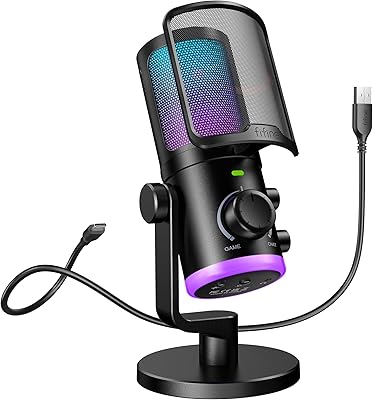
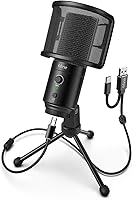
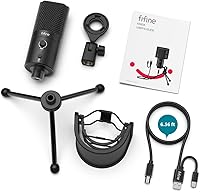
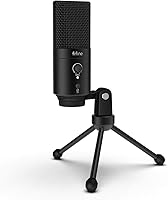
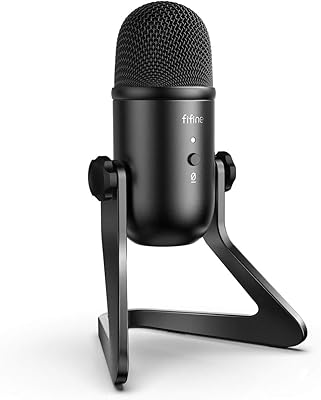
The FIFINE K683A is a budget USB condenser microphone that punches well above its price tag, targeting beginners and intermediate creators who want a meaningful upgrade without a steep investment. Plug it into a Windows PC, Mac, PS4, or PS5 and it is ready to go — no drivers, no setup headaches. What sets it apart from similarly priced plastic rivals is its all-metal construction, which gives the whole package a noticeably sturdier feel. It also ships with everything you actually need: a tripod stand, pop filter, dual USB cable, and a thread adapter. For a mic that has held a top-200 ranking in its category since late 2020, that is a compelling start.

Features & Benefits

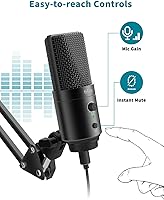
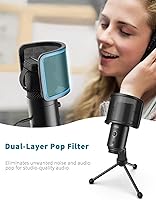
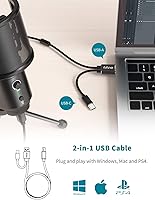
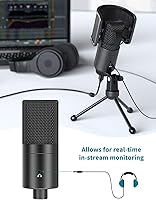
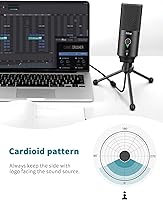
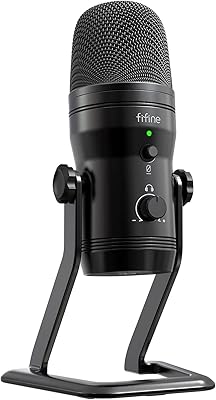
The K683A's cardioid pickup pattern does a solid job focusing on what is directly in front of it — your voice — while pushing away ambient sound from the sides and rear. One of the more practical touches is the hardware gain knob sitting right on the body; if your audio is clipping or too quiet mid-stream, you can fix it in seconds without opening any software. The one-touch mute button is similarly handy, perfect for stepping away from a podcast without an awkward pause. Around back, a 3.5mm headphone jack lets you monitor your own voice in real time with zero latency. The detachable pop filter handles plosives well, and the bundled cable covers both USB-A and USB-C ports.

Best For

This desktop mic makes the most sense for people just getting started who do not want to spend big to sound noticeably better. If you are a remote worker tired of muffled laptop audio on video calls, or a student recording lectures, this USB microphone delivers a clear step up with zero fuss. Casual streamers and gamers on PC or PS4/PS5 will appreciate how quickly it gets up and running — though it is worth noting upfront that it does not work with Xbox. Bedroom voice-over beginners recording in a reasonably quiet space will get solid results too. The on-body controls make it a natural fit for anyone who prefers physical knobs over digging through software menus.

User Feedback

Buyers consistently point to warm, clear vocal reproduction as the K683A's strongest quality, especially relative to what it costs. The mute button and gain knob come up repeatedly in reviews from people working at home — small conveniences that apparently make a big daily difference. That said, it is not all glowing praise. In untreated rooms, background noise can creep in, so do not expect studio-grade isolation if your space is not reasonably quiet. The tripod is functional but not rock-solid; anyone with a busy desktop may want a dedicated mic arm. A handful of buyers also mention the pop filter mount loosening after extended use. Overall, the feedback is positive, with caveats that are entirely predictable at this price.

Pros

  • Plug-and-play setup works instantly on Windows, Mac, PS4, and PS5 — no drivers needed.
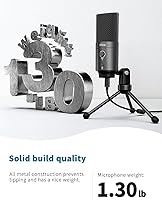
  • All-metal body feels noticeably more durable than plastic rivals at the same price.
  • Physical gain knob lets you adjust mic sensitivity mid-stream without touching software.
  • One-touch mute button is a genuine daily convenience during calls and live broadcasts.
  • Rear headphone jack provides zero-latency monitoring — useful for podcasters and voice-over beginners.
  • Ships with tripod, pop filter, dual USB cable, and thread adapter — nothing extra to buy on day one.
  • The K683A supports both USB-A and USB-C through a single bundled cable, covering older and newer devices.
  • Warm, clear vocal reproduction consistently earns praise from buyers at this price tier.
  • Compact footprint fits comfortably on a standard desk without dominating the workspace.

Cons

  • Background noise bleeds through noticeably in untreated rooms — not suitable for noisy environments.
  • Completely incompatible with Xbox, with no workaround available regardless of adapter or cable.
  • The pop filter mount loosens over time with repeated use and feels cheap relative to the mic body.
  • Gain knob has no markings or detents, making it hard to return to a consistent setting across sessions.
  • Bundled tripod lacks the stability needed for heavy desktops or users who type while recording.
  • Headphone monitoring volume cannot be adjusted independently from the mic gain knob.
  • USB-B connector on the mic end is uncommon and inconvenient to replace if the cable is lost or damaged.
  • Mute button lacks a firm tactile click, making it hard to confirm mute status during a live session.

Ratings

The FIFINE K683A has been put through its paces by our AI rating engine, which analyzed thousands of verified buyer reviews from global markets — actively filtering out incentivized, bot-generated, and low-quality submissions to surface what real users actually experience. Scores reflect both the genuine strengths that keep this USB microphone consistently ranked in the top tier of its price class, and the honest pain points that matter when making a purchase decision.

Audio Clarity
83%
For a mic at this price, vocal reproduction is notably warm and intelligible — streamers and remote workers consistently report that listeners can hear them clearly without post-processing. Call quality on Zoom and Teams stands out as a particular strength compared to built-in laptop microphones.
It is a capable entry-level condenser, not a broadcast-grade mic. Sibilance can creep in at higher gain settings, and the sound lacks the depth and air that pricier large-diaphragm options deliver in controlled studio environments.
Background Noise Rejection
67%
33%
The cardioid pattern does a reasonable job isolating the speaker's voice when positioned correctly — keyboard clicks and ambient chatter from a few feet away are noticeably reduced during streams and calls, which buyers in home office setups appreciate.
In acoustically untreated rooms — a spare bedroom, a kitchen, a dorm — ambient noise bleeds through more than many buyers expect. Air conditioning hum, street noise, and fan rumble can all surface in recordings, which catches first-time mic owners off guard.
Build Quality
84%
The all-metal body is one of the first things buyers mention when unboxing — it feels noticeably more substantial than plastic-bodied competitors at the same price. The weight and finish give a strong impression of durability that holds up well over months of daily desk use.
While the mic body itself is solid, a few smaller components do not match that standard. The pop filter mount in particular has drawn complaints about loosening with repeated attachment and removal, which undermines the otherwise premium feel.
Ease of Setup
93%
Plug it in and it works — no driver installation, no audio interface, no configuration required. Windows, Mac, PS4, and PS5 users all report the same experience: the system recognizes it immediately and audio is live within seconds, which is exactly what first-time mic buyers need.
Xbox users will hit a wall immediately, as this desktop mic is not compatible with that platform. It is a hardware limitation that is easy to miss before purchasing, and several buyers have flagged it as a frustrating surprise after the fact.
On-Body Controls
88%
Having a physical gain knob and a dedicated mute button directly on the microphone is a genuine everyday convenience. Work-from-home buyers especially value being able to mute instantly during a live call without hunting through a software mixer or fumbling with a keyboard shortcut.
The mute button does not have a strong tactile click, so in the heat of a live stream it can be hard to confirm whether you are muted or live without glancing at the indicator. A clearer LED or firmer press would reduce that uncertainty.
Value for Money
91%
The combination of metal construction, hardware controls, a headphone monitoring jack, and a complete accessory bundle at this price point is difficult to match. Buyers repeatedly describe it as one of the best-equipped entry-level mics available without spending significantly more.
As the broader USB mic market has grown more competitive, a handful of rivals have started offering comparable specs at slightly lower prices. The K683A still holds its ground, but the value gap has narrowed compared to when it launched.
Headphone Monitoring
79%
21%
The rear-mounted 3.5mm headphone jack provides genuine zero-latency monitoring, letting podcasters and voice-over beginners hear themselves in real time as they record. Buyers who have previously worked without monitoring consistently call it a useful quality-of-life addition.
The headphone output volume is fixed and cannot be independently adjusted from the gain knob, which controls mic sensitivity rather than monitor level. Users who prefer a separate monitoring volume control will find this arrangement limiting.
Pop Filter Effectiveness
76%
24%
The included U-shaped pop filter does its primary job well — plosive sounds on words starting with P and B are meaningfully reduced, and buyers note that it saves the cost of purchasing a separate accessory right out of the box.
The filter mount loosens over time with regular use, and the attachment mechanism feels like an afterthought compared to the mic body itself. Some buyers end up replacing or supplementing it with a standard boom-arm filter within a few months.
Tripod Stand Stability
63%
37%
For a clean, uncluttered desk with no heavy peripherals nearby, the bundled metal tripod holds the mic at a usable angle without any issue. It is adequate for casual home use and eliminates the need to buy a stand separately.
The tripod has a relatively narrow footprint and does not handle vibration or desk movement well. Buyers who type heavily while recording, or who have busy workstations, often find the mic picks up desk rumble or tips slightly — a boom arm upgrade is a common follow-up purchase.
Cable Quality & Length
81%
19%
The 6.56-foot dual-ended cable is long enough for most desk-to-tower setups and covers both USB-A and USB-C connections in a single cable, which is a practical choice for buyers switching between devices or using newer laptops.
The cable uses a USB-B connector at the microphone end, which is less common and harder to replace if it is lost or damaged. A few buyers have noted the cable feels slightly stiff, making cable management on a tidy desk a minor annoyance.
Gain Control Performance
82%
18%
Being able to dial sensitivity up or down directly on the mic without opening software is a real advantage during live use. Streamers and podcasters who switch between speaking softly and projecting find it easy to compensate on the fly without interrupting their session.
The gain knob lacks detents or markings beyond its range endpoints, making it hard to return to a known setting after adjusting. Buyers who share their setup with others or who need consistent gain across sessions find this mildly frustrating.
Compatibility
78%
22%
Windows, macOS, PS4, and PS5 support covers the vast majority of the target audience — streamers, remote workers, and casual creators — without requiring any additional software or configuration steps regardless of platform.
The absence of Xbox compatibility is a recurring disappointment in reviews from console gamers who did not check the fine print before purchasing. It is a firm limitation with no workaround, and it narrows the audience more than the broad marketing language suggests.
Packaging & Unboxing
74%
26%
Everything arrives neatly arranged and buyers rarely report missing or damaged components. The inclusion of a thread adapter is a thoughtful touch that allows the mic to mount on standard boom arms without a separate purchase.
The packaging itself is functional rather than premium, and the instruction manual is fairly sparse. Buyers who are completely new to microphones may find the setup guidance lacking, particularly when it comes to optimal placement and gain settings.
Aesthetic & Desk Presence
77%
23%
The all-black metal finish is clean and understated, fitting naturally on a gaming or work desk without looking out of place on camera. Streamers who appear on video appreciate that it does not draw attention away from them.
The design is conservative to the point of being forgettable — there are no RGB lighting options or distinctive visual features. For buyers who want their setup to look distinctive on stream, this desktop mic will not provide that.

Suitable for:

The FIFINE K683A is a strong match for anyone stepping up from a headset or laptop mic for the first time and who does not want to spend a lot to sound noticeably better. Remote workers and students who spend their days on Zoom, Teams, or Google Meet will find it a genuine upgrade — voices come through warmer and clearer, and the physical mute button alone saves a lot of awkward fumbling mid-call. Casual streamers and gamers on PC, PS4, or PS5 will appreciate how little friction is involved: plug it in, and it just works. Aspiring podcasters and bedroom voice-over beginners recording in a reasonably quiet space will also get solid results, especially given that the tripod, pop filter, and cable are all included so there is nothing else to buy on day one. If you want hands-on controls — a real gain knob, a dedicated mute button — rather than digging through audio software every time, this desktop mic is built exactly with that preference in mind.

Not suitable for:

The FIFINE K683A is not the right call for buyers who need professional-grade audio isolation or broadcast-quality recordings. If your recording space is acoustically untreated — a live room, a busy apartment, a home with HVAC noise — the cardioid pattern will not save you, and background bleed will be an ongoing frustration. Serious musicians, professional voice-over artists, or podcasters planning to monetize and compete on production quality will quickly outgrow what this USB microphone can offer and should invest in a proper XLR setup with an audio interface instead. Xbox gamers should skip it entirely — there is no workaround for the compatibility limitation, and it will not function on that platform regardless of the cable used. Anyone who needs a rock-solid desktop stand without investing in a separate boom arm may also find the included tripod frustrating on a cluttered or vibration-prone desk.

Specifications

  • Polar Pattern: Cardioid (unidirectional) pickup pattern focuses on audio directly in front of the mic while rejecting sound from the sides and rear.
  • Mic Type: Large diaphragm condenser microphone designed for voice recording, streaming, and communication applications.
  • Connectivity: Connects via USB-B to USB-A or USB-C using the included dual-ended cable, supporting both legacy and modern laptops and desktops.
  • Cable Length: Bundled USB cable measures 6.56ft (2m), providing comfortable reach from desk mic to tower PC or laptop without strain.
  • Signal-to-Noise Ratio: Rated at 75 dB, delivering a clean audio signal with low self-noise suitable for voice, podcasting, and streaming use cases.
  • Headphone Output: Rear-mounted 3.5mm headphone jack enables zero-latency real-time monitoring without any audible delay.
  • Controls: Features a hardware gain knob for real-time sensitivity adjustment and a dedicated one-touch mute button, both accessible directly on the mic body.
  • Power Source: USB bus-powered — draws power entirely through the USB connection with no batteries, wall adapter, or external power supply required.
  • Body Material: All-metal construction throughout the microphone body, providing durability and a more premium feel compared to plastic alternatives at this price point.
  • Dimensions: Measures 4.88 x 2.6 x 7.28 inches, making it a full-sized desktop microphone rather than a compact travel unit.
  • Weight: Weighs 2.2 pounds as a complete unit, heavy enough to feel substantial on a desk without being difficult to reposition.
  • Compatibility: Plug-and-play compatible with Windows PC, Mac, PS4, and PS5; not compatible with Xbox in any configuration.
  • Pop Filter: Includes a detachable U-shaped pop filter that mounts directly to the mic stand to reduce plosive sounds during recording or streaming.
  • Stand: Ships with a foldable all-metal tripod desk stand that positions the mic at a stable working height for desktop use.
  • Included Accessories: Package contains the microphone, foldable tripod stand, pop filter, 6.56ft USB-B to USB-A/C cable, 3/8″ to 5/8″ thread adapter, and a user manual.
  • Thread Adapter: Includes a 3/8″ to 5/8″ screw adapter, allowing the microphone to be mounted on standard boom arms and third-party mic stands.
  • Color: Available in matte black finish across the mic body, stand, and accessories for a consistent, understated desktop appearance.
  • Driver Requirement: No additional drivers or software installation required — the operating system recognizes the mic automatically upon connection.

Related Reviews
Fifine K054
Fifine K054
79%
93%
Value for Money
78%
Audio Clarity for Voice
96%
Ease of Setup
81%
Build Quality
88%
Mute Button & LED Indicator
More
Fifine N6 4-Channel Headphone Amplifier
77%
88%
Audio Signal Clarity
93%
Individual Volume Control
76%
Build Quality
91%
Value for Money
84%
Ease of Setup
More
FIFINE AmpliGame A8
FIFINE AmpliGame A8
78%
78%
Sound Clarity
67%
Noise Rejection
61%
Build Quality
94%
Ease of Setup
86%
On-Mic Controls
More
FIFINE AmpliGame A20
77%
91%
Value for Money
78%
Audio Clarity
54%
Bass Performance
88%
RGB Lighting
93%
Ease of Setup
More
FIFINE X3 Wireless Bluetooth Headphones
82%
88%
Value for Money
94%
Battery Life
77%
Noise Cancellation
84%
Comfort & Fit
89%
Portability
More
FIFINE K690
FIFINE K690
82%
84%
Audio Clarity
88%
Pickup Pattern Versatility
81%
Build Quality
93%
Ease of Setup
79%
Headphone Monitoring
More
FIFINE K678
FIFINE K678
79%
78%
Audio Clarity
91%
Value for Money
83%
Build Quality
96%
Ease of Setup
67%
Gain Control
More
FIFINE AmpliGame AM6
76%
83%
Voice Clarity
67%
Noise Cancellation
88%
Game/Chat Balance Control
91%
Ease of Setup
61%
Build Quality
More
AmpliGame V3
AmpliGame V3
76%
91%
Setup & Ease of Use
78%
Capture Quality
67%
HDMI Passthrough
86%
Port Selection & Connectivity
88%
Software Compatibility
More

FAQ

It works on both PS4 and PS5 without any setup required — just plug the USB cable into an available port and the console recognizes it automatically. Keep in mind it does not work with Xbox, so if you are on that platform you will need a different option.

No installation needed at all. The FIFINE K683A is plug-and-play on Windows, Mac, PS4, and PS5 — your system will detect it as a standard USB audio device within seconds of plugging it in. You can start talking immediately.

Yes, and many buyers do exactly that. The included 3/8″ to 5/8″ thread adapter lets you mount it on most standard boom arms available online. If you type heavily while recording or just want a cleaner desk setup, a boom arm is a worthwhile upgrade.

The cardioid pattern helps reduce noise coming from the sides and rear, but it is not a noise-cancelling mic — low-frequency hum from fans, air conditioning, or street noise can still bleed into recordings, especially in an untreated room. If your space is on the louder side, you may want to use noise suppression software like NVIDIA RTX Voice or Krisp alongside this desktop mic to clean things up.

The gain knob controls how sensitive the mic is to incoming sound. If your voice sounds too quiet or too loud and distorted in recordings or calls, turn the knob to compensate — no need to open any software or dig through audio settings. It is one of the more practical features on this USB microphone for people who are new to mic setup.

It is primarily designed for real-time monitoring — you hear your own voice as the mic captures it with zero audible delay, which is useful when recording or streaming. It can technically output other system audio too, but the volume level is fixed and cannot be adjusted independently from the gain knob, so it is best thought of as a monitoring port rather than a full headphone output.

It attaches to the tripod stand and holds position well initially, but a number of buyers have noted that the mounting mechanism loosens after repeated removal and reattachment over weeks of use. If you tend to detach it often, it may need occasional repositioning. For most people who leave it in place, it holds up fine day to day.

Yes — the bundled cable has a USB-B connector at the mic end and splits into both USB-A and USB-C on the other end, so it natively supports USB-C laptops without any adapter. You just plug the USB-C end straight into your laptop and you are good to go.

Speak into the side of the mic that has the FIFINE logo on it — that is where the capsule is, and that is the side that captures audio. A very common mistake with condenser mics like this one is talking into the top, which results in noticeably quieter and duller sound. Once you are positioned correctly, the difference is obvious.

The mic body itself is all-metal and feels genuinely solid — it does not rattle, flex, or feel hollow when handled. The tripod stand is functional but lighter duty, and can wobble slightly on an uneven or busy desk surface. For a stationary desk setup where you are not moving it around much, it holds up well with normal daily use.